
TAOTRONICS LED DESK LAMP
User Guide
MODEL: TT-DL19
EUROPE
E-mail:
support.uk@taotronics.com(UK)
support.de@taotronics.com(DE)
support.fr@taotronics.com(FR)
support.es@taotronics.com(ES)
support.it@taotronics.com(IT)
EU Importer: ZBT International Trading GmbH
Address: Halstenbeker Weg 98C, 25462 Rellingen, Deutschland
MANUFACTURER
NORTH AMERICA
E-mail : support@taotronics.com(US)
support.ca@taotronics.com(CA)
Tel : 1-888-456-8468 (Monday-Friday: 9:00 – 17:00 PST)
US Distributor: SUNVALLEYTEK INTERNATIONAL INC.
Address: 46724 Lakeview Blvd, Fremont, CA 94538
MADE IN CHINA
TT-DL19_V2.2
ASIA PACIFIC
E-mail: support.jp@taotronics.com(JP)
Tel 03-5542-0238 10 18 /
JP Importer: SUNVALLEY JAPAN
Address: 104-0032 18-6 PMO F
www.taotronics.com
CONTENTS
English
Deutsch
Français
Español
Italiano
01/06
07/12
13/18
19/24
25/30
31/37

Product Features
• Ultrathin, minimalist design
• Energy efficient LED
• 5 levels of adjustable color temperature and brightness
• Memory function
• Convenient iSmart USB port
Package Contents
• 1 x TaoTronics LED Desk Lamp With USB (Model: TT-DL19)
• 1 x Power Adapter
• 1 x Quick Installation Guide
• 1 x 1-Year TaoTronics Worry-free Warranty
Specications
Thank you for choosing the TaoTronics LED Desk Lamp.
Please read this guide carefully and keep
it for future reference.
US UK CA
01/02
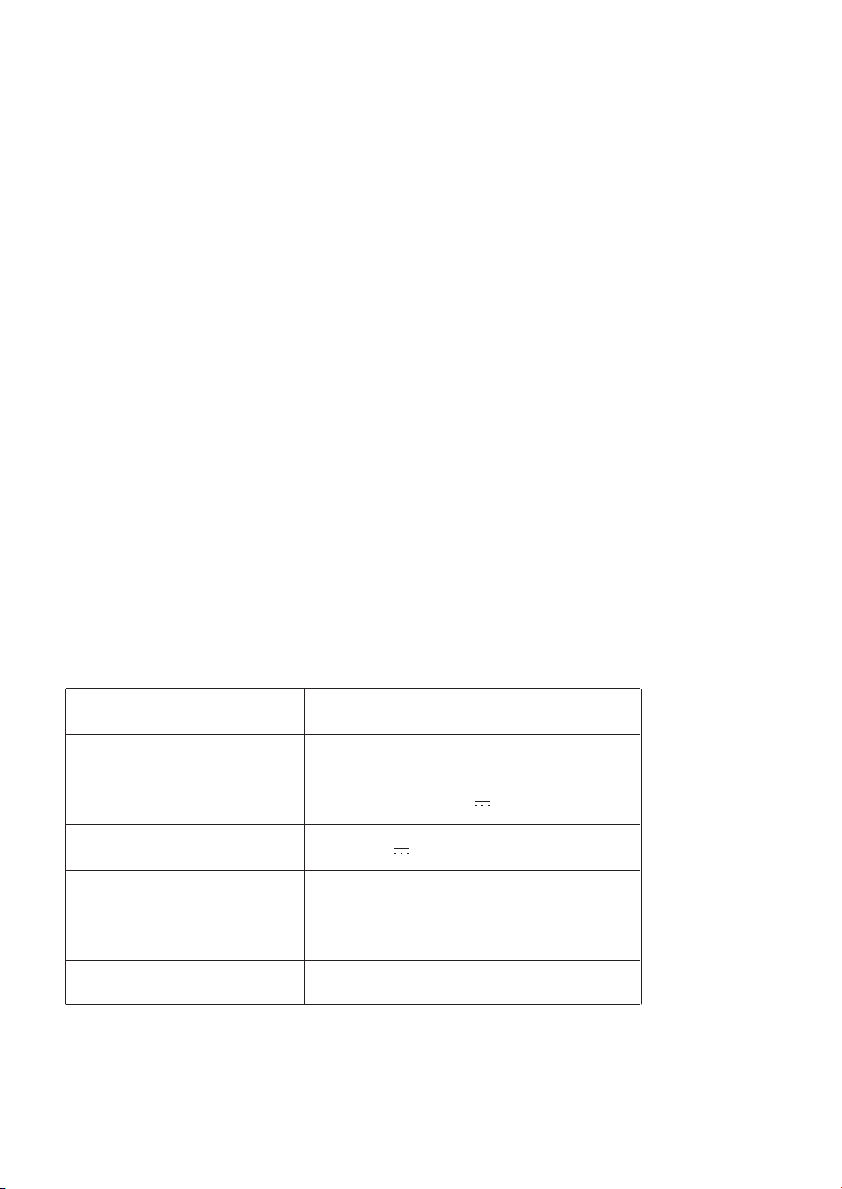
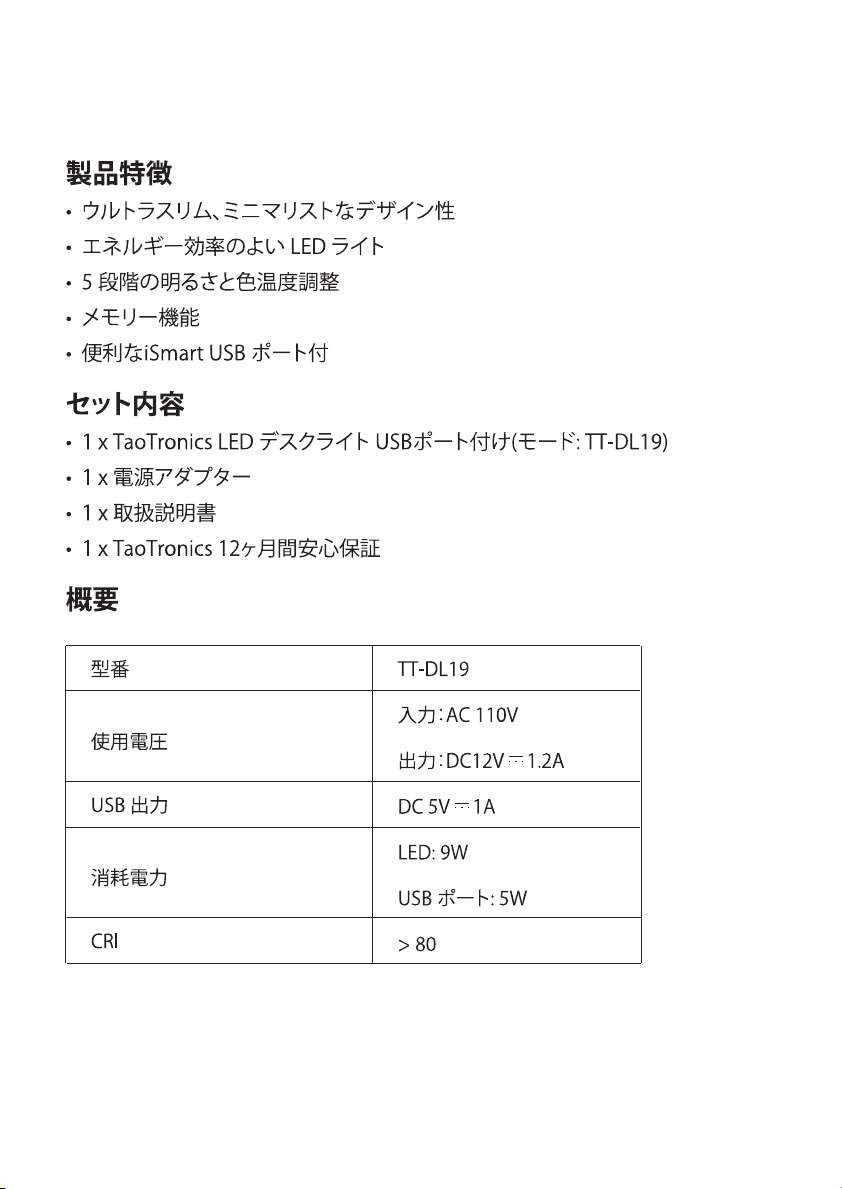
Model
Adapter Voltage
USB Output
Power
CRI
TT-DL19
Input: AC 100-240V 50/60Hz
Output: DC12V 1.2A
DC 5V 1A
LED: 9W
USB Port: 5W
> 80
Product Features
• Ultrathin, minimalist design
• Energy efficient LED
• 5 levels of adjustable color temperature and brightness
• Memory function
• Convenient iSmart USB port
Package Contents
• 1 x TaoTronics LED Desk Lamp With USB (Model: TT-DL19)
• 1 x Power Adapter
• 1 x Quick Installation Guide
• 1 x 1-Year TaoTronics Worry-free Warranty
Specications
Thank you for choosing the TaoTronics LED Desk Lamp.
Please read this guide carefully and keep
it for future reference.
US UK CA
01/02
Model
Adapter Voltage
USB Output
Power
CRI
TT-DL19
Input: AC 100-240V 50/60Hz
Output: DC12V 1.2A
DC 5V 1A
LED: 9W
USB Port: 5W
> 80
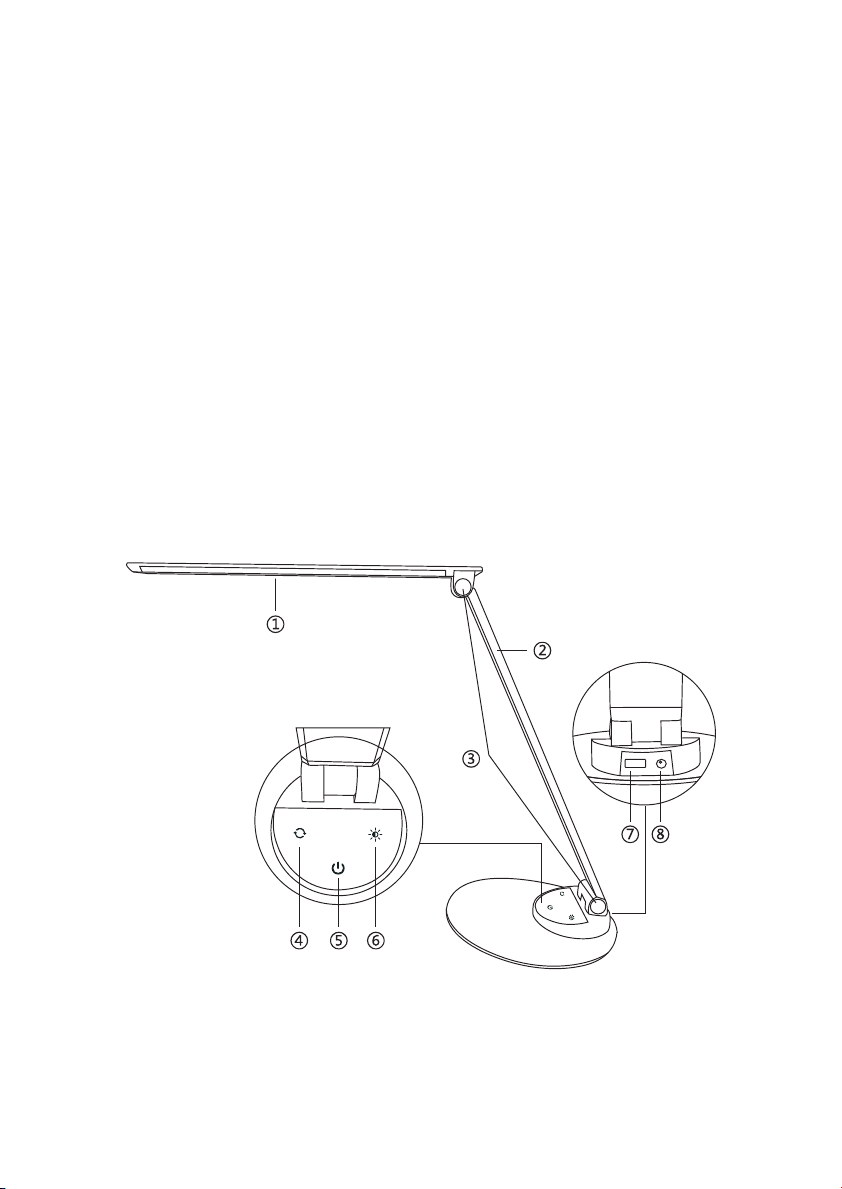
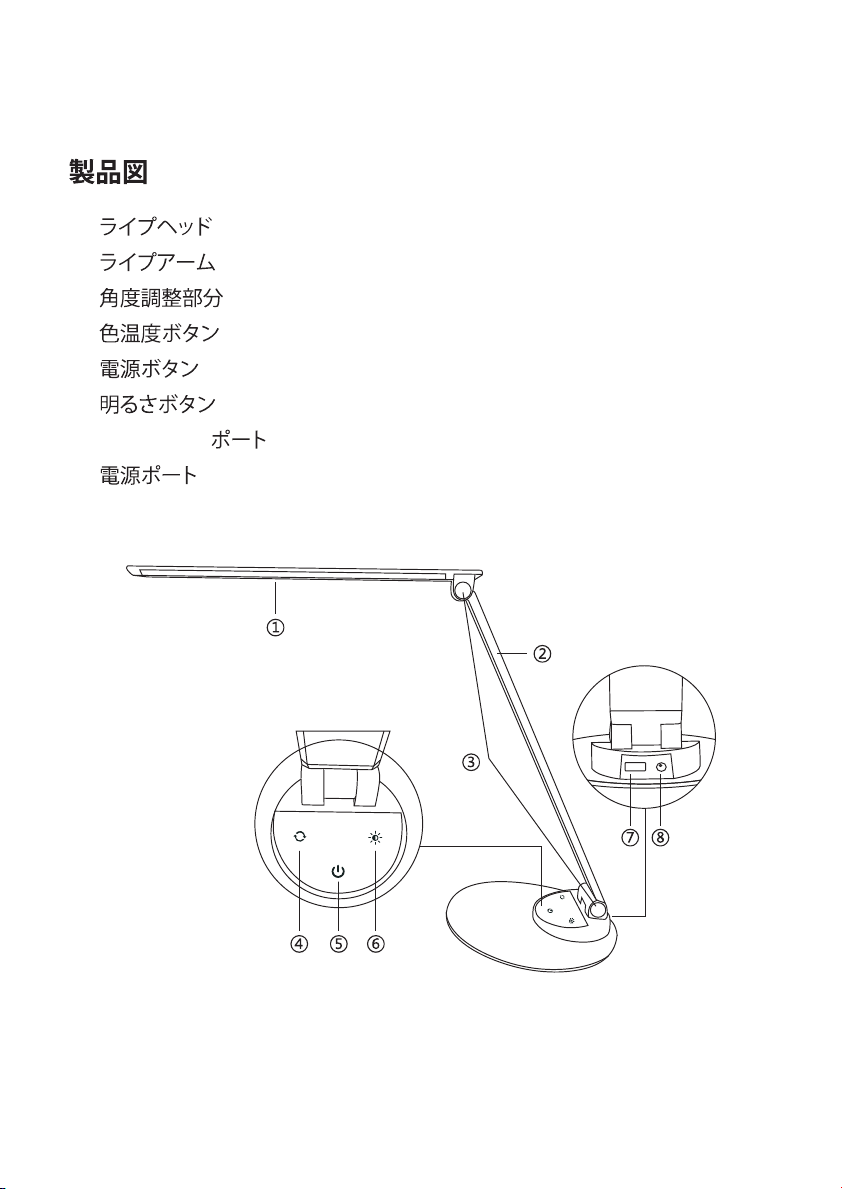
Product Diagram
①
②
③
④
⑤
⑥
⑦
⑧
Lamp Head
Lamp Arm
Tension Adjuster
Color Temperature Button
Power Button
Brightness Button
iSmart USB Port
Power Connector
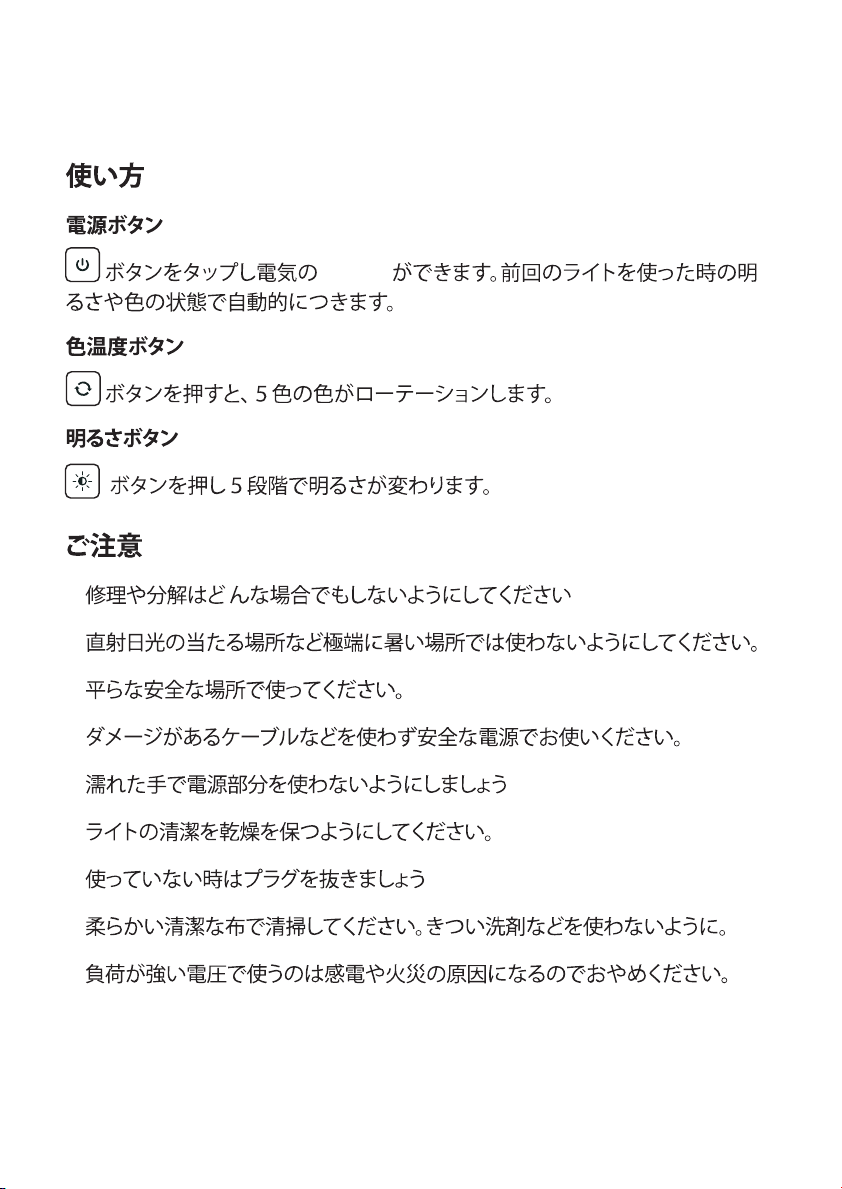
How to Use
Power Button
Tap the to turn on / off the lamp. It will automatically remember your
last brightness and color temperature selection when turned on.
Color Temperature Button
Tap the button to adjust and cycle through the 5 color temperatures.
Brightness Adjustment Button
Tap the button to adjust and cycle through the 5 levels of brightness.
Caution
• Use only the supplied AC power adapter.
• Please do not dismantle the product by yourself, always ask
a professional electrician or authorized technician for repairs.
• If you smell a bad odor or anything unusual,
please turn off the unit immediately.
• Please do not remove the power plug with wet hands as it may
cause electrical shock.
• It is not a toy. Keep away from children.
• Do not put this unit near any heat source or under direct sunlight.
• Clean the unit on a regular basis.
• Please store in a dry and shady place.
03/04

Product Diagram
①
②
③
④
⑤
⑥
⑦
⑧
Lamp Head
Lamp Arm
Tension Adjuster
Color Temperature Button
Power Button
Brightness Button
iSmart USB Port
Power Connector
How to Use
Power Button
Tap the to turn on / off the lamp. It will automatically remember your
last brightness and color temperature selection when turned on.
Color Temperature Button
Tap the button to adjust and cycle through the 5 color temperatures.
Brightness Adjustment Button
Tap the button to adjust and cycle through the 5 levels of brightness.
Caution
• Use only the supplied AC power adapter.
• Please do not dismantle the product by yourself, always ask
a professional electrician or authorized technician for repairs.
• If you smell a bad odor or anything unusual,
please turn off the unit immediately.
• Please do not remove the power plug with wet hands as it may
cause electrical shock.
• It is not a toy. Keep away from children.
• Do not put this unit near any heat source or under direct sunlight.
• Clean the unit on a regular basis.
• Please store in a dry and shady place.
03/04

Warranty
TaoTronics products are covered by a 1-Year worry-free warranty from the
date of its original purchase. If any problems occur, please contact our
support team.
We can only provide after sales service for products that are sold by
TaoTronics or TaoTronics authorized retailers and distributors. If you have
purchased your unit from a different place, please contact your seller for
return and warranty issues.
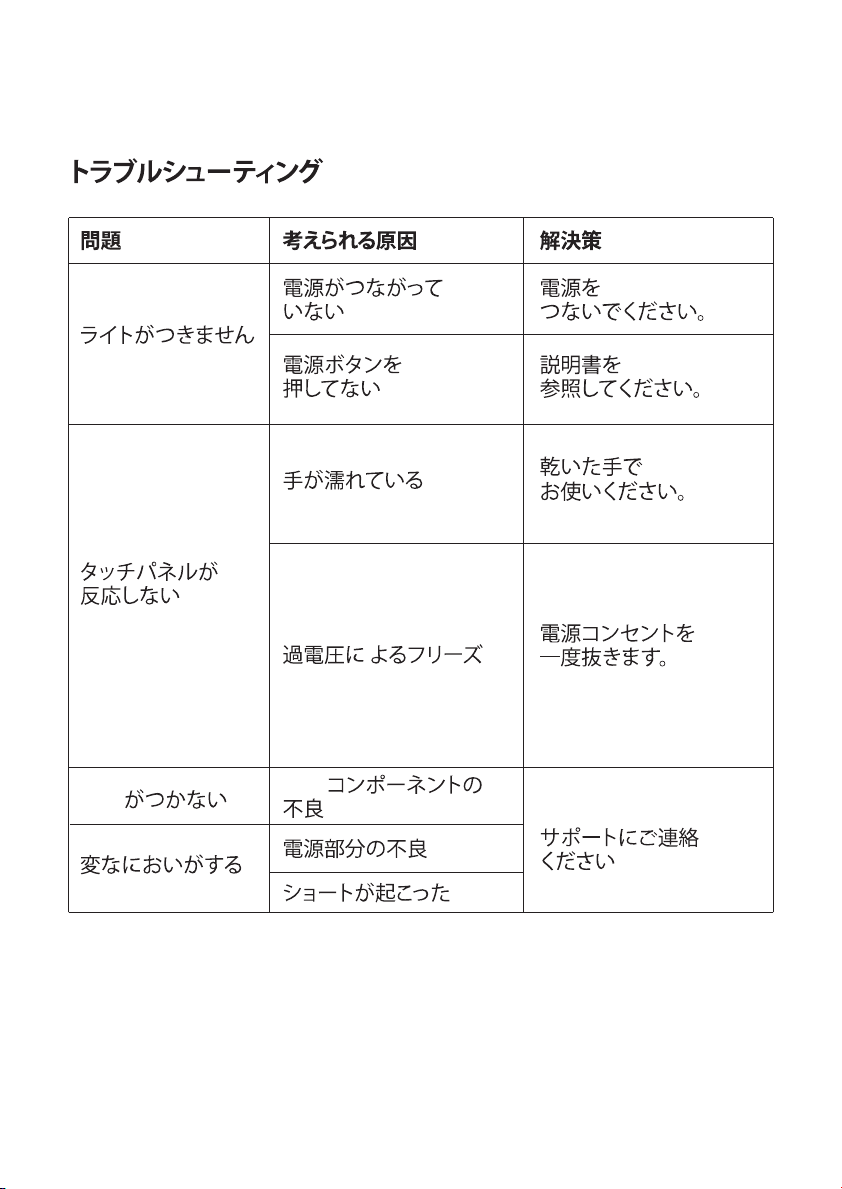
Troubleshooting Guide
Problem
Possible Cause
Solution
No power supply
Did not press the
Power Button
Hands are wet
Voltage fluctuation causing
panel failure
LED component failed
Power adapter failed
Short circuited
The lamp does
not light up
The touch
panel is not
responsive
LED failure
Bad smell
Plug in the
power adapter
Refer to the How to
Use section
Tap the panel with
dry hands
Disconnect power to
restart the lamp
Please contact the
TaoTronics Support Team
Please contact the
TaoTronics Support Team
Please contact the
TaoTronics Support Team
05/06

Warranty
TaoTronics products are covered by a 1-Year worry-free warranty from the
date of its original purchase. If any problems occur, please contact our
support team.
We can only provide after sales service for products that are sold by
TaoTronics or TaoTronics authorized retailers and distributors. If you have
purchased your unit from a different place, please contact your seller for
return and warranty issues.
Troubleshooting Guide
Problem
Possible Cause
Solution
No power supply
Did not press the
Power Button
Hands are wet
Voltage fluctuation causing
panel failure
LED component failed
Power adapter failed
Short circuited
The lamp does
not light up
The touch
panel is not
responsive
LED failure
Bad smell
Plug in the
power adapter
Refer to the How to
Use section
Tap the panel with
dry hands
Disconnect power to
restart the lamp
Please contact the
TaoTronics Support Team
Please contact the
TaoTronics Support Team
Please contact the
TaoTronics Support Team
05/06

Produkteigenschaften
• Ultradünn, minimalistisches Design
• Energieeffiziente LED
• In 5 Stufen einstellbare Farbtemperatur und Helligkeit
• Merkfunktion
• Komfortabler iSmart USB-Anschluss
Lieferumfang
• 1 x TaoTronics LED-Schreibtischlampe mit USB-Anschluss (Modell:
TT-DL19)
• 1 x Netzteil
• 1 x Schnellanleitung
• 1 x 1- Jährige TaoTronics Rundum-Garantie
Spezikationen
Vielen Dank, dass Sie sich für die TaoTronics LED-Schreibtischlampe
entschieden haben. Bitte lesen Sie diese Anleitung aufmerksam
und bewahren Sie sie auf, falls Sie später etwas Nachlesen
möchten.
DE
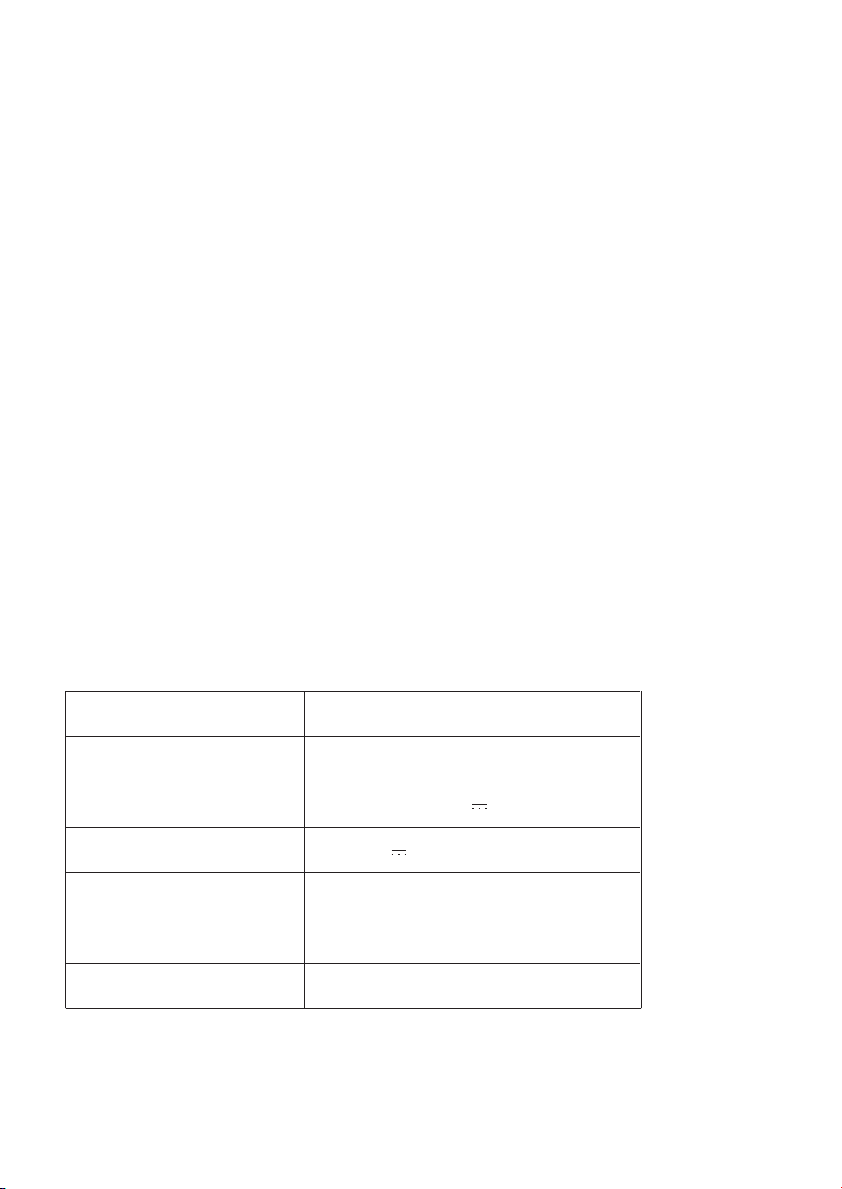
Modell
Spannungsadapter
USB-Ausgang
Leistung
CRI
TT-DL19
Input: AC 100-240V 50/60Hz
Output: DC12V 1.2A
DC 5V 1A
LED: 9W
USB-Anschluss: 5W
>80
07/08
Produkteigenschaften
• Ultradünn, minimalistisches Design
• Energieeffiziente LED
• In 5 Stufen einstellbare Farbtemperatur und Helligkeit
• Merkfunktion
• Komfortabler iSmart USB-Anschluss
Lieferumfang
• 1 x TaoTronics LED-Schreibtischlampe mit USB-Anschluss (Modell:
TT-DL19)
• 1 x Netzteil
• 1 x Schnellanleitung
• 1 x 1- Jährige TaoTronics Rundum-Garantie
Spezikationen
Vielen Dank, dass Sie sich für die TaoTronics LED-Schreibtischlampe
entschieden haben. Bitte lesen Sie diese Anleitung aufmerksam
und bewahren Sie sie auf, falls Sie später etwas Nachlesen
möchten.
DE
Modell
Spannungsadapter
USB-Ausgang
Leistung
CRI
TT-DL19
Input: AC 100-240V 50/60Hz
Output: DC12V 1.2A
DC 5V 1A
LED: 9W
USB-Anschluss: 5W
>80
07/08
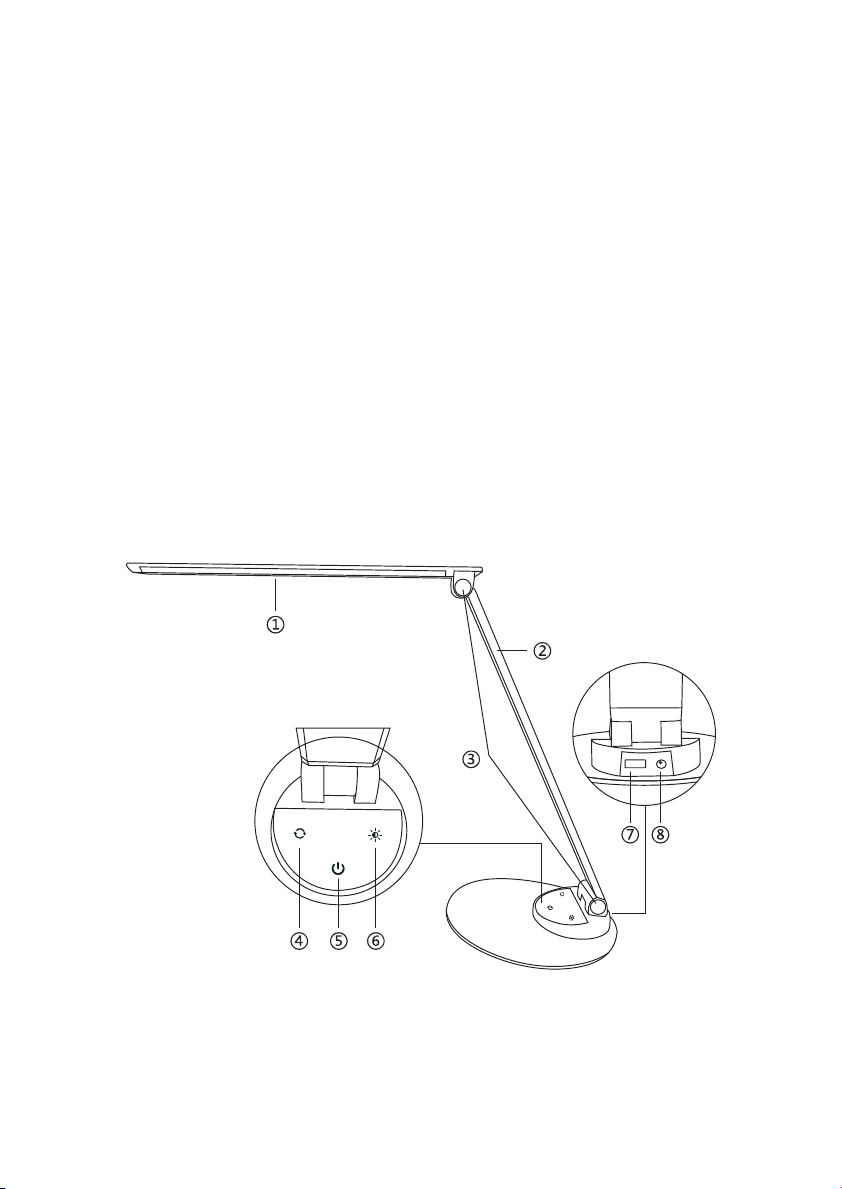
Produktdiagramm
①
②
③
④
⑤
⑥
⑦
⑧
Lampenkopf
Lampenarm
Gelenk
Farbtemperaturtaste
Stromtaste
Helligkeitstaste
iSmart USB-Anschluss
Stromanschluss
Bedienung
Stromtaste
Drücken Sie zum Ein- und Ausschalten der Lampe. Sie merkt sich
automatisch die zuletzt eingestellte Farbtemperatur und Helligkeit und
stellt diese beim nächsten Einschalten selbst ein.
Farbtemperaturtaste
Drücken Sie zum Wechseln zwischen den 5 Farbtemperaturen.
Helligkeitstaste
Drücken Sie zum Auswählen der Helligkeitsstufe.
Warnung
• Benutzen Sie nur das mitgelieferte Netzteil.
• Versuchen Sie nicht, das Produkt selbst zu reparieren. Lassen Sie
Reparaturen nur von einem professionellen Elektriker oder autorisier-
ten Techniker durchführen.
• Falls Sie einen schlechten Geruch oder etwas anderes Ungewöhnli-
ches wahrnehmen, schalten Sie die Lampe sofort aus.
• Berühren Sie den Stecker nicht mit nassen Händen. Es besteht die
Gefahr eines Stromschlags.
• Die Lampe ist kein Spielzeug. Halten Sie sie von Kindern fern.
• Setzen Sie die Lampe keinen Hitzequellen, Feuchtigkeit oder
ätzenden Substanzen aus.
• Säubern Sie die Lampe regelmäßig.
• Lagern Sie die Lampe an einem trockenen und kühlen Platz, falls
Sie sie für eine längere Zeit nicht benutzen wollen.
09/10

Produktdiagramm
①
②
③
④
⑤
⑥
⑦
⑧
Lampenkopf
Lampenarm
Gelenk
Farbtemperaturtaste
Stromtaste
Helligkeitstaste
iSmart USB-Anschluss
Stromanschluss
Bedienung
Stromtaste
Drücken Sie zum Ein- und Ausschalten der Lampe. Sie merkt sich
automatisch die zuletzt eingestellte Farbtemperatur und Helligkeit und
stellt diese beim nächsten Einschalten selbst ein.
Farbtemperaturtaste
Drücken Sie zum Wechseln zwischen den 5 Farbtemperaturen.
Helligkeitstaste
Drücken Sie zum Auswählen der Helligkeitsstufe.
Warnung
• Benutzen Sie nur das mitgelieferte Netzteil.
• Versuchen Sie nicht, das Produkt selbst zu reparieren. Lassen Sie
Reparaturen nur von einem professionellen Elektriker oder autorisier-
ten Techniker durchführen.
• Falls Sie einen schlechten Geruch oder etwas anderes Ungewöhnli-
ches wahrnehmen, schalten Sie die Lampe sofort aus.
• Berühren Sie den Stecker nicht mit nassen Händen. Es besteht die
Gefahr eines Stromschlags.
• Die Lampe ist kein Spielzeug. Halten Sie sie von Kindern fern.
• Setzen Sie die Lampe keinen Hitzequellen, Feuchtigkeit oder
ätzenden Substanzen aus.
• Säubern Sie die Lampe regelmäßig.
• Lagern Sie die Lampe an einem trockenen und kühlen Platz, falls
Sie sie für eine längere Zeit nicht benutzen wollen.
09/10

Garantie
Für TaoTronics Produkte gilt ab dem Kaufdatum eine 1-jährige Garantie.
Falls das Produkt während dieser Zeit defekt sein sollte, kontaktieren Sie
bitte unverzüglich den Kundendienst.
Wir bieten unseren Kundendienst nur für Produkte an, die bei TaoTronics
oder einem von TaoTronics autorisierten Händler und Vertriebsdienstleis-
ter gekauft wurden. Falls Sie Ihr Produkt bei einem anderen Händler
gekauft haben, wenden Sie sich bezüglich des Garantieanspruchs an den
Verkäufer.
11/12
Problem
Die Lampe
leuchtet nicht
die Tasten
reagieren nicht
LED-Fehlfunktion
schlechter Geruch
mögliche Ursache
keine Stromzufuhr
die Stromtaste wurde
nicht gedrückt
Hände sind nass
Spannungsfluktuationen
verursachen
Funktionsfehler
defekte LED-Komponente
defektes Netzteil
Kurzschluss
Lösung
schließen Sie das
Netzteil an
drücken Sie die
Stromtaste
drücken Sie die
Tasten mit trockenen
Händen
ziehen Sie den
Stecker und stecken
Sie ihn wieder in
die Steckdose
Bitte kontaktieren Sie
den TaoTronics
Kundendienst
Fehlerbehebung

Garantie
Für TaoTronics Produkte gilt ab dem Kaufdatum eine 1-jährige Garantie.
Falls das Produkt während dieser Zeit defekt sein sollte, kontaktieren Sie
bitte unverzüglich den Kundendienst.
Wir bieten unseren Kundendienst nur für Produkte an, die bei TaoTronics
oder einem von TaoTronics autorisierten Händler und Vertriebsdienstleis-
ter gekauft wurden. Falls Sie Ihr Produkt bei einem anderen Händler
gekauft haben, wenden Sie sich bezüglich des Garantieanspruchs an den
Verkäufer.
11/12
Problem
Die Lampe
leuchtet nicht
die Tasten
reagieren nicht
LED-Fehlfunktion
schlechter Geruch
mögliche Ursache
keine Stromzufuhr
die Stromtaste wurde
nicht gedrückt
Hände sind nass
Spannungsfluktuationen
verursachen
Funktionsfehler
defekte LED-Komponente
defektes Netzteil
Kurzschluss
Lösung
schließen Sie das
Netzteil an
drücken Sie die
Stromtaste
drücken Sie die
Tasten mit trockenen
Händen
ziehen Sie den
Stecker und stecken
Sie ihn wieder in
die Steckdose
Bitte kontaktieren Sie
den TaoTronics
Kundendienst
Fehlerbehebung

Caractéristiques du Produit
• Design minimaliste et ultra fin
• LED à économie d’énergie
• 5 niveaux de réglage de température de couleur et de luminosité
• Fonction mémoire
• Port USB pratique iSmart
Contenu de la Boîte
• 1 x TaoTronics Lampe de Bureau LED avec Port USB (Modèle:
TT-DL19)
• 1 x Adaptateur Secteur
• 1 x Guide d'Installation Rapide
• 1 x TaoTronics Garantie de 1 An Sans Souci
Spécications
Merci d’avoir choisi la Lampe de Bureau à LED TaoTronics. Veuillez
lire ce manuel attentivement et le conserver pour toute future
référence.
FR
Modèle
Alimentation électrique
Sortie USB
Puissance
CRI
TT-DL19
Entrée: AC 100-240V 50/60Hz
Sortie: DC12V 1.2A
DC 5V 1A
LED: 9W
Port USB: 5W
>80
13/14
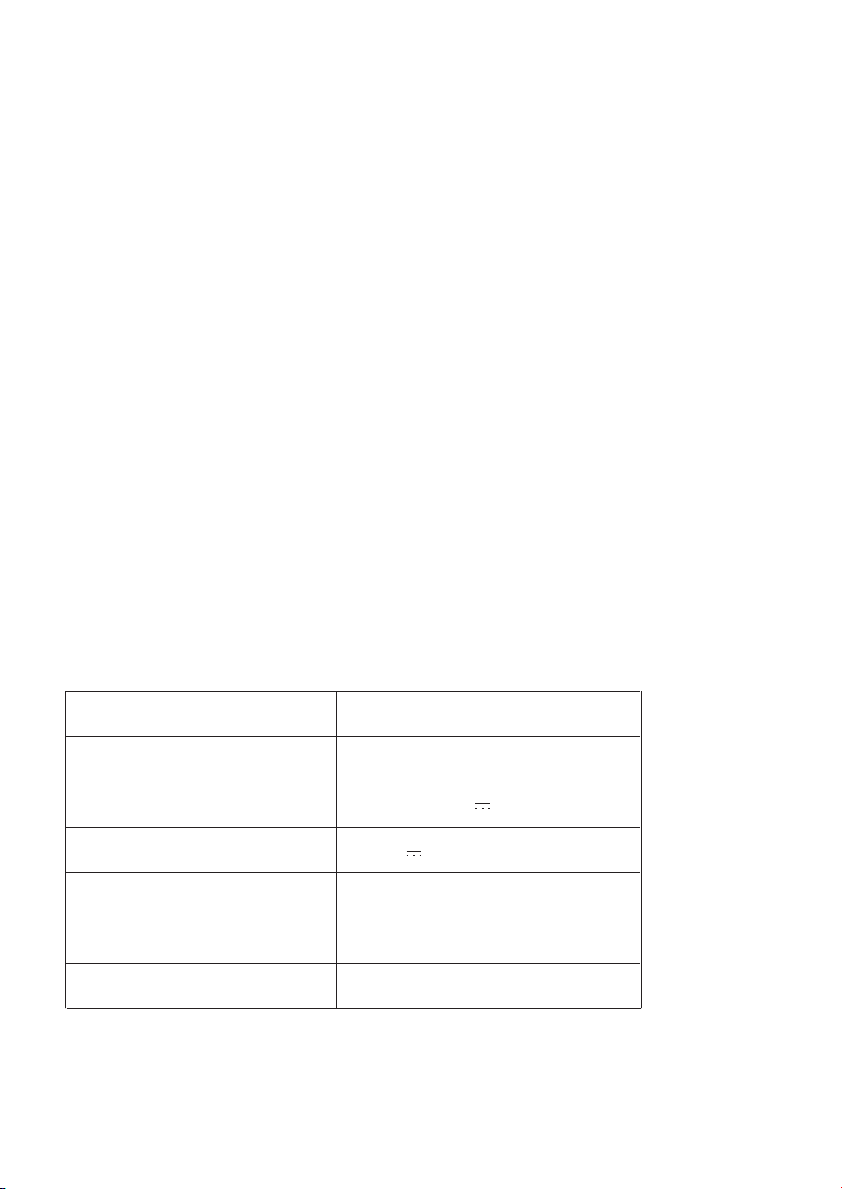
Caractéristiques du Produit
• Design minimaliste et ultra fin
• LED à économie d’énergie
• 5 niveaux de réglage de température de couleur et de luminosité
• Fonction mémoire
• Port USB pratique iSmart
Contenu de la Boîte
• 1 x TaoTronics Lampe de Bureau LED avec Port USB (Modèle:
TT-DL19)
• 1 x Adaptateur Secteur
• 1 x Guide d'Installation Rapide
• 1 x TaoTronics Garantie de 1 An Sans Souci
Spécications
Merci d’avoir choisi la Lampe de Bureau à LED TaoTronics. Veuillez
lire ce manuel attentivement et le conserver pour toute future
référence.
FR
Modèle
Alimentation électrique
Sortie USB
Puissance
CRI
TT-DL19
Entrée: AC 100-240V 50/60Hz
Sortie: DC12V 1.2A
DC 5V 1A
LED: 9W
Port USB: 5W
>80
13/14
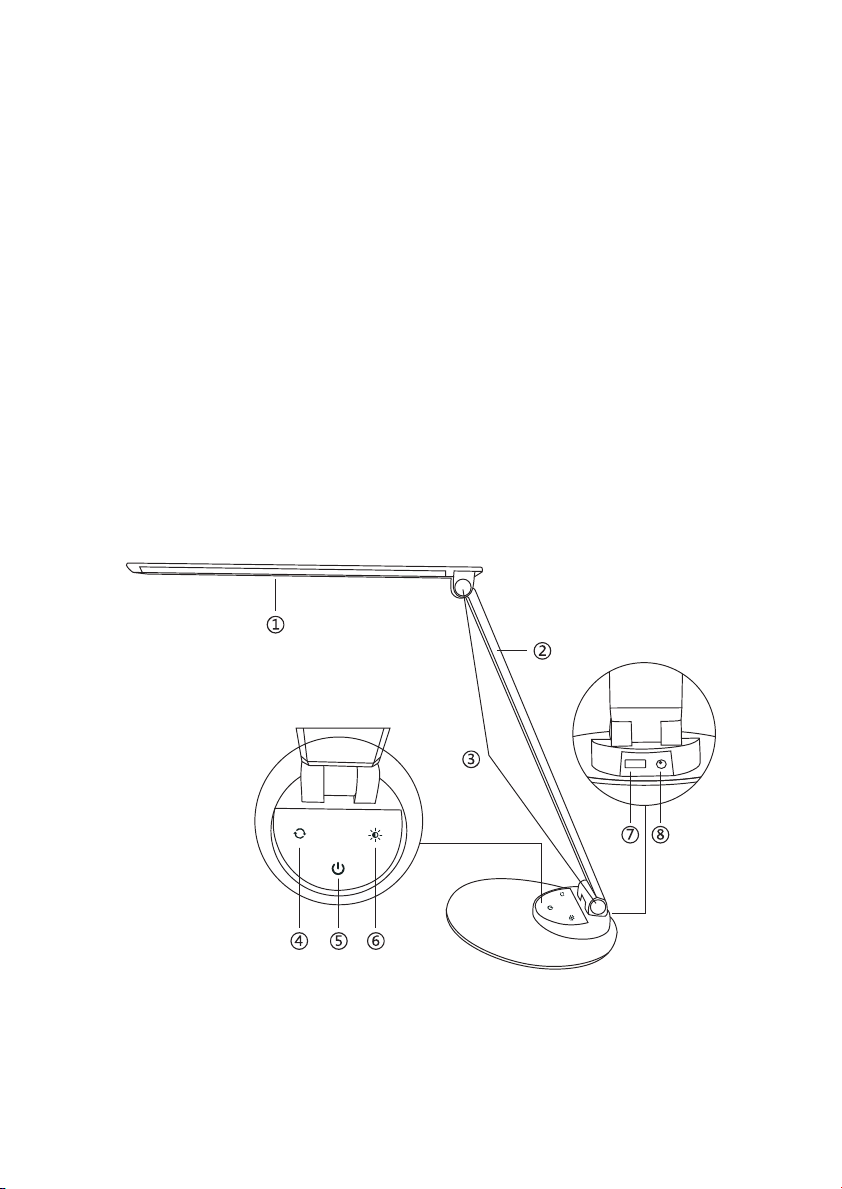
Description du Product
①
②
③
④
⑤
⑥
⑦
⑧
Tête de la Lampe
Bras de la Lampe
Molette de Serrage
Bouton de Couleur de Température
Bouton d’Alimentation
Bouton de Luminosité
Port USB iSmart
Prise Electrique
Mode d’Emploi
Bouton d’Alimentation
Appuyez sur le bouton pour allumer / éteindre la lampe. Elle
reviendra automatiquement à votre dernier réglage de luminosité et de
température de couleur en s’allumant.
Bouton de Température de Couleur
Appuyez sur le bouton pour régler et alterner entre les 5 tempéra-
tures de couleur.
Bouton de Réglage de Luminosité
Appuyez sur le bouton pour régler et alterner entre les 5 niveaux de
luminosité.
Avertissements
• Utilisez uniquement l'adaptateur fourni.
• Veuillez ne pas démonter le produit vous-même, demandez toujours à
un électricien professionnel ou un technicien agréé pour la réparation.
• Si vous sentez une mauvaise odeur ou quelque chose d'inhabituel,
veuillez éteindre l'appareil immédiatement.
• Veuillez ne pas débrancher avec les mains mouillées car cela pourrait
causer un choc électrique
• Tenir hors de la portée des enfants.
• Ne mettez pas cet appareil près d'une source de chaleur extrême,
humidité ou substance corrosive.
• Nettoyez régulièrement la lampe.
• Veuillez conserver dans un endroit sec et frais si vous ne l’utilisez pas
pour une longue durée.
15/16

Description du Product
①
②
③
④
⑤
⑥
⑦
⑧
Tête de la Lampe
Bras de la Lampe
Molette de Serrage
Bouton de Couleur de Température
Bouton d’Alimentation
Bouton de Luminosité
Port USB iSmart
Prise Electrique
Mode d’Emploi
Bouton d’Alimentation
Appuyez sur le bouton pour allumer / éteindre la lampe. Elle
reviendra automatiquement à votre dernier réglage de luminosité et de
température de couleur en s’allumant.
Bouton de Température de Couleur
Appuyez sur le bouton pour régler et alterner entre les 5 tempéra-
tures de couleur.
Bouton de Réglage de Luminosité
Appuyez sur le bouton pour régler et alterner entre les 5 niveaux de
luminosité.
Avertissements
• Utilisez uniquement l'adaptateur fourni.
• Veuillez ne pas démonter le produit vous-même, demandez toujours à
un électricien professionnel ou un technicien agréé pour la réparation.
• Si vous sentez une mauvaise odeur ou quelque chose d'inhabituel,
veuillez éteindre l'appareil immédiatement.
• Veuillez ne pas débrancher avec les mains mouillées car cela pourrait
causer un choc électrique
• Tenir hors de la portée des enfants.
• Ne mettez pas cet appareil près d'une source de chaleur extrême,
humidité ou substance corrosive.
• Nettoyez régulièrement la lampe.
• Veuillez conserver dans un endroit sec et frais si vous ne l’utilisez pas
pour une longue durée.
15/16

Garantie
Les produits TaoTronics sont couverts par une garantie sans souci de 1 an
à compter de la date d'achat initiale. Si votre produit devenait défectueux,
veuillez contacter l’équipe du Service Clients par email.
Nous ne pouvons fournir de service après-vente que pour les appareils
vendus par TaoTronics ou un de ses distributeurs ou revendeurs autorisés. Si
vous avez acheté votre appareil depuis un autre endroit, veuillez
contacter le vendeur pour les questions de retour et de garantie.
17/18
Problème
La lampe ne
s’allume pas
Le panneau tactile
ne répond pas
Panne de LED
Mauvaise odeur
Cause Possible
Pas de courant
Pas d’appui sur le
bouton d’alimentation
Mains mouillées
Des variations
de courant ont
causé un plantage
du panneau
Panne des
composants de LED
Panne de
l’adaptateur secteur
Court-circuit
Solution
Branchez
l’adaptateur secteur
Referez-vous à la
section Mode
d’Emploi
Appuyez sur le
panneau avec des
mains sèches
Débranchez le
courant et rallumez
la lampe
Veuillez contacter
l’Équipe du
Support TaoTronics
Guide de Dépannage

Garantie
Les produits TaoTronics sont couverts par une garantie sans souci de 1 an
à compter de la date d'achat initiale. Si votre produit devenait défectueux,
veuillez contacter l’équipe du Service Clients par email.
Nous ne pouvons fournir de service après-vente que pour les appareils
vendus par TaoTronics ou un de ses distributeurs ou revendeurs autorisés. Si
vous avez acheté votre appareil depuis un autre endroit, veuillez
contacter le vendeur pour les questions de retour et de garantie.
17/18
Problème
La lampe ne
s’allume pas
Le panneau tactile
ne répond pas
Panne de LED
Mauvaise odeur
Cause Possible
Pas de courant
Pas d’appui sur le
bouton d’alimentation
Mains mouillées
Des variations
de courant ont
causé un plantage
du panneau
Panne des
composants de LED
Panne de
l’adaptateur secteur
Court-circuit
Solution
Branchez
l’adaptateur secteur
Referez-vous à la
section Mode
d’Emploi
Appuyez sur le
panneau avec des
mains sèches
Débranchez le
courant et rallumez
la lampe
Veuillez contacter
l’Équipe du
Support TaoTronics
Guide de Dépannage

Características del producto
• Ultrafina, diseño minimalista
• Energía LED eficiente
• 5 niveles de temperatura de color ajustable y brillo
• Con función de memoria
• Práctico puerto USB iSmart
Contenido del paquete
• 1 x Lámpara de Escritorio LED TaoTronics con USB (Modelo:
TT-DL19)
• 1 x Adaptador de Corriente
• 1 x Guía de Instalación Rápida
• 1 x Garantía Completa de 1 Año de TaoTronics
Características Técnicas
Gracias a usted por elegir La Lámpara de Escritorio LED TaoTronics, Por favor
lea este manual y consérvelo para futuras consultas.
ES
Modelo
Tensión de funcionamiento
Salida USB
Potencia
CRI
TT-DL19
Entrada: AC 100-240V 50/60Hz
Salida: DC12V 1.2A
DC 5V 1A
LED: 9W
Puerto USB: 5W
>80
19/20
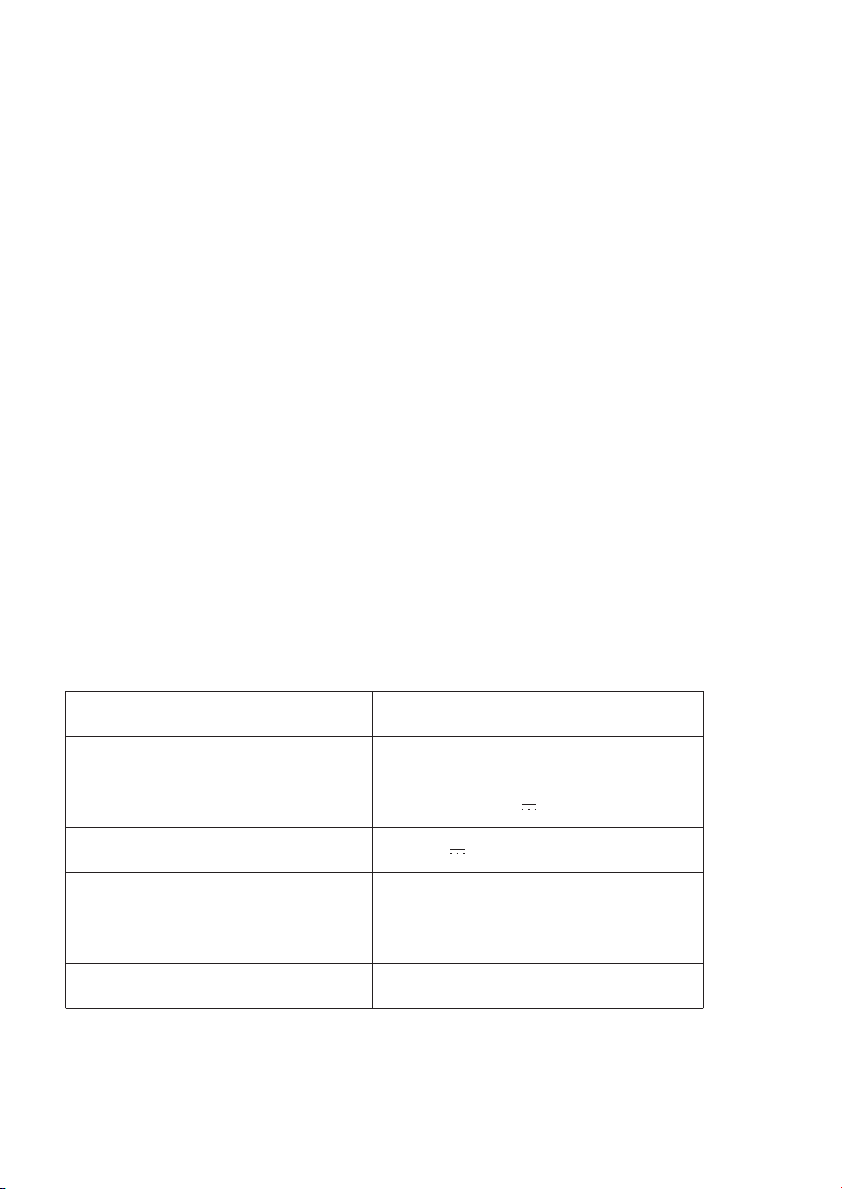
Características del producto
• Ultrafina, diseño minimalista
• Energía LED eficiente
• 5 niveles de temperatura de color ajustable y brillo
• Con función de memoria
• Práctico puerto USB iSmart
Contenido del paquete
• 1 x Lámpara de Escritorio LED TaoTronics con USB (Modelo:
TT-DL19)
• 1 x Adaptador de Corriente
• 1 x Guía de Instalación Rápida
• 1 x Garantía Completa de 1 Año de TaoTronics
Características Técnicas
Gracias a usted por elegir La Lámpara de Escritorio LED TaoTronics, Por favor
lea este manual y consérvelo para futuras consultas.
ES
Modelo
Tensión de funcionamiento
Salida USB
Potencia
CRI
TT-DL19
Entrada: AC 100-240V 50/60Hz
Salida: DC12V 1.2A
DC 5V 1A
LED: 9W
Puerto USB: 5W
>80
19/20
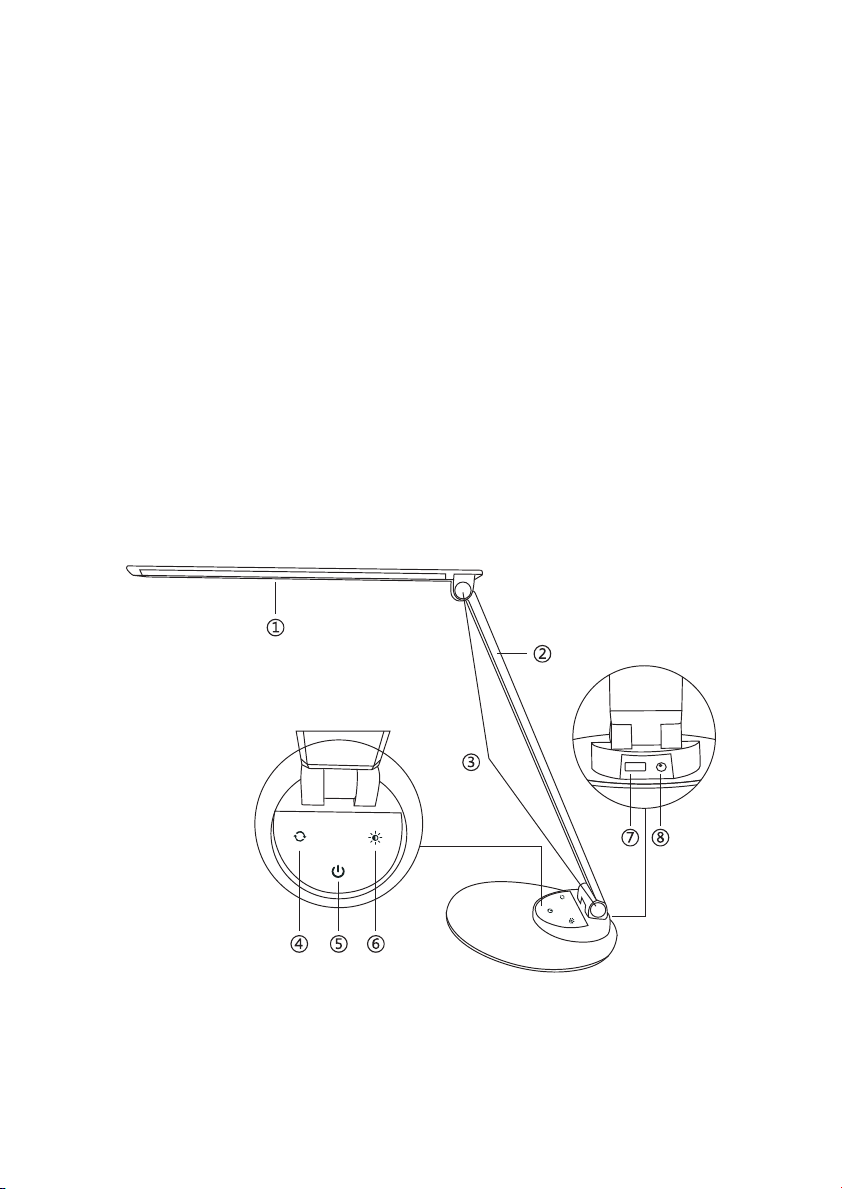
Diagrama de producto
①
②
③
④
⑤
⑥
⑦
⑧
Cabezal de la lámpara
Brazo de la lámpara
Ajustador de Tensión
Botón del color de temperatura
Botón de alimentación
Botón Brillo
Puerto USB iSmart
Conector de alimentación
Cómo utilizar
Botón de encendido
Toque en el para encender / apagar la lámpara. Se recordará
automáticamente su última selección de la temperatura, de brillo y color
cuando se enciende.
Botón de temperatura de color
Toque el botón para ajustar y cambiar entre las temperaturas de 5
colores.
Botón de ajuste de brillo
Toque el botón para ajustar y pasar por los 5 niveles de brillo.
Precaución
• Utilice únicamente el adaptador de alimentación de CA suministrado.
• No desmonte el producto usted mismo, siempre pida ayuda a un
electricista profesional o un técnico autorizado para su reparación.
• Si huele mal o encuentra algo inusual, por favor apague la unidad de
inmediato.
• Por favor, no retire el enchufe de alimentación con las manos mojadas,
ya que puede causar una descarga eléctrica.
• Aleje la lámpara de los niños.
• No coloque esta unidad cerca de fuentes de calor extremo, humedad
o sustancias corrosivas.
• Limpie regularmente la lámpara.
• Guarde en un lugar fresco y seco si no se utiliza durante un largo
periodo de tiempo.
21/22

Diagrama de producto
①
②
③
④
⑤
⑥
⑦
⑧
Cabezal de la lámpara
Brazo de la lámpara
Ajustador de Tensión
Botón del color de temperatura
Botón de alimentación
Botón Brillo
Puerto USB iSmart
Conector de alimentación
Cómo utilizar
Botón de encendido
Toque en el para encender / apagar la lámpara. Se recordará
automáticamente su última selección de la temperatura, de brillo y color
cuando se enciende.
Botón de temperatura de color
Toque el botón para ajustar y cambiar entre las temperaturas de 5
colores.
Botón de ajuste de brillo
Toque el botón para ajustar y pasar por los 5 niveles de brillo.
Precaución
• Utilice únicamente el adaptador de alimentación de CA suministrado.
• No desmonte el producto usted mismo, siempre pida ayuda a un
electricista profesional o un técnico autorizado para su reparación.
• Si huele mal o encuentra algo inusual, por favor apague la unidad de
inmediato.
• Por favor, no retire el enchufe de alimentación con las manos mojadas,
ya que puede causar una descarga eléctrica.
• Aleje la lámpara de los niños.
• No coloque esta unidad cerca de fuentes de calor extremo, humedad
o sustancias corrosivas.
• Limpie regularmente la lámpara.
• Guarde en un lugar fresco y seco si no se utiliza durante un largo
periodo de tiempo.
21/22

Garantía
TaoTronics ofrece una garantía limitada de 1 Año de Garantía Completa
de TaoTronics. Si su producto resulta defectuoso, póngase en contacto
con nuestro equipo de atención al cliente por correo electrónico.
Sólo podemos ofrecer servicios de postventa de los productos que están
vendidos por TaoTronics o minoristas y distribuidores aurtorizados por
TaoTronics. Si usted ha comprado su unidad desde un lugar diferente, por
favor póngase en contacto con el vendedor directamente para cuestiones
de retorno y de garantía.
23/24
Guía para resolver problemas
Problema
La lámpara no se
enciende
El panel táctil no
responde
Fallo en el LED
Mal olor
Posible Causa
Ninguna fuente de
alimentación
Las manos están
mojadas
La fluctuación
de voltaje ha
provocando fallos
del panel
El componente
LED falla
El adaptador de
corriente falla
Cortocircuito
Solución
Enchufe el adaptador
de corriente
Consulte la sección
Cómo utilizar
Toque el panel con
las manos secas
Desconecte la
alimentación y
reinicie la lámpara
Por favor, póngase
en contacto con el
Equipo de Soporte
de TaoTronics
No se ha presionado
el botón de
encendido

Garantía
TaoTronics ofrece una garantía limitada de 1 Año de Garantía Completa
de TaoTronics. Si su producto resulta defectuoso, póngase en contacto
con nuestro equipo de atención al cliente por correo electrónico.
Sólo podemos ofrecer servicios de postventa de los productos que están
vendidos por TaoTronics o minoristas y distribuidores aurtorizados por
TaoTronics. Si usted ha comprado su unidad desde un lugar diferente, por
favor póngase en contacto con el vendedor directamente para cuestiones
de retorno y de garantía.
23/24
Guía para resolver problemas
Problema
La lámpara no se
enciende
El panel táctil no
responde
Fallo en el LED
Mal olor
Posible Causa
Ninguna fuente de
alimentación
Las manos están
mojadas
La fluctuación
de voltaje ha
provocando fallos
del panel
El componente
LED falla
El adaptador de
corriente falla
Cortocircuito
Solución
Enchufe el adaptador
de corriente
Consulte la sección
Cómo utilizar
Toque el panel con
las manos secas
Desconecte la
alimentación y
reinicie la lámpara
Por favor, póngase
en contacto con el
Equipo de Soporte
de TaoTronics
No se ha presionado
el botón de
encendido

Caratteristiche
• Design minimalista e ultra sottile
• LED a risparmio energetico
• 5 levelli di temperatura di colore e luminosità
• Funzione memoria
• Pratica porta USB iSmart
Contenuto della Confezione
• 1 x TaoTronics Lampada da Tavolo a LED con USB (Modello:
TT-DL19)
• 1 x Adattatore
• 1 x Guida d'installazione rapida
• 1 x TaoTronics Garanzia di 1 anno
Speciche Tecniche
Grazie per aver scelto la Lampada LED da Tavolo TaoTronics TT-DL19. Vi
invitiamo a leggere attentamente il seguente manuale e a conservarlo
per consultarlo in futuro.
IT
Modello
Voltaggio Operativo
Uscita USB
Potenza
CRI
TT-DL19
Ingresso: AC 100-240V 50/60Hz
Uscita: DC12V 1.2A
DC 5V 1A
LED: 9W
Porta USB: 5W
> 80
25/26
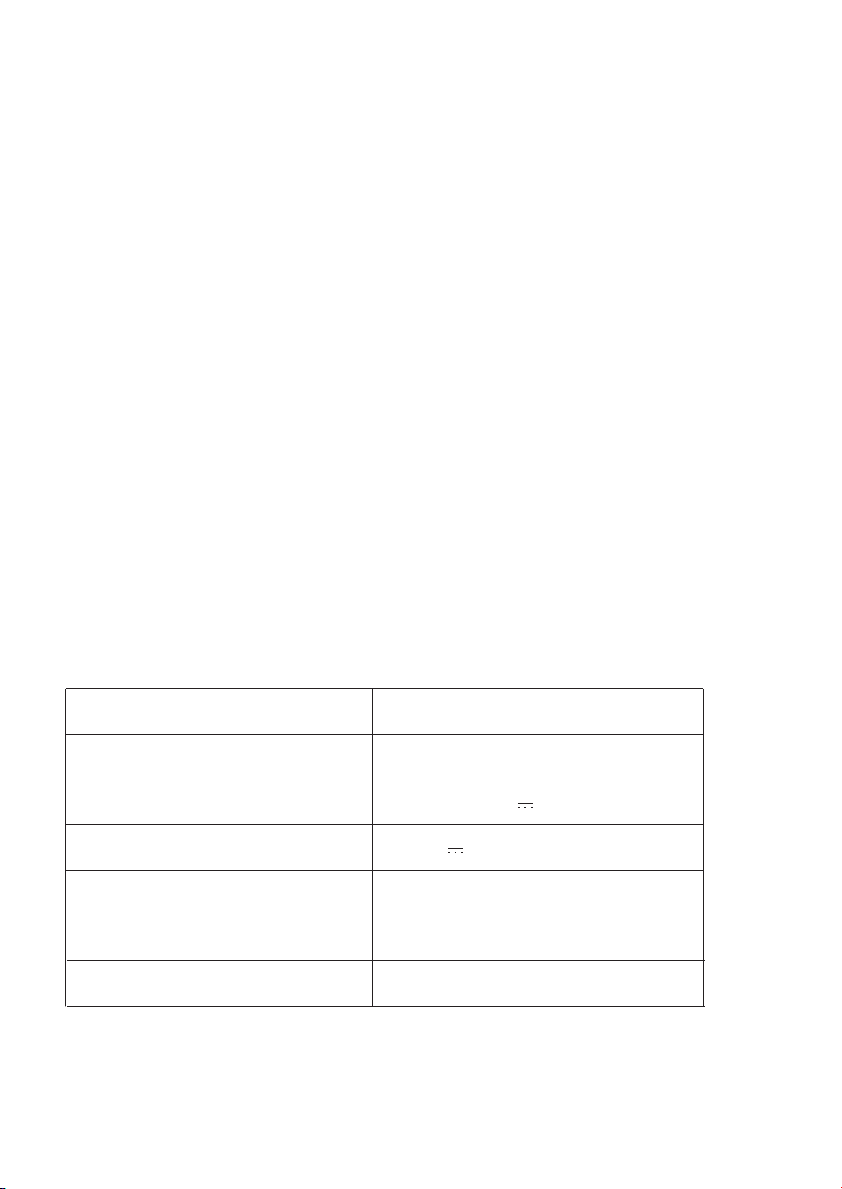
Caratteristiche
• Design minimalista e ultra sottile
• LED a risparmio energetico
• 5 levelli di temperatura di colore e luminosità
• Funzione memoria
• Pratica porta USB iSmart
Contenuto della Confezione
• 1 x TaoTronics Lampada da Tavolo a LED con USB (Modello:
TT-DL19)
• 1 x Adattatore
• 1 x Guida d'installazione rapida
• 1 x TaoTronics Garanzia di 1 anno
Speciche Tecniche
Grazie per aver scelto la Lampada LED da Tavolo TaoTronics TT-DL19. Vi
invitiamo a leggere attentamente il seguente manuale e a conservarlo
per consultarlo in futuro.
IT
Modello
Voltaggio Operativo
Uscita USB
Potenza
CRI
TT-DL19
Ingresso: AC 100-240V 50/60Hz
Uscita: DC12V 1.2A
DC 5V 1A
LED: 9W
Porta USB: 5W
> 80
25/26
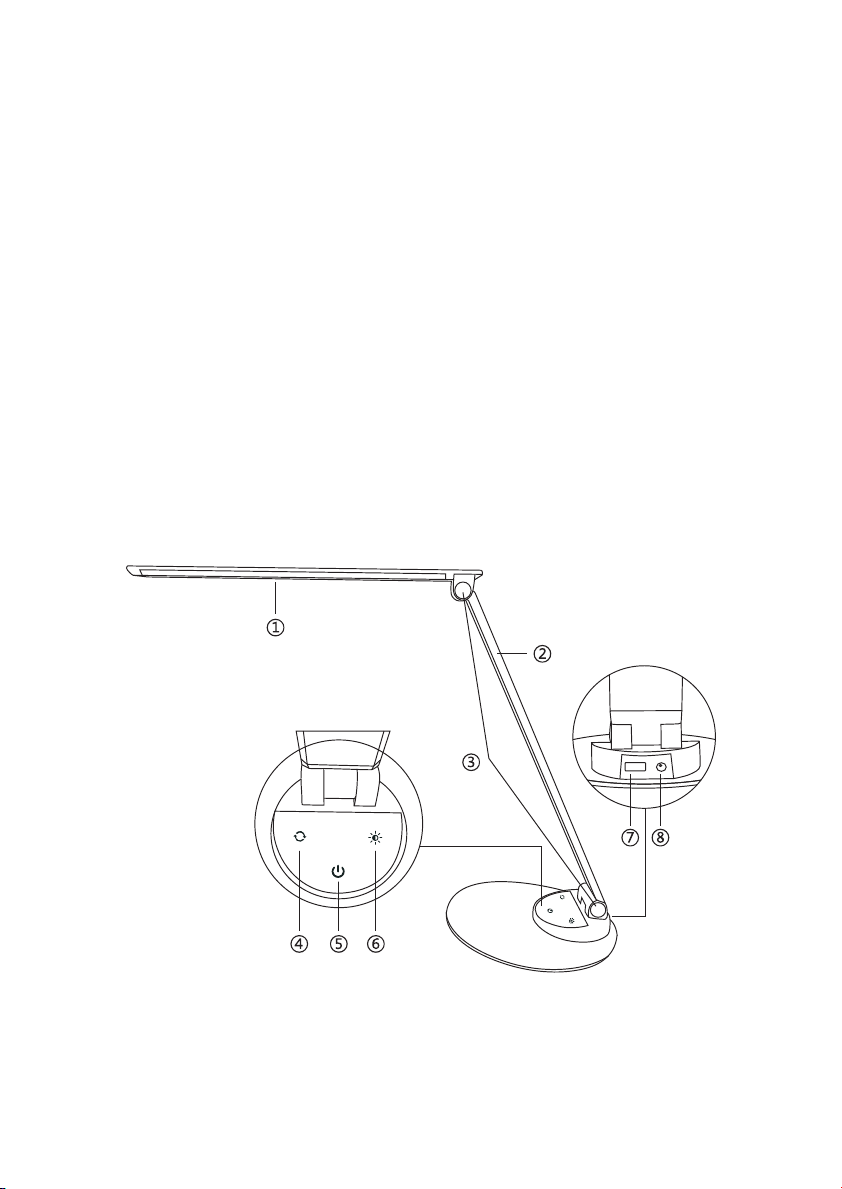
Schema del Prodotto
①
②
③
④
⑤
⑥
⑦
⑧
Testa della Lampada
Braccio della Lampada
Perno Rotante Inclinazione
Tasto Temperatura di Colore
Tasto di Accensione
Tasto Luminosità
Porta USB iSmart
Porta di Alimentazione
Funzionamento
Tasto di Accensione
Premere il tasto per accendere/spegnere la lampada.La lampada si
accende automaticamente all'ultimo livello di luminosità/temperatura di
colore impostato.
Tasto Temperatura di Colore
Premere il tasto per scorrere le 5 temperature di colore e selezionare
quella desiderata.
Tasto Regolazione Luminosità
Premere il tasto per scorrere i 5 livelli di luminosità e selezionare
quello desiderato.
Avvertenze
• Utilizzare esclusivamete l'adattatore AC presente nella confezione.
• Non smantellare il prodotto, rivolgersi sempre a personale qualificato o ad
un tecnico autorizzato per la sua riparazione.
• Spegnere immediatamente il dispositivo in caso di cattivo odore o strano
funzionamento.
• Non rimuovere il dispositivo dalla presa di corrente con le mani bagnate in
quanto potrebbe procurare uno shock elettrico.
• Tenere lontano dalla portata dei bambini.
• Non esporre il dispositivo a fonti di calore eccessivo,umidità o sostanze
corrosive.
• Si raccomanda di pulire periodicamente la lampada.
• Conservare in un luogo asciutto e riparato in caso di inutilizzo prolungato.
27/28

Schema del Prodotto
①
②
③
④
⑤
⑥
⑦
⑧
Testa della Lampada
Braccio della Lampada
Perno Rotante Inclinazione
Tasto Temperatura di Colore
Tasto di Accensione
Tasto Luminosità
Porta USB iSmart
Porta di Alimentazione
Funzionamento
Tasto di Accensione
Premere il tasto per accendere/spegnere la lampada.La lampada si
accende automaticamente all'ultimo livello di luminosità/temperatura di
colore impostato.
Tasto Temperatura di Colore
Premere il tasto per scorrere le 5 temperature di colore e selezionare
quella desiderata.
Tasto Regolazione Luminosità
Premere il tasto per scorrere i 5 livelli di luminosità e selezionare
quello desiderato.
Avvertenze
• Utilizzare esclusivamete l'adattatore AC presente nella confezione.
• Non smantellare il prodotto, rivolgersi sempre a personale qualificato o ad
un tecnico autorizzato per la sua riparazione.
• Spegnere immediatamente il dispositivo in caso di cattivo odore o strano
funzionamento.
• Non rimuovere il dispositivo dalla presa di corrente con le mani bagnate in
quanto potrebbe procurare uno shock elettrico.
• Tenere lontano dalla portata dei bambini.
• Non esporre il dispositivo a fonti di calore eccessivo,umidità o sostanze
corrosive.
• Si raccomanda di pulire periodicamente la lampada.
• Conservare in un luogo asciutto e riparato in caso di inutilizzo prolungato.
27/28

Garanzia
TaoTronics fornisce per questo prodotto, una garanzia limitata di
TaoTronics Garanzia di 1 anno In caso di difetti del prodotto, si prega di
contattare via email il nostro team di supporto clienti.
Forniamo servizio di post vendita esclusivamente per prodotti venduti da
TaoTronics o da distributori e rivenditori autorizzati TaoTronics. Se
acquistati da terzi, vi invitiamo a rivolgervi al vostro venditore per casi
attinenti alla restituzione del prodotto e questioni sulla garanzia.
29/30
Problema
La lampada non
si accende
Il pannello tattile
non risponde
LED non si accende
Cattivo/strano odore
Possibile Causa
Mancanza di
alimentazione
L'interruttore della
lampada non è
acceso
Mani bagnate
Fluttuazione di
tensione
LED guasto
Adattatore guasto
Cortocircuito
Soluzione
Collegare
all'alimentazione
Consultare la sessione
Funzionamento della
Guida Utente
Asciugarsi le mani
prima di toccare
la superficie
touch-control
Interrompere
l'alimentazione per
riavviare la lampada
Contattare il Team di
Supporto TaoTronics
Risoluzione dei Problemi

Garanzia
TaoTronics fornisce per questo prodotto, una garanzia limitata di
TaoTronics Garanzia di 1 anno In caso di difetti del prodotto, si prega di
contattare via email il nostro team di supporto clienti.
Forniamo servizio di post vendita esclusivamente per prodotti venduti da
TaoTronics o da distributori e rivenditori autorizzati TaoTronics. Se
acquistati da terzi, vi invitiamo a rivolgervi al vostro venditore per casi
attinenti alla restituzione del prodotto e questioni sulla garanzia.
29/30
Problema
La lampada non
si accende
Il pannello tattile
non risponde
LED non si accende
Cattivo/strano odore
Possibile Causa
Mancanza di
alimentazione
L'interruttore della
lampada non è
acceso
Mani bagnate
Fluttuazione di
tensione
LED guasto
Adattatore guasto
Cortocircuito
Soluzione
Collegare
all'alimentazione
Consultare la sessione
Funzionamento della
Guida Utente
Asciugarsi le mani
prima di toccare
la superficie
touch-control
Interrompere
l'alimentazione per
riavviare la lampada
Contattare il Team di
Supporto TaoTronics
Risoluzione dei Problemi
JP
50/60Hz
31/32
JP
50/60Hz
31/32
①
②
③
④
⑤
⑥
⑦
⑧
iSmart USB
on / off
•
•
•
•
• .
•
•
•
•
33/34
①
②
③
④
⑤
⑥
⑦
⑧
iSmart USB
on / off
•
•
•
•
• .
•
•
•
•
33/34
35/36
LED
LED
TaoTronics
35/36
LED
LED
TaoTronics
37
FCC Compliance
This device complies with Part 15 of the FCC Rules. Operation is subject
to the following two conditions: (1) this device may not cause harmful
interference, and (2) this device must withstand any interference received,
including interference that may cause undesired operation.
WEEE Compliance
Correct Disposal of This Product (Waste Electrical & Electronic Equipment)
(Applicable in countries with separate collection systems)
This marking on the product, accessories or literature indicates that the
product and its electronic accessories should not be disposed of with
other household waste at the end of their working life. To prevent possible
harm to the environment or human health from uncontrolled waste
disposal, please separate these items from other types of waste and
recycle them responsibly to promote the sustainable reuse of material
resources. Household users should contact either the retailer where they
purchased this product, or their local government office, for details of
where and how they can take these items for environmentally safe
recycling. Business users should contact their supplier and check the
terms and conditions of the purchase contract. This product and its
electronic accessories should not be mixed with other commercial wastes
for disposal.

37
FCC Compliance
This device complies with Part 15 of the FCC Rules. Operation is subject
to the following two conditions: (1) this device may not cause harmful
interference, and (2) this device must withstand any interference received,
including interference that may cause undesired operation.
WEEE Compliance
Correct Disposal of This Product (Waste Electrical & Electronic Equipment)
(Applicable in countries with separate collection systems)
This marking on the product, accessories or literature indicates that the
product and its electronic accessories should not be disposed of with
other household waste at the end of their working life. To prevent possible
harm to the environment or human health from uncontrolled waste
disposal, please separate these items from other types of waste and
recycle them responsibly to promote the sustainable reuse of material
resources. Household users should contact either the retailer where they
purchased this product, or their local government office, for details of
where and how they can take these items for environmentally safe
recycling. Business users should contact their supplier and check the
terms and conditions of the purchase contract. This product and its
electronic accessories should not be mixed with other commercial wastes
for disposal.
TAOTRONICS LED DESK LAMP
User Guide
MODEL: TT-DL19
EUROPE
E-mail:
support.uk@taotronics.com(UK)
support.de@taotronics.com(DE)
support.fr@taotronics.com(FR)
[email protected]m(ES)
support.it@taotronics.com(IT)
EU Importer: ZBT International Trading GmbH
Address: Halstenbeker Weg 98C, 25462 Rellingen, Deutschland
MANUFACTURER
NORTH AMERICA
E-mail : [email protected]om(US)
support.c[email protected](CA)
Tel : 1-888-456-8468 (Monday-Friday: 9:00 – 17:00 PST)
US Distributor: SUNVALLEYTEK INTERNATIONAL INC.
Address: 46724 Lakeview Blvd, Fremont, CA 94538
MADE IN CHINA
TT-DL19_V2.2
ASIA PACIFIC
E-mail: support.jp@taotronics.com(JP)
Tel 03-5542-0238 10 18 /
JP Importer: SUNVALLEY JAPAN
Address: 104-0032 18-6 PMO F
www.taotronics.com

TECHNOLOGY ENHANCES LIFE