
OWNER’S MANUAL
nuwavenow.com
Digital Air Fryer
with Temperature Probe
6Q
Open your mobile app store
(App Store, Google Play).
Search for "QR code readers."
Simply download the QR code reader to your phone,
open it, scan the code and you are ready to go.
NOTE: You may need to open your downloaded QR
code reader each time you want to scan a QR code.
nuwavenow.com
2 3
nuwavenow.com
2 3
3
for an additional
months
warranty!
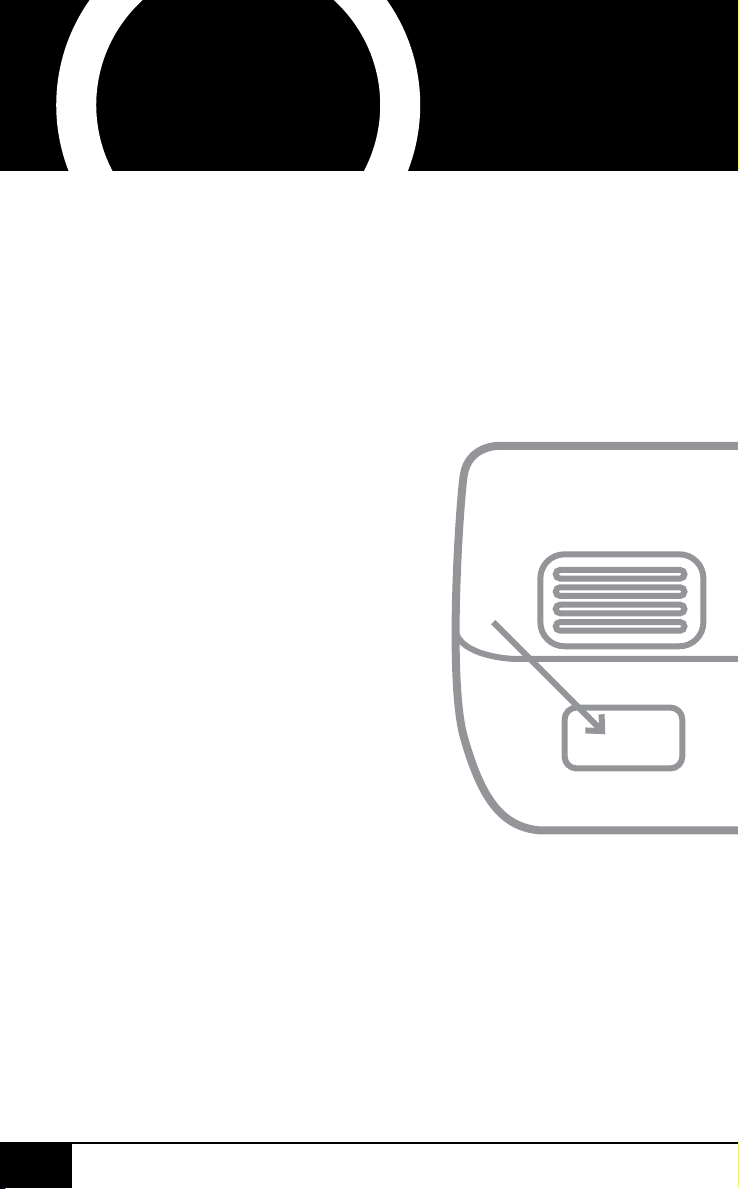
Using your smartphone or
smart device, scan the QR code
located on the unit label on the
back of the unit.
You will be directed to NuWave’s
product registration page with
your unit’s unique serial number
automatically entered in the
appropriate eld.
NOTE: If you do not have a
web-enabled smart device,
simply visit nuwavenow.com/QR
and manually enter in your unit’s
serial number.
Fill out the remaining information
and complete the optional survey.
Once you submit your
information, you will receive
a conrmation email containing
your extended warranty details.
1
2
3
4
*Register your product within 1 year of date of purchase for a free
3-month extension of your limited warranty.
1
2
3
DOWNLOAD THE QR CODE
APP TO YOUR MOBILE DEVICE
QR code readers
REGISTER
NOW!
As a special thank-you for registering your NuWave unit,
you’ll automatically receive an additional 3 months add-
ed to your limited manufacturer’s warranty!*
All you have to do is follow these simple steps.
Open your mobile app store
(App Store, Google Play).
Search for "QR code readers."
Simply download the QR code reader to your phone,
open it, scan the code and you are ready to go.
NOTE: You may need to open your downloaded QR
code reader each time you want to scan a QR code.
nuwavenow.com
2 3
nuwavenow.com
2 3
3
for an additional
months
warranty!
Using your smartphone or
smart device, scan the QR code
located on the unit label on the
back of the unit.
You will be directed to NuWave’s
product registration page with
your unit’s unique serial number
automatically entered in the
appropriate eld.
NOTE: If you do not have a
web-enabled smart device,
simply visit nuwavenow.com/QR
and manually enter in your unit’s
serial number.
Fill out the remaining information
and complete the optional survey.
Once you submit your
information, you will receive
a conrmation email containing
your extended warranty details.
1
2
3
4
*Register your product within 1 year of date of purchase for a free
3-month extension of your limited warranty.
1
2
3
DOWNLOAD THE QR CODE
APP TO YOUR MOBILE DEVICE
QR code readers
REGISTER
NOW!
As a special thank-you for registering your NuWave unit,
you’ll automatically receive an additional 3 months add-
ed to your limited manufacturer’s warranty!*
All you have to do is follow these simple steps.
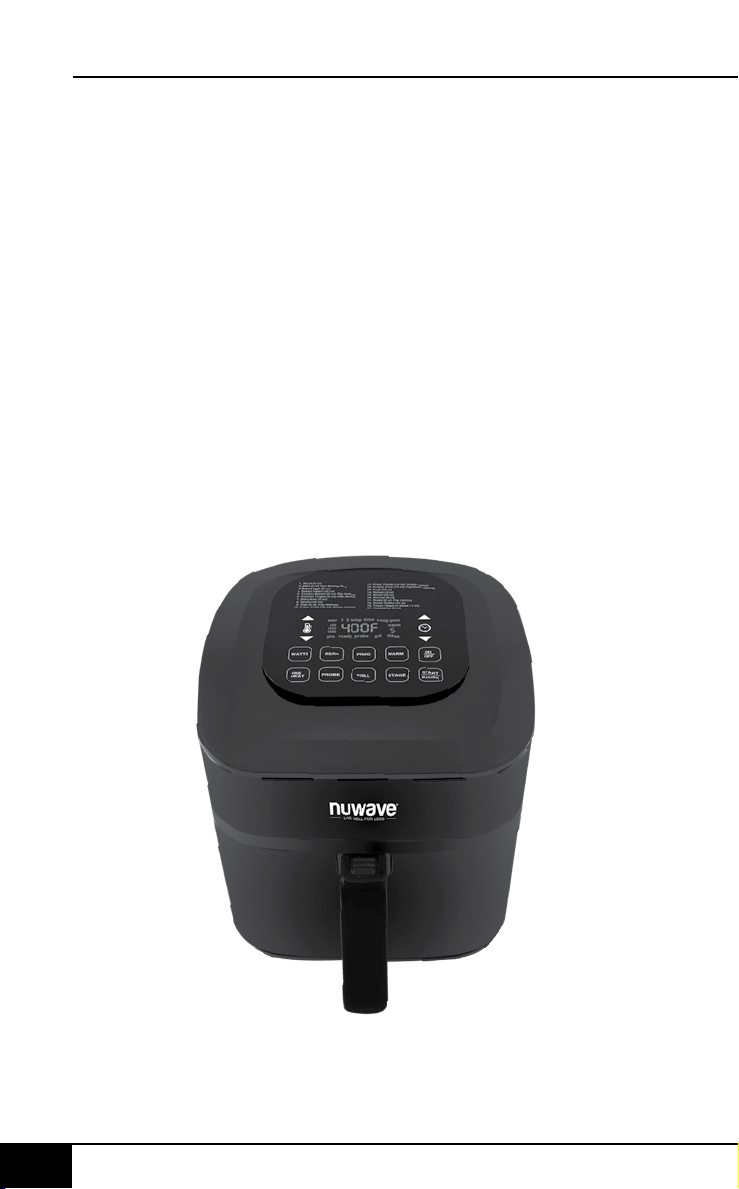
table of contents
nuwavenow.com
4 5
ENGLISH
nuwavenow.com
TABLE OF CONTENTS
4 5
OWNER’S MANUAL
Important Safeguards .....................................................5-7
Additional Safeguards .....................................................7-8
Parts & Accessories ...........................................................9
Assembly Guide ..........................................................10-12
Quickstart ....................................................................12-13
Instructions..................................................................14-28
Cleaning & Maintenance ..............................................29-30
Troubleshoot Guide ......................................................31-33
Limited Warranty ..........................................................34-38
Spanish..........................................................................39-77
Replacement Parts .......................................................78-79
IMPORTANT SAFEGUARDS
HOUSEHOLD USE ONLY • READ ALL INSTRUCTIONS BEFORE USE
WARNING: When using
the Brio, basic safety
precautions should always
be followed:
1. Do not touch hot
surfaces. Use handles
or knobs.
2. To protect against
electrical shock, do not
immerse cord, plug,
or the Brio in water or
other liquids.
3. Do not operate the
Brio with a damaged
cord or plug or after the
appliance malfunctions
or has been damaged
in any manner. Return
appliance to the nearest
authorized service facility
for examination, repair,
or adjustment.
4. Close supervision is
necessary when any
appliance is used near
children. This appliance
is not intended for use
by persons (including
children) with reduced
physical, sensory or
mental capabilities,
or lack of experience
and knowledge,
unless they have been
given supervision or
instruction concerning
use of the appliance by
a person responsible for
their safety.
5. The use of accessories
that are not intended to
be used with the Brio
is not recommended.
Doing so may damage
the Brio and can cause
accidents.
6. NOT INTENDED FOR
OUTDOOR USE. FOR
HOUSEHOLD USE
ONLY.
7. Do not let the cord hang
over the edge of tables
or counters, or touch hot
surfaces.
8. Do not place the Brio
on or near hot gas or
electric burners, or in a
heated oven.
9. Extreme caution must be
used when moving the
Brio while hot.
10. To disconnect, turn the
Brio OFF, then remove
plug from the wall outlet.
11. During air-frying, hot
steam is released from
the air outlet vent. Keep
hands and face away
from the steam and from
the air outlet vent. Also,
be careful of hot steam
and air when removing
Trays, and Racks.
12. Never put the Brio
against the wall or other
appliances. There should
be at least 3 inches of
free space for the back
side, left/right sides, and
the upper side of the Brio.
13. Do not place anything on
top of the Brio.

table of contents
nuwavenow.com
4 5
ENGLISH
nuwavenow.com
TABLE OF CONTENTS
4 5
OWNER’S MANUAL
Important Safeguards .....................................................5-7
Additional Safeguards .....................................................7-8
Parts & Accessories ...........................................................9
Assembly Guide ..........................................................10-12
Quickstart ....................................................................12-13
Instructions..................................................................14-28
Cleaning & Maintenance ..............................................29-30
Troubleshoot Guide ......................................................31-33
Limited Warranty ..........................................................34-38
Spanish..........................................................................39-77
Replacement Parts .......................................................78-79
IMPORTANT SAFEGUARDS
HOUSEHOLD USE ONLY • READ ALL INSTRUCTIONS BEFORE USE
WARNING: When using
the Brio, basic safety
precautions should always
be followed:
1. Do not touch hot
surfaces. Use handles
or knobs.
2. To protect against
electrical shock, do not
immerse cord, plug,
or the Brio in water or
other liquids.
3. Do not operate the
Brio with a damaged
cord or plug or after the
appliance malfunctions
or has been damaged
in any manner. Return
appliance to the nearest
authorized service facility
for examination, repair,
or adjustment.
4. Close supervision is
necessary when any
appliance is used near
children. This appliance
is not intended for use
by persons (including
children) with reduced
physical, sensory or
mental capabilities,
or lack of experience
and knowledge,
unless they have been
given supervision or
instruction concerning
use of the appliance by
a person responsible for
their safety.
5. The use of accessories
that are not intended to
be used with the Brio
is not recommended.
Doing so may damage
the Brio and can cause
accidents.
6. NOT INTENDED FOR
OUTDOOR USE. FOR
HOUSEHOLD USE
ONLY.
7. Do not let the cord hang
over the edge of tables
or counters, or touch hot
surfaces.
8. Do not place the Brio
on or near hot gas or
electric burners, or in a
heated oven.
9. Extreme caution must be
used when moving the
Brio while hot.
10. To disconnect, turn the
Brio OFF, then remove
plug from the wall outlet.
11. During air-frying, hot
steam is released from
the air outlet vent. Keep
hands and face away
from the steam and from
the air outlet vent. Also,
be careful of hot steam
and air when removing
Trays, and Racks.
12. Never put the Brio
against the wall or other
appliances. There should
be at least 3 inches of
free space for the back
side, left/right sides, and
the upper side of the Brio.
13. Do not place anything on
top of the Brio.
important safeguards
nuwavenow.com
6 7
ENGLISH
nuwavenow.com
IMPORTANT SAFEGUARDS
HOUSEHOLD USE ONLY • READ ALL INSTRUCTIONS BEFORE USE
6 7
SAVE THESE
INSTRUCTIONS
Read and understand
the entire manual before
using the Brio.
DO NOT USE THE
UNIT FOR OTHER
THAN INTENDED USE.
Note: Put the Brio on a
surface that is horizontal,
even, and stable. This
appliance is intended for
normal household use. It
is not intended to be used
in environments such as
the staff kitchens of shops,
ofces, farms, or other
work environments. Nor is
it intended to be used by
clients in hotels, motels, bed
and breakfasts, and non-
residential environments.
NOTICE: THE FAILURE
TO FOLLOW ANY
OF THE IMPORTANT
SAFEGUARDS,
ADDITIONAL
SAFEGUARDS, OR THE
INSTRUCTIONS FOR SAFE
WARNING
In case of other
problems, immediately
unplug and contact
Customer Service
Department.
1-877-689-2838 • help@
nuwavenow.com
14. Unplug the Brio from
outlet when not in use
and before cleaning.
Allow the Brio to cool
before cleaning, putting
on or taking off parts.
15. Keep manual handy for
future reference.
CAUTION
• Always put the ingredients
to be fried in the Fry Pan
Basket to prevent direct
contact with the heating
components.
• Do not cover the air inlet
and outlet openings
while the appliance is
operating.
• Do not pour oil into the
Base Tray or Fry Pan
Basket, as this may
create a re hazard.
• Never touch the insides
of the appliance while it
is operating.
ADDITIONAL
SAFEGUARDS
SEE INSTRUCTIONS
BEFORE USE
Electrical Information
A short power-supply
cord (or detachable
power-supply cord)
is provided to reduce
the risk resulting from
becoming entangled in
or tripping over a longer
cord. Longer detachable
power-supply cords or
extension cords are
available and may be
used if care is exercised
in their use. If a longer
detachable power-
supply cord or extension
cord is used:
USE IS A MISUSE OF YOUR
BRIO THAT CAN VOID
YOUR WARRANTY AND
CREATE THE RISK OF
SERIOUS INJURY.
1. Do not place the Brio
close to ammable
materials, heating units,
or wet environments.
2. Do not put any other
cooking pans in the
Fry Pan Basket. Do not
replace any parts with
other containers.
3. It is normal for some
smoke to escape the
Brio when heating for the
rst time.
4. If a lot of smoke is
escaping from the air
vent during operation,
unplug the Brio
immediately and contact
Customer Service.*
5. Extreme caution must
be exercised when
operating the Brio or any
other appliance.
6. Do not move the Brio
while in operation.
Only after the Brio has
completely cooled
should moving be
attempted. Always wait
for the Air Fryer to cool
down prior to handling it.
7. Children should be
supervised to ensure
that they do not play
with the appliance.
8. Never use a towel or
other material or object
to block the air vents.
9. If any trouble arises
during operation,
any service MUST
be done by NuWave
LLC or authorized by
the manufacturer for
repairs.
10. The Brio is not intended
to be operated by
means of an external
timer or separate
remote-control system.
11. Do not disassemble
the Brio or replace
any parts without prior
written consent from the
manufacturer.
12. Do not use metal
utensils with the coated
Fry Pan Basket or Fry
Pan Basket Net as this
can damage the surface.
13. Make sure the Brio is
always clean prior to
cooking.
*Customer Service
Department:
1-877-689-2838
help@nuwavenow.com
important safeguards
nuwavenow.com
6 7
ENGLISH
nuwavenow.com
IMPORTANT SAFEGUARDS
HOUSEHOLD USE ONLY • READ ALL INSTRUCTIONS BEFORE USE
6 7
SAVE THESE
INSTRUCTIONS
Read and understand
the entire manual before
using the Brio.
DO NOT USE THE
UNIT FOR OTHER
THAN INTENDED USE.
Note: Put the Brio on a
surface that is horizontal,
even, and stable. This
appliance is intended for
normal household use. It
is not intended to be used
in environments such as
the staff kitchens of shops,
ofces, farms, or other
work environments. Nor is
it intended to be used by
clients in hotels, motels, bed
and breakfasts, and non-
residential environments.
NOTICE: THE FAILURE
TO FOLLOW ANY
OF THE IMPORTANT
SAFEGUARDS,
ADDITIONAL
SAFEGUARDS, OR THE
INSTRUCTIONS FOR SAFE
WARNING
In case of other
problems, immediately
unplug and contact
Customer Service
Department.
1-877-689-2838 • help@
nuwavenow.com
14. Unplug the Brio from
outlet when not in use
and before cleaning.
Allow the Brio to cool
before cleaning, putting
on or taking off parts.
15. Keep manual handy for
future reference.
CAUTION
• Always put the ingredients
to be fried in the Fry Pan
Basket to prevent direct
contact with the heating
components.
• Do not cover the air inlet
and outlet openings
while the appliance is
operating.
• Do not pour oil into the
Base Tray or Fry Pan
Basket, as this may
create a re hazard.
• Never touch the insides
of the appliance while it
is operating.
ADDITIONAL
SAFEGUARDS
SEE INSTRUCTIONS
BEFORE USE
Electrical Information
A short power-supply
cord (or detachable
power-supply cord)
is provided to reduce
the risk resulting from
becoming entangled in
or tripping over a longer
cord. Longer detachable
power-supply cords or
extension cords are
available and may be
used if care is exercised
in their use. If a longer
detachable power-
supply cord or extension
cord is used:
USE IS A MISUSE OF YOUR
BRIO THAT CAN VOID
YOUR WARRANTY AND
CREATE THE RISK OF
SERIOUS INJURY.
1. Do not place the Brio
close to ammable
materials, heating units,
or wet environments.
2. Do not put any other
cooking pans in the
Fry Pan Basket. Do not
replace any parts with
other containers.
3. It is normal for some
smoke to escape the
Brio when heating for the
rst time.
4. If a lot of smoke is
escaping from the air
vent during operation,
unplug the Brio
immediately and contact
Customer Service.*
5. Extreme caution must
be exercised when
operating the Brio or any
other appliance.
6. Do not move the Brio
while in operation.
Only after the Brio has
completely cooled
should moving be
attempted. Always wait
for the Air Fryer to cool
down prior to handling it.
7. Children should be
supervised to ensure
that they do not play
with the appliance.
8. Never use a towel or
other material or object
to block the air vents.
9. If any trouble arises
during operation,
any service MUST
be done by NuWave
LLC or authorized by
the manufacturer for
repairs.
10. The Brio is not intended
to be operated by
means of an external
timer or separate
remote-control system.
11. Do not disassemble
the Brio or replace
any parts without prior
written consent from the
manufacturer.
12. Do not use metal
utensils with the coated
Fry Pan Basket or Fry
Pan Basket Net as this
can damage the surface.
13. Make sure the Brio is
always clean prior to
cooking.
*Customer Service
Department:
1-877-689-2838
help@nuwavenow.com

important safeguards
nuwavenow.com
8 9
ENGLISH
nuwavenow.com
IMPORTANT SAFEGUARDS
HOUSEHOLD USE ONLY • READ ALL INSTRUCTIONS BEFORE USE
8 9
1. The marked
electrical rating of
the extension cord
should be at least
as great as the
electrical rating of the
appliance.
2. The longer cord
should be arranged
so that it will not
drape over the
countertop or
tabletop where it
could be pulled
on or tripped over
unintentionally.
3. The appliance has
a polarized plug
(one blade is wider
than the other). To
reduce the risk of
electric shock, this
plug is intended to
fit into a polarized
outlet only one way.
If the plug does not
fit fully into the outlet,
reverse the plug. If
it still does not fit,
contact a qualified
electrician. Do not
attempt to modify the
plug in any way. If
the appliance is of the
grounded type, the
cord set or extension
cord should be a
grounding-type 3-wire
cord.
1
3
5
2
4a
4b
START
PAUSE
WATTS
STAGEGRILL
PROG WARM
sear 1 2
1800
1500
900
pre ready probe grill stage
temp time prog open
warm
PROBE
SEAR
1. Bacon (4 oz)
2. Bake (8 oz) Use Baking Pan
3. Baked Eggs (2 oz)
4. Baked Potato (32 oz)
5. Chicken Breast (8 oz) Flip Halfway
6. Chicken Thighs (8 oz) Flip Halfway
7. Dehydrate (8 oz)
8. Dessert (8 oz)
9. Fish (6 oz) Flip Halfway
10. Fries, Fresh (16 oz) Shake Halfway
11. Fries, Frozen (16 oz) Shake Halfway
12. Frozen Food (16 oz) Flip/Shake Halfway
13. Pork (16 oz)
14. Reheat (8 oz)
15. Roast (32 oz)
16. Shrimp (8 oz)
17. Steak (8 oz) Flip Halfway
18. Sweet Potato (32 oz)
19. Toast / Bagel (4 slices / 4 oz)
20. Vegetables (8 oz)
date name doc#
05-19-20 6Q Control Panel 02
all text and lines - pantone metallic 877C
LED Display - BLUE
PRE
HEAT
ON
OFF
Silicone Tabs
6
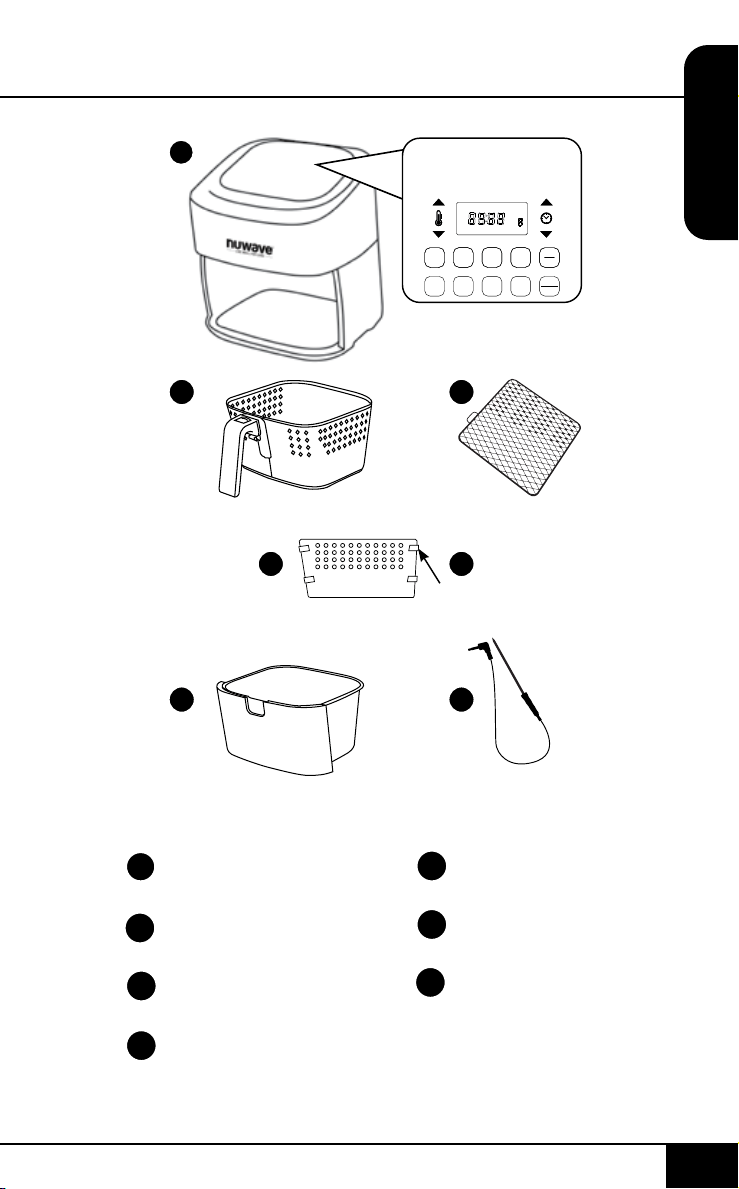
Air Fryer Power Base
Part #: 37210
Fry Pan Basket
Part #: 37202
Fry Pan Basket Net
Part #: 37204
Fry Pan Divider
Part #: 37205
1
2
3
4a
4 Silicone Tabs
Part #: 37207
Base Tray
Part #: 37201
Probe
Part #: 36261
4b
5
6
PARTS & ACCESSORIES
important safeguards
nuwavenow.com
8 9
ENGLISH
nuwavenow.com
IMPORTANT SAFEGUARDS
HOUSEHOLD USE ONLY • READ ALL INSTRUCTIONS BEFORE USE
8 9
1. The marked
electrical rating of
the extension cord
should be at least
as great as the
electrical rating of the
appliance.
2. The longer cord
should be arranged
so that it will not
drape over the
countertop or
tabletop where it
could be pulled
on or tripped over
unintentionally.
3. The appliance has
a polarized plug
(one blade is wider
than the other). To
reduce the risk of
electric shock, this
plug is intended to
fit into a polarized
outlet only one way.
If the plug does not
fit fully into the outlet,
reverse the plug. If
it still does not fit,
contact a qualified
electrician. Do not
attempt to modify the
plug in any way. If
the appliance is of the
grounded type, the
cord set or extension
cord should be a
grounding-type 3-wire
cord.
1
3
5
2
4a
4b
START
PAUSE
WATTS
STAGEGRILL
PROG WARM
sear 1 2
1800
1500
900
pre ready probe grill stage
temp time prog open
warm
PROBE
SEAR
1. Bacon (4 oz)
2. Bake (8 oz) Use Baking Pan
3. Baked Eggs (2 oz)
4. Baked Potato (32 oz)
5. Chicken Breast (8 oz) Flip Halfway
6. Chicken Thighs (8 oz) Flip Halfway
7. Dehydrate (8 oz)
8. Dessert (8 oz)
9. Fish (6 oz) Flip Halfway
10. Fries, Fresh (16 oz) Shake Halfway
11. Fries, Frozen (16 oz) Shake Halfway
12. Frozen Food (16 oz) Flip/Shake Halfway
13. Pork (16 oz)
14. Reheat (8 oz)
15. Roast (32 oz)
16. Shrimp (8 oz)
17. Steak (8 oz) Flip Halfway
18. Sweet Potato (32 oz)
19. Toast / Bagel (4 slices / 4 oz)
20. Vegetables (8 oz)
date name doc#
05-19-20 6Q Control Panel 02
all text and lines - pantone metallic 877C
LED Display - BLUE
PRE
HEAT
ON
OFF
Silicone Tabs
6
Air Fryer Power Base
Part #: 37210
Fry Pan Basket
Part #: 37202
Fry Pan Basket Net
Part #: 37204
Fry Pan Divider
Part #: 37205
1
2
3
4a
4 Silicone Tabs
Part #: 37207
Base Tray
Part #: 37201
Probe
Part #: 36261
4b
5
6
PARTS & ACCESSORIES
assembly guide
nuwavenow.com
10 11
ENGLISH
nuwavenow.com
ASSEMBLY GUIDE
10 11
2
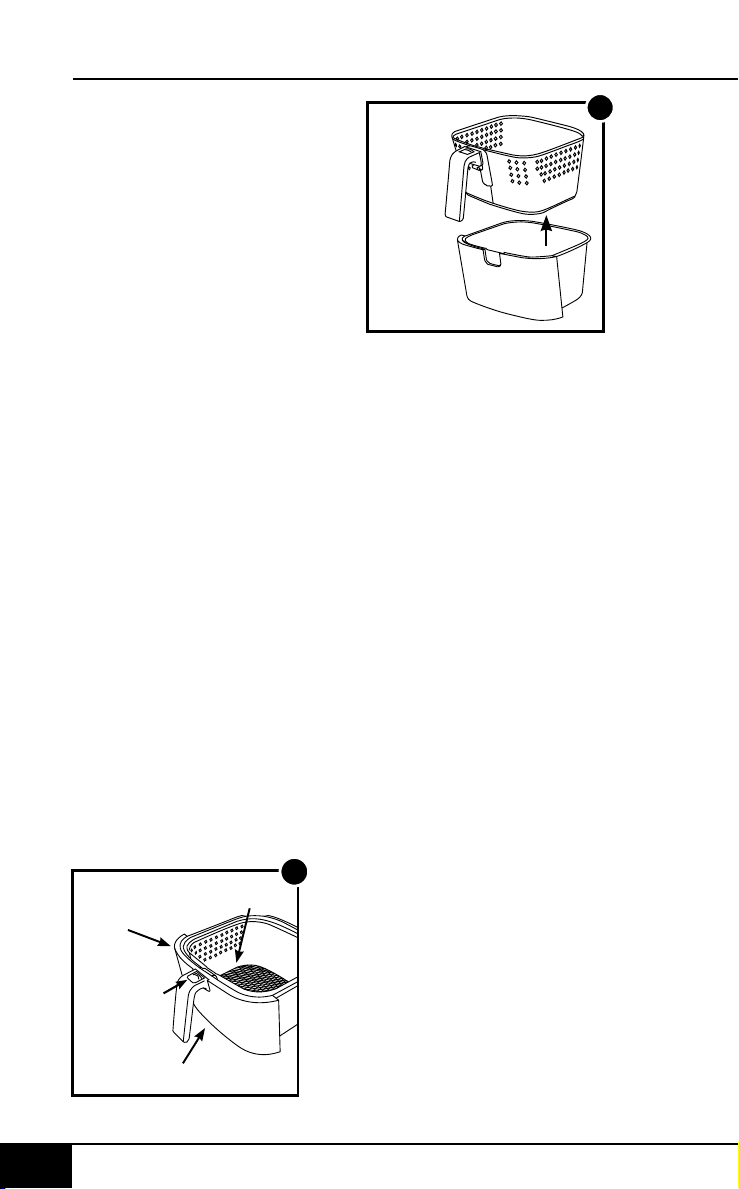
Fry Pan
Basket
Demounting
Button
Base Tray
1
Basket Net
Fry Pan
Basket
Base Tray
Assembling the Brio
CAUTION: DO NOT use
the Brio without the Base
Tray and Fry Pan Basket
with Net. DO NOT touch the
insides of the Base Tray,
Fry Pan Basket, and Net
immediately after cooking.
Parts will be hot. ONLY hold
the Base Tray and Fry Pan
Basket by the handle.
Removing Base Tray with
Fry Pan Basket
1. Using the handle, pull
and slide out the Base
Tray and Fry Pan Basket
with Net. (See Fig. 1.)
2. To remove the Fry
Pan Basket from the
Base Tray, hold the
handle and press the
demounting button
forward and lift the Fry
Pan Basket out of the
Base Tray (See Fig. 2).
When cooking, this will
reduce extra weight from
the Base Tray and make
it easier to pour or shake
smaller foods.
3
Basket
Net
Tab
Removing the Fry Pan
Basket Net:
1. After removing Fry
Pan Basket from Base
Tray, turn Fry Pan
Basket upside down.
2. Using oven mitts, press
the bottom of the Fry
Pan Basket Net down
until it is released from
Fry Pan Basket.
Assembling the Fry Pan
Basket Net
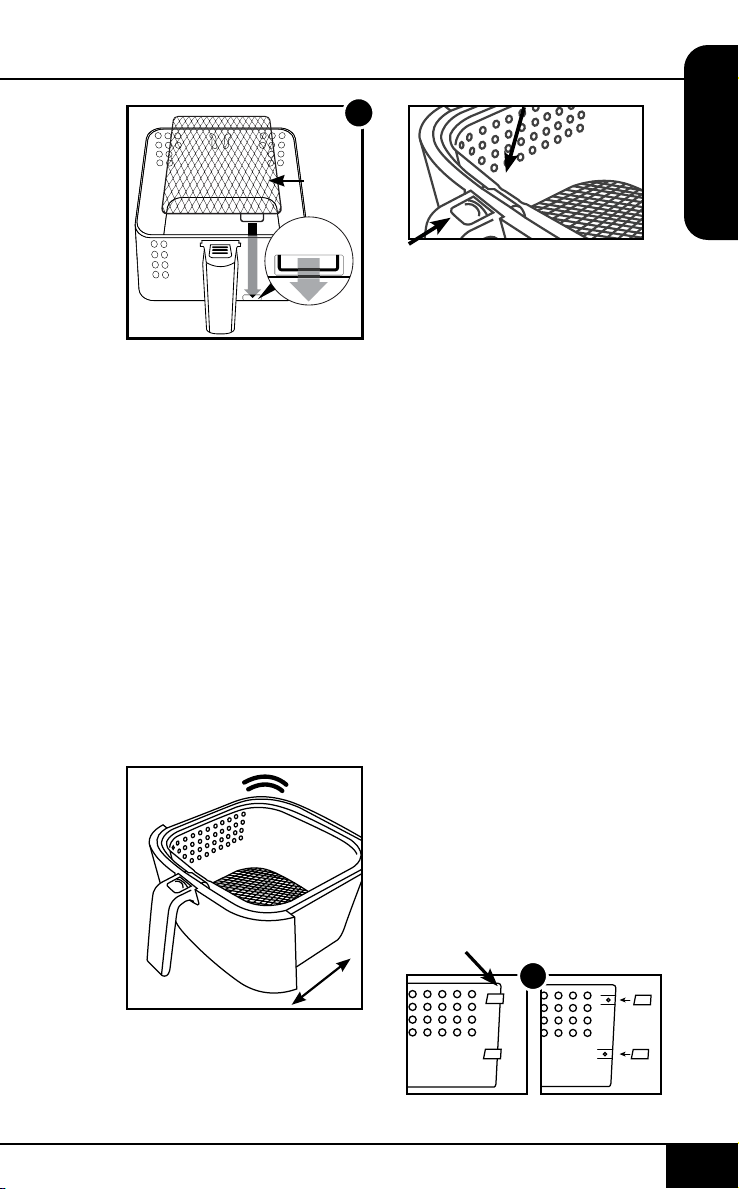
1. Place the Tab of the Fry
Pan Basket Net into
the slot of the Fry Pan
Basket. (See Fig. 3.)
2. Press the other end
of the Fry Pan Basket
Net down until Net
snaps into place and is
at inside the Fry Pan
Basket.
DO NOT PUSH THE
DEMOUNTING
BUTTON FORWARD
WHILE SHAKING.
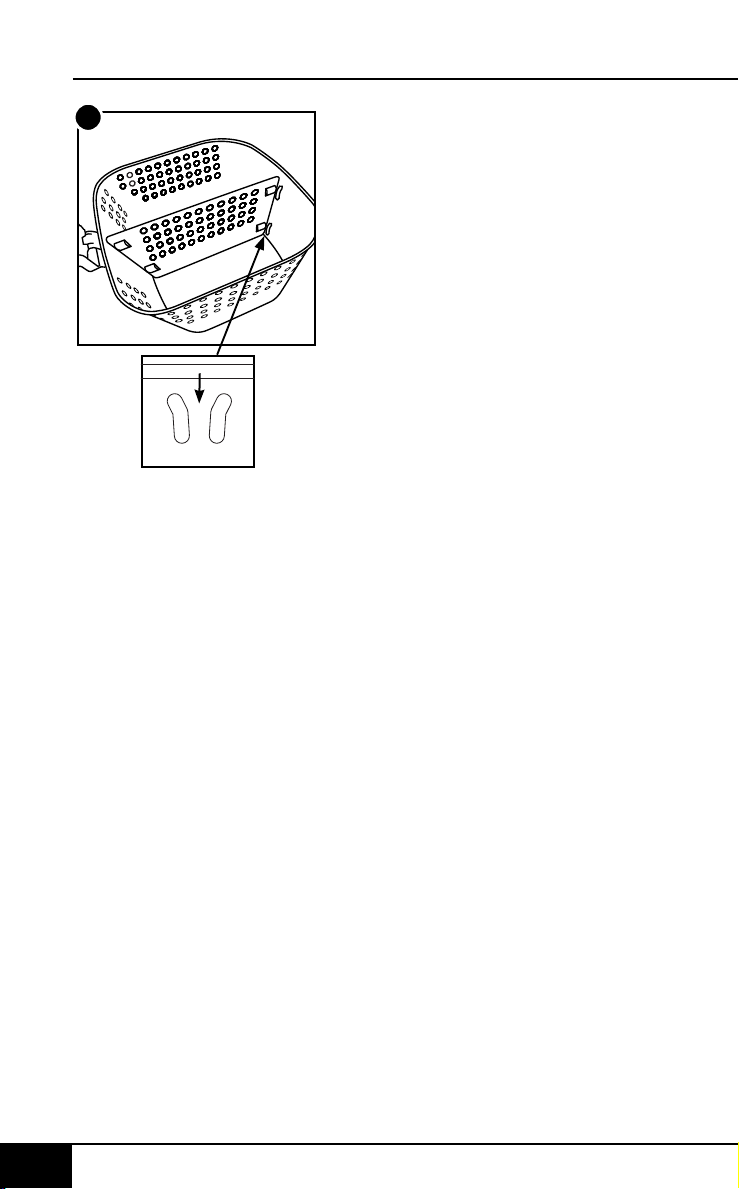
Using the Fry Pan Divider:
Fig.1.
Make sure all 4 Silicone Tabs
are placed on the divider
tabs.
Fig. 2.
Looking down at the Fry Pan
Basket, slide the Divider
down the center of the
Basket.
Make sure the Divider is
between both the grooves
and screws of the Basket.
To remove the Divider,
simply slide it straight up.
(Caution: Divider will be hot
from cooking. Use oven
mitts.)
The Silicone Tabs can be
removed from the Divider
before cleaning. (Caution:
Silicone Tabs may be hot.)
XX
For Best Results
Shaking Food
Some foods require shaking
halfway through cooking.
To properly shake the food,
hold the handle, remove
the Base Tray with Fry Pan
Basket from the appliance,
and shake. Once the food
has been adequately
shaken, slide the Base Tray
with Fry Pan Basket back
into the Brio.
Note: For best results, when
cooking, do not ll the Fry
Pan Basket more than
4
⁄
5
full.
Silicone Tabs
1
assembly guide
nuwavenow.com
10 11
ENGLISH
nuwavenow.com
ASSEMBLY GUIDE
10 11
2
Fry Pan
Basket
Demounting
Button
Base Tray
1
Basket Net
Fry Pan
Basket
Base Tray
Assembling the Brio
CAUTION: DO NOT use
the Brio without the Base
Tray and Fry Pan Basket
with Net. DO NOT touch the
insides of the Base Tray,
Fry Pan Basket, and Net
immediately after cooking.
Parts will be hot. ONLY hold
the Base Tray and Fry Pan
Basket by the handle.
Removing Base Tray with
Fry Pan Basket
1. Using the handle, pull
and slide out the Base
Tray and Fry Pan Basket
with Net. (See Fig. 1.)
2. To remove the Fry
Pan Basket from the
Base Tray, hold the
handle and press the
demounting button
forward and lift the Fry
Pan Basket out of the
Base Tray (See Fig. 2).
When cooking, this will
reduce extra weight from
the Base Tray and make
it easier to pour or shake
smaller foods.
3
Basket
Net
Tab
Removing the Fry Pan
Basket Net:
1. After removing Fry
Pan Basket from Base
Tray, turn Fry Pan
Basket upside down.
2. Using oven mitts, press
the bottom of the Fry
Pan Basket Net down
until it is released from
Fry Pan Basket.
Assembling the Fry Pan
Basket Net
1. Place the Tab of the Fry
Pan Basket Net into
the slot of the Fry Pan
Basket. (See Fig. 3.)
2. Press the other end
of the Fry Pan Basket
Net down until Net
snaps into place and is
at inside the Fry Pan
Basket.
DO NOT PUSH THE
DEMOUNTING
BUTTON FORWARD
WHILE SHAKING.
Using the Fry Pan Divider:
Fig.1.
Make sure all 4 Silicone Tabs
are placed on the divider
tabs.
Fig. 2.
Looking down at the Fry Pan
Basket, slide the Divider
down the center of the
Basket.
Make sure the Divider is
between both the grooves
and screws of the Basket.
To remove the Divider,
simply slide it straight up.
(Caution: Divider will be hot
from cooking. Use oven
mitts.)
The Silicone Tabs can be
removed from the Divider
before cleaning. (Caution:
Silicone Tabs may be hot.)
XX
For Best Results
Shaking Food
Some foods require shaking
halfway through cooking.
To properly shake the food,
hold the handle, remove
the Base Tray with Fry Pan
Basket from the appliance,
and shake. Once the food
has been adequately
shaken, slide the Base Tray
with Fry Pan Basket back
into the Brio.
Note: For best results, when
cooking, do not ll the Fry
Pan Basket more than
4
⁄
5
full.
Silicone Tabs
1
assembly guide
nuwavenow.com
12 13
ENGLISH
nuwavenow.com
ASSEMBLY GUIDE
12 13
2
QUICKSTART
QUICKSTART
Function Buttons
ON/OFF: The ON/OFF button turns the unit on and off and
stops all cooking functions.
Switch from Fahrenheit to Celsius
• Press the TEMP Arrow Key + SEAR to change the
Temperature Format from °F (default) to °C (Celsius).
Press TEMP Arrow Key + SEAR again to switch from °C
(Celsius) to °F (Fahrenheit). Degree adjustments for °F
are in 5° increments and °C are in 1° increments. They are
adjusted with the [↑] and [↓] buttons.
Note: Switching the Temperature Format can only be
done during setting. It cannot be done while cooking. If the
user switches to Celsius, the unit will stay Celsius even if
unplugged until it is changed back.
START/PAUSE: When the START/PAUSE button is
pressed, the unit begins or pauses cooking. The START/
PAUSE button is also used to mute and unmute the Brio’s
beeping sounds for quiet operation, if desired.
[↑] & [↓] Buttons: Use the arrow buttons to adjust
temperatures and times.
WATTS: The unit comes with three (3) wattage adjustments
(900, 1500 & 1800). Press the WATTS button to change the
running wattage the unit will use. When the unit is turned off
and/or unplugged, the unit will run at the wattage previously
used when plugged in and turned on.
GRILL: Press GRILL, choose between 9 levels of cooking.
Level 4 is default. Choose pressing [↑] & [↓] Buttons (either
Temp or Time). Each level determines level of doneness,
see GRILL section under INSTRUCTIONS for a detailed
chart. After selecting the level of cooking, press START/
PAUSE to start grilling.
For grilling with the Digital Probe, see the GRILL section
under INSTRUCTIONS.
STAGE: Use the STAGE button set to up to ve (5) different
cooking parameters. Cooking temperatures and times can
be adjusted for each stage of cooking using the TEMP &
TIME buttons and the [↑] and [↓] buttons.
PREHEAT: Use the PREHEAT button to preheat the unit
before cooking. Use the [↑] and [↓] buttons to adjust the
temperature before or during preheat. To cancel the preheat
function press the PREHEAT button anytime.
SEAR: The SEAR button is used to cook at high temperature
for a short amount of time. Use the SEAR button to "sear"
foods directly before and/or after the regular cooking cycle.
Use the [↑] and [↓] buttons to adjust the temperature and
time (up to 15-minutes) before or during the searing cycle.
WARM: Use the WARM button to keep your food warm after
cooking or when you simply want to keep something warm
for an extended amount of time. Use the [↑] and [↓] buttons
to adjust the warming temperature and warming time. Press
the WARM button to cancel the warm cycle.
PROGRAM: The unit comes with 100 pre-programed
cooking recipes along with an additional 50 memory
slots allowing you to add your own unique recipes. Use
the PROGRAM button to recall and save programmed
recipes.
PROBE: Use the PROBE button to set the Digital
Temperature Probe’s target temperature as well as to view
the foods internal temperature during cooking. Use the [↑]
and [↓] buttons to adjust the Digital Temperature Probe
target temperature.

assembly guide
nuwavenow.com
12 13
ENGLISH
nuwavenow.com
ASSEMBLY GUIDE
12 13
2
QUICKSTART
QUICKSTART
Function Buttons
ON/OFF: The ON/OFF button turns the unit on and off and
stops all cooking functions.
Switch from Fahrenheit to Celsius
• Press the TEMP Arrow Key + SEAR to change the
Temperature Format from °F (default) to °C (Celsius).
Press TEMP Arrow Key + SEAR again to switch from °C
(Celsius) to °F (Fahrenheit). Degree adjustments for °F
are in 5° increments and °C are in 1° increments. They are
adjusted with the [↑] and [↓] buttons.
Note: Switching the Temperature Format can only be
done during setting. It cannot be done while cooking. If the
user switches to Celsius, the unit will stay Celsius even if
unplugged until it is changed back.
START/PAUSE: When the START/PAUSE button is
pressed, the unit begins or pauses cooking. The START/
PAUSE button is also used to mute and unmute the Brio’s
beeping sounds for quiet operation, if desired.
[↑] & [↓] Buttons: Use the arrow buttons to adjust
temperatures and times.
WATTS: The unit comes with three (3) wattage adjustments
(900, 1500 & 1800). Press the WATTS button to change the
running wattage the unit will use. When the unit is turned off
and/or unplugged, the unit will run at the wattage previously
used when plugged in and turned on.
GRILL: Press GRILL, choose between 9 levels of cooking.
Level 4 is default. Choose pressing [↑] & [↓] Buttons (either
Temp or Time). Each level determines level of doneness,
see GRILL section under INSTRUCTIONS for a detailed
chart. After selecting the level of cooking, press START/
PAUSE to start grilling.
For grilling with the Digital Probe, see the GRILL section
under INSTRUCTIONS.
STAGE: Use the STAGE button set to up to ve (5) different
cooking parameters. Cooking temperatures and times can
be adjusted for each stage of cooking using the TEMP &
TIME buttons and the [↑] and [↓] buttons.
PREHEAT: Use the PREHEAT button to preheat the unit
before cooking. Use the [↑] and [↓] buttons to adjust the
temperature before or during preheat. To cancel the preheat
function press the PREHEAT button anytime.
SEAR: The SEAR button is used to cook at high temperature
for a short amount of time. Use the SEAR button to "sear"
foods directly before and/or after the regular cooking cycle.
Use the [↑] and [↓] buttons to adjust the temperature and
time (up to 15-minutes) before or during the searing cycle.
WARM: Use the WARM button to keep your food warm after
cooking or when you simply want to keep something warm
for an extended amount of time. Use the [↑] and [↓] buttons
to adjust the warming temperature and warming time. Press
the WARM button to cancel the warm cycle.
PROGRAM: The unit comes with 100 pre-programed
cooking recipes along with an additional 50 memory
slots allowing you to add your own unique recipes. Use
the PROGRAM button to recall and save programmed
recipes.
PROBE: Use the PROBE button to set the Digital
Temperature Probe’s target temperature as well as to view
the foods internal temperature during cooking. Use the [↑]
and [↓] buttons to adjust the Digital Temperature Probe
target temperature.

instructions
nuwavenow.com
14 15
ENGLISH
nuwavenow.com
INSTRUCTIONS
14 15
Order of Cooking
Sequence:
1. Preheat
2. Sear 1
3. Stage 1~5 / Program /
Probe
4. Sear 2
5. Warm
FUNCTIONS
Plug the power cord into
an electrical outlet. Press
the ON/OFF button to
turn the unit on. The LED
display will show "350F"
("177C") and "temp."
ON/OFF
1. Press the ON/OFF
button to turn the
unit on and off. Once
turned on the LED
display will show
the default cooking
temperature (350F)
(175C) and "temp."
2. The temperature can
be adjusted up or
down by using the
[↑] and [↓] buttons
above and below the
temperature icon.
3. The default cooking
time is 15-minutes.
To adjust the cooking
time, press the [↑] and
[↓] buttons above and
below the time icon.
4. Press the START/
PAUSE button to
begin cooking.
Note: Before setting any
other cooking function, set
the regular Stage 1 cooking
temperature and time. Stage
cooking is explained in the
STAGE section of these
Operating Instructions.
START/PAUSE
1. Press the START/PAUSE
button to begin cooking.
The ":" will ash indicating
the unit is now cooking.
2. To pause cooking, press
the START/PAUSE button
or simply remove the Fry
Pan Basket with Base
Tray. The ":" will no longer
ash indicating the unit is
now paused and the LED
display will show open.
3. To un-pause and go back
to cooking, slide the Fry
Pan Basket with Base
Tray back into the Brio.
4. Once the unit nishes
cooking, the LED display
will show "End" with three
(3) beep sounds.
5. The SEAR + STAGE
buttons are also used
to mute and unmute the
beep sounds. To mute
the beep sounds, press
and hold the SEAR
+ STAGE buttons for
two seconds. The Brio
will remain mute until
it is unmuted by again
pressing and holding the
SEAR/STAGE button for
two seconds or turning
off the Brio.
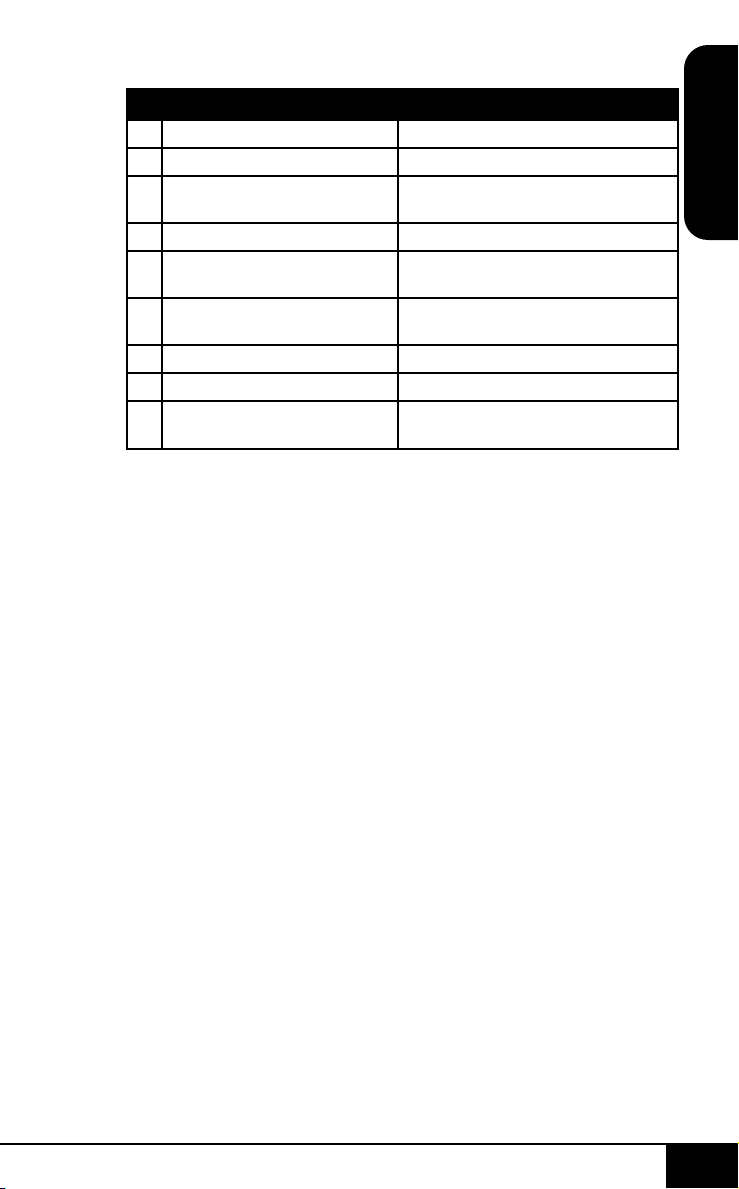
The Grill button has 2
options for cooking, with
and without the Digital
Probe. There are 9 levels
of grilling, see the above
chart for temps and times.
To Grill:
1. Plug the Probe into
the Brio.
2. Press GRILL.
a) This sets the Brio to grill
a medium steak at 400F
(204C) Level "4" is the
default.
i. Adjust grill level (1–9)
with either Temp or
Time arrow keys.
b) Press and hold PROBE
until you hear a beep.
i. The screen will show
"probe" and 135F (57)
(the Grill Level Probe
Temperature).
ii. Adjust temperature
with arrow key if
necessary
iii. Consult cooking
guide above for times,
temps, and levels of
doneness.
3. Press START/PAUSE
a) The unit will preheat
automatically to the grilling
temperature.
i. Unit will give a 5-minute
countdown.
4. Insert Food.
5. Insert Probe into Food.
6. Press START/PAUSE to
start grilling.
Note: To Grill without the
Probe do not follow "b" under
step 2. Then it will cook with
desired grill temperature.
TEMP
1. To set a different cooking
temperature, press
the [↑] and [↓] buttons
above and below the
temperature icon. The
control panel will display
"350F" ("177C") and
"temp."
• The temperature will
adjust in 5-degree
With Probe No Probe
1. 110°F (43°C) (Rare) 400°F (204°C) - 5 min. (Rare)
2. 120°F (48°C) (Med-Rare) 400°F (204°C) - 7 min. (Med-Rare)
3. 130°F (54°C) (Med-Rare-Plus) 400°F (204°C) - 8 min. (Med-Rare-
Plus)
4. 135°F (57°C) (Medium) 400°F (204°C) - 9 min (Medium)
5. 140°F (60°C) (Medium-Plus
and Fish)
400°F (204°C) - 10 min (Medium-Plus
and Fish)
6. 145°F (63°C) (Medium-Well
and Pork)
400°F (204°C) - 11 min (Medium-Well
and Pork)
7. 155°F (68°C) (Well Done) 400°F (204°C) - 12 min (Well Done)
8. 165°F (74°C) (Poultry) 400°F (204°C) - 13 min (Poultry)
9. 170°F (77°C) (Poultry Well
Done)
400°F (204°C) - 15 min (Poultry Well
Done)
GRILL
Grill your favorite foods. Brio will Preheat at 400˚F (204˚C)
by default.
instructions
nuwavenow.com
14 15
ENGLISH
nuwavenow.com
INSTRUCTIONS
14 15
Order of Cooking
Sequence:
1. Preheat
2. Sear 1
3. Stage 1~5 / Program /
Probe
4. Sear 2
5. Warm
FUNCTIONS
Plug the power cord into
an electrical outlet. Press
the ON/OFF button to
turn the unit on. The LED
display will show "350F"
("177C") and "temp."
ON/OFF
1. Press the ON/OFF
button to turn the
unit on and off. Once
turned on the LED
display will show
the default cooking
temperature (350F)
(175C) and "temp."
2. The temperature can
be adjusted up or
down by using the
[↑] and [↓] buttons
above and below the
temperature icon.
3. The default cooking
time is 15-minutes.
To adjust the cooking
time, press the [↑] and
[↓] buttons above and
below the time icon.
4. Press the START/
PAUSE button to
begin cooking.
Note: Before setting any
other cooking function, set
the regular Stage 1 cooking
temperature and time. Stage
cooking is explained in the
STAGE section of these
Operating Instructions.
START/PAUSE
1. Press the START/PAUSE
button to begin cooking.
The ":" will ash indicating
the unit is now cooking.
2. To pause cooking, press
the START/PAUSE button
or simply remove the Fry
Pan Basket with Base
Tray. The ":" will no longer
ash indicating the unit is
now paused and the LED
display will show open.
3. To un-pause and go back
to cooking, slide the Fry
Pan Basket with Base
Tray back into the Brio.
4. Once the unit nishes
cooking, the LED display
will show "End" with three
(3) beep sounds.
5. The SEAR + STAGE
buttons are also used
to mute and unmute the
beep sounds. To mute
the beep sounds, press
and hold the SEAR
+ STAGE buttons for
two seconds. The Brio
will remain mute until
it is unmuted by again
pressing and holding the
SEAR/STAGE button for
two seconds or turning
off the Brio.
The Grill button has 2
options for cooking, with
and without the Digital
Probe. There are 9 levels
of grilling, see the above
chart for temps and times.
To Grill:
1. Plug the Probe into
the Brio.
2. Press GRILL.
a) This sets the Brio to grill
a medium steak at 400F
(204C) Level "4" is the
default.
i. Adjust grill level (1–9)
with either Temp or
Time arrow keys.
b) Press and hold PROBE
until you hear a beep.
i. The screen will show
"probe" and 135F (57)
(the Grill Level Probe
Temperature).
ii. Adjust temperature
with arrow key if
necessary
iii. Consult cooking
guide above for times,
temps, and levels of
doneness.
3. Press START/PAUSE
a) The unit will preheat
automatically to the grilling
temperature.
i. Unit will give a 5-minute
countdown.
4. Insert Food.
5. Insert Probe into Food.
6. Press START/PAUSE to
start grilling.
Note: To Grill without the
Probe do not follow "b" under
step 2. Then it will cook with
desired grill temperature.
TEMP
1. To set a different cooking
temperature, press
the [↑] and [↓] buttons
above and below the
temperature icon. The
control panel will display
"350F" ("177C") and
"temp."
• The temperature will
adjust in 5-degree
With Probe No Probe
1. 110°F (43°C) (Rare) 400°F (204°C) - 5 min. (Rare)
2. 120°F (48°C) (Med-Rare) 400°F (204°C) - 7 min. (Med-Rare)
3. 130°F (54°C) (Med-Rare-Plus) 400°F (204°C) - 8 min. (Med-Rare-
Plus)
4. 135°F (57°C) (Medium) 400°F (204°C) - 9 min (Medium)
5. 140°F (60°C) (Medium-Plus
and Fish)
400°F (204°C) - 10 min (Medium-Plus
and Fish)
6. 145°F (63°C) (Medium-Well
and Pork)
400°F (204°C) - 11 min (Medium-Well
and Pork)
7. 155°F (68°C) (Well Done) 400°F (204°C) - 12 min (Well Done)
8. 165°F (74°C) (Poultry) 400°F (204°C) - 13 min (Poultry)
9. 170°F (77°C) (Poultry Well
Done)
400°F (204°C) - 15 min (Poultry Well
Done)
GRILL
Grill your favorite foods. Brio will Preheat at 400˚F (204˚C)
by default.

instructions
nuwavenow.com
16 17
ENGLISH
nuwavenow.com
INSTRUCTIONS
16 17
increments between
50F and 400F (10C -
204C).
2. To quickly adjust the
temperature, hold down
the arrows until desired
cooking temperature is
reached.
Note: Cooking
temperature can be
adjusted at any time before
or during the cooking
process. Once the display
is switched to temperature
display, it will remain in the
temperature display.
TIME
1. To set a different
cooking time, press
the [↑] and [↓] buttons
above and below the
time icon. The control
panel will display
"00:15" and "time."
• The time will adjust in
1-minute increments.
2. To quickly adjust the
time, hold down the
arrows until desired
cooking time is
reached.
• The maximum
selectable cooking
time differs
depending on the
selected cooking
temperature.
• 50F - 275F (10C -
135C), maximum
cooking time
is 00:00~99:59
(0-minutes to 99-hrs.;
59-minutes).
• 280F - 345F (138C
- 174C), maximum
cooking time is
00:00~24:00 hours
(0-minutes to
24-hours).
• 350F - 400F (177C
- 204C), maximum
cooking time
is 00:00~1 hour
(0-minutes to1 hour).
Note: Cooking time can
be adjusted at any time
before or during the
cooking process. The Brio
will beep 3 times half-way
through the cooking cycle
to alert you to remove the
basket from the unit, shake
the food in the basket, and
then reinsert the basket to
nish cooking.
PREHEAT
The unit will preheat to
the temperature of the
next cooking cycle. For
example, if Sear 1 is set to
400F (204C), the unit will
Preheat to 400F (204C).
If Sear 1 is not used, the
unit will preheat to the set
cooking temperature.
1. Press the ON/OFF
button and adjust your
cooking temperature
and time for Stage 1
cooking.
2. Press the PREHEAT
button to engage the
Preheat function.
• The LED display will
show the set cooking
temperature, "pre,"
and "temp."
• The unit will
ALWAYS preheat
to the cooking
temperature of the
next cooking cycle.
3. Press the START/
PAUSE button to begin
preheating.
• The unit will begin
preheating to the set
temperature.
• The LED display
will show the set
cooking/preheat
temperature
(ashing), "pre," and
"temp."
• During preheat the
cooking temperature
can be adjusted by
using the [↑] and
[↓] buttons above
and below the
temperature icon.
• The cooking time
can be adjusted
also by pressing the
[↑] and [↓] buttons
above and below the
time icon.
4. When the unit
reaches the preheat
temperature the unit
will move into a ve
(5) minute hold. The
unit will maintain the
preheat temperature
during this ve (5)
minute hold.
• The LED display will
show "5" (ashing),
"ready," and "time."
AUTO PREHEAT
The Brio defaults to
Automatic Preheat at 350F
(177F), the default cooking
temperature.
• You can turn the
Automatic Preheat off
or on again by pressing
PROG + PREHEAT at
the same time.
• Temperature range is
50F - 400F (10C-204C).
• After it has reached the
set cooking temperature,
Brio will go into a
5-minute countdown
just like the typical
PREHEAT function.
• If no action is taken
within the ve (5)
minute hold, the unit
will automatically go
into standby mode.
5. Place your food into
the unit, slide the Fry
Pan Basket with Base
Tray back into the Brio.
The unit will begin
cooking at the set
temperature and time.
6. The preheat cycle
can be canceled
anytime by pressing
the PREHEAT button.
The unit will end the
preheat cycle and
automatically go into
the next cooking cycle.
7. When the unit is
nished cooking the
LED display will show
"End" and beep three
(3) times.

instructions
nuwavenow.com
16 17
ENGLISH
nuwavenow.com
INSTRUCTIONS
16 17
increments between
50F and 400F (10C -
204C).
2. To quickly adjust the
temperature, hold down
the arrows until desired
cooking temperature is
reached.
Note: Cooking
temperature can be
adjusted at any time before
or during the cooking
process. Once the display
is switched to temperature
display, it will remain in the
temperature display.
TIME
1. To set a different
cooking time, press
the [↑] and [↓] buttons
above and below the
time icon. The control
panel will display
"00:15" and "time."
• The time will adjust in
1-minute increments.
2. To quickly adjust the
time, hold down the
arrows until desired
cooking time is
reached.
• The maximum
selectable cooking
time differs
depending on the
selected cooking
temperature.
• 50F - 275F (10C -
135C), maximum
cooking time
is 00:00~99:59
(0-minutes to 99-hrs.;
59-minutes).
• 280F - 345F (138C
- 174C), maximum
cooking time is
00:00~24:00 hours
(0-minutes to
24-hours).
• 350F - 400F (177C
- 204C), maximum
cooking time
is 00:00~1 hour
(0-minutes to1 hour).
Note: Cooking time can
be adjusted at any time
before or during the
cooking process. The Brio
will beep 3 times half-way
through the cooking cycle
to alert you to remove the
basket from the unit, shake
the food in the basket, and
then reinsert the basket to
nish cooking.
PREHEAT
The unit will preheat to
the temperature of the
next cooking cycle. For
example, if Sear 1 is set to
400F (204C), the unit will
Preheat to 400F (204C).
If Sear 1 is not used, the
unit will preheat to the set
cooking temperature.
1. Press the ON/OFF
button and adjust your
cooking temperature
and time for Stage 1
cooking.
2. Press the PREHEAT
button to engage the
Preheat function.
• The LED display will
show the set cooking
temperature, "pre,"
and "temp."
• The unit will
ALWAYS preheat
to the cooking
temperature of the
next cooking cycle.
3. Press the START/
PAUSE button to begin
preheating.
• The unit will begin
preheating to the set
temperature.
• The LED display
will show the set
cooking/preheat
temperature
(ashing), "pre," and
"temp."
• During preheat the
cooking temperature
can be adjusted by
using the [↑] and
[↓] buttons above
and below the
temperature icon.
• The cooking time
can be adjusted
also by pressing the
[↑] and [↓] buttons
above and below the
time icon.
4. When the unit
reaches the preheat
temperature the unit
will move into a ve
(5) minute hold. The
unit will maintain the
preheat temperature
during this ve (5)
minute hold.
• The LED display will
show "5" (ashing),
"ready," and "time."
AUTO PREHEAT
The Brio defaults to
Automatic Preheat at 350F
(177F), the default cooking
temperature.
• You can turn the
Automatic Preheat off
or on again by pressing
PROG + PREHEAT at
the same time.
• Temperature range is
50F - 400F (10C-204C).
• After it has reached the
set cooking temperature,
Brio will go into a
5-minute countdown
just like the typical
PREHEAT function.
• If no action is taken
within the ve (5)
minute hold, the unit
will automatically go
into standby mode.
5. Place your food into
the unit, slide the Fry
Pan Basket with Base
Tray back into the Brio.
The unit will begin
cooking at the set
temperature and time.
6. The preheat cycle
can be canceled
anytime by pressing
the PREHEAT button.
The unit will end the
preheat cycle and
automatically go into
the next cooking cycle.
7. When the unit is
nished cooking the
LED display will show
"End" and beep three
(3) times.

instructions
nuwavenow.com
18 19
ENGLISH
nuwavenow.com
INSTRUCTIONS
18 19
• After the countdown, the
Brio will cook at the set
cooking temperature and
cooking time.
Note: Changing the
preheat temperature will
change the subsequent
cooking temperature.
STAGE
Stage cooking is used
to cook food at different
temperatures and times
throughout the cooking
process. Up to ve (5)
stages of cooking can
be set up. Grill, Preheat,
Sear 1, Sear 2, and Warm
are NOT considered
stages in the cooking
process. Stage 1 cooking
is the default 350F (177C)
for 15-minutes). The
temperature and time can
be adjusted.
1. Press the ON/OFF
button. The LED
display will show
"350F" ("177C") and
"temp." This is Stage
1. Adjust the cooking
temperature and time
using the [↑] and [↓]
buttons.
2. To add additional
stages, press the
STAGE button one (1)
time. The LED display
will show "350F"
("177C"), "temp,"
"stage," and "2" (above
stage). This is Stage 2
cooking.
3. Adjust Stage 2
cooking temperature
and time by using the
[↑] and [↓] buttons.
4. To set additional stage
cooking settings,
repeat steps 2 and 3.
The number above
stage will change as
you continue to press
the STAGE button and
set temperature and
time. After Stage 5, if
the STAGE button is
pressed again it will
go back to Stage 1.
The LED display will
show the Stage set
cooking temperature,
"temp," "stage," and
"1" (above "stage").
5. If you only want two
(2) stages of cooking,
leave the time at 00:00
for stages 3~5 and
those stages will be
skipped.
6. Press the START/
PAUSE button to begin
cooking. The unit
will cook with the set
parameters.
7. During cooking, press
the STAGE button
to see and adjust
upcoming cooking
stages.
8. When the unit is
nished cooking the
LED display will show
"End" and beep three
(3) times.
9. The STAGE button
is also used to scroll
through the cooking
functions that have
been set for a
particular recipe. Press
the STAGE button,
either before or during
cooking, to see and
edit each function
of the cooking cycle
as desired. This is
explained later in this
manual.
Note:
• The LED display
will only indicate the
stage cooking number
when two (2) or more
stages are used. The
LED display will not
show stage number if
only one (1) stage of
cooking is used.
• Stage 1 default: 350F
(177C), 00:15
• Stage 2~5 default:
350F (177C), 00:00
• If no time is set for
stages 2~5, those
stages will be skipped
in the cooking cycle.
SEAR
Sear 1 will ALWAYS be
directly before regular
stage cooking and Sear
2 will ALWAYS be directly
after regular stage
cooking.
Sear 1
Default sear 1 temperature
is 400F (204C) and default
sear 1 time is ve (5)
minutes (00:05).
1. Press the ON/OFF
button and adjust your
cooking temperature
and time for stage
cooking.
2. Press the SEAR
button one (1) time.
This will engage the
Sear 1 function.
3. The LED display will
show 400F (204C),
"sear," "1," and "temp."
• Sear 1 searing
temperature can be
adjusted by using the
[↑] and [↓] buttons
above and below the
temperature icon.
400F (204C) is the
maximum searing
temperature.
• Sear 1 searing time
can be adjusted by
using the [↑] and
[↓] buttons above
and below the time
icon up to ve (5)
minutes (00:05).
4. Press the START/
PAUSE button to begin
cooking. The LED
display will show "sear
1" (ashing), "time,"
and the set sear time
(00:05 default) with the
":" ashing.
5. Once the Sear 1 cycle
is complete the unit
will automatically go
into stage (regular)
cooking.
6. When the unit is
nished cooking the
LED display will show
"End" and beep three
(3) times.

instructions
nuwavenow.com
18 19
ENGLISH
nuwavenow.com
INSTRUCTIONS
18 19
• After the countdown, the
Brio will cook at the set
cooking temperature and
cooking time.
Note: Changing the
preheat temperature will
change the subsequent
cooking temperature.
STAGE
Stage cooking is used
to cook food at different
temperatures and times
throughout the cooking
process. Up to ve (5)
stages of cooking can
be set up. Grill, Preheat,
Sear 1, Sear 2, and Warm
are NOT considered
stages in the cooking
process. Stage 1 cooking
is the default 350F (177C)
for 15-minutes). The
temperature and time can
be adjusted.
1. Press the ON/OFF
button. The LED
display will show
"350F" ("177C") and
"temp." This is Stage
1. Adjust the cooking
temperature and time
using the [↑] and [↓]
buttons.
2. To add additional
stages, press the
STAGE button one (1)
time. The LED display
will show "350F"
("177C"), "temp,"
"stage," and "2" (above
stage). This is Stage 2
cooking.
3. Adjust Stage 2
cooking temperature
and time by using the
[↑] and [↓] buttons.
4. To set additional stage
cooking settings,
repeat steps 2 and 3.
The number above
stage will change as
you continue to press
the STAGE button and
set temperature and
time. After Stage 5, if
the STAGE button is
pressed again it will
go back to Stage 1.
The LED display will
show the Stage set
cooking temperature,
"temp," "stage," and
"1" (above "stage").
5. If you only want two
(2) stages of cooking,
leave the time at 00:00
for stages 3~5 and
those stages will be
skipped.
6. Press the START/
PAUSE button to begin
cooking. The unit
will cook with the set
parameters.
7. During cooking, press
the STAGE button
to see and adjust
upcoming cooking
stages.
8. When the unit is
nished cooking the
LED display will show
"End" and beep three
(3) times.
9. The STAGE button
is also used to scroll
through the cooking
functions that have
been set for a
particular recipe. Press
the STAGE button,
either before or during
cooking, to see and
edit each function
of the cooking cycle
as desired. This is
explained later in this
manual.
Note:
• The LED display
will only indicate the
stage cooking number
when two (2) or more
stages are used. The
LED display will not
show stage number if
only one (1) stage of
cooking is used.
• Stage 1 default: 350F
(177C), 00:15
• Stage 2~5 default:
350F (177C), 00:00
• If no time is set for
stages 2~5, those
stages will be skipped
in the cooking cycle.
SEAR
Sear 1 will ALWAYS be
directly before regular
stage cooking and Sear
2 will ALWAYS be directly
after regular stage
cooking.
Sear 1
Default sear 1 temperature
is 400F (204C) and default
sear 1 time is ve (5)
minutes (00:05).
1. Press the ON/OFF
button and adjust your
cooking temperature
and time for stage
cooking.
2. Press the SEAR
button one (1) time.
This will engage the
Sear 1 function.
3. The LED display will
show 400F (204C),
"sear," "1," and "temp."
• Sear 1 searing
temperature can be
adjusted by using the
[↑] and [↓] buttons
above and below the
temperature icon.
400F (204C) is the
maximum searing
temperature.
• Sear 1 searing time
can be adjusted by
using the [↑] and
[↓] buttons above
and below the time
icon up to ve (5)
minutes (00:05).
4. Press the START/
PAUSE button to begin
cooking. The LED
display will show "sear
1" (ashing), "time,"
and the set sear time
(00:05 default) with the
":" ashing.
5. Once the Sear 1 cycle
is complete the unit
will automatically go
into stage (regular)
cooking.
6. When the unit is
nished cooking the
LED display will show
"End" and beep three
(3) times.

instructions
nuwavenow.com
20 21
ENGLISH
nuwavenow.com
INSTRUCTIONS
20 21
1. Press the ON/OFF
button and adjust your
cooking temperature
and time for stage
cooking.
2. If you want to set a
different temperature
and/or time for Sear
1, press the SEAR
button one time and
adjust the Sear 1
temperature and time.
3. Press the SEAR button
again. The LED display
will show 400F (204C),
"sear," "1," "2," and
"temp."
4. Adjust the Sear 2
temperature and time
if desired.
5. Press the START/
PAUSE button to
begin cooking. The
LED display will show
"sear 1" (ashing),
"2," "time," and the set
sear 1 time with the ":"
ashing.
6. Once the Sear 1 cycle
is complete the unit
will beep one (1) time
and automatically
go into regular stage
cooking. The LED
display will show "sear
2," "time," and the set
regular stage cooking
time (00:15 default)
with the ":" ashing.
7. Once the stage cooking
cycle is complete the
unit will beep one (1)
time and automatically
go into Sear 2 cooking.
The LED display
will show "sear 2"
(ashing), "time," and
the set Sear time
(00:05 default) with the
":" ashing.
8. When the unit is
nished cooking the
LED display will show
"End" and beep three
(3) times.
Sear 2
Default Sear 2 temperature
is 400F (204C) and default
Sear 2 time is ve (5)
minutes (00:05).
1. Press the ON/OFF
button and adjust your
cooking temperature
and time for Stage 1.
2. Press the SEAR button
three (3) times. This
will engage the Sear 2
function.
3. The LED display will
show "400F" ("204C"),
"sear," "2," and "temp."
• Sear 2 searing
temperature can be
adjusted by using the
[↑] and [↓] buttons
above and below the
temperature icon.
400F (204C) is the
maximum searing
temperature.
• Adjust the Sear 2
time by using the
[↑] and [↓] buttons
above and below the
time icon up to ve
(5) minutes (00:05).
4. Press the START/
PAUSE button to
begin cooking.
5. Once the stage
cooking cycle is
complete the unit will
beep one (1) time and
automatically go into
Sear 2 cooking. The
LED display will show
"sear 2" (ashing),
"time," and the set sear
time (00:05 default)
with the ":" ashing.
6. When the unit is
nished cooking the
LED display will show
"End" and beep three
(3) times.
WARM
1. Press the WARM
button to engage the
"Warm" function and
keep your food warm
until you’re ready to
serve.
2. The LED display will
show 140F (60C),
"temp" and "warm."
3. Use the [↑] and [↓]
buttons above and
below the temperature
icon to adjust the warm
temperature.
4. Press the [↑] and [↓]
buttons above and
below the time icon to
adjust the warm time.
The LED display will
show "01:00" (default),
"time" and "warm."
5. Use the [↑] and [↓]
buttons above and
below the time icon to
adjust the warm time.
6. Press the START/
PAUSE button to start
cooking. The unit
will go through the
regular stage cooking
cycle then will go
into "Warm" at the
temperature set as well
as the set time.
Using Warm as an
Independent Function
1. Warm can be used
as an independent
function. Press and
hold the WARM button
for 1 second.
2. The unit will
automatically begin
the warming function
and the LED display
will show "01:00,"
"time and warm."
3. Warm temperature and
time can be adjusted at
this time by using the
[↑] and [↓] buttons.
Sear 1 & 2
Sear 1 & 2 is used to sear
before and after regular
stage cooking.

instructions
nuwavenow.com
20 21
ENGLISH
nuwavenow.com
INSTRUCTIONS
20 21
1. Press the ON/OFF
button and adjust your
cooking temperature
and time for stage
cooking.
2. If you want to set a
different temperature
and/or time for Sear
1, press the SEAR
button one time and
adjust the Sear 1
temperature and time.
3. Press the SEAR button
again. The LED display
will show 400F (204C),
"sear," "1," "2," and
"temp."
4. Adjust the Sear 2
temperature and time
if desired.
5. Press the START/
PAUSE button to
begin cooking. The
LED display will show
"sear 1" (ashing),
"2," "time," and the set
sear 1 time with the ":"
ashing.
6. Once the Sear 1 cycle
is complete the unit
will beep one (1) time
and automatically
go into regular stage
cooking. The LED
display will show "sear
2," "time," and the set
regular stage cooking
time (00:15 default)
with the ":" ashing.
7. Once the stage cooking
cycle is complete the
unit will beep one (1)
time and automatically
go into Sear 2 cooking.
The LED display
will show "sear 2"
(ashing), "time," and
the set Sear time
(00:05 default) with the
":" ashing.
8. When the unit is
nished cooking the
LED display will show
"End" and beep three
(3) times.
Sear 2
Default Sear 2 temperature
is 400F (204C) and default
Sear 2 time is ve (5)
minutes (00:05).
1. Press the ON/OFF
button and adjust your
cooking temperature
and time for Stage 1.
2. Press the SEAR button
three (3) times. This
will engage the Sear 2
function.
3. The LED display will
show "400F" ("204C"),
"sear," "2," and "temp."
• Sear 2 searing
temperature can be
adjusted by using the
[↑] and [↓] buttons
above and below the
temperature icon.
400F (204C) is the
maximum searing
temperature.
• Adjust the Sear 2
time by using the
[↑] and [↓] buttons
above and below the
time icon up to ve
(5) minutes (00:05).
4. Press the START/
PAUSE button to
begin cooking.
5. Once the stage
cooking cycle is
complete the unit will
beep one (1) time and
automatically go into
Sear 2 cooking. The
LED display will show
"sear 2" (ashing),
"time," and the set sear
time (00:05 default)
with the ":" ashing.
6. When the unit is
nished cooking the
LED display will show
"End" and beep three
(3) times.
WARM
1. Press the WARM
button to engage the
"Warm" function and
keep your food warm
until you’re ready to
serve.
2. The LED display will
show 140F (60C),
"temp" and "warm."
3. Use the [↑] and [↓]
buttons above and
below the temperature
icon to adjust the warm
temperature.
4. Press the [↑] and [↓]
buttons above and
below the time icon to
adjust the warm time.
The LED display will
show "01:00" (default),
"time" and "warm."
5. Use the [↑] and [↓]
buttons above and
below the time icon to
adjust the warm time.
6. Press the START/
PAUSE button to start
cooking. The unit
will go through the
regular stage cooking
cycle then will go
into "Warm" at the
temperature set as well
as the set time.
Using Warm as an
Independent Function
1. Warm can be used
as an independent
function. Press and
hold the WARM button
for 1 second.
2. The unit will
automatically begin
the warming function
and the LED display
will show "01:00,"
"time and warm."
3. Warm temperature and
time can be adjusted at
this time by using the
[↑] and [↓] buttons.
Sear 1 & 2
Sear 1 & 2 is used to sear
before and after regular
stage cooking.

instructions
nuwavenow.com
22 23
ENGLISH
nuwavenow.com
INSTRUCTIONS
22 23
4. When the warming
time runs out, the LED
display will show "End"
and will beep three (3)
times.
Notes:
• Warm temperature
can only be adjusted
up to 200F (93C).
Time can be adjusted
up to 3 hours.
• Warm can be used
with the program
options as well. Simply
choose the program
number and press
the WARM button
and adjust the Warm
temperature and time.
• To cancel the Warm
function at any time
simply press the
WARM button. "Warm"
will no longer be lit in
the LED display.
PROGRAM
The PROG button
represents Memory
Entry (the storage of
frequently used cooking
sequences) and Memory
Recall (retrieval of cooking
sequences). Program slots
number 1~100 are preset
recipe programs. Slots
101~150 are for your own
unique programs.
Memory Recall
Press the PROG button.
The LED display will show
"prog" and "1."
1. Use the [↑] and [↓]
buttons to choose
the desired program
number to recall.
Either set of [↑] and [↓]
buttons (temperature
icon or time icon)
can be used to scroll
through the program
numbers.
2. Once the program
number is chosen,
press the START/
PAUSE button to begin
cooking. You can make
temperature and time
adjustments if desired.
3. The unit will cook at the
programmed settings.
Program Your Own
Recipe Before Cooking
1. Set your cooking
parameters using
GRILL, PREHEAT,
SEAR 1, STAGE (1~5),
SEAR 2 and/or WARM.
2. Press PROG for 1
second. The LED
display will show "prog"
and "101."
3. Use the [↑] and [↓]
buttons to choose
the desired program
number to save the
program to (101~150).
4. Press PROG again for
1 second to store and
save the program to your
chosen program number.
The program is now
stored and available for
future recall.
5. Press the START/
PAUSE button to begin
cooking the program.
Program Your Own
Recipe During Cooking
1. Set your cooking
parameters using
GRILL, PREHEAT,
SEAR 1, STAGE (1~5),
SEAR 2 and/or WARM.
2. Press the START/
PAUSE button to
begin cooking.
3. During cooking, press
PROG for 1 second.
The LED display will
show "prog" and "101."
4. Use the [↑] and [↓]
buttons to choose
the desired program
number to save the
program to (101~150).
5. Press PROG for 1
second again to store
and save the program
to your chosen
program number. The
program is now stored
and available for
future recall.
6. The unit will continue
to cook the recipe
programmed.
Program Your Own
Recipe After cooking
1. Set your cooking
parameters using
GRILL, PREHEAT,
SEAR 1, STAGE (1~5),
SEAR 2 and/or WARM.
2. Press the START/
PAUSE button to
begin cooking.
3. When the cooking
process is nished, and
the LED display shows
"End" press on hold the
PROG button. The LED
display will show "prog"
and "101."
4. Use the [↑] and [↓]
buttons to choose
the desired program
number to save the
program to (101~150).
5. Press PROG again for
1 second to store and
save the program to
your chosen program
number. The program
is now stored and
available for future
recall.
View Current Program
During Cooking
You can view the currently
cooking program number
while the program is
running.
1. During cooking, press
and PROG.
2. The LED display will
show the currently
running program.
3. Release the PROG
button to see the
previous screen on the
LED display.
View Cooking Functions
You can view all cooking
functions associated with

instructions
nuwavenow.com
22 23
ENGLISH
nuwavenow.com
INSTRUCTIONS
22 23
4. When the warming
time runs out, the LED
display will show "End"
and will beep three (3)
times.
Notes:
• Warm temperature
can only be adjusted
up to 200F (93C).
Time can be adjusted
up to 3 hours.
• Warm can be used
with the program
options as well. Simply
choose the program
number and press
the WARM button
and adjust the Warm
temperature and time.
• To cancel the Warm
function at any time
simply press the
WARM button. "Warm"
will no longer be lit in
the LED display.
PROGRAM
The PROG button
represents Memory
Entry (the storage of
frequently used cooking
sequences) and Memory
Recall (retrieval of cooking
sequences). Program slots
number 1~100 are preset
recipe programs. Slots
101~150 are for your own
unique programs.
Memory Recall
Press the PROG button.
The LED display will show
"prog" and "1."
1. Use the [↑] and [↓]
buttons to choose
the desired program
number to recall.
Either set of [↑] and [↓]
buttons (temperature
icon or time icon)
can be used to scroll
through the program
numbers.
2. Once the program
number is chosen,
press the START/
PAUSE button to begin
cooking. You can make
temperature and time
adjustments if desired.
3. The unit will cook at the
programmed settings.
Program Your Own
Recipe Before Cooking
1. Set your cooking
parameters using
GRILL, PREHEAT,
SEAR 1, STAGE (1~5),
SEAR 2 and/or WARM.
2. Press PROG for 1
second. The LED
display will show "prog"
and "101."
3. Use the [↑] and [↓]
buttons to choose
the desired program
number to save the
program to (101~150).
4. Press PROG again for
1 second to store and
save the program to your
chosen program number.
The program is now
stored and available for
future recall.
5. Press the START/
PAUSE button to begin
cooking the program.
Program Your Own
Recipe During Cooking
1. Set your cooking
parameters using
GRILL, PREHEAT,
SEAR 1, STAGE (1~5),
SEAR 2 and/or WARM.
2. Press the START/
PAUSE button to
begin cooking.
3. During cooking, press
PROG for 1 second.
The LED display will
show "prog" and "101."
4. Use the [↑] and [↓]
buttons to choose
the desired program
number to save the
program to (101~150).
5. Press PROG for 1
second again to store
and save the program
to your chosen
program number. The
program is now stored
and available for
future recall.
6. The unit will continue
to cook the recipe
programmed.
Program Your Own
Recipe After cooking
1. Set your cooking
parameters using
GRILL, PREHEAT,
SEAR 1, STAGE (1~5),
SEAR 2 and/or WARM.
2. Press the START/
PAUSE button to
begin cooking.
3. When the cooking
process is nished, and
the LED display shows
"End" press on hold the
PROG button. The LED
display will show "prog"
and "101."
4. Use the [↑] and [↓]
buttons to choose
the desired program
number to save the
program to (101~150).
5. Press PROG again for
1 second to store and
save the program to
your chosen program
number. The program
is now stored and
available for future
recall.
View Current Program
During Cooking
You can view the currently
cooking program number
while the program is
running.
1. During cooking, press
and PROG.
2. The LED display will
show the currently
running program.
3. Release the PROG
button to see the
previous screen on the
LED display.
View Cooking Functions
You can view all cooking
functions associated with

instructions
nuwavenow.com
24 25
ENGLISH
nuwavenow.com
INSTRUCTIONS
24 25
a program before or during
the cooking process.
1. View Before Cooking
• Press PROG for 1
second and nd the
program number to
review using the [↑]
and [↓] buttons.
• Once the program
number shows in the
LED display, press
the STAGE button to
review each phase
of cooking.
• Adjustments to
temperature and
time can be made
for each function at
this time.
2. During Cooking
• Press the STAGE
button to review each
phase of cooking.
• Continue to press
the STAGE button
to scroll through
all programmed
functions for that
program number.
See example above.
• Adjustments to
temperature and
time can be made
for each function at
this time.
• If a cooking function
has already
occurred in the
cooking process,
that function is no
longer available
for adjustments in
cooking temperature
or time.
Editing a Program
You can edit the programs
you create before or during
the cooking process and
save any changes.
1. Edit Before Cooking
• Press PROG for 1
second and nd the
program number to
edit using the [↑] and
[↓] buttons.
• Once the program
number shows in
the LED display,
press the STAGE
button until the
function you would
like to edit shows in
the LED display.
• Using the [↑] and [↓]
buttons, make the
edits to temperature
and time as desired.
• Once all edits are
made, press and
hold the PROG
button. The LED
display will show
"prog" and "101."
• Use the [↑] and [↓]
buttons to nd the
program number to
save your edits to.
• Press PROG for 1
second button again
to save and store
the edits.
Note: Save indicates there
has been a change in the
program settings during
cooking.
1. If you have already
saved the changes
to a program number
during cooking, there
is nothing more you
need to do. The edited
program is available for
further recall.
2. If you have not saved
the changes to a
program number by the
time cooking nishes,
the Brio will remind you
that changes have been
made by displaying
"SAVE" and allow you
to save the changes at
this point.
• Press PROG for 1
second. The LED
display will show
"prog" and "101."
• Use the [↑] and [↓]
buttons to nd the
program number to
save your edits to.
• Press the PROG
button again to save
and store the edits.
Note: If you save any
recipe to an already
lled memory slot, the
new recipe will override
the previous recipe. Any
edits to a preset program
(1~100) can only be saved
and stored into program
numbers 101~150. You
cannot save an adjusted
preset program to its
original preset program
number.
2. Edit During Cooking
• During cooking,
press the STAGE
button until the
function you would
like to edit shows in
the LED display.
• Use the [↑] and [↓]
buttons to adjust the
cooking temperature
and time.
• If there are more
cooking functions
that you would
like to edit, press
the STAGE button
until you reach the
function you would
like to edit and make
the changes.
• The unit will continue
the cooking process
with the edits that
you have made.
Note: Functions that
have already ended in the
cooking cycle cannot be
edited.
• When cooking has
nished, the unit will
beep three (3) times
and the LED display
will show "End"
followed by "SAVE."

instructions
nuwavenow.com
24 25
ENGLISH
nuwavenow.com
INSTRUCTIONS
24 25
a program before or during
the cooking process.
1. View Before Cooking
• Press PROG for 1
second and nd the
program number to
review using the [↑]
and [↓] buttons.
• Once the program
number shows in the
LED display, press
the STAGE button to
review each phase
of cooking.
• Adjustments to
temperature and
time can be made
for each function at
this time.
2. During Cooking
• Press the STAGE
button to review each
phase of cooking.
• Continue to press
the STAGE button
to scroll through
all programmed
functions for that
program number.
See example above.
• Adjustments to
temperature and
time can be made
for each function at
this time.
• If a cooking function
has already
occurred in the
cooking process,
that function is no
longer available
for adjustments in
cooking temperature
or time.
Editing a Program
You can edit the programs
you create before or during
the cooking process and
save any changes.
1. Edit Before Cooking
• Press PROG for 1
second and nd the
program number to
edit using the [↑] and
[↓] buttons.
• Once the program
number shows in
the LED display,
press the STAGE
button until the
function you would
like to edit shows in
the LED display.
• Using the [↑] and [↓]
buttons, make the
edits to temperature
and time as desired.
• Once all edits are
made, press and
hold the PROG
button. The LED
display will show
"prog" and "101."
• Use the [↑] and [↓]
buttons to nd the
program number to
save your edits to.
• Press PROG for 1
second button again
to save and store
the edits.
Note: Save indicates there
has been a change in the
program settings during
cooking.
1. If you have already
saved the changes
to a program number
during cooking, there
is nothing more you
need to do. The edited
program is available for
further recall.
2. If you have not saved
the changes to a
program number by the
time cooking nishes,
the Brio will remind you
that changes have been
made by displaying
"SAVE" and allow you
to save the changes at
this point.
• Press PROG for 1
second. The LED
display will show
"prog" and "101."
• Use the [↑] and [↓]
buttons to nd the
program number to
save your edits to.
• Press the PROG
button again to save
and store the edits.
Note: If you save any
recipe to an already
lled memory slot, the
new recipe will override
the previous recipe. Any
edits to a preset program
(1~100) can only be saved
and stored into program
numbers 101~150. You
cannot save an adjusted
preset program to its
original preset program
number.
2. Edit During Cooking
• During cooking,
press the STAGE
button until the
function you would
like to edit shows in
the LED display.
• Use the [↑] and [↓]
buttons to adjust the
cooking temperature
and time.
• If there are more
cooking functions
that you would
like to edit, press
the STAGE button
until you reach the
function you would
like to edit and make
the changes.
• The unit will continue
the cooking process
with the edits that
you have made.
Note: Functions that
have already ended in the
cooking cycle cannot be
edited.
• When cooking has
nished, the unit will
beep three (3) times
and the LED display
will show "End"
followed by "SAVE."

instructions
nuwavenow.com
26 27
ENGLISH
nuwavenow.com
INSTRUCTIONS
26 27
PROBE
Use the Digital
Temperature Probe
to accurately cook to
your preferred internal
temperature. To use the
probe, connect the probe
to the unit.
1. Set your cooking
functions and stages
as desired.
2. Press the PROBE
button. The LED
display with show
current probe
temperature, "temp,"
and "probe."
3. Press and hold the
PROBE button for
2 seconds. The
LED display will
show "probe,"165F"
("74C") (target probe
temperature default),
and "temp."
4. Use the [↑] and [↓]
buttons above and
below the temperature
icon to set the target
probe temperature (the
internal temperature
you want the food to
reach during cooking),
up to 212F (100C).
5. Insert the pointed end
of the probe into the
food to be cooked and
place food in the unit.
6. Press the START/
PAUSE button to
begin cooking. The
LED display will show
the current probe
temperature, "temp,"
and "probe."
• To see the current
cooking temperature,
press the [↑] or
[↓] button above
or below the
temperature icon.
This will show you
current cooking
temperature.
• To go back and see
the current probe
temperature, press
the PROBE button.
• To see the target
probe temperature,
press and hold the
PROBE button for
two (2) seconds. You
can adjust the target
probe temperature
by using the [↑] and
[↓] buttons above
and below the
temperature icon.
7. The unit will cook until the
current probe temperature
reaches the set target
probe temperature. For
example, if you want to
cook your chicken to
170F (77C), set the target
probe temperature to
170F (77C).
8. Once the target probe
temperature is reached,
cooking will stop, and the
LED display will show
"End."
The Brio will beep 3 times half-way through the
cooking cycle to alert you to remove the basket from
the unit, shake the food in the basket (or flip foods
like chicken, steak, or fish), and then reinsert the
basket to finish cooking.
instructions
nuwavenow.com
26 27
ENGLISH
nuwavenow.com
INSTRUCTIONS
26 27
PROBE
Use the Digital
Temperature Probe
to accurately cook to
your preferred internal
temperature. To use the
probe, connect the probe
to the unit.
1. Set your cooking
functions and stages
as desired.
2. Press the PROBE
button. The LED
display with show
current probe
temperature, "temp,"
and "probe."
3. Press and hold the
PROBE button for
2 seconds. The
LED display will
show "probe,"165F"
("74C") (target probe
temperature default),
and "temp."
4. Use the [↑] and [↓]
buttons above and
below the temperature
icon to set the target
probe temperature (the
internal temperature
you want the food to
reach during cooking),
up to 212F (100C).
5. Insert the pointed end
of the probe into the
food to be cooked and
place food in the unit.
6. Press the START/
PAUSE button to
begin cooking. The
LED display will show
the current probe
temperature, "temp,"
and "probe."
• To see the current
cooking temperature,
press the [↑] or
[↓] button above
or below the
temperature icon.
This will show you
current cooking
temperature.
• To go back and see
the current probe
temperature, press
the PROBE button.
• To see the target
probe temperature,
press and hold the
PROBE button for
two (2) seconds. You
can adjust the target
probe temperature
by using the [↑] and
[↓] buttons above
and below the
temperature icon.
7. The unit will cook until the
current probe temperature
reaches the set target
probe temperature. For
example, if you want to
cook your chicken to
170F (77C), set the target
probe temperature to
170F (77C).
8. Once the target probe
temperature is reached,
cooking will stop, and the
LED display will show
"End."
The Brio will beep 3 times half-way through the
cooking cycle to alert you to remove the basket from
the unit, shake the food in the basket (or flip foods
like chicken, steak, or fish), and then reinsert the
basket to finish cooking.
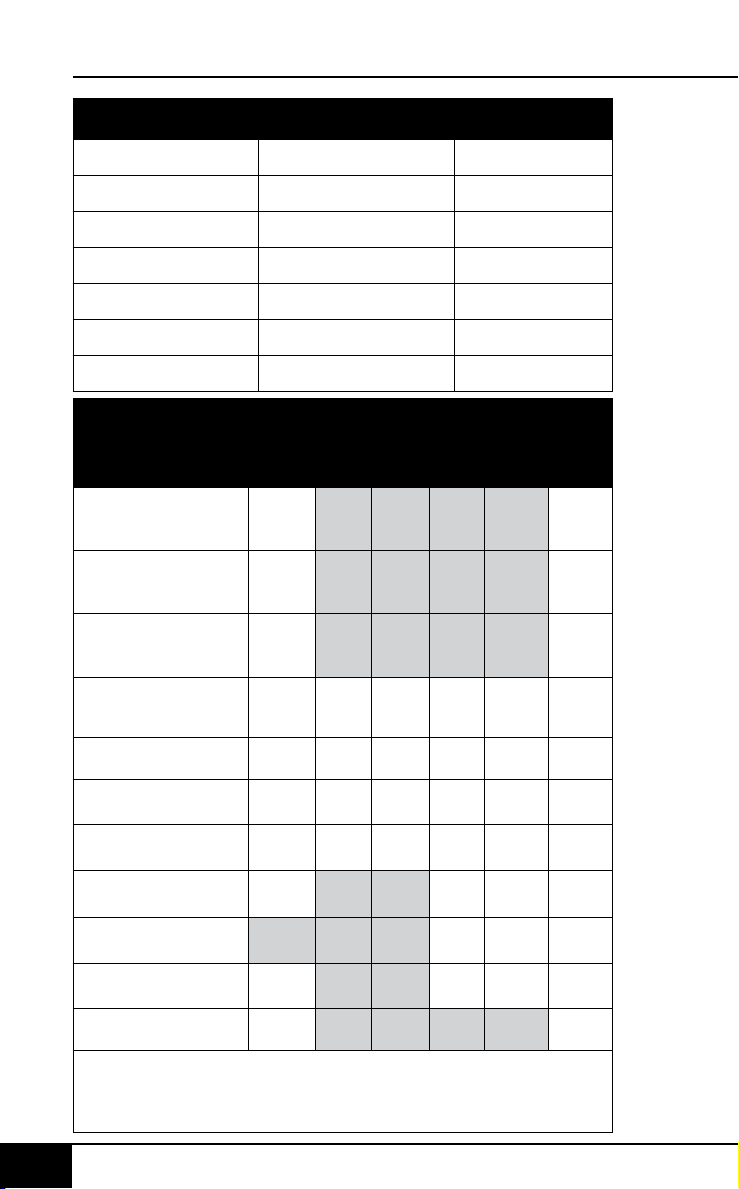
instructions
nuwavenow.com
28 29
ENGLISH
nuwavenow.com
INSTRUCTIONS
28 29
Temperature Chart
Meats °F/ °C
Rare
°F/ °C
Med
Rare
°F/ °C
Med
°F/ °C
Med
Well
°F/ °C
Well
°F/ °C
Chicken, breast
Turkey, breast
Duck, breast
360/182 165/74*
Chicken, whole
Turkey, whole
Duck, whole
360/182 165/74*
Chicken, thigh
Turkey, thigh
Duck, thigh
360/182 165/74*
Steak 1-inch thick
(25mm)
400 or
450/204
or 232
125/51 135/57
145/
62*
150/65*
160/
71*
Burgers ½ lb (227g) 350/177 125/51 135/57
145/
62*
155/68*
160/
71*
Roast Beef (bone-in)
Roast Beef (boneless)
325/163 125/51 135/57
145/
62*
150/65*
160/
71*
Lamb (bone-in)
Lamb (boneless)
325/163 125/51 135/57
145/
62*
150/65*
160/
71*
Pork (bone-in)
Pork (boneless)
350/177
145/
62*
150/65*
160/
71*
Salmon, Tuna, Halibut,
Swordfish
145/
62*
150/65*
160/
71*
Fish Steaks 1-inch
thick (25mm)
350/177
145/
62*
150/65*
160/
71*
Sausage 360/182
160/
71*
Note: Times may vary depending on cooking preference. Consuming
raw or undercooked meats, poultry, or seafood may increase your risk
of food borne illness. *To reduce the risk, cook your food to USDA-safe
temperatures.
Measurement Chart
Teaspoon = t Fahrenheit = °F Minute = min
Tablespoon = T Celsius = °C Second = sec
Cup = c Fluid Ounces = oz Inch = in.
Ounce = oz Liter = L Dozen = doz
Pound = lb(s) Milliliter = ml Hour = hr
Quart = qt Package = pkg. Gram = g
Pint = pt Gallon = gal Kilograms = kg
Cleaning
Clean the Brio after every use or in between a number of
large batches. The Fry Pan Basket and the Base Tray have
a non-stick coating with a stainless steel Basket Net. Do not
use metal utensils or harsh abrasives when cleaning as this
can damage the coating.
1. Unplug the appliance and make sure it cools completely.
2. Use a damp cloth to wipe the outside of the appliance.
3. Clean the Fry Pan Basket and inside components with a
nonabrasive sponge, hot water, and mild detergent.
Note: Remove the Base Tray and Fry Pan Basket and place
on a heat-resistant surface to help cool the appliance quicker.
Note: If using the dishwasher for the Base Tray, Fry Pan
Basket, and Fry Pan Basket Net, it is recommended to use
top rack only.
Tip: If there is residual food in the Base Tray and Fry Pan
Basket, add some hot water and let it soak separately for
about 10 minutes for easier cleaning. Then, use a soft
cleaning brush to remove any lingering food.
Note: To clean Probe, wipe end with a damp cloth or paper towel.
Storage:
1. Unplug the Brio and let it cool down completely.
2. Make sure that all the parts are clean and dry.
3. Push the power cord into the storing capsule. Afx the
cord by inserting it into the cord-afxing opening in the
back of the unit.
CLEANING & MAINTENANCE

instructions
nuwavenow.com
28 29
ENGLISH
nuwavenow.com
INSTRUCTIONS
28 29
Temperature Chart
Meats °F/ °C
Rare
°F/ °C
Med
Rare
°F/ °C
Med
°F/ °C
Med
Well
°F/ °C
Well
°F/ °C
Chicken, breast
Turkey, breast
Duck, breast
360/182 165/74*
Chicken, whole
Turkey, whole
Duck, whole
360/182 165/74*
Chicken, thigh
Turkey, thigh
Duck, thigh
360/182 165/74*
Steak 1-inch thick
(25mm)
400 or
450/204
or 232
125/51 135/57
145/
62*
150/65*
160/
71*
Burgers ½ lb (227g) 350/177 125/51 135/57
145/
62*
155/68*
160/
71*
Roast Beef (bone-in)
Roast Beef (boneless)
325/163 125/51 135/57
145/
62*
150/65*
160/
71*
Lamb (bone-in)
Lamb (boneless)
325/163 125/51 135/57
145/
62*
150/65*
160/
71*
Pork (bone-in)
Pork (boneless)
350/177
145/
62*
150/65*
160/
71*
Salmon, Tuna, Halibut,
Swordfish
145/
62*
150/65*
160/
71*
Fish Steaks 1-inch
thick (25mm)
350/177
145/
62*
150/65*
160/
71*
Sausage 360/182
160/
71*
Note: Times may vary depending on cooking preference. Consuming
raw or undercooked meats, poultry, or seafood may increase your risk
of food borne illness. *To reduce the risk, cook your food to USDA-safe
temperatures.
Measurement Chart
Teaspoon = t Fahrenheit = °F Minute = min
Tablespoon = T Celsius = °C Second = sec
Cup = c Fluid Ounces = oz Inch = in.
Ounce = oz Liter = L Dozen = doz
Pound = lb(s) Milliliter = ml Hour = hr
Quart = qt Package = pkg. Gram = g
Pint = pt Gallon = gal Kilograms = kg
Cleaning
Clean the Brio after every use or in between a number of
large batches. The Fry Pan Basket and the Base Tray have
a non-stick coating with a stainless steel Basket Net. Do not
use metal utensils or harsh abrasives when cleaning as this
can damage the coating.
1. Unplug the appliance and make sure it cools completely.
2. Use a damp cloth to wipe the outside of the appliance.
3. Clean the Fry Pan Basket and inside components with a
nonabrasive sponge, hot water, and mild detergent.
Note: Remove the Base Tray and Fry Pan Basket and place
on a heat-resistant surface to help cool the appliance quicker.
Note: If using the dishwasher for the Base Tray, Fry Pan
Basket, and Fry Pan Basket Net, it is recommended to use
top rack only.
Tip: If there is residual food in the Base Tray and Fry Pan
Basket, add some hot water and let it soak separately for
about 10 minutes for easier cleaning. Then, use a soft
cleaning brush to remove any lingering food.
Note: To clean Probe, wipe end with a damp cloth or paper towel.
Storage:
1. Unplug the Brio and let it cool down completely.
2. Make sure that all the parts are clean and dry.
3. Push the power cord into the storing capsule. Afx the
cord by inserting it into the cord-afxing opening in the
back of the unit.
CLEANING & MAINTENANCE
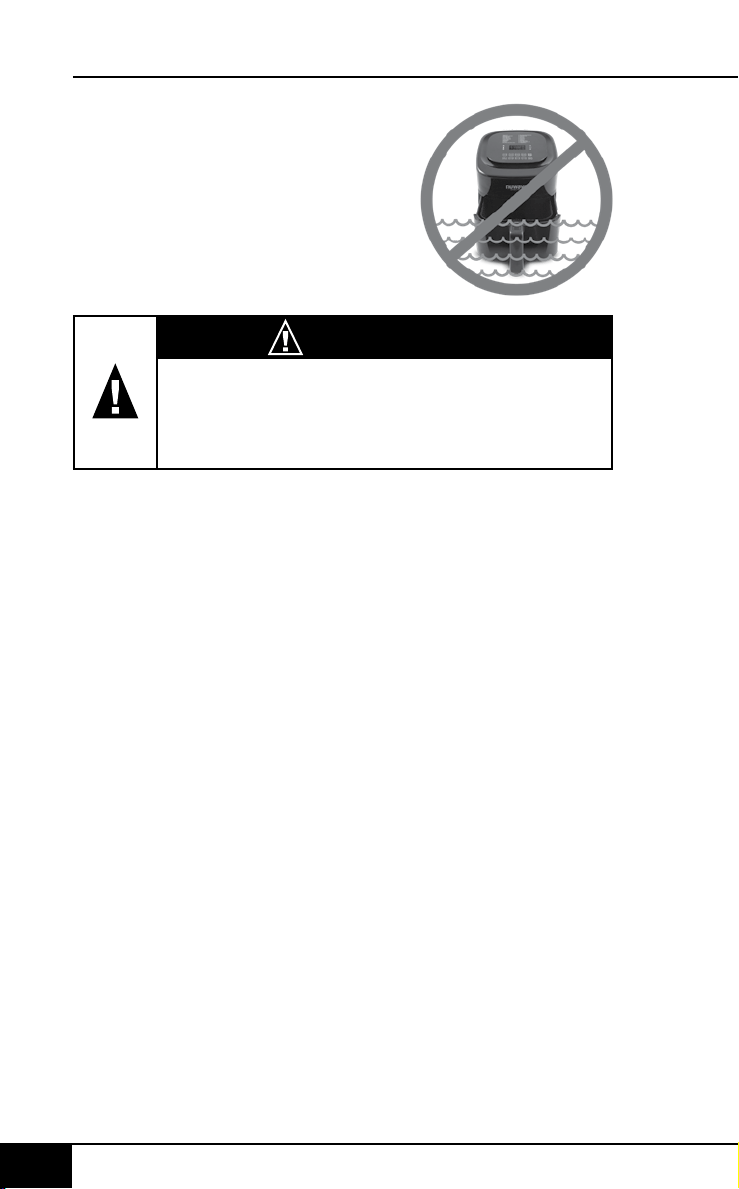
cleaning & maintenance
nuwavenow.com
30 31
ENGLISH
nuwavenow.com
CLEANING & MAINTENANCE
30 31
WARNING
In case of other problems, immediately unplug
and contact Customer Service Department.
1-877-689-2838 • help@nuwavenow.com
TROUBLESHOOT GUIDE
The Brio is not turning on or working.
1. The Brio is not plugged in.
2. Did not press ON/OFF.
3. Base Tray with Fry Pan Basket is not in the Brio.
4. Insert the plug into an appropriate grounded power
socket. Press ON/OFF after settings are selected. Place
the Base Tray with Fry Pan Basket into the Brio.
The ingredients fried in the Fry Pan Basket are not
completely cooked.
1. Too many ingredients were used. The cooking
temperature is too low.
2. The cooking time is too short.
3. Remove some ingredients from the Fry Pan Basket;
smaller batches air-fry more evenly. Cook at a higher
temperature. Set the Brio to air-fry for a longer time.
The food is fried unevenly.
1. Certain types of ingredients need to be shaken halfway
through the cooking time.
2. Ingredients that are on the top need to be shaken
halfway through the cooking time.
Fried snacks are not crispy when they come out
of the Brio.
1. You used a type of snack meant to be prepared in a tradi-
tional deep fryer.
2. Use snacks designed to be baked in a traditional oven,
or lightly brush some olive oil onto the snacks before
placing into Brio for a crispier result.
Cannot slide the Fry Pan Basket into
the appliance properly.
1. The Fry Pan Basket is overlled. The Fry Pan Basket is
not placed in the Base Tray correctly.
2. Do not ll the Fry Pan Basket more than 4/5 full. Push
the Fry Pan Basket down into the Base Tray until you
hear a click.
IMPORTANT - Do not immerse unit
in water or attempt to cycle through
dishwasher. The outer surface may
be cleaned by wiping carefully with
a damp dishcloth or sponge.
Make sure unit has cooled
completely prior to cleaning.

cleaning & maintenance
nuwavenow.com
30 31
ENGLISH
nuwavenow.com
CLEANING & MAINTENANCE
30 31
WARNING
In case of other problems, immediately unplug
and contact Customer Service Department.
1-877-689-2838 • help@nuwavenow.com
TROUBLESHOOT GUIDE
The Brio is not turning on or working.
1. The Brio is not plugged in.
2. Did not press ON/OFF.
3. Base Tray with Fry Pan Basket is not in the Brio.
4. Insert the plug into an appropriate grounded power
socket. Press ON/OFF after settings are selected. Place
the Base Tray with Fry Pan Basket into the Brio.
The ingredients fried in the Fry Pan Basket are not
completely cooked.
1. Too many ingredients were used. The cooking
temperature is too low.
2. The cooking time is too short.
3. Remove some ingredients from the Fry Pan Basket;
smaller batches air-fry more evenly. Cook at a higher
temperature. Set the Brio to air-fry for a longer time.
The food is fried unevenly.
1. Certain types of ingredients need to be shaken halfway
through the cooking time.
2. Ingredients that are on the top need to be shaken
halfway through the cooking time.
Fried snacks are not crispy when they come out
of the Brio.
1. You used a type of snack meant to be prepared in a tradi-
tional deep fryer.
2. Use snacks designed to be baked in a traditional oven,
or lightly brush some olive oil onto the snacks before
placing into Brio for a crispier result.
Cannot slide the Fry Pan Basket into
the appliance properly.
1. The Fry Pan Basket is overlled. The Fry Pan Basket is
not placed in the Base Tray correctly.
2. Do not ll the Fry Pan Basket more than 4/5 full. Push
the Fry Pan Basket down into the Base Tray until you
hear a click.
IMPORTANT - Do not immerse unit
in water or attempt to cycle through
dishwasher. The outer surface may
be cleaned by wiping carefully with
a damp dishcloth or sponge.
Make sure unit has cooled
completely prior to cleaning.

troubleshoot guide
nuwavenow.com
32 33
ENGLISH
nuwavenow.com
TROUBLESHOOT GUIDE
32 33
White smoke is coming out of the product.
1. You are frying greasy foods. The Fry Pan Basket and
Fry Pan Basket Net or Base Tray contains greasy
residue from previous uses.
2. When preparing greasy ingredients in the air fryer, large
amounts of oil can smoke and inltrate Fry Pan Basket.
The oil will produce white smoke and the Fry Pan
Basket or Base Tray might become hotter than usual.
This will not affect the nal cooking result. White smoke
is caused by grease heating up in the Fry Pan Basket.
Make sure you clean Fry Pan Basket and Fry Pan
Basket Net and Base Tray properly after use.
French fries are fried unevenly in the Brio.
1. You did not soak the potato sticks properly before air-
frying them.
2. You did not use the right potato type or they were not fresh.
3. Soak potato sticks in a bowl of water for at least 30
minutes, remove them, and dry with paper towels. Use
fresh potatoes and make sure they stay rm during
air-frying.
French fries are not crispy when they come out
of the Brio.
1. The crispiness of the fries depends on the amount of oil
and water in the fries.
2. Make sure you dry the potato sticks properly before
adding oil. Cut the potato sticks smaller and dry them
for a crispier result. Add slightly more oil on potatoes
before placing in Brio for a crispier result.
If the unit needs to be replaced or returned to the
manufacturer, please contact Customer Service Department
at: 1-877-689-2838 or [email protected].
Error Message: Solution(s):
Prb1
Probe not connected to the unit. Plug
the Brio into the appropriate
power socket.
Prb2
The Probe target internal temperature is
set higher than set cooking temperature.
Prb3
Probe short Circuit.
Contact Customer Service Department
at 1-877-689-2838 or help@
nuwavenow.com.
Prb4
Probe sensor not detecting temperature
increase. Ensure the Probe is inserted
into the food and the food is in oven
during cooking.
Er1
NTC Temperature Sensor overheated.
Turn unit off to cool. If the Brio is not
working after it cools down, contact
Customer Service.
Err1
NTC Temperature Sensor short circuit.
Contact Customer Service Department
at 1-877-689-2838 or
help@nuwavenow.com.
Err2
NTC Temperature Sensor is open.
Contact Customer Service Department
at 1-877-689-2838 or
help@nuwavenow.com.
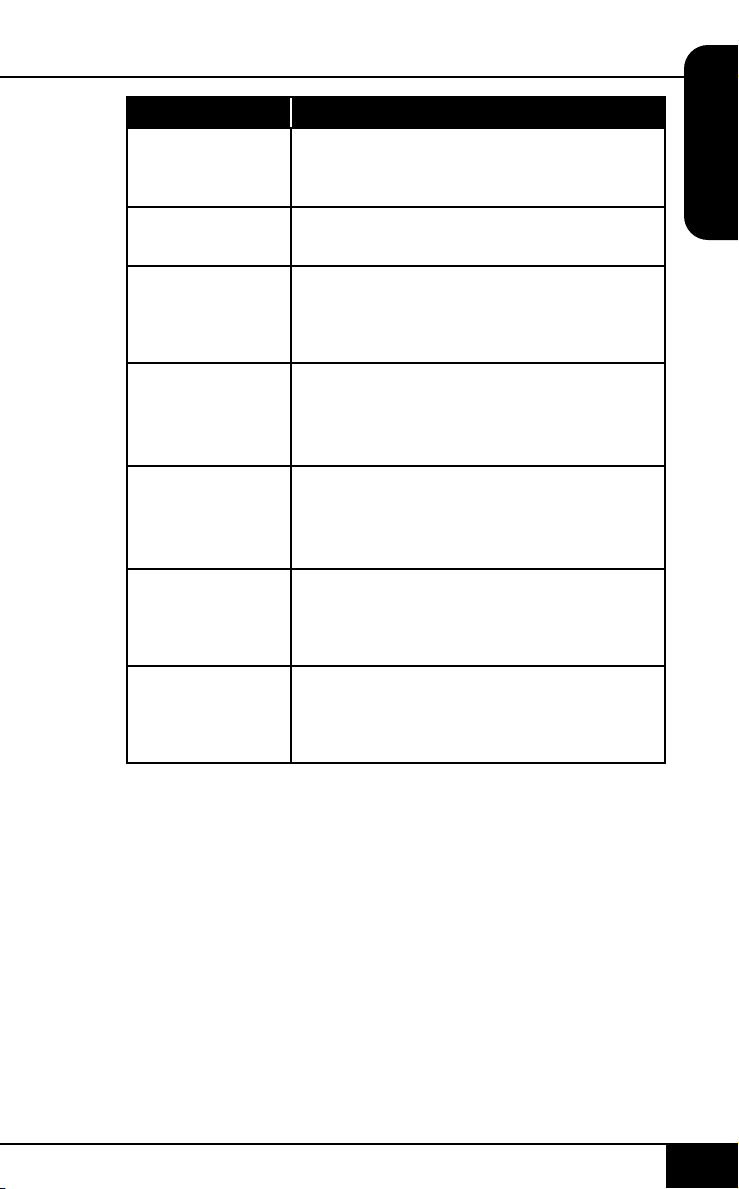
troubleshoot guide
nuwavenow.com
32 33
ENGLISH
nuwavenow.com
TROUBLESHOOT GUIDE
32 33
White smoke is coming out of the product.
1. You are frying greasy foods. The Fry Pan Basket and
Fry Pan Basket Net or Base Tray contains greasy
residue from previous uses.
2. When preparing greasy ingredients in the air fryer, large
amounts of oil can smoke and inltrate Fry Pan Basket.
The oil will produce white smoke and the Fry Pan
Basket or Base Tray might become hotter than usual.
This will not affect the nal cooking result. White smoke
is caused by grease heating up in the Fry Pan Basket.
Make sure you clean Fry Pan Basket and Fry Pan
Basket Net and Base Tray properly after use.
French fries are fried unevenly in the Brio.
1. You did not soak the potato sticks properly before air-
frying them.
2. You did not use the right potato type or they were not fresh.
3. Soak potato sticks in a bowl of water for at least 30
minutes, remove them, and dry with paper towels. Use
fresh potatoes and make sure they stay rm during
air-frying.
French fries are not crispy when they come out
of the Brio.
1. The crispiness of the fries depends on the amount of oil
and water in the fries.
2. Make sure you dry the potato sticks properly before
adding oil. Cut the potato sticks smaller and dry them
for a crispier result. Add slightly more oil on potatoes
before placing in Brio for a crispier result.
If the unit needs to be replaced or returned to the
manufacturer, please contact Customer Service Department
at: 1-877-689-2838 or help@nuwavenow.com.
Error Message: Solution(s):
Prb1
Probe not connected to the unit. Plug
the Brio into the appropriate
power socket.
Prb2
The Probe target internal temperature is
set higher than set cooking temperature.
Prb3
Probe short Circuit.
Contact Customer Service Department
at 1-877-689-2838 or help@
nuwavenow.com.
Prb4
Probe sensor not detecting temperature
increase. Ensure the Probe is inserted
into the food and the food is in oven
during cooking.
Er1
NTC Temperature Sensor overheated.
Turn unit off to cool. If the Brio is not
working after it cools down, contact
Customer Service.
Err1
NTC Temperature Sensor short circuit.
Contact Customer Service Department
at 1-877-689-2838 or
help@nuwavenow.com.
Err2
NTC Temperature Sensor is open.
Contact Customer Service Department
at 1-877-689-2838 or
help@nuwavenow.com.

limited warranty
nuwavenow.com
34 35
ENGLISH
nuwavenow.com
LIMITED WARRANTY
34 35
The NuWave Brio
®
6Q Digital Air Fryer with Probe
THE MANUFACTURER WARRANTS
The Brio, including the Base Tray, Fry Pan Divider, Fry Pan
Basket, Fry Pan Basket Net, and Probe, are to be free from
manufacturer defects.
All electrical components are warrantied for 1 year from
the date of purchase, under normal household use, and
when operated in accordance with the Manufacturer’s
written instructions. The Manufacturer will provide the
necessary parts and labor to repair any part of the Brio
at NuWave LLC Service Department. After the expiration
of the warranty, the cost of the labor and parts will be the
responsibility of the owner.
MANUFACTURER’S OBLIGATION
The Manufacturer’s obligation under this Limited Warranty
is limited, to the extent allowable by law, to repairing or
replacing any part covered by this Limited Warranty which
upon examination is found to be defective under normal use.
The Limited Warranty is applicable only within the continental
United States and only to the original purchaser of the
manufacturer’s authorized channels of distribution. THE
LIMITED WARRANTY MAY NOT BE ALTERED, VARIED
OR EXTENDED EXCEPT BY A WRITTEN INSTRUMENT
EXECUTED BY THE MANUFACTURER. THE REMEDY
OF REPAIR OR REPLACEMENT AS PROVIDED UNDER
THIS LIMITED WARRANTY IS EXCLUSIVE. IN NO
EVENT SHALL THE MANUFACTURER BE LIABLE FOR
LIMITED WARRANTY
ANY CONSEQUENTIAL OR INCIDENTAL DAMAGES TO
ANY PERSON, WHETHER OR NOT OCCASIONED BY
NEGLIGENCE OF THE MANUFACTURER, INCLUDING
WITHOUT LIMITATION, DAMAGES FOR LOSS OF USE,
COSTS OF SUBSTITUTION, PROPERTY DAMAGE, OR
OTHER MONEY LOSS.
Some states do not allow the exclusion or limitation of
incidental or consequential damages, so the above limitation
exclusions may not apply. This Limited Warranty gives specic
legal rights, and there may also be other rights which vary
from state to state. EXCEPT AS OTHERWISE EXPRESSLY
PROVIDED ABOVE, THE MANUFACTURER MAKES NO
WARRANTIES EXPRESSED OR IMPLIED ARISING BY
LAW OR OTHERWISE, INCLUDING WITHOUT LIMITATION,
THE IMPLIED WARRANTIES OF MERCHANTABILITY
AND FITNESS FOR A PARTICULAR PURPOSE TO ANY
OTHER PERSON. READ YOUR OWNER’S MANUAL. IF
YOU STILL HAVE ANY QUESTIONS ABOUT OPERATION
OR WARRANTY OF THE PRODUCT, PLEASE CONTACT
NUWAVE LLC.
DISPUTE RESOLUTION PROCEDURE. For disputes
relating to use of the website or use or purchase of a
NuWave product or service (collectively "Disputes"), you
agree to rst contact NuWave LLC at (877) 689-2838
(phone), (847) 367-5486 (facsimile), or legal@nuwavenow.
com (email). If we cannot resolve your dispute informally,
any and all disputes shall be submitted to nal and binding
arbitration. You may start the arbitration process by
submitting in writing a demand to the American Arbitration

limited warranty
nuwavenow.com
34 35
ENGLISH
nuwavenow.com
LIMITED WARRANTY
34 35
The NuWave Brio
®
6Q Digital Air Fryer with Probe
THE MANUFACTURER WARRANTS
The Brio, including the Base Tray, Fry Pan Divider, Fry Pan
Basket, Fry Pan Basket Net, and Probe, are to be free from
manufacturer defects.
All electrical components are warrantied for 1 year from
the date of purchase, under normal household use, and
when operated in accordance with the Manufacturer’s
written instructions. The Manufacturer will provide the
necessary parts and labor to repair any part of the Brio
at NuWave LLC Service Department. After the expiration
of the warranty, the cost of the labor and parts will be the
responsibility of the owner.
MANUFACTURER’S OBLIGATION
The Manufacturer’s obligation under this Limited Warranty
is limited, to the extent allowable by law, to repairing or
replacing any part covered by this Limited Warranty which
upon examination is found to be defective under normal use.
The Limited Warranty is applicable only within the continental
United States and only to the original purchaser of the
manufacturer’s authorized channels of distribution. THE
LIMITED WARRANTY MAY NOT BE ALTERED, VARIED
OR EXTENDED EXCEPT BY A WRITTEN INSTRUMENT
EXECUTED BY THE MANUFACTURER. THE REMEDY
OF REPAIR OR REPLACEMENT AS PROVIDED UNDER
THIS LIMITED WARRANTY IS EXCLUSIVE. IN NO
EVENT SHALL THE MANUFACTURER BE LIABLE FOR
LIMITED WARRANTY
ANY CONSEQUENTIAL OR INCIDENTAL DAMAGES TO
ANY PERSON, WHETHER OR NOT OCCASIONED BY
NEGLIGENCE OF THE MANUFACTURER, INCLUDING
WITHOUT LIMITATION, DAMAGES FOR LOSS OF USE,
COSTS OF SUBSTITUTION, PROPERTY DAMAGE, OR
OTHER MONEY LOSS.
Some states do not allow the exclusion or limitation of
incidental or consequential damages, so the above limitation
exclusions may not apply. This Limited Warranty gives specic
legal rights, and there may also be other rights which vary
from state to state. EXCEPT AS OTHERWISE EXPRESSLY
PROVIDED ABOVE, THE MANUFACTURER MAKES NO
WARRANTIES EXPRESSED OR IMPLIED ARISING BY
LAW OR OTHERWISE, INCLUDING WITHOUT LIMITATION,
THE IMPLIED WARRANTIES OF MERCHANTABILITY
AND FITNESS FOR A PARTICULAR PURPOSE TO ANY
OTHER PERSON. READ YOUR OWNER’S MANUAL. IF
YOU STILL HAVE ANY QUESTIONS ABOUT OPERATION
OR WARRANTY OF THE PRODUCT, PLEASE CONTACT
NUWAVE LLC.
DISPUTE RESOLUTION PROCEDURE. For disputes
relating to use of the website or use or purchase of a
NuWave product or service (collectively "Disputes"), you
agree to rst contact NuWave LLC at (877) 689-2838
(phone), (847) 367-5486 (facsimile), or legal@nuwavenow.
com (email). If we cannot resolve your dispute informally,
any and all disputes shall be submitted to nal and binding
arbitration. You may start the arbitration process by
submitting in writing a demand to the American Arbitration

limited warranty
nuwavenow.com
36 37
ENGLISH
nuwavenow.com
LIMITED WARRANTY
36 37
Association ("AAA") and sending a copy to NuWave.
NuWave will pay all ling costs. A single arbitrator of the
AAA will conduct the arbitration in a location convenient
to you or by phone. The arbitrator’s award will be binding
and may be entered as a judgment in a court of competent
jurisdiction. The arbitration will be conducted in accordance
with the provisions of AAA’s Commercial Arbitration Rules
and Mediation Procedures in effect at the time of submission
of your demand for arbitration. See https://www.adr.org/sites/
default/les/CommercialRules_Web.pdf. Except as may be
required by law as determined by an arbitrator, no party or
arbitrator may disclose the existence, content, or results of
any arbitration hereunder without prior written consent of
both parties.
A. WAIVER OF RIGHT TO SUE. By agreeing to arbitration
you understand that, to the maximum extent permitted by
law, you are agreeing to waive your right to le suit in any
court, to a court hearing, judge trial, and jury trial.
B. CLASS ACTION WAIVER. To the maximum extent
permitted by law you expressly agree to refrain from
bringing or joining any claims in any representative or
class-wide capacity, including but not limited to, bringing
or joining any claims in any class action or class-wide
arbitration.
C. OPT OUT PROCEDURE. To opt out of arbitration you
must contact NuWave. To request to opt out of arbitration
contact us at legal@nuwavenow.com (email), NuWave LLC,
1795 N. Buttereld Road, Libertyville, IL 60048, U.S.A.,
(847) 367-5486 (fax), or (877) 689-2838 or (224) 206-3019
(phone). You will have thirty (30) days from the date of
product delivery to opt out of arbitration with respect to any
dispute arising out of or relating to use or purchase of any
NuWave product. If more than 30 days have passed you are
not eligible to opt out of arbitration and will have waived your
right to sue or participate in a class action with respect to
the dispute arising out of your purchase or use of a NuWave
product. For any dispute arising out of your use of NuWave’s
website, you have thirty (30) days from the date you
provided information to the website to opt out of arbitration.
If more than 30 days have passed you are not eligible to opt
out of arbitration and you will have waived your right to sue
and participate in a class action with respect to the dispute
arising out of your use of NuWave’s website.

limited warranty
nuwavenow.com
36 37
ENGLISH
nuwavenow.com
LIMITED WARRANTY
36 37
Association ("AAA") and sending a copy to NuWave.
NuWave will pay all ling costs. A single arbitrator of the
AAA will conduct the arbitration in a location convenient
to you or by phone. The arbitrator’s award will be binding
and may be entered as a judgment in a court of competent
jurisdiction. The arbitration will be conducted in accordance
with the provisions of AAA’s Commercial Arbitration Rules
and Mediation Procedures in effect at the time of submission
of your demand for arbitration. See https://www.adr.org/sites/
default/les/CommercialRules_Web.pdf. Except as may be
required by law as determined by an arbitrator, no party or
arbitrator may disclose the existence, content, or results of
any arbitration hereunder without prior written consent of
both parties.
A. WAIVER OF RIGHT TO SUE. By agreeing to arbitration
you understand that, to the maximum extent permitted by
law, you are agreeing to waive your right to le suit in any
court, to a court hearing, judge trial, and jury trial.
B. CLASS ACTION WAIVER. To the maximum extent
permitted by law you expressly agree to refrain from
bringing or joining any claims in any representative or
class-wide capacity, including but not limited to, bringing
or joining any claims in any class action or class-wide
arbitration.
C. OPT OUT PROCEDURE. To opt out of arbitration you
must contact NuWave. To request to opt out of arbitration
contact us at legal@nuwavenow.com (email), NuWave LLC,
1795 N. Buttereld Road, Libertyville, IL 60048, U.S.A.,
(847) 367-5486 (fax), or (877) 689-2838 or (224) 206-3019
(phone). You will have thirty (30) days from the date of
product delivery to opt out of arbitration with respect to any
dispute arising out of or relating to use or purchase of any
NuWave product. If more than 30 days have passed you are
not eligible to opt out of arbitration and will have waived your
right to sue or participate in a class action with respect to
the dispute arising out of your purchase or use of a NuWave
product. For any dispute arising out of your use of NuWave’s
website, you have thirty (30) days from the date you
provided information to the website to opt out of arbitration.
If more than 30 days have passed you are not eligible to opt
out of arbitration and you will have waived your right to sue
and participate in a class action with respect to the dispute
arising out of your use of NuWave’s website.

limited warranty
LIMITED WARRANTYLIMITED WARRANTY
3838
nuwavenow.com
39
nuwavenow.com
39
MANUAL DEL
PROPIETARIO
Freidora de Aire Digital
Con Sensor Digital Integrado
6Q
SPANISH
D. SOME MATTERS ARE NOT SUBJECT TO
ARBITRATION. Notwithstanding the foregoing, the
following shall not be subject to arbitration and may be
adjudicated only in the state and federal courts of Illinois: (i)
any dispute, controversy, or claim relating to or contesting
the validity of our intellectual property rights and proprietary
rights, including without limitation, patents, trademarks,
service marks, copyrights, or trade secrets; (ii) an action by
a party for temporary, preliminary, or permanent injunctive
relief, whether prohibitive or mandatory, or other provisional
relief; or (iii) interactions with governmental and regulatory
authorities. You expressly agree to refrain from bringing
or joining any claims in any representative or class-wide
capacity, including but not limited to, bringing or joining any
claims in any class action or any class-wide arbitration.
READ YOUR OWNER’S MANUAL
If you still have any questions about operation or warranty
of the product, please contact NuWave LLC at: 1-877-
689-2838 or email help@nuwavenow.com.
limited warranty
LIMITED WARRANTYLIMITED WARRANTY
3838
nuwavenow.com
39
nuwavenow.com
39
MANUAL DEL
PROPIETARIO
Freidora de Aire Digital
Con Sensor Digital Integrado
6Q
SPANISH
D. SOME MATTERS ARE NOT SUBJECT TO
ARBITRATION. Notwithstanding the foregoing, the
following shall not be subject to arbitration and may be
adjudicated only in the state and federal courts of Illinois: (i)
any dispute, controversy, or claim relating to or contesting
the validity of our intellectual property rights and proprietary
rights, including without limitation, patents, trademarks,
service marks, copyrights, or trade secrets; (ii) an action by
a party for temporary, preliminary, or permanent injunctive
relief, whether prohibitive or mandatory, or other provisional
relief; or (iii) interactions with governmental and regulatory
authorities. You expressly agree to refrain from bringing
or joining any claims in any representative or class-wide
capacity, including but not limited to, bringing or joining any
claims in any class action or any class-wide arbitration.
READ YOUR OWNER’S MANUAL
If you still have any questions about operation or warranty
of the product, please contact NuWave LLC at: 1-877-
689-2838 or email help@nuwavenow.com.
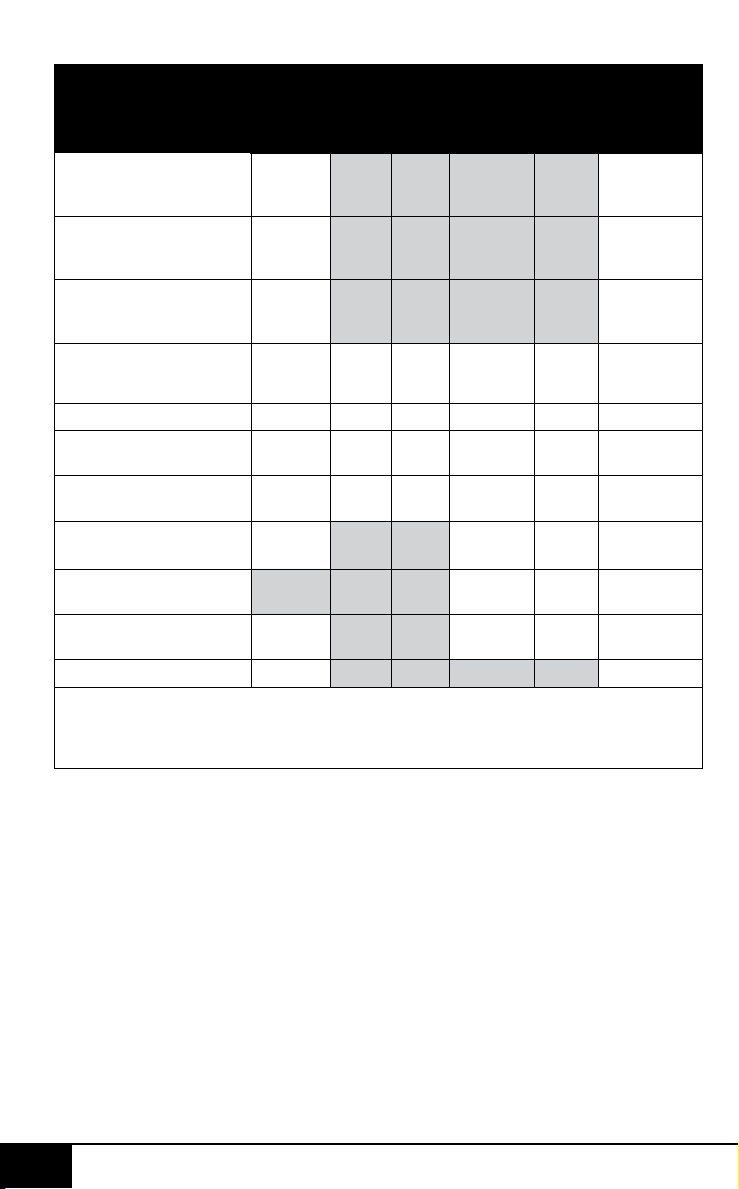
nuwavenow.com
41
SPANISH
nuwavenow.com
41
Tabla de Temperatura
Meats °F/ °C
Poco
Cocido
°F/ °C
Al
Punto
°F/ °C
Términdo
°F/ °C
Cocido
°F/ °C
Bein
Cocido
°F/ °C
Pechuga de pollo
Pechuga de pavo
Pechuga de pato
360/182 165/74*
Pollo entero
Pavo entero
Pato entero
360/182 165/74*
Muslo de pollo
Muslo de pavo
Muslo de pato
360/182 165/74*
Filete de 1 pulgada
(25mm)
400 or
450/204
or 232
125/51 135/57 145/ 62* 150/65* 160/ 71*
Hamburguesas ½ lb (227g) 350/177 125/51 135/57 145/ 62* 155/68* 160/ 71*
Carne asada (con hueso)
Carne asada (sin hueso)
325/163 125/51 135/57 145/ 62* 150/65* 160/ 71*
Cordera (con hueso)
Cordera (sin hueso)
325/163 125/51 135/57 145/ 62* 150/65* 160/ 71*
Cerdo (con hueso)
Cerdo (sin hueso)
350/177 145/ 62* 150/65* 160/ 71*
Salmon, Tuna, Hipoglosa,
Pez espada
145/ 62* 150/65* 160/ 71*
Filetes De Pescado de 1
pulgada (25mm)
350/177 145/ 62* 150/65* 160/ 71*
Salchicha 360/182 160/ 71*
Nota: Los tiempos pueden variar según la preferencia de cocción. El consumo de carnes,
aves o mariscos crudos o poco cocidos puede aumentar el riesgo denfermedades
transmitidas por los alimentos. *Para reducir el riesgo, cocine sus alimentos a
temperaturas seguras del USDA.
4040
Tabla de medidas
Cucharadita = t Farenheit = °F Minuto = min
Cucharada = T Centígrados = °C Segundo= sec
Taza = c Onzas uidas = oz Pulgada = in.
Onza = oz Litro = L Docena = doz
Libra = lb(s) Mililitro = ml Hora = hr
Cuarto de galón = qt Paquete = pkg. Gramo = g
Pinta = pt Galón = gal Kilogramo = kg
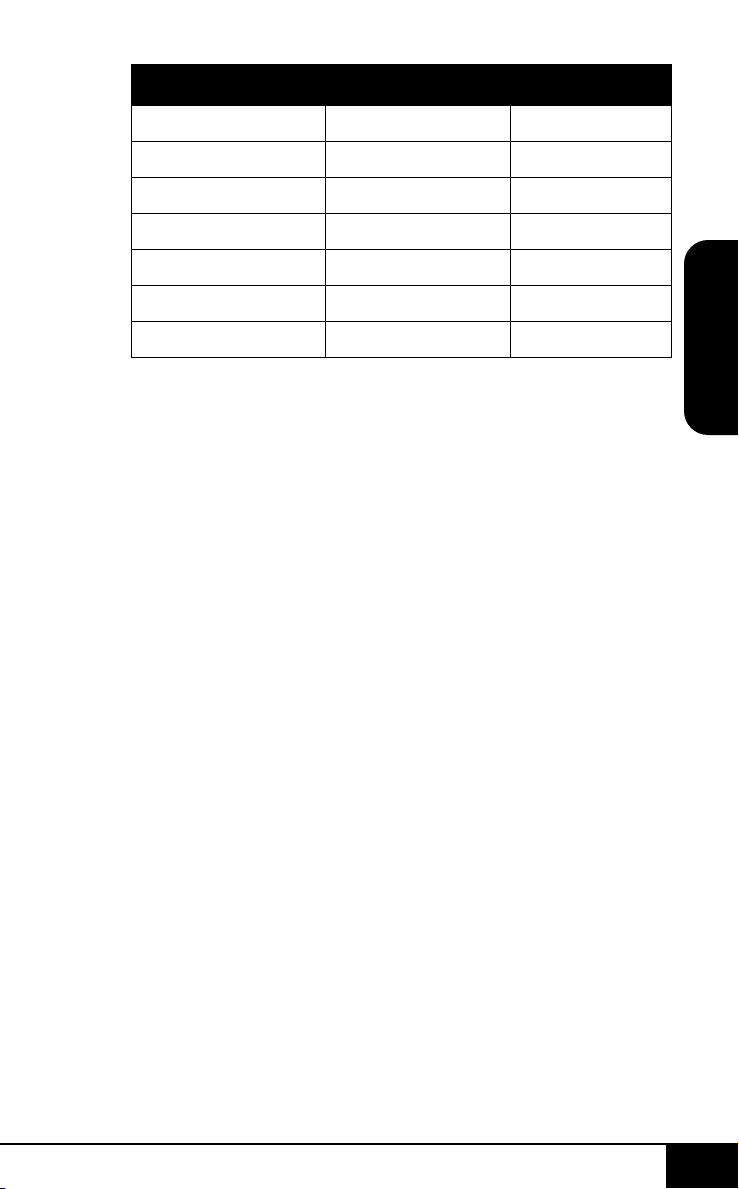
nuwavenow.com
41
SPANISH
nuwavenow.com
41
Tabla de Temperatura
Meats °F/ °C
Poco
Cocido
°F/ °C
Al
Punto
°F/ °C
Términdo
°F/ °C
Cocido
°F/ °C
Bein
Cocido
°F/ °C
Pechuga de pollo
Pechuga de pavo
Pechuga de pato
360/182 165/74*
Pollo entero
Pavo entero
Pato entero
360/182 165/74*
Muslo de pollo
Muslo de pavo
Muslo de pato
360/182 165/74*
Filete de 1 pulgada
(25mm)
400 or
450/204
or 232
125/51 135/57 145/ 62* 150/65* 160/ 71*
Hamburguesas ½ lb (227g) 350/177 125/51 135/57 145/ 62* 155/68* 160/ 71*
Carne asada (con hueso)
Carne asada (sin hueso)
325/163 125/51 135/57 145/ 62* 150/65* 160/ 71*
Cordera (con hueso)
Cordera (sin hueso)
325/163 125/51 135/57 145/ 62* 150/65* 160/ 71*
Cerdo (con hueso)
Cerdo (sin hueso)
350/177 145/ 62* 150/65* 160/ 71*
Salmon, Tuna, Hipoglosa,
Pez espada
145/ 62* 150/65* 160/ 71*
Filetes De Pescado de 1
pulgada (25mm)
350/177 145/ 62* 150/65* 160/ 71*
Salchicha 360/182 160/ 71*
Nota: Los tiempos pueden variar según la preferencia de cocción. El consumo de carnes,
aves o mariscos crudos o poco cocidos puede aumentar el riesgo denfermedades
transmitidas por los alimentos. *Para reducir el riesgo, cocine sus alimentos a
temperaturas seguras del USDA.
4040
Tabla de medidas
Cucharadita = t Farenheit = °F Minuto = min
Cucharada = T Centígrados = °C Segundo= sec
Taza = c Onzas uidas = oz Pulgada = in.
Onza = oz Litro = L Docena = doz
Libra = lb(s) Mililitro = ml Hora = hr
Cuarto de galón = qt Paquete = pkg. Gramo = g
Pinta = pt Galón = gal Kilogramo = kg
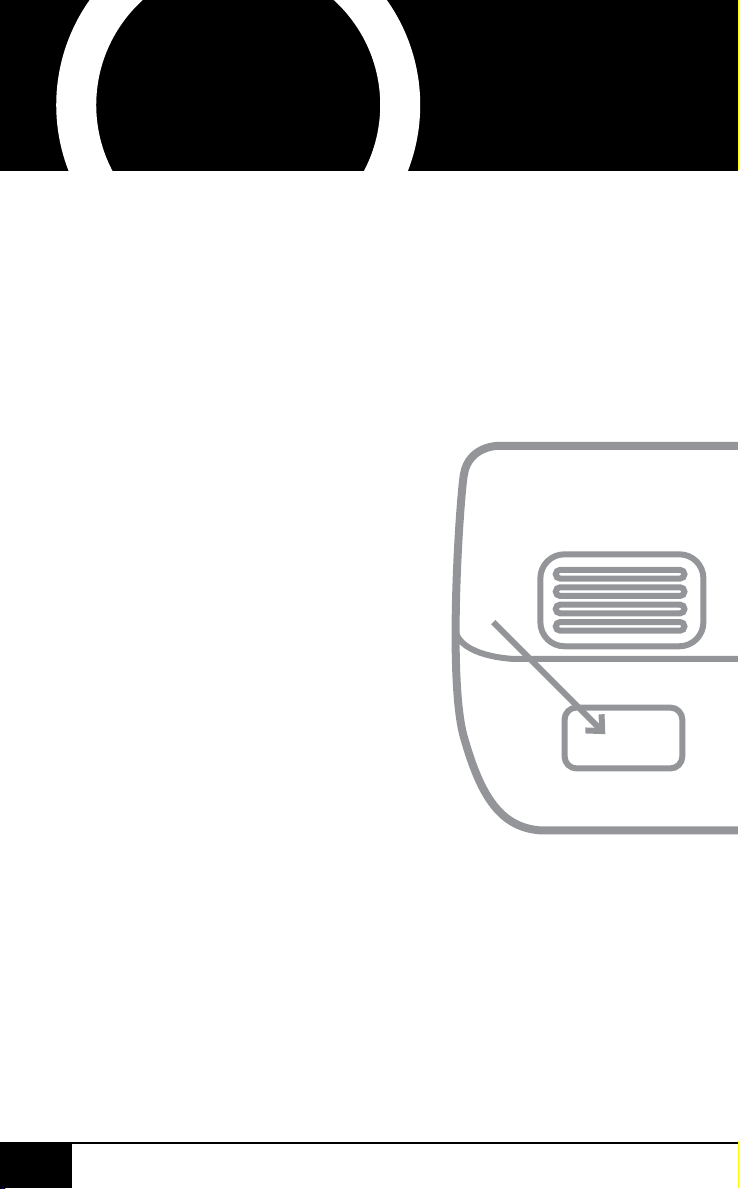
Abra su tienda de aplicaciones móviles (App Store,
Google Play).
Busque “lectores de códigos QR.”
Simplemente descargue el lector de códigos QR a
su teléfono, ábralo y escanee el código, ya está listo
para comenzar.
NOTA: Es posible que deba abrir el lector de código
QR descargado cada vez que desee escanear un
código QR.
nuwavenow.com
42 43
nuwavenow.com
42 43
3
4
* Registre su producto dentro de 1 año a partir de la fecha
de compra para una extensión gratuita de 3 meses de
garantía limitada.
1
2
3
lectores de códigos QR
¡REGÍSTRESE
AHORA!
6
!para una garantía
adicional de
meses!
Usando su teléfono inteligente o
dispositivo inteligente, escanee
el código QR ubicado en la
etiqueta de su producto en la
parte posterior de la unidad.
Se le dirigirá a la página de
registro del producto NuWave
con el número de serie único
de su producto que se ingresa
automáticamente en el campo
correspondiente.
NOTA: Si no tiene un dispositivo
inteligente habilitado para
la web, simplemente visite
nuwavenow.com/QR e ingrese
manualmente el número de
serie de su producto.
Complete la información restante
y complete la encuesta opcional.
Una vez que envíe su
información, recibirá un correo
electrónico de conrmación
con los detalles de la garantía
extendida.
1
2
¡REGÍSTRESE
AHORA!
Como agradecimiento especial por registrar su producto,
¡recibirá automáticamente 3 meses adicionales a su
garantía limitada del fabricante!*
Todo lo que tiene que hacer es seguir estos
simples pasos.
3
!para una garantía
adicional de
meses!
DESCARGUE LA APLICACIÓN QR
CODE EN SU DISPOSITIVO MÓVIL
Abra su tienda de aplicaciones móviles (App Store,
Google Play).
Busque “lectores de códigos QR.”
Simplemente descargue el lector de códigos QR a
su teléfono, ábralo y escanee el código, ya está listo
para comenzar.
NOTA: Es posible que deba abrir el lector de código
QR descargado cada vez que desee escanear un
código QR.
nuwavenow.com
42 43
nuwavenow.com
42 43
3
4
* Registre su producto dentro de 1 año a partir de la fecha
de compra para una extensión gratuita de 3 meses de
garantía limitada.
1
2
3
lectores de códigos QR
¡REGÍSTRESE
AHORA!
6
!para una garantía
adicional de
meses!
Usando su teléfono inteligente o
dispositivo inteligente, escanee
el código QR ubicado en la
etiqueta de su producto en la
parte posterior de la unidad.
Se le dirigirá a la página de
registro del producto NuWave
con el número de serie único
de su producto que se ingresa
automáticamente en el campo
correspondiente.
NOTA: Si no tiene un dispositivo
inteligente habilitado para
la web, simplemente visite
nuwavenow.com/QR e ingrese
manualmente el número de
serie de su producto.
Complete la información restante
y complete la encuesta opcional.
Una vez que envíe su
información, recibirá un correo
electrónico de conrmación
con los detalles de la garantía
extendida.
1
2
¡REGÍSTRESE
AHORA!
Como agradecimiento especial por registrar su producto,
¡recibirá automáticamente 3 meses adicionales a su
garantía limitada del fabricante!*
Todo lo que tiene que hacer es seguir estos
simples pasos.
3
!para una garantía
adicional de
meses!
DESCARGUE LA APLICACIÓN QR
CODE EN SU DISPOSITIVO MÓVIL

MEDIDAS DE SEGURIDAD IMPORTANTES
USO DOMÉSTICO SOLAMENTE • LEA TODAS LAS INSTRUCCIONES
ANTES DE USAR
SPANISH
medidas de seguridad importantes
4444
Al usar unidades
eléctricas, siempre
se deben seguir las
precauciones básicas de
seguridad, incluidas
las siguientes:
1. No toque las supercies
calientes. Utilice mangos
o perillas.
2. Para protegerse contra
descargas eléctricas,
no sumerja el cable, los
enchufes ni la Brio en
agua u otros líquidos.
3. No opere ningún
aparato con un cable
o enchufe dañado o
después de que el
aparato funcione mal
o haya sido dañado
de alguna manera.
Devuelva el aparato
al centro de servicio
autorizado más
cercano para que lo
examinen, reparen o
ajusten.
4. Es necesaria una
estrecha supervisión
cuando se utiliza
cualquier aparato
cerca de niños. Este
dispositivo no está
diseñado para ser
utilizado por personas
(incluidos niños) con
capacidades físicas,
sensoriales o mentales
reducidas, o con
falta de experiencia y
conocimiento, a menos
que sean supervisados
o instruidos sobre el
uso del dispositivo
por una persona
responsable de su
seguridad.
5. El uso de otros
accesorios que no
estén destinados a ser
utilizados con la Brio
no es recomendable.
Hacerlo puede dañar
la Brio y causar
accidentes.
6. NO APTO PARA USO
EN EXTERIORES.
PARA USO
DOMÉSTICO
SOLAMENTE.
7. No deje que el cable
cuelgue del borde de
la mesa o mostrador ni
que toque supercies
calientes.
8. No lo coloque sobre ni
cerca de un quemador
caliente, de gas o
eléctrico, ni en un
horno caliente.
9. Se debe tener mucho
cuidado al mover el
Brio que contiene
líquidos calientes.
10. Para desconectarla,
apague la Brio, luego
retire el enchufe del
contacto de pared.
11. Durante la fritura al
aire, se libera vapor
caliente de la salida
de aire. Mantenga
las manos y la cara
alejadas del vapor
nuwavenow.com
45
nuwavenow.com
45
MEDIDAS DE SE-
GURIDAD ADICIO-
NALES
VEA LAS
INSTRUCCIONES
ANTES DE USAR
Se proporciona un
cable de suministro de
energía corto (o cable de
suministro de energía
desmontable) para reducir
el riesgo resultante de
enredarse o tropezar con
un cable más largo. Los
cables de alimentación
desmontables más largos
o los cables de extensión
están disponibles y se
pueden usar si se tiene
cuidado al hacerlo.
Si se usa un cable de
alimentación desmontable
más largo o un cable de
extensión:
1. La calificación eléctrica
marcada del cable de
extensión debe ser
al menos tan grande
como la calificación
eléctrica del aparato.
2. El cable más largo
debe estar dispuesto
de modo que no se
cuelgue sobre la
encimera o sobre
una mesa donde se
pueda tirar o tropezar
involuntariamente. La
Brio debe operarse
en una toma eléctrica
separada de otros
aparatos operativos
debido a limitaciones
de la salida de aire.
Además, tenga cuidado
con el vapor caliente y
el aire cuando retire las
bandejas y las rejillas.
12. Nunca ponga la Brio
contra la pared u otros
aparatos. Debe haber
al menos 3 pulgadas
de espacio libre para el
lado posterior, los lados
izquierdo/derecho y
el lado superior de la
Brio. No coloque nada
encima de la Brio.
13. Desenchufe la Brio del
contacto cuando no
esté en uso y antes de
limpiarla. Permita que la
Brio se enfríe antes de
limpiar, poner o quitar
partes.
14. La Brio no está
diseñada para ser
operada por medio
de un temporizador
externo o un sistema
de control remoto
separado.
15. Mantenga el manual a
la mano para futuras
referencias.

MEDIDAS DE SEGURIDAD IMPORTANTES
USO DOMÉSTICO SOLAMENTE • LEA TODAS LAS INSTRUCCIONES
ANTES DE USAR
SPANISH
medidas de seguridad importantes
4444
Al usar unidades
eléctricas, siempre
se deben seguir las
precauciones básicas de
seguridad, incluidas
las siguientes:
1. No toque las supercies
calientes. Utilice mangos
o perillas.
2. Para protegerse contra
descargas eléctricas,
no sumerja el cable, los
enchufes ni la Brio en
agua u otros líquidos.
3. No opere ningún
aparato con un cable
o enchufe dañado o
después de que el
aparato funcione mal
o haya sido dañado
de alguna manera.
Devuelva el aparato
al centro de servicio
autorizado más
cercano para que lo
examinen, reparen o
ajusten.
4. Es necesaria una
estrecha supervisión
cuando se utiliza
cualquier aparato
cerca de niños. Este
dispositivo no está
diseñado para ser
utilizado por personas
(incluidos niños) con
capacidades físicas,
sensoriales o mentales
reducidas, o con
falta de experiencia y
conocimiento, a menos
que sean supervisados
o instruidos sobre el
uso del dispositivo
por una persona
responsable de su
seguridad.
5. El uso de otros
accesorios que no
estén destinados a ser
utilizados con la Brio
no es recomendable.
Hacerlo puede dañar
la Brio y causar
accidentes.
6. NO APTO PARA USO
EN EXTERIORES.
PARA USO
DOMÉSTICO
SOLAMENTE.
7. No deje que el cable
cuelgue del borde de
la mesa o mostrador ni
que toque supercies
calientes.
8. No lo coloque sobre ni
cerca de un quemador
caliente, de gas o
eléctrico, ni en un
horno caliente.
9. Se debe tener mucho
cuidado al mover el
Brio que contiene
líquidos calientes.
10. Para desconectarla,
apague la Brio, luego
retire el enchufe del
contacto de pared.
11. Durante la fritura al
aire, se libera vapor
caliente de la salida
de aire. Mantenga
las manos y la cara
alejadas del vapor
nuwavenow.com
45
nuwavenow.com
45
MEDIDAS DE SE-
GURIDAD ADICIO-
NALES
VEA LAS
INSTRUCCIONES
ANTES DE USAR
Se proporciona un
cable de suministro de
energía corto (o cable de
suministro de energía
desmontable) para reducir
el riesgo resultante de
enredarse o tropezar con
un cable más largo. Los
cables de alimentación
desmontables más largos
o los cables de extensión
están disponibles y se
pueden usar si se tiene
cuidado al hacerlo.
Si se usa un cable de
alimentación desmontable
más largo o un cable de
extensión:
1. La calificación eléctrica
marcada del cable de
extensión debe ser
al menos tan grande
como la calificación
eléctrica del aparato.
2. El cable más largo
debe estar dispuesto
de modo que no se
cuelgue sobre la
encimera o sobre
una mesa donde se
pueda tirar o tropezar
involuntariamente. La
Brio debe operarse
en una toma eléctrica
separada de otros
aparatos operativos
debido a limitaciones
de la salida de aire.
Además, tenga cuidado
con el vapor caliente y
el aire cuando retire las
bandejas y las rejillas.
12. Nunca ponga la Brio
contra la pared u otros
aparatos. Debe haber
al menos 3 pulgadas
de espacio libre para el
lado posterior, los lados
izquierdo/derecho y
el lado superior de la
Brio. No coloque nada
encima de la Brio.
13. Desenchufe la Brio del
contacto cuando no
esté en uso y antes de
limpiarla. Permita que la
Brio se enfríe antes de
limpiar, poner o quitar
partes.
14. La Brio no está
diseñada para ser
operada por medio
de un temporizador
externo o un sistema
de control remoto
separado.
15. Mantenga el manual a
la mano para futuras
referencias.

MEDIDAS DE SEGURIDAD IMPORTANTES
USO DOMÉSTICO SOLAMENTE • LEA TODAS LAS INSTRUCCIONES
ANTES DE USAR
SPANISH
medidas de seguridad importantes
4646
del voltaje. El aparato
tiene un enchufe
polarizado (una cuchilla
es más ancha que la
otra). Para reducir el
riesgo de descarga
eléctrica, este enchufe
está diseñado para
encajar en una toma
de corriente polarizada
de una sola manera.
Si el enchufe no
encaja completamente
en el tomacorriente,
invierta el enchufe.
Si aún así no encaja,
comuníquese con un
electricista calificado.
No intente modificar
el enchufe de ninguna
manera.
3. Si el aparato es del tipo
con conexión a tierra,
el juego de cables o el
cable de extensión debe
ser un cable de 3 hilos
con conexión a tierra.
GUARDE ESTAS
INSTRUCCIONES
Lea y comprenda todo el
manual antes de usar la
Brio.
NO UTILICE LA
UNIDAD PARA OTRO
USO QUE NO SEA EL
PREVISTO.
Nota: coloque el Brio
en una supercie que
sea horizontal, uniforme
y estable. Este aparato
está diseñado para uso
doméstico normal. No está
diseñado para ser utilizado
en entornos como las
cocinas del personal de
tiendas, ocinas, granjas u
otros entornos de trabajo.
Tampoco está destinado a
ser utilizado por clientes en
hoteles, moteles, bed and
breakfast y entornos no
residenciales.
AVISO: EL FALLO DE
SEGUIR CUALQUIERA
DE LAS MEDIDAS
DE SEGURIDAD
IMPORTANTES,
ADICIONALES O LAS
INSTRUCCIONES PARA
UN USO SEGURO ES
UN ABUSO DE SU BRIO
QUE PUEDE ANULAR
SU GARANTÍA Y
CREAR EL RIESGO DE
LESIONES GRAVES.
1. No coloque la Brio
cerca de materiales
inamables, unidades
de calefacción, o
ambientes húmedos.
2. La altura de los
ingredientes colocados
en la canastilla
debe cumplir con
las instrucciones
enumeradas en
las "Instrucciones".
3. No coloque ningún
otro recipiente en la
cacerola. No reemplace
ninguna parte con otros
contenedores.
ADVERTENCIA
En caso de otros
problemas,
desenchúfela
inmediatamente y
comuníquese con
el Departamento de
Servicio al Cliente.
1-877-689-2838 • help@
nuwavenow.com
nuwavenow.com
47
nuwavenow.com
47
4. Es normal que algo de
humo escape de la Brio
cuando se calienta por
primera vez.
5. Si sale mucho humo
del respiradero
de aire durante el
funcionamiento,
desenchufe la Brio
de inmediato y
comuníquese con
Servicio al Cliente.*
6. No mueva la Brio
mientras esté en
funcionamiento. Sólo
después de que la
Brio se haya enfriado
completamente debe
intentarse moverla.
Siempre espere a
que la freidora de aire
se enfríe antes de
manipularla.
7. Los niños deben ser
supervisados para
asegurarse de que no
jueguen con el aparato.
8. Nunca use una toalla
u otro material u objeto
para bloquear las
salidas de aire.
9. Si surge algún
problema durante la
operación, cualquier
servicio DEBE ser
realizado por NuWave
LLC o autorizado por
el fabricante para
reparaciones.
10. El aparato no está
diseñado para ser
operado por medio
de un temporizador
externo o un sistema
de control remoto
separado.
11. No desarme la
Brio ni reemplace
ninguna pieza sin
el consentimiento
previo por escrito del
fabricante.
12. No utilice utensilios de
metal en la cacerola
recubierta o en la
canastilla, ya que
esto puede dañar la
supercie.
13. Asegúrese de que
la Brio esté siempre
limpia antes
de cocinar.
*Departamento de
Servicio al Cliente:
1-877-689-2838 • help@
nuwavenow.com
MEDIDAS DE SEGURIDAD IMPORTANTES
USO DOMÉSTICO SOLAMENTE • LEA TODAS LAS INSTRUCCIONES
ANTES DE USAR
SPANISH
medidas de seguridad importantes
4646
del voltaje. El aparato
tiene un enchufe
polarizado (una cuchilla
es más ancha que la
otra). Para reducir el
riesgo de descarga
eléctrica, este enchufe
está diseñado para
encajar en una toma
de corriente polarizada
de una sola manera.
Si el enchufe no
encaja completamente
en el tomacorriente,
invierta el enchufe.
Si aún así no encaja,
comuníquese con un
electricista calificado.
No intente modificar
el enchufe de ninguna
manera.
3. Si el aparato es del tipo
con conexión a tierra,
el juego de cables o el
cable de extensión debe
ser un cable de 3 hilos
con conexión a tierra.
GUARDE ESTAS
INSTRUCCIONES
Lea y comprenda todo el
manual antes de usar la
Brio.
NO UTILICE LA
UNIDAD PARA OTRO
USO QUE NO SEA EL
PREVISTO.
Nota: coloque el Brio
en una supercie que
sea horizontal, uniforme
y estable. Este aparato
está diseñado para uso
doméstico normal. No está
diseñado para ser utilizado
en entornos como las
cocinas del personal de
tiendas, ocinas, granjas u
otros entornos de trabajo.
Tampoco está destinado a
ser utilizado por clientes en
hoteles, moteles, bed and
breakfast y entornos no
residenciales.
AVISO: EL FALLO DE
SEGUIR CUALQUIERA
DE LAS MEDIDAS
DE SEGURIDAD
IMPORTANTES,
ADICIONALES O LAS
INSTRUCCIONES PARA
UN USO SEGURO ES
UN ABUSO DE SU BRIO
QUE PUEDE ANULAR
SU GARANTÍA Y
CREAR EL RIESGO DE
LESIONES GRAVES.
1. No coloque la Brio
cerca de materiales
inamables, unidades
de calefacción, o
ambientes húmedos.
2. La altura de los
ingredientes colocados
en la canastilla
debe cumplir con
las instrucciones
enumeradas en
las "Instrucciones".
3. No coloque ningún
otro recipiente en la
cacerola. No reemplace
ninguna parte con otros
contenedores.
ADVERTENCIA
En caso de otros
problemas,
desenchúfela
inmediatamente y
comuníquese con
el Departamento de
Servicio al Cliente.
1-877-689-2838 • help@
nuwavenow.com
nuwavenow.com
47
nuwavenow.com
47
4. Es normal que algo de
humo escape de la Brio
cuando se calienta por
primera vez.
5. Si sale mucho humo
del respiradero
de aire durante el
funcionamiento,
desenchufe la Brio
de inmediato y
comuníquese con
Servicio al Cliente.*
6. No mueva la Brio
mientras esté en
funcionamiento. Sólo
después de que la
Brio se haya enfriado
completamente debe
intentarse moverla.
Siempre espere a
que la freidora de aire
se enfríe antes de
manipularla.
7. Los niños deben ser
supervisados para
asegurarse de que no
jueguen con el aparato.
8. Nunca use una toalla
u otro material u objeto
para bloquear las
salidas de aire.
9. Si surge algún
problema durante la
operación, cualquier
servicio DEBE ser
realizado por NuWave
LLC o autorizado por
el fabricante para
reparaciones.
10. El aparato no está
diseñado para ser
operado por medio
de un temporizador
externo o un sistema
de control remoto
separado.
11. No desarme la
Brio ni reemplace
ninguna pieza sin
el consentimiento
previo por escrito del
fabricante.
12. No utilice utensilios de
metal en la cacerola
recubierta o en la
canastilla, ya que
esto puede dañar la
supercie.
13. Asegúrese de que
la Brio esté siempre
limpia antes
de cocinar.
*Departamento de
Servicio al Cliente:
1-877-689-2838 • help@
nuwavenow.com
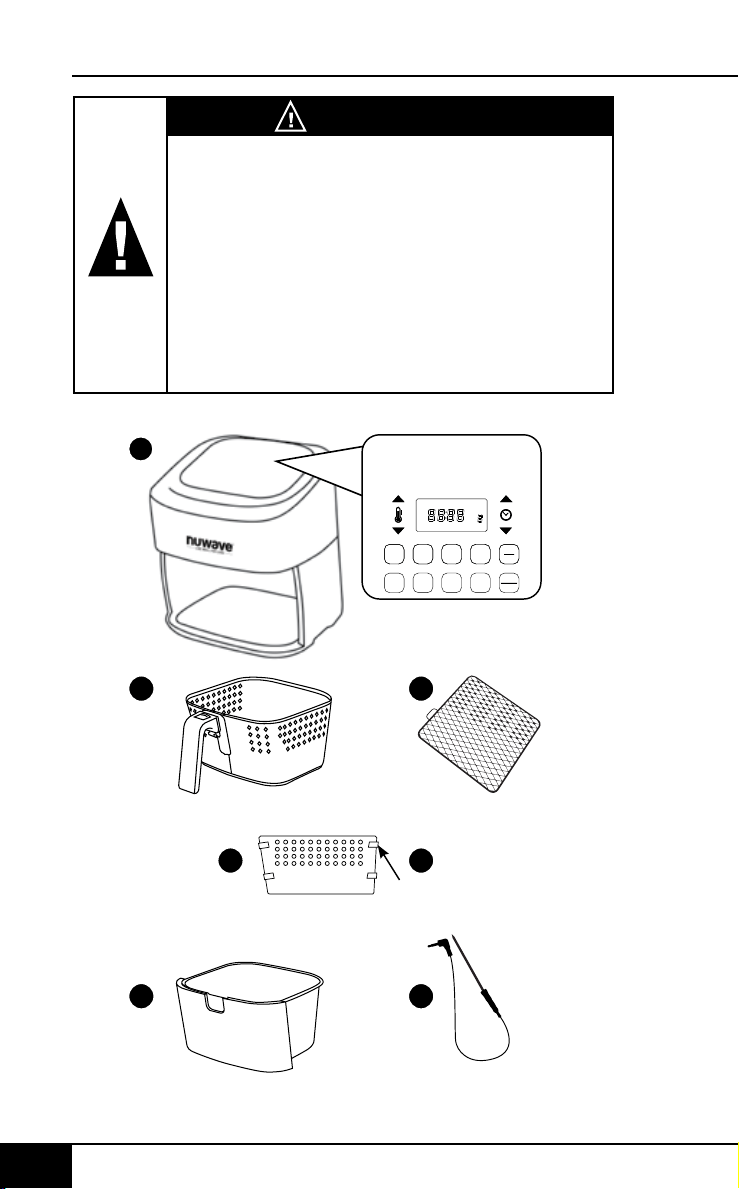
SPANISH
PARTES Y ACCESORIOS
Pestañas de Silicón
PARTES Y ACCESORIOS
partes y accesorios
4848
PRECAUCIÓN
• Siempre coloque los alimentos a cocinar
en la canastilla para evitar que entren en
contacto con los componentes de calor.
• No tape las ventilaciones mientras
esté funcionando.
• No vierta aceite en la cacerola o en la
canastilla, ya que podría generarse un riesgo
de incendio.
• Nunca toque el interior del aparato mientras
esté funcionando.
1
3
5
2
4a
4b
START
PAUSE
WATTS
STAGEGRILL
PROG WARM
sear 1 2
1800
1500
900
pre ready probe grill stage
temp time prog open
warm
PROBE
SEAR
1. Bacon (4 oz)
2. Bake (8 oz) Use Baking Pan
3. Baked Eggs (2 oz)
4. Baked Potato (32 oz)
5. Chicken Breast (8 oz) Flip Halfway
6. Chicken Thighs (8 oz) Flip Halfway
7. Dehydrate (8 oz)
8. Dessert (8 oz)
9. Fish (6 oz) Flip Halfway
10. Fries, Fresh (16 oz) Shake Halfway
11. Fries, Frozen (16 oz) Shake Halfway
12. Frozen Food (16 oz) Flip/Shake Halfway
13. Pork (16 oz)
14. Reheat (8 oz)
15. Roast (32 oz)
16. Shrimp (8 oz)
17. Steak (8 oz) Flip Halfway
18. Sweet Potato (32 oz)
19. Toast / Bagel (4 slices / 4 oz)
20. Vegetables (8 oz)
date name doc#
05-19-20 6Q Control Panel 02
all text and lines - pantone metallic 877C
LED Display - BLUE
PRE
HEAT
ON
OFF
6
Base de Potencia de
la Freidora de Aire
Parte #: 37210
Canastilla
Parte #: 37202
Malla de la Canastilla
Parte #: 37204
Divisor de la
Canastilla
Parte #: 37205
4 Pestañas de Silicón
Parte #: 37207
Bandeja de la Base
Parte #: 37201
Sensor
Parte #: 36261
1
2
3
4a
4b
5
6
nuwavenow.com
49
nuwavenow.com
49
Montaje de la Brio
PRECAUCIÓN: NO utilice
la Brio sin la Bandeja
de la Base o la Cesta
con la Malla. NO toque
el interior de la Bandeja
de la Base, la Cesta ni
la Malla inmediatamente
después de cocinar. Las
partes estarán calientes.
Solamente sostenga la
Bandeja de la Base y la
Cesta por el mango.
Retirar la Bandeja de la
Base y la Cesta para Freír
1. Utilizando el mango,
jale y deslice hacia
afuera la Bandeja de la
Base y la Cesta con la
Malla. (Vea Fig. 1.)
GUÍA DE MONTAJE
2. Para quitar la Cesta
para Freír de la
Bandeja de la Base,
mientras sostiene por
el mango, presione el
botón de desmontaje
hacia adelante y
levante la Cesta para
Freír de la Bandeja de
la Base. (Vea Fig. 2.) Al
cocinar, esto reducirá
el peso extra de la
Bandeja de la Base y
hará más fácil verter o
agitar alimentos más
pequeños.
Cesta
para Freír
Botón de
Desmontaje
Bandeja de la Base
1
Malla de la Cesta
2
Freidora
de Aire
Cesta para
Freír
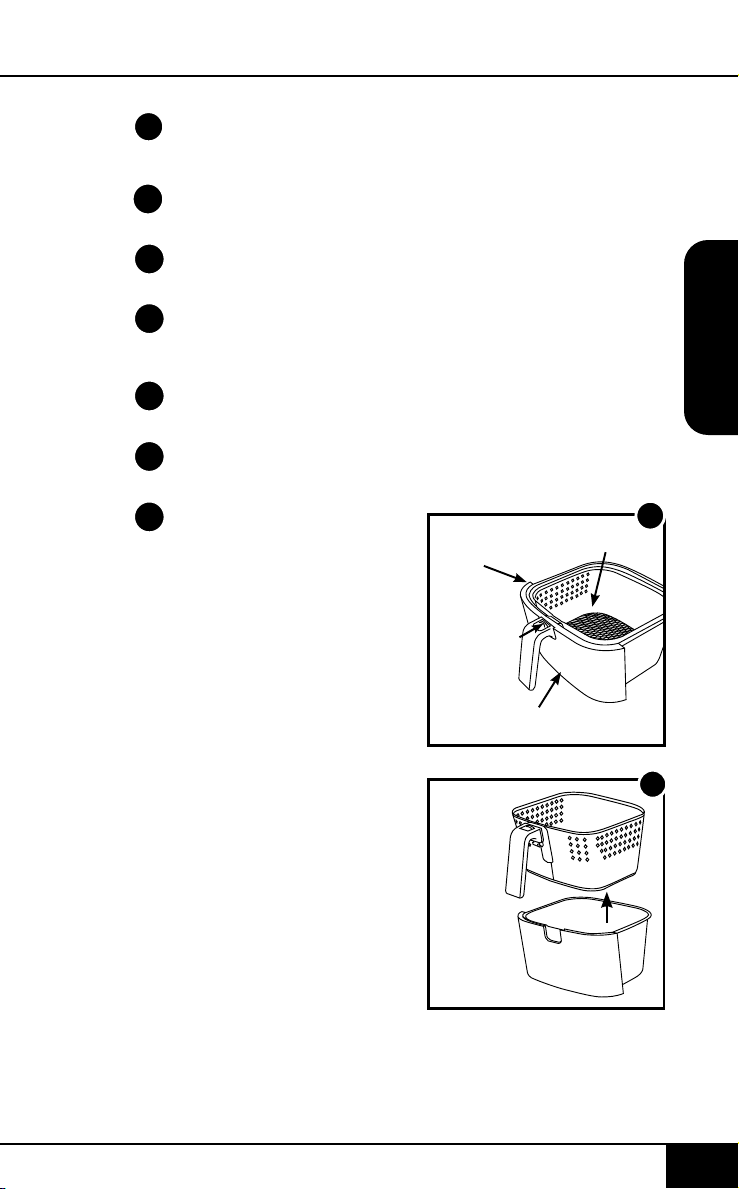
SPANISH
PARTES Y ACCESORIOS
Pestañas de Silicón
PARTES Y ACCESORIOS
partes y accesorios
4848
PRECAUCIÓN
• Siempre coloque los alimentos a cocinar
en la canastilla para evitar que entren en
contacto con los componentes de calor.
• No tape las ventilaciones mientras
esté funcionando.
• No vierta aceite en la cacerola o en la
canastilla, ya que podría generarse un riesgo
de incendio.
• Nunca toque el interior del aparato mientras
esté funcionando.
1
3
5
2
4a
4b
START
PAUSE
WATTS
STAGEGRILL
PROG WARM
sear 1 2
1800
1500
900
pre ready probe grill stage
temp time prog open
warm
PROBE
SEAR
1. Bacon (4 oz)
2. Bake (8 oz) Use Baking Pan
3. Baked Eggs (2 oz)
4. Baked Potato (32 oz)
5. Chicken Breast (8 oz) Flip Halfway
6. Chicken Thighs (8 oz) Flip Halfway
7. Dehydrate (8 oz)
8. Dessert (8 oz)
9. Fish (6 oz) Flip Halfway
10. Fries, Fresh (16 oz) Shake Halfway
11. Fries, Frozen (16 oz) Shake Halfway
12. Frozen Food (16 oz) Flip/Shake Halfway
13. Pork (16 oz)
14. Reheat (8 oz)
15. Roast (32 oz)
16. Shrimp (8 oz)
17. Steak (8 oz) Flip Halfway
18. Sweet Potato (32 oz)
19. Toast / Bagel (4 slices / 4 oz)
20. Vegetables (8 oz)
date name doc#
05-19-20 6Q Control Panel 02
all text and lines - pantone metallic 877C
LED Display - BLUE
PRE
HEAT
ON
OFF
6
Base de Potencia de
la Freidora de Aire
Parte #: 37210
Canastilla
Parte #: 37202
Malla de la Canastilla
Parte #: 37204
Divisor de la
Canastilla
Parte #: 37205
4 Pestañas de Silicón
Parte #: 37207
Bandeja de la Base
Parte #: 37201
Sensor
Parte #: 36261
1
2
3
4a
4b
5
6
nuwavenow.com
49
nuwavenow.com
49
Montaje de la Brio
PRECAUCIÓN: NO utilice
la Brio sin la Bandeja
de la Base o la Cesta
con la Malla. NO toque
el interior de la Bandeja
de la Base, la Cesta ni
la Malla inmediatamente
después de cocinar. Las
partes estarán calientes.
Solamente sostenga la
Bandeja de la Base y la
Cesta por el mango.
Retirar la Bandeja de la
Base y la Cesta para Freír
1. Utilizando el mango,
jale y deslice hacia
afuera la Bandeja de la
Base y la Cesta con la
Malla. (Vea Fig. 1.)
GUÍA DE MONTAJE
2. Para quitar la Cesta
para Freír de la
Bandeja de la Base,
mientras sostiene por
el mango, presione el
botón de desmontaje
hacia adelante y
levante la Cesta para
Freír de la Bandeja de
la Base. (Vea Fig. 2.) Al
cocinar, esto reducirá
el peso extra de la
Bandeja de la Base y
hará más fácil verter o
agitar alimentos más
pequeños.
Cesta
para Freír
Botón de
Desmontaje
Bandeja de la Base
1
Malla de la Cesta
2
Freidora
de Aire
Cesta para
Freír
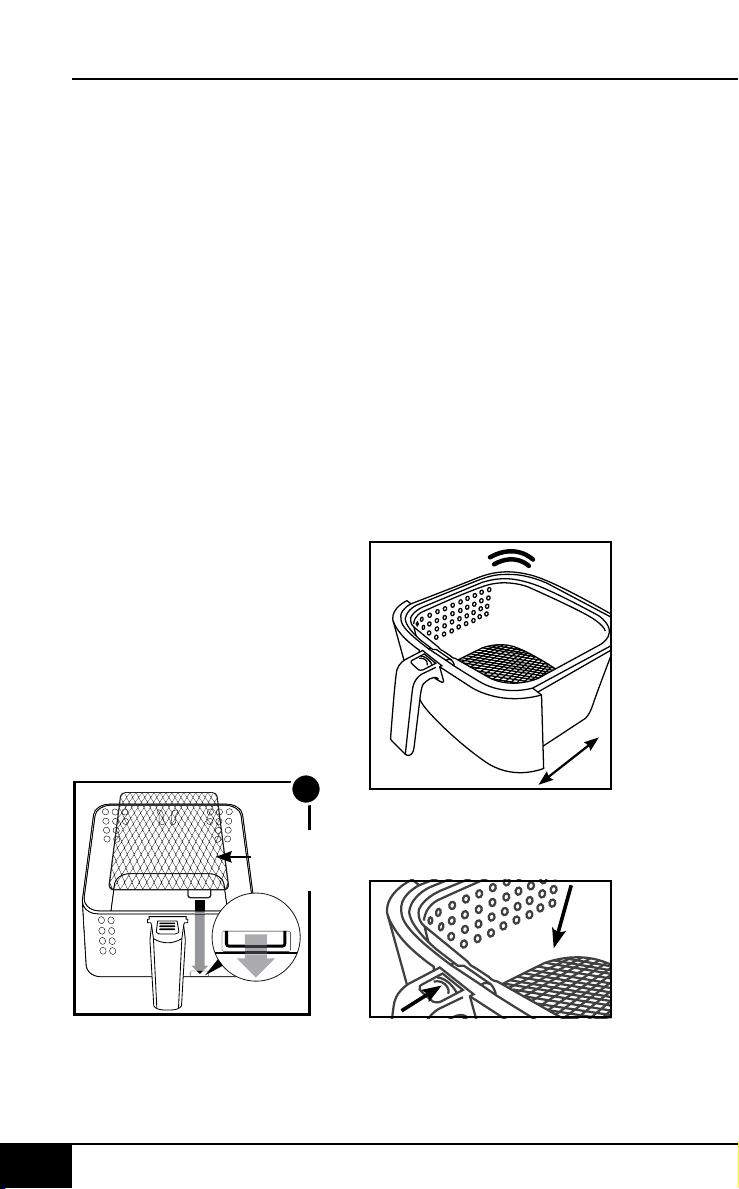
SPANISH
GUÍA DE MONTAJE
3
Lengüeta
de la Malla
de la Cesta
Lengüeta
GUÍA DE MONTAJE
NO PRESIONE EL BOTÓN
DE DESMONTAJE
MIENTRAS AGITA.
XX
Mover los Alimentos
Algunos alimentos
requieren agitarse a la
mitad de la cocción. Para
agitar adecuadamente los
alimentos, sostenga el asa,
retire la Bandeja de la Base
con la cesta de sartén del
aparato y agite. Una vez
que la comida se haya
agitado adecuadamente,
deslice la bandeja de la
base con la canastilla de
nuevo en la Brio.
Nota: Para mejores
resultados al cocinar, no
llene a más de
4
⁄
5
.
guía de montaje
5050
Retirar la Malla de la
Cesta para Freír:
1. Después de retirar la
Cesta para Freír de la
Bandeja de la Base,
voltee la Cesta boca
abajo.
2. Utilizando guantes
para horno, presione
la parte de abajo de la
Malla de la Cesta hasta
que salga de ella.
Montaje de la Malla de la
Cesta
para Freír
1. Coloque la lengüeta de
la Malla en la ranura
de la Cesta para Freír
(Vea Fig. 3.)
2. Presione el otro
extremo de la Malla
de la Cesta hasta que
entre en su lugar y
quede de forma plana
dentro de la Cesta.
nuwavenow.com
51
nuwavenow.com
51
Pestañas de Silicón
Usando el divisor de la
Canastilla
Figura 1.
Asegúrese de que las 4
pestañas de silicón estén
colocadas en las pestañas
divisorias.
Figura 2.
Mirando hacia abajo en la
canastilla, deslice el divisor
hacia abajo en el centro de
la canastilla.
Asegúrese de que el divisor
se encuentre entre los dos
aros y los tornillos de la
1
2
cesta. Para quitar el divisor,
simplemente deslice
el divisor hacia arriba.
(Precaución: el divisor
estará caliente al cocinar.
Use guantes para horno).
Las pestañas de silicón
se pueden quitar del
divisor antes de limpiar.
(Precaución: las pestañas
de silicona pueden estar
calientes.)
INSTRUCCIONES
Botones de Función
ON/OFF: El botón ON/
OFF enciende y apaga la
unidad y detiene todas las
funciones de cocción.
Cambiar de Fahrenheit a
Celsius
Presione la tecla de
echa TEMP + SEAR
para cambiar el formato
de temperatura de °F
(predeterminado) a °C
(centígrado). Presione la
tecla de echa TEMP +
SEAR nuevamente para
cambiar de °C (centígrado)
a °F (Fahrenheit). Los
incrementos de grados
para ° F y ° C se realizarán
en incrementos de 1 ° y se
ajustan con los botones [↑]
y [↓].
START/PAUSE: Cuando
se presiona el botón
START/PAUSE, la unidad
inicia o hace una pausa
en la cocción. El botón
START/PAUSE también se
usa para silenciar y activar
el sonido de los pitidos del
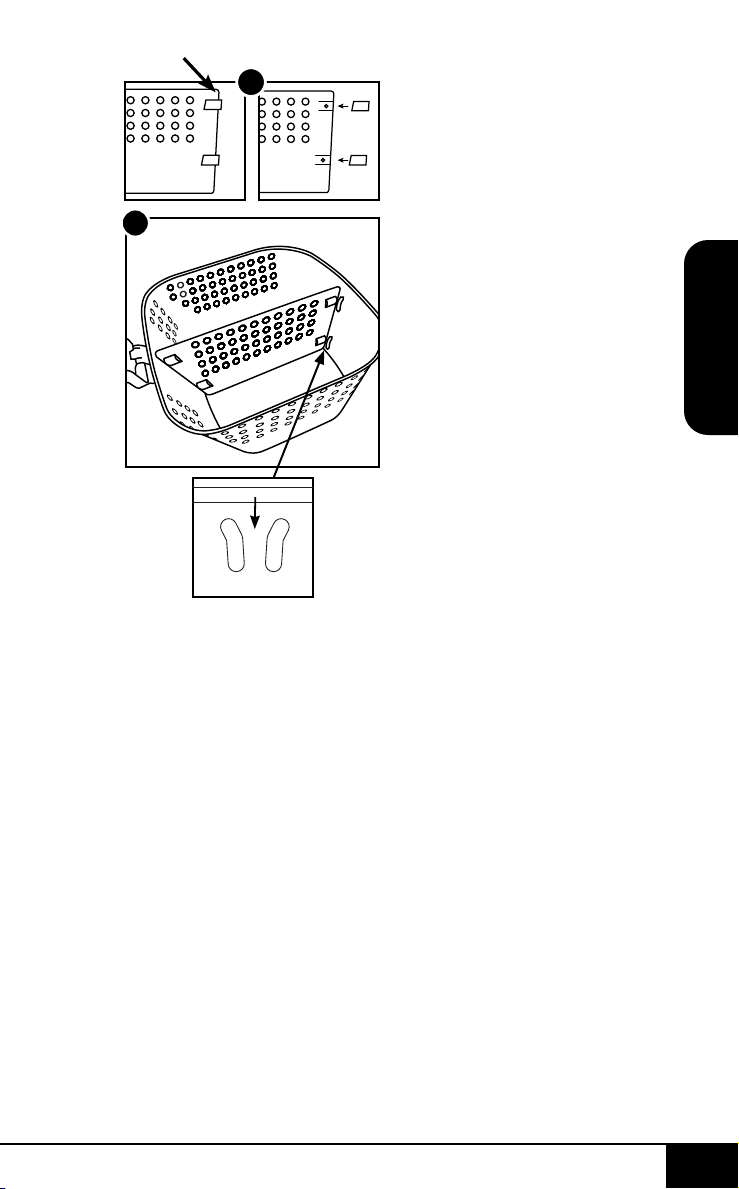
SPANISH
GUÍA DE MONTAJE
3
Lengüeta
de la Malla
de la Cesta
Lengüeta
GUÍA DE MONTAJE
NO PRESIONE EL BOTÓN
DE DESMONTAJE
MIENTRAS AGITA.
XX
Mover los Alimentos
Algunos alimentos
requieren agitarse a la
mitad de la cocción. Para
agitar adecuadamente los
alimentos, sostenga el asa,
retire la Bandeja de la Base
con la cesta de sartén del
aparato y agite. Una vez
que la comida se haya
agitado adecuadamente,
deslice la bandeja de la
base con la canastilla de
nuevo en la Brio.
Nota: Para mejores
resultados al cocinar, no
llene a más de
4
⁄
5
.
guía de montaje
5050
Retirar la Malla de la
Cesta para Freír:
1. Después de retirar la
Cesta para Freír de la
Bandeja de la Base,
voltee la Cesta boca
abajo.
2. Utilizando guantes
para horno, presione
la parte de abajo de la
Malla de la Cesta hasta
que salga de ella.
Montaje de la Malla de la
Cesta
para Freír
1. Coloque la lengüeta de
la Malla en la ranura
de la Cesta para Freír
(Vea Fig. 3.)
2. Presione el otro
extremo de la Malla
de la Cesta hasta que
entre en su lugar y
quede de forma plana
dentro de la Cesta.
nuwavenow.com
51
nuwavenow.com
51
Pestañas de Silicón
Usando el divisor de la
Canastilla
Figura 1.
Asegúrese de que las 4
pestañas de silicón estén
colocadas en las pestañas
divisorias.
Figura 2.
Mirando hacia abajo en la
canastilla, deslice el divisor
hacia abajo en el centro de
la canastilla.
Asegúrese de que el divisor
se encuentre entre los dos
aros y los tornillos de la
1
2
cesta. Para quitar el divisor,
simplemente deslice
el divisor hacia arriba.
(Precaución: el divisor
estará caliente al cocinar.
Use guantes para horno).
Las pestañas de silicón
se pueden quitar del
divisor antes de limpiar.
(Precaución: las pestañas
de silicona pueden estar
calientes.)
INSTRUCCIONES
Botones de Función
ON/OFF: El botón ON/
OFF enciende y apaga la
unidad y detiene todas las
funciones de cocción.
Cambiar de Fahrenheit a
Celsius
Presione la tecla de
echa TEMP + SEAR
para cambiar el formato
de temperatura de °F
(predeterminado) a °C
(centígrado). Presione la
tecla de echa TEMP +
SEAR nuevamente para
cambiar de °C (centígrado)
a °F (Fahrenheit). Los
incrementos de grados
para ° F y ° C se realizarán
en incrementos de 1 ° y se
ajustan con los botones [↑]
y [↓].
START/PAUSE: Cuando
se presiona el botón
START/PAUSE, la unidad
inicia o hace una pausa
en la cocción. El botón
START/PAUSE también se
usa para silenciar y activar
el sonido de los pitidos del

SPANISH
INSTRUCCIONESINSTRUCCIONES
instrucciones
5252
Brio para una operación
silenciosa, si así lo desea.
Botones [↑] y [↓]: Use los
botones de echa para
ajustar las temperaturas y
los tiempos.
WATTS: La unidad viene
con tres (3) ajustes de
vataje (900, 1500 y 1800).
Presione el botón WATTS
para cambiar la potencia
en funcionamiento que
utilizará la unidad. Cuando
la unidad se apague y/o
desenchufe, la unidad
funcionará con el vataje
que se usó anteriormente
al volverla a enchufar y
encender.
GRILL: Presione GRILL,
elija entre 9 niveles
de cocción. El nivel 4
es el predeterminado.
Presione los botones [↑]
y [↓] (Temp o Time) para
elejir los niveles. Cada
nivel determina el nivel
de cocción; consulte
la sección GRILL en
INSTRUCCIONES para
ver el cuadro detallado.
Después de seleccionar el
nivel de cocción, presione
START/PAUSE para
comenzar a asar.
Para asar a la parrilla con
El Sensor Digital, vea
la sección de GRILL en
INSTRUCCIONES.
STAGE: Use el botón
STAGE congurado para
hasta cinco (5) parámetros
de cocción diferentes. Las
temperaturas y tiempos de
cocción se pueden ajustar
para cada etapa de cocción
usando los botones TEMP y
TIME y los botones [↑] y [↓].
PREHEAT: Use el botón
PREHEAT para precalentar
la unidad antes de cocinar.
Use los botones [↑] y [↓]
para ajustar la temperatura
antes o durante el
precalentamiento. Para
cancelar la función de
precalentamiento, presione
el botón PREHEAT en
cualquier momento.
SEAR: El botón SEAR se
utiliza para cocinar a alta
temperatura durante un
corto período de tiempo.
Use el botón SEAR para
"sellar" los alimentos
directamente antes y/o
después del ciclo de
cocción regular. Use los
botones [↑] y [↓] para
ajustar la temperatura y
tiempo (hasta 15 minutos)
antes o durante el ciclo de
sellado.
WARM: Utilice el botón
caliente para mantener su
comida caliente después
de cocinar o cuando
simplemente quiera
mantener algo caliente
durante un gran periodo de
tiempo. Utilice los botones
[↑] y [↓] para ajustar el
tiempo y temperatura
nuwavenow.com
53
nuwavenow.com
53
para mantener caliente.
Presione el botón WARM
para cancelar el ciclo de
mantener caliente.
PROGRAM: La unidad
viene con 100 recetas de
cocina preprogramadas
junto con 50 ranuras de
memoria adicionales
para agregar sus propias
recetas únicas a su gusto.
Use el botón PROGRAM
para encontrar o guardar
recetas programadas.
PROBE: Use el botón
PROBE para congurar
la temperatura objetivo
de la sonda digital de
temperatura, así como
para ver la temperatura
interna de los alimentos
durante la cocción. Use
los botones [↑] y [↓] para
ajustar la temperatura
objetivo de la sonda digital
de temperatura.
Orden de Secuencia de
Cocción:
1. Preheat
2. Sear 1
3. Stage 1~5 / Program /
Probe
4. Sear 2
5. Warm
USOS DE LAS
FUNCIONES
Enchufe el cable de
alimentación a una toma de
corriente. Presione el botón
ON/OFF para encender la
unidad. La pantalla LED
mostrará 350F (177C) y
TEMP.
ON/OFF
1. Presione el botón
ON/OFF para
encender y apagar
la unidad. Una vez
encendida, la pantalla
LED mostrará la
temperatura de cocción
predeterminada (350F
(177C)) y la palabra
temp.
2. La temperatura se
puede ajustar hacia
arriba o hacia abajo
usando los botones [↑]
y [↓] arriba y debajo del
ícono de temperatura.
3. El tiempo de cocción
predeterminado es
de 15 minutos. Para
ajustar el tiempo
de cocción, pulse
los botones [↑] y [↓]
encima y debajo del
icono de tiempo.
4. Presione el botón
de START/PAUSE
paracomenzar a
cocinar.
Nota: Antes de congurar
cualquier otra función
de cocción, congure la
temperatura y el tiempo
de cocción de la etapa
1 normal. La cocción
por etapas se explica en
la sección ETAPAS de
estas Instrucciones de
Funcionamiento.

SPANISH
INSTRUCCIONESINSTRUCCIONES
instrucciones
5252
Brio para una operación
silenciosa, si así lo desea.
Botones [↑] y [↓]: Use los
botones de echa para
ajustar las temperaturas y
los tiempos.
WATTS: La unidad viene
con tres (3) ajustes de
vataje (900, 1500 y 1800).
Presione el botón WATTS
para cambiar la potencia
en funcionamiento que
utilizará la unidad. Cuando
la unidad se apague y/o
desenchufe, la unidad
funcionará con el vataje
que se usó anteriormente
al volverla a enchufar y
encender.
GRILL: Presione GRILL,
elija entre 9 niveles
de cocción. El nivel 4
es el predeterminado.
Presione los botones [↑]
y [↓] (Temp o Time) para
elejir los niveles. Cada
nivel determina el nivel
de cocción; consulte
la sección GRILL en
INSTRUCCIONES para
ver el cuadro detallado.
Después de seleccionar el
nivel de cocción, presione
START/PAUSE para
comenzar a asar.
Para asar a la parrilla con
El Sensor Digital, vea
la sección de GRILL en
INSTRUCCIONES.
STAGE: Use el botón
STAGE congurado para
hasta cinco (5) parámetros
de cocción diferentes. Las
temperaturas y tiempos de
cocción se pueden ajustar
para cada etapa de cocción
usando los botones TEMP y
TIME y los botones [↑] y [↓].
PREHEAT: Use el botón
PREHEAT para precalentar
la unidad antes de cocinar.
Use los botones [↑] y [↓]
para ajustar la temperatura
antes o durante el
precalentamiento. Para
cancelar la función de
precalentamiento, presione
el botón PREHEAT en
cualquier momento.
SEAR: El botón SEAR se
utiliza para cocinar a alta
temperatura durante un
corto período de tiempo.
Use el botón SEAR para
"sellar" los alimentos
directamente antes y/o
después del ciclo de
cocción regular. Use los
botones [↑] y [↓] para
ajustar la temperatura y
tiempo (hasta 15 minutos)
antes o durante el ciclo de
sellado.
WARM: Utilice el botón
caliente para mantener su
comida caliente después
de cocinar o cuando
simplemente quiera
mantener algo caliente
durante un gran periodo de
tiempo. Utilice los botones
[↑] y [↓] para ajustar el
tiempo y temperatura
nuwavenow.com
53
nuwavenow.com
53
para mantener caliente.
Presione el botón WARM
para cancelar el ciclo de
mantener caliente.
PROGRAM: La unidad
viene con 100 recetas de
cocina preprogramadas
junto con 50 ranuras de
memoria adicionales
para agregar sus propias
recetas únicas a su gusto.
Use el botón PROGRAM
para encontrar o guardar
recetas programadas.
PROBE: Use el botón
PROBE para congurar
la temperatura objetivo
de la sonda digital de
temperatura, así como
para ver la temperatura
interna de los alimentos
durante la cocción. Use
los botones [↑] y [↓] para
ajustar la temperatura
objetivo de la sonda digital
de temperatura.
Orden de Secuencia de
Cocción:
1. Preheat
2. Sear 1
3. Stage 1~5 / Program /
Probe
4. Sear 2
5. Warm
USOS DE LAS
FUNCIONES
Enchufe el cable de
alimentación a una toma de
corriente. Presione el botón
ON/OFF para encender la
unidad. La pantalla LED
mostrará 350F (177C) y
TEMP.
ON/OFF
1. Presione el botón
ON/OFF para
encender y apagar
la unidad. Una vez
encendida, la pantalla
LED mostrará la
temperatura de cocción
predeterminada (350F
(177C)) y la palabra
temp.
2. La temperatura se
puede ajustar hacia
arriba o hacia abajo
usando los botones [↑]
y [↓] arriba y debajo del
ícono de temperatura.
3. El tiempo de cocción
predeterminado es
de 15 minutos. Para
ajustar el tiempo
de cocción, pulse
los botones [↑] y [↓]
encima y debajo del
icono de tiempo.
4. Presione el botón
de START/PAUSE
paracomenzar a
cocinar.
Nota: Antes de congurar
cualquier otra función
de cocción, congure la
temperatura y el tiempo
de cocción de la etapa
1 normal. La cocción
por etapas se explica en
la sección ETAPAS de
estas Instrucciones de
Funcionamiento.

SPANISH
INSTRUCCIONES
instrucciones
5454
START/PAUSE
1. Presione el botón de
START/PAUSE para
comenzar a cocinar. ":"
parpadeará indicando
que la unidad
está cocinando.
2. Para hacer una pausa
en la cocción, presione
el botón de START/
PAUSE o simplemente
retire la cesta con la
bandeja de la base.
":" ya no parpadeará,
lo que indica que la
unidad está ahora en
pausa y la pantalla
LED se mostrará
abierta.
3. Para dejar de hacer
una pausa y volver
a cocinar, deslice la
Cesta de Fry Pan con
la Bandeja de Base de
nuevo en el Brio.
4. Una vez que la unidad
termine de cocinar, la
pantalla LED mostrará
End con tres (3)
pitidos.
5. El botón SEAR +
STAGE también se
usa para silenciar y
activar el sonido de los
pitidos. Para silenciar
los pitidos, mantenga
presionado el botón
SEAR + STAGE
durante dos segundos.
El Brio permanecerá en
silencio hasta que se
desactive, presionando
nuevamente el botón
START/PAUSE (inicio
/ pausa) durante dos
segundos o apagando
el Brio.
Con Probe Sin Probe
1. 110°F (43) (Rara) 400°F (204°C) - 5 min. (Rara)
2. 120°F (48) (Media-Rara) 400°F (204°C) - 7 min. (Media-Rara)
3. 130°F (54) ) (Media-Rara-Mas) 400°F (204°C) - 8 min. (Media-Rara-Mas)
4. 135°F (57) (Medio Cocido) 400°F (204°C) - 9 min (Medio Cocido)
5. 140°F (60) (Medio-Mas y Pez) 400°F (204°C) - 10 min (Medio-Mas y Pez)
6. 145°F (62) (Medio-Bien y Cerdo) 400°F (204°C) - 11 min (Medio-Bien y Cerdo)
7. 155°F 68°C) (Al Punto) 400°F (204°C) - 12 min (Al Punto)
8. 165°F 74°C) (Aves de corral) 400°F (204°C) - 13 min (Aves de corral)
9. 170°F 77°C) (Aves de corral bien
hecho)
400°F (204°C) - 15 min (Aves de corral bien
hecho)
GRILL: Asa tus comidas favoritas. Brio precalentará a 400° F
(204°C) de forma predeterminada.
nuwavenow.com
55
nuwavenow.com
55
TEMP
1. Para establecer una
temperatura de cocción
diferente, presione los
botones [↑] y [↓] encima
y debajo del icono de
temperatura. El panel
de control mostrará
350F (177C) y temp.
• La temperatura
se ajustará en
incrementos de 5
grados entre 50° F y
400˚F (10˚C-204˚C).
2. Para ajustar
rápidamente la
temperatura, mantenga
presionadas las echas
hasta alcanzar la
temperatura de cocción
deseada.
Nota: La temperatura de
cocción se puede ajustar
en cualquier momento
GRILL
El boton de GRILL tiene
2 opciones para cocinar,
con y sin El Sensor
Digital. Hay 9 niveles de
parrilla, consulte la tabla
anterior para conocer las
temperaturas y los tiempos.
Para Asar:
1. Conecte El Sensor
Digital al Brio.
2. Presione GRILL.
a) Esto congura el
Brio para cocinar un
bistec mediano a 400° F
(204C) y el nivel "4" es el
predeterminado.
i. Ajuste el nivel de la
parrilla (1-9) con los
botones [↑] y [↓] de Temp o
Time.
b) Presione y sostenga
PROBE hasta que escuche
un pitido.
i. La pantalla mostrará
"Probe" y "135F (57)" (la
temperatura de El Sensor
Digital).
ii. Ajuste la temperatura con
os botones [↑] y [↓] de Temp
o Time. si es necesario
iii) Consulte la guía de
cocción anterior para
conocer los tiempos y
temperaturas que cubren
diferentes alimentos y
niveles de cocción.
3. Presione START/
PAUSE.
a) La unidad
se precalentará
automáticamente a la
temperatura de asado.
i. La unidad dará una
cuenta regresiva de 5
minutos.
4. Inserte comida.
5. Inserte El Sensor
Digital en el alimento.
6. Presione START/
PAUSE para comenzar
a asar.
Nota: Para asar sin
El Sensor Digital,
simplemente elimine
"b" en el paso 2. Luego
se cocinará con la
temperatura deseada.

SPANISH
INSTRUCCIONES
instrucciones
5454
START/PAUSE
1. Presione el botón de
START/PAUSE para
comenzar a cocinar. ":"
parpadeará indicando
que la unidad
está cocinando.
2. Para hacer una pausa
en la cocción, presione
el botón de START/
PAUSE o simplemente
retire la cesta con la
bandeja de la base.
":" ya no parpadeará,
lo que indica que la
unidad está ahora en
pausa y la pantalla
LED se mostrará
abierta.
3. Para dejar de hacer
una pausa y volver
a cocinar, deslice la
Cesta de Fry Pan con
la Bandeja de Base de
nuevo en el Brio.
4. Una vez que la unidad
termine de cocinar, la
pantalla LED mostrará
End con tres (3)
pitidos.
5. El botón SEAR +
STAGE también se
usa para silenciar y
activar el sonido de los
pitidos. Para silenciar
los pitidos, mantenga
presionado el botón
SEAR + STAGE
durante dos segundos.
El Brio permanecerá en
silencio hasta que se
desactive, presionando
nuevamente el botón
START/PAUSE (inicio
/ pausa) durante dos
segundos o apagando
el Brio.
Con Probe Sin Probe
1. 110°F (43) (Rara) 400°F (204°C) - 5 min. (Rara)
2. 120°F (48) (Media-Rara) 400°F (204°C) - 7 min. (Media-Rara)
3. 130°F (54) ) (Media-Rara-Mas) 400°F (204°C) - 8 min. (Media-Rara-Mas)
4. 135°F (57) (Medio Cocido) 400°F (204°C) - 9 min (Medio Cocido)
5. 140°F (60) (Medio-Mas y Pez) 400°F (204°C) - 10 min (Medio-Mas y Pez)
6. 145°F (62) (Medio-Bien y Cerdo) 400°F (204°C) - 11 min (Medio-Bien y Cerdo)
7. 155°F 68°C) (Al Punto) 400°F (204°C) - 12 min (Al Punto)
8. 165°F 74°C) (Aves de corral) 400°F (204°C) - 13 min (Aves de corral)
9. 170°F 77°C) (Aves de corral bien
hecho)
400°F (204°C) - 15 min (Aves de corral bien
hecho)
GRILL: Asa tus comidas favoritas. Brio precalentará a 400° F
(204°C) de forma predeterminada.
nuwavenow.com
55
nuwavenow.com
55
TEMP
1. Para establecer una
temperatura de cocción
diferente, presione los
botones [↑] y [↓] encima
y debajo del icono de
temperatura. El panel
de control mostrará
350F (177C) y temp.
• La temperatura
se ajustará en
incrementos de 5
grados entre 50° F y
400˚F (10˚C-204˚C).
2. Para ajustar
rápidamente la
temperatura, mantenga
presionadas las echas
hasta alcanzar la
temperatura de cocción
deseada.
Nota: La temperatura de
cocción se puede ajustar
en cualquier momento
GRILL
El boton de GRILL tiene
2 opciones para cocinar,
con y sin El Sensor
Digital. Hay 9 niveles de
parrilla, consulte la tabla
anterior para conocer las
temperaturas y los tiempos.
Para Asar:
1. Conecte El Sensor
Digital al Brio.
2. Presione GRILL.
a) Esto congura el
Brio para cocinar un
bistec mediano a 400° F
(204C) y el nivel "4" es el
predeterminado.
i. Ajuste el nivel de la
parrilla (1-9) con los
botones [↑] y [↓] de Temp o
Time.
b) Presione y sostenga
PROBE hasta que escuche
un pitido.
i. La pantalla mostrará
"Probe" y "135F (57)" (la
temperatura de El Sensor
Digital).
ii. Ajuste la temperatura con
os botones [↑] y [↓] de Temp
o Time. si es necesario
iii) Consulte la guía de
cocción anterior para
conocer los tiempos y
temperaturas que cubren
diferentes alimentos y
niveles de cocción.
3. Presione START/
PAUSE.
a) La unidad
se precalentará
automáticamente a la
temperatura de asado.
i. La unidad dará una
cuenta regresiva de 5
minutos.
4. Inserte comida.
5. Inserte El Sensor
Digital en el alimento.
6. Presione START/
PAUSE para comenzar
a asar.
Nota: Para asar sin
El Sensor Digital,
simplemente elimine
"b" en el paso 2. Luego
se cocinará con la
temperatura deseada.

nuwavenow.com
56 57
SPANISH
nuwavenow.com
INSTRUCCIONES
56 57
instrucciones
antes o durante el proceso
de cocción. Una vez que
la pantalla cambia a la
pantalla de temperatura,
permanecerá en la pantalla
de temperatura.
TIME
1. Para establecer un
tiempo de cocción
diferente, pulse la
tecla [↑] y [↓] encima
y debajo del icono de
tiempo. El panel de
control mostrará 00:15
y time.
• The time will adjust in
1-minute increments.
2. Para ajustar
rápidamente el tiempo,
mantenga presionadas
las echas hasta que
se alcance el tiempo de
cocción deseado.
• El tiempo máximo
de cocción
seleccionable varía
según la temperatura
de cocción
seleccionada.
• 50° F - 275° F (10°C
- 135°C), el tiempo
máximo de cocción
es de 00:00~99:59 (0
minutos - 99 horas;
59 minutos).
• 280° F - 345° F
(138°C - 177°C),
el tiempo máximo
de cocción es de
00:00~10:00 horas
(0 minutos -10:00
horas).
• 350° F - 400° F
(177°C - 204C),
el tiempo máximo
de cocción es de
00:00~01:00 hora (0
minutos -1 hora).
Nota: El tiempo de cocción
se puede ajustar en
cualquier momento antes
o durante el proceso de
cocción. El Brio emitirá un
pitido 3 veces a la mitad
del ciclo de cocción para
alertarlo de que retire la
canasta de la unidad, agite
los alimentos en la canasta
y luego vuelva a insertar la
canasta para terminar de
cocinar.
PREHEAT
La unidad precalentará
a la temperatura del
próximo ciclo de cocción.
Por ejemplo, si Sear 1 se
establece en 400F (204°C),
la unidad precalentará
a 400F (204°C). Si
no se usa Sear 1, la
unidad precalentará a la
temperatura de cocción
establecida.
1. Presione el botón
ON/OFF y ajuste la
temperatura y el tiempo
de cocción para la
etapa 1 de cocción.
2. Presione el botón
PREHEAT para
activar la función de
precalentamiento.
• La pantalla LED
mostrará cooking
temperature, pre, y
temp.
• La unidad SIEMPRE
precalentará a la
temperatura de
cocción del siguiente
ciclo de cocción.
3. Presione el botón
START/PAUSE
para comenzar el
precalentamiento.
• La unidad comenzará
a precalentar a
la temperatura
establecida.
• La pantalla LED
mostrará set
cooking/preheat
temperature
(parpadeando), pre
y temp.
• Durante el
precalentamiento,
la temperatura de
cocción se puede
ajustar utilizando
los botones [↑]
y [↓] encima y
debajo del icono de
temperatura.
• El tiempo de cocción
también se puede
ajustar presionando
los botones [↑] y [↓]
arriba y debajo del
ícono de tiempo.
4. Cuando la unidad
alcance la temperatura
de precalentamiento,
entrará en una
retención de cinco
(5) minutos. La
unidad mantendrá
la temperatura de
precalentamiento
durante esta retención
de cinco (5) minutos.
• Durante esos
cinco (5) minutos
la pantalla LED
mostrará 5
(intermitente), ready
y time y sonará una
(1) vez.
• Si no se realiza
ninguna acción
en los cinco (5)
minutos de espera,
la unidad pasará
automáticamente al
modo de espera.
5. Coloque su comida
en la unidad, deslice
la canastilla con la
bandeja de la base
hacia atrás en el Brio.
La unidad comenzará
a cocinar a la
temperatura y el tiempo
establecidos.
6. El ciclo de
precalentamiento se
puede cancelar en
cualquier momento
presionando el botón
PREHEAT. La unidad
nalizará el ciclo de
precalentamiento
y pasará
automáticamente al
siguiente ciclo de
cocción.
7. Cuando la unidad
haya terminado de
cocinar, la pantalla LED
mostrará End y emitirá
tres (3) pitidos.

nuwavenow.com
56 57
SPANISH
nuwavenow.com
INSTRUCCIONES
56 57
instrucciones
antes o durante el proceso
de cocción. Una vez que
la pantalla cambia a la
pantalla de temperatura,
permanecerá en la pantalla
de temperatura.
TIME
1. Para establecer un
tiempo de cocción
diferente, pulse la
tecla [↑] y [↓] encima
y debajo del icono de
tiempo. El panel de
control mostrará 00:15
y time.
• The time will adjust in
1-minute increments.
2. Para ajustar
rápidamente el tiempo,
mantenga presionadas
las echas hasta que
se alcance el tiempo de
cocción deseado.
• El tiempo máximo
de cocción
seleccionable varía
según la temperatura
de cocción
seleccionada.
• 50° F - 275° F (10°C
- 135°C), el tiempo
máximo de cocción
es de 00:00~99:59 (0
minutos - 99 horas;
59 minutos).
• 280° F - 345° F
(138°C - 177°C),
el tiempo máximo
de cocción es de
00:00~10:00 horas
(0 minutos -10:00
horas).
• 350° F - 400° F
(177°C - 204C),
el tiempo máximo
de cocción es de
00:00~01:00 hora (0
minutos -1 hora).
Nota: El tiempo de cocción
se puede ajustar en
cualquier momento antes
o durante el proceso de
cocción. El Brio emitirá un
pitido 3 veces a la mitad
del ciclo de cocción para
alertarlo de que retire la
canasta de la unidad, agite
los alimentos en la canasta
y luego vuelva a insertar la
canasta para terminar de
cocinar.
PREHEAT
La unidad precalentará
a la temperatura del
próximo ciclo de cocción.
Por ejemplo, si Sear 1 se
establece en 400F (204°C),
la unidad precalentará
a 400F (204°C). Si
no se usa Sear 1, la
unidad precalentará a la
temperatura de cocción
establecida.
1. Presione el botón
ON/OFF y ajuste la
temperatura y el tiempo
de cocción para la
etapa 1 de cocción.
2. Presione el botón
PREHEAT para
activar la función de
precalentamiento.
• La pantalla LED
mostrará cooking
temperature, pre, y
temp.
• La unidad SIEMPRE
precalentará a la
temperatura de
cocción del siguiente
ciclo de cocción.
3. Presione el botón
START/PAUSE
para comenzar el
precalentamiento.
• La unidad comenzará
a precalentar a
la temperatura
establecida.
• La pantalla LED
mostrará set
cooking/preheat
temperature
(parpadeando), pre
y temp.
• Durante el
precalentamiento,
la temperatura de
cocción se puede
ajustar utilizando
los botones [↑]
y [↓] encima y
debajo del icono de
temperatura.
• El tiempo de cocción
también se puede
ajustar presionando
los botones [↑] y [↓]
arriba y debajo del
ícono de tiempo.
4. Cuando la unidad
alcance la temperatura
de precalentamiento,
entrará en una
retención de cinco
(5) minutos. La
unidad mantendrá
la temperatura de
precalentamiento
durante esta retención
de cinco (5) minutos.
• Durante esos
cinco (5) minutos
la pantalla LED
mostrará 5
(intermitente), ready
y time y sonará una
(1) vez.
• Si no se realiza
ninguna acción
en los cinco (5)
minutos de espera,
la unidad pasará
automáticamente al
modo de espera.
5. Coloque su comida
en la unidad, deslice
la canastilla con la
bandeja de la base
hacia atrás en el Brio.
La unidad comenzará
a cocinar a la
temperatura y el tiempo
establecidos.
6. El ciclo de
precalentamiento se
puede cancelar en
cualquier momento
presionando el botón
PREHEAT. La unidad
nalizará el ciclo de
precalentamiento
y pasará
automáticamente al
siguiente ciclo de
cocción.
7. Cuando la unidad
haya terminado de
cocinar, la pantalla LED
mostrará End y emitirá
tres (3) pitidos.

instrucciones
nuwavenow.com
58 59
SPANISH
nuwavenow.com
INSTRUCCIONES
58 59
el proceso de cocción.
La cocción de la Etapa
1 es la predeterminada
350F (177C) durante 15
minutos). La temperatura
y el tiempo se pueden
ajustar.
1. Presione el botón
ON/OFF. La pantalla
(182F) y temp. Esta
es la Etapa 1. Ajuste
la temperatura y el
tiempo de cocción
usando los botones [↑]
y [↓].
2. Para agregar etapas
adicionales, presione el
botón STAGE una (1)
vez. La pantalla LED
mostrará 350F (177C),
temp, stage y 2 (stage
arriba). Esta es la etapa
2 de cocción.
3. Ajuste la temperatura
y el tiempo de cocción
de la Etapa 2 usando
los botones [↑] y [↓].
4. Para establecer ajustes
adicionales de cocción
en la etapa, repita
los pasos 2 y 3. El
número de la etapa
anterior cambiará a
medida que continúe
presionando el botón
STAGE y congure
la temperatura y el
tiempo. Después de la
Etapa 5, si se presiona
nuevamente el botón
STAGE, volverá a la
Etapa 1. La pantalla
LED mostrará set
PRECALENTAMIENTO
AUTOMÁTICO
El Brio precalienta
automaticamente a 350F
(177F), la temperatura de
cocción predeterminada.
• Puede encender
o apagar el
precalentamiento
automático presionando
PROG + PREHEAT al
mismo tiempo.
• El rango de temperatura
es de 50°F - 400°F
(10°C-204°C).
• Una vez que
haya alcanzado
la temperatura de
cocción establecida,
Bravo realizará una
cuenta regresiva de 5
minutos al igual que
la función PREHEAT
(precalentamiento)
típica.
Nota: Cambiar la
temperatura de
precalentamiento cambiará
la temperatura de cocción
posterior.
STAGE
La cocción por etapas
se utiliza para cocinar
alimentos a diferentes
temperaturas y tiempos
durante todo el proceso
de cocción. Se pueden
congurar hasta cinco
(5) etapas de cocción.
Demora, Precalentar,
Sellar 1, Sellar 2 y
Mantener Caliente no se
consideran etapas en
cooking temperature,
temp, stage y 1 (arriba
stage).
5. Si solo desea dos (2)
etapas de cocción,
deje el tiempo a las
00:00 para las etapas
3 ~ 5 y esas etapas se
omitirán.
6. Presione el botón de
START/PAUSE para
comenzar a cocinar.
La unidad cocinará
con los parámetros
establecidos.
7. Cuando la unidad
haya terminado de
cocinar, la pantalla LED
mostrará End y emitirá
tres (3) pitidos.
8. El botón STAGE
también se usa para
desplazarse por la
función de cocción
que se ha congurado
para una receta en
particular. Presione
el botón STAGE, ya
sea antes o durante
la cocción, para ver y
editar cada función del
ciclo de cocción que
desee. Esto se explica
más adelante en este
manual.
Nota:
• La pantalla LED solo
indicará el número de
cocción de la etapa
cuando se utilicen
dos (2) o más etapas.
La pantalla LED no
mostrará el número
de etapa si solo se
utiliza una (1) etapa de
cocción.
• Predeterminado Etapa
1: 350F (177C), 00:15
• Etapa 2 ~ 5
predeterminado: 350F
(177C), 00:00
• Si no se establece un
tiempo para las etapas
2 ~ 5, esas etapas se
omitirán en el ciclo de
cocción.
Ejemplo:
• Use los botones [↑]
y [↓] hasta llegar al
número del programa,
como ejemplo
usaremos el # 114.
• Presione el botón
STAGE, la pantalla
LED mostrará el tiempo
de sear 1, Establecer
tiempo de búsqueda 1
y hora.
• Presione el botón
STAGE nuevamente, la
pantalla LED mostrará
el stage 1, establecerá
la hora y la hora de el
stage 1.
• Presione el botón
STAGE por tercera
vez, la pantalla LED
mostrará la stage 2,
establecerá la hora y la
hora de sear.
• Presione el botón
STAGE por cuarta
vez, la pantalla LED
mostrará warm,
establecerá el tiempo
de warm y el tiempo.

instrucciones
nuwavenow.com
58 59
SPANISH
nuwavenow.com
INSTRUCCIONES
58 59
el proceso de cocción.
La cocción de la Etapa
1 es la predeterminada
350F (177C) durante 15
minutos). La temperatura
y el tiempo se pueden
ajustar.
1. Presione el botón
ON/OFF. La pantalla
(182F) y temp. Esta
es la Etapa 1. Ajuste
la temperatura y el
tiempo de cocción
usando los botones [↑]
y [↓].
2. Para agregar etapas
adicionales, presione el
botón STAGE una (1)
vez. La pantalla LED
mostrará 350F (177C),
temp, stage y 2 (stage
arriba). Esta es la etapa
2 de cocción.
3. Ajuste la temperatura
y el tiempo de cocción
de la Etapa 2 usando
los botones [↑] y [↓].
4. Para establecer ajustes
adicionales de cocción
en la etapa, repita
los pasos 2 y 3. El
número de la etapa
anterior cambiará a
medida que continúe
presionando el botón
STAGE y congure
la temperatura y el
tiempo. Después de la
Etapa 5, si se presiona
nuevamente el botón
STAGE, volverá a la
Etapa 1. La pantalla
LED mostrará set
PRECALENTAMIENTO
AUTOMÁTICO
El Brio precalienta
automaticamente a 350F
(177F), la temperatura de
cocción predeterminada.
• Puede encender
o apagar el
precalentamiento
automático presionando
PROG + PREHEAT al
mismo tiempo.
• El rango de temperatura
es de 50°F - 400°F
(10°C-204°C).
• Una vez que
haya alcanzado
la temperatura de
cocción establecida,
Bravo realizará una
cuenta regresiva de 5
minutos al igual que
la función PREHEAT
(precalentamiento)
típica.
Nota: Cambiar la
temperatura de
precalentamiento cambiará
la temperatura de cocción
posterior.
STAGE
La cocción por etapas
se utiliza para cocinar
alimentos a diferentes
temperaturas y tiempos
durante todo el proceso
de cocción. Se pueden
congurar hasta cinco
(5) etapas de cocción.
Demora, Precalentar,
Sellar 1, Sellar 2 y
Mantener Caliente no se
consideran etapas en
cooking temperature,
temp, stage y 1 (arriba
stage).
5. Si solo desea dos (2)
etapas de cocción,
deje el tiempo a las
00:00 para las etapas
3 ~ 5 y esas etapas se
omitirán.
6. Presione el botón de
START/PAUSE para
comenzar a cocinar.
La unidad cocinará
con los parámetros
establecidos.
7. Cuando la unidad
haya terminado de
cocinar, la pantalla LED
mostrará End y emitirá
tres (3) pitidos.
8. El botón STAGE
también se usa para
desplazarse por la
función de cocción
que se ha congurado
para una receta en
particular. Presione
el botón STAGE, ya
sea antes o durante
la cocción, para ver y
editar cada función del
ciclo de cocción que
desee. Esto se explica
más adelante en este
manual.
Nota:
• La pantalla LED solo
indicará el número de
cocción de la etapa
cuando se utilicen
dos (2) o más etapas.
La pantalla LED no
mostrará el número
de etapa si solo se
utiliza una (1) etapa de
cocción.
• Predeterminado Etapa
1: 350F (177C), 00:15
• Etapa 2 ~ 5
predeterminado: 350F
(177C), 00:00
• Si no se establece un
tiempo para las etapas
2 ~ 5, esas etapas se
omitirán en el ciclo de
cocción.
Ejemplo:
• Use los botones [↑]
y [↓] hasta llegar al
número del programa,
como ejemplo
usaremos el # 114.
• Presione el botón
STAGE, la pantalla
LED mostrará el tiempo
de sear 1, Establecer
tiempo de búsqueda 1
y hora.
• Presione el botón
STAGE nuevamente, la
pantalla LED mostrará
el stage 1, establecerá
la hora y la hora de el
stage 1.
• Presione el botón
STAGE por tercera
vez, la pantalla LED
mostrará la stage 2,
establecerá la hora y la
hora de sear.
• Presione el botón
STAGE por cuarta
vez, la pantalla LED
mostrará warm,
establecerá el tiempo
de warm y el tiempo.

instrucciones
nuwavenow.com
60 61
SPANISH
nuwavenow.com
INSTRUCCIONES
60 61
400F (204°C) es la
temperatura máxima
de abrasión.
• El tiempo de
abrasión de Sear
1 se puede ajustar
usando los botones
[↑] y [↓] encima y
debajo del icono de
tiempo hasta cinco
(5) minutos (00:05).
4. Presione el botón de
START/PAUSE para
comenzar a cocinar. La
pantalla LED mostrará
sear 1 (ashing), time,
y el tiempo de sellado
(00:05 predeterminado)
con el ":" parpadeando.
5. Una vez que se
complete el ciclo Sear
1, la unidad pasará
automáticamente a
la cocción en etapa
(regular).
6. Cuando la unidad
haya terminado de
cocinar, la pantalla LED
mostrará End y emitirá
tres (3) pitidos.
Sear 1 & 2
Sear 1 & 2 se usa para
sellar antes y después de
la cocción regular.
1. Presione el botón
ON/OFF y ajuste la
temperatura y el tiempo
de cocción para la
cocción por etapas.
2. Si desea establecer
una temperatura y/o
tiempo diferente para
Sear 1, oprima el botón
• Y para este ejemplo,
presione el botón
STAGE por quinta
vez, la pantalla LED
mostrará la primera
función en este ciclo
de cocción que fue el
tiempo de cocción 1, el
tiempo de cocción 1 y
el tiempo.
SEAR
Sear 1 SIEMPRE estará
directamente antes de la
cocción en la etapa normal
y Sear 2 SIEMPRE estará
directamente después de la
cocción en la etapa regular.
Sear 1: La temperatura
predeterminada de Sear
1 es 400F (204°C) y el
tiempo predeterminado
de Sear 1 es de cinco (5)
minutos (00:05).
1. Presione el botón
ON/OFF y ajuste la
temperatura y el tiempo
de cocción para la
cocción por etapas.
2. Presione el botón
SEAR una (1) vez.
Esto activará la función
Sear 1.
3. La pantalla LED
mostrará 400F (204°C),
sear, 1, y temp.
• La temperatura de
abrasión de Sear
1 se puede ajustar
usando los botones
[↑] y [↓] encima y
debajo del ícono
de temperatura.
SEAR una vez y ajuste
la temperatura y el
tiempo para sellar 1.
3. Presione el botón
SEAR nuevamente. La
pantalla LED mostrará
400F (204C), sear, 1,
2, y temp.
4. Ajuste la temperatura y
el tiempo de Sear 2 si
lo desea.
5. Presione el botón
de START/PAUSE
para comenzar a
cocinar. La pantalla
LED mostrarásear 1
(parpadeando), 2, time
y el tiempo establecido
de sear 1 con ":"
parpadeando.
6. Una vez que se
complete el ciclo
Sear 1, la unidad
emitirá un pitido una
(1) vez y pasará
automáticamente
a la cocción de la
etapa regular. La
pantalla LED mostrará
sear 2, time, y el
tiempo de cocción
de la etapa regular
establecido (00:15
predeterminado) con el
":" parpadeando.
7. Una vez que se
complete el ciclo
de cocción por
etapas, la unidad
emitirá un pitido una
(1) vez y entrará
automáticamente en
la cocción Sear 2. La
pantalla LED mostrará
sear 2 (parpadeando),
el tiempo y el
tiempo de sellar
establecido (00: 05
predeterminado) con
el ":" parpadeando.
8. Cuando la unidad
haya terminado de
cocinar, la pantalla LED
mostrará End y emitirá
tres (3) pitidos.
Sear 2
La temperatura de sear 2
predeterminada es 400F
(204C) y el tiempo de sear
2 predeterminada son cinco
(5) minutos (00: 05).
1. Presione el botón
ON/OFF y ajuste la
temperatura y el tiempo
de cocción para la
etapa 1 de cocción.
2. Presione el botón
SEAR tres (3) veces.
Esto activará la función
Sear 2.
3. La pantalla LED
mostrará 400F (204C),
sear, 2, y temp.
• La temperatura de
sellar de Sear 2
se puede ajustar
usando los botones
[↑] y [↓] arriba y
debajo del ícono
de temperatura.
400F (204C) es la
temperatura máxima
de abrasión.
• Ajuste el tiempo de
sear 2 utilizando las

instrucciones
nuwavenow.com
60 61
SPANISH
nuwavenow.com
INSTRUCCIONES
60 61
400F (204°C) es la
temperatura máxima
de abrasión.
• El tiempo de
abrasión de Sear
1 se puede ajustar
usando los botones
[↑] y [↓] encima y
debajo del icono de
tiempo hasta cinco
(5) minutos (00:05).
4. Presione el botón de
START/PAUSE para
comenzar a cocinar. La
pantalla LED mostrará
sear 1 (ashing), time,
y el tiempo de sellado
(00:05 predeterminado)
con el ":" parpadeando.
5. Una vez que se
complete el ciclo Sear
1, la unidad pasará
automáticamente a
la cocción en etapa
(regular).
6. Cuando la unidad
haya terminado de
cocinar, la pantalla LED
mostrará End y emitirá
tres (3) pitidos.
Sear 1 & 2
Sear 1 & 2 se usa para
sellar antes y después de
la cocción regular.
1. Presione el botón
ON/OFF y ajuste la
temperatura y el tiempo
de cocción para la
cocción por etapas.
2. Si desea establecer
una temperatura y/o
tiempo diferente para
Sear 1, oprima el botón
• Y para este ejemplo,
presione el botón
STAGE por quinta
vez, la pantalla LED
mostrará la primera
función en este ciclo
de cocción que fue el
tiempo de cocción 1, el
tiempo de cocción 1 y
el tiempo.
SEAR
Sear 1 SIEMPRE estará
directamente antes de la
cocción en la etapa normal
y Sear 2 SIEMPRE estará
directamente después de la
cocción en la etapa regular.
Sear 1: La temperatura
predeterminada de Sear
1 es 400F (204°C) y el
tiempo predeterminado
de Sear 1 es de cinco (5)
minutos (00:05).
1. Presione el botón
ON/OFF y ajuste la
temperatura y el tiempo
de cocción para la
cocción por etapas.
2. Presione el botón
SEAR una (1) vez.
Esto activará la función
Sear 1.
3. La pantalla LED
mostrará 400F (204°C),
sear, 1, y temp.
• La temperatura de
abrasión de Sear
1 se puede ajustar
usando los botones
[↑] y [↓] encima y
debajo del ícono
de temperatura.
SEAR una vez y ajuste
la temperatura y el
tiempo para sellar 1.
3. Presione el botón
SEAR nuevamente. La
pantalla LED mostrará
400F (204C), sear, 1,
2, y temp.
4. Ajuste la temperatura y
el tiempo de Sear 2 si
lo desea.
5. Presione el botón
de START/PAUSE
para comenzar a
cocinar. La pantalla
LED mostrarásear 1
(parpadeando), 2, time
y el tiempo establecido
de sear 1 con ":"
parpadeando.
6. Una vez que se
complete el ciclo
Sear 1, la unidad
emitirá un pitido una
(1) vez y pasará
automáticamente
a la cocción de la
etapa regular. La
pantalla LED mostrará
sear 2, time, y el
tiempo de cocción
de la etapa regular
establecido (00:15
predeterminado) con el
":" parpadeando.
7. Una vez que se
complete el ciclo
de cocción por
etapas, la unidad
emitirá un pitido una
(1) vez y entrará
automáticamente en
la cocción Sear 2. La
pantalla LED mostrará
sear 2 (parpadeando),
el tiempo y el
tiempo de sellar
establecido (00: 05
predeterminado) con
el ":" parpadeando.
8. Cuando la unidad
haya terminado de
cocinar, la pantalla LED
mostrará End y emitirá
tres (3) pitidos.
Sear 2
La temperatura de sear 2
predeterminada es 400F
(204C) y el tiempo de sear
2 predeterminada son cinco
(5) minutos (00: 05).
1. Presione el botón
ON/OFF y ajuste la
temperatura y el tiempo
de cocción para la
etapa 1 de cocción.
2. Presione el botón
SEAR tres (3) veces.
Esto activará la función
Sear 2.
3. La pantalla LED
mostrará 400F (204C),
sear, 2, y temp.
• La temperatura de
sellar de Sear 2
se puede ajustar
usando los botones
[↑] y [↓] arriba y
debajo del ícono
de temperatura.
400F (204C) es la
temperatura máxima
de abrasión.
• Ajuste el tiempo de
sear 2 utilizando las

instrucciones
nuwavenow.com
62 63
SPANISH
nuwavenow.com
INSTRUCCIONES
62 63
para ajustar la
temperatura de
mantener caliente.
4. Presione los botones
[↑] y [↓] arriba y
debajo del ícono de
tiempo para ajustar el
tiempo de mantener
caliente. La pantalla
LED mostrará 01:00
(predeterminado), time
y warm.
5. Use los botones [↑] y
[↓] encima y debajo del
icono de tiempo para
ajustar el tiempo de
mantener caliente.
6. Presione el botón
START/PAUSE para
comenzar a cocinar.
La unidad pasará por
el ciclo de cocción
de la etapa regular
y luego se calentará
a la temperatura
establecida y al tiempo
establecido.
Usando mantener
caliente como una
función independiente
1. Mantener Caliente
se puede utilizar
como una función
independiente.
Mantenga presionado
el botón WARM
durante un segundo.
2. La unidad comenzará
automáticamente la
función de mantener
caliente y la pantalla
LED mostrará 01:00,
time y warm.
teclas [↑] y [↓] encima
y debajo del icono de
tiempo hasta cinco
(5) minutos (00:05).
4. Presione el botón de
START/PAUSE para
comenzar a cocinar.
5. Una vez que se
complete el ciclo de
cocción por etapas, la
unidad emitirá un pitido
una (1) vez y entrará
automáticamente en
la cocción Sear 2. La
pantalla LED mostrará
sear 2 (parpadeando),
el tiempo y el
tiempo de sellar
establecido (00: 05
predeterminado) con el
":" parpadeando.
6. Cuando la unidad
haya terminado de
cocinar, la pantalla LED
mostrará End y emitirá
tres (3) pitidos.
WARM
1. Presione el botón de
WARM para activar la
función de mantener
caliente y así mantener
la comida caliente
después de la cocción
hasta que esté listo
para servirla.
2. La pantalla LED
mostrará 140F (60C),
temp y warm.
3. Use los botones [↑] y
[↓] arriba y debajo del
icono de temperatura
3. La temperatura
y el tiempo de
calentamiento se
pueden ajustar en este
momento usando los
botones [↑] y [↓].
4. Cuando se agote
el tiempo de
calentamiento, la
pantalla LED mostrará
End y emitirá tres (3)
pitidos.
Notas:
• La temperatura de
mantener caliente solo
se puede ajustar hasta
200F (93C). El tiempo
se puede ajustar hasta
3 horas.
• Mantener Caliente se
puede utilizar con las
opciones de programa
también. Simplemente
elija el número de
programa, presione
el botón WARM y
ajuste la temperatura
y el tiempo de
calentamiento.
• Para cancelar la
función de mantener
caliente en cualquier
momento, simplemente
presione el botón
WARM. Warm ya no
se encenderá en la
pantalla LED.
PROGRAM
El botón PROG representa
la Entrada en la Memoria
(el almacenamiento de
las secuencias de cocción
utilizadas frecuentemente)
y la Recuperación de la
Memoria (recuperación
de las secuencias de
cocción). Los números 1
~ 100 están designados
para programas
preestablecidos. Las
ranuras 101 ~ 150 son para
sus propios programas
únicos. La unidad viene
con 100 recetas de cocina
preprogramadas junto con
50 ranuras de memoria
adicionales para agregar
sus propias recetas únicas
a su gusto.
Recuperación de
Memoria
Presione el botón PROG.
La pantalla LED mostrará
prog y 1.
1. Use los botones [↑] y [↓]
para elegir el número
de programa que desea
recuperar. Se puede
usar cualquiera de
los botones [↑] y [↓]
(ícono de temperatura
o ícono de tiempo) para
desplazarse por los
números de programa.
2. Una vez elegido el
número de programa,
presione el botón de
START/PAUSE para
comenzar a cocinar.
Puede hacer ajustes de
temperatura y tiempo si
lo desea.
3. La unidad cocinará
en los ajustes
programados.

instrucciones
nuwavenow.com
62 63
SPANISH
nuwavenow.com
INSTRUCCIONES
62 63
para ajustar la
temperatura de
mantener caliente.
4. Presione los botones
[↑] y [↓] arriba y
debajo del ícono de
tiempo para ajustar el
tiempo de mantener
caliente. La pantalla
LED mostrará 01:00
(predeterminado), time
y warm.
5. Use los botones [↑] y
[↓] encima y debajo del
icono de tiempo para
ajustar el tiempo de
mantener caliente.
6. Presione el botón
START/PAUSE para
comenzar a cocinar.
La unidad pasará por
el ciclo de cocción
de la etapa regular
y luego se calentará
a la temperatura
establecida y al tiempo
establecido.
Usando mantener
caliente como una
función independiente
1. Mantener Caliente
se puede utilizar
como una función
independiente.
Mantenga presionado
el botón WARM
durante un segundo.
2. La unidad comenzará
automáticamente la
función de mantener
caliente y la pantalla
LED mostrará 01:00,
time y warm.
teclas [↑] y [↓] encima
y debajo del icono de
tiempo hasta cinco
(5) minutos (00:05).
4. Presione el botón de
START/PAUSE para
comenzar a cocinar.
5. Una vez que se
complete el ciclo de
cocción por etapas, la
unidad emitirá un pitido
una (1) vez y entrará
automáticamente en
la cocción Sear 2. La
pantalla LED mostrará
sear 2 (parpadeando),
el tiempo y el
tiempo de sellar
establecido (00: 05
predeterminado) con el
":" parpadeando.
6. Cuando la unidad
haya terminado de
cocinar, la pantalla LED
mostrará End y emitirá
tres (3) pitidos.
WARM
1. Presione el botón de
WARM para activar la
función de mantener
caliente y así mantener
la comida caliente
después de la cocción
hasta que esté listo
para servirla.
2. La pantalla LED
mostrará 140F (60C),
temp y warm.
3. Use los botones [↑] y
[↓] arriba y debajo del
icono de temperatura
3. La temperatura
y el tiempo de
calentamiento se
pueden ajustar en este
momento usando los
botones [↑] y [↓].
4. Cuando se agote
el tiempo de
calentamiento, la
pantalla LED mostrará
End y emitirá tres (3)
pitidos.
Notas:
• La temperatura de
mantener caliente solo
se puede ajustar hasta
200F (93C). El tiempo
se puede ajustar hasta
3 horas.
• Mantener Caliente se
puede utilizar con las
opciones de programa
también. Simplemente
elija el número de
programa, presione
el botón WARM y
ajuste la temperatura
y el tiempo de
calentamiento.
• Para cancelar la
función de mantener
caliente en cualquier
momento, simplemente
presione el botón
WARM. Warm ya no
se encenderá en la
pantalla LED.
PROGRAM
El botón PROG representa
la Entrada en la Memoria
(el almacenamiento de
las secuencias de cocción
utilizadas frecuentemente)
y la Recuperación de la
Memoria (recuperación
de las secuencias de
cocción). Los números 1
~ 100 están designados
para programas
preestablecidos. Las
ranuras 101 ~ 150 son para
sus propios programas
únicos. La unidad viene
con 100 recetas de cocina
preprogramadas junto con
50 ranuras de memoria
adicionales para agregar
sus propias recetas únicas
a su gusto.
Recuperación de
Memoria
Presione el botón PROG.
La pantalla LED mostrará
prog y 1.
1. Use los botones [↑] y [↓]
para elegir el número
de programa que desea
recuperar. Se puede
usar cualquiera de
los botones [↑] y [↓]
(ícono de temperatura
o ícono de tiempo) para
desplazarse por los
números de programa.
2. Una vez elegido el
número de programa,
presione el botón de
START/PAUSE para
comenzar a cocinar.
Puede hacer ajustes de
temperatura y tiempo si
lo desea.
3. La unidad cocinará
en los ajustes
programados.

instrucciones
nuwavenow.com
64 65
SPANISH
nuwavenow.com
INSTRUCCIONES
64 65
3. Durante la cocción,
presione el botón
PROG por un segundo.
La pantalla LED
mostrará prog y 101.
4. Use los botones [↑]
y [↓] para elegir el
número de programa
deseado para guardar
el programa en
(101 ~ 150).
5. Presione el botón
PROG por un segundo
nuevamente para
almacenar y guardar
el programa en el
número de programa
elegido. El programa
está ahora almacenado
y disponible para su
posterior recuperación.
6. La unidad continuará
cocinando la receta
programada.
Programe su propia
receta después de
cocinar
1. Establezca sus
parámetros de cocción
utilizando GRILL,
PREHEAT, SEAR 1,
STAGE (1 ~ 5), SEAR
2 y/o WARM.
2. Presione el botón de
START/PAUSE para
comenzar a cocinar.
3. Cuando nalice el
proceso de cocción y la
pantalla LED muestre
End , presione el botón
PROG por un segundo.
La pantalla LED
mostrará prog y 101.
Programe su propia
receta antes de cocinar
1. Establezca sus
parámetros de cocción
utilizando GRILL,
PREHEAT, SEAR 1,
STAGE (1 ~ 5), SEAR
2 y/o WARM.
2. Presione el botón
PROG por un segundo.
La pantalla LED
mostrará prog y 101.
3. Use los botones [↑]
y [↓] para elegir el
número de programa
deseado para guardar
el programa en
(101 ~ 150).
4. Presione el botón
PROG por un segundo
nuevamente para
almacenar y guardar
el programa en el
número de programa
elegido. El programa
almacenado ahora
está disponible para su
posterior recuperación.
5. Presione el botón de
START/PAUSE para
comenzar a cocinar el
programa.
Programe su propia
receta mientras cocina
1. Seleccione sus
parámetros de cocción
utilizando GRILL,
PREHEAT, SEAR 1,
STAGE (1 ~ 5), SEAR
2 y/o WARM.
2. Presione el botón de
START/PAUSE para
comenzar a cocinar.
4. Use los botones [↑]
y [↓] para elegir el
número de programa
deseado para guardar
el programa en
(101 ~ 150).
5. Presione el botón
PROG nuevamente
por un segundo para
almacenar y guardar
el programa en el
número de programa
elegido. El programa
está ahora almacenado
y disponible para su
posterior recuperación.
Ver el programa actual
durante la cocción
Puede ver el número de
programa de cocción actual
mientras el programa se
está ejecutando.
1. Durante la cocción,
oprima el botón PROG.
2. La pantalla LED
mostrará el programa
que se está ejecutando
actualmente.
3. Suelte el botón PROG
para ver la pantalla
anterior en la pantalla
LED.
Ver funciones de cocción
Puede ver todas las
funciones de cocción
asociadas con un programa
antes o durante el proceso
de cocción.
1. Ver antes de cocinar
• Oprima el botón
PROG por un
segundo y encuentre
el número de
programa usando los
botones [↑] y [↓].
• Una vez que
el número del
programa aparezca
en la pantalla
LED, presione el
botón STAGE para
revisar cada fase de
cocción.
• Los ajustes a la
temperatura y el
tiempo se pueden
hacer para cada
función como los ve.
2. Durante la cocción
• Presione el botón
STAGE para revisar
cada fase
de la cocción.
• Continúe
presionando el
botón STAGE para
desplazarse por
todas las funciones
programadas para
ese número de
programa. Ver
ejemplo arriba.
• Se pueden
realizar ajustes de
temperatura y tiempo
para cada función en
este momento.
Si ya se ha llevado a
cabo una función de
cocción, esa función ya
no estará disponible para
ajustes en la temperatura
o el tiempo de cocción.

instrucciones
nuwavenow.com
64 65
SPANISH
nuwavenow.com
INSTRUCCIONES
64 65
3. Durante la cocción,
presione el botón
PROG por un segundo.
La pantalla LED
mostrará prog y 101.
4. Use los botones [↑]
y [↓] para elegir el
número de programa
deseado para guardar
el programa en
(101 ~ 150).
5. Presione el botón
PROG por un segundo
nuevamente para
almacenar y guardar
el programa en el
número de programa
elegido. El programa
está ahora almacenado
y disponible para su
posterior recuperación.
6. La unidad continuará
cocinando la receta
programada.
Programe su propia
receta después de
cocinar
1. Establezca sus
parámetros de cocción
utilizando GRILL,
PREHEAT, SEAR 1,
STAGE (1 ~ 5), SEAR
2 y/o WARM.
2. Presione el botón de
START/PAUSE para
comenzar a cocinar.
3. Cuando nalice el
proceso de cocción y la
pantalla LED muestre
End , presione el botón
PROG por un segundo.
La pantalla LED
mostrará prog y 101.
Programe su propia
receta antes de cocinar
1. Establezca sus
parámetros de cocción
utilizando GRILL,
PREHEAT, SEAR 1,
STAGE (1 ~ 5), SEAR
2 y/o WARM.
2. Presione el botón
PROG por un segundo.
La pantalla LED
mostrará prog y 101.
3. Use los botones [↑]
y [↓] para elegir el
número de programa
deseado para guardar
el programa en
(101 ~ 150).
4. Presione el botón
PROG por un segundo
nuevamente para
almacenar y guardar
el programa en el
número de programa
elegido. El programa
almacenado ahora
está disponible para su
posterior recuperación.
5. Presione el botón de
START/PAUSE para
comenzar a cocinar el
programa.
Programe su propia
receta mientras cocina
1. Seleccione sus
parámetros de cocción
utilizando GRILL,
PREHEAT, SEAR 1,
STAGE (1 ~ 5), SEAR
2 y/o WARM.
2. Presione el botón de
START/PAUSE para
comenzar a cocinar.
4. Use los botones [↑]
y [↓] para elegir el
número de programa
deseado para guardar
el programa en
(101 ~ 150).
5. Presione el botón
PROG nuevamente
por un segundo para
almacenar y guardar
el programa en el
número de programa
elegido. El programa
está ahora almacenado
y disponible para su
posterior recuperación.
Ver el programa actual
durante la cocción
Puede ver el número de
programa de cocción actual
mientras el programa se
está ejecutando.
1. Durante la cocción,
oprima el botón PROG.
2. La pantalla LED
mostrará el programa
que se está ejecutando
actualmente.
3. Suelte el botón PROG
para ver la pantalla
anterior en la pantalla
LED.
Ver funciones de cocción
Puede ver todas las
funciones de cocción
asociadas con un programa
antes o durante el proceso
de cocción.
1. Ver antes de cocinar
• Oprima el botón
PROG por un
segundo y encuentre
el número de
programa usando los
botones [↑] y [↓].
• Una vez que
el número del
programa aparezca
en la pantalla
LED, presione el
botón STAGE para
revisar cada fase de
cocción.
• Los ajustes a la
temperatura y el
tiempo se pueden
hacer para cada
función como los ve.
2. Durante la cocción
• Presione el botón
STAGE para revisar
cada fase
de la cocción.
• Continúe
presionando el
botón STAGE para
desplazarse por
todas las funciones
programadas para
ese número de
programa. Ver
ejemplo arriba.
• Se pueden
realizar ajustes de
temperatura y tiempo
para cada función en
este momento.
Si ya se ha llevado a
cabo una función de
cocción, esa función ya
no estará disponible para
ajustes en la temperatura
o el tiempo de cocción.

instrucciones
nuwavenow.com
66 67
SPANISH
nuwavenow.com
INSTRUCCIONES
66 67
• Presione el botón
PROGRAM
nuevamente para
guardar y guardar las
ediciones.
2. Editar durante la
cocción
• Durante la cocción,
presione el botón
STAGE hasta que la
función que desea
editar se muestre
en la pantalla LED.
Use los botones [↑]
y [↓] para ajustar
la temperatura y el
tiempo de cocción.
• Utilice los botones
[↑] y [↓] para ajustar
la temperatura de
cocción y el tiempo.
• Si hay más funciones
de cocción que
desea editar,
presione el botón
STAGE hasta que
llegue a la función
que desea editar y
realice los cambios.
• La unidad continuará
el proceso de
cocción con las
modicaciones que
haya realizado.
Nota: Las funciones que
ya se han terminado en el
ciclo de cocción no pueden
ser editados.
• Cuando la cocción
haya terminado, la
unidad emitirá un
pitido tres (3) veces
Edición de un Programa
Puede editar los
programas que creo
antes o durante el
proceso de cocción, y
guardar los cambios.
1. Editar antes de cocinar
• Presione el botón
PROG por un
segundo y busque el
número de programa
para editar usando
los botones [↑] y [↓].
• Una vez que
el número del
programa aparezca
en la pantalla LED,
presione el botón
STAGE hasta que la
función que desea
editar se muestre en
la pantalla LED.
• Utilizando los
botones [↑] y [↓], para
hacer las ediciones
de temperatura y
tiempo como se
desee.
• Una vez que se
hayan realizado
todas las ediciones,
presione el botón
PROG por un
segundo. La pantalla
LED mostrará prog
y 101.
• Use los botones [↑] y
[↓] para encontrar el
número de programa
para guardar sus
ediciones.
y la pantalla LED
mostrará End seguido
de SAVE (Guardar).
Nota: Guardar indica que
ha habido un cambio en la
conguración del programa
durante la cocción.
1. Si ya ha guardado los
cambios en un número
de programa durante la
cocción, no hay nada
más que deba hacer.
El programa editado
está disponible para su
posterior recuperación.
2. Si no ha guardado
los cambios en un
número de programa
para cuando naliza
la cocción, el Brio
le recordará que
se han realizado
cambios mostrando
SAVE, y le permitirá
guardar los cambios
en este momento.
Simplemente;
• Presione el botón
PROG por un
segundo. La pantalla
LED mostrará prog
y 101.
• Use los botones [↑] y
[↓] para encontrar el
número de programa
para guardar sus
ediciones.
• Presione el botón
PROG por un
segundonuevamente
para guardar y
almacenar las
ediciones.
Nota: Si guarda cualquier
receta en una ranura
de memoria ya llena, la
nueva receta anulará la
receta anterior. Cualquier
edición de un programa
preestablecido (1 ~ 100)
solo se puede guardar y
almacenar en los números
de programa 101 ~ 150. No
puede guardar un programa
predenido ajustado en
su número de programa
predenido original.
PROBE
Use la sonda digital
de temperatura para
cocinar con precisión a
su temperatura interna
preferida. Para utilizar la
sonda, conecte la sonda a
la unidad.
1. Congure sus
funciones y etapas de
cocción como desee.
2. Presione el botón
PROBE. La pantalla
LED mostrará current
probe temperature,
temp y probe.
3. Mantenga presionado
el botón PROBE
durante 2 segundos. La
pantalla LED mostrará
probe, 165F (74C)
(valor predeterminado
de temperatura de la
sonda) y temp.
4. Use los botones [↑] y
[↓] encima y debajo del
icono de temperatura
para congurar la
temperatura de la

instrucciones
nuwavenow.com
66 67
SPANISH
nuwavenow.com
INSTRUCCIONES
66 67
• Presione el botón
PROGRAM
nuevamente para
guardar y guardar las
ediciones.
2. Editar durante la
cocción
• Durante la cocción,
presione el botón
STAGE hasta que la
función que desea
editar se muestre
en la pantalla LED.
Use los botones [↑]
y [↓] para ajustar
la temperatura y el
tiempo de cocción.
• Utilice los botones
[↑] y [↓] para ajustar
la temperatura de
cocción y el tiempo.
• Si hay más funciones
de cocción que
desea editar,
presione el botón
STAGE hasta que
llegue a la función
que desea editar y
realice los cambios.
• La unidad continuará
el proceso de
cocción con las
modicaciones que
haya realizado.
Nota: Las funciones que
ya se han terminado en el
ciclo de cocción no pueden
ser editados.
• Cuando la cocción
haya terminado, la
unidad emitirá un
pitido tres (3) veces
Edición de un Programa
Puede editar los
programas que creo
antes o durante el
proceso de cocción, y
guardar los cambios.
1. Editar antes de cocinar
• Presione el botón
PROG por un
segundo y busque el
número de programa
para editar usando
los botones [↑] y [↓].
• Una vez que
el número del
programa aparezca
en la pantalla LED,
presione el botón
STAGE hasta que la
función que desea
editar se muestre en
la pantalla LED.
• Utilizando los
botones [↑] y [↓], para
hacer las ediciones
de temperatura y
tiempo como se
desee.
• Una vez que se
hayan realizado
todas las ediciones,
presione el botón
PROG por un
segundo. La pantalla
LED mostrará prog
y 101.
• Use los botones [↑] y
[↓] para encontrar el
número de programa
para guardar sus
ediciones.
y la pantalla LED
mostrará End seguido
de SAVE (Guardar).
Nota: Guardar indica que
ha habido un cambio en la
conguración del programa
durante la cocción.
1. Si ya ha guardado los
cambios en un número
de programa durante la
cocción, no hay nada
más que deba hacer.
El programa editado
está disponible para su
posterior recuperación.
2. Si no ha guardado
los cambios en un
número de programa
para cuando naliza
la cocción, el Brio
le recordará que
se han realizado
cambios mostrando
SAVE, y le permitirá
guardar los cambios
en este momento.
Simplemente;
• Presione el botón
PROG por un
segundo. La pantalla
LED mostrará prog
y 101.
• Use los botones [↑] y
[↓] para encontrar el
número de programa
para guardar sus
ediciones.
• Presione el botón
PROG por un
segundonuevamente
para guardar y
almacenar las
ediciones.
Nota: Si guarda cualquier
receta en una ranura
de memoria ya llena, la
nueva receta anulará la
receta anterior. Cualquier
edición de un programa
preestablecido (1 ~ 100)
solo se puede guardar y
almacenar en los números
de programa 101 ~ 150. No
puede guardar un programa
predenido ajustado en
su número de programa
predenido original.
PROBE
Use la sonda digital
de temperatura para
cocinar con precisión a
su temperatura interna
preferida. Para utilizar la
sonda, conecte la sonda a
la unidad.
1. Congure sus
funciones y etapas de
cocción como desee.
2. Presione el botón
PROBE. La pantalla
LED mostrará current
probe temperature,
temp y probe.
3. Mantenga presionado
el botón PROBE
durante 2 segundos. La
pantalla LED mostrará
probe, 165F (74C)
(valor predeterminado
de temperatura de la
sonda) y temp.
4. Use los botones [↑] y
[↓] encima y debajo del
icono de temperatura
para congurar la
temperatura de la

limpieza y mantenimiento
nuwavenow.com
68 69
SPANISH
nuwavenow.com
LIMPIEZA Y MANTENIMIENTO
68 69
INSTRUCCIONES
temperatura deseada
de la sonda,
presione y mantenga
presionado el botón
PROBE durante dos
(2) segundos. Puede
ajustar la temperatura
de la sonda de
destino usando los
botones [↑] y [↓]
encima y debajo del
icono de temperatura.
7. La unidad cocinará
hasta que la
temperatura de la
sonda actual alcance
la temperatura de
la sonda objetivo
establecida. Por
ejemplo, si desea
cocinar su pollo a
170F (77C), congure
la temperatura de la
sonda deseada a 170F
(77C).
8. Una vez que se
alcanza la temperatura
deseada de la sonda,
la cocción se detendrá
y la pantalla LED
mostrará End.
sonda (la temperatura
interna que desea que
alcance el alimento
durante la cocción),
hasta 212F (100C).
5. Inserte el extremo
puntiagudo de la
sonda en el alimento
a cocinar y coloque el
alimento en la unidad.
6. Presione el botón de
START/PAUSE para
comenzar a cocinar. La
pantalla LED mostrará
la temperatura actual
de la sonda, temp y
probe.
• Para ver la
temperatura de
cocción actual,
presione Botón
[↑] o [↓] arriba o
debajo del ícono
de temperatura.
Esto le mostrará la
temperatura actual
de cocción.
• Para regresar y ver
la temperatura actual
de la sonda, presione
el botón PROBE.
• Para ver la
Limpieza
Limpie el aparato después de cada uso o entre varios
lotes grandes. La canastilla y la bandeja de la base tienen
un revestimiento antiadherente con una cesta de acero
inoxidable. No utilice utensilios metálicos o abrasivos fuertes
al limpiar, ya que esto puede dañar el revestimiento.
1. Desenchufe el aparato y asegúrese de que se
enfríe completamente.
2. Use un paño húmedo para limpiar el exterior del aparato.
3. Limpie la canastilla y la malla con una esponja no
abrasiva, agua caliente y detergente suave.
Nota: retire la bandeja de la base y la canastilla y colóquelas
sobre una supercie resistente al calor para ayudar a enfriar
el aparato más rápido.
Nota: Si usa el lavavajillas para la bandeja de la base, la
canastilla y la malla, se recomienda usar solo la rejilla superior.
Consejo: Si hay comida residual en la bandeja de la base
y en la canastilla, agregue un poco de agua caliente y deje
que se remoje por separado durante unos 10 minutos para
facilitar la limpieza. Luego, use un cepillo de limpieza suave
para eliminar cualquier alimento persistente.
Almacenamiento:
1. Desenchufe el aparato y deje que se enfríe completamente.
2. Asegúrese de que todas las piezas estén limpias y secas.
3. Limpie la Bandeja de la Base, la cesta, la Cesta de
la Canestilla o los componentes extraíbles con una
esponja no abrasiva, agua caliente y detergente suave.
ADVERTENCIA
En caso de otros problemas, desenchúfela
inmediatamente y comuníquese con el
Departamento de Servicio al Cliente.
1-877-689-2838 • help@nuwavenow.com
IMPORTANTE - No sumerja la
unidad en agua ni intente lavarla en
el lavavajillas. La supercie exterior
podrá ser limpiada cuidadosamente
con un trapo o esponja húmedos.
Asegúrese de que la unidad se ha
enfriado completamente antes
de limpiarla.
LIMPIEZA Y MANTENIMIENTO
El Brio emitirá un pitido 3 veces a la mitad del ciclo
de cocción para alertarlo de que retire la canasta
de la unidad, agite la comida en la canasta (o voltee
alimentos como pollo, filete o pescado) y luego
vuelva a insertar la canasta para terminar cocinando.
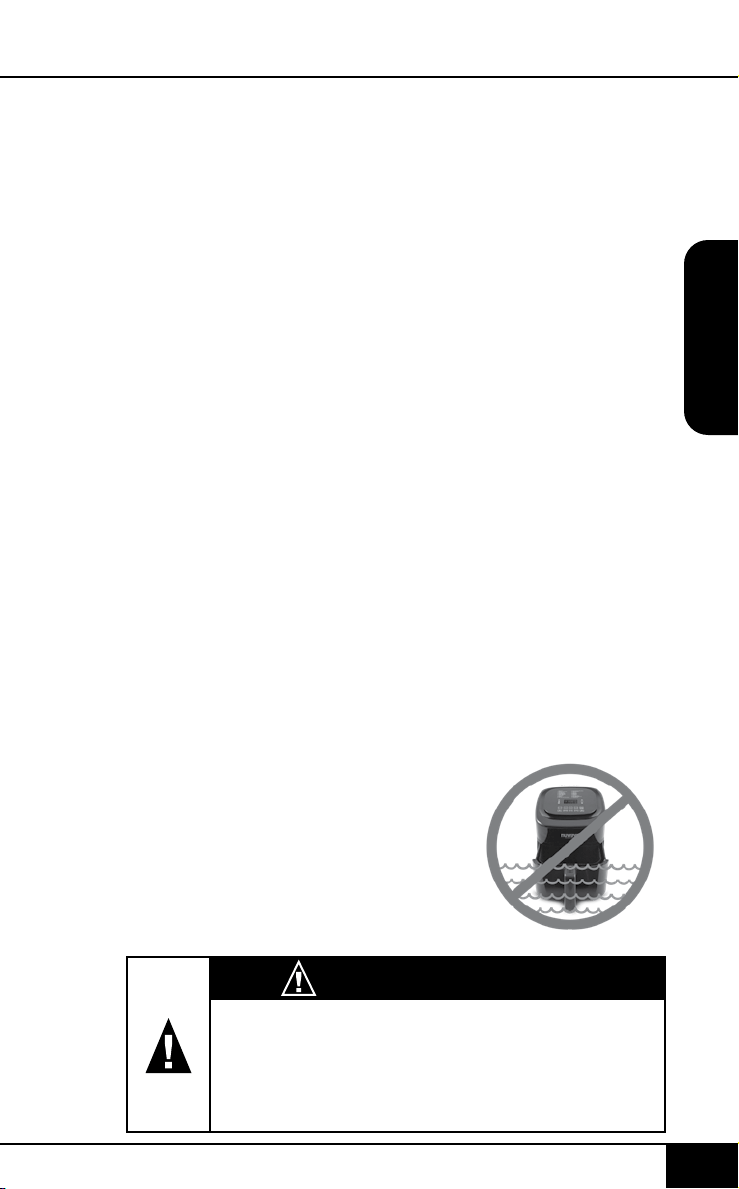
limpieza y mantenimiento
nuwavenow.com
68 69
SPANISH
nuwavenow.com
LIMPIEZA Y MANTENIMIENTO
68 69
INSTRUCCIONES
temperatura deseada
de la sonda,
presione y mantenga
presionado el botón
PROBE durante dos
(2) segundos. Puede
ajustar la temperatura
de la sonda de
destino usando los
botones [↑] y [↓]
encima y debajo del
icono de temperatura.
7. La unidad cocinará
hasta que la
temperatura de la
sonda actual alcance
la temperatura de
la sonda objetivo
establecida. Por
ejemplo, si desea
cocinar su pollo a
170F (77C), congure
la temperatura de la
sonda deseada a 170F
(77C).
8. Una vez que se
alcanza la temperatura
deseada de la sonda,
la cocción se detendrá
y la pantalla LED
mostrará End.
sonda (la temperatura
interna que desea que
alcance el alimento
durante la cocción),
hasta 212F (100C).
5. Inserte el extremo
puntiagudo de la
sonda en el alimento
a cocinar y coloque el
alimento en la unidad.
6. Presione el botón de
START/PAUSE para
comenzar a cocinar. La
pantalla LED mostrará
la temperatura actual
de la sonda, temp y
probe.
• Para ver la
temperatura de
cocción actual,
presione Botón
[↑] o [↓] arriba o
debajo del ícono
de temperatura.
Esto le mostrará la
temperatura actual
de cocción.
• Para regresar y ver
la temperatura actual
de la sonda, presione
el botón PROBE.
• Para ver la
Limpieza
Limpie el aparato después de cada uso o entre varios
lotes grandes. La canastilla y la bandeja de la base tienen
un revestimiento antiadherente con una cesta de acero
inoxidable. No utilice utensilios metálicos o abrasivos fuertes
al limpiar, ya que esto puede dañar el revestimiento.
1. Desenchufe el aparato y asegúrese de que se
enfríe completamente.
2. Use un paño húmedo para limpiar el exterior del aparato.
3. Limpie la canastilla y la malla con una esponja no
abrasiva, agua caliente y detergente suave.
Nota: retire la bandeja de la base y la canastilla y colóquelas
sobre una supercie resistente al calor para ayudar a enfriar
el aparato más rápido.
Nota: Si usa el lavavajillas para la bandeja de la base, la
canastilla y la malla, se recomienda usar solo la rejilla superior.
Consejo: Si hay comida residual en la bandeja de la base
y en la canastilla, agregue un poco de agua caliente y deje
que se remoje por separado durante unos 10 minutos para
facilitar la limpieza. Luego, use un cepillo de limpieza suave
para eliminar cualquier alimento persistente.
Almacenamiento:
1. Desenchufe el aparato y deje que se enfríe completamente.
2. Asegúrese de que todas las piezas estén limpias y secas.
3. Limpie la Bandeja de la Base, la cesta, la Cesta de
la Canestilla o los componentes extraíbles con una
esponja no abrasiva, agua caliente y detergente suave.
ADVERTENCIA
En caso de otros problemas, desenchúfela
inmediatamente y comuníquese con el
Departamento de Servicio al Cliente.
1-877-689-2838 • help@nuwavenow.com
IMPORTANTE - No sumerja la
unidad en agua ni intente lavarla en
el lavavajillas. La supercie exterior
podrá ser limpiada cuidadosamente
con un trapo o esponja húmedos.
Asegúrese de que la unidad se ha
enfriado completamente antes
de limpiarla.
LIMPIEZA Y MANTENIMIENTO
El Brio emitirá un pitido 3 veces a la mitad del ciclo
de cocción para alertarlo de que retire la canasta
de la unidad, agite la comida en la canasta (o voltee
alimentos como pollo, filete o pescado) y luego
vuelva a insertar la canasta para terminar cocinando.

solución de problemas
nuwavenow.com
70 71
SPANISH
nuwavenow.com
SOLUCIÓN DE PROBLEMAS
70 71
La Freidora Digital de Aire Brio no funciona.
1. El aparato no está conectado. No se presionó el botón
ON/OFF.
2. No está la Canastilla en Brio.
3. Conecte la clavija en un contacto apropiado. Presione
el botón ON/OFF después de seleccionar los ajustes.
4. Coloque la Canastilla en la Brio.
Los ingredientes en la Canastilla no están lo
sucientemente fritos.
1. Se usaron demasiados ingredientes. La temperatura
es muy baja.
2. El tiempo es muy corto.
3. Quite algunos ingredientes de la Canastilla. Las porciones
pequeñas se fríen mejor. Fría a una temperatura más alta.
Programe la Freidora por más tiempo.
La comida no se fríe uniformemente.
1. Algunos alimentos necesitan ser movidos a la mitad
del tiempo de coccion.
2. Los alimentos de encima necesitan ser movidos a la
mitad el tiempo de preparación.
Las botanas fritas no salen crujientes de Brio.
1. Se utilizó un tipo de botana que está diseñada para
prepararse en una freidora tradicional.
2. Utilice botanas hechas para hornos tradicionales
o cepille las botanas con aceite de oliva antes de
coccion para que queden crujientes.
No se puede meter la Canastilla en el aparato
correctamente.
1. La Canastilla está muy llena. La Canastilla no está
colocada correctamente en la Cacerola.
2. No llene la Canastilla más de un 4/5 partes. Presione
la Canastilla hacia abajo en la Cacerola hasta que
escuche un click.
Sale humo blanco del aparato.
1. Está friendo alimentos grasosos. La Cacerola tiene
residuos grasosos de los usos anteriores.
2. Cuando se preparen alimentos grasosos en Brio
pueden surgir grandes cantidades de humo y
adherirse a la Cacerola. La grasa producirá humo
blanco y la Cacerola puede calentarse más de
lo habitual. Esto no afectará el efecto nal. El
humo blanco es causado por la grasa caliente
en la cacerola. Asegúrese de limpiar la cacerola
correctamente después de cada uso.
Las papas a la francesa no se fríen uniformemente
en Brio.
1. Las papas no se remojaron bien antes de freírlas.
2. No se utilizó el tipo de papa correcto.
3. Remoje las papas en un recipiente por al menos 30
minutos. Sáquelas y séquelas con una toalla de papel.
Utilice papas frescas y asegúrese de que estén rmes
durante su cocción.
Las papas a la francesa no salen crujientes de Brio.
1. Lo crujiente de las papas depende de la cantidad de
aceite y agua en ellas.
2. Asegúrese de secar bien las papas antes de ponerles
aceite. Corte las papas más pequeñas o agregue un
poco más de aceite antes de coccion para que queden
más crujientes.
Si la unidad necesita ser reemplazada o devuelta al
fabricante, contacte a nuestro Departamento de Servicio
al Cliente al 1-877-689-2838 • help@nuwavenow.com
Contacte a Servicio al Cliente si ocurre alguno de
estos errores:
Código
Error
E1 E2 E3
Sensor abierto
Corto circuito
en el sensor
Sobrecalenta-
miento
solución de problemas
nuwavenow.com
70 71
SPANISH
nuwavenow.com
SOLUCIÓN DE PROBLEMAS
70 71
La Freidora Digital de Aire Brio no funciona.
1. El aparato no está conectado. No se presionó el botón
ON/OFF.
2. No está la Canastilla en Brio.
3. Conecte la clavija en un contacto apropiado. Presione
el botón ON/OFF después de seleccionar los ajustes.
4. Coloque la Canastilla en la Brio.
Los ingredientes en la Canastilla no están lo
sucientemente fritos.
1. Se usaron demasiados ingredientes. La temperatura
es muy baja.
2. El tiempo es muy corto.
3. Quite algunos ingredientes de la Canastilla. Las porciones
pequeñas se fríen mejor. Fría a una temperatura más alta.
Programe la Freidora por más tiempo.
La comida no se fríe uniformemente.
1. Algunos alimentos necesitan ser movidos a la mitad
del tiempo de coccion.
2. Los alimentos de encima necesitan ser movidos a la
mitad el tiempo de preparación.
Las botanas fritas no salen crujientes de Brio.
1. Se utilizó un tipo de botana que está diseñada para
prepararse en una freidora tradicional.
2. Utilice botanas hechas para hornos tradicionales
o cepille las botanas con aceite de oliva antes de
coccion para que queden crujientes.
No se puede meter la Canastilla en el aparato
correctamente.
1. La Canastilla está muy llena. La Canastilla no está
colocada correctamente en la Cacerola.
2. No llene la Canastilla más de un 4/5 partes. Presione
la Canastilla hacia abajo en la Cacerola hasta que
escuche un click.
Sale humo blanco del aparato.
1. Está friendo alimentos grasosos. La Cacerola tiene
residuos grasosos de los usos anteriores.
2. Cuando se preparen alimentos grasosos en Brio
pueden surgir grandes cantidades de humo y
adherirse a la Cacerola. La grasa producirá humo
blanco y la Cacerola puede calentarse más de
lo habitual. Esto no afectará el efecto nal. El
humo blanco es causado por la grasa caliente
en la cacerola. Asegúrese de limpiar la cacerola
correctamente después de cada uso.
Las papas a la francesa no se fríen uniformemente
en Brio.
1. Las papas no se remojaron bien antes de freírlas.
2. No se utilizó el tipo de papa correcto.
3. Remoje las papas en un recipiente por al menos 30
minutos. Sáquelas y séquelas con una toalla de papel.
Utilice papas frescas y asegúrese de que estén rmes
durante su cocción.
Las papas a la francesa no salen crujientes de Brio.
1. Lo crujiente de las papas depende de la cantidad de
aceite y agua en ellas.
2. Asegúrese de secar bien las papas antes de ponerles
aceite. Corte las papas más pequeñas o agregue un
poco más de aceite antes de coccion para que queden
más crujientes.
Si la unidad necesita ser reemplazada o devuelta al
fabricante, contacte a nuestro Departamento de Servicio
al Cliente al 1-877-689-2838 • [email protected]
Contacte a Servicio al Cliente si ocurre alguno de
estos errores:
Código
Error
E1 E2 E3
Sensor abierto
Corto circuito
en el sensor
Sobrecalenta-
miento

solución de problemas
nuwavenow.com
72 73
SPANISH
nuwavenow.com
SOLUCIÓN DE PROBLEMAS
72 73
Error Message: Solution(s):
Prb1
Sonda no conectada a la unidad.
Enchufe la sonda a la unidad.
Prb2
La temperatura objetivo establecida de
la sonda es mayor que la temperatura
de cocción. Ajuste las temperaturas
para que la temperatura objetivo de la
sonda sea más baja que la temperatura
de cocción.
Prb3
Corto Circuito en la sonda. Contacte a
Soporte NuWave.
Prb4
El Sensor de la sonda no detecta
aumento de temperatura. Asegúrese
de que la sonda esté insertada en los
alimentos y que estén dentro del horno
durante la cocción.
Er1
Sensor de temperatura NTC
sobrecalentado. Apague la unidad
para enfriarla. Si la unidad no funciona
después de enfriarse, póngase en
contacto con Soporte de NuWave.
Err1
Cortocircuito en el Sensor de
temperatura NTC. Póngase en contacto
con Soporte de NuWave.
Err2
Sensor de temperatura NTC abierto.
Póngase en contacto con Soporte de
NuWave 1-877-689-2838 o
help@nuwavenow.com.
La Freidora de Aire Digital NuWave Brio 6Q
LOS GARANTÍAS DEL FABRICANTE
La Freidora de Aire Digital de 6Q NuWave Brio, incluida la
bandeja de la base, el divisor, la canastilla, la malla y el sensor,
deben estar libres de defectos del fabricante.
Todos los componentes eléctricos están garantizados por 1
año a partir de la fecha de compra, bajo un uso doméstico
normal y siempre que se hayan manejado de acuerdo a
las instrucciones por escrito del Fabricante. El Fabricante
GARANTÍA LIMITADA
GARANTÍA LIMITADA
proporcionará las partes necesarias y mano de obra para
reparar cualquier parte de la Freidora de Aire Digital NuWave
Brio 6Q en el Departamento de Servicio de NuWave LLC. Una
vez vencida la garantía, el costo de mano de obra y las partes
será responsabilidad del propietario.
LA GARANTÍA NO CUBRE
La garantía limitada se anula si las reparaciones son
realizadas por un distribuidor no autorizado o si la placa de
datos del número de serie se retira o borra. Esta garantía
no cubre el deterioro normal del acabado debido al uso o
la exposición. Esta garantía limitada no cubre fallas, daños
o un desempeño inadecuado debido a un accidente, actos
de Dios (como rayos), uctuaciones en la energía eléctrica,
alteraciones, abuso, mal uso, aplicaciones incorrectas,
atmósferas de tipo corrosivo, instalación incorrecta, falta de
funcionamiento de acuerdo con las instrucciones escritas del
fabricante, uso anormal o uso comercial. NuWave LLC se
reserva el derecho de anular la Garantía Limitada, según lo
permita la ley, para los productos adquiridos a través de un
distribuidor no autorizado.
OBTENER SERVICIO
El propietario tendrá la obligación y la responsabilidad de:
pagar por todos los servicios y piezas no cubiertos por la
garantía; prepagar el ete hacia y desde el Departamento
de Servicio para cualquier parte o sistema devuelto bajo
esta garantía; y empacar cuidadosamente el producto con
materialde relleno adecuado para evitar daños durante el
transporte.El envase original es ideal para este propósito.
Incluya en el paquete el nombre del propietario, la dirección,
el número de teléfono durante el día, una descripción
detallada del problema y su "número RGA". (Llame al
1-877-689-2838)o envíe un correo electrónico a help@
nuwavenow.com para obtener el número RGA (Número
de autorización de devolución de mercancías). Proporcione
el modelo del sistema de cocción y el número de serie y el
comprobante de la fecha de compra (una copia del recibo) al
realizar reclamaciones bajo esta garantía.

solución de problemas
nuwavenow.com
72 73
SPANISH
nuwavenow.com
SOLUCIÓN DE PROBLEMAS
72 73
Error Message: Solution(s):
Prb1
Sonda no conectada a la unidad.
Enchufe la sonda a la unidad.
Prb2
La temperatura objetivo establecida de
la sonda es mayor que la temperatura
de cocción. Ajuste las temperaturas
para que la temperatura objetivo de la
sonda sea más baja que la temperatura
de cocción.
Prb3
Corto Circuito en la sonda. Contacte a
Soporte NuWave.
Prb4
El Sensor de la sonda no detecta
aumento de temperatura. Asegúrese
de que la sonda esté insertada en los
alimentos y que estén dentro del horno
durante la cocción.
Er1
Sensor de temperatura NTC
sobrecalentado. Apague la unidad
para enfriarla. Si la unidad no funciona
después de enfriarse, póngase en
contacto con Soporte de NuWave.
Err1
Cortocircuito en el Sensor de
temperatura NTC. Póngase en contacto
con Soporte de NuWave.
Err2
Sensor de temperatura NTC abierto.
Póngase en contacto con Soporte de
NuWave 1-877-689-2838 o
help@nuwavenow.com.
La Freidora de Aire Digital NuWave Brio 6Q
LOS GARANTÍAS DEL FABRICANTE
La Freidora de Aire Digital de 6Q NuWave Brio, incluida la
bandeja de la base, el divisor, la canastilla, la malla y el sensor,
deben estar libres de defectos del fabricante.
Todos los componentes eléctricos están garantizados por 1
año a partir de la fecha de compra, bajo un uso doméstico
normal y siempre que se hayan manejado de acuerdo a
las instrucciones por escrito del Fabricante. El Fabricante
GARANTÍA LIMITADA
GARANTÍA LIMITADA
proporcionará las partes necesarias y mano de obra para
reparar cualquier parte de la Freidora de Aire Digital NuWave
Brio 6Q en el Departamento de Servicio de NuWave LLC. Una
vez vencida la garantía, el costo de mano de obra y las partes
será responsabilidad del propietario.
LA GARANTÍA NO CUBRE
La garantía limitada se anula si las reparaciones son
realizadas por un distribuidor no autorizado o si la placa de
datos del número de serie se retira o borra. Esta garantía
no cubre el deterioro normal del acabado debido al uso o
la exposición. Esta garantía limitada no cubre fallas, daños
o un desempeño inadecuado debido a un accidente, actos
de Dios (como rayos), uctuaciones en la energía eléctrica,
alteraciones, abuso, mal uso, aplicaciones incorrectas,
atmósferas de tipo corrosivo, instalación incorrecta, falta de
funcionamiento de acuerdo con las instrucciones escritas del
fabricante, uso anormal o uso comercial. NuWave LLC se
reserva el derecho de anular la Garantía Limitada, según lo
permita la ley, para los productos adquiridos a través de un
distribuidor no autorizado.
OBTENER SERVICIO
El propietario tendrá la obligación y la responsabilidad de:
pagar por todos los servicios y piezas no cubiertos por la
garantía; prepagar el ete hacia y desde el Departamento
de Servicio para cualquier parte o sistema devuelto bajo
esta garantía; y empacar cuidadosamente el producto con
materialde relleno adecuado para evitar daños durante el
transporte.El envase original es ideal para este propósito.
Incluya en el paquete el nombre del propietario, la dirección,
el número de teléfono durante el día, una descripción
detallada del problema y su "número RGA". (Llame al
1-877-689-2838)o envíe un correo electrónico a help@
nuwavenow.com para obtener el número RGA (Número
de autorización de devolución de mercancías). Proporcione
el modelo del sistema de cocción y el número de serie y el
comprobante de la fecha de compra (una copia del recibo) al
realizar reclamaciones bajo esta garantía.

garantía limitada
nuwavenow.com
74 75
SPANISH
nuwavenow.com
GARANTÍA LIMITADA
74 75
OBLIGACIÓN DEL FABRICANTE
La obligación del fabricante en virtud de esta Garantía
Limitada se limita, en la medida en que lo permita la
ley, a reparar o reemplazar cualquier pieza cubierta por
esta Garantía Limitada que, al examinarla, se encuentre
defectuosa en el uso normal. La Garantía Limitada se
aplica solo dentro de los Estados Unidos continentales y
solo al comprador original de los canales de distribución
autorizados por el fabricante. LA GARANTÍA LIMITADA
NO PUEDE SER ALTERADA, VARIADA O EXTENDIDA,
EXCEPTO POR UN INSTRUMENTO ESCRITO
EJECUTADO POR EL FABRICANTE. EL RECHAZO
DE REPARACIÓN O REEMPLAZO SEGÚN LO
PROPORCIONADO POR ESTA GARANTÍA LIMITADA ES
EXCLUSIVO. EN NINGÚN CASO, EL FABRICANTE SERÁ
RESPONSABLE DE CUALQUIER DAÑO CONSECUENTE
O INCIDENTAL A CUALQUIER PERSONA, SEA O NO
OCASIONADO POR LA NEGLIGENCIA DEL FABRICANTE,
INCLUIDOS, SIN LIMITACIÓN, DAÑOS POR PÉRDIDA
DE USO, COSTOS DE SUSTITUCIÓN, DAÑO A LA
PROPIEDAD U OTRA PÉRDIDA DE DINERO.
Algunos estados no permiten la exclusión o limitación
de daños incidentales o consecuentes, por lo que es
posible que no se apliquen las exclusiones de limitación
anteriores. Esta Garantía Limitada otorga derechos
legales especícos, y también puede haber otros derechos
que varían de estado a estado. EXCEPTO OTRAS
MANERAS QUE EXPRESAMENTE SE PROPORCIONAN
ANTERIORMENTE, EL FABRICANTE NO HACE
GARANTÍAS EXPRESAS O IMPLÍCITAS DE LA LEY O
DE OTRA MANERA, INCLUYENDO SIN LIMITACIONES,
LAS GARANTÍAS IMPLÍCITAS DE COMERCIALIZACIÓN
Y EJERCICIO PARA UN PROPÓSITO PARTICULAR A
CUALQUIER OTRA PERSONA. LEA EL MANUAL DEL
USUARIO. SI TUVIERA ALGUNA DUDA SOBRE EL
FUNCIONAMIENTO O LA GARANTÍA DEL PRODUCTO,
CONTACTE A NUWAVE LLC.
PROCEDIMIENTO DE RESOLUCIÓN DE
CONTROVERSIAS. Para disputas relacionadas con el
uso del sitio web o el uso o la compra de un producto o
servicio NuWave (colectivamente "Disputas"), usted acepta
comunicarse primero con NuWave LLC al (877) 689-2838
(teléfono), (847) 367-5486 ( facsímil) o legal@nuwavenow.
com (correo electrónico). Si no podemos resolver su disputa
de manera informal, todas las disputas se someterán a un
arbitraje nal y vinculante. Puede comenzar el proceso de
arbitraje enviando una solicitud por escrito a la Asociación
Americana de Arbitraje ("AAA") y enviando una copia a
NuWave. NuWave pagará todos los costos de presentación.
Un solo árbitro de la AAA llevará a cabo el arbitraje en un
lugar conveniente para usted o por teléfono.
El laudo del árbitro será vinculante y podrá presentarse
como un fallo en un tribunal de jurisdicción competente.
El arbitraje se llevará a cabo de conformidad con las
disposiciones de las Reglas de arbitraje comercial de AAA
y los Procedimientos de mediación vigentes en el momento
de la presentación de su solicitud de arbitraje. Ver https://
www.adr.org/sites/default/les/CommercialRules_Web.
pdf. Salvo que lo exija la ley según lo determine un árbitro,
ninguna de las partes o el árbitro puede revelar la existencia,
el contenido o los resultados de cualquier arbitraje a
continuación sin el consentimiento previo por escrito de
ambas partes.
A. RENUNCIA DE DERECHO A DEMANDAR. Al aceptar el
arbitraje, comprende que, en la medida máxima permitida
por la ley, acepta renunciar a su derecho a presentar una
demanda en cualquier tribunal, a una audiencia judicial, un
juicio con jueces y un juicio con jurado.
B. RENUNCIA A LA ACCIÓN DE CLASE. En la medida máxima
permitida por la ley, usted acepta expresamente abstenerse de
presentar o unirse a cualquier reclamo en cualquier capacidad
representativa o de toda la clase, incluyendo, entre otros,
presentar o unir cualquier reclamo en cualquier acción de clase o
arbitraje de clase.

garantía limitada
nuwavenow.com
74 75
SPANISH
nuwavenow.com
GARANTÍA LIMITADA
74 75
OBLIGACIÓN DEL FABRICANTE
La obligación del fabricante en virtud de esta Garantía
Limitada se limita, en la medida en que lo permita la
ley, a reparar o reemplazar cualquier pieza cubierta por
esta Garantía Limitada que, al examinarla, se encuentre
defectuosa en el uso normal. La Garantía Limitada se
aplica solo dentro de los Estados Unidos continentales y
solo al comprador original de los canales de distribución
autorizados por el fabricante. LA GARANTÍA LIMITADA
NO PUEDE SER ALTERADA, VARIADA O EXTENDIDA,
EXCEPTO POR UN INSTRUMENTO ESCRITO
EJECUTADO POR EL FABRICANTE. EL RECHAZO
DE REPARACIÓN O REEMPLAZO SEGÚN LO
PROPORCIONADO POR ESTA GARANTÍA LIMITADA ES
EXCLUSIVO. EN NINGÚN CASO, EL FABRICANTE SERÁ
RESPONSABLE DE CUALQUIER DAÑO CONSECUENTE
O INCIDENTAL A CUALQUIER PERSONA, SEA O NO
OCASIONADO POR LA NEGLIGENCIA DEL FABRICANTE,
INCLUIDOS, SIN LIMITACIÓN, DAÑOS POR PÉRDIDA
DE USO, COSTOS DE SUSTITUCIÓN, DAÑO A LA
PROPIEDAD U OTRA PÉRDIDA DE DINERO.
Algunos estados no permiten la exclusión o limitación
de daños incidentales o consecuentes, por lo que es
posible que no se apliquen las exclusiones de limitación
anteriores. Esta Garantía Limitada otorga derechos
legales especícos, y también puede haber otros derechos
que varían de estado a estado. EXCEPTO OTRAS
MANERAS QUE EXPRESAMENTE SE PROPORCIONAN
ANTERIORMENTE, EL FABRICANTE NO HACE
GARANTÍAS EXPRESAS O IMPLÍCITAS DE LA LEY O
DE OTRA MANERA, INCLUYENDO SIN LIMITACIONES,
LAS GARANTÍAS IMPLÍCITAS DE COMERCIALIZACIÓN
Y EJERCICIO PARA UN PROPÓSITO PARTICULAR A
CUALQUIER OTRA PERSONA. LEA EL MANUAL DEL
USUARIO. SI TUVIERA ALGUNA DUDA SOBRE EL
FUNCIONAMIENTO O LA GARANTÍA DEL PRODUCTO,
CONTACTE A NUWAVE LLC.
PROCEDIMIENTO DE RESOLUCIÓN DE
CONTROVERSIAS. Para disputas relacionadas con el
uso del sitio web o el uso o la compra de un producto o
servicio NuWave (colectivamente "Disputas"), usted acepta
comunicarse primero con NuWave LLC al (877) 689-2838
(teléfono), (847) 367-5486 ( facsímil) o legal@nuwavenow.
com (correo electrónico). Si no podemos resolver su disputa
de manera informal, todas las disputas se someterán a un
arbitraje nal y vinculante. Puede comenzar el proceso de
arbitraje enviando una solicitud por escrito a la Asociación
Americana de Arbitraje ("AAA") y enviando una copia a
NuWave. NuWave pagará todos los costos de presentación.
Un solo árbitro de la AAA llevará a cabo el arbitraje en un
lugar conveniente para usted o por teléfono.
El laudo del árbitro será vinculante y podrá presentarse
como un fallo en un tribunal de jurisdicción competente.
El arbitraje se llevará a cabo de conformidad con las
disposiciones de las Reglas de arbitraje comercial de AAA
y los Procedimientos de mediación vigentes en el momento
de la presentación de su solicitud de arbitraje. Ver https://
www.adr.org/sites/default/les/CommercialRules_Web.
pdf. Salvo que lo exija la ley según lo determine un árbitro,
ninguna de las partes o el árbitro puede revelar la existencia,
el contenido o los resultados de cualquier arbitraje a
continuación sin el consentimiento previo por escrito de
ambas partes.
A. RENUNCIA DE DERECHO A DEMANDAR. Al aceptar el
arbitraje, comprende que, en la medida máxima permitida
por la ley, acepta renunciar a su derecho a presentar una
demanda en cualquier tribunal, a una audiencia judicial, un
juicio con jueces y un juicio con jurado.
B. RENUNCIA A LA ACCIÓN DE CLASE. En la medida máxima
permitida por la ley, usted acepta expresamente abstenerse de
presentar o unirse a cualquier reclamo en cualquier capacidad
representativa o de toda la clase, incluyendo, entre otros,
presentar o unir cualquier reclamo en cualquier acción de clase o
arbitraje de clase.

garantía limitada
nuwavenow.com
76 77
SPANISH
nuwavenow.com
GARANTÍA LIMITADA
76 77
C. PROCEDIMIENTO DE SALIDA. Para optar por no
participar en el arbitraje, debe comunicarse con NuWave.
Para solicitar la exclusión voluntaria del arbitraje, contáctenos
en legal@nuwavenow.com (correo electrónico), NuWave
LLC, 1795 N. Buttereld Road, Libertyville, IL 60048, EE. UU.,
(847) 367-5486 (fax) o (877) 689 -2838 o (224) 206-3019
(teléfono). Tendrá treinta (30) días a partir de la fecha de
entrega del producto para optar por el arbitraje con respecto a
cualquier disputa que surja o esté relacionada con el uso o la
compra de cualquier producto NuWave.
Si han pasado más de 30 días, no es elegible para optar por
no participar en el arbitraje y habrá renunciado a su derecho
de demandar o participar en una demanda colectiva con
respecto a la disputa que surge de su compra o uso de un
producto NuWave. Para cualquier disputa que surja de su uso
del sitio web de NuWave, tiene treinta (30) días a partir de la
fecha en que proporcionó información al sitio web para optar
por no participar en el arbitraje. Si han pasado más de 30
días, no es elegible para optar por no participar en el arbitraje
y habrá renunciado a su derecho de demandar y participar en
una demanda colectiva con respecto a la disputa que surge
del uso del sitio web de NuWave.
D. ALGUNOS ASUNTOS NO ESTÁN SUJETOS A
ARBITRAJE. Sin perjuicio de lo anterior, lo siguiente no
estará sujeto a arbitraje y podrá ser juzgado solo en los
tribunales estatales y federales de Illinois: (i) cualquier
disputa, controversia o reclamo relacionado o que
impugne la validez de nuestros derechos de propiedad
intelectual y derechos de propiedad , incluidas, entre
otras, patentes, marcas comerciales, marcas de servicio,
derechos de autor o secretos comerciales; (ii) una
acción de una parte para una medida cautelar temporal,
preliminar o permanente, ya sea prohibitiva u obligatoria,
u otra medida provisional; o (iii) interacciones con
autoridades gubernamentales y reguladoras.
Usted acepta expresamente abstenerse de presentar
o unirse a cualquier reclamo en cualquier capacidad
representativa o de toda la clase, incluyendo, entre otros,
presentar o unir cualquier reclamo en cualquier acción de
clase o cualquier arbitraje de clase.
LEA EL MANUAL DE SU PROPIETARIO
Si aún tiene preguntas sobre el funcionamiento o la garantía
del producto, comuníquese con NuWave LLC al:
1-877-689-2838 o envíe un correo electrónico a
help@nuwavenow.com.

garantía limitada
nuwavenow.com
76 77
SPANISH
nuwavenow.com
GARANTÍA LIMITADA
76 77
C. PROCEDIMIENTO DE SALIDA. Para optar por no
participar en el arbitraje, debe comunicarse con NuWave.
Para solicitar la exclusión voluntaria del arbitraje, contáctenos
en legal@nuwavenow.com (correo electrónico), NuWave
LLC, 1795 N. Buttereld Road, Libertyville, IL 60048, EE. UU.,
(847) 367-5486 (fax) o (877) 689 -2838 o (224) 206-3019
(teléfono). Tendrá treinta (30) días a partir de la fecha de
entrega del producto para optar por el arbitraje con respecto a
cualquier disputa que surja o esté relacionada con el uso o la
compra de cualquier producto NuWave.
Si han pasado más de 30 días, no es elegible para optar por
no participar en el arbitraje y habrá renunciado a su derecho
de demandar o participar en una demanda colectiva con
respecto a la disputa que surge de su compra o uso de un
producto NuWave. Para cualquier disputa que surja de su uso
del sitio web de NuWave, tiene treinta (30) días a partir de la
fecha en que proporcionó información al sitio web para optar
por no participar en el arbitraje. Si han pasado más de 30
días, no es elegible para optar por no participar en el arbitraje
y habrá renunciado a su derecho de demandar y participar en
una demanda colectiva con respecto a la disputa que surge
del uso del sitio web de NuWave.
D. ALGUNOS ASUNTOS NO ESTÁN SUJETOS A
ARBITRAJE. Sin perjuicio de lo anterior, lo siguiente no
estará sujeto a arbitraje y podrá ser juzgado solo en los
tribunales estatales y federales de Illinois: (i) cualquier
disputa, controversia o reclamo relacionado o que
impugne la validez de nuestros derechos de propiedad
intelectual y derechos de propiedad , incluidas, entre
otras, patentes, marcas comerciales, marcas de servicio,
derechos de autor o secretos comerciales; (ii) una
acción de una parte para una medida cautelar temporal,
preliminar o permanente, ya sea prohibitiva u obligatoria,
u otra medida provisional; o (iii) interacciones con
autoridades gubernamentales y reguladoras.
Usted acepta expresamente abstenerse de presentar
o unirse a cualquier reclamo en cualquier capacidad
representativa o de toda la clase, incluyendo, entre otros,
presentar o unir cualquier reclamo en cualquier acción de
clase o cualquier arbitraje de clase.
LEA EL MANUAL DE SU PROPIETARIO
Si aún tiene preguntas sobre el funcionamiento o la garantía
del producto, comuníquese con NuWave LLC al:
1-877-689-2838 o envíe un correo electrónico a
help@nuwavenow.com.
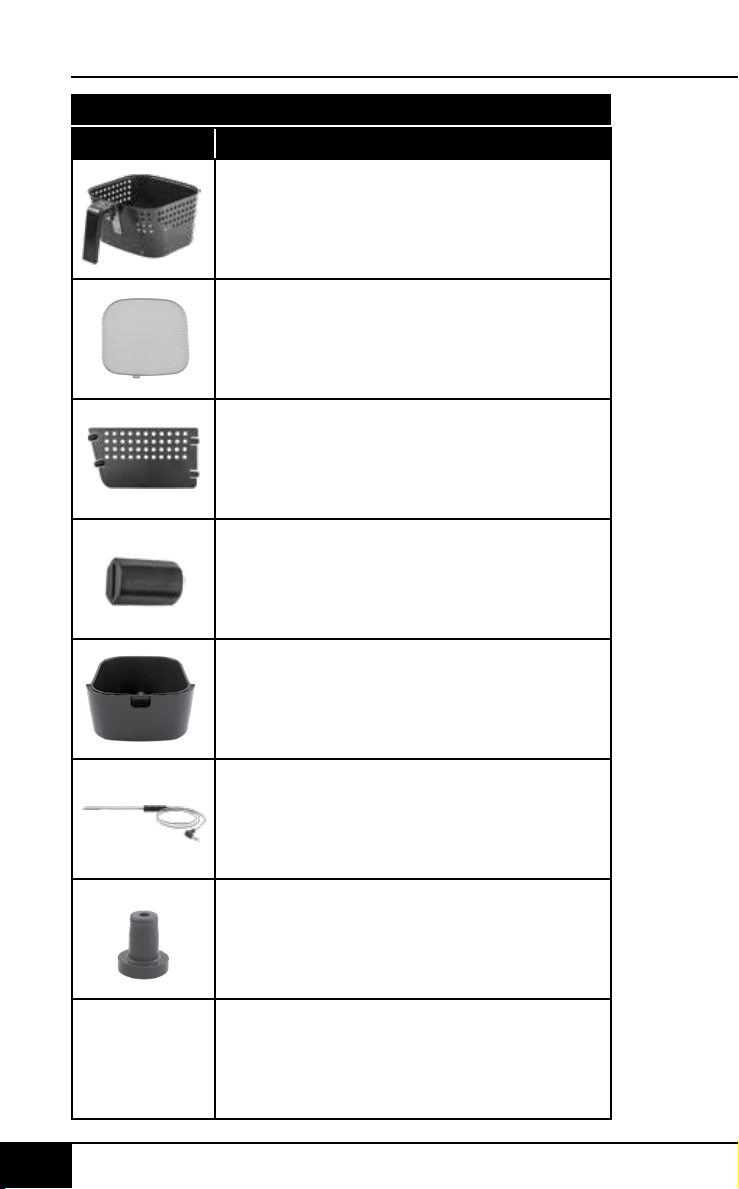
78 7978 79
replaceable parts
nuwavenow.com
REPLACEABLE PARTS
nuwavenow.com
REPLACEABLE PARTS
Part Name Part Description Part No.
To order replaceable parts head over to NuWaveNow.com
Fry Pan Basket
Fry Pan Basket Net
Fry Pan Divider
4 Silicone Tabs
Probe
Rubber Feet
Base Tray
37202
37205
37207
36261
37204
37218
37201
Used to place food in. Basket clicks
into Base Tray for cooking.
Inserted into food. Measures internal
temperature of food.
Goes on the bottom of unit in each
corner. Keeps unit from sliding.
Snaps into bottom of Fry Pan
Basket. Used to place food on.
Helps with air flow.
Slides into center of Fry Pan
Basket. Cook two foods at once.
Two on each side of Fry Pan
Divider. Keeps Divider in place.
Fry Pan Basket with Fry Pan Basket
Net clicks into Base Tray. Used for
cooking in unit.
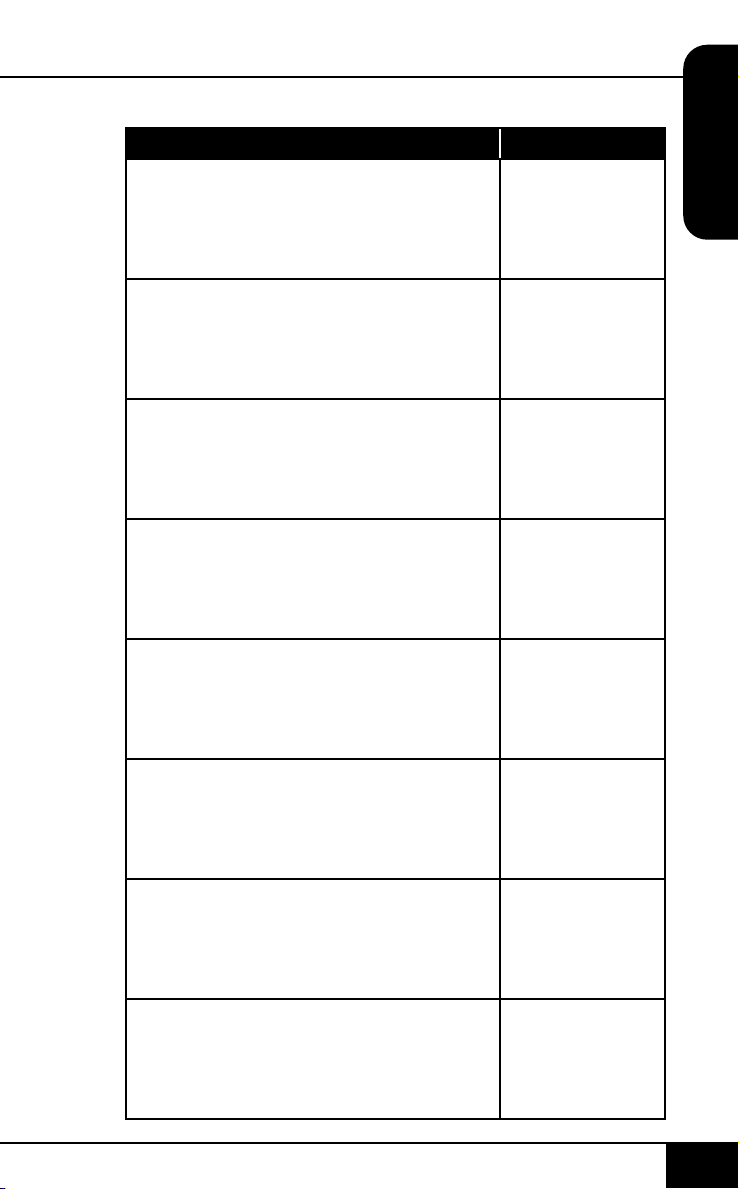
78 7978 79
replaceable parts
nuwavenow.com
REPLACEABLE PARTS
nuwavenow.com
REPLACEABLE PARTS
Part Name Part Description Part No.
To order replaceable parts head over to NuWaveNow.com
Fry Pan Basket
Fry Pan Basket Net
Fry Pan Divider
4 Silicone Tabs
Probe
Rubber Feet
Base Tray
37202
37205
37207
36261
37204
37218
37201
Used to place food in. Basket clicks
into Base Tray for cooking.
Inserted into food. Measures internal
temperature of food.
Goes on the bottom of unit in each
corner. Keeps unit from sliding.
Snaps into bottom of Fry Pan
Basket. Used to place food on.
Helps with air flow.
Slides into center of Fry Pan
Basket. Cook two foods at once.
Two on each side of Fry Pan
Divider. Keeps Divider in place.
Fry Pan Basket with Fry Pan Basket
Net clicks into Base Tray. Used for
cooking in unit.
Item No: BM 37006
Rev. 04-OG
06-22-20
DJ01 CC02
FOR HOUSEHOLD USE ONLY
Model: 37006
120V, 60Hz, 1800 Watts
For patent information please go to:
www.nuwavenow.com/legal/patent
Designed & Developed in USA by:
NuWave LLC
1795 N. Buttereld Road
Libertyville, IL 60048, U.S.A.
Customer Service:
1-877-689-2838 • help@nuwavenow.com
Made in China
©2020 NuWave LLC • All Rights Reserved.
nuwavenow.com