Simply scrape off large food particles before loading the dishwasher.
Choose a green detergent
Read the environmental declaration on the packaging!
Run programs only with a full load
Wait until the dishwasher is fully loaded before running a program, this way you save energy. Use the Rinse and hold program to rinse the dishes if there are any unpleasant odors while you wait for the dishwasher to become fully loaded.
Run programs at a lower temperature
If the dishes are only lightly soiled, you can select a program with a low temperature.
Select ECO wash
This program is the most effective in terms of energy consumption.
Select Green mode
The dishwasher has different program modes. To save energy and water, use Green mode. (Available with: Normal wash, Sanitation wash)
Open the door a little once the program has finished
Better drying results are achieved if you open the door a little once the program has ended. (If the dishwasher is built-in, the surrounding furnishings must be resistant to any condensation from the dishwasher.)
Connect to cold water
Connect the dishwasher to the cold water supply if the building is heated using oil, electricity, or gas.
Connection to hot water supply
Connect the dishwasher to the hot water supply (max. 160 °F (70 °C)) if the building is heated using an energy-efficient means such as district heating, solar power, or geothermal power. Choosing a hot water connection cuts dishwashing times and reduces the dishwasher's energy consumption.
Fragile dishes
Some cookware is not dishwasher safe. This can be for several reasons. Some materials cannot withstand high temperatures, others can be damaged by dishwasher detergent.
Use caution with, for example, handmade items, fragile decoration, crystal/glassware, silver, copper, tin, aluminum, wood, and plastic. Look for the "Dishwasher safe" marking.
Fragile decoration
Porcelain with decoration on top of the glazing (the items feel rough) should not be washed in a dishwasher.
Crystal/Glass
Wash fragile items made of crystal/glass, such as crystal glass from Orrefors, using the gentle dishwashing program Crystal glass. Remember to use a small amount of detergent and to place items so that they do not touch each other during the wash.
Use rinse aid to improve wash and dry times. Also use rinse aid to achieve clear and spotless results.
Hand-painted glassware, as well as antique and very fragile items, should not be washed in a dishwasher.
Silver
Silver and stainless steel items should not come into contact, as the silver can become discolored.
Aluminum
Aluminum can lose its shine if washed in a dishwasher. However, good quality aluminum pans can be washed in a dishwasher, even if some of the shine will be lost.
Cutlery with glued handles
Some types of glue are not dishwasher safe. In such cases, the handles may loosen.
Points to consider
• All dirty surfaces should face in and down!
• Dishes should not be placed in or on each other.
• Angle dishes with hollows, such as cups, so that the rinse water will run off. This is also important for plastic items.
• Place the upper basket in its highest position when dishwashing very large plates.
• Make sure small items cannot fall through the dishwasher basket; place them in the cutlery basket.
Using the dishwasher
Add detergent
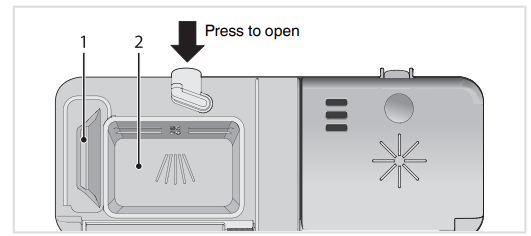
Prewash detergent compartment
Main wash detergent compartment
Detergent is added according to water hardness.
Follow the instructions on the detergent packaging.
Too much detergent can result in less effective dishwashing and also entails greater environmental impact.
The detergent compartment must be dry when adding detergent. There is one compartment for the prewash and one for the main wash. If powder or liquid dishwasher detergent is used, add a small amount of the detergent to the prewash compartment. Contact the detergent manufacturer if you have questions about the detergent.
Dishwasher tablets
Halve the tablet if it is difficult to close the dispenser lid. There is a risk that the detergent will not be released properly if the lid is tight and cannot open correctly.
All-in-one detergent
There are many types of all-in-one detergents on the market. Read through the directions for these products carefully.
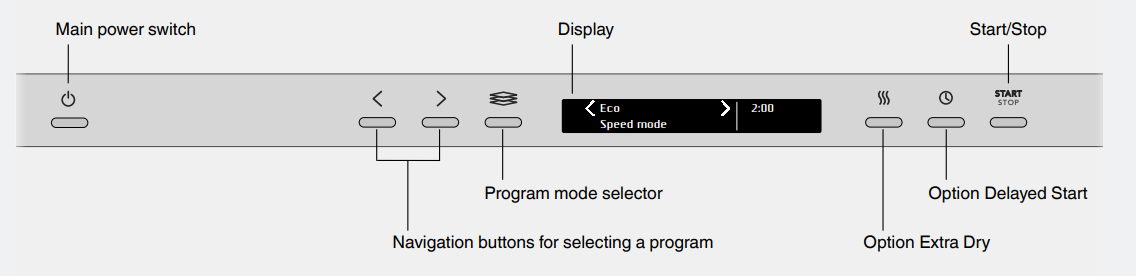
The main power switch
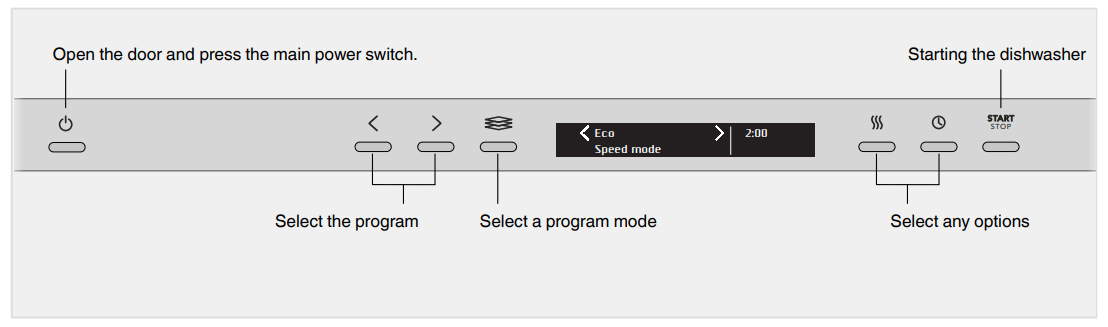
Open the door and press the main power switch. Also turn on the water supply valve if it is turned off.
Select a program
To select a program, press the Navigation button or until the desired program is shown on the display.
Select a program to suit the type of dishes and how dirty they are.
Normal wash
This program is recommended for daily, regular, or typical use to completely wash a full load of normally soiled dishes, such as plates, serving dishes, cups, and glasses.
ECO wash
This program is the most effective in terms of energy consumption.
You can read more about greener dishwashing in the chapter Loading the dishwasher.
Sanitation wash
An effective program for daily use with slightly dried leftovers. (This program is not intended for burnt food, such as on oven dishes.)
Time program
The program adapts to the specified running time or finish time. With this program, it is important to choose a time suited to how dirty the dishes are.
0:15-0:45 Lightly soiled dishes
1:00-1:30 Normally soiled dishes
2:00-2:30 Heavily soiled dishes
Press the option button to set the desired program time.
Rinse and hold
Use to rinse dishes while you wait for the dishwasher to become fully loaded.
Plastic wash
A program intended for washing plastic items that are dishwasher safe. This program has an extra long drying cycle. Porcelain and glasses can also be washed.
Hygiene wash
This program is recommended for baby bottles and cutting boards when additional sanitation is required. The temperature is high in the main wash and in the final rinse.
Crystal glass
A gentle dishwashing program with a low temperature for washing fragile items made of crystal/glass, such as crystal glass from Orrefors. Remember to use a small amount of detergent and to place items so that they do not touch each other during the wash. See also Fragile dishes in the chapter Loading the dishwasher. Porcelain that has just been used without dried leftovers can also be washed using this program.
Self-cleaning
Self-cleaning program for sanitizing the dishwasher tub, spray arms, and spray pipes.
This program should be run (with no dishes in the machine) using regular dishwasher detergent or citric acid. Special dishwasher cleaners are also available in stores. For the removal of limescale deposits, see The dishwasher tub in the chapter Care and maintenance instructions.
Upper half
You can use this program if you only have cups and glasses that need washing in the upper basket. Lightly soiled dishes can also be placed in the lower basket.
Lower half
You can use this program when you only want to wash plates and cutlery in the lower basket. Lightly soiled dishes can also be placed in the upper basket.
Select a program mode
To select a program mode, press the program mode selector until the desired mode is shown on the display. The available program modes vary between programs.
Green mode
The dishwasher uses less energy and water. The program time is extended.
Speed mode
The program time is shortened, but the dishwasher uses more energy.
Night mode
Lower noise level during the dishwashing program. The program time is extended.
Intensive mode (Heat Boost)
Improves the dishwashing results, but the dishwasher uses more energy and water. The program time is extended.
Select an Option
To select an option, press the option button until the desired option is shown on the display. The available options vary between programs
Extra Dry (Heated drying option)
A higher temperature in the final rinse and a longer drying cycle improve the drying results if you activate this option. Energy consumption is slightly increased.
Delayed Start
When you select Delayed Start, the dishwasher will start 1-24 hours after you have pressed the button Start/Stop and closed the door.
Press the button once to activate Delayed Start. Press the button several times – or hold it in – to set the desired number of hours.
Press Start/Stop and close the door. The timer counts down and the dishwasher starts after the selected delay.
If you want to cancel the Delayed Start option, open the door then press and hold Start/Stop for three seconds.
Starting the dishwasher
Press Start/Stop until the display shows "Program started, close door in 4 sec". This indicates that the dishwasher is ready to start. Close the door properly within four seconds, otherwise the dishwasher will not start.
If the dishwasher is not started or the door is not closed within 2 minutes of the last button press, the machine switches off.
Time remaining
Once you have chosen a program, program mode, and options, the time the program took when last used is displayed.
Status light™
The status light at the bottom on the dishwasher provides information by means of 3 different colors.
Blue - Load more
The program has started, but you can still load more dishes.
Red - Do not load
You should not load more dishes (can result in poor dishwashing). Flashing red indicates a problem. See also the chapter Troubleshooting.
Green - Unload
The dishwashing program is finished. Standby light for 60 minutes.
Stopping or changing a program
If you want to change the program after starting the dishwasher, open the door then press and hold Start/Stop for three seconds. Add more detergent if the lid of the detergent dispenser has opened. Then choose a new program, press Start/Stop, and close the door within four seconds
If you want to load more dishes
Open the door. The dishwasher stops automatically. Add the dishes. Press Start/Stop and close the door within four seconds
If the dishwasher is turned off due to a power failure
If the program was not finished, the interrupted program resumes when power is restored.
Once the program has finished
The end of the program is indicated by one short signal from the buzzer. The chapter Settings describes how to change this function.
Moreover, the end of the program is indicated by the status light turning green.
The dishwasher switches off automatically after the program ends.
To minimize the risk of leaks, we recommend that you turn off the water supply valve if away from home for an extended period of time.
How to get the best drying results
• Fully load the dishwasher.
• Angle dishes with hollows, such as cups, so that the rinse water will run off. This is also important for plastic items.
• Top up with rinse aid or increase the rinse aid dosage level.
• Activate the Extra Dry option.
• Activate the High temperature setting. See the chapter Settings.
• Open the door a little once the program has finished.
• Allow the dishes to cool before unloading the dishwasher.
Unloading the dishwasher
Hot porcelain is more fragile. Leave the dishes to cool in the dishwasher before unloading them.
Unload the lower basket first to avoid any water drops from the upper basket falling onto the dishes in the lower basket.
Care and maintenance instructions
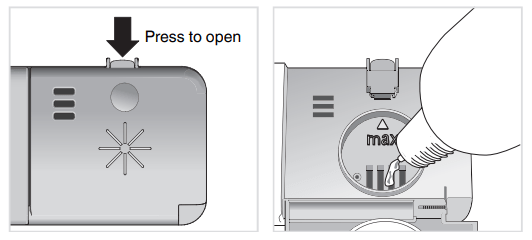
Add rinse aid
When the rinse aid needs topping up, the above symbol lights on the display.
Open the rinse aid compartment lid.
Carefully top up with rinse aid to the level marked max.
Wipe up any spilled rinse aid around the compartment.
Close the lid firmly.
After topping up, it may take a while before the symbol goes out.
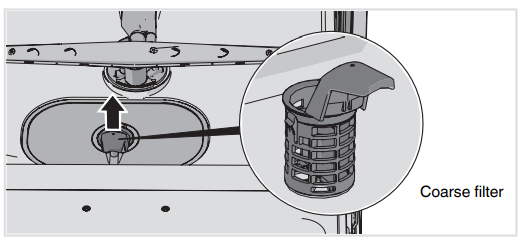
Coarse filter
The coarse filter traps larger food particles, which cannot get past the drain pump. Empty the coarse filter when necessary.
Lift the coarse filter by the handle.
Empty the coarse filter. Remember to reinstall it!
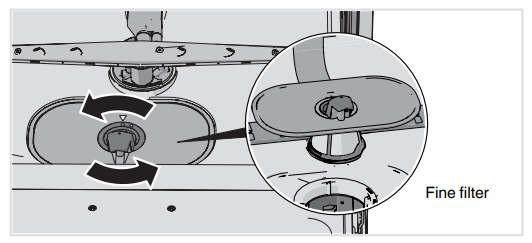
Fine filter
Debris that collects on the fine filter is automatically rinsed away during each wash. Clean the fine filter when necessary.
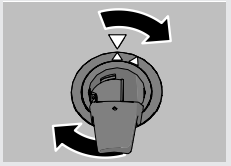
Turn the handle counterclockwise.
Lift the filter straight up using the handle. Remove the coarse filter to clean the fine filter.
Reinstall in reverse order. Check that the edges seal properly when reinstalling the fine filter.
Lock the filter in place by turning the handle clockwise to the stop position. The handle should point straight out from the dishwasher.
NOTE!
Dishwashing results may be affected if the filters are incorrectly fitted. Note that the dishwasher must not be used without the filters in place!
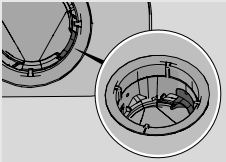
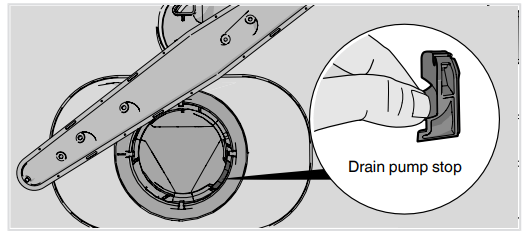
Check that the colored stop on the right in the bottom drain is in place.
Spray arms and spray pipes
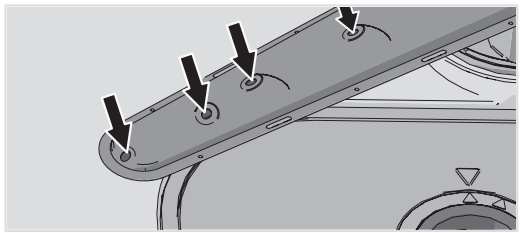
Holes and bearings can become blocked. Remove debris using a needle or similar item. The spray arms have holes on the bottom.
Spray arms can be removed for cleaning. Remember to fit them firmly back into place afterward.
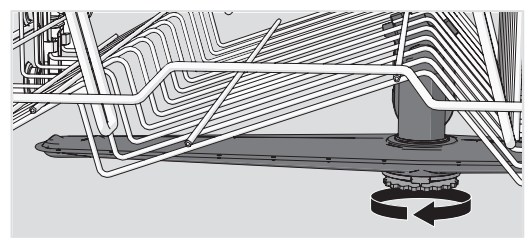
Upper spray arm
Pull out the upper basket
Unscrew the spray arm bearings counterclockwise to remove the spray arm from the upper basket.
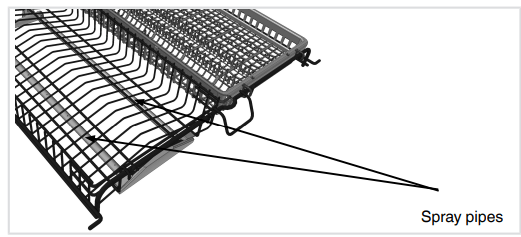
The middle spray pipes
• Pull out the middle basket.
• Check the holes in the spray pipes.
Lower spray arm
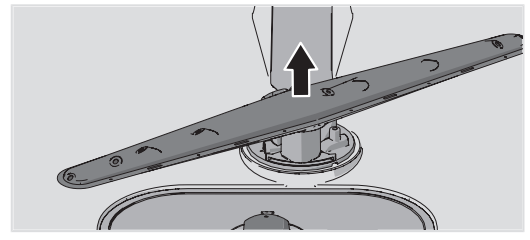
• Pull the lower spray arm straight up to release it.
The door and the door seal
Regularly clean the sides of the door and the door seal. Use a slightly damp cloth (with a little cleaner if necessary).
Display panel
Keep the buttons clean and free from grease. Wipe them clean with a dry or slightly damp cloth. Never use cleaners – they can scratch the surface. Use the main power switch to turn off the dishwasher before cleaning the buttons to avoid activating any buttons unintentionally.
The dishwasher tub
The dishwasher tub is made of stainless steel and is kept clean through normal use.
Limescale deposits
If you have hard water, limescale deposits may build up in the dishwasher. If this happens, run the Self-cleaning program with two tablespoons of citric acid in the detergent compartment (with no dishes in the machine). Special dishwasher cleaners are also available in stores.
Never use anti-freeze, Draino®, CLR®, or other chemical cleaners
Unblocking the drain pump
If the dishwasher still contains water after the program has finished, something may be blocking the drain pump. Such items are easily removed.
1. Turn off the machine using the main power switch and unplug it from the power outlet.
2. Remove the coarse filter and the fine filter.
3. Scoop out the water from the dishwasher tub.
4. In order to inspect the drain pump, remove the colored stop on the right in the bottom drain.
5. Turn the pump wheel located behind the drain pump stop by hand. Carefully remove any items.
6. Reinstall the drain pump stop along with the fine and coarse filters.
7. Plug the machine in again. If the dishwasher still does not start and a whirring sound is heard, the overflow protection has been triggered.
• Shut off the water.
• Unplug the unit from the power outlet.
• Call the Customer Care Center.
Troubleshooting
Type of fault on the display
Action
F10
Overfilling water 1
Clear the drain pump. See the chapter Care and maintenance instructions. If the problem persists, call the Customer Care Center.
F11
Water outlet fault
See “Water remains in the dishwasher above the filters” in the table “Problem” below. If the problem persists, call the Customer Care Center.
F12
Water inlet fault
Check that the water supply valve is on. If the problem persists, call the Customer Care Center. The water pressure should be 4.2-140 psi.
F40
Inlet valve leakage
Turn off the water supply valve and call the Customer Care Center.
F52
Water level fault
Clean the coarse and fine filters. If the problem persists, call the Customer Care Center.
F54
Overfilling water 2
Turn off the water supply valve and call the Customer Care Center.
F56
Circ. pump fault
Call the Customer Care Center.
Press any button to clear the error message.
Problem
Possible causes
Action
The buttons do not react when pressed.
You have pressed the buttons too soon after opening the door.
Wait a moment then try again.
Child lock (button lock) activated.
See the chapter Settings.
The door is closed.
Open the door. The buttons only react to use when the door is open.
The buttons are dirty.
Clean with a dry or slightly damp cloth.
Cannot close door.
The baskets are not correctly positioned.
Check that the baskets are correctly positioned horizontally, and that the middle basket's water connector is in line with its spray pipe.
Check that the dishes are not blocking the baskets from sliding properly into place.
The dishwasher does not start.
The Start/Stop start button has been pressed for too short a time.
Press and hold Start/Stop until the display shows "Program started, close door in 4 sec".
The door is not closed properly or was not closed immediately after pressing the Start/Stop button.
Close the door within four seconds, otherwise the dishwasher will not start.
You have opened the dishwasher to add more dishes while a program is in progress.
If you want the dishwashing program to continue, press Start/Stop and close the door within four seconds.
Afuse/circuit breaker has been tripped.
Check.
The plug is not plugged into the power outlet.
Check.
The water supply valve is turned off.
Check.
Overflow/leaks.
Check.
A whirring sound (the drain pump) is heard from the dishwasher and does not stop when the main power switch is turned off.
Turn off the water supply valve. Pull out the plug and call the Customer Care Center.
Check that the Delayed Start option has not been selected.
Press and hold Start/Stop for three seconds if you want to cancel the Delayed Start option.
The dishes are not clean.
The spray arms do not rotate.
Check that the dishes are not blocking the spray arms.
Spray arm holes or bearings blocked.
Clean the spray arms and the middle basket's spray pipe. See the chapter Care and maintenance instructions.
Unsuitable dishwashing program.
Choose a longer program.
Incorrect detergent dosage.
Dose according to water hardness. Far too much or far too little detergent can result in poor dishwashing results.
Detergent is too old. Detergent is a perishable product.
Avoid large packages.
Dishes loaded incorrectly.
Do not cover dishes with large bowls or lids. Avoid placing very tall glasses in the corners of the baskets.
Glasses and cups have toppled over during the program.
Load the dishes securely.
The filters are not fitted correctly.
Check that the filter handle is locked in the stop position. The handle should point straight out from the dishwasher.
Drain pump stop missing.
Check that the colored stop on the right in the bottom drain is in place. See the chapter Care and maintenance instructions.
Spots on stainless steel or silver.
Some types of food, such as mustard, mayonnaise, lemon, vinegar, salt, and dressings, can mark stainless steel if left for too long.
Rinse off these types of food if not starting the dishwasher immediately. Use the Rinse and hold program.
All stainless steel can cause spots on silver if they come into contact during dishwashing. Aluminum can also cause spots on dishes.
In order to avoid marks and tarnishing, separate dishes made from different metals, such as silver, stainless steel, and aluminum.
Spots or films on the dishes.
Incorrect rinse aid dosage setting.
See the chapter Settings.
Too high temperature and/or too much detergent can cause etching on crystal. Unfortunately, this cannot be repaired, only prevented.
Wash crystal at a low temperature and with a conservative amount of detergent. Contact the detergent manufacturer.
The dishes have a sticky white/blue film.
Rinse aid dosage setting too high.
Reduce the dosage. See the chapter Settings. If you have very soft water, you may want to dilute the rinse aid 50:50 with water.
Spots left after washing.
Lipstick and tea can be difficult to wash off.
Use a detergent with a bleaching agent.
Detergent residue in the detergent compartment after dishwashing.
The detergent compartment was damp when adding detergent.
The detergent compartment must be dry when adding detergent.
The detergent compartment has been blocked.
Check that the dishes are not preventing the detergent compartment from opening.
Rattling sound when dishwashing.
The dishes are not correctly placed or the spray arms are not rotating.
Check that the dishes are placed securely. Spin the spray arms to make sure they can rotate.
"Program paused" is shown on the display.
The dishwasher door has been opened while a program is in progress.
If you want the dishwashing program to continue, press Start/Stop and close the door within four seconds.
If you want to cancel the dishwashing program, press and hold Start/Stop for three seconds.
Water remains in the dishwasher above the filters.
The filters are blocked.
Clean the coarse and fine filters.
The filters are not fitted correctly.
Check that the filter handle is locked in the stop position. The handle should point straight out from the dishwasher.
Debris in the drain pump.
Clean the drain pump. See the chapter Care and maintenance instructions.
Drain pump stop missing.
Check that the colored stop on the right in the bottom drain is in place. See the chapter Care and maintenance instructions.
Kink in drain hose.
Check that the hose is free from kinks and sharp bends.
Blocked drain hose.
Loosen the drain hose from where it terminates. Check that no debris has clogged the hose. Is the cone-shaped part of the drain boot cut to the maximum size of the fitting where it attaches?
Bad odor in dishwasher.
Dirt around the seals and in corners.
Clean with dish brush and low foaming cleaner.
Low temperature programs have been selected for a prolonged period.
Run a program with a higher temperature once or twice a month. Or run a self-cleaning program. See Self-cleaning in the chapter Using the dishwasher.
The dishwasher is connected to a garbage disposer.
Cleaning the garbage disposer connected to the dishwasher can eliminate odors. Follow the disposer manufacturer's cleaning instructions.
The dishes are not dry enough.
Depending on the load, the program's drying cycle may be insufficient.
Activate the Extra Dry option.
The dishwasher is not fully loaded.
Fully load the dishwasher.
Rinse aid needs topping up or dosage is set too low.
Top up with rinse aid or increase the rinse aid dosage level. See the chapter Settings.
Open the door a little once the program has finished.
 The main power switch
  Select a program
 or
or until the desired program is shown on the display.
  option button to set the desired program time.
 Select a program mode
 Extra Dry (Heated drying option)
  Delayed Start
  Starting the dishwasher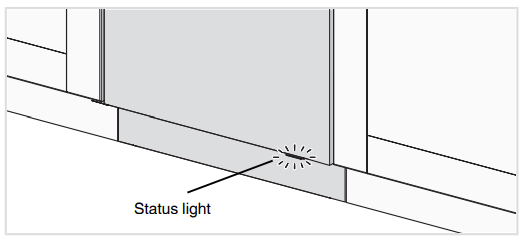
 Add rinse aid