INSTALLATION GUIDE
INSTALLATION GUIDE
READ AND SAVE THESE INSTRUCTIONS
Technical Specifications
Check the fan label to make sure it is the correct voltage.
Operating voltage Diameter Weight Operating frequency
120 VAC, 1 Φ 52 in. (132 cm) 11 lb (5 kg) 60 Hz
220/240 VAC, 1 Φ 52 in. (132 cm) 11 lb (5 kg) 50/60 Hz
Tools Needed
• Ladder
• Wire Strippers
• Phillips Screwdriver
• Hex Key
• Wrenches
Scan for online Haiku Home app help
Models: L3127-X5, L3127-X6, FR127C-U1EXX
1
HAIKU® HOME ● WWW.HAIKUHOME.COM/SERVICE ● 1-855-MY-HAIKU
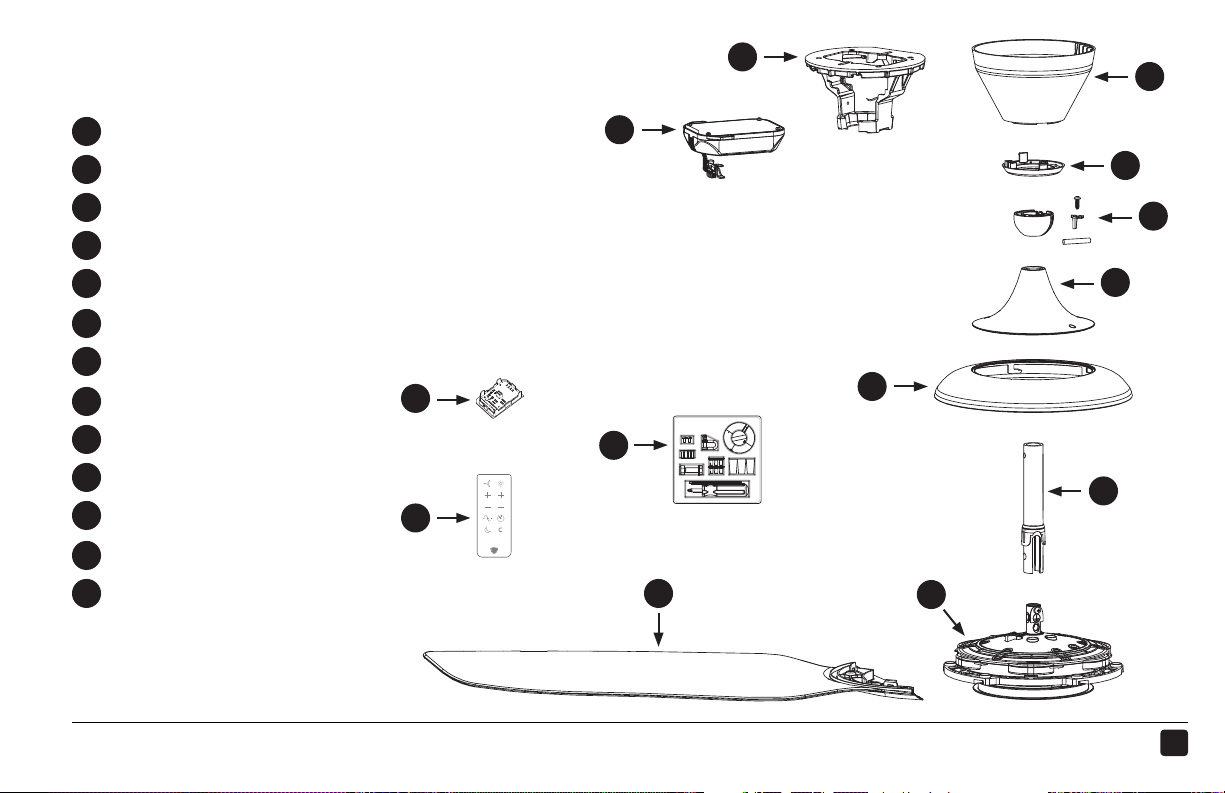
Mounting Bracket
Control Box
Wiring Cover
LED Diuser Ring
Mounting Ball & Hardware
Lower Cover Trim
Lower Cover Ring
Extension Tube
Motor Unit
(3) Airfoils
Remote Control
Hardware Pack
Wall Control Wi-Fi Module†
PARTS
See the following page for hardware.
Packaged with wall control†
a
b
c
d
e
f
g
h
i
j
k
l
m
a
b
c
d
e
f
g
h
i
j
k
l
m
2
REV.D ● © 2015 HAIKU HOME. ALL RIGHTS RESERVED.
HARDWARE
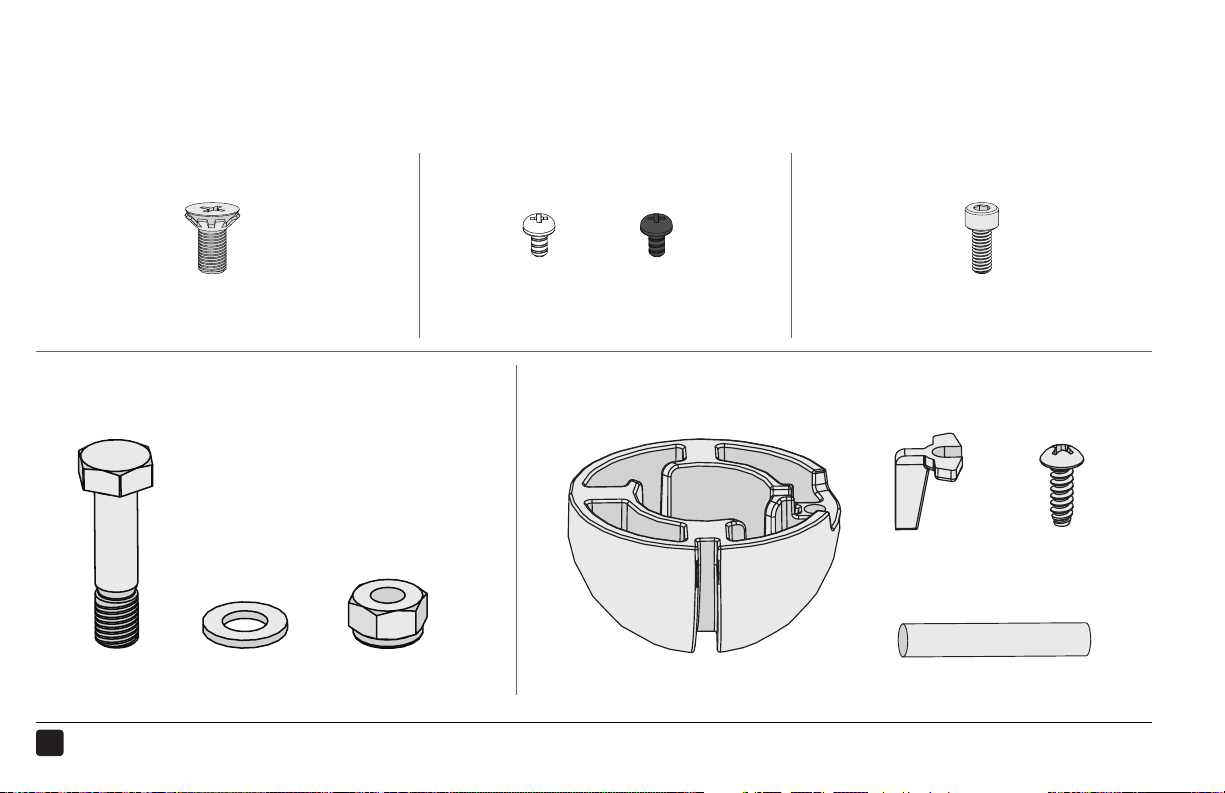
Hardware and tools needed for installation are packaged in the hardware pack. Hardware below shown at
actual size.
Mounting Hardware
M8 Bolt M8 Washer M8 Nylock Nut
Airfoil Hardware
(6) M5 Screws with Tooth Washer
Wiring Cover Hardware
(4) M4 Socket Head Cap Screws
Lower Cover Hardware
Mounting Ball & Hardware
Steel Pin
Wedge 4 mm Self-Tapping
Screw
Mounting Ball
(2) Painted M3.5 Screws
or
BlackWhite
3
HAIKU® HOME ● WWW.HAIKUHOME.COM/SERVICE ● 1-855-MY-HAIKU
1
PREPARE THE FAN SITE
Installation requires basic electrical knowledge. Contact a licensed electrician if you are uncomfortable
performing electrical work!
2
1
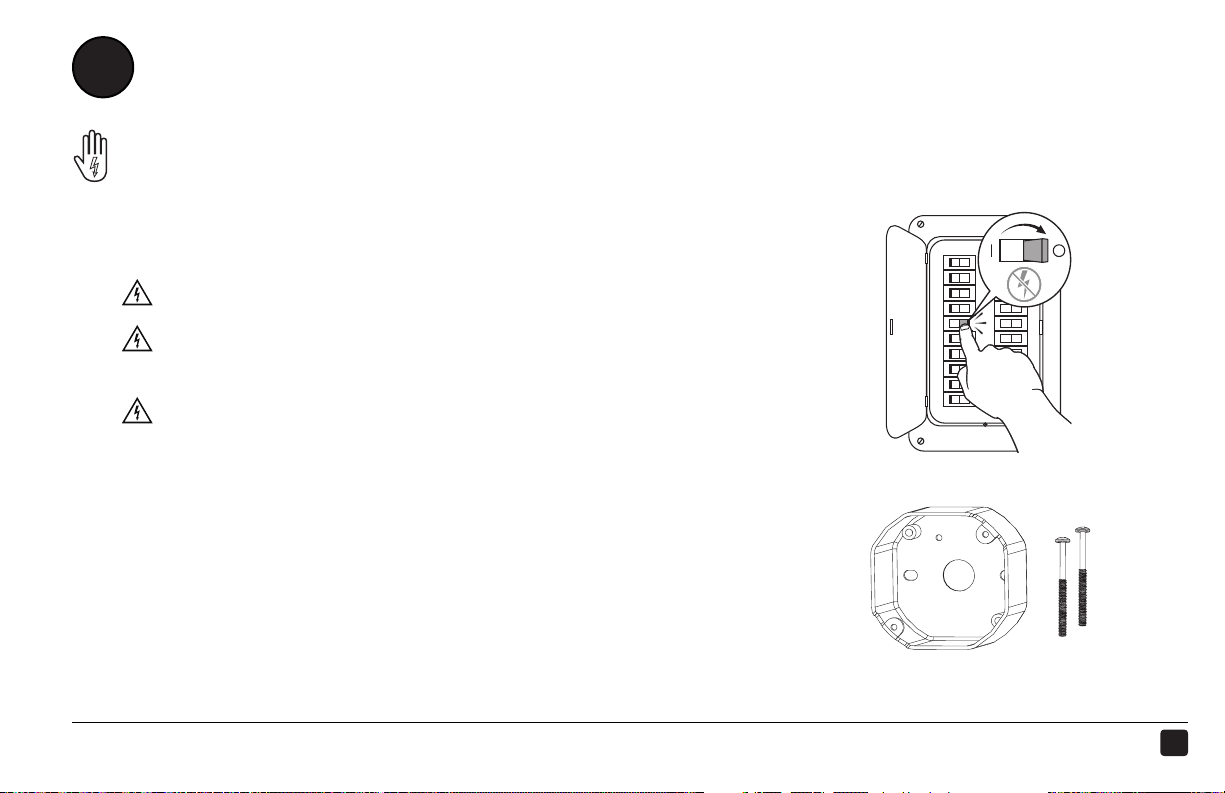
Disconnect Power!
Disconnect power to the fan location before wiring fan!
If required by your local electrical code, a licensed electrician
must install the fan.
A means for disconnection must be incorporated in the
fixed wiring in accordance with the wiring rules.
If you are installing your fan to an outlet box, it must be suitable for
fan support. If there is not an outlet box at the fan location, install
one on a ceiling joist or beam.
4
REV.D ● © 2015 HAIKU HOME. ALL RIGHTS RESERVED.
INSTALL THE MOUNTING BRACKET
2
b
a
c
Installation may vary. Refer to
the outlet box instructions.
slope
open side
slope
5
HAIKU® HOME ● WWW.HAIKUHOME.COM/SERVICE ● 1-855-MY-HAIKU
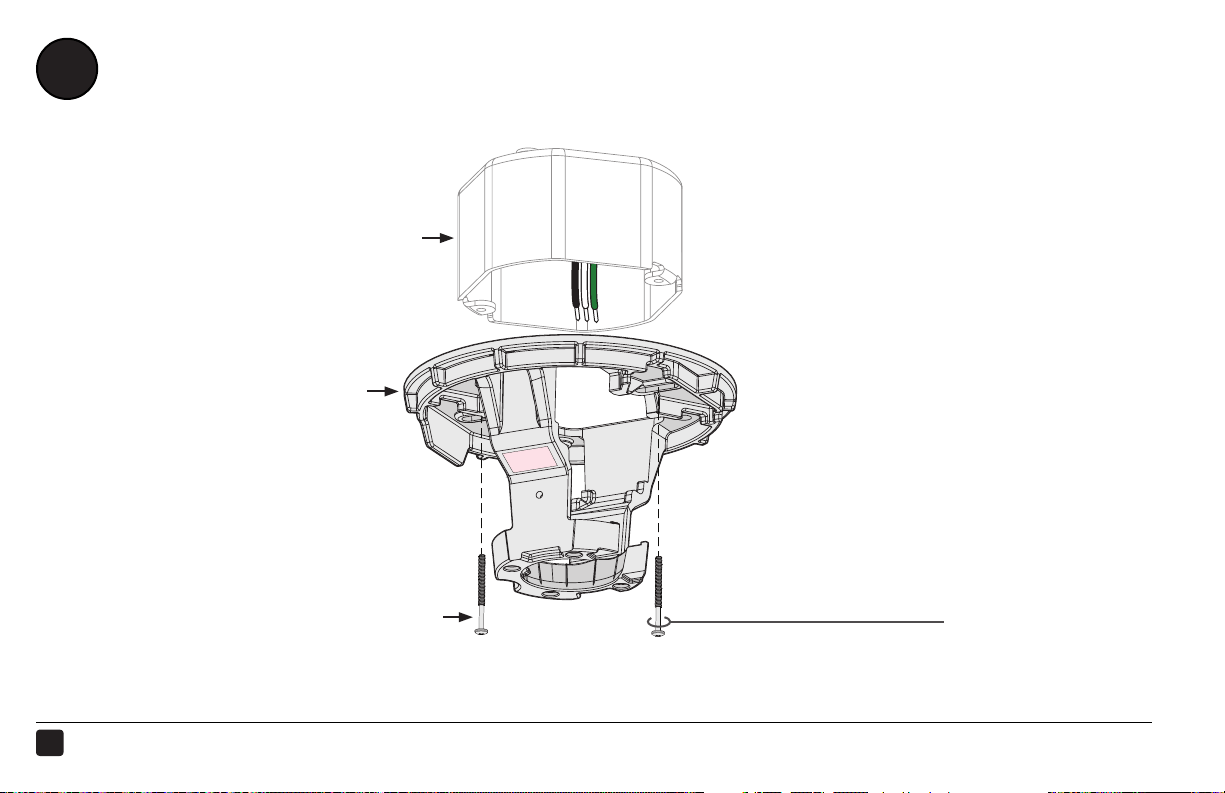
Secure the mounting bracket (a) to the outlet box (b) with the screws supplied with the outlet box (c).
Outlet Box Hardware:
c. Screw (supplied with outlet box)
STEP COMPLETED
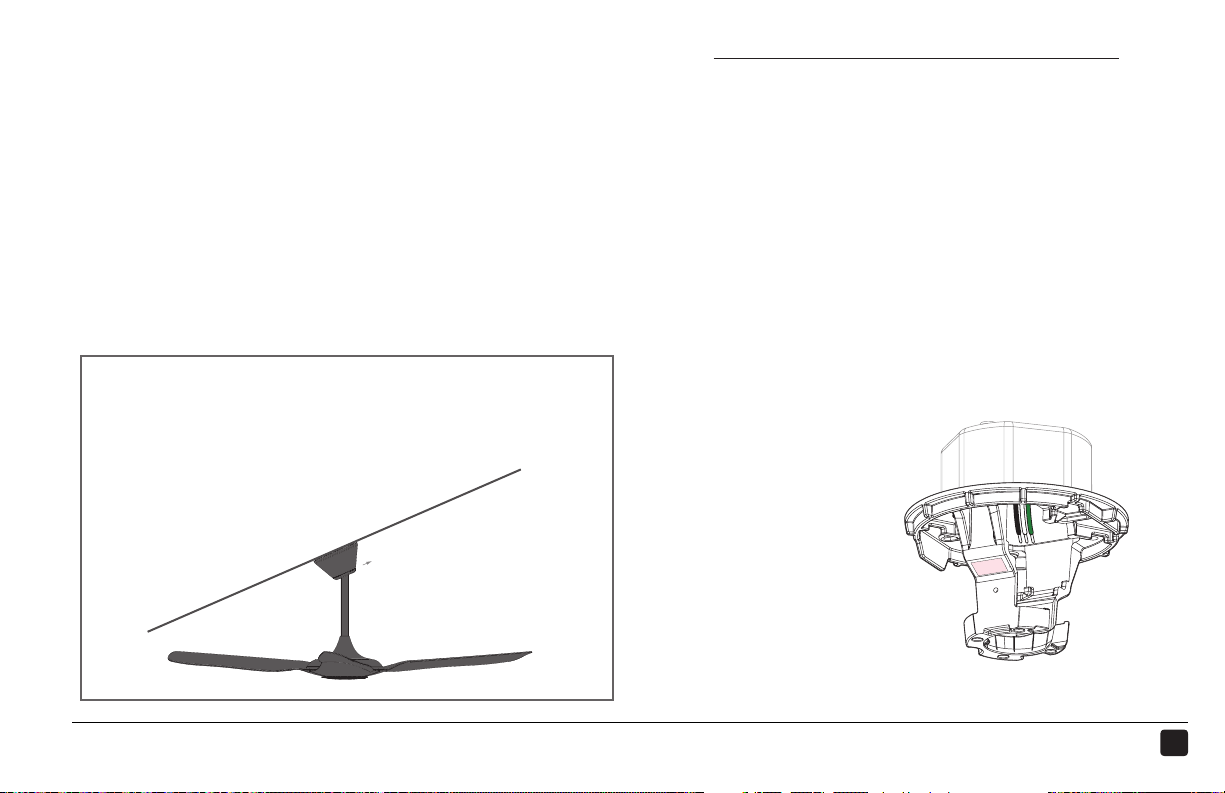
Sloped Ceilings
If mounting to a sloped ceiling, install the mounting bracket
so that the open side faces upward with the slope.
6
REV.D ● © 2015 HAIKU HOME. ALL RIGHTS RESERVED.
PREPARE THE AIRFOILS
3
1 2
a b
SELECT LENS
(BLACK FANS WITH LIGHTS)
MATCH AIRFOIL STICKERS

7
HAIKU® HOME ● WWW.HAIKUHOME.COM/SERVICE ● 1-855-MY-HAIKU
2
1
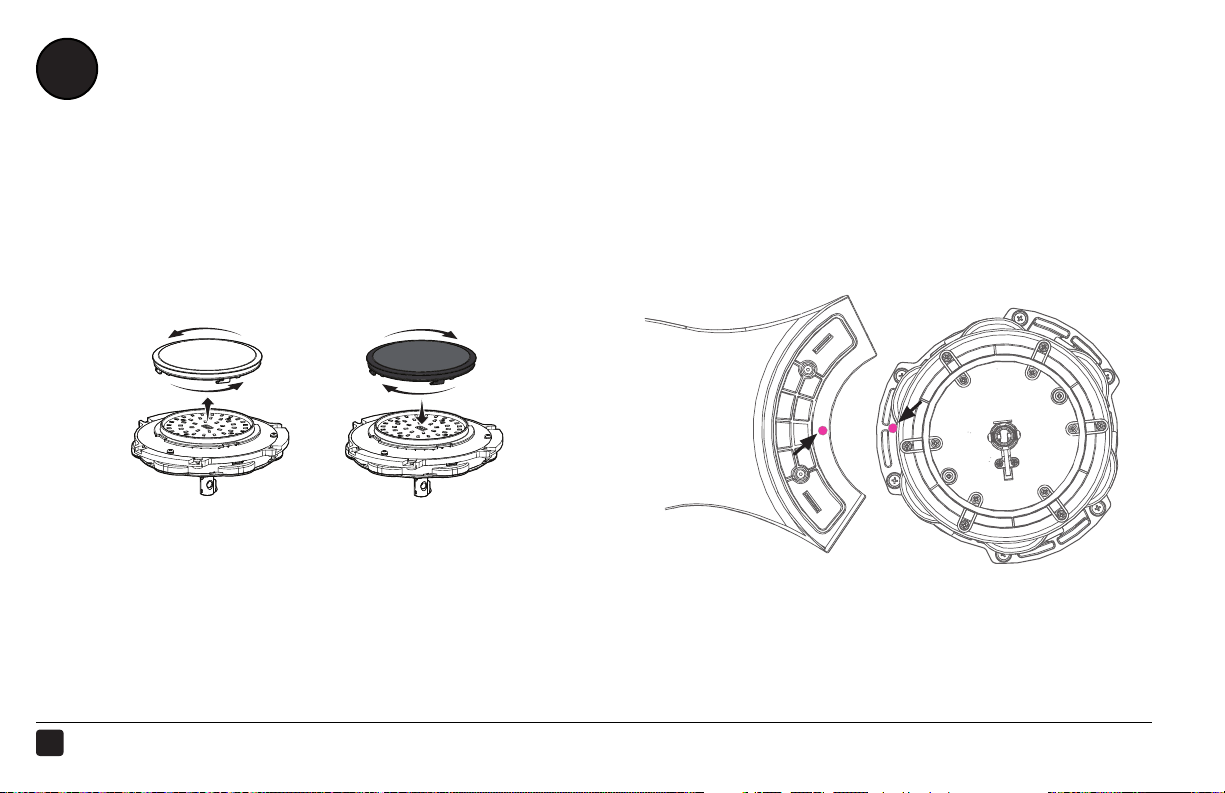
Black fans with lights: For softer lighting, remove the white lens and install the smoky lens before
attaching the airfoils.
a. Twist to uninstall white lens.
b. Twist smoky lens to lock in place.
Make sure the stickers on the airfoils match the stickers on the fan hub.
8
REV.D ● © 2015 HAIKU HOME. ALL RIGHTS RESERVED.
INSTALL THE AIRFOILS
4
b
c
a
1 2
d
INSTALL AIRFOILS FANS WITHOUT LIGHTS
9
HAIKU® HOME ● WWW.HAIKUHOME.COM/SERVICE ● 1-855-MY-HAIKU
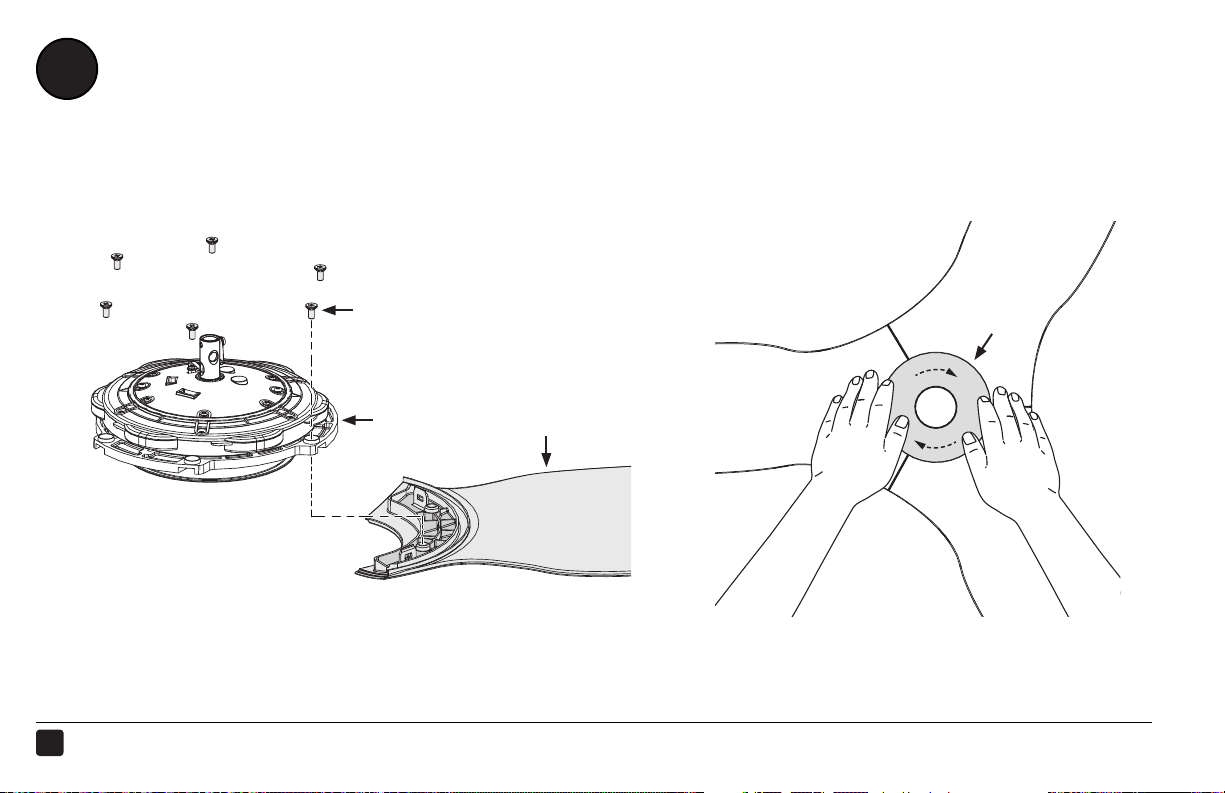
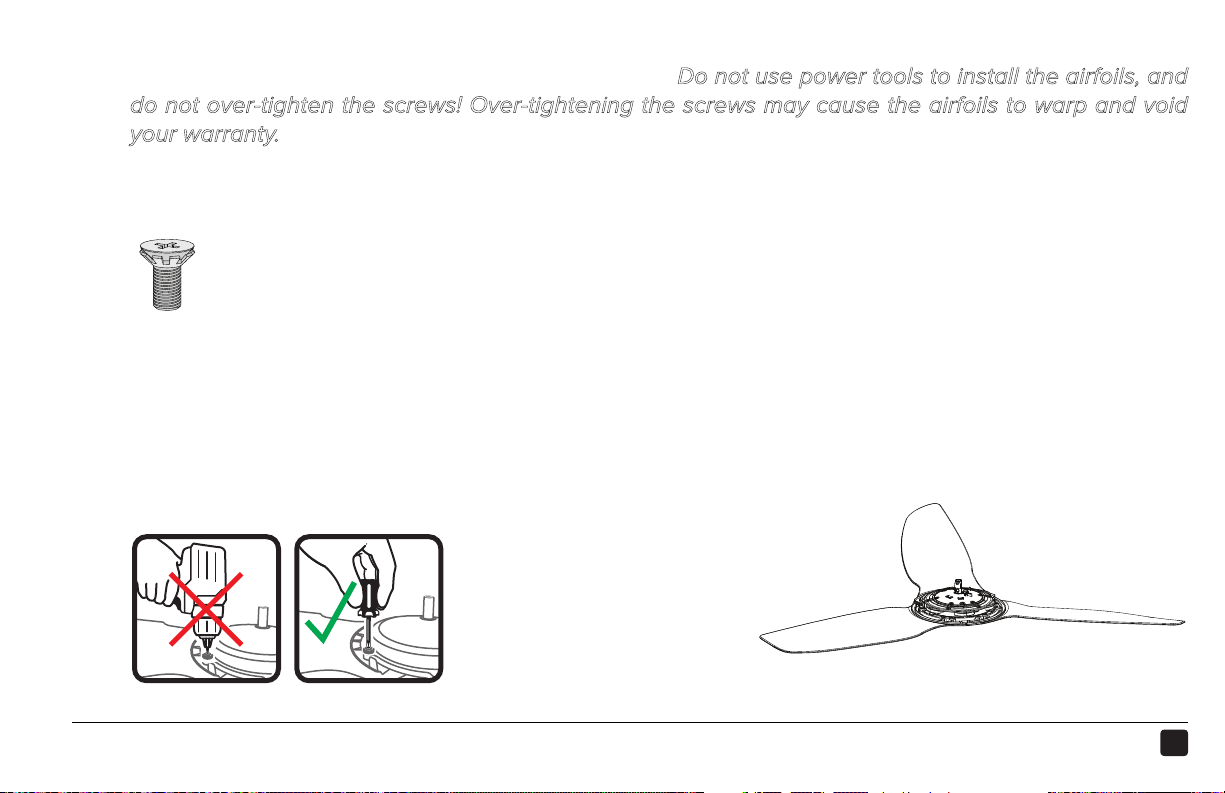
Rest the motor assembly (a) on your lap. Moving clockwise, install each airfoil (b) with the provided
hardware. Tighten the screws to 2.5 N·m (22.1 in·lb). Do not use power tools to install the airfoils, and
do not over-tighten the screws! Over-tightening the screws may cause the airfoils to warp and void
your warranty.
Airfoil Hardware:
c. (6) M5 screws with tooth washer
Fans without lights: Position the motor cover (d) over the motor, and then place both hands flat on the
cover and turn it clockwise to lock it in place.
DO NOT USE POWER TOOLS!
STEP COMPLETED
2
1
tooltip
10
REV.D ● © 2015 HAIKU HOME. ALL RIGHTS RESERVED.
INSTALL THE LOWER EARTH/GROUND WIRE
5
a
c
1 2
b
d
SECURE EARTH/GROUND WIRE
POSITION EXTENSION TUBE
Box cables back, in color
11
HAIKU® HOME ● WWW.HAIKUHOME.COM/SERVICE ● 1-855-MY-HAIKU
STEP COMPLETED
2
1
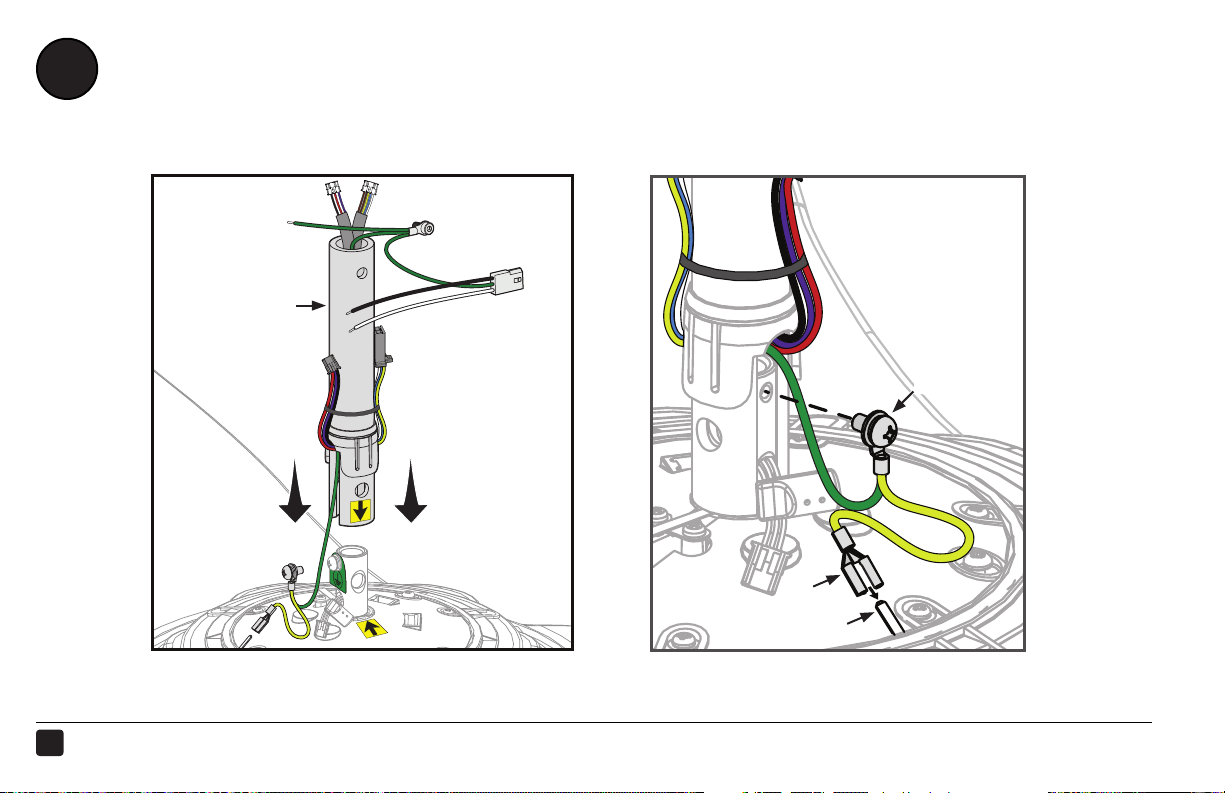
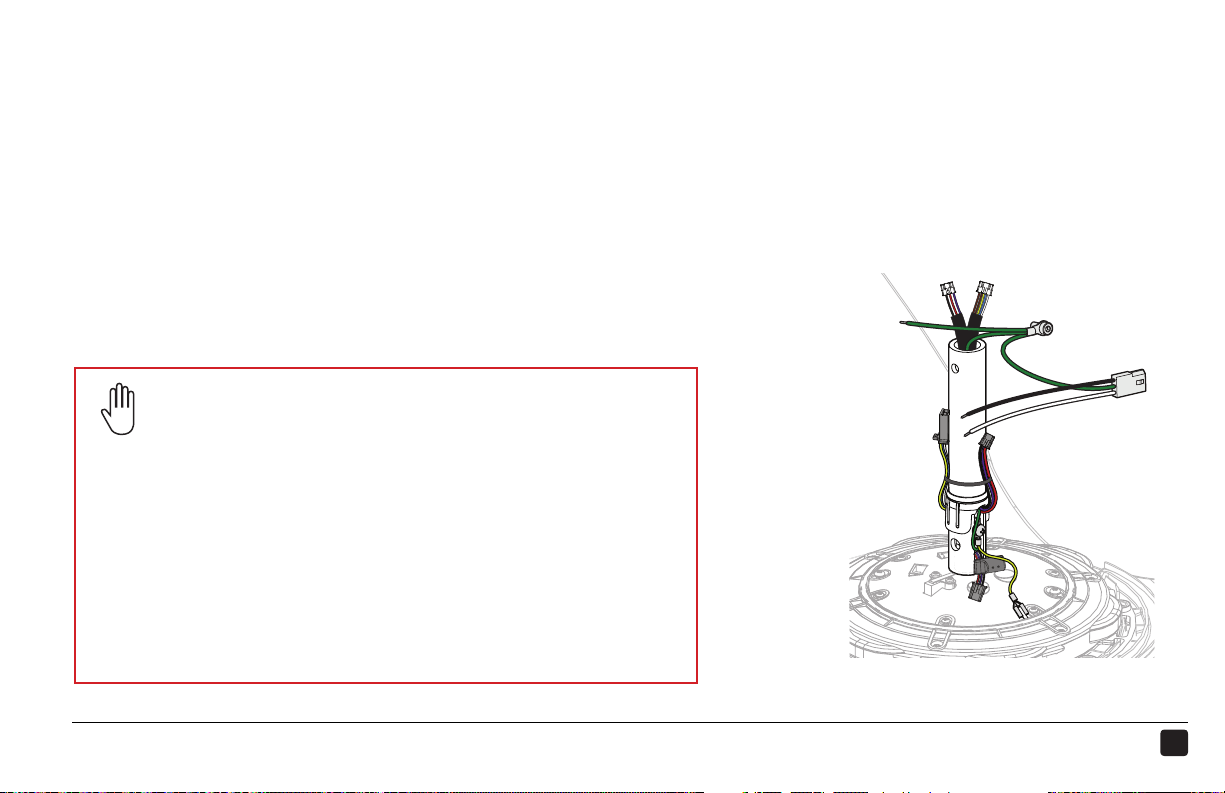
Lower the extension tube (a) onto the motor shaft. Ensure the yellow arrow sticker on the extension
tube is aligned with the sticker on the motor.
Remove the screw and ground tag from the motor shaft. Secure the Earth/Ground wire to the motor
shaft with the captive screw (b). Connect the yellow Earth/Ground female spade connector (c) to the
male connector (d) on the motor.
Safety Cable Installation
You may be required to secure the fan directly to the building
structure if your local safety code requires it. Check your
local code! Refer to the Safety Cable instructional sheet
included with this guide for more information.
Acceptable building structures include a wooden beam or a
metal mounting brace secured between two beams. In some
cases it may be necessary to install additional structural
material to provide attachment points.
12
REV.D ● © 2015 HAIKU HOME. ALL RIGHTS RESERVED.
6
CONNECT MOTOR WIRING AND SECURE EXTENSION TUBE
1 32
d
SECURE HARDWARE
REMOVE SLACK
INSTALL WIRING HARNESSES
a
a
b
c
e
13
HAIKU® HOME ● WWW.HAIKUHOME.COM/SERVICE ● 1-855-MY-HAIKU
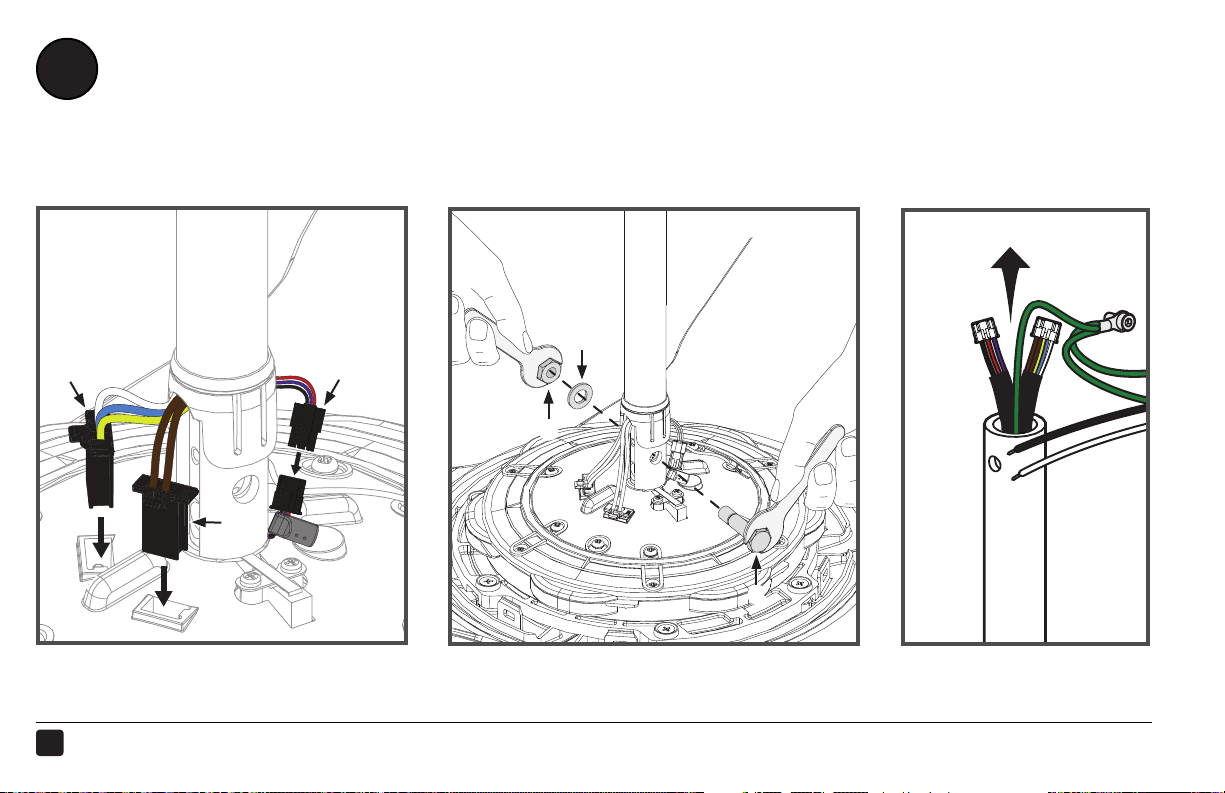
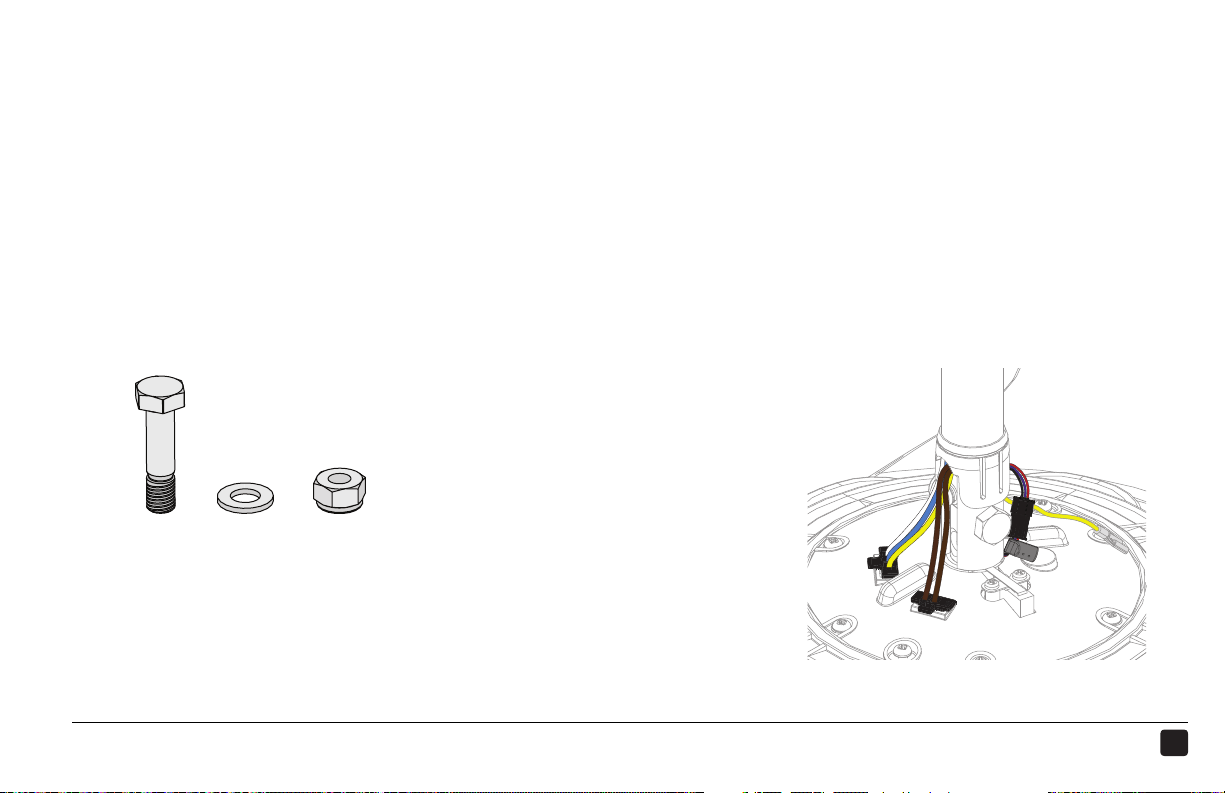
Remove the tie holding the wiring harnesses to the extension tube. Plug the two large wiring harnesses
(a) into the receptacles on the motor. Plug the small, male wiring harness (b) into the female wiring
harness from the motor shaft.
Align the bolt holes on the extension tube with the holes on the motor shaft, and then secure the tube
with the provided hardware and wrenches.
Mounting Hardware:
c. M8 bolt
d. M8 washer
e. M8 nylock nut
To remove slack, gently tug on the cables at the top
of the extension tube.
STEP COMPLETED
2
1
3
14
REV.D ● © 2015 HAIKU HOME. ALL RIGHTS RESERVED.
SECURE THE LOWER COVER
c
7
b
a
STEP COMPLETED
15
HAIKU® HOME ● WWW.HAIKUHOME.COM/SERVICE ● 1-855-MY-HAIKU
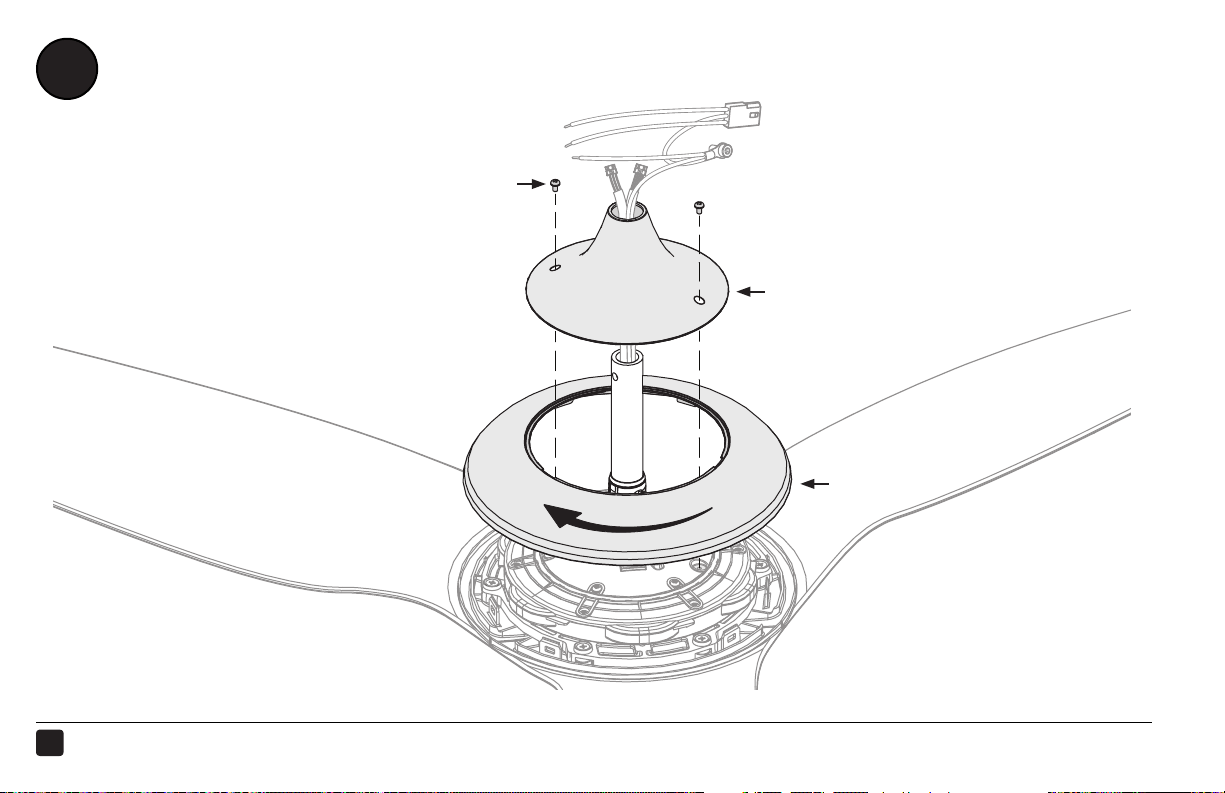
Place the lower cover ring (a) around the extension tube, resting it evenly on the motor. There should
be a very small gap between the cover and the airfoils. Rotate the cover ring clockwise until it stops.
Thread the wires through the opening in the lower cover trim (b), and then slide the trim down the
extension tube, resting it evenly on the cover ring.
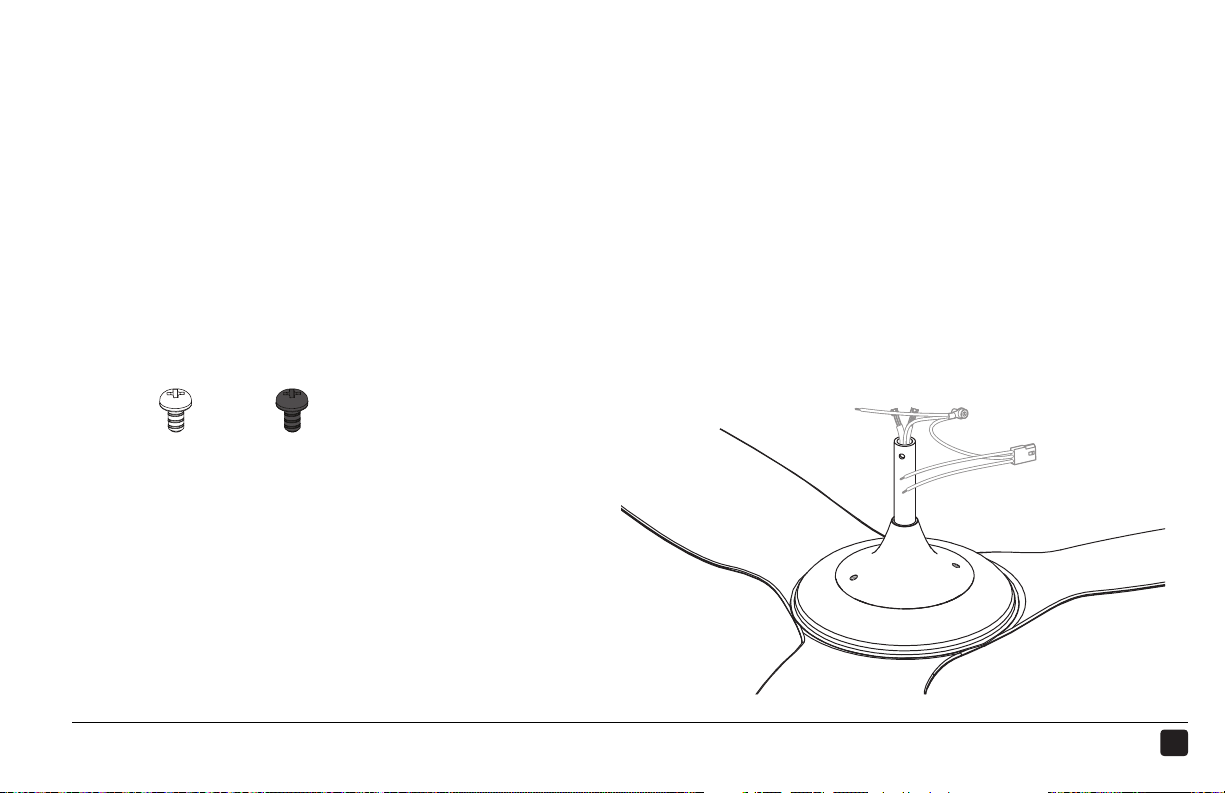
Align the screw holes on the trim with the motor screw holes, and then secure the trim in place with
the provided screws (c).
Lower Cover Hardware:
c. (2) Painted M3.5 screws
2
1
3
or
BlackWhite
16
REV.D ● © 2015 HAIKU HOME. ALL RIGHTS RESERVED.
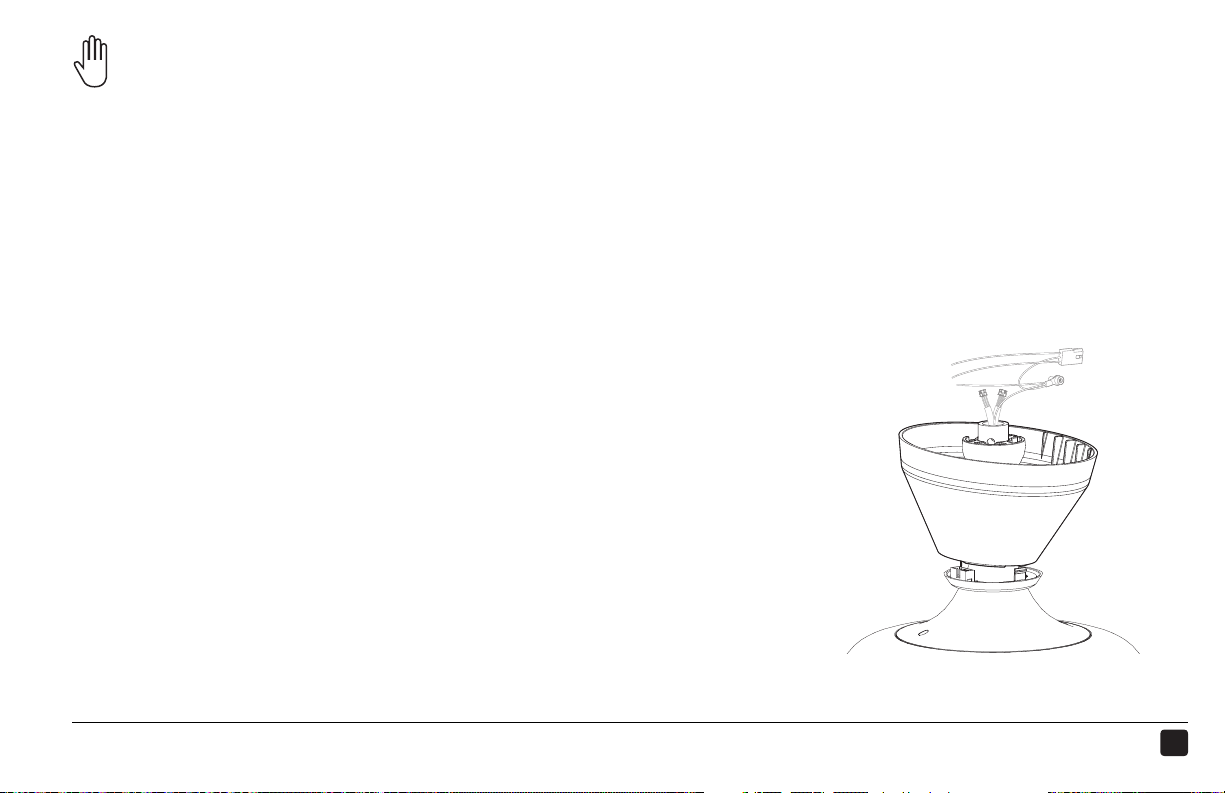
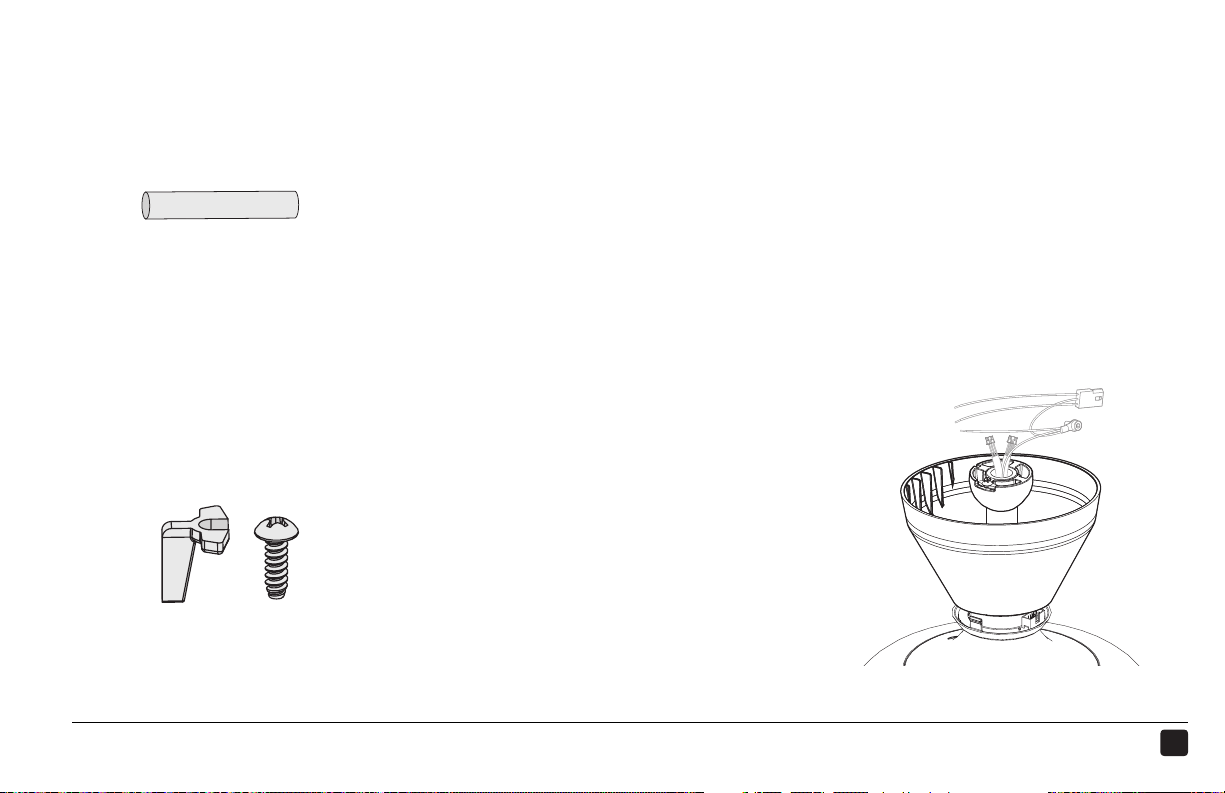
ARRANGE LED DIFFUSER RING, WIRING COVER, AND MOUNTING BALL
8
a
b
c
Do not seat the LED diuser ring in the wiring cover at this step!
17
HAIKU® HOME ● WWW.HAIKUHOME.COM/SERVICE ● 1-855-MY-HAIKU
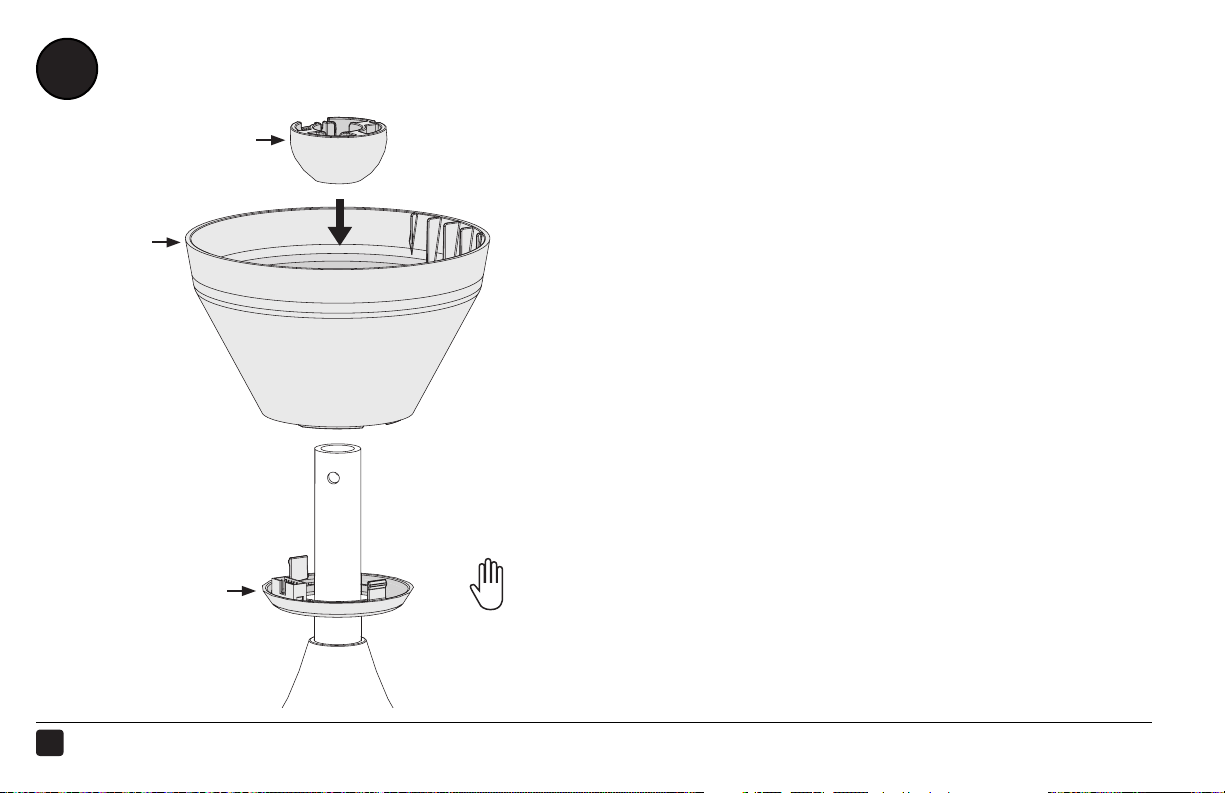
Slide the LED diuser ring (a), wiring cover (b), and mounting ball (c) down the extension tube (in that order),
resting them on the fan hub.
STEP COMPLETED
Do not seat the LED diuser ring in the wiring cover at this step!
18
REV.D ● © 2015 HAIKU HOME. ALL RIGHTS RESERVED.
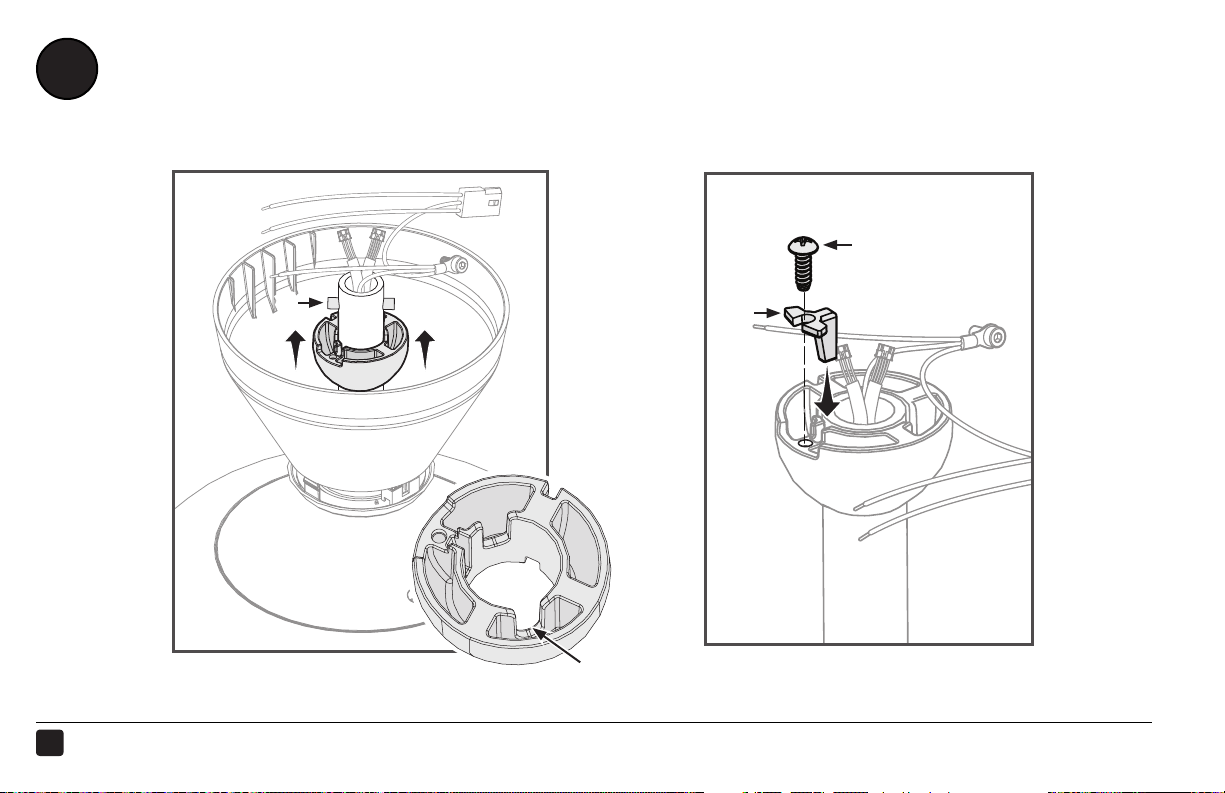
ATTACH THE MOUNTING BALL
c
a
b
Inner
slot
SEAT MOUNTING BALL
21
INSTALL WEDGE
9
19
HAIKU® HOME ● WWW.HAIKUHOME.COM/SERVICE ● 1-855-MY-HAIKU
Insert the steel pin (a) into the hole at the top of the extension tube, and then slide the mounting ball
upward, seating the steel pin in the inner slots of the ball.
Mounting Ball Hardware:
a. Steel pin
Insert the wedge (b) into the mounting ball as shown, and
then secure the wedge with the screw (c). Tighten the screw
enough to prevent movement between the mounting ball
and extension tube. Do not over-tighten the screw.
Mounting Ball Hardware:
b. Wedge
c. 4 mm self-tapping screw
STEP COMPLETED
2
1
20
REV.D ● © 2015 HAIKU HOME. ALL RIGHTS RESERVED.
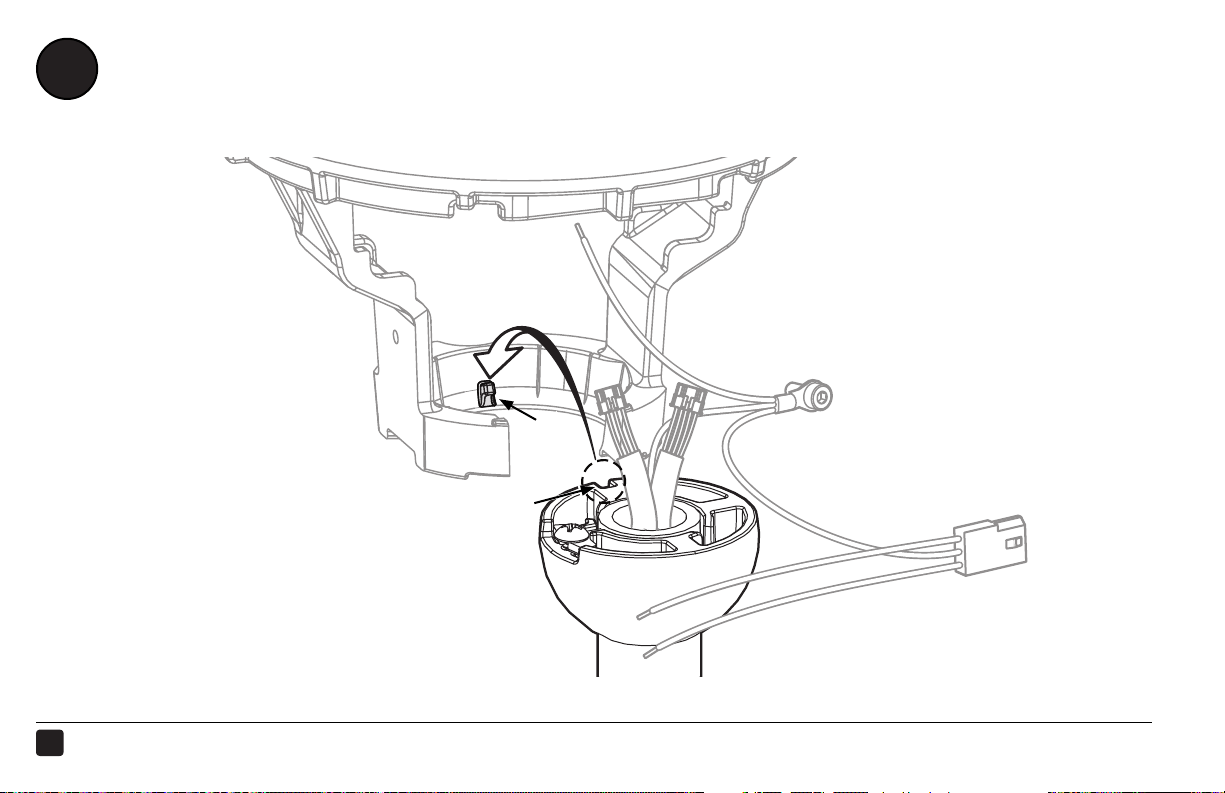
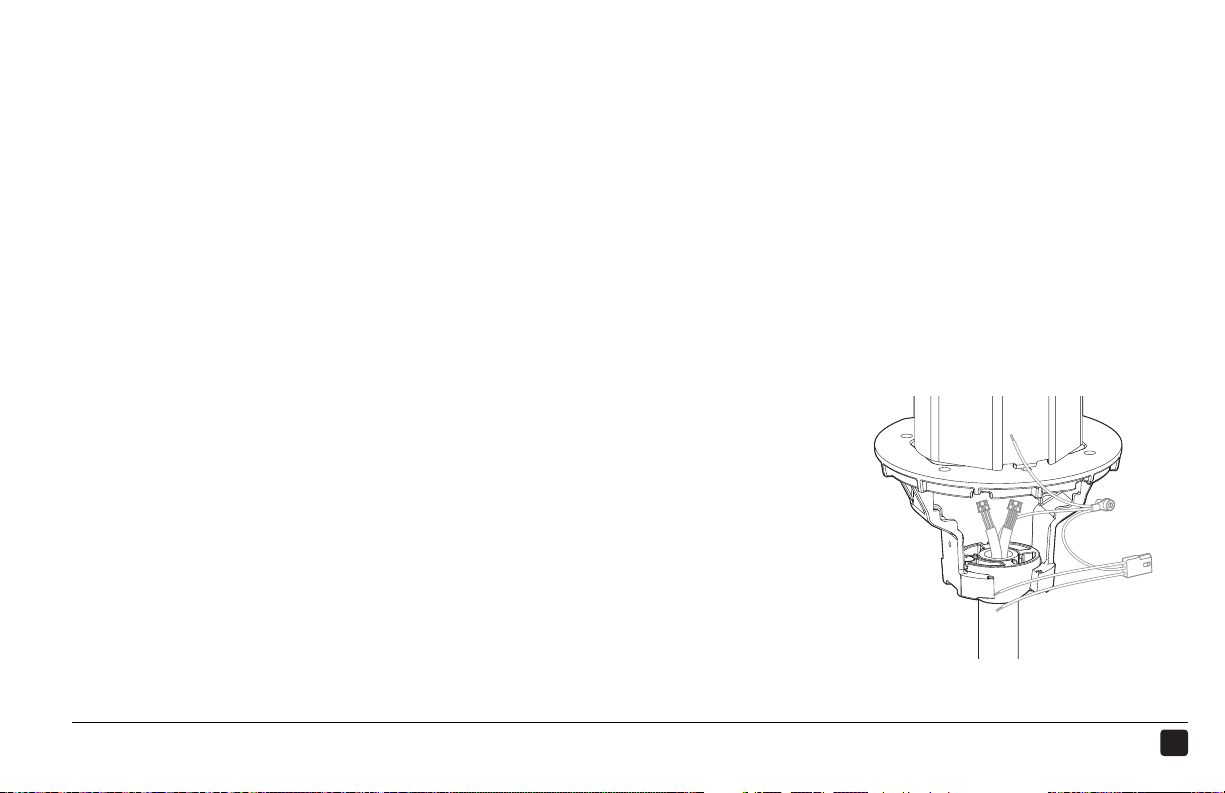
HANG THE FAN
10
Rib
Slot
21
HAIKU® HOME ● WWW.HAIKUHOME.COM/SERVICE ● 1-855-MY-HAIKU
Raise the fan to the mounting bracket. Align the slot in the mounting ball with the rib in the mounting
bracket, insert the mounting ball, and let the fan hang freely.
Gently twist the extension tube to ensure the mounting ball is properly seated and will not move
during fan operation.
STEP COMPLETED
2
1
22
REV.D ● © 2015 HAIKU HOME. ALL RIGHTS RESERVED.
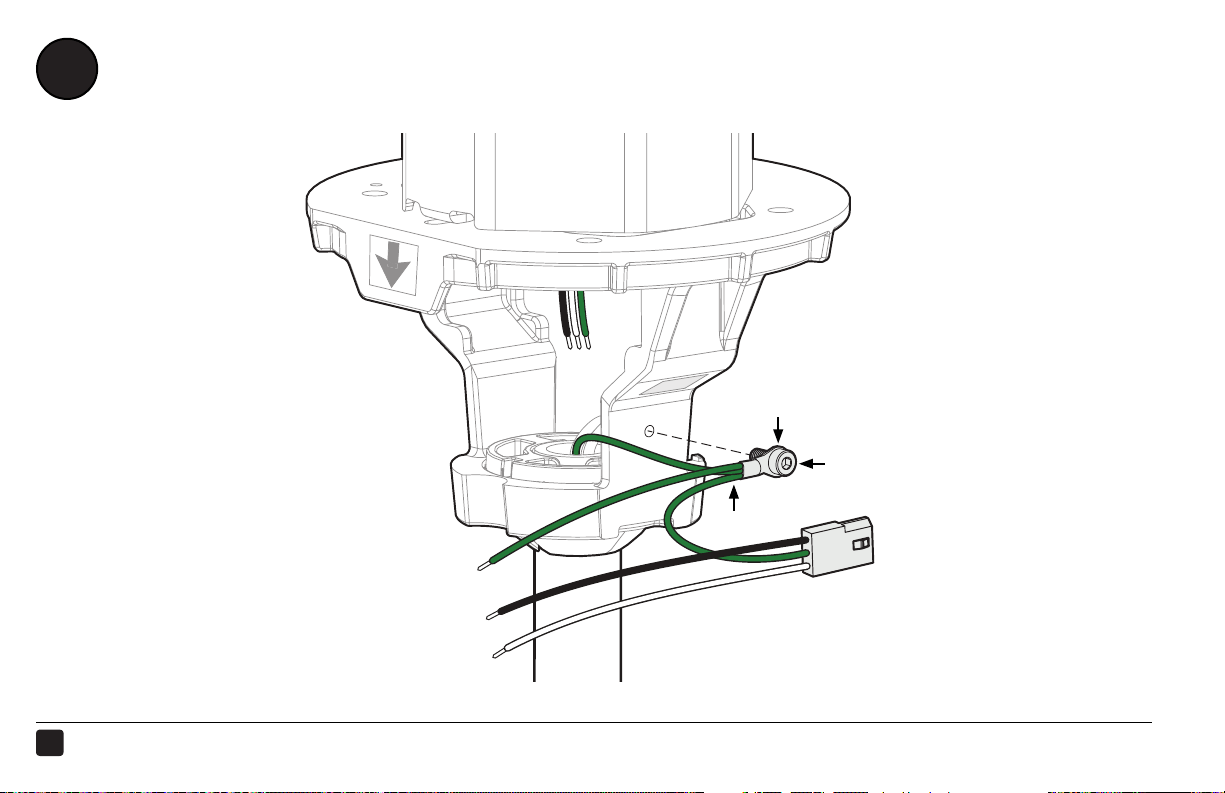
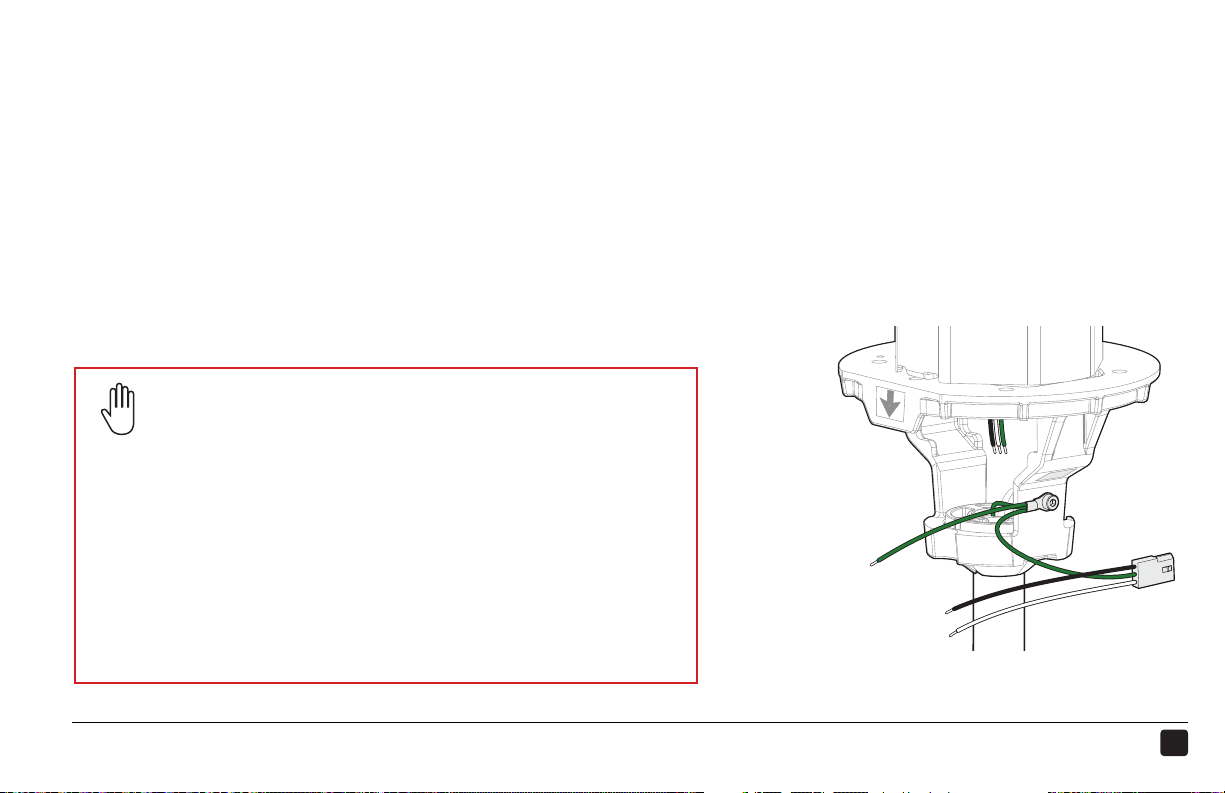
INSTALL THE UPPER EARTH/GROUND WIRE
11
b
c
a
23
HAIKU® HOME ● WWW.HAIKUHOME.COM/SERVICE ● 1-855-MY-HAIKU
STEP COMPLETED
Safety Cable Installation
You may be required to secure the fan directly to the building
structure if your local safety code requires it. Check your
local code! Refer to the Safety Cable instructional sheet
included with this guide for more information.
Acceptable building structures include a wooden beam or a
metal mounting brace secured between two beams. In some
cases it may be necessary to install additional structural
material to provide attachment points.
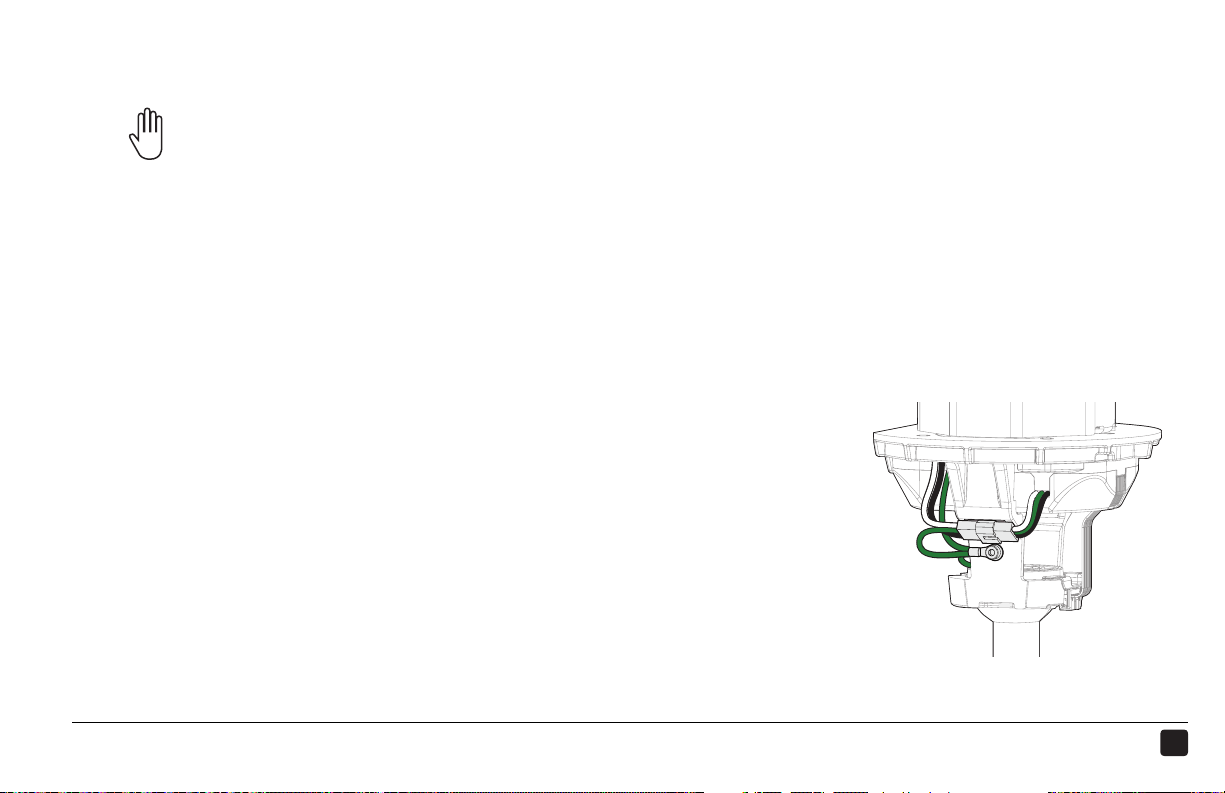
Route the ground wire from the extension tube (a) to the outside of the mounting bracket. Secure the
ground wire terminal (b) to the mounting bracket with the screw (c).
24
REV.D ● © 2015 HAIKU HOME. ALL RIGHTS RESERVED.
12
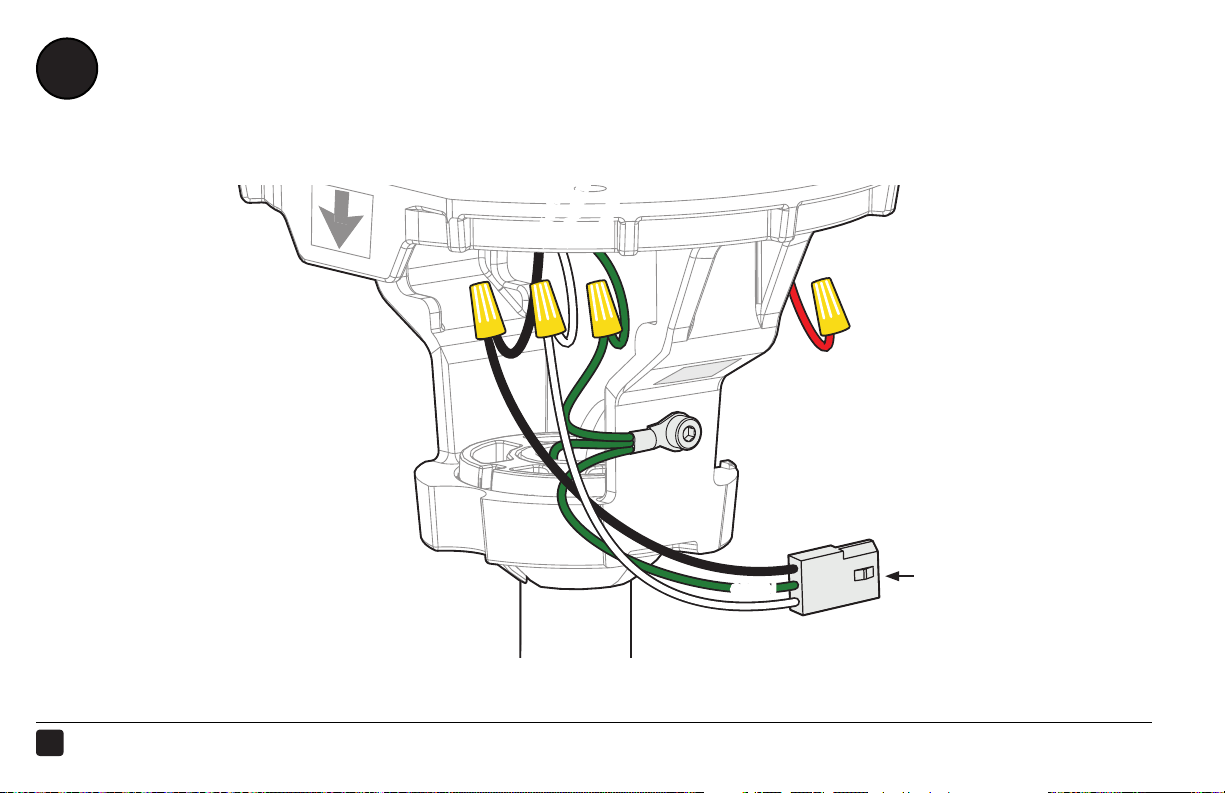
WIRE THE FAN
GREEN
WHITE
BLACK
a
AC HOT/L1
AC NEUTRAL/L2
PE/EARTH GROUND
25
HAIKU® HOME ● WWW.HAIKUHOME.COM/SERVICE ● 1-855-MY-HAIKU
Make sure power is disconnected before wiring the fan!
Do not connect the fan to a damaged power source! Do not attempt to resolve electrical failures on
your own. Consult a qualified electrician if uncertain of the electrical installation of this fan.
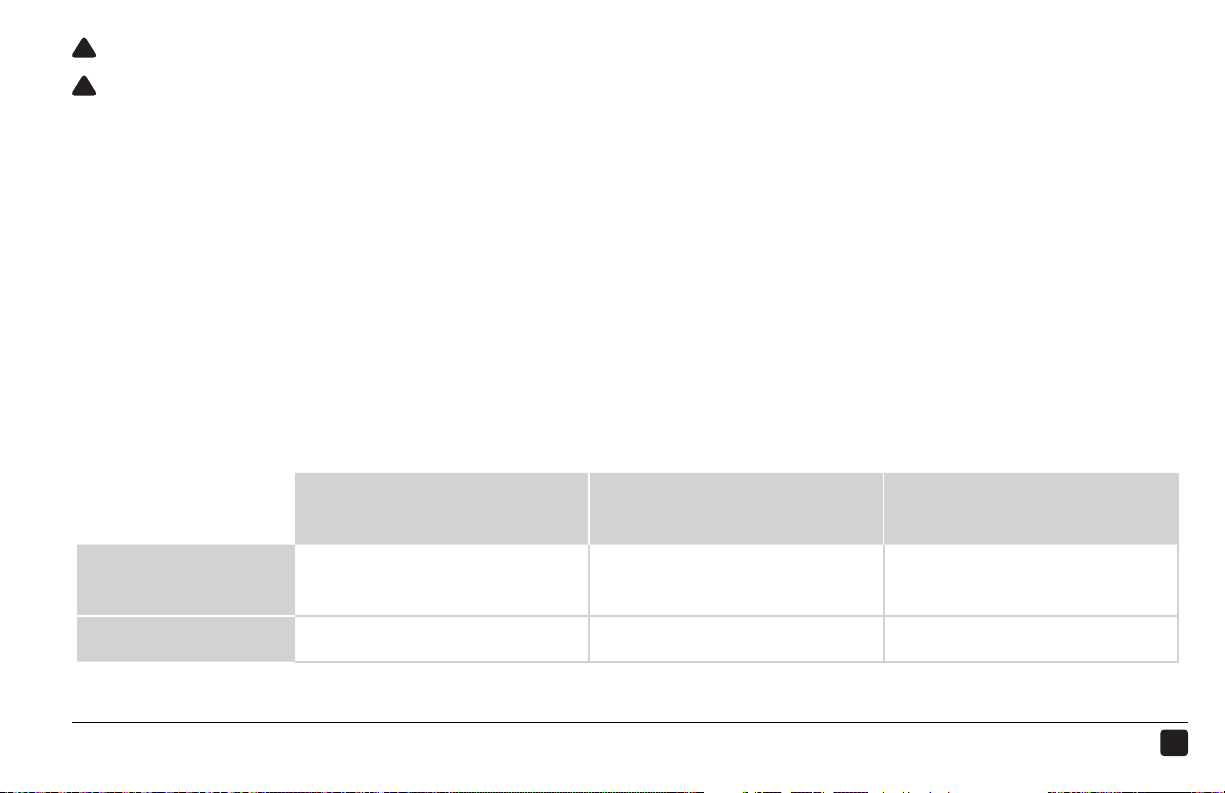
Make the electrical connections by securing the supply power wires to the loose ends of the wiring
harness (a) with the provided wire nuts.
Test the connection by lightly tugging on the wires.
Tuck the power wiring and wire nuts into the outlet box.
AC Hot/L1
Black
AC Neutral/L2
White
PE/Earth Ground
Green
North America
100–120 V system
Black White Green or Bare Copper
All other regions Brown Blue Green with Yellow Tracer
!
!
3
2
1
26
REV.D ● © 2015 HAIKU HOME. ALL RIGHTS RESERVED.
INSTALL THE WI-FI MODULE
13
Wall Control Wi-Fi Module
(Packaged with wall control)
1
2
Skip this step if you did not purchase the Haiku Wall Control!
LOCATE MODULE
INSTALL MODULE
27
HAIKU® HOME ● WWW.HAIKUHOME.COM/SERVICE ● 1-855-MY-HAIKU
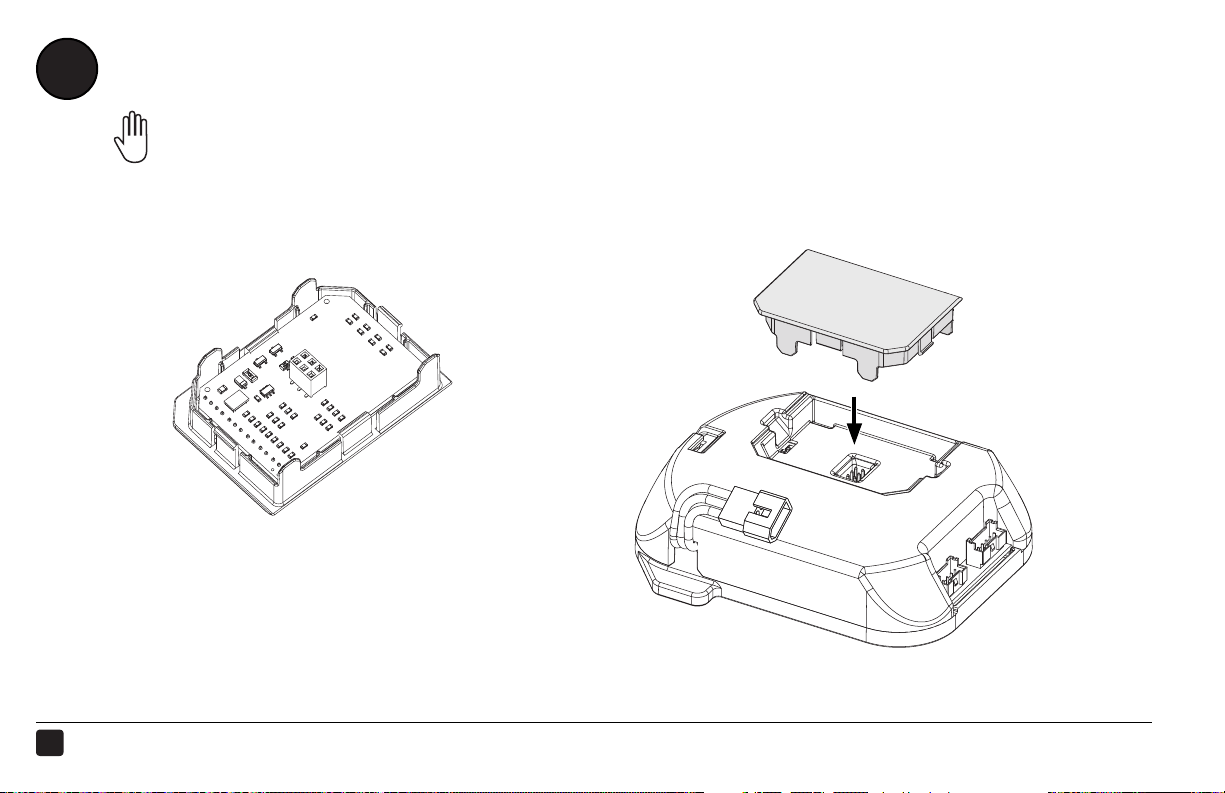
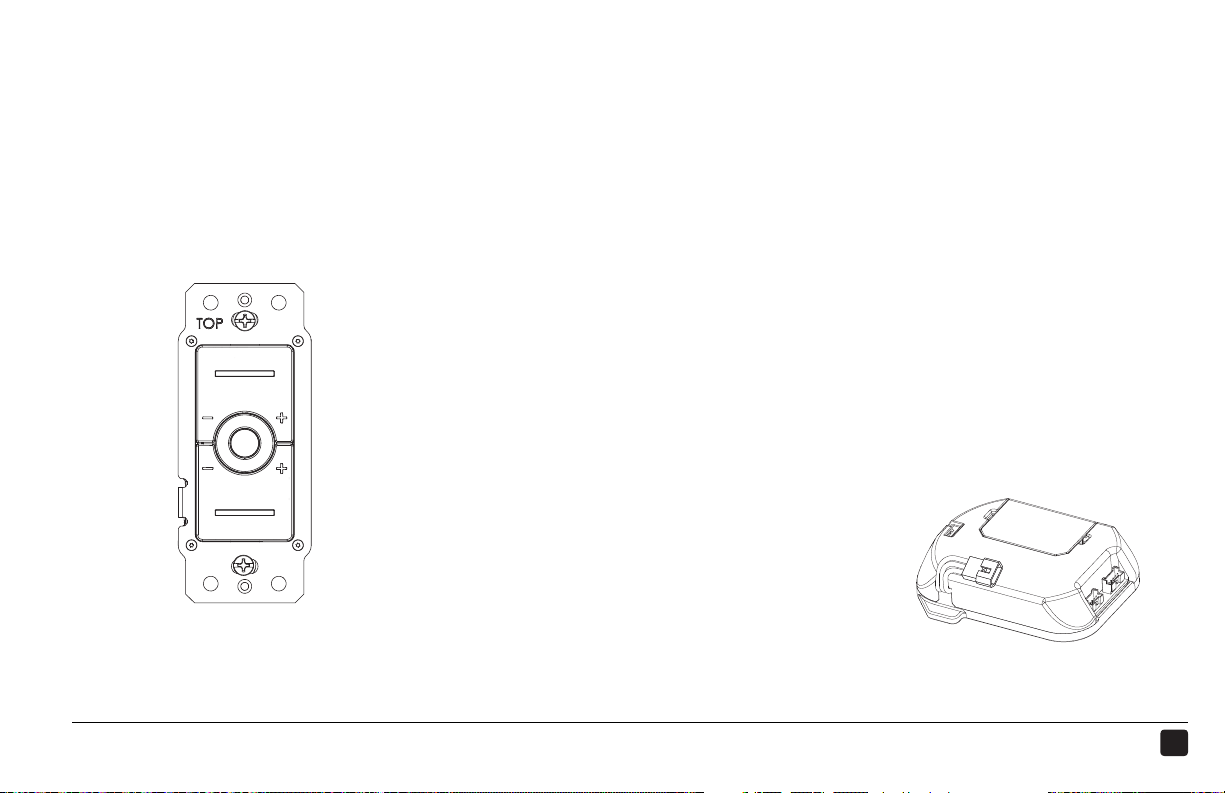
If you purchased the Haiku Wall Control, locate the Wi-Fi module included in the wall control packaging.
Remove the plastic tray from the fan control box and discard it. Insert the Wi-Fi module into the control
box, snapping it into place.
STEP COMPLETED
2
1
Haiku Wall
Control
28
REV.D ● © 2015 HAIKU HOME. ALL RIGHTS RESERVED.
INSTALL THE CONTROL BOX
14
a
1
2
b
INSERT CONTROL BOX
SEAT LED INDICATOR
29
HAIKU® HOME ● WWW.HAIKUHOME.COM/SERVICE ● 1-855-MY-HAIKU
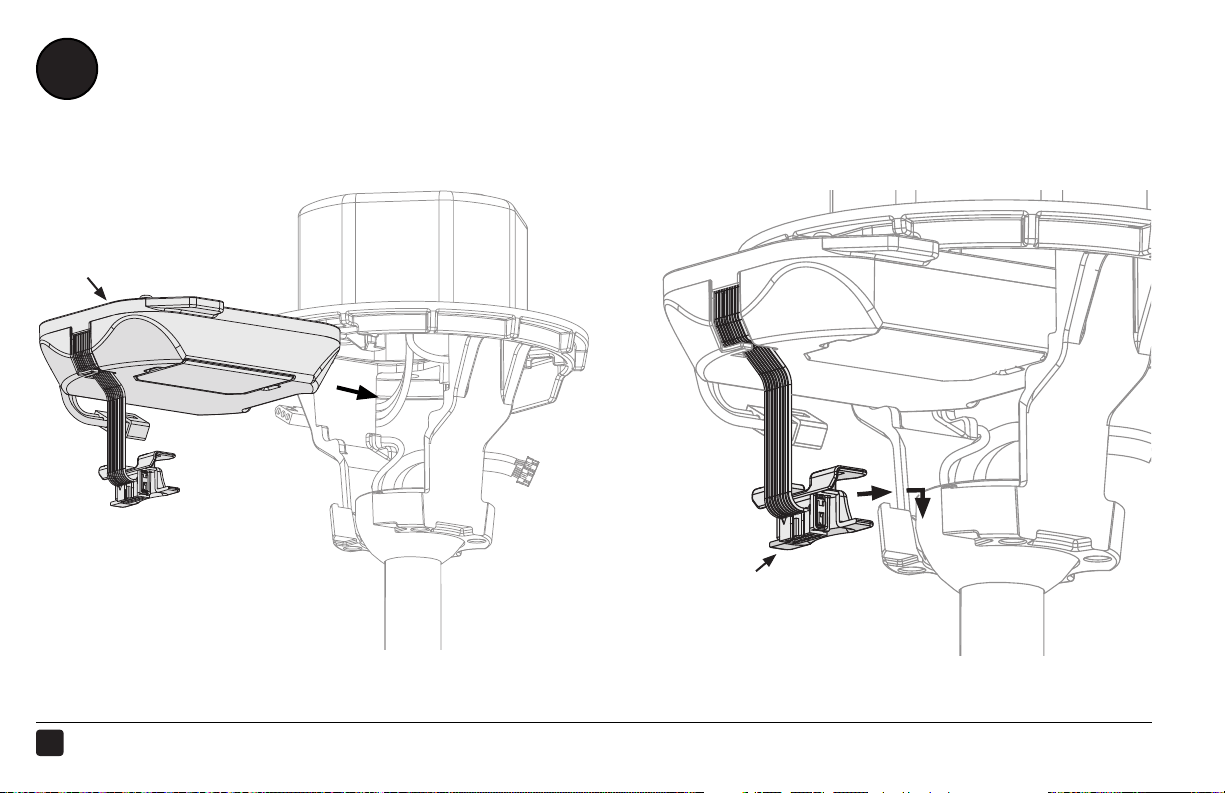
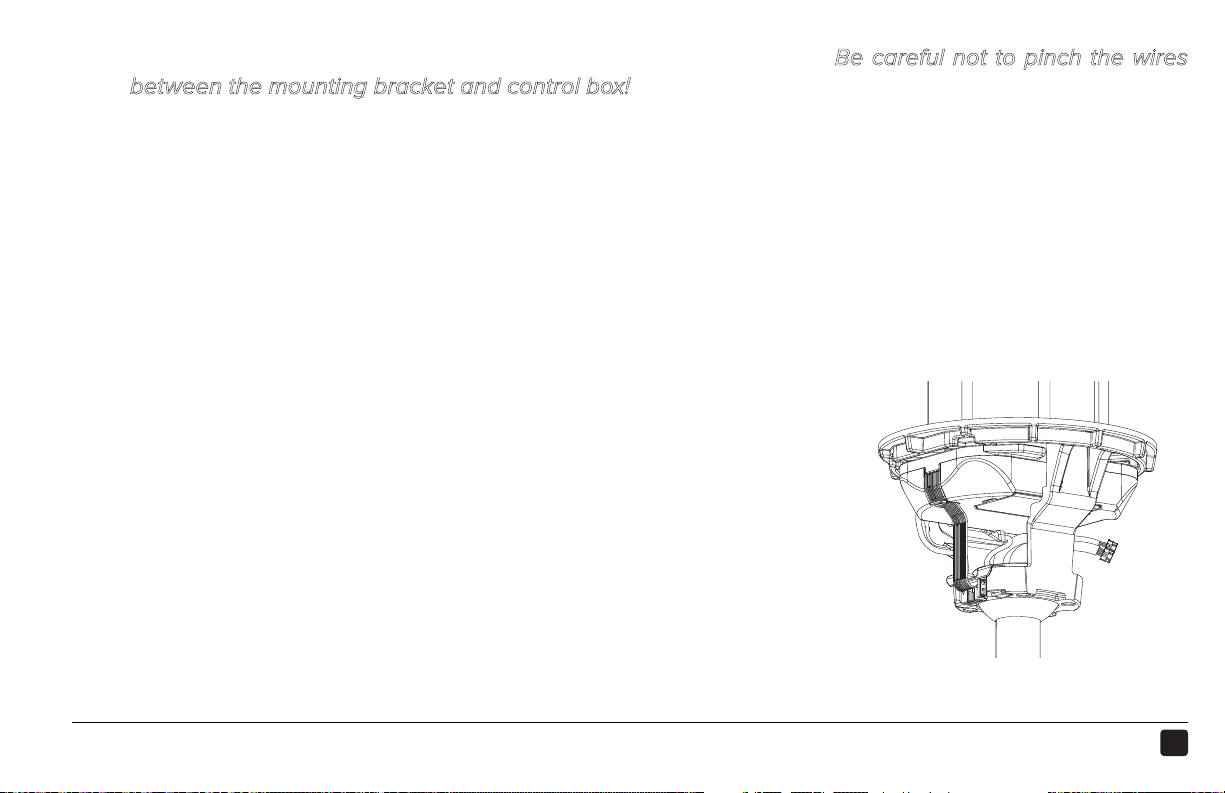
Insert the control box (a) into the mounting bracket as illustrated. Be careful not to pinch the wires
between the mounting bracket and control box!
Snap the LED indicator (b) into the gap in the mounting bracket. Make sure it is securely seated.
STEP COMPLETED
2
1
e
d
30
REV.D ● © 2015 HAIKU HOME. ALL RIGHTS RESERVED.
a
CONNECT THE CONTROL BOX
15
1
2
b
c
CONNECT SUPPLY POWER HARNESS CONNECT WIRING HARNESSES
31
HAIKU® HOME ● WWW.HAIKUHOME.COM/SERVICE ● 1-855-MY-HAIKU
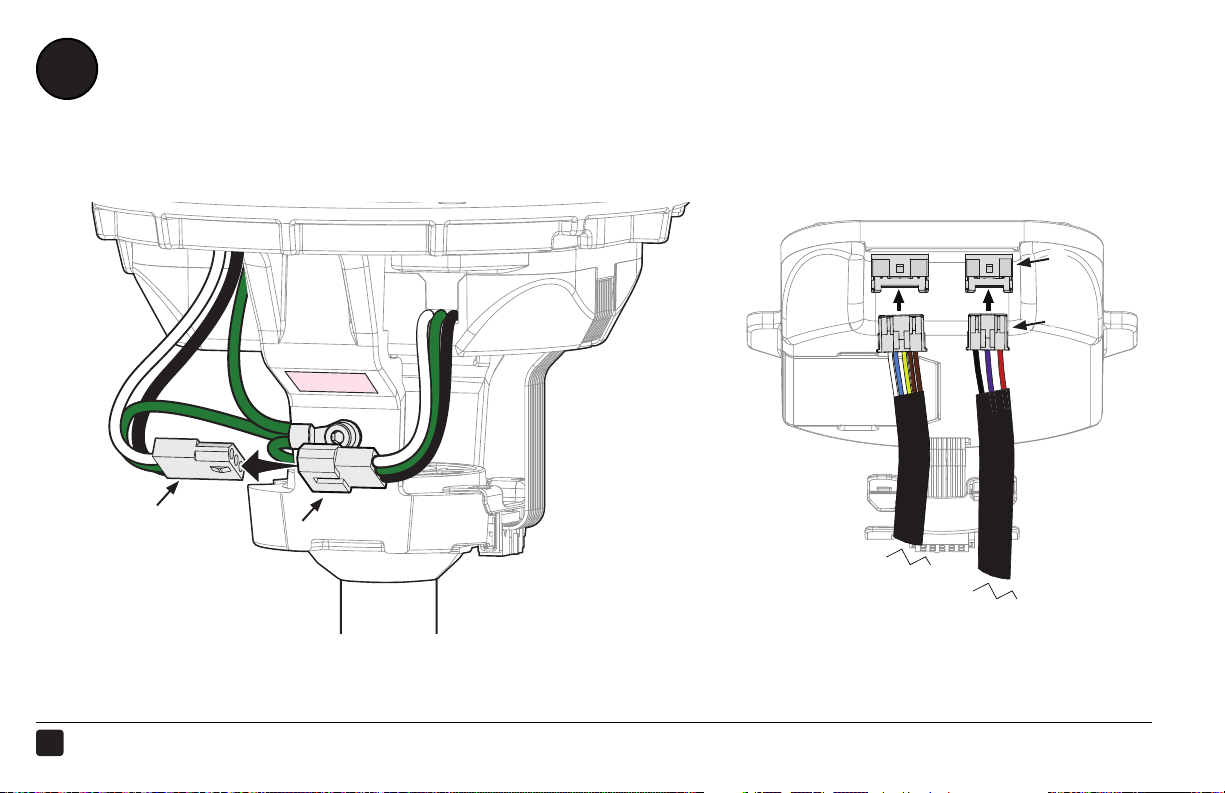
Connect the wiring harness from the control box (a) to the harness from the junction box (b).
Peel the backing o the double-sided tape (c) on the mounting bracket, and then ax the
harnesses to the tape.
Connect the wiring harnesses from the extension tube (d) to the corresponding receptacles (e) on the
control box.
STEP COMPLETED
1
2
32
REV.D ● © 2015 HAIKU HOME. ALL RIGHTS RESERVED.
INSTALL THE WIRING COVER
16
1 2
a
c
d
View from below
bb
ALIGN WIRING COVER
INSTALL SCREWS INSTALL DIFFUSER RING
3
b
33
HAIKU® HOME ● WWW.HAIKUHOME.COM/SERVICE ● 1-855-MY-HAIKU
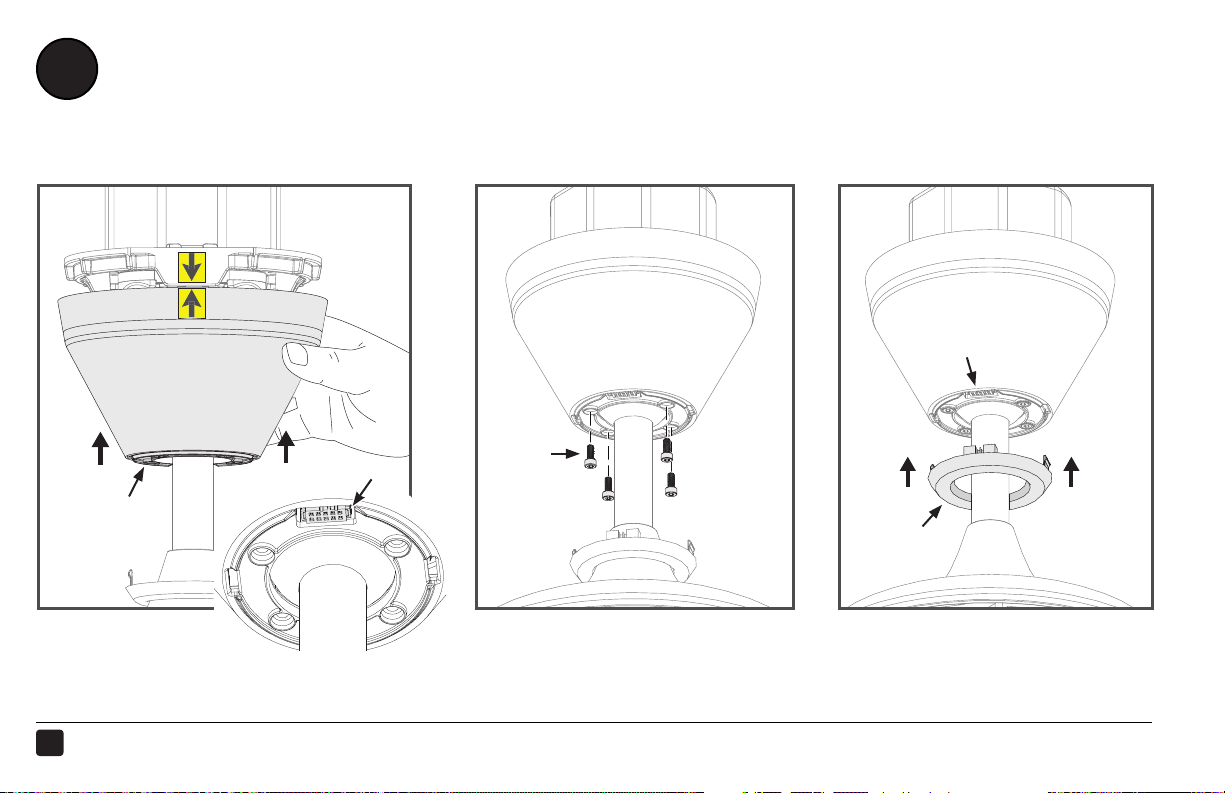
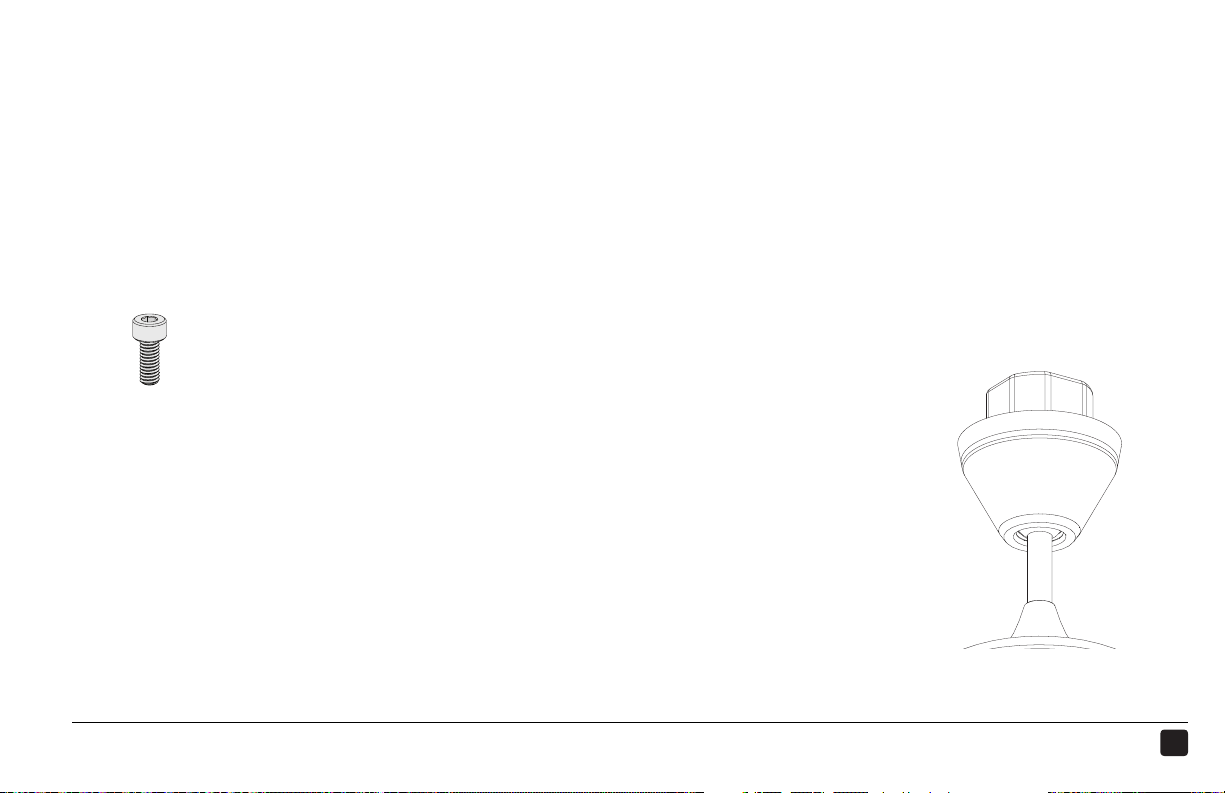
Slide the wiring cover (a) up the extension tube, aligning the yellow arrow stickers so that the top of
the wiring cover sits flush with the mounting bracket. Make sure the LED indicator receptacle shows
through the opening in the cover (b).
Make sure all wiring is tucked into the wiring cover, and then secure the cover with the provided
screws (c).
Wiring Cover Hardware:
c. (4) M4 socket head cap screws
Slide the LED diuser ring (d) up the extension tube and plug
the connector into the LED indicator receptacle through the
opening (b) in the wiring cover.
Make sure the tabs on the diuser ring are securely snapped
in place.
1
2
STEP COMPLETED
3
34
REV.D ● © 2015 HAIKU HOME. ALL RIGHTS RESERVED.
TEST THE FAN
17
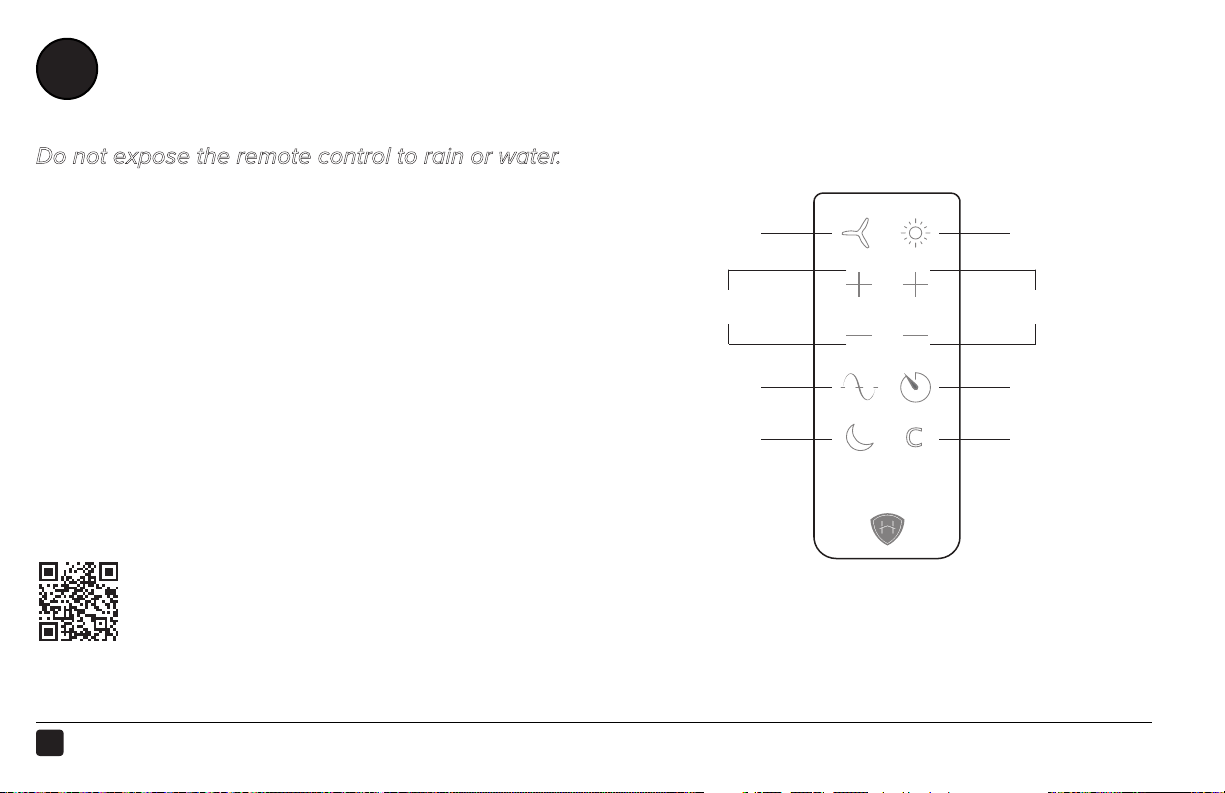
Do not expose the remote control to rain or water.
Before using the remote control, remove the plastic
tab from the battery tray.
Turn on power to the fan location and test functionality
using the remote. Turn on the fan and test speed and
light brightness*.
If you purchased the Haiku Wall Control, follow the
instructions packaged with the wall control to install
and set up SenseME
™
functionality.
For operation, maintenance, and troubleshooting
information, visit haikuhome.com/help
Turn on
the light*
Turn on
the fan
Adjust fan speed
Adjust light*
Whoosh
®
Sleep
Timer
Clear
*Applies only to fans with lights

CONTACT US
Please contact us with any questions you may have by calling 1-855-MY-HAIKU, or visit us at
www.haikuhome.com to learn more about Haiku.
United States
2348 Innovation Drive
Lexington, KY 40511
855 694 2458
Canada
6300 Northwest Dr, Unit 3
Mississauga, ON L4V 1J7, Canada
1 844 924 4277

NOTES

© 2015 Haiku Home
The information contained in this document is subject to change without notice. May be protected by one or more
patents listed at www.bigasssolutions.com/patents
Haiku is a trademark of Delta T Corporation, registered in the U.S. and/or other countries.
www.haikuhome.com/warranties

INSTALLATION GUIDE
INSTALLATION GUIDE
HKU-INST-63-ENG-01
LP