2
INTRODUCTION
Thank you for choosing Electrolux. We are
the progressive and premium home life
brand, making desirable experiences more
sustainable. This Use & Care Manual is part
of our commitment to your experience for
the life of your appliance.
Purchase date
Model number
Serial number
jfk;fkda;jfda jfk;fkda;jfda jfk;fkda;jfda jfk;fkda;jfda
jfk;fkda;jfda jfk;fkda;jfda jfk;fkda;jfda jfk;fkda;jfda
jfk;fkda;jfda jfk;fkda;jfda jfk;fkda;jfda jfk;fkda;jfda
jfk;fkda;jfda jfk;fkda;jfda jfk;fkda;jfda jfk;fkda;jfda
jfk;fkda;jfda jfk;fkda;jfda jfk;fkda;jfda jfk;fkda;jfda
jfk;fkda;jfda jfk;fkda;jfda jfk;fkda;jfda jfk;fkda;jfda
jfk;fkda;jfda jfk;fkda;jfda jfk;fkda;jfda jfk;fkda;jfda
jfk;fkda;jfda jfk;fkda;jfda jfk;fkda;jfda jfk;fkda;jfda
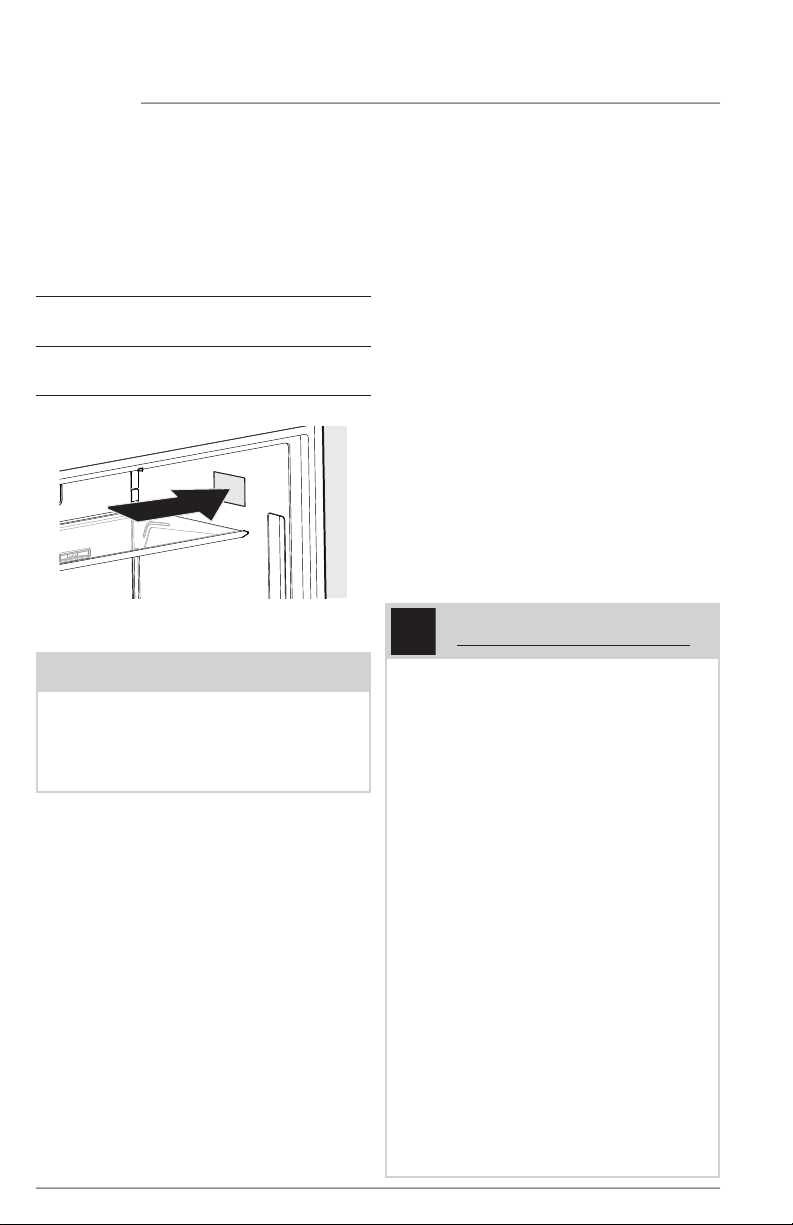
Serial Plate location
NOTE
Registering your product with Electrolux
enhances our ability to serve you. You can
register online at ElectroluxAppliances.com
or by sending your Product Registration
Card in the mail.
Doors
Handles are secure and tight
Door seals completely to cabinet on
all sides
Door is level from side to side across
the top
Leveling
Appliance is level, side to side and
front to back
Cabinet is setting solid on all corners
Anti-tip bracket set in front (hinge side)
Electrical Power
House power turned on
Appliance plugged in
Water Supply
House water supply connected
to appliance
No water leaks present at all
connections - recheck in 24 hours
Final Checks
Shipping material removed
Registration card sent in
Installation Checklist
Introduction..............................................................2
Important Safety Information ........................... 3
Features ....................................................................5
Installation ................................................................ 7
Door Removal .........................................................9
Door Reversal ....................................................... 10
Door Handle Installation ...................................11
Water Supply Connection .................................12
Controls And Settings ........................................ 15
Automatic Water Dispenser .............................19
Storage Features .................................................20
Saving Energy ....................................................... 22
Filter Replacement ..............................................23
Care And Cleaning .............................................26
Troubleshooting ..................................................28
Limited Warranty .................................................. 31
3
WARNING
WARNING indicates a potentially
hazardous situation which, if not avoided,
could result in death or serious injury.
IMPORTANT
IMPORTANT indicates installation, opera-
tion or maintenance information which is
important but not hazard-related.
DANGER
DANGER indicates an imminently
hazardous situation which, if not avoided,
will result in death or serious injury.
CAUTION
CAUTION indicates a potentially
hazardous situation which, if not avoided,
may result in minor or moderate injury.
Safety Definitions
This is the safety alert symbol. It is used
to alert of potential personal injury hazards.
Obey all safety messages that follow this
symbol to avoid possible injury or death.
WARNING
Please read all instructions before using
this appliance.
WARNING
CALIFORNIA RESIDENTS ONLY
Cancer and Reproductive Harm
www.P65Warnings.ca.gov
DANGER
DANGER Risk of fire or explosion.
Flammable refrigerant used. Do not use
mechanical devices to defrost refrigerator.
Do not puncture refrigerant tubing.
DANGER Risk of fire or explosion.
Flammable refrigerant used. To be
repaired only by trained service personnel.
Use only manufacturer-authorized service
parts. Any repair equipment used must
be designed for flammable refrigerants.
Follow all manufacturer repair instructions.
Do not puncture refrigerant tubing.
CAUTION
CAUTION Risk of fire or explosion. Dispose
of refrigerator properly in accordance with
the applicable federal or local regulations.
Flammable refrigerant used.
CAUTION Risk of fire or explosion due
to puncture of refrigerant tubing. Follow
handling instructions carefully. Flammable
refrigerant used.
IMPORTANT SAFETY INFORMATION
4
IMPORTANT SAFETY INFORMATION
Proper Disposal of your Appliance
Risk of child entrapment
Child entrapment and suffocation are not
problems of the past. Junked or abandoned
appliances are still dangerous – even if they
will sit for “just a few days”. If you are getting
rid of your old appliance, please follow the
instructions below to help prevent accidents.
We strongly encourage responsible
appliance recycling/disposal methods.
Check with your utility company or visit
energystar.gov/products/recycle for more
information on recycling your old appliance.
Before you throw away your old appliance:
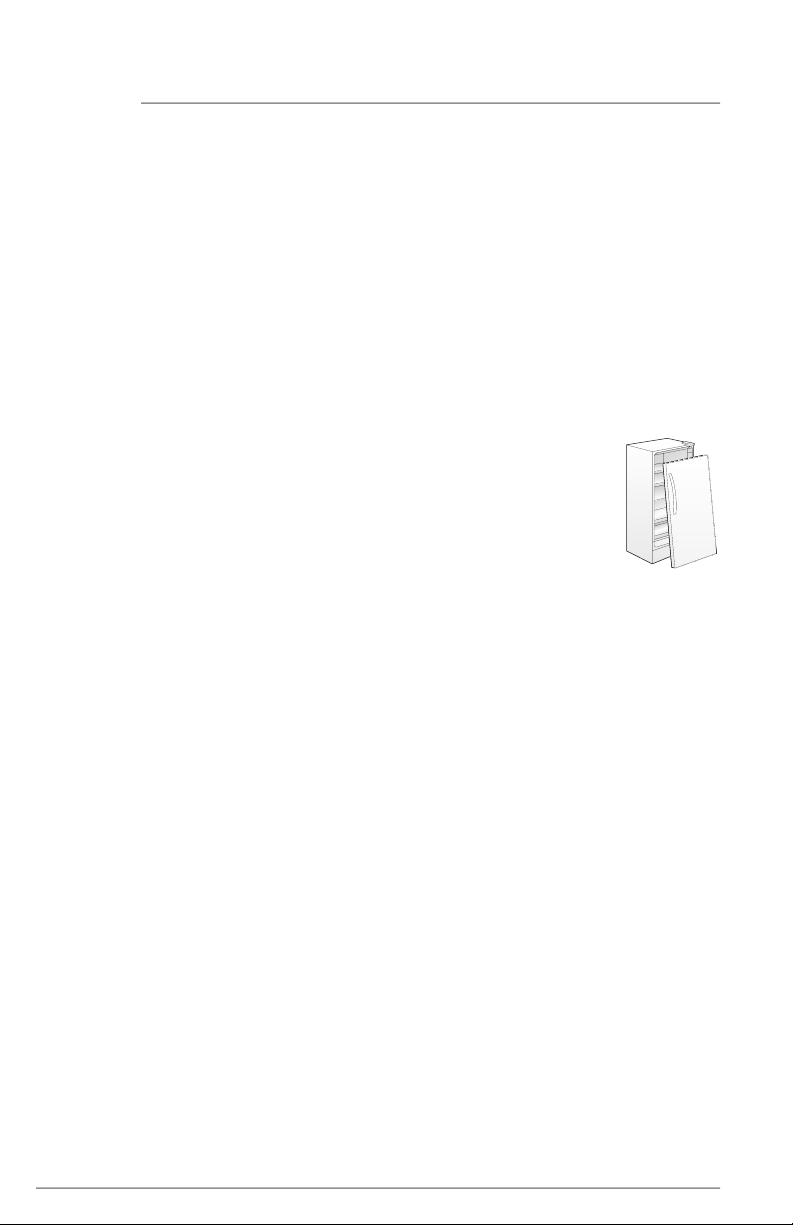
• Remove door.
• Leave shelves in place
so children may not easily
climb inside.
• Have refrigerant removed
by a qualified service
technician.
Safety Instructions
• DO NOT store or use gasoline, or other
flammable liquid within or in the vicinity
of this appliance. Read Product Label
for warnings regarding flammability and
other hazards.
• DO NOT store explosive substances
such as aerosol cans with a flammable
propellant in this appliance.
• DO NOT operate the refrigerator in the
presence of explosive fumes.
• Avoid contact with any moving parts of
automatic ice maker.
• Remove all staples from the carton.
Staples can cause severe cuts, and also
destroy finishes if they come in contact
with other appliances or furniture.
Child Safety
This appliance is not intended for use by
persons (including children) with reduced
physical, sensory or mental capabilities,
or lack of experience and knowledge,
unless they have been given supervision or
instruction concerning use of the appliance
by a person responsible for their safety.
Destroy or recycle the carton, plastic
bags, and any exterior wrapping material
immediately after the refrigerator is
unpacked. Children should never use these
items to play. Cartons covered with rugs,
bedspreads, plastic sheets or stretch wrap
may become airtight chambers, and can
quickly cause suffocation.
5
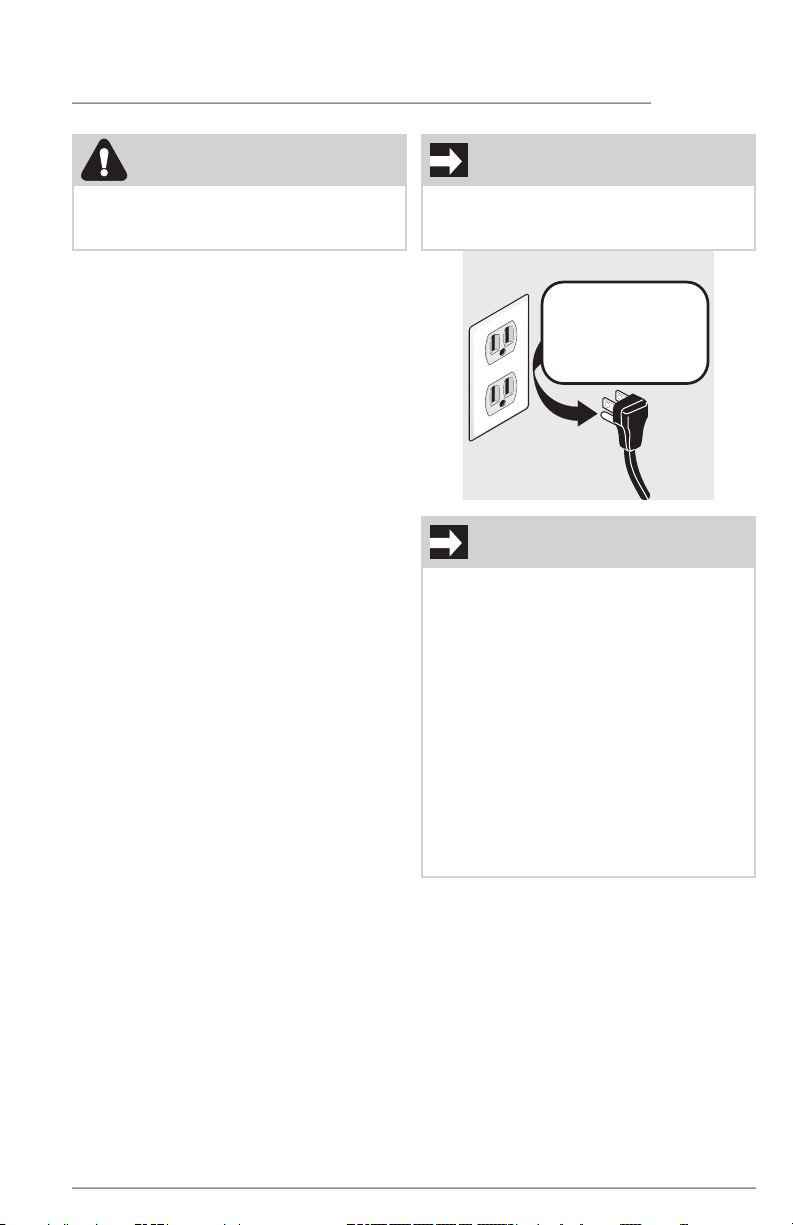
Grounding type wall receptacle
Power cord with
3-prong grounded plug
Do not, under
any circumstances,
cut, remove,
or bypass the
grounding prong.
Electrical information
• Plug the appliance into its own
dedicated 115 Volt, 60 Hz., 15 Amp,
AC only electrical outlet. The power
cord of the appliance is equipped with
a 3-prong grounding plug for your
protection against electrical shock
hazards. Plug it directly into a properly
grounded 3-prong receptacle. Install
the receptacle in accordance with
local codes and ordinances. Consult a
qualified electrician. Avoid connecting
the appliance to a Ground Fault
Interrupter (GFI) circuit. Do not use an
extension cord or adapter plug.
• If the power cord is damaged, an
authorized service technician should
replace it to prevent any risk.
• Never unplug the appliance by pulling
on the power cord. Always grip the
plug firmly, and pull straight out from
the receptacle to prevent damaging the
power cord.
• Unplug the appliance before cleaning
to avoid electrical shock.
• Performance may be affected if
the voltage varies by 10% or more.
Operating the appliance with
insufficient power can damage the
compressor. Such damage is not
covered under your warranty.
• Do not plug the unit into an electrical
outlet controlled by a wall switch or
pull cord to prevent the appliance from
being turned off accidentally.
• WARNING: Do not use electrical
appliances inside the food storage
compartments of the appliance unless
they are recommended accessories for
use within this model.
WARNING
These guidelines must be followed to
ensure that safety mechanisms in this
appliance will operate properly.
IMPORTANT
CFC/HCFC Disposal
Your old appliance may have a cooling
system that used CFCs or HCFCs (chlo-
rofluorocarbons or hydrochlorofluorocar-
bons). CFCs and HCFCs are believed to
harm stratospheric ozone if released to
the atmosphere. Other refrigerants may
also cause harm to the environment if
released to the atmosphere.
If you are throwing away your old
appliance, make sure the refrigerant is
removed for proper disposal by a quali-
fied technician. If you intentionally release
refrigerant, you may be subject to fines
and imprisonment under provisions of
environmental legislation.
IMPORTANT
To turn off power to your appliance you
must unplug the power cord from the elec-
trical outlet.
IMPORTANT SAFETY INFORMATION
6
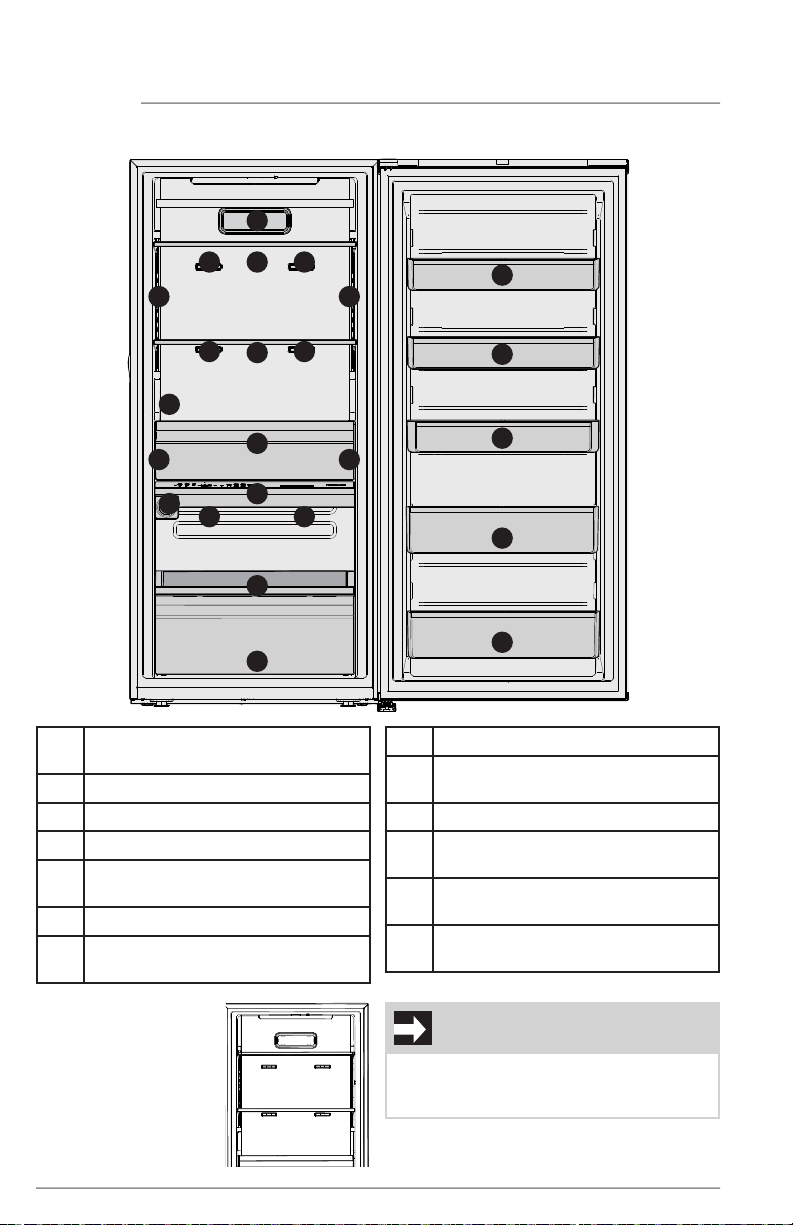
FEATURES
*Features may vary according to model
A Lower Drawer with
Removable Dividers
B Slide-out Shelf
C Water Filter
D Appliance Control Display
E TasteLock™ Plus Crisper with
Auto-Humidity Control
F Internal Water Dispenser
G Adjustable Full Width Glass Shelves
with Metallic Trim
H Air Filter
I *LuxCool™ Cooling System
Multi-Port Air Exhaust Ducts
J LED Lighting
K Adjustable Half Gallon Door Bins
with Removable Dividers
L Adjustable Gallon Door Bin with
Removable Divider
M Adjustable Tall Item Door Bins with
Removable Dividers
A
B
C
D
E
F
G
H
K
L
M
J
G
K
J J
JJ
M
J
I
I
I
I
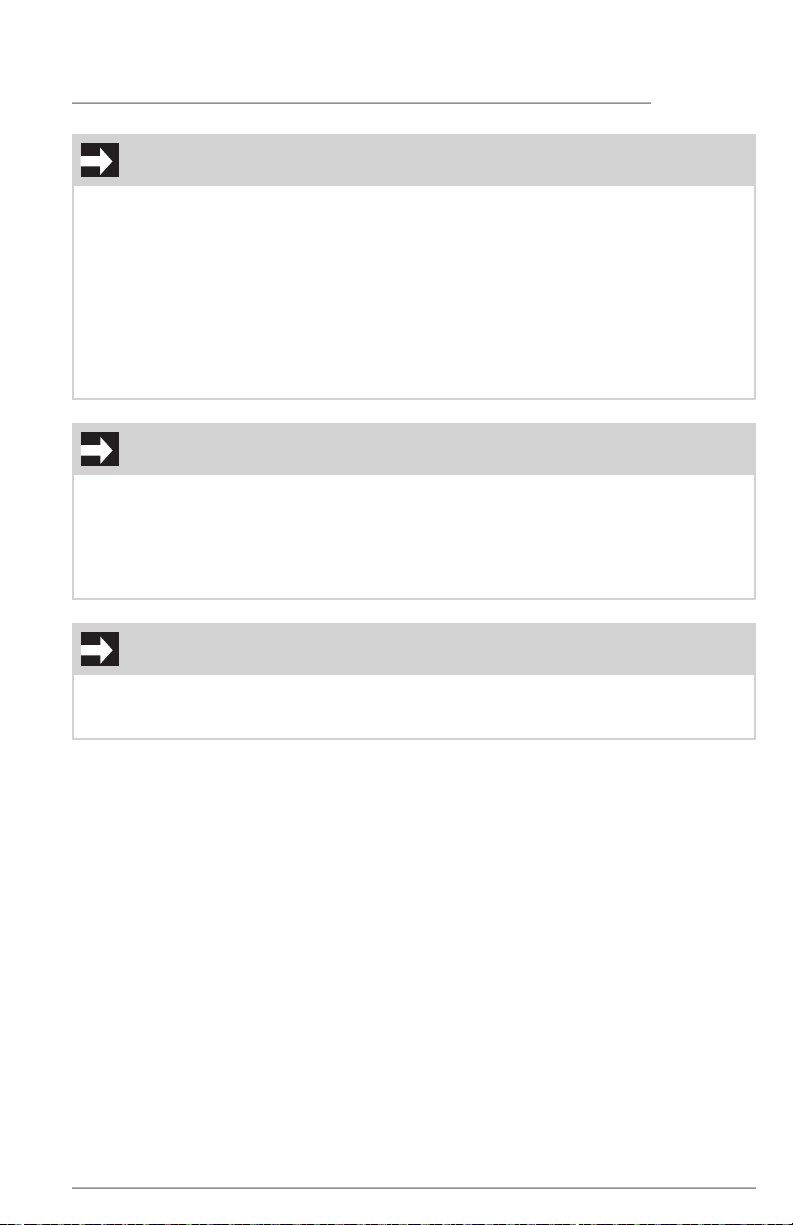
IMPORTANT
*Do not place items in front of the Multi-
Port Air Exhaust Ducts as this will impact
temperature performance.
7
IMPORTANT
Accessories are available for your appliance and may be purchased at
ElectroluxAppliances.com, by calling 1-877-4ELECTROLUX (1-877-435-3287) or from an
authorized seller.
FEATURES
IMPORTANT
Cleaning your Appliance
Remove tape and glue residue from surfaces before turning on the appliance. Rub a
small amount of liquid dish soap over any remaining adhesive with your fingers. Rinse
with warm water and dry with a soft cloth.
Do not use sharp instruments, rubbing alcohol, flammable fluids, or abrasive cleaners to
remove tape or glue. These products can damage the surface of your appliance.
After you remove all of the package materials, clean the inside of your appliance before
using it. See the CARE & CLEANING section in this manual.
See important information about cleaning glass shelves and covers in the STORAGE
FEATURES section of this manual.
IMPORTANT
Moving your Appliance
Your appliance is heavy. When moving the appliance for cleaning or service, raise the
anti-tip bracket (see “Setting the anti-tip bracket”). Be sure to cover the floor with card-
board or hardboard to avoid floor damage. Always pull the appliance straight out when
moving it. Do not wiggle or “walk” the appliance when trying to move it as floor damage
could occur.
8
INSTALLATION
NOTE
If your appliance is placed with the door
hinge side against a wall, you may have
to allow additional space for the handle
so the door can be opened wider.
This Use & Care Manual provides general
operating instructions for your model. Use
the appliance only as instructed in this Use &
Care Manual. Before starting the appliance,
follow these important first steps.
Installation
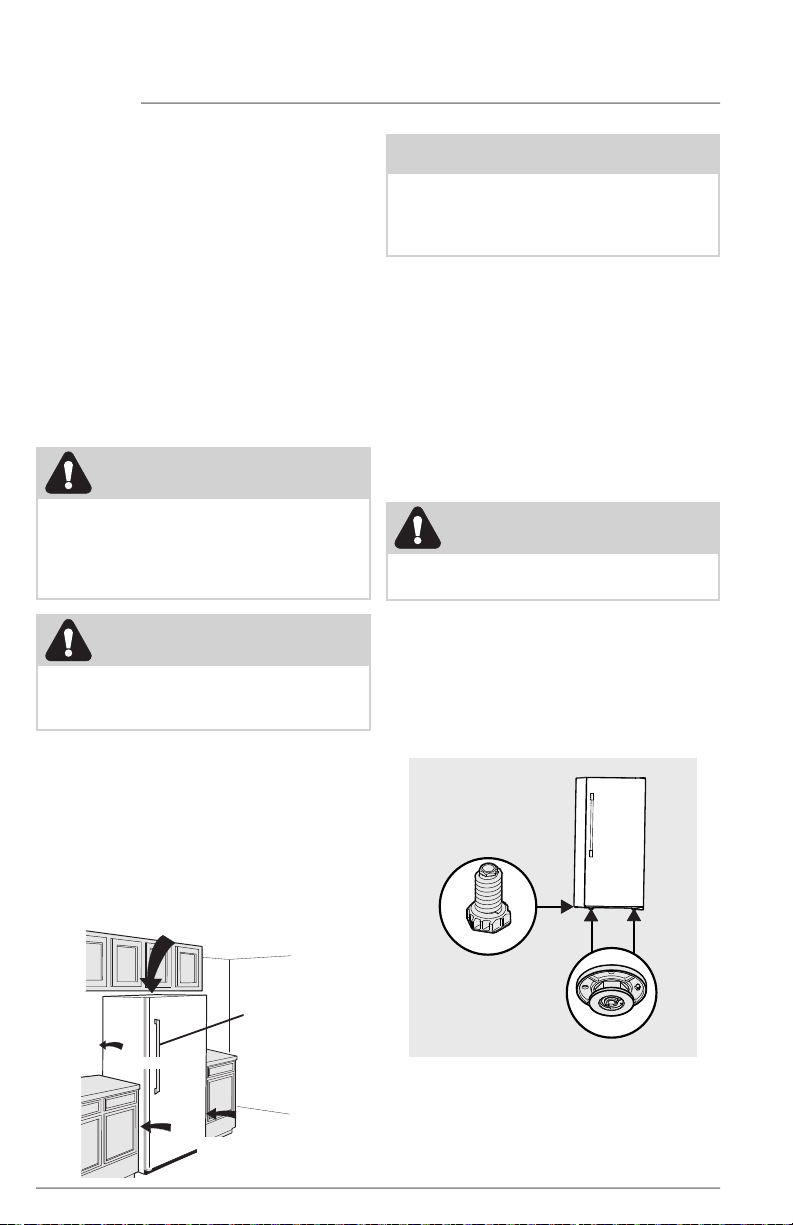
Installation clearances
Allow the following clearances for ease
of installation, proper air circulation, and
plumbing and electrical connections:
Sides 3/16"
Top & Back 1"
Location
• Choose a place that is near a ground-
ed electrical outlet. Do Not use an
extension cord or an adapter plug.
• If possible, place the appliance out of
direct sunlight and away from the range,
dishwasher or other heat sources.
• Install the appliance on a floor that is
level and strong enough to support a
fully loaded appliance.
Refrigerator
3/16˝
(5 mm)
3/16˝
(5 mm)
1˝
(25 mm)
1˝ (25 mm)
Leveling
Rest all bottom feet firmly on a
solid floor.
The floor must be strong enough to support
a fully loaded appliance.
It is VERY IMPORTANT for your unit to be
level in order to function properly. If the
appliance is not leveled during installation,
the door may be misaligned and not close
or seal properly, causing cooling, frost or
moisture problems.
To Level the Appliance:
Level the unit using a carpenter’s level.
Adjust the leveling feet at the front making
minor adjustments to the rear leveling feet
as needed. Level the unit front to back and
side to side. Make sure all 4 feet fully touch
the floor.
x2
x2
WARNING
DO NOT install the appliance where the
temperature will drop below 55°F (13°C)
or rise above 110°F (43°C). The compressor
will not be able to maintain proper tem-
peratures inside the unit.
CAUTION
The cabinet is heavy. Two people are
recommended to level the cabinet.
CAUTION
Do not block the lower front of your appli-
ance. Sufficient air circulation is essential
to operate your appliance properly.
9
INSTALLATION
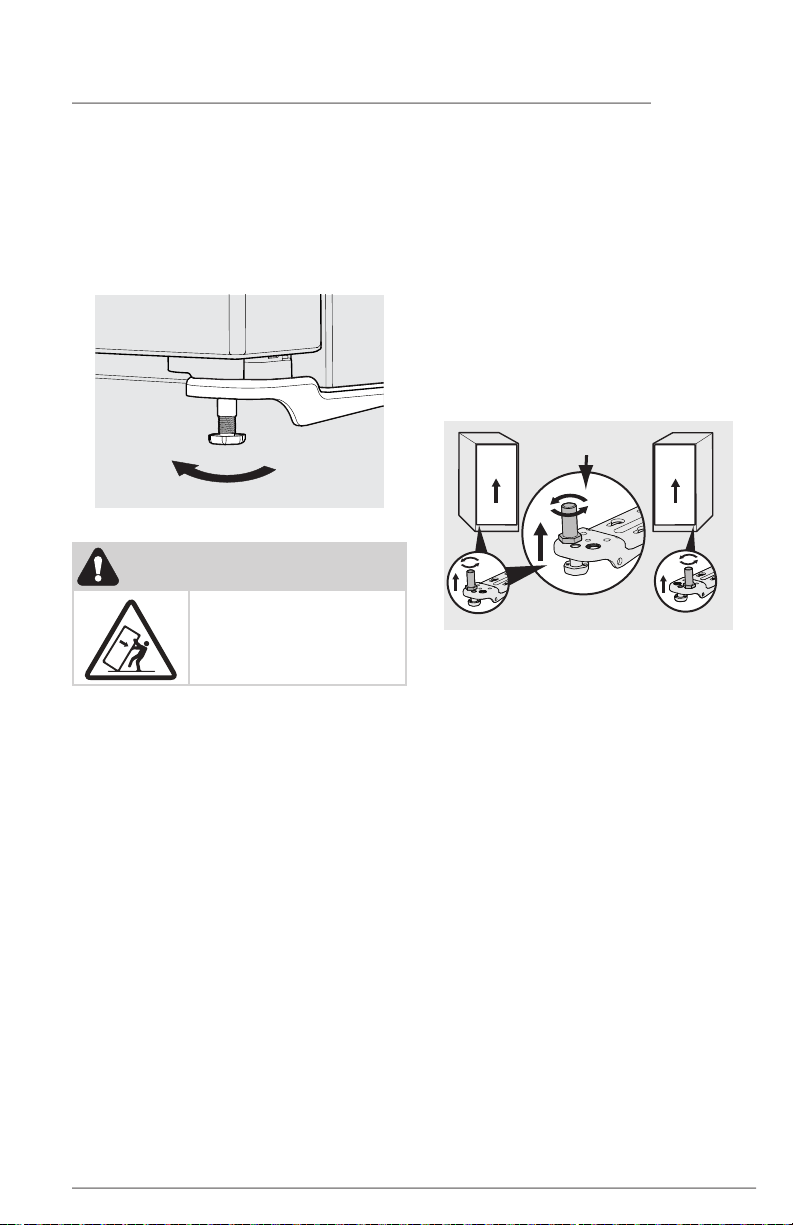
Guidelines for final positioning of
your appliance:
• Rest all bottom leveling feet firmly on a
solid floor.
• The cabinet should be level on all sides.
• The door should be level.
Door
Raise
Door
Raise
Door
Freezer Hinge
Adjustment
Freezer
Refrigerator
Door
Lower Hinge Adjustment for Leveling the Doors
of the Matching Refrigerator / Freezer Pair
To level the doors using the adjustable lower
hinge (some models):
If the refrigerator door is lower than
the freezer door, raise the refrigerator
door by turning the adjustment screw
counterclockwise using a 19mm socket
wrench. (See illustration below.)
If the freezer door is lower than the
refrigerator door, raise the freezer
door by turning the adjustment screw
counterclockwise using a 19mm socket
wrench. (See illustration below.)
WARNING
The anti-tip device must be
installed according to the
instructions in your Use &
Care Manual. Failure to do
so may result in injury.
Setting the anti-tip bracket:
Units are equipped with an anti-tip bracket.
The anti-tip bracket is located on the lower
front corner of the cabinet, on the lower
hinge bracket. After fully leveling the unit,
lower the anti-tip foot by turning it clockwise
until is securely contacts the floor. Do not
raise the cabinet.
Lower
Anti-tip Bracket
10
DOOR REMOVAL
or
or
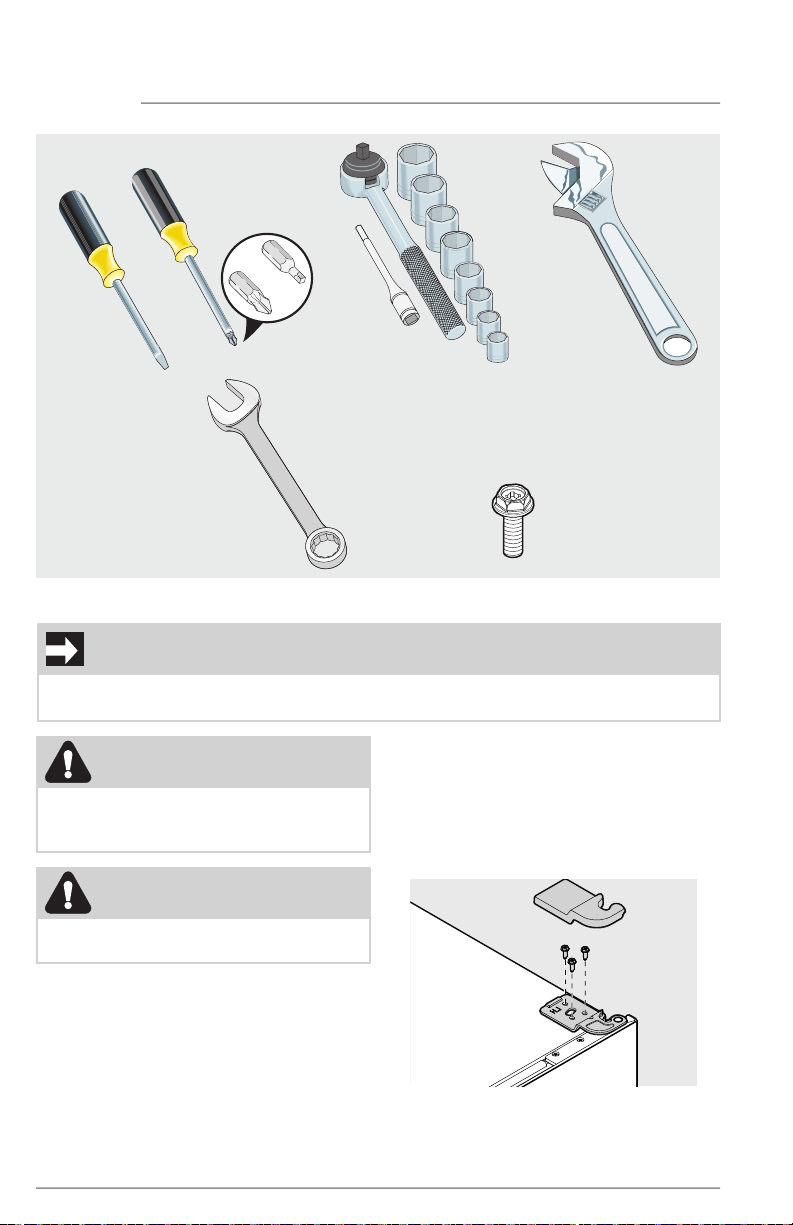
Tools Necessary:
Socket
Wrench Set
Adjustable
Wrench
5/16"
(8mm)
Fixed
Wrench
Flathead
Screwdriver
and
or
Phillips
TM
Head or
#2 Square
Drive Head
8mm
(M5x16mm)
Hex head screw x3
x2
Door removal:
• Unplug the unit or switch the breaker
that supplies power to the unit to the off
position.
• Remove the plastic top hinge cover.
• Hold the door in place while removing
the top hinge from the cabinet.
• Remove the M5x16 mm hex head
screws from the top hinge with a wrench
or socket.
• Lift the door upwards and pull up and
away from the cabinet until free of the
bottom hinge pin mounted on the front
of the cabinet.
• To replace the door, reverse the above
procedures and securely tighten all
screws to prevent hinge slippage.
IMPORTANT
Before you begin, remove the electrical power cord from the wall outlet. Remove any
food from door bins.
CAUTION
The door should be closed prior to
removing or installing
CAUTION
Doors are heavy. Two people are
recommended to remove or replace the
door assembly from the cabinet.
11
DOOR REVERSAL
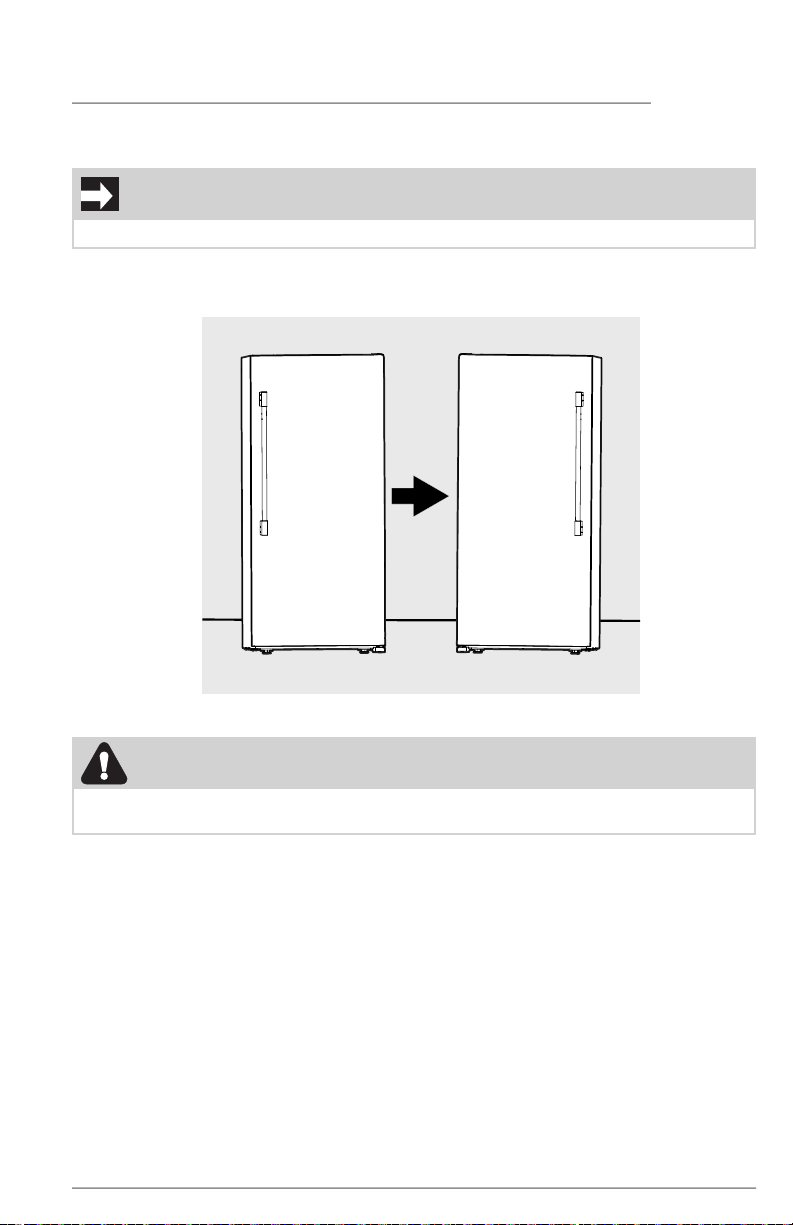
Door swing reversal:
If you would like to change your door from a right-hand swing to a left-hand swing, you
must purchase a Door Swing Kit.
Order Kit TTDRRVERKIT on ElectroluxAppliances.com or by calling 1-877-4ELECTROLUX
(1-877-435-3287).
Right-hand Swing Left-hand Swing
IMPORTANT
A qualified person should change the swing of your door.
CAUTION
Doors are heavy. Two people are recommended to remove or replace the door assembly
from the cabinet.
12
DOOR HANDLE INSTALLATION
Door Handle Mounting Instructions
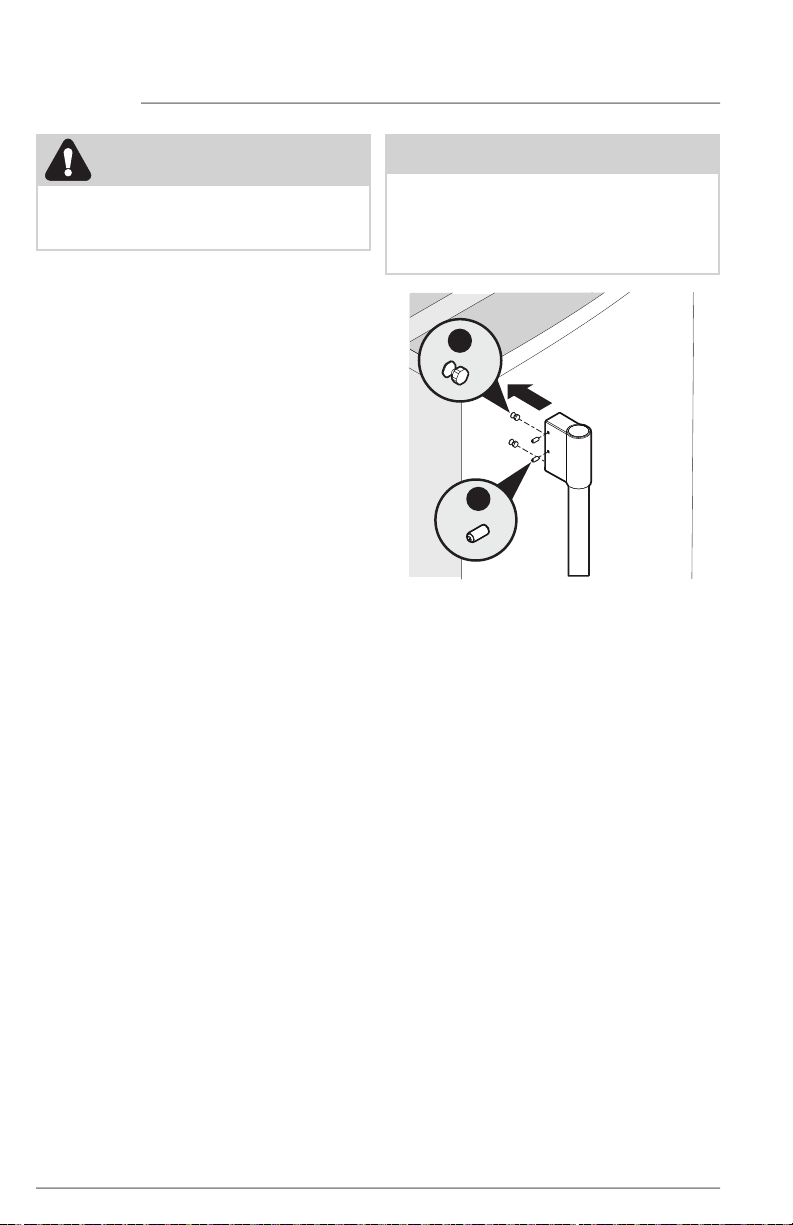
1. Remove handle from carton and any
other protective packaging.
2. Position handle end caps over upper
and lower pre-installed shoulder
bolts (A) that are fastened into door,
ensuring the holes for the set screws
are facing toward the hinge.
3. While holding handle firmly against
door, fasten upper and lower Allen set
screws (B) with supplied Allen wrench.
A
B
CAUTION
Wear gloves and use extreme CAUTION
when installing these handles. The rounded
end of the handles may be sharp.
NOTE
All set screws should be tightened and
sub-flush (Allen set screw should be seat-
ed just below the surface of the end cap)
of handle end cap. The end caps should
be drawn tight to door with no gaps.
13
WATER SUPPLY CONNECTION
Before Installing The Water Supply Line, You
Will Need:
• Basic Tools: adjustable wrench,
flat-blade screwdriver, and Phillips
TM
screwdriver
• Access to a household cold water line
with water pressure between 30 and
100 psi.
• A braided stainless steel water supply
line with integral fittings such as Smart
Choice® 5304437642 or ¼" copper line
with compression fittings. The line must
be 6˙ or longer to allow appliance to
be moved out for cleaning.
• A shutoff valve to connect the water
supply line to your household water
system. DO NOT use a self-piercing
type shutoff valve.
• Do not reuse compression fitting or use
thread seal tape.
• A compression nut and ferrule (sleeve)
for connecting a copper water supply
line to the water valve.
WARNING
To avoid electric shock, which can
cause death or severe personal injury,
disconnect the unit from electrical power
source before connecting a water supply
line to the appliance.
CAUTION
To Avoid Property Damage:
• Use Copper or Stainless Steel braided
tubing for the water supply line.
Electrolux does not recommend water
supply tubing made of ¼” plastic.
Plastic tubing greatly increases the
potential for water leaks, and the
manufacturer will not be responsible
for any damage if plastic tubing is
used for the supply line.
• DO NOT install water supply tubing
in areas where temperatures fall
below freezing.
NOTE
Ensure that your water supply line connec-
tions comply with all local plumbing codes.
14
WATER SUPPLY CONNECTION
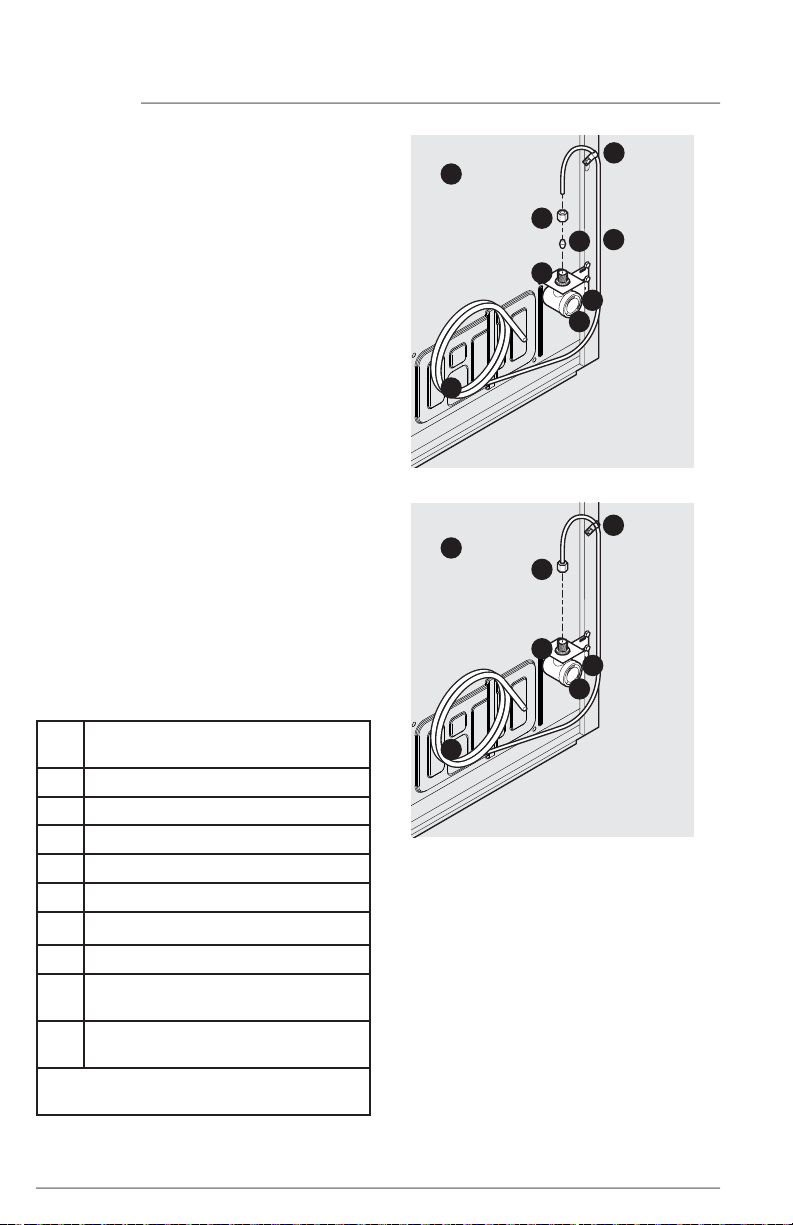
To Connect Water Supply Line To Water
Inlet Valve
1. Disconnect the refrigerator from elec-
trical power source.
2. Place the end of the water supply line
into a sink or bucket. Turn ON the water
supply and flush the supply line until
the water is clear. Turn OFF the water
supply at the shutoff valve.
3. Remove the plastic cap from the water
valve inlet and discard the cap.
4. If you use copper tubing - Slide the
brass compression nut, and then the
ferrule (sleeve) onto the water supply
line. Push the water supply line into
the water valve inlet as far as it will
go (¼"/6.4 mm). Slide the ferrule
(sleeve) into the valve inlet and finger
tighten the compression nut onto the
valve. Tighten another half turn with
a wrench; DO NOT overtighten. See
Figure 1.
If you use braided flexible stain-
less steel tubing - The nut is already
assembled on the tubing. Slide the nut
onto the valve inlet and finger tighten
the nut onto valve. Tighten another half
turn with a wrench; DO NOT overtight-
en. See Figure 2.
A Plastic Water Tubing to Water
Dispenser (foamed within the cabinet)
B Steel Clamp (Fig. 1: ¼"; Fig. 2: ½")
C Brass Compression Nut
D Ferrule (Sleeve)
E Copper Water Line
F Water Valve Bracket
G Valve Inlet
H Water Valve
I Copper Water Line from Household
Water Supply*
J Braided Flexible Stainless Steel
Water Line
*Include enough tubing in the loop to allow
moving the refrigerator out for cleaning
Figure 1
A
B
C
D
E
F
G
H
I
Figure 2
A
C
G
F
H
J
B
15
WATER SUPPLY CONNECTION
5. With the steel clamp and screw, secure
the water supply line (copper tubing
only) to the rear panel of refrigerator
as shown.
6. Coil the excess water supply line
(copper tubing only), about 2½ turns,
behind refrigerator as shown and
arrange coils so they do not vibrate or
wear against any other surface.
7. Turn ON the water supply at shutoff
valve and tighten any connections
that leak.
8. Reconnect the appliance to electrical
power source.
NOTE
Check with your local building authority
for recommendations on water lines and
associated materials prior to installing your
new refrigerator. Depending on your local/
state building codes, Electrolux recom-
mends for homes with existing valves its
Smart Choice® water line kit 5305513409
(with a 6' Stainless Steel Water Line) and for
homes without an existing valve, Electrolux
recommends its Smart Choice® water line
kit 5305510264 (with a 20' copper water
line with self-tapping saddle valve). Please
refer to ElectroluxAppliances.com for
more information.
16
CONTROLS AND SETTINGS
Cool Down Period
To ensure safe food storage, allow the appliance to operate with the door closed for at
least 8 hours before loading it with food.
Power On
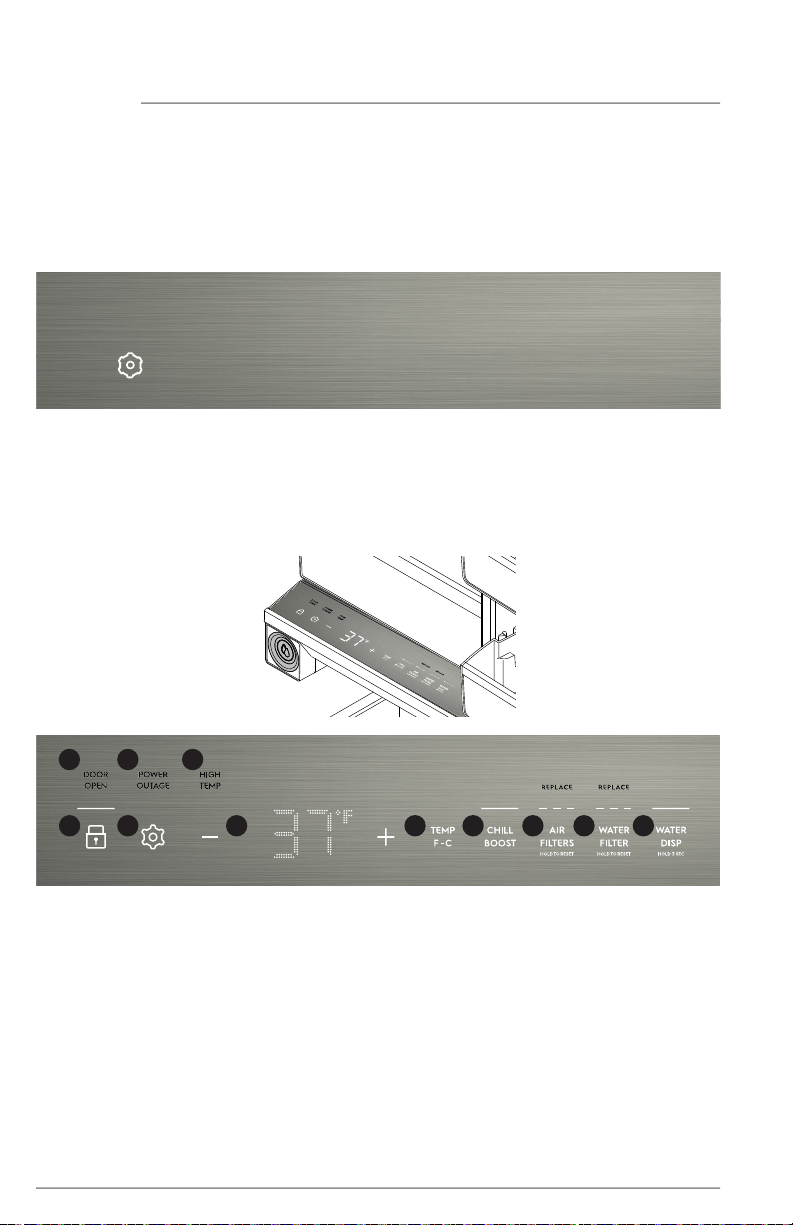
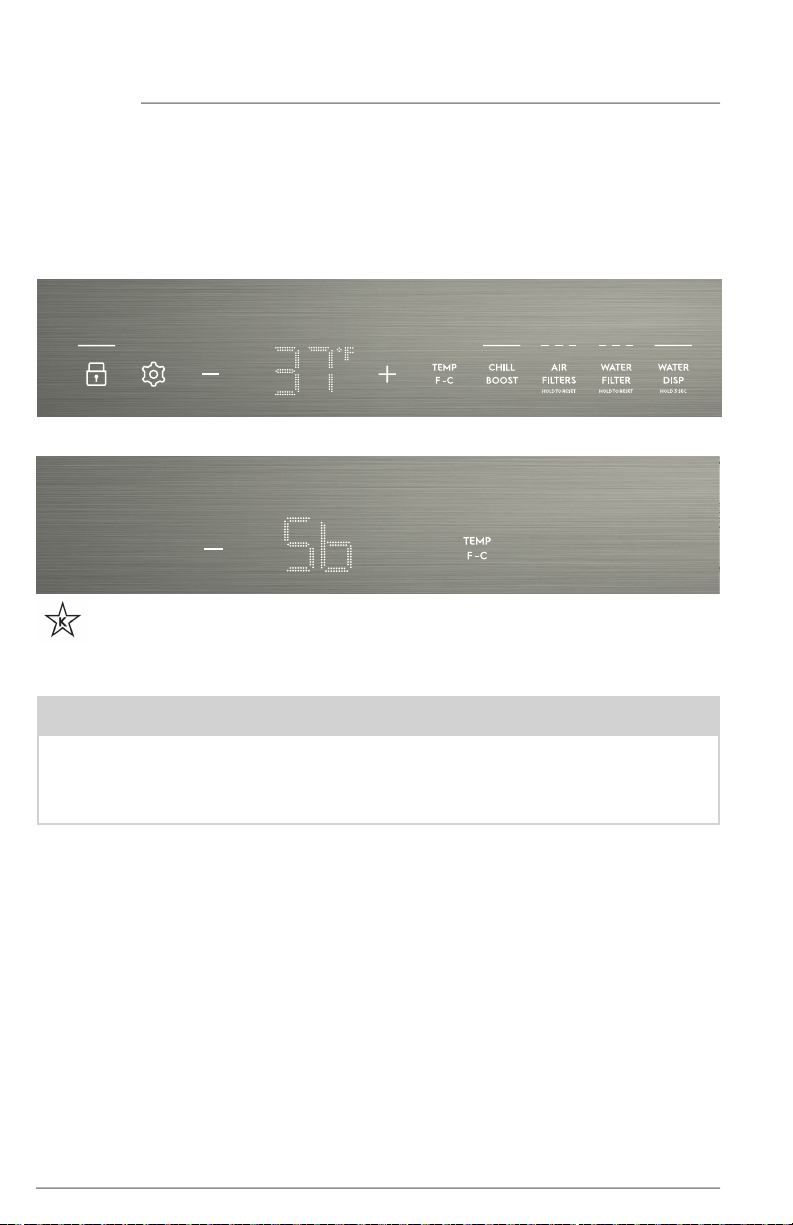
Upon opening the door, the settings icon will illuminate on the control panel.
Appliance Control Display
By pressing the settings icon, you will illuminate all of the icons on the appliance control.
After 10 seconds of no user interaction with the icons or door closure, all the icons will fade,
except for the settings icon.
The appliance control display is located in the cabinet below the upper drawer.
1
2
3
4
5 6 7 8 9
1110
17
CONTROLS AND SETTINGS
Alarms
Controls
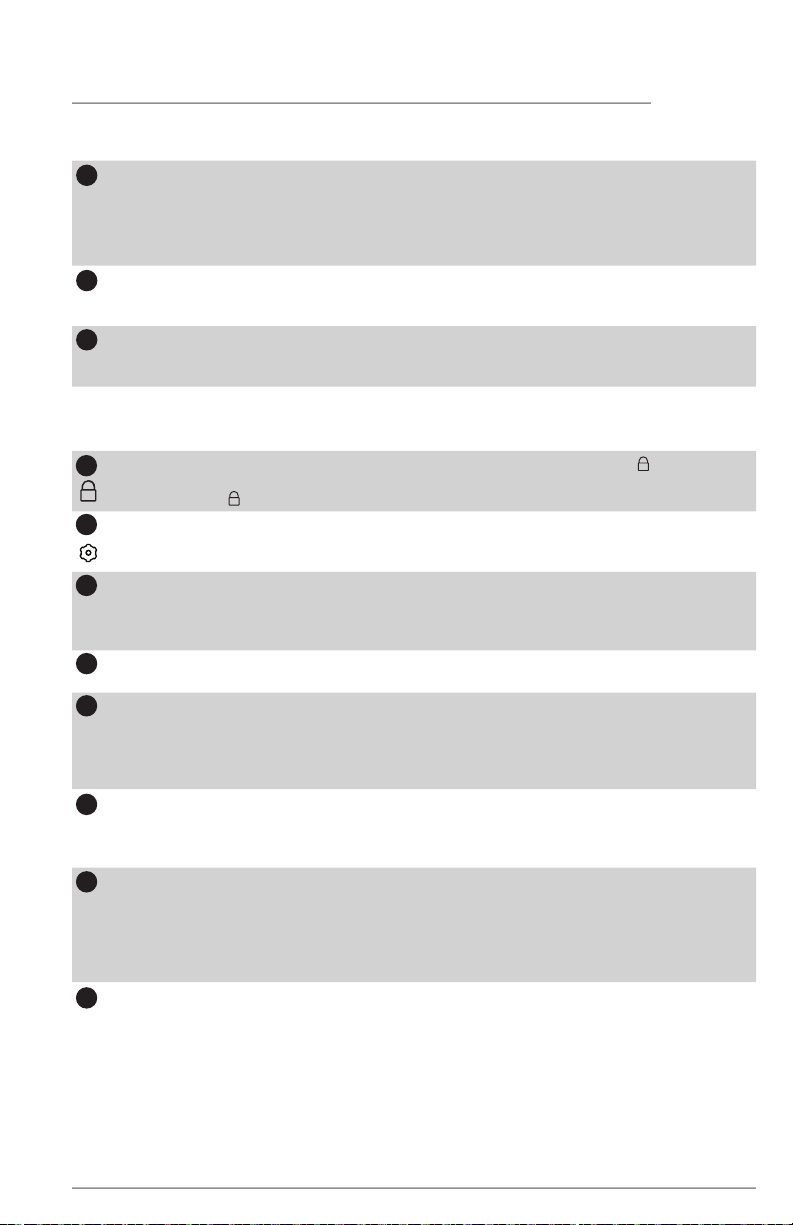
DOOR OPEN
This alert indicates the door has been open for 5 minutes or more. The DOOR OPEN
LED will illuminate and the audible alert will sound until the door is closed.
The audible alert can be turned off by pressing the DOOR OPEN key or by closing
the door. If the door is ajar for 5 minutes, the interior light will turn off.
POWER OUTAGE
The POWER OUTAGE indicator light informs you there has been a power interruption.
Reset the alarm by pressing POWER OUTAGE.
HIGH TEMP
If the temperature increases above a safe temperature range, the red HIGH TEMP LED
light will illuminate and the alarm will sound. Reset the alarm by pressing HIGH TEMP.
1
2
3
The lock button can be used to lock the control panel. Press and hold for 3 sec-
onds to enable. While in the locked state, no changes can be made until unlocked.
Press and hold for 3 seconds to disable.
The settings icon illuminates upon opening the appliance door. Press the settings icon
to reveal other function icons. After 10 seconds of non use of icons or door closure, all
icons will fade except the settings icon.
Adjusting Temp
To adjust the temperature setting, press + to raise the temperature and - to lower
the temperature on the appliance control. Allow several hours for the temperature to
stabilize between adjustments.
Temp °F/°C
Short press to toggle between Fahrenheit (°F) and Celsius (°C).
CHILL BOOST
Turning on CHILL BOOST will cool the appliance down to a target temperature and will
remain active for up to 24 hours before automatically deactivating or being manually
exited. To turn the function on/off, press CHILL BOOST. When you turn off CHILL BOOST,
it will automatically reset the refrigerator back to the previous temperature setting.
AIR FILTERS
The AIR FILTERS replacement alert will illuminate when it is time to replace the air filters.
See the FILTER REPLACEMENT section for instructions on how to replace the air filters. After
changing the air filters, reset the AIR FILTERS alert by pressing and holding AIR FILTERS.
WATER FILTER
The WATER FILTER replacement alert will illuminate when it is time to replace the wa-
ter filter. See the FILTER REPLACEMENT section for instructions on how to replace the
water filter. After changing the water filter, reset the WATER FILTER alert by pressing
and holding WATER FILTER. After replacing the water filter, see the AUTOMATIC
WATER DISPENSER section for instructions on how to prime the water system.
WATER DISP
The illuminated WATER DISP LED means the internal water dispenser is ON. Open the
internal water dispenser by pushing the push-push nozzle. Press the water dispenser
paddle inside the cabinet to dispense water. Turn the dispenser off by pressing and
holding WATER DISP for 3 seconds. When the water dispenser is off, you cannot dis-
pense water. You will hear a beep if you try to press the paddle without WATER DISP
being turned on. Press and hold WATER DISP to turn it on.
6
4
5
7
9
10
11
8
18
CONTROLS AND SETTINGS
Sabbath Mode
The Sabbath Mode is a feature that disables portions of the appliance and its controls
in accordance with observance of the weekly Sabbath and religious holidays within the
Orthodox Jewish community.
To enter Sabbath Mode
Simultaneously press and hold — and TEMP F/C for 5 seconds.
For further assistance, guidelines of proper usage and a complete list of models with
the Sabbath feature, please visit the web at star-k.org.
The unit stays in Sabbath mode after a power failure recovery. It must be deactivated with
the buttons on the appliance control display.
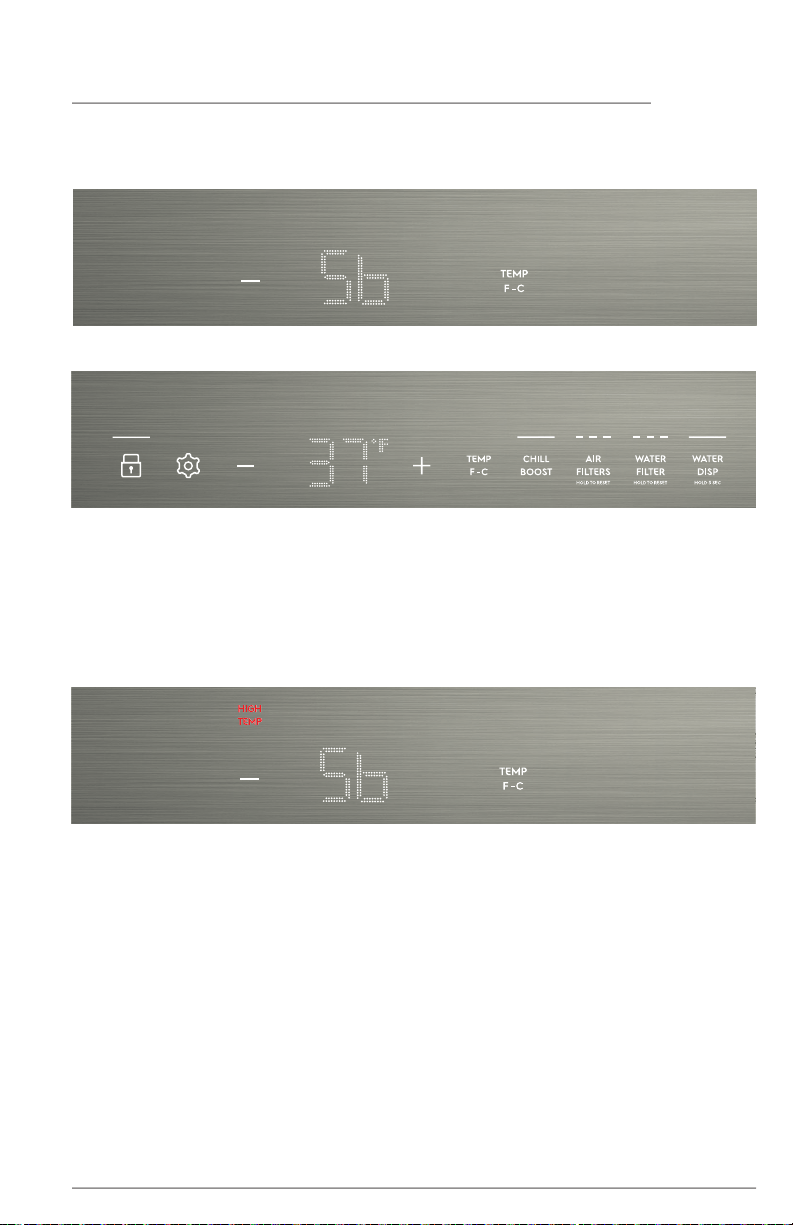
Sb will appear on the appliance control display indicating that the unit is in Sabbath mode.
NOTE
While in the Sabbath Mode, neither the lights nor the appliance control display will work
(except to exit Sabbath Mode) until Sabbath Mode is deactivated.
The appliance stays in Sabbath Mode after power failure recovery. You must deactivate
it with the buttons on the appliance control display.
19
To exit Sabbath Mode
Simultaneously press and hold — and TEMP F/C for 5 seconds.
The appliance control display will show all of the icons.
CONTROLS AND SETTINGS
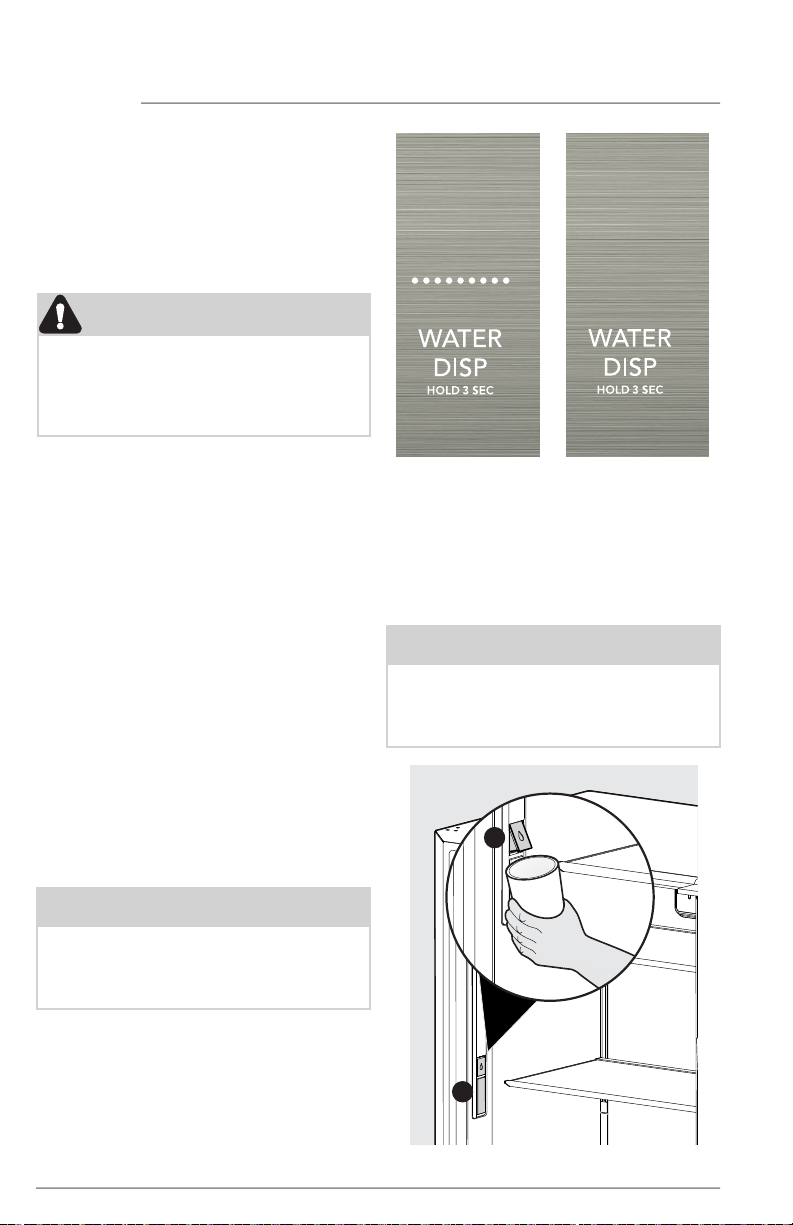
In the Sabbath mode, the HIGH TEMP alarm is active for health reasons. For example, if
you leave the door ajar, the HIGH TEMP alarm is activated. The refrigerator will function
normally once you close the door, without any violation of the Sabbath/holidays. The
HIGH TEMP alarm comes on when the cabinet temperature is outside the safe zone for 20
minutes. The alarm silences itself after 10 minutes while the HIGH TEMP icon stays lit until
you exit the Sabbath mode.
All buttons are disabled, and all sounds (except the HIGH TEMP alert*) are muted. Only the
HIGH TEMP alert will illuminate until you deactivate the Sabbath Mode.
20
AUTOMATIC WATER DISPENSER
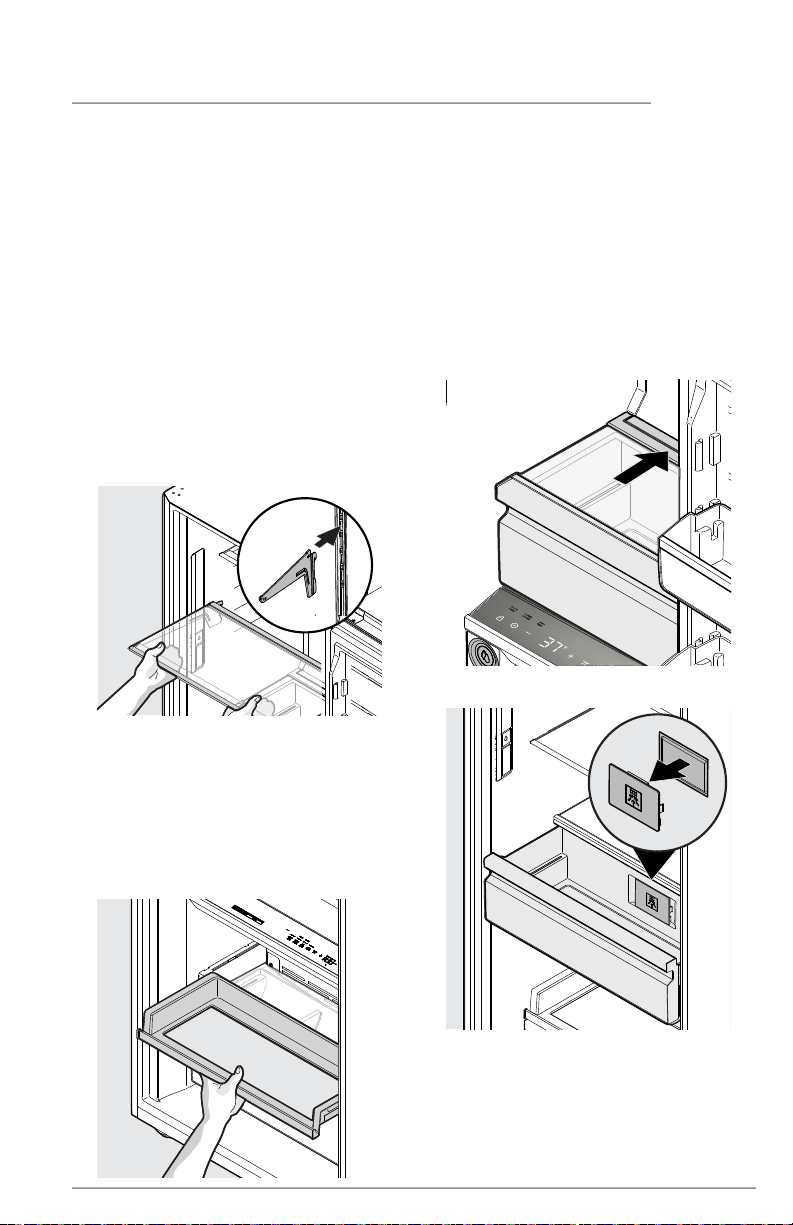
Your refrigerator is equipped with an internal
water dispenser mounted inside the cabinet,
along the left-hand cabinet wall.
Before using the water dispenser for the first
time or after changing the water filter, you must
prime your water supply system.
The water nozzle inside the cabinet allows
the water nozzle (A) to be recessed against
cabinet when not in use and to be extended
outward when in use. To use the water
dispenser, push the water nozzle (A) so it
is fully extended. Place a cup against the
paddle (B) and press to dispense water.
A
B
Water Dispenser On Water Dispenser Off
CAUTION
For proper dispenser operation, the
recommended water supply pressure
should fall between 30 psi and 100 psi.
Excessive pressure may cause the system
to malfunction.
Priming the water supply system
Using the dispenser after installation:
If the system is not flushed, the first glass of
water may have discolored water or have
an odd flavor.
1. Begin filling the system by pressing
a drinking glass against the water
dispnser paddle.
2. Keep the glass in this position until the
water comes out of the dispenser. It
may take about 1½ minutes.
3. Continue dispensing water for about
4 minutes to flush the system and
plumbing connections of any
impurities (stopping to empty the
glass as necessary).
If the water dispenser function becomes
disabled, enable the water dispenser by
pressing and holding WATER DISP on the
appliance control display. When the water
dispenser is turned on, the LEDs above
WATER DISP are illuminated.
NOTE
If you prefer to keep the internal water
dispenser disabled, use the appliance
display to disable it. The LEDs will not be
illuminated above WATER DISP.
NOTE
Optional: Lock the water dispenser
back in place by pushing the water
nozzle back in when you have finished
dispensing water.
21
STORAGE FEATURES
Full Width Cantilever Shelves
Multi-position adjustable glass shelves
can be moved to any position for larger or
smaller packages. The shipping spacers that
stabilize the shelves for shipping may be
removed and discarded.
To Adjust The Shelves
• Remove all food from the shelf.
• Lift the front edge up to release the tabs
from the slots in the rear and pull the
shelf out.
• Replace the shelf by inserting the
mounting bracket hooks into the
desired support slots at the rear.
• Carefully lower the shelf and lock
into position.
Slide-Out Shelf
The slide-out shelf can hold many different con-
tainers and food types for your convenience.
To remove the slide-out shelf:
1. Remove all items from the shelf.
2. Remove the shelf by pulling it out until
it is fully extended and lift it out.
TasteLock™ Plus Crispers with
Auto-Humidity Control
The TasteLock™ Plus Crispers with Auto-
Humidity Control keeps produce tasting
fresher. The smart crisper technology re-
moves excess moisture and blocks out dry
air to prevent shriveling and molding. The
crisper drawer contains the PureAdvantage
Produce Keeper™ to ensure your produce
stays fresher longer. For more information
about your PureAdvantage Produce Keep-
er™, see FILTER REPLACEMENT.
TasteLock™ Plus CrispersCrisper
PureAdvantage Produce Keeper™
22
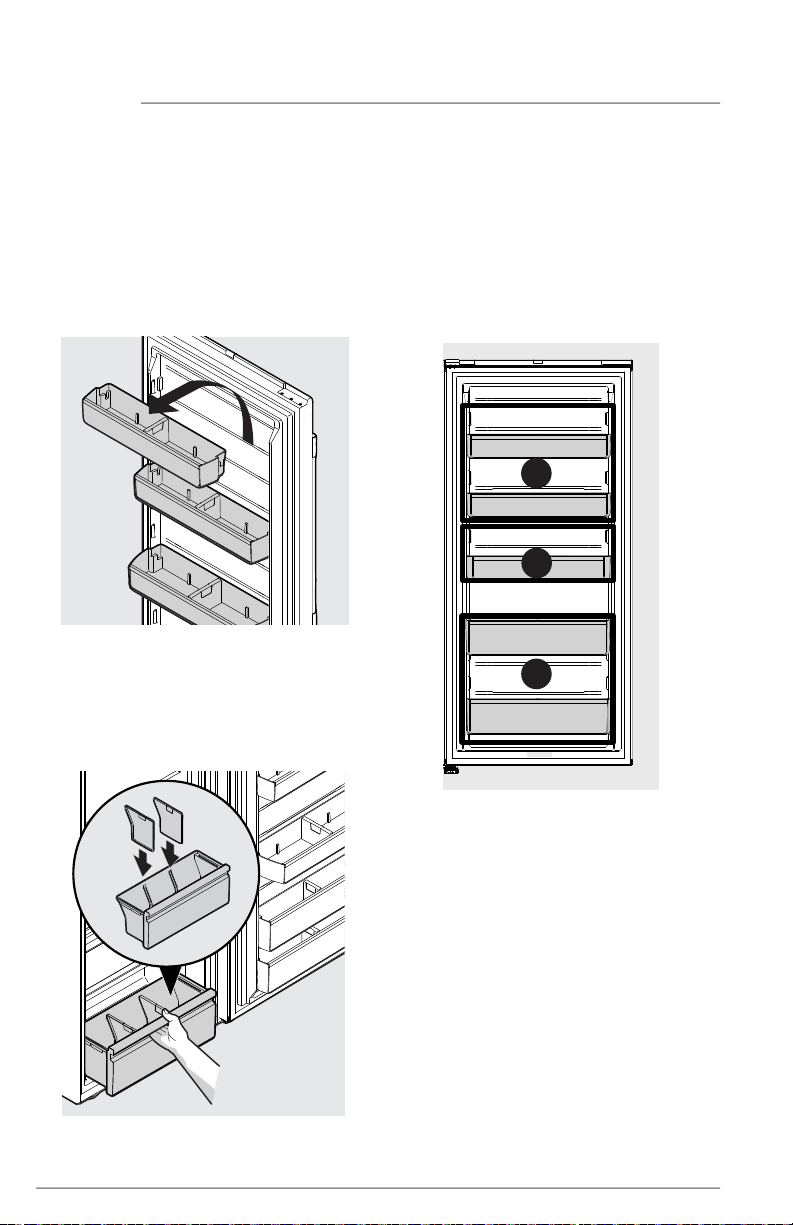
Adjustable Door Bins
with Dividers
The adjustable door bins are specially
designed to hold large containers or storage
bags. Each bin type can be used only in the
zone indicated below so the door can close
correctly. Your unit has two 2-Liter Door Bins
(A), a Gallon Door Bin (B), and two Tall Item
Door Bins (C). The bins can be used easily
with or without the dividers.
STORAGE FEATURES
Lower Drawer with Dividers
The lower drawer with dividers works great
for food that may need to be separated.
The drawer can easily be used with the
dividers or without by removing or adding
the inserts.
A
B
C
To remove a door bin:
• Grasp the ends of the door bin.
• Lift the door bin up until it clears the
locking lugs.
• Pull the door bin straight out
toward you.
To install a door bin:
• Make sure the locking feature on the bin
aligns with the mounting lugs on the door.
• Lower the door bin into the mounting
lugs until it locks in place.
Door Bin Dividers
Customize your unit to fit different sized items
as your needs change with door
bin dividers.
To remove, grasp the divider and pull it
upward until it disengages with the door bin.
To install, slide the divider downward into
the corresponding door bin alignment
features until it is fully placed.

23
SAVING ENERGY
• Locate the appliance in the coolest part of the room, out of direct sunlight, and
away from heating ducts or registers. Do not place the unit next to heat-producing
appliances such as a range, oven, or dishwasher. If this is not possible, a section of
cabinetry or an added layer of insulation between the two appliances will help the unit
operate more efficiently.
• Level appliance so that the door closes tightly.
• Refer to the CONTROLS AND SETTINGS section for the suggested temperature control
settings.
• Do not overcrowd the unit or block cold air vents. Doing so causes the appliance to
run longer and use more energy.
• Cover foods and wipe containers dry before placing them in the appliance. This cuts
down on moisture build-up inside the unit.
• Organize the appliance to reduce door openings. Remove as many items as needed
at one time and close the door as soon as possible.
24
FILTER REPLACEMENT
PureAdvantage™ Ultra Water &
Ice Filter
Have clean life-giving water and ice with
PureAdvantage™ water filter. Using a
PureAdvantage™ water filter:
• Clean Life-Giving Water
PureAdvantage™ water filters deliver
refreshing, great-tasting water with up
to 99% contaminant reduction * for you
and your family.
• Protects Your Family
Know for certain your PureAdvantage™
water filter is a protector for up to 6
months. Counterfeits and knockoffs
put your refrigerator and health at
risk. Electrolux Genuine Filters are the
smarter, safer choice.
• Every Drop Gives Back
Partnered on sustainability efforts,
the use of a PureAdvantage™ water
filter reduces the use of plastic used to
produce and package bottled water
*For the complete list, please see Performance
DataSheet on Electroluxappliances.com
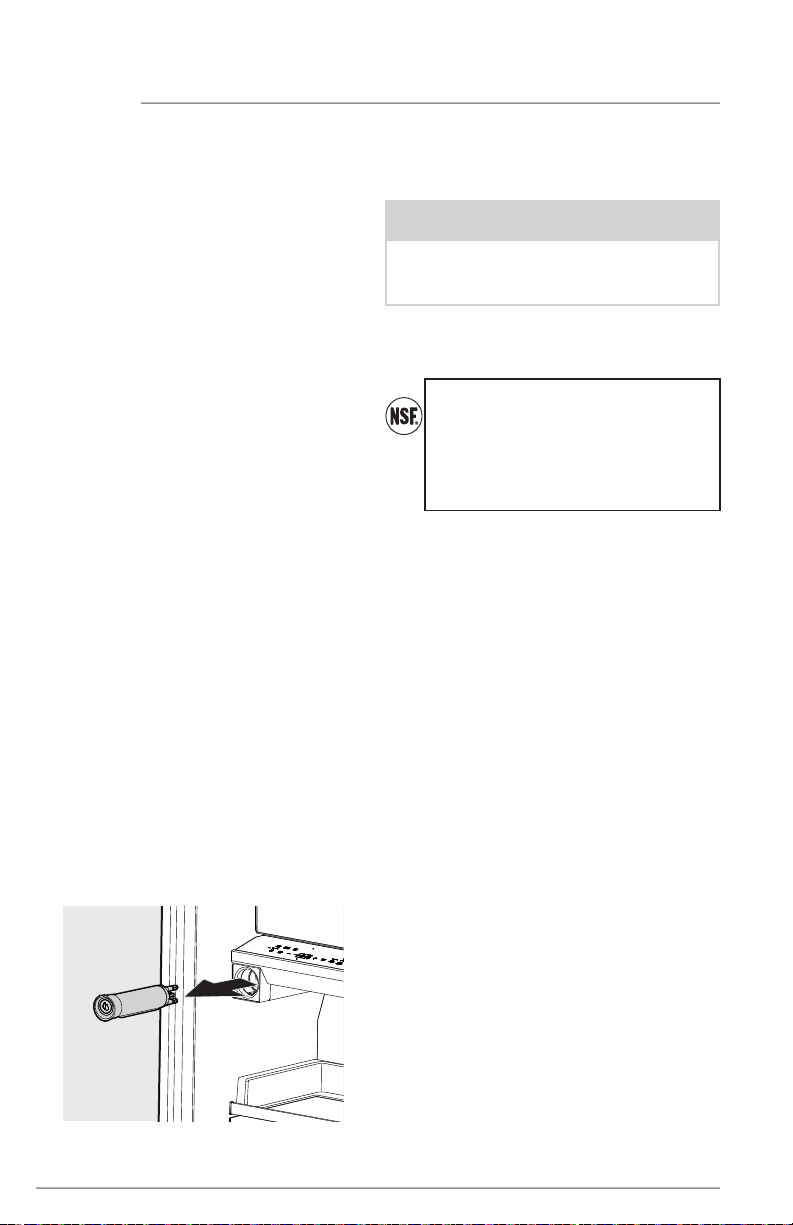
Replacing the Water Filter
The water filter is located at the middle left
side of the refrigerator compartment. In
general, you should change the water filter
every 6 months to ensure the highest possi-
ble water quality. Water Filter Status on the
appliance control display prompts you to
replace the filter after a standard amount of
water (125 gal/453 L for PureAdvantage™)
has flowed through the system.
If you have not used your refrigerator for
a period of time (during moving for exam-
ple), change the filter before reinstalling the
refrigerator.
Do not use with water that is microbiolog-
ically unsafe or of unknown quality without
adequate disinfection before or after the
system. Use systems certified for cyst reduc-
tion on disinfected waters that may contain
filterable cysts.
Test & certification results:
• Rated Capacity - 125 gal/453 L for
PureAdvantage™ and ice and water filter
• Rated service flow - .50 gal/min.
• Operating Temp.: Min. 33°F, Max. 100°F
• Maximum Rated Pressure - 100 lbs/in.²
• Recommended Minimum Operating
Pressure: 30 lbs/in²
Replacing your PureAdvantage™
Water Filter
It is not necessary to turn the water supply
off to change the filter. Be ready to wipe up
any small amounts of water released during
the filter replacement.
1. Remove the filter by firmly pressing the
water filter cartridge until it releases.
You will hear a click.
2. Slide the old water filter cartridge
straight out of the housing and discard it.
3. Unpackage the new filter cartridge.
Using the alignment guide, slide it
gently into the filter housing until it
stops against the snap-in connector at
the back of the housing.
More about your Advanced
Water Filter
The PureAdvantage™
ice and water
filter system is tested and certified to
NSF/ANSI Standards 42, 53, 401 and
CSA B483.1 for the reduction of claims
specified on the performance data
sheet. Visit ElectroluxAppliances.com
for more information.
Here are the product numbers to request
when ordering:
PureAdvantage™ Water Filter EPPWFU01™
NOTE
When you order your replacement filter,
please reorder the same filter type cur-
rently in your refrigerator.
25
4. Push firmly until the cartridge snaps
into place (you should hear a click as
the cartridge engages the
snap-in connector).
5. Press a drinking glass against the
water dispenser while checking for any
leaks at the filter housing. Any spurts
and sputters that occur as the system
purges air out of the dispenser system
are normal.
6. After filling one glass of water, continue
flushing the system for about 4 minutes.
7. Press and hold WATER FILTER on the
appliance control display for 3 seconds.
When the display changes from red to
green, the status has been reset.
FILTER REPLACEMENT
f;ad mva;’ak f;ad mva;’ak f;ad mva;’ak f;ad mva;’ak f;ad mva;’ak f;ad mva;’ak f;ad mva;’ak f;ad mva;’ak
f;ad mva;’ak f;ad mva;’ak f;ad mva;’ak f;ad mva;’ak f;ad mva;’ak f;ad mva;’ak f;ad mva;’ak f;ad mva;’ak
f;ad mva;’ak f;ad mva;’ak f;ad mva;’ak f;ad mva;’ak f;ad mva;’ak f;ad mva;’ak f;ad mva;’ak f;ad mva;’ak
f;ad mva;’ak f;ad mva;’ak f;ad mva;’ak f;ad mva;’ak f;ad mva;’ak f;ad mva;’ak f;ad mva;’ak f;ad mva;’ak
f;ad mva;’ak f;ad mva;’ak f;ad mva;’ak f;ad mva;’ak f;ad mva;’ak f;ad mva;’ak f;ad mva;’ak f;ad mva;’ak
f;ad mva;’ak f;ad mva;’ak f;ad mva;’ak f;ad mva;’ak f;ad mva;’ak f;ad mva;’ak f;ad mva;’ak f;ad mva;’ak
f;ad mva;’ak f;ad mva;’ak f;ad mva;’ak f;ad mva;’ak f;ad mva;’ak f;ad mva;’ak f;ad mva;’ak f;ad mva;’ak
f;ad mva;’ak f;ad mva;’ak f;ad mva;’ak f;ad mva;’ak f;ad mva;’ak f;ad mva;’ak f;ad mva;’ak f;ad mva;’ak
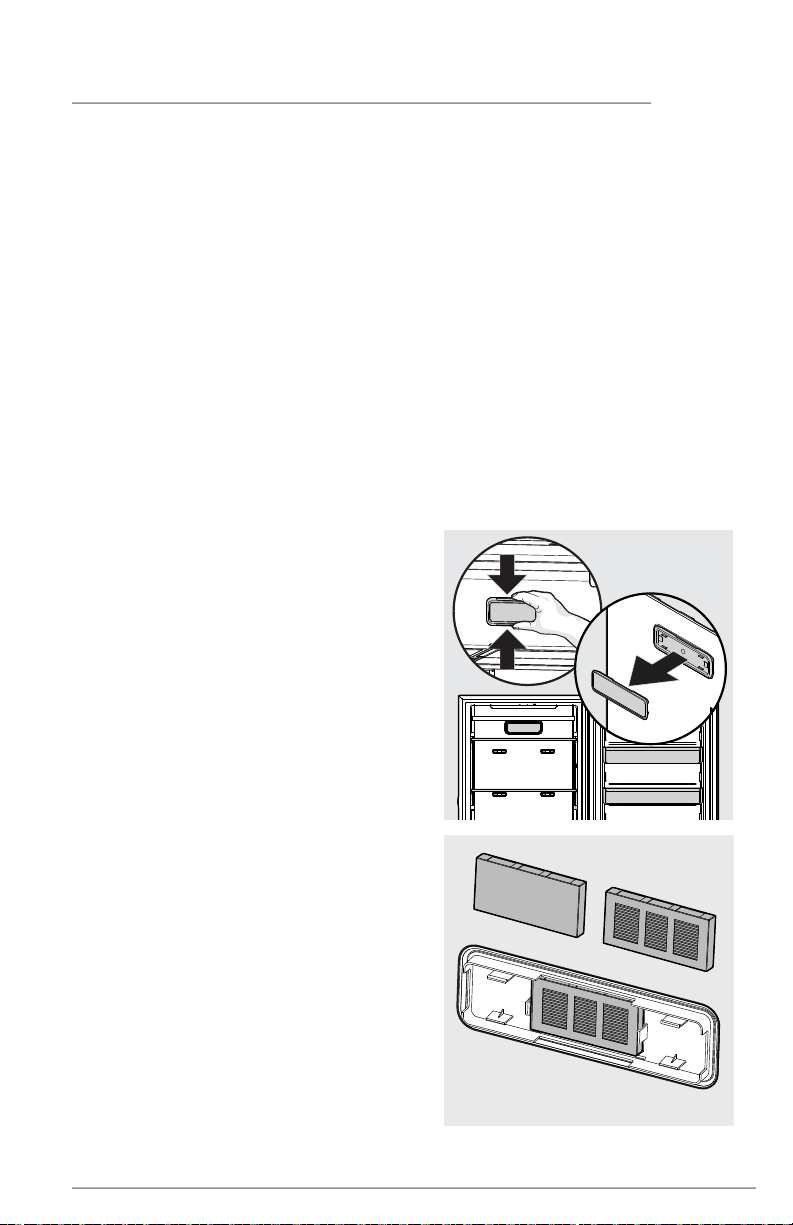
The air filter element is held in by the
removable air filter cover which has a
stainless steel decorative plate.
1. Grab the cover with your hand, pulling
until it releases from the fixed air
filter housing. The air filter element is
mounted on the back of the cover.
2. Remove the old filter and discard it.
3. Unpackage the new filter and snap
it into the filter cover. The open face
(carbon media) of the filter should be
installed facing outward in the cover.
4. Reattach the air filter cover to the air
filter housing by aligning the cover to
the housing and firmly pushing it until it
snaps in place.
5. Press and hold REPLACE AIR FILTER
on the appliance control display to
reset it.
PureAdvantage Ultra II™ Air Filter
WIth more power to clear the air, Electrolux
air filters banish pungent smells and work
better than baking soda. PureAdvantage
Ultra II™ Air Filters:
• More powerful than baking soda
Keep your unit fresh for up to 6 months.
• Captures & Keeps Odors Away
Absorbs undesirable smells with carbon
technology.
Here are the product numbers to request
when ordering:
PureAdvantage Ultra II™ Air Filter
ELPAULTRA2
TM
Installing or replacing the air filter
Your new PureAdvantage Ultra II™ air filter
is located in the air filter cover, located in the
upper rear center of the cabinet.
Your appliance control is equipped with a
REPLACE AIR FILTER indicator to remind you
to change your filter every 6 months to ensure
optimal filtering of appliance odors. To order
your replacement filters, please visit our online
store at ElectroluxAppliances.com, by calling
toll-free at 1-877-435-3287, or by visiting the
dealer where you purchased your unit.
26
PureAdvantage Produce Keeper™
Keep fruits and vegetables fresher longer
with PureAdvantage Produce Keeper™. Our
produce keeper absorbs ethylene gas, the
natural gas that causes produce to ripen
quicker. Reduce food waste, save money
and enjoy fresh-tasting produce with a
longer storage life.
Here are the product numbers to request
when ordering:
PureAdvantage Produce Keeper™
PK-1™
ELPAPKRF™
.
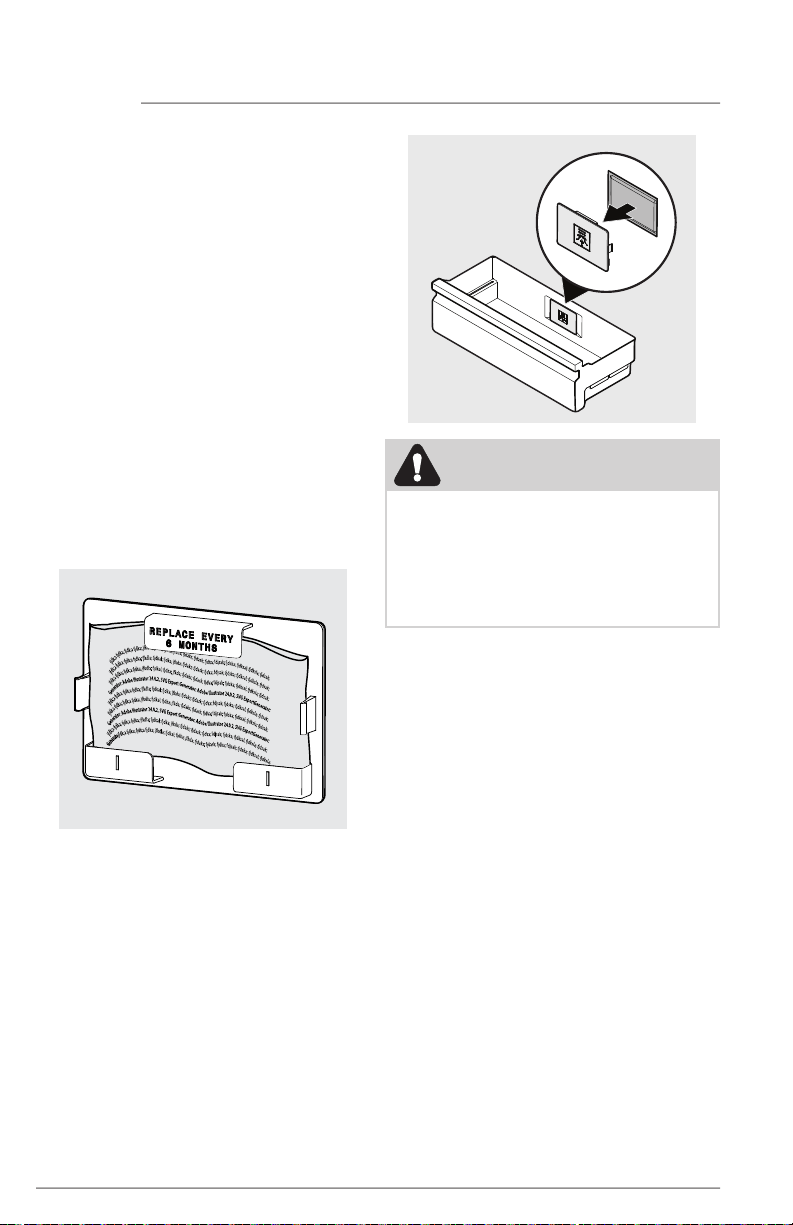
Installing the PureAdvantage Produce Keeper™:
1. Remove the plastic wrapper. Insert
unopened packet into the holder in the
TasteLock™ Crisper Drawer.
2. For optimal results, replace the
refill every 6 months along with your
air filter.
FILTER REPLACEMENT
j
f
d
k
;
a
d
k
a
;
d
k
;
a
d
k
a
;
j
f
k
d
l
a
;
d
k
a
l
;
d
k
a
;
j
f
k
d
a
;
d
a
k
s
;
d
a
s
k
;
d
k
a
;
f
d
j
s
a
k
;
d
s
k
a
;
d
k
s
a
l
;
d
k
s
l
a
;
d
s
a
k
;
G
e
n
e
r
a
t
o
j
f
d
k
;
a
d
k
a
;
d
k
;
a
d
k
a
;
j
f
k
d
l
a
;
d
k
a
l
;
d
k
a
;
j
f
k
d
a
;
d
a
k
s
;
d
a
s
k
;
d
k
a
;
f
d
j
s
a
k
;
d
s
k
a
;
d
k
s
a
l
;
d
k
s
l
a
;
j
f
d
k
;
a
d
k
a
;
d
k
;
a
d
k
a
;
j
f
k
d
l
a
;
d
k
a
l
;
d
k
a
;
j
f
k
d
a
;
d
a
k
s
;
d
a
s
k
;
d
k
a
;
f
d
j
s
a
k
;
d
s
k
a
;
d
k
s
a
l
;
d
k
s
l
a
;
d
s
a
k
;
j
f
d
k
;
a
d
k
a
;
d
k
;
a
d
k
a
;
j
f
k
d
l
a
;
d
k
a
l
;
d
k
a
;
j
f
k
d
a
;
d
a
k
s
;
d
a
s
k
;
d
k
a
;
f
d
j
s
a
k
;
d
s
k
a
;
d
k
s
a
l
;
d
k
s
l
a
;
d
s
a
k
;
G
e
n
e
r
a
t
o
r
:
A
d
o
b
e
I
l
l
u
s
t
r
a
t
o
r
2
4
.
0
.
2
,
S
V
G
E
x
p
o
r
t
G
e
n
e
r
a
t
o
r
:
A
d
o
b
e
I
l
l
u
s
t
r
a
t
o
r
2
4
.
0
.
2
,
S
V
G
E
x
p
o
r
t
G
e
n
e
r
a
t
o
r
:
j
f
d
k
;
a
d
k
a
;
d
k
;
a
d
k
a
;
j
f
k
d
l
a
;
d
k
a
l
;
d
k
a
;
j
f
k
d
a
;
d
a
k
s
;
d
a
s
k
;
d
k
a
;
f
d
j
s
a
k
;
d
s
k
a
;
d
k
s
a
l
;
d
k
s
l
a
;
d
s
a
k
;
j
f
d
k
;
a
d
k
a
;
d
k
;
a
d
k
a
;
j
f
k
d
l
a
;
d
k
a
l
;
d
k
a
;
j
f
k
d
a
;
d
a
k
s
;
d
a
s
k
;
d
k
a
;
f
d
j
s
a
k
;
d
s
k
a
;
d
k
s
a
l
;
d
k
s
l
a
;
d
s
a
k
;
G
e
n
e
r
a
t
o
r
:
A
d
o
b
e
I
l
l
u
s
t
r
a
t
o
r
2
4
.
0
.
2
,
S
V
G
E
x
p
o
r
t
G
e
n
e
r
a
t
o
r
:
A
d
o
b
e
I
l
l
u
s
t
r
a
t
o
r
2
4
.
0
.
2
,
S
V
G
E
x
p
o
r
t
G
e
n
e
r
a
t
o
r
:
j
f
d
k
;
a
d
k
a
;
d
k
;
a
d
k
a
;
j
f
k
d
l
a
;
d
k
a
l
;
d
k
a
;
j
f
k
d
a
;
d
a
k
s
;
d
a
s
k
;
d
k
a
;
f
d
j
s
a
k
;
d
s
k
a
;
d
k
s
a
l
;
d
k
s
l
a
;
d
s
a
k
;
CAUTION
DO NOT OPEN. Contents may irritate eyes
or skin. Keep out of reach of children.
FIRST AID: Contains potassium perman-
ganate. In case of contact with eyes or
skin, rinse immediately with water.
DO NOT EAT: If swallowed, seek medical
treatment immediately.
27
CARE AND CLEANING
Protecting Your investment
Keeping your appliance clean maintains
appearance and prevents odor build-up.
Wipe up any spills immediately and clean
the appliance at least twice a year. When
cleaning, take the following precautions:
• Never use CHLORIDE or cleaners with
bleach to clean stainless steel.
• Do not wash any removable parts in
a dishwasher.
• Always unplug the electrical power cord
from the wall outlet before cleaning.
• Remove adhesive labels by hand. Do
not use razor blades or other sharp
instruments which can scratch the
appliance surface.
• Do not remove the serial plate.
Do not use abrasive cleaners such as
window sprays, scouring cleansers, brushes,
flammable fluids, cleaning waxes, concen-
trated detergents, bleaches or cleansers
containing petroleum products on plastic
parts, interior doors, gaskets or cabinet
liners. Do not use paper towels, metallic
scouring pads, or other abrasive cleaning
materials or strong alkaline solutions.
Vacation and Moving Tips
Short Vacations: Leave the unit operating
during vacations of less than 3 weeks.
Long Vacations: If the appliance will not be
used for several months:
• Remove all food and unplug the
power cord.
• Clean and dry the interior thoroughly.
• Leave the door open slightly, blocking it
open if necessary, to prevent odor and
mold growth.
Moving: When moving the unit, follow these
guidelines to prevent damage:
• Disconnect the power cord plug from
the wall outlet.
• Secure all loose items such drawers
and shelves by taping them securely in
place to prevent damage.
• In the moving vehicle, secure unit in an
upright position to prevent movement.
Also protect outside of the appliance
with a blanket, or similar item.
CAUTION
• Pull the appliance straight out to move
it. Shifting it from side to side may
damage flooring.
• Damp objects stick to cold metal
surfaces. Do not touch refrigerated
surfaces with wet or damp hands.
NOTE
Do not use razor blades or other sharp
instruments which can scratch the appli-
ance surface when removing adhesive la-
bels. Any glue left from tape or labels can
be removed with a mixture of warm water
and mild detergent, or, touch the glue
residue with the sticky side of tape you
have already removed. Do not remove
the serial plate.
28
CARE AND CLEANING
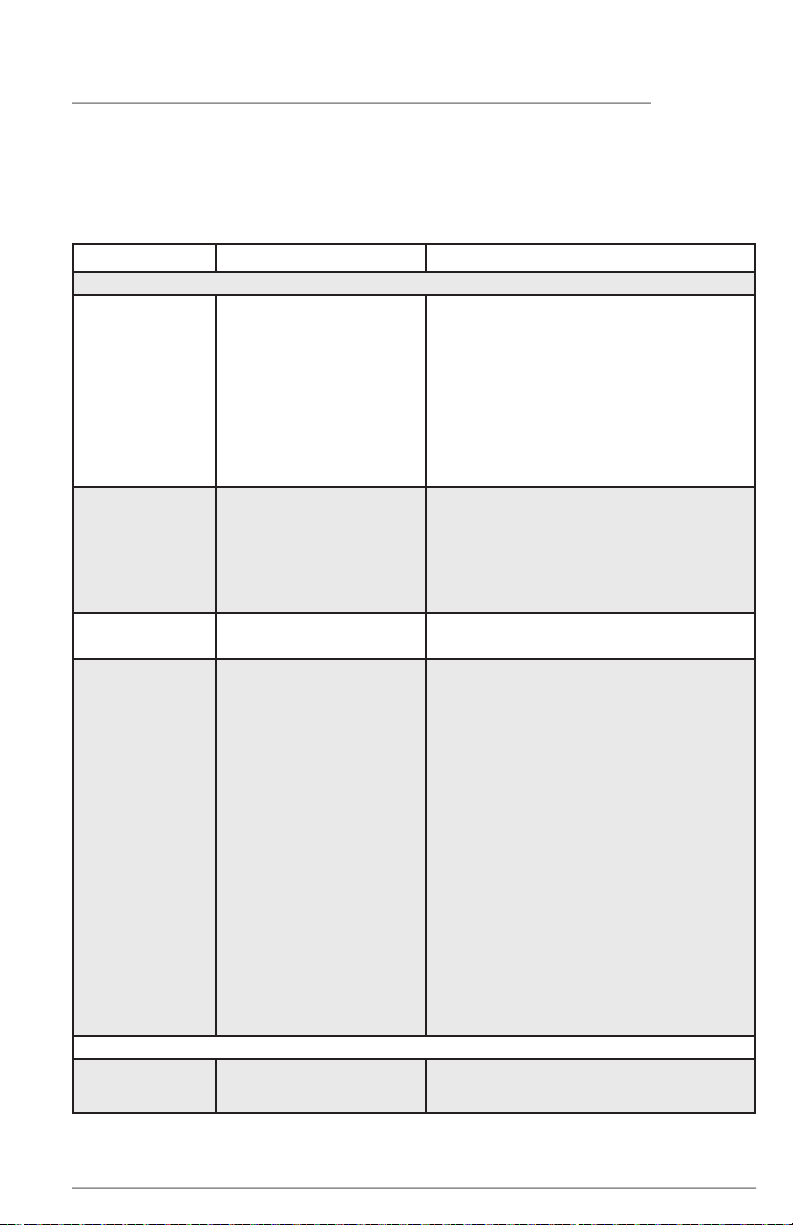
Care & Cleaning Tips
Part What To Use Tips and Precautions
Interior & Door
Liners
• Soap and water
• Baking soda
and water
Use 2 tbsp of baking soda in 1 qt of warm
water. Be sure to wring excess water out
of sponge or cloth before cleaning around
controls, light bulb or any electrical part.
Door Gaskets
• Soap and water
Wipe gaskets with a clean soft cloth.
Drawers
& Bins
• Soap and water
Use a soft cloth to clean drawer runners and
tracks. Do not wash any removable items
(bins, drawers, etc.) in dishwasher.
Glass Shelves • Soap and water
• Glass cleaner
• Mild liquid sprays
Allow glass to warm to room temperature
before immersing in warm water.
Exterior &
Handles
• Soap and water
• Non-Abrasive
Glass Cleaner
Do not use commercial household cleaners,
ammonia, or alcohol to clean handles. Use
a soft cloth to clean smooth handles. Do not
use a dry cloth to clean smooth doors.
Exterior &
Handles
(Stainless Steel
Models Only)
• Soap and water
• Ammonia
• Stainless Steel
Cleaners
Never use CHLORIDE to clean stainless
steel. Clean stainless steel front and handles
with non-abrasive soapy water and a
dishcloth. Rinse with clean water and a soft
cloth. Wipe stubborn spots with an ammo-
nia-soaked paper towel, and rinse. Use a
non-abrasive stainless steel cleaner. These
cleaners can be purchased at most home
improvement or major department stores.
Always follow manufacturer’s instruction.
NOTE: Always, clean, wipe and dry with
grain to prevent cross-grain scratching.
Wash the rest of the cabinet with warm wa-
ter and mild liquid detergent. Rinse well, and
wipe dry with a clean soft cloth.
29
1-877-4ELECTROLUX (1-877-435-3287)
ElectroluxAppliances.com
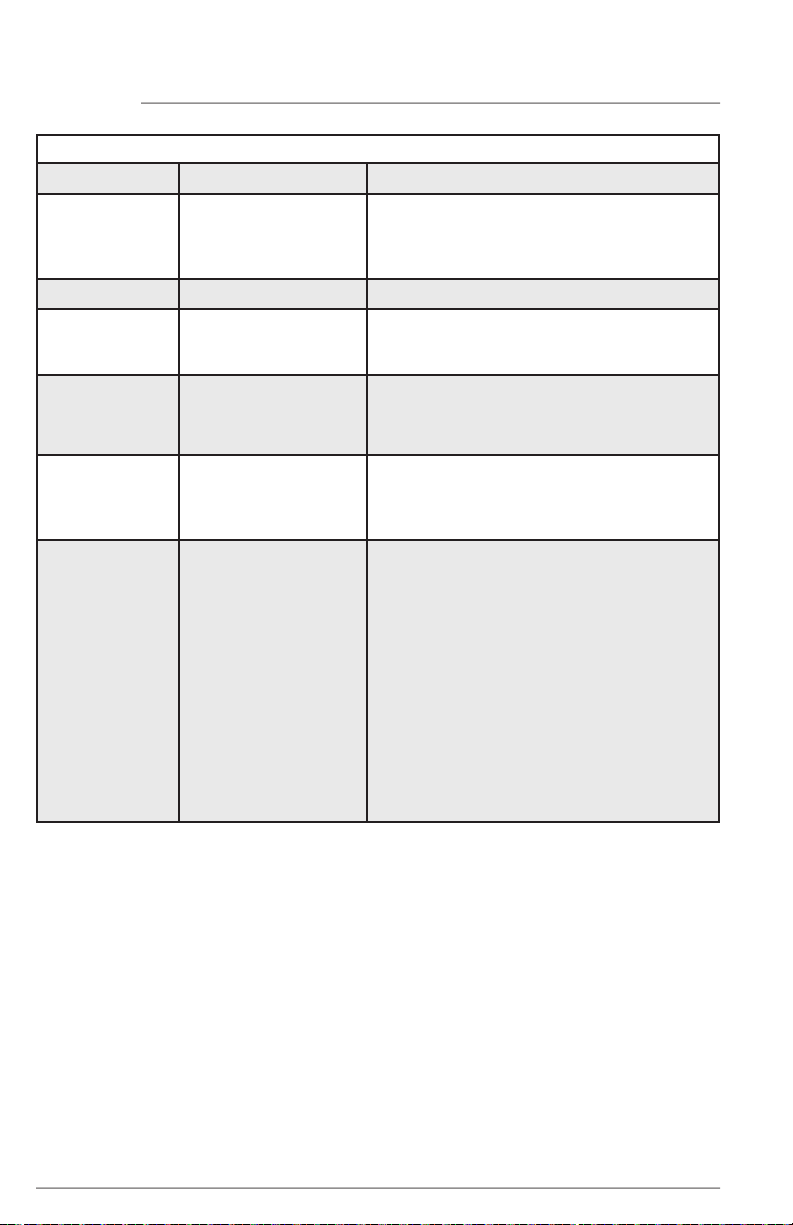
TROUBLESHOOTING
Let us help you troubleshoot your concern! This section will help you with common issues.
If you need us, visit our website, chat with an agent, or call us. We may be able to help you
avoid a service visit. If you do need service, we can get that started for you!
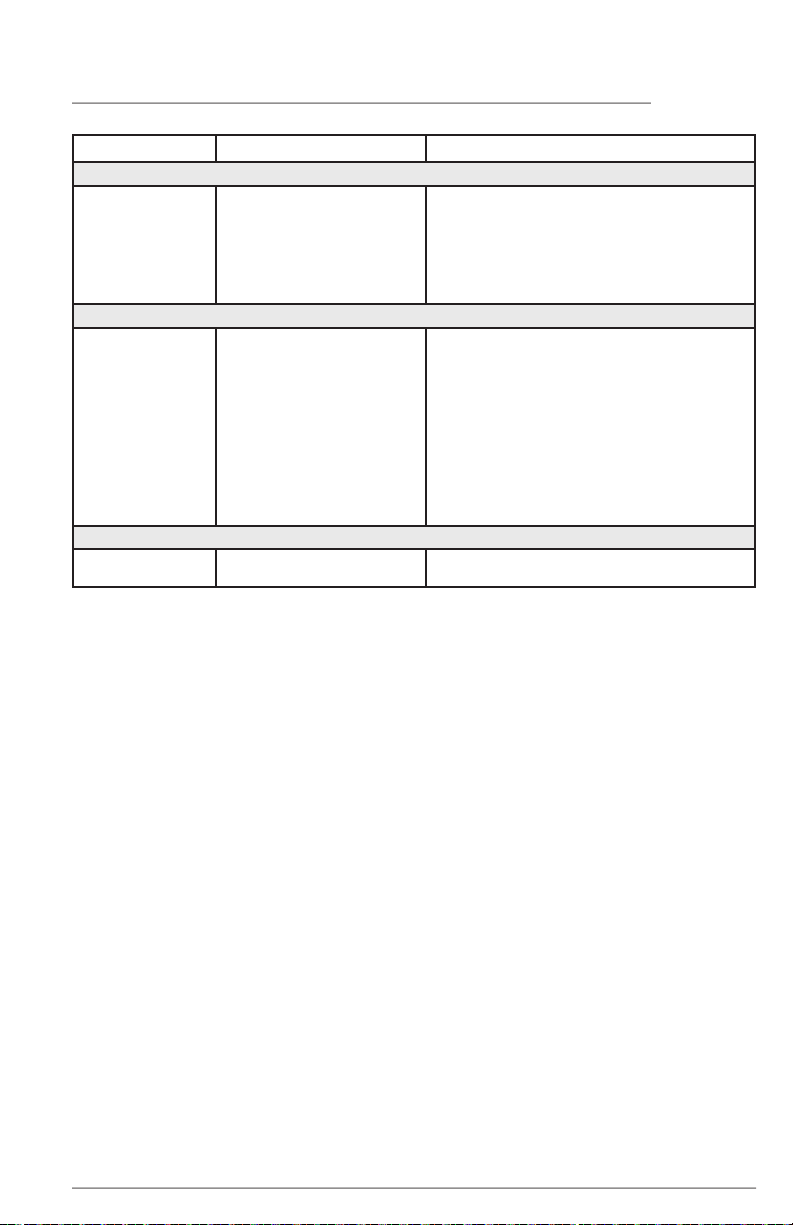
CONCERN CAUSE SOLUTION
APPLIANCE OPERATION
Appliance does
not run.
• Appliance is plugged
into a tripped Ground
Fault Interrupt (GFI).
• Appliance may not
be plugged in or plug
is loose.
• House fuse blown or
tripped circuit breaker.
• Power outage.
• Appliance must be plugged into a
dedicated circuit with standard outlet.
Contact a certified electrician to check.
• Ensure plug is tightly pushed into outlet.
• Check/replace fuse with a 15-amp
time-delay fuse. Reset circuit breaker.
• Check house lights. Call the local
electric company.
Appliance
temperature is
warmer than
preferred.
• The appliance tem-
perature is set too high.
• Items are blocking the
multi-port air flow sys-
tem, which may affect
cooling performance.
• Set control to a colder setting until ap-
pliance temperature is satisfactory. Allow
24 hours for the temperature to stabilize.
• Make sure the items are not placed di-
rectly in front of the cold air exhaust ports.
Appliance is
noisy or vibrates.
• The cabinet is not level.
• Floor is weak.
• Adjust the leveling feet. See “Leveling”
in the INSTALLATION section.
Appliance runs
too much or too
long.
• Room or outside
weather is hot.
• Appliance has recently
been disconnected for
a period of time.
• Large amounts of warm
or hot food have been
stored recently.
• Door is opened too
frequently or too long.
• Door may be
slightly open.
• Temperature control is
set too low.
• Gaskets are dirty, worn,
cracked, or poorly fitted.
• It’s normal for the appliance to work
longer under these conditions.
• It takes 24 hours for the appliance to
cool down completely.
• Warm food will cause appliance to
run more until the desired temperature
is reached.
• Warm air entering the appliance
causes it to run more. Open door
less often.
• See DOOR PROBLEMS in
TROUBLESHOOTING section.
• Turn control knob to a warmer setting.
Allow several hours for the temperature
to stabilize.
• Clean or change gasket. (See Care and
Cleaning Tips in CARE AND CLEANING
section). Worn, cracked or poorly fitting
gaskets should be replaced.
APPLIANCE TEMPERATURES
Interior appli-
ance tempera-
ture is too cold.
• Temperature control is
set too low.
• Set control to a warmer setting. Allow
several hours for temperature to stabilize.
30
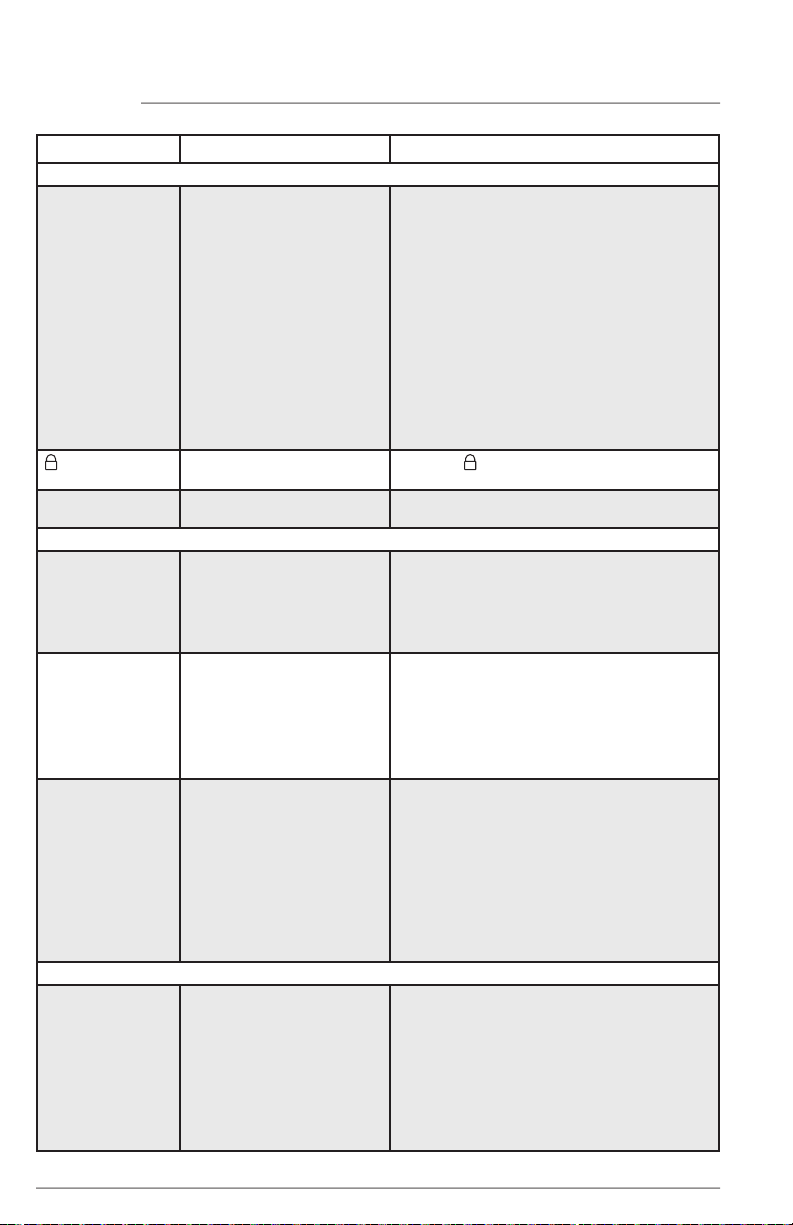
CONCERN CAUSE SOLUTION
APPLIANCE TEMPERATURES (cont’d)
Temperature
inside appliance
is too warm.
• Temperature control is
set too warm.
• Door is opened too
frequently or too long.
• Door may not be
seating properly.
• Large amount of warm
or hot food has been
stored recently.
• Unit has recently been
disconnected for a
period of time.
• Turn control to a colder setting. Allow
several hours for temperature to stabilize.
• Warm air enters the appliance every
time the door is opened. Open door
less often.
• Look for food items on the shelves or
in the door bins keeping the door from
closing completely.
• Wait until the appliance has had a
chance to reach its selected temperature.
• Appliance may take up to 24 hours to
cool down completely.
is displayed
on control.
• The control has
been locked.
• Press for 3 seconds to unlock.
Sb is displayed
on the control.
• The control is in
Sabbath Mode.
• Press — and TEMP F/C for 5 seconds.
SOUND AND NOISE
Louder sound
levels whenever
appliance is on.
• Modern appliances
have increased storage
capacity and more
stable temperatures.
They require heavy-
duty compressors.
• This is normal. When the surrounding
noise level is low, you might hear the com-
pressor running while it cools the interior.
Popping or
cracking sound
when compres-
sor comes on.
Bubbling or
gurgling sound.
• Metal parts undergo ex-
pansion and contraction,
as in hot water pipes.
• Refrigerant (used to
cool refrigerator) is
circulating throughout
the system.
• This is normal. Sound will level off or dis-
appear as appliance continues to run.
• This is normal.
Vibrating or
rattling noise.
• Appliance is not level. It
rocks on the floor when
it is moved slightly.
• Floor is uneven or weak.
• Appliance is touching
the wall.
• Level the appliance. Refer to “Leveling”
in the INSTALLATION section.
• Ensure floor can adequately support
the appliance. Level the appliance by
putting wood or metal shims under part
of the appliance.
• Re-level appliance or move appliance
slightly. Refer to “Leveling” in the IN
STALLATION section.
WATER / MOISTURE / FROST INSIDE APPLIANCE
Moisture forms
on inside ap-
pliance walls.
• Weather is hot and
humid, which increas-
es internal rate of
frost buildup.
• Door is slightly open.
• Door is kept open
too long.
• This is normal.
• Look for food items on the shelves
or in the door bins keeping the door
from closing completely.
• Open the door less often.
TROUBLESHOOTING
31
TROUBLESHOOTING
CONCERN CAUSE SOLUTION
ODOR IN APPLIANCE
Odors in
appliance.
• Interior needs to
be cleaned.
• Foods with strong odors
are in the appliance.
• The air filter needs to
be replaced.
• Clean interior with sponge, warm wa-
ter, and baking soda. Replace air filter.
• Cover the food tightly.
• Refer to “PureAdvantage Ultra II™ Air Fil-
ter” the in FILTER REPLACEMENT section.
DOOR PROBLEMS
Door will
not close.
• Appliance is not level. It
rocks on the floor when
it is moved slightly.
• Floor is uneven or weak.
• This condition can force the cabinet
out of square and misalign the door.
Refer to “Leveling” in the INSTALLA
TION section.
• Ensure floor can adequately support
appliance. Level the appliance by
putting wood or metal shims under part
of the appliance.
• Look for food items on the shelves or
in the door bins keeping the door from
closing completely.
LIGHTING PROBLEMS
Cabinet light is
not working.
• LED has burned out. • Call an Electrolux service technician.

32
LIMITED WARRANTY
Major Appliance Warranty Information
Your appliance is covered by a one year limited warranty. For one year from your original date
of purchase, Electrolux will repair or replace any parts of this appliance that prove to be defec-
tive in materials or workmanship when such appliance is installed, used, and maintained in ac-
cordance with the provided instructions. In addition, the cabinet liner and sealed refrigeration
system (compressor, condenser, evaporator, dryer or tubing) of your appliance is covered by a
two through five year limited warranty. During the 2
nd
through 5
th
years from your original date
of purchase, Electrolux will repair or replace any parts in the cabinet liner and sealed refriger-
ation system which prove to be defective in materials or workmanship when such appliance is
installed, used, and maintained in accordance with the provided instructions.
Exclusions
This warranty does not cover the following:
1. Products with original serial numbers that have been removed, altered or cannot be
readily determined.
2. Product that has been transferred from its original owner to another party or removed
outside the USA or Canada.
3. Rust on the interior or exterior of the unit.
4. Products purchased “as-is” are not covered by this warranty.
5. Food loss due to any refrigerator or freezer failures.
6. Products used in a commercial setting.
7. Service calls which do not involve malfunction or defects in materials or workmanship,
or for appliances not in ordinary household use or used other than in accordance with
the provided instructions.
8. Service calls to correct the installation of your appliance or to instruct you how to use
your appliance.
9. Expenses for making the appliance accessible for servicing, such as removal of trim, cup-
boards, shelves, etc., which are not a part of the appliance when it is shipped from the factory.
10. Service calls to repair or replace appliance light bulbs, air filters, water filters, other con-
sumables, or knobs, handles, or other cosmetic parts.
11. Pickup and delivery costs; your appliance is designed to be repaired in the home.
12. Surcharges including, but not limited to, any after hour, weekend, or holiday service calls, tolls, ferry
trip charges, or mileage expense for service calls to remote areas, including the state of Alaska.
13. Damages to the finish of appliance or home incurred during transportation or installa-
tion, including but not limited to floors, cabinets, walls, etc.
14. Damages caused by: services performed by unauthorized service companies; use of
parts other than genuine Electrolux parts or parts obtained from persons other than
authorized service companies; or external causes such as abuse, misuse, inadequate
power supply, accidents, fires, or acts of God.
DISCLAIMER OF IMPLIED WARRANTIES; LIMITATION OF REMEDIES
CUSTOMER’S SOLE AND EXCLUSIVE REMEDY UNDER THIS LIMITED WARRANTY SHALL BE REPAIR
OR REPLACEMENT AS PROVIDED HEREIN. CLAIMS BASED ON IMPLIED WARRANTIES, INCLUD-
ING WARRANTIES OF MERCHANTABILITY OR FITNESS FOR A PARTICULAR PURPOSE, ARE LIMIT-
ED TO ONE YEAR OR THE SHORTEST PERIOD ALLOWED BY LAW, BUT NOT LESS THAN ONE YEAR.
ELECTROLUX SHALL NOT BE LIABLE FOR CONSEQUENTIAL OR INCIDENTAL DAMAGES SUCH
AS PROPERTY DAMAGE AND INCIDENTAL EXPENSES RESULTING FROM ANY BREACH OF THIS
WRITTEN LIMITED WARRANTY OR ANY IMPLIED WARRANTY. SOME STATES AND PROVINCES DO
NOT ALLOW THE EXCLUSION OR LIMITATION OF INCIDENTAL OR CONSEQUENTIAL DAMAG-
ES, OR LIMITATIONS ON THE DURATION OF IMPLIED WARRANTIES, SO THESE LIMITATIONS OR
EXCLUSIONS MAY NOT APPLY TO YOU. THIS WRITTEN WARRANTY GIVES YOU SPECIFIC LEGAL
RIGHTS. YOU MAY ALSO HAVE OTHER RIGHTS THAT VARY FROM STATE TO STATE.
If You Need Service
Keep your receipt, delivery slip, or some other appropriate payment record to establish the warranty
period should service be required. If service is performed, it is in your best interest to obtain and keep
all receipts. Service under this warranty must be obtained by contacting Electrolux at the addresses or
phone numbers below.
This warranty only applies in the USA, Puerto Rico and Canada. In the USA and Puerto Rico, your
appliance is warranted by Electrolux Major Appliances North America, a division of Electrolux Home
Products, Inc. In Canada, your appliance is warranted by Electrolux Canada Corp. Electrolux autho-
rizes no person to change or add to any obligations under this warranty. Obligations for service and
parts under this warranty must be performed by Electrolux or an authorized service company. Product
features or specifications as described or illustrated are subject to change without notice.
USA
1-877-435-3287
Electrolux Major Appliances North America
10200 David Taylor Drive
Charlotte, NC 28262
Canada
1-800-265-8352
Electrolux Canada Corp.
5855 Terry Fox Way
Mississauga, Ontario,
Canada L5V 3E4