Table of Contents
- 1. Overview
- 1.1 What's in the Box
- 1.2 Product Diagram
- 2. Features
- 2.1 Sound Performance
- 2.2 Lighting System
- 2.3 Waterproofing (IPX7)
- 2.4 Connectivity
- 2.5 Battery & Charging
- 2.6 Portability
- 3. Getting Started
- 3.1 Charging the Speaker
- 3.2 Power On/Off
- 3.3 Bluetooth Pairing
- 3.4 TWS Stereo Pairing (Two Speakers)
- 3.5 TF Card Playback
- 4. Controls & Indicators
- 4.1 Button Functions
- 4.2 LED Indicators
- 4.3 Light Modes
- 5. Specifications
- 6. Troubleshooting
- 7. Safety & Care
- 8. Warranty & Support
1. Overview
The Tiksounds S12 is a compact portable Bluetooth speaker designed for use at home, outdoors, and during travel. It delivers 15W of stereo sound and includes a dynamic RGB lighting system on the top surface. The speaker is IPX7 waterproof, allowing for immersion in water up to 1 meter (3 feet) for up to 30 minutes.
Key capabilities include Bluetooth 5.4 wireless connectivity, TWS (True Wireless Stereo) pairing for dual-speaker setups, TF card playback, and up to 24 hours of battery life on a single charge.
1.1 What's in the Box
- Tiksounds S12 Portable Bluetooth Speaker
- Type-C charging cable
- Carrying lanyard
- User documentation
1.2 Product Diagram

The speaker features a cylindrical design with the following main components:
- Top Surface: Contains three RGB lighting zones and the control buttons.
- Speaker Grille: Wraps around the body for 360° sound output.
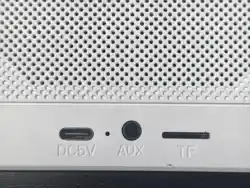
- TF Card Slot: Located on the side, supports WAV and MP3 formats.
- Type-C Charging Port: For fast charging via the included cable.
- Lanyard Loop: For attaching the included carrying strap.
2. Features
2.1 Sound Performance

- 15W Output: Provides loud, clear audio with zero distortion at normal listening levels.
- Full-Range Audio: Delivers loud highs, crisp midrange, and full bass.
- 360° Coverage: The cylindrical design disperses sound in all directions.
- Stereo Mode (TWS): Pair two S12 speakers for a combined 30W output with true stereo separation.
2.2 Lighting System

The top of the speaker features three RGB lighting zones that sync with the rhythm of the music. The lights offer six different modes:
- Rainbow cycle
- Alternating red, green, and blue
- Red, green, and blue alternating (fast)
- Rainbow breathing
- Rainbow stacking
- Off
Light modes can be cycled using the dedicated light control button (see Section 4.1).
2.3 Waterproofing (IPX7)

- IPX7 Rating: The speaker can be fully immersed in water up to 1 meter (3 feet) for up to 30 minutes.
- Weather Resistant: Protects against rain, dust, snow, and spills.
- Ideal for Outdoor Use: Suitable for shower, beach, pool, hiking, and camping.
2.4 Connectivity

- Bluetooth 5.4: Provides fast pairing, stable connection, and extended range.
- Compatible Devices: Works with smartphones, tablets, laptops, and other Bluetooth-enabled devices.
- TF Card Slot: Supports WAV and MP3 audio files for playback without a Bluetooth connection.
2.5 Battery & Charging
- Playtime: Up to 24 hours of continuous playback on a single charge (at moderate volume).
- Charging: Type-C fast charging port.
- Power Source: Battery powered, rechargeable via included cable.
2.6 Portability
- Dimensions: 4.84 inches high, 3.34 inches in diameter.
- Weight: Compact and lightweight for on-the-go use.
- Lanyard: Included for convenient carrying.
3. Getting Started
3.1 Charging the Speaker
- Locate the Type-C charging port on the side of the speaker.
- Connect the included Type-C cable to the speaker.
- Plug the other end into a USB power adapter (not included) or a computer's USB port.
- The LED indicator will show charging status (see Section 4.2).
- Charge fully before first use. A full charge typically takes 2–3 hours.
3.2 Power On/Off
- Power On: Press and hold the Power button for 2–3 seconds until you hear a startup sound or see the LED indicator light up.
- Power Off: Press and hold the Power button for 2–3 seconds until you hear a shutdown sound or see the LED indicator turn off.
3.3 Bluetooth Pairing
- Power on the speaker. It will automatically enter pairing mode if no device is connected.
- On your phone, tablet, or computer, enable Bluetooth and search for available devices.
- Select "Tiksounds S12" (or similar name) from the list of discovered devices.
- If prompted, enter the PIN 0000 or confirm the pairing request.
- Once connected, you will hear a confirmation tone.
3.4 TWS Stereo Pairing (Two Speakers)
To create a true wireless stereo setup with two S12 speakers:
- Power on both speakers.
- Ensure both speakers are not connected to any Bluetooth device.
- Press and hold the TWS button on both speakers simultaneously for 2–3 seconds.
- The speakers will automatically pair with each other.
- Once paired, connect your phone to either speaker via Bluetooth.
- Both speakers will now play audio in stereo mode (combined 30W output).
3.5 TF Card Playback
- Insert a TF (microSD) card with WAV or MP3 files into the TF card slot.
- Power on the speaker. It will automatically detect and play from the TF card.
- Use the playback controls (see Section 4.1) to manage playback.
- To switch back to Bluetooth mode, remove the TF card or press the Mode button.
4. Controls & Indicators
4.1 Button Functions
4.2 LED Indicators
The speaker uses LED indicators to communicate status:
- Blinking Blue: Pairing mode – speaker is searching for a device.
- Solid Blue: Connected to a Bluetooth device.
- Solid Green: Battery fully charged.
- Blinking Red: Low battery – charge the speaker.
- Solid Red: Charging in progress.
- RGB Lights (top): Indicates the selected light mode.
4.3 Light Modes
The top of the speaker has three RGB lighting zones. Press the Light Mode button to cycle through the following modes:
| Mode | Description |
|---|---|
| Rainbow Cycle | Colors smoothly transition through the full spectrum. |
| Alternating RGB | Red, green, and blue alternate in sequence. |
| Fast RGB Alternating | Red, green, and blue alternate at a faster rate. |
| Rainbow Breathing | Colors fade in and out in a breathing pattern. |
| Rainbow Stacking | Colors build up in a stacked pattern. |
| Off | All lighting is disabled. |
5. Specifications
6. Troubleshooting
| Problem | Possible Cause | Solution |
|---|---|---|
| No sound | Volume is muted or too low | Increase volume on both the speaker and the connected device. |
| No sound | Bluetooth not connected | Check Bluetooth connection status on your device. Re-pair if necessary. |
| No sound | TF card not inserted properly | Remove and reinsert the TF card. Ensure files are in WAV or MP3 format. |
| Cannot pair via Bluetooth | Speaker is connected to another device | Disconnect the other device or power off the speaker and try again. |
| Cannot pair via Bluetooth | Speaker is in TWS pairing mode | Exit TWS mode by pressing the TWS button briefly. |
| Battery drains quickly | High volume or heavy bass | Reduce volume. Battery life is rated at moderate volume levels. |
| Speaker not charging | Charging cable not connected properly | Check the Type-C connection. Try a different cable or power adapter. |
| Speaker not charging | Charging port is wet | Dry the charging port completely before charging. |
| Audio stuttering | Bluetooth interference | Move the speaker closer to the connected device. Avoid obstacles. |
| Lights not working | Light mode set to Off | Press the Light Mode button to cycle through modes until lights appear. |
7. Safety & Care
Safety Precautions
- Do not disassemble the speaker. There are no user-serviceable parts inside.
- Do not expose the speaker to extreme heat or fire.
- Do not use the speaker near water unless it is fully sealed (IPX7 rating applies to the speaker body, not the charging port when open).
- Keep the speaker away from small children to prevent choking hazards from small parts.
- Do not drop the speaker or subject it to strong impacts.
Care & Maintenance
- Clean the speaker with a soft, dry cloth. Do not use abrasive cleaners.
- After exposure to water, dry the speaker thoroughly before charging or inserting a TF card.
- Store the speaker in a cool, dry place when not in use.
- Charge the battery at least once every 3 months to maintain battery health.
8. Warranty & Support
For warranty information, product support, or customer service inquiries, please contact the manufacturer through the following channels:
- Brand: Tiksounds
- Manufacturer: Tiksounds
- Product Page: Available on Amazon.com (ASIN: B0H74MB6QG)
- Store: Visit the Tiksounds Store on Amazon for additional contact options.