Overview

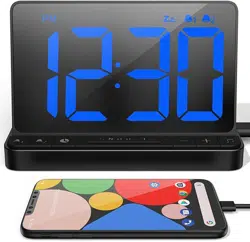
The NOKLEAD 5252 is a digital alarm clock featuring a 5.9-inch LED display with large, easy-to-read numbers. It has a wood grain finish and is designed for use on a nightstand, desk, or shelf. The clock operates on USB power and includes features such as adjustable brightness, a single alarm with two volume settings, a snooze function, and a 12/24-hour time format.
Model: 5252
Package Contents

- 1 x NOKLEAD 5252 Digital Alarm Clock
- 1 x USB-C Cable (78.7 inches / 2 meters)
- 1 x Power Adapter (5V/1A)
- 1 x User Manual (this document)
Product Features
Physical Description
- Display: 5.9-inch LED screen with 1.9-inch tall white digits.
- Dimensions: 5.5" (W) x 3" (H) x 1.6" (D).
- Finish: Wood grain design (available in Brown and Light Wood).
- Base: Non-slip silicone pad for stability.

Display and Brightness
The clock features a large, clear digital display. The brightness can be adjusted to suit different lighting conditions.
- Brightness Control: Five dimming levels plus a full OFF option.
- Operation: Press the large top button to cycle through brightness levels (Level 1 to 5, then OFF).

Alarm Function
- Type: Single alarm with a beeping sound.
- Volume: Two settings: Soft (approx. 70dB) and High (approx. 85dB).
- Duration: The alarm will sound for up to 30 minutes if not acknowledged.
- Snooze: 9-minute snooze function. Press the large top button when the alarm is sounding.

Time Format
The clock can display time in either 12-hour (AM/PM) or 24-hour (military) format.

Power
- Source: USB-powered (corded electric). Requires the included USB-C cable and 5V power adapter.
- Power Loss: If power is lost, the screen will go dark and the alarm will not sound. The time and alarm settings are saved in memory and will resume when power is restored.
- Note: This clock does not have a battery backup for continuous operation during a power outage.
Control Buttons

The clock has five buttons on the back for setup and control:
- (Large Top Button on Front): Press to activate 9-minute snooze during alarm. Press during normal operation to cycle through display brightness levels (1-5, then OFF).
- : Used to set the current time and to toggle between 12/24-hour format.
- : Used to set the alarm time and to toggle the alarm ON/OFF.
- : Adjusts the hour value during time or alarm setting.
- : Adjusts the minute value during time or alarm setting.
Setup and Use Guide
Initial Setup
- Place the clock on a stable, flat surface.
- Connect the USB-C cable to the port on the back of the clock.
- Plug the power adapter into a wall outlet and connect the USB cable to it. The display will illuminate.
Setting the Time
- Press and hold the button for about 2 seconds. The hour digits will blink.
- Press the button to adjust the hour value.
- Press the button to adjust the minute value.
- Press the button again to confirm and exit setting mode.
- To switch between 12-hour and 24-hour format: Briefly press the button while the clock is in normal display mode.
Setting the Alarm
- Press and hold the button for about 2 seconds. The alarm time hour digits will blink.
- Press the button to set the alarm hour.
- Press the button to set the alarm minute.
- Press the button again to confirm. The alarm icon should appear on the display, indicating the alarm is ON.
- To turn the alarm ON or OFF: Briefly press the button while the clock is in normal display mode. The alarm icon will appear/disappear.
- To adjust alarm volume: The volume level (Soft or High) is typically set during manufacturing and may not be user-adjustable. Refer to the alarm sound description for default levels.
Using the Snooze
When the alarm sounds, press the large button on the top of the clock. The alarm will stop and will sound again after 9 minutes. You can repeat this during the 30-minute alarm duration.
Adjusting Display Brightness
Press the large button on the top during normal operation. Each press cycles to the next brightness level: Level 1 (brightest) → Level 2 → Level 3 → Level 4 → Level 5 (dimmest) → OFF → Level 1.
Specifications
| Attribute | Specification |
|---|---|
| Brand | NOKLEAD |
| Model Number | 5252 |
| Display Type | Digital LED |
| Screen Size | 5.9 inches |
| Digit Height | 1.9 inches |
| Dimensions (W x H x D) | 5.5" x 3" x 1.6" |
| Power Source | USB-C (5V/1A adapter included) |
| Alarm | Single beep alarm, 2 volume levels |
| Snooze | 9 minutes |
| Time Format | 12-hour / 24-hour switchable |
| Brightness Levels | 5 levels + OFF |
| Material | ABS Plastic with wood grain finish |
Troubleshooting
| Issue | Possible Solution |
|---|---|
| Display is blank | Ensure the USB cable is firmly connected to both the clock and the powered adapter. Check that the wall outlet is working. The display may be set to OFF; press the top brightness button. |
| Time is incorrect | Reset the time following the "Setting the Time" instructions. |
| Alarm does not sound | Verify the alarm is turned ON (alarm icon visible). Check the alarm time setting. Ensure the clock is powered. The alarm will not sound if the unit is unplugged. |
| Buttons are unresponsive | Unplug the clock from power for 10 seconds, then plug it back in. |
| Display is too bright or too dim at night | Use the top button to adjust the brightness to a comfortable level before sleeping. |
Care and Maintenance
- Use a soft, dry cloth to clean the clock. Do not use abrasive cleaners or liquids.
- Place the clock on a dry, stable surface away from direct sunlight or excessive heat.
- To prevent damage, avoid pulling on the power cable.
Compliance and Warranty
Manufacturer's Warranty: 2 years.
This product is intended for indoor use only.
Note on Power Interruption: This is a plug-in alarm clock. It requires constant USB power to operate. During a power failure, the display will turn off and the alarm will not sound, but your time and alarm settings will be retained in memory.