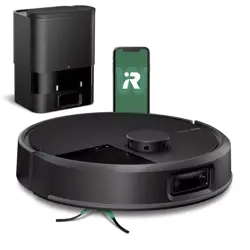
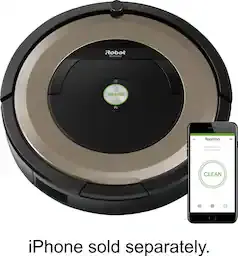
iRobot ROOMBA MAX 705 Vac Robot Vacuum + AutoEmpty Dock Extreme Power-Lifting Suction, Anti-Tangle Dual Rubber Brushes, Self-Empties, Recognizes and Avoids Obstacles, LiDAR Navigation

Product's Documents

Below are documents related to this product, you can read online or download:
ROOMBA MAX 705 photo

Overview

The iRobot Roomba Max 705 Vac is a robotic vacuum cleaner designed for use on carpets and hard floors. It is paired with an AutoEmpty Dock that automatically empties the robot's dustbin. The robot uses LiDAR navigation and AI-powered object recognition to map and clean your home while avoiding obstacles.

Front view of the white iRobot Roomba Max 705 Vac robot vacuum and its AutoEmpty Dock

Features

Cleaning System

  • Dual Multi-Surface Rubber Brushes: Adjust to maintain contact with different floor types and are designed to resist tangling with pet hair.
  • Edge-Sweeping Brush: Extends to pull dirt and debris from corners and edges.
  • Extreme Power-Lifting Suction: Provides strong suction power, especially in Spot Clean mode.
  • Carpet Boost: Automatically increases suction power when transitioning from hard floors to carpets.
  • Advanced Dirt Detect Technology: Identifies areas with concentrated dirt and performs additional cleaning passes.
Diagram showing the Dual Rubber Brushes and their action on debris

Navigation and Intelligence

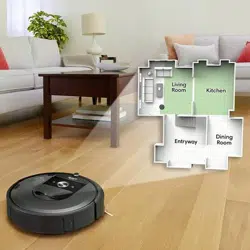
  • ClearView Pro LiDAR Navigation: Creates detailed maps of your home for efficient, room-by-room cleaning.
  • PrecisionVision AI Technology: Recognizes and avoids common household obstacles such as cords, socks, and pet waste.
  • Anti-Fall Sensors: Detect stairs and ledges to prevent the robot from falling.
  • Smart Mapping: Can create and store multiple maps, automatically naming recognized rooms.
Illustration of the robot's LiDAR mapping a home floor plan

AutoEmpty Dock

  • Self-Emptying: Automatically empties the robot's dustbin into a sealed disposable bag located in the dock.
  • Allergen Containment: The enclosed bag captures dust and particles as small as 0.7 microns.
  • 75-Day Capacity: The dock is designed to hold up to 75 days of debris before the bag needs replacement.
The AutoEmpty Dock with a cutaway showing the internal dust bag

Control and Connectivity

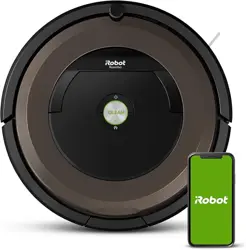
  • Roomba Home App: Allows you to start, stop, schedule cleanings, select specific rooms or zones, adjust suction power, and view cleaning history.
  • Voice Control: Compatible with Alexa, Google Assistant, and Siri for voice-activated commands.
  • Cleaning Routines: Set custom schedules and routines for different days or times.
Screenshot of the Roomba Home App interface on a smartphone

Use Guide

Initial Setup

  1. Unbox: Remove the Roomba robot, AutoEmpty Dock, extra filter, and extra AutoEmpty bag from the packaging.
  2. Place the Dock: Position the AutoEmpty Dock on a hard, level floor. Ensure there is at least 4 feet (1.2 meters) of clear space in front of the dock and that it is away from stairs.
  3. Power On: Plug the dock into a wall outlet. The robot's battery comes partially charged.
  4. Install the App: Download the "Roomba Home" app from your device's app store.
  5. Connect and Map: Follow the in-app instructions to connect the robot to your Wi-Fi network. The robot will then perform an initial mapping run to learn your home's layout.

Starting a Cleaning Job

You can start cleaning in several ways:

  • Using the App: Open the Roomba Home app and press the "Clean" button.
  • Using Voice: Say a command like "Alexa, ask Roomba to start cleaning."
  • Using the Robot: Press the "Clean" button on the robot itself.

Using the Roomba Home App

The app provides control over the following functions:

  • Start/Pause/Stop: Control the current cleaning job.
  • Room & Zone Cleaning: Select specific rooms or draw zones on the map to clean.
  • Suction Power: Adjust between four suction levels.
  • Cleaning Passes: Set the number of passes for a specific room or zone.
  • Schedules: Create recurring cleaning schedules.
  • Keep Out Zones: Designate areas where the robot should not enter.
  • History & Recommendations: View past cleaning reports and see smart cleaning suggestions based on usage.

Emptying the AutoEmpty Dock

  1. The dock will automatically empty the robot's bin after most cleaning jobs.
  2. When the bag is full (typically after up to 75 days), an alert will appear in the Roomba Home app.
  3. To replace the bag, open the compartment door on the front of the dock.
  4. Remove the full bag by pulling it up and out. Dispose of it sealed.
  5. Insert a new AutoEmpty bag into the compartment, ensuring it is seated properly, and close the door.

Maintenance

Regular maintenance ensures optimal performance.

  • Clean the Brushes: Regularly remove hair and debris wrapped around the Dual Rubber Brushes and the Edge-Sweeping Brush.
  • Empty the Robot Bin: Although the dock handles this automatically, you may need to manually empty the robot's bin if it becomes full mid-job.
  • Clean the Filter: Remove and tap the filter to clear dust. Replace the filter every 2-3 months, or as needed.
  • Clean Sensors and Charging Contacts: Wipe the LiDAR sensor window on top of the robot, the cliff sensors on its underside, and the charging contacts on the robot and dock with a dry cloth.
  • Check the Wheels: Remove any debris lodged in the wheels.

Troubleshooting

  • Robot not starting: Ensure it is charged. Place it on the dock and check that the charging contacts are clean.
  • Robot missing areas: Ensure the mapping run is complete. Clear clutter from floors to allow full navigation.
  • Suction seems weak: Check and clean the filter, robot bin, and all brushes for blockages.
  • App connection issues: Ensure your robot and mobile device are connected to the same Wi-Fi network. Restart the robot and your router if necessary.
  • Dock not emptying robot: Ensure the dock is powered on and the bag is properly installed and not full.

Specifications

  • Model Name: 705 Vac
  • Color: White (also available in Black)
  • Product Dimensions (Robot): 14"L x 13.8"W x 4.1"H
  • Item Weight: 16.2 pounds
  • Battery Life: Up to 210 minutes
  • Power Source: Rechargeable battery (included)
  • Control Method: App, Voice, Physical Buttons
  • Included Components: Roomba Max 705 Vac robot, AutoEmpty Dock, 1 Extra AutoEmpty Bag, 1 Extra Filter

Reference file: iRobot ROOMBA MAX 705 Vac Robot Vacuum + AutoEmpty Dock Extreme Power-Lifting Suction, Anti-Tangle Dual Rubber Brushes, Self-Empties, Recognizes and Avoids Obstacles, LiDAR Navigation

Specifications

Indexed Terms: Robot Vacuum

iRobot ROOMBA MAX 705 Questions and Answers