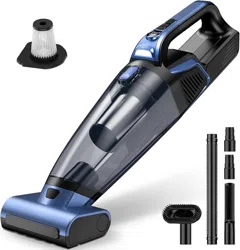
RELIDOL VC038S Cordless Handheld Vacuum Cleaner
Model: VC038S
1. Safety Instructions
- Only use the provided charger (5V/2A) to charge the vacuum.
- Do not use the vacuum to pick up liquids, burning materials, or sharp objects.
- Keep the vacuum and its accessories away from children and pets when not in use.
- Do not block the air intake or exhaust vents while the vacuum is operating.
- Clean or replace the filters regularly to maintain performance and prevent motor damage.
2. Package Contents
Please check that your package contains the following items:
- Main Vacuum Unit x1
- Auto-Rolling Brush (for pet hair) x1
- Crevice Nozzle x1
- 2-in-1 Brush (Dusting/Upholstery) x1
- Extension Hose x1
- Washable HEPA Filter x2
- Washable Steel Filter x1
- Charging Cable (Type-C) x1
- User Manual x1
3. Product Overview & Key Features
- High-Power Suction: 20,000 PA suction power for effective cleaning of pet hair, dust, and debris.
- Dual Suction Modes: Eco Mode (longer battery life for light cleaning) and Max Mode (maximum power for deep cleaning).
- Large 720ml Dustbin: Reduces the frequency of emptying compared to standard handheld vacuums.
- Built-In LED Light: Illuminates dark areas like under furniture or in car footwells.
- Rechargeable Battery: 10400mAh battery with Type-C fast charging. Full charge in approximately 2.5 hours.
- Dual Filtration System: Includes washable HEPA and steel filters to trap fine dust and protect the motor.
4. Getting Started: Charging and Assembly
Initial Charging
- Connect the provided Type-C charging cable to the charging port on the vacuum.
- Plug the other end into a standard 5V/2A USB power adapter (not included) or a computer USB port.
- The LED indicator will show red while charging and turn green when fully charged.
- For the first use, we recommend giving it a full charge.
Attaching Accessories
To attach a brush or nozzle, align it with the intake port on the main unit and push firmly until it clicks into place.
5. How to Use Your Vacuum
- Power On/Off & Select Mode: Press the power button to turn on the vacuum. It may start in Eco mode. Press the mode button (if available) to switch between Eco and Max suction power.
- Cleaning: Glide the vacuum over the surface. For pet hair on upholstery or carpets, use the Auto-Rolling Brush attachment. For tight spaces, use the Crevice Nozzle.
- Using the LED Light: The light typically turns on automatically when the vacuum is powered on to help illuminate your cleaning path.
- Power Off: Press the power button again to turn off the vacuum after use.
6. Emptying the Dustbin and Cleaning Filters
Emptying the Dustbin
- Press the dustbin release button (usually located on the main body) to detach the dust cup.
- Hold the dustbin over a trash can and open the bottom lid to empty the contents.
- Close the lid and reattach the dustbin to the main unit until it clicks.
Cleaning the Filters
Regular maintenance is crucial for maintaining suction power.
- Remove the dustbin as described above.
- Take out the HEPA filter and the steel filter from inside the dustbin or motor area.
- Gently tap the filters to remove loose dust. For a thorough clean, rinse them with water and let them air dry completely for at least 24 hours before reinstalling.
- Never operate the vacuum with wet filters.
7. Battery and Run Time
- Battery: Built-in 10400mAh rechargeable lithium battery.
- Run Time: Approximately 18-32 minutes, depending on the suction mode (Eco mode provides longer run time).
- Charging Time: About 2.5 hours for a full charge using a 5V/2A charger.
- Indicator: The LED indicator shows the charging status (Red = Charging, Green = Fully Charged). A low battery warning may be indicated on the unit.
8. Troubleshooting Guide
| Problem |
Possible Cause & Solution |
| Vacuum won't turn on |
Battery is depleted. Connect the charger and allow it to charge fully. |
| Weak suction power |
- Dustbin is full: Empty the dustbin.
- Filter is clogged: Clean or replace the filters as described in Section 6.
- Intake is blocked: Check the hose, nozzle, or brush for blockages and clear them.
|
| Vacuum stops during use |
The motor may have overheated. Turn off the vacuum and let it cool down for 30-60 minutes before using it again. |
| Battery does not hold charge |
After long-term use, battery capacity naturally decreases. Ensure you are using the correct charger. If the problem persists, the battery may need service. |
9. Warranty and Customer Support
The RELIDOL VC038S comes with a 3-year free replacement parts service for brushes and filters (based on the product description).
For any questions or if you encounter issues with your product, please contact the seller through your Amazon order page or the contact information provided by RELIDOL.