Overview
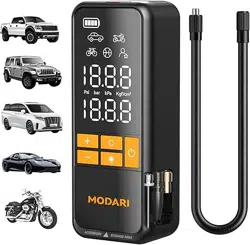
The MODARI AP002 is a cordless, portable tire inflator designed for inflating tires and other inflatables. It is powered by a rechargeable battery and features an automatic shut-off function.

Key attributes of the device include:
- Cordless Operation: Powered by an internal battery.
- Portable Design: Compact and lightweight for easy transport and storage.
- Multi-Use: Suitable for car tires, bicycle tires, sports balls, and other inflatables.
- Built-in Accessory Storage: Magnetic holders for nozzles.
- Digital Display: LED screen for setting and monitoring pressure.
Features & Specifications
Physical Specifications
- Brand: modari
- Model: AP002 Tire Inflator
- Color: Black (No case)
- Material: Metal, Plastic
- Dimensions (L x W x H): 2.76" x 2.01" x 6.93"
- Weight: 1.38 Pounds

Performance Specifications
- Power Source: Battery Powered (Rechargeable)
- Battery: 2600 mAh × 3 (3S)
- Maximum Pressure: 160 PSI
- Air Flow Capacity: 45 Liters Per Minute
- Hose Length: 19.6 inches

Key Features
Automatic Shut-Off
The inflator will automatically stop when the preset target tire pressure is reached.
Magnetic Storage
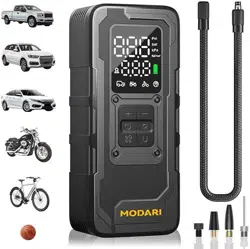
Built-in magnets allow for the storage of up to three accessory nozzles on the side of the unit.

Multi-Mode Operation
Four preset inflation modes for different vehicle types, plus a custom mode for setting a specific PSI.
Built-in Flashlight
An integrated LED light aids visibility in low-light conditions.
Power Bank Function
The device can be used to charge other USB devices.
Safety Features
- Constructed with UL94-V0 fireproof material.
- Built-in cooling fan with dual heat dissipation.
- Overheat protection.

Package Contents
- AP002 Tire Inflator x1 (No carrying case included)
- Air Hose x1
- Nozzle x3
- Charging Cable (USB-A) x1 (Charger not included)
- User Manual x1

Use Guide
Initial Setup and Charging
FRIENDLY REMINDER: This device does NOT include a wall charger. The provided charging cable is compatible with standard USB-A power sources (e.g., computer port, USB wall adapter, car charger). Fully charge the device before first use to activate the battery.
- Connect the provided USB charging cable to the port on the inflator.
- Connect the other end of the cable to a USB-A power source.
- The device's display or indicator lights will show the charging status. Refer to the device's indicators for a full charge signal.
- Allow the unit to charge completely before first use.
Control Panel Overview
The unit features an interface with the following elements:
- LED Digital Display: Shows current pressure (PSI) and preset values.
- Mode Buttons (M): Large buttons for cycling through four preset inflation modes (e.g., Car, Motorcycle, Bicycle, Custom).
- Unit Button: Toggles pressure measurement between PSI, BAR, KPA.
- + / - Buttons: For adjusting the target pressure value in custom mode.
- Power/Start Button: To turn the device on/off and start the inflation process.
- Flashlight Button: To turn the built-in LED light on/off.

Inflating a Tire
- Power On: Press the Power button. The LED display will illuminate.
- Select Mode: Press the 'M' button to cycle to the desired preset mode (Car, Motorcycle, etc.) or select 'Custom' mode.
- Set Pressure (Custom Mode Only): In Custom mode, use the '+' and '-' buttons to set your desired target pressure (up to 160 PSI). Ensure the correct unit (PSI/BAR/KPA) is selected.
- Attach Hose & Nozzle: Screw the appropriate nozzle onto the air hose. Remove the valve cap from the tire and firmly press the nozzle onto the tire valve stem.
- Start Inflation: Press and hold the Power/Start button. The display will show the real-time pressure increasing.
- Automatic Stop: The inflator will automatically shut off when the target pressure is reached.
- Disconnect: Quickly remove the nozzle from the valve stem to prevent air loss. Replace the tire's valve cap.
- Power Off: The device may turn off automatically after a period of inactivity, or you can press the Power button to turn it off.

Using as a Power Bank
- Ensure the inflator is charged.
- Use a standard USB charging cable (not included for this function) to connect your electronic device to the inflator's USB output port.
- The inflator will supply power to the connected device.
Care & Maintenance
- Cleaning: Wipe the exterior with a dry, soft cloth. Do not use liquids or submerge the unit.
- Storage: Store in a cool, dry place. Avoid extreme temperatures (heat or cold).
- Battery Care for Long-Term Storage: If storing the device for an extended period, charge it periodically to prevent over-discharge of the battery.
- Hose and Nozzles: Keep the air hose and nozzles clean and free from debris to ensure a proper seal.
Troubleshooting
- Device does not turn on: The battery may be depleted. Connect to a power source and charge fully.
- Inflation stops prematurely: Check for overheating. Allow the unit to cool down before resuming use. Ensure the nozzle is properly sealed on the valve stem.
- Inaccurate pressure reading: Ensure the nozzle is firmly attached to the valve stem with no air leaks. The tire's valve core may be faulty.
- Unit feels hot during use: This is normal during extended operation due to the motor. The built-in cooling fan and safety protections are designed to manage heat. If the unit shuts off due to overheating, allow it to cool completely before next use.
- Accessories not staying on magnetic storage: Ensure the metal parts of the accessories are clean and making full contact with the magnetic strip.