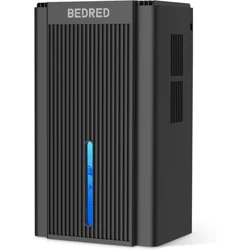
Overview
The BEDRED Dehumidifier (Model CT11) is a semiconductor (thermoelectric) dehumidifier designed for residential spaces up to 1000 square feet. It uses thermoelectric cooling to remove moisture from the air, helping to reduce humidity and improve air quality. The unit features a 95 fluid ounce (5.9 pounds) water tank, automatic shut-off when the tank is full, a 7-color ambient light, and a Sleep Mode.

Package Contents
- Dehumidifier unit (Black)
- Water tank (included)
- User manual
Product Specifications
| Brand |
BEDRED |
| Model Name / Number |
CT11 |
| Color |
Black (also available in Pale Turquoise and White) |
| Floor Area |
1000 square feet |
| Tank Volume |
95 fluid ounces |
| Capacity |
5.9 pounds |
| Product Dimensions (D x W x H) |
6.7" x 8.7" x 14.6" |
| Material |
Polypropylene (PP) |
| Operation Mode |
Intermittent |
| Special Feature |
Automatic Shutoff |
| Recommended Uses |
Residential (living room, bedroom, basement, bathroom, RV) |
| Included Components |
Tank |
| Unit Count |
1 Count |
| UPC |
739750147672 |
Features
Thermoelectric (Semiconductor) Dehumidification
This dehumidifier uses a semiconductor thermoelectric cooling system to condense moisture from the air. It operates without a compressor, making it lighter and quieter than traditional compressor-based units.
Auto Shut-Off
The unit features an intelligent auto-shutoff function. When the water tank reaches full capacity, the dehumidifier automatically powers down to prevent overflow. This allows for safe, unattended operation.
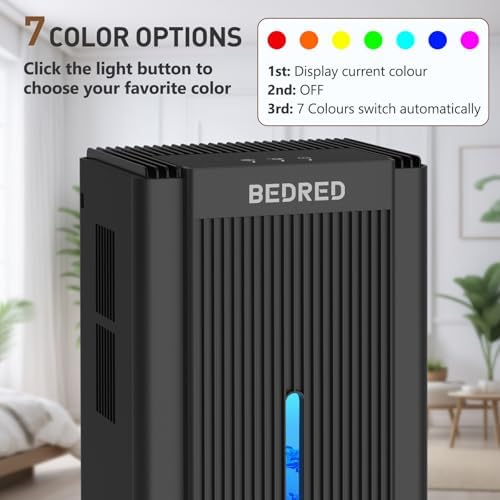
7-Color Ambient Light
The dehumidifier includes a built-in 7-color ambient light. You can cycle through a spectrum of colors (including blue, green, red, and others) to create a desired atmosphere in the room.

Sleep Mode
Sleep Mode is designed for use during nighttime. When activated, the ambient lights turn off and the fan noise is reduced to a whisper, providing undisturbed dehumidification.
Compact and Portable Design
The dehumidifier has a sleek, compact footprint (6.7" x 8.7" x 14.6") and weighs 5.9 pounds. It is designed to fit in various spaces including living rooms, bedrooms, bathrooms, basements, and RVs.
Quiet Operation
The semiconductor cooling system and optimized fan produce low noise levels, making the unit suitable for use in bedrooms and other quiet environments.
Sustainability Features
This product has sustainability features recognized by trusted certifications:
- Recycled materials: Contains at least 50% recycled material (certified by Global Recycled Standard).
- Safer chemicals: Made with chemicals safer for human health and the environment.
- Worker well-being: Manufactured in facilities that protect the rights and health of workers.
Control Panel & Indicators
The control panel is located on the top or front of the unit (refer to the product image). It includes the following controls and indicators:
- Power Button: Turns the dehumidifier on and off.
- Light Button: Cycles through the 7 ambient light colors. Press repeatedly to select the desired color.
- Sleep Mode Button: Activates Sleep Mode (lights off, reduced noise).
- Full Tank Indicator: A light or icon that illuminates when the water tank is full and the unit has shut off automatically.

Use Guide
Before First Use
- Remove all packaging materials from the unit and the water tank.
- Place the dehumidifier on a flat, stable surface. Ensure the air intake and outlet are not blocked.
- Allow the unit to stand upright for at least 2 hours before plugging it in (to allow the refrigerant to settle).
Operation
- Plug the power cord into a standard electrical outlet (120V AC).
- Press the Power Button to turn on the unit. The dehumidifier will begin extracting moisture.
- To change the ambient light color, press the Light Button repeatedly. Each press cycles to the next color.
- To activate Sleep Mode, press the Sleep Mode Button. The lights will turn off and the fan will operate at a lower speed.
- The unit will run continuously until the water tank is full, at which point it will automatically shut off. The Full Tank Indicator will light up.
Emptying the Water Tank
- When the unit shuts off and the Full Tank Indicator is on, unplug the power cord.
- Carefully slide out the water tank from the back or bottom of the unit.
- Empty the water into a sink or drain.
- Rinse the tank with clean water if necessary.
- Reinsert the tank securely into the unit.
- Plug the unit back in and press the Power Button to resume operation.
Note: The dehumidifier uses intermittent operation. It will cycle on and off to maintain the desired humidity level. The fan may continue to run even when the cooling element is off.
Placement Tips
- Place the unit in the center of the room for best air circulation.
- Keep at least 6 inches of clearance on all sides for proper airflow.
- Do not place the unit directly against a wall or in a corner.
- For best results, close windows and doors in the room being dehumidified.
Maintenance
- Cleaning the exterior: Wipe the outer surface with a soft, damp cloth. Do not use abrasive cleaners or solvents.
- Cleaning the water tank: Rinse the tank with warm water and mild detergent periodically to prevent mold or mildew buildup. Dry thoroughly before reinserting.
- Cleaning the air intake: Use a soft brush or vacuum cleaner attachment to gently remove dust from the air intake grille.
- Storage: If storing the unit for an extended period, empty and dry the water tank completely. Store in a cool, dry place.
Troubleshooting
| Issue |
Possible Cause |
Solution |
| Unit does not turn on |
Not plugged in; power outage; tank full |
Check power cord; check outlet; empty water tank |
| Unit shuts off prematurely |
Water tank is full |
Empty the water tank |
| Low water collection |
Room humidity is already low; unit placed too close to wall |
Move unit to a more open area; allow more time |
| Unit is noisy |
Unit is not level; fan obstruction |
Place on a flat, stable surface; check for obstructions |
| Water leaks from unit |
Tank not inserted correctly; seal damaged |
Remove and reinsert tank; check seal before use |
Warranty & Support
For warranty information and customer support, please contact the manufacturer BEDRED through their Amazon store or refer to the documentation included with your product. No specific warranty terms or contact details are provided in this manual.