1. Overview
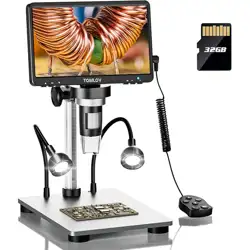
The TOMLOV DM9B is a digital microscope with a built-in 7-inch LCD screen. It is designed for detailed inspection tasks such as soldering, coin and stamp examination, rock inspection, and educational use. The microscope features a digital camera, adjustable magnification, integrated lighting, and connectivity options for use with a computer.

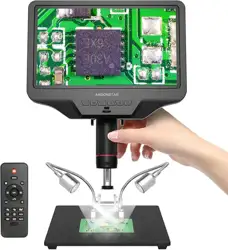
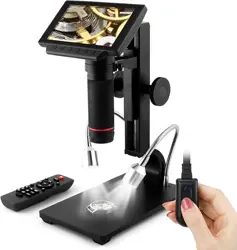
Key components visible in the image include the 7-inch LCD screen, the microscope camera lens at the end of an adjustable arm, the aluminum alloy stand and base, and control buttons on the unit.
2. Features and Specifications
2.1 Physical Specifications
- Model Name: DM9B
- Brand: TOMLOV
- Material: Aluminum Alloy (frame, base, stand)
- Color: Black
- Screen: 7-inch LCD Display
- Stand Height: 8.5 inches
- Base Size: 4.6 x 6.5 inches
2.2 Optical and Imaging Specifications
- Magnification Range: 5X to 1200X
- Camera Resolution: 12MP
- Photo Resolutions: 12MP (4023×3024), 10MP (3648×2736), 8MP (3264×2448), 5MP (2592×1944), 3MP (2048×1536)
- Video Resolution: 1080P FHD (1920×1080)
- Angle of View: 120 Degrees
- Objective Lens: Achromatic
- Light Source: 8 LED fill lights, plus 2 additional gooseneck LED lights
2.3 Connectivity and Power
- PC Compatibility: Windows and macOS
- Connection: USB cable (included)
- Power Source: Battery powered (rechargeable via USB)
- Voltage: 5 Volts
2.4 Storage
- Included Storage: 32GB Micro SD Card (pre-installed)
3. What's in the Box
- 7-Inch Digital Microscope main unit x1
- 32GB Micro SD Card x1 (pre-installed)
- Adjustable Aluminum Alloy Stand x1
- USB Cable x1
- Detailed English User Manual x1
4. Use Guide
4.1 Initial Setup and Power On
- Assemble the microscope by attaching the adjustable aluminum alloy stand to the base, if not already assembled.
- Mount the main microscope unit (with the screen) onto the stand.
- Charge the internal battery using the provided USB cable connected to a power source (e.g., computer USB port or wall adapter).
- Press the power button to turn on the microscope. The 7-inch LCD screen will illuminate.
4.2 Basic Operation and Viewing
- Place the object you wish to examine on the black base under the microscope lens.
- Adjust the height of the microscope arm to bring the object into a rough focus.
- Use the focus wheel on the microscope body to achieve a sharp, precise focus.
- Use the magnification controls to zoom in or out, within the 5X-1200X range.
- Adjust the brightness using the controls for the 8 built-in LED lights. The two gooseneck lights can be positioned independently for side illumination.
- The screen can be rotated up to 90 degrees for a comfortable viewing angle.

4.3 Capturing Photos and Videos
- To take a photo, press the photo capture button. Images are saved to the included 32GB Micro SD card.
- To record a video, press the video record button. Press it again to stop recording. Videos are saved to the Micro SD card.
- To switch between "Photographing," "Video Recording," and "Playback" modes, press and hold the menu button for 3 seconds.
- Select your desired photo or video resolution from the settings menu. Higher resolutions use more storage space.

4.4 Using with a Computer (PC View)
- Connect the microscope to your Windows PC or Mac using the provided USB cable.
- On Windows, open the default "Windows Camera" application.
- On macOS, open the default "Photo Booth" application.
- The microscope's live view should appear in the application window, allowing for observation on a larger screen.
- Note: When connected to a PC, the available resolution for viewing may be limited compared to the standalone device.
4.5 Managing Storage and Files
- The included 32GB Micro SD card is pre-installed in the slot on the microscope to prevent loss.
- To transfer files to a computer, you can either:
- Remove the Micro SD card and use a card reader.
- Connect the microscope to the computer via USB and access it as a storage device (if supported).
- Regularly back up your photos and videos to free up space on the Micro SD card.
5. Care and Maintenance
- Clean the microscope lens gently with a soft, dry microfiber cloth. Avoid using liquids or abrasive materials.
- Wipe the screen with a soft, slightly damp cloth if necessary. Do not spray liquid directly onto the screen.
- Store the microscope in a dry place when not in use.
- Avoid touching the LED lights directly.
- The aluminum alloy construction is durable, but avoid dropping the unit or subjecting it to strong impacts.
6. Troubleshooting
| Issue | Possible Solution |
|---|---|
| Microscope does not power on. | Ensure the battery is charged. Connect the USB cable to a power source and allow it to charge for several hours. |
| Image on screen is blurry. | Adjust the focus wheel slowly. Ensure the object is stable and the microscope arm is at an appropriate height. |
| Screen is dark. | Turn on the LED lights using the brightness controls. Adjust the position of the gooseneck lights. |
| Photos/Videos are not saving. | Check that the Micro SD card is properly inserted. Ensure the card is not full. Try reformatting the card (this will erase all data). |
| No image when connected to PC. | Ensure you are using the correct application ("Windows Camera" or "Photo Booth"). Try a different USB port or cable. Restart the application. |
7. Warranty and Support
The TOMLOV DM9B digital microscope is covered by a 12-month limited warranty from the date of purchase. The warranty covers defects in materials and workmanship.
For warranty service or technical support, contact the manufacturer, TOMLOV. Refer to the contact information provided in the detailed user manual included in the box.