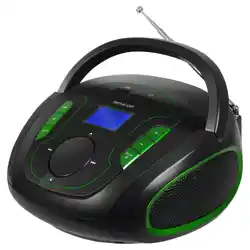
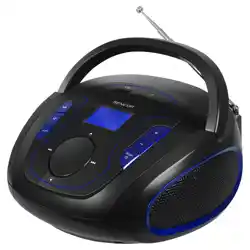
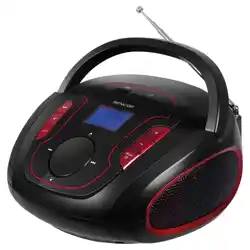
This manual provides instructions for the Audiocrazy Portable AM/FM Rechargeable Radio. This device is a digital radio with a backlit LCD display, Bluetooth connectivity, and multiple power options including a built-in rechargeable battery.
Features
The radio combines traditional AM/FM tuning with modern Bluetooth streaming capabilities.
Power Supply
AC Power: Use the included power adapter to plug the radio into a wall outlet for continuous use.
Built-in Rechargeable Battery: The integrated 1800mAh lithium-ion battery provides up to 10 hours of use on a full charge.
AA Batteries: The radio can also operate on 4 AA batteries (not included) for portable use where AC power is unavailable.
Display and Controls
Digital LCD Display: Shows the current time, radio station frequency, and alarm settings.
Backlight: Illuminates the display for visibility in low-light conditions.
Time Format: Can be set to 12-hour or 24-hour format.
Single Alarm: Allows you to set one alarm for reminders.
Sleep Timer: An auto-off timer can be set from 0 to 90 minutes.
Radio and Audio
Tuner Bands: AM (520-1710 kHz) and FM (87-108 MHz).
Reception Technology: Utilizes DSP technology and a high-sensitivity antenna for strong signal reception.
Bluetooth: Connect to smartphones, tablets, or laptops to stream music, podcasts, or audiobooks wirelessly.
Built-in Speaker: Delivers audio from both radio and Bluetooth sources.
Use Guide
Initial Setup and Power
Unpacking: Confirm the package contains the radio, owner's manual, and power adapter.
First Use: For initial setup, it is recommended to use the included AC power adapter. Plug the adapter into a wall outlet and connect it to the DC input port on the radio.
Battery Power: To use the built-in rechargeable battery, ensure it is fully charged by leaving the radio plugged in. To use AA batteries, open the battery compartment on the back, insert 4 AA batteries observing the correct polarity, and close the compartment.
Using the Radio
Turning On: Press the Power button. The display will light up.
Selecting Band: Press the Band button to switch between AM and FM modes. The current band will be shown on the display.
Tuning a Station: Use the large Tuning knob to manually scan for stations. The current frequency will be shown on the digital display. For best reception, fully extend the telescopic antenna and adjust its position.
Adjusting Volume: Turn the Volume knob to increase or decrease the sound level.
Using Bluetooth
Entering Bluetooth Mode: Press the Mode or Bluetooth button until "BT" or a Bluetooth icon appears on the display. The radio will enter pairing mode.
Pairing a Device: On your smartphone or other Bluetooth device, go to the Bluetooth settings menu. Select "Audiocrazy Radio" or a similar name from the list of available devices.
Streaming Audio: Once connected, audio from your device will play through the radio's speaker. Use your device's media controls to play, pause, or skip tracks. Use the radio's Volume knob to control the playback volume.
Switching Back to Radio: Press the Mode button again to switch back to AM or FM radio mode.
Setting the Clock and Alarm
Setting the Time:
Press and hold the Clock Set button.
Use the Tuning or Time Set knob to adjust the hour, then press the button again to move to the minutes.
Adjust the minutes and press the button to confirm. Some models may have a separate button to toggle between 12H and 24H format.
Setting the Alarm:
Press the Alarm Set button.
Set the desired alarm hour and minutes using the tuning or set controls.
Press the button again to confirm. Ensure the alarm is switched to the "On" position.
Using the Sleep Timer:
Press the Sleep or Timer button repeatedly to cycle through the available time intervals (e.g., 15, 30, 45, 60, 90 minutes, and Off).
The selected time will be shown on the display. The radio will automatically turn off after the set duration.
Specifications
Brand: Audiocrazy
Model Number: 0a665a2d-4f08-4fa7-aa1b-961cc1fd1832
Color: Cobalt Blue--LCD
Dimensions: 9.4" L x 2.95" W x 6.93" H
Weight: 1.3 lbs
Power Sources: AC Adapter (included), Built-in 1800mAh Rechargeable Battery, 4 x AA Batteries (not included)
Frequency Range: FM 87-108 MHz, AM 520-1710 kHz
Connectivity: Bluetooth
Display: Backlit LCD
Included Components: Radio, Owner's Manual, Power Adapter
Care and Maintenance
Clean the radio with a soft, dry cloth. Do not use liquid or aerosol cleaners.
Do not expose the radio to extreme temperatures, moisture, or direct sunlight for prolonged periods.
If using AA batteries, remove them if the radio will not be used for an extended time to prevent potential leakage.
To preserve the built-in rechargeable battery's lifespan, avoid completely draining it regularly. Recharge it periodically.
Troubleshooting
No Power: Ensure the AC adapter is securely connected, the outlet is working, or that the batteries are correctly inserted and not depleted.
Poor AM/FM Reception: Fully extend the telescopic antenna. Move the radio to a different location, preferably near a window. For AM, rotating the entire radio may improve reception.
Bluetooth Won't Connect: Ensure the radio is in Bluetooth pairing mode. On your device, delete old pairings for "Audiocrazy Radio" and try again. Keep the device within 33 feet (10 meters) of the radio.
No Sound: Check that the volume is turned up and the radio is not in Sleep Timer countdown mode. Ensure the correct input mode (Radio or Bluetooth) is selected.
Display is Dim or Off: The display backlight may turn off to save power. Press any button to illuminate it. If using battery power, the batteries may be low.