Overview
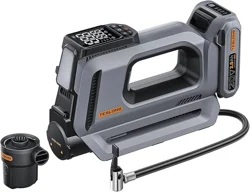
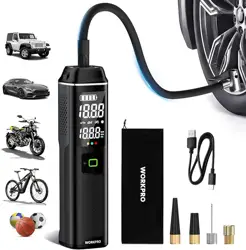
The Neakhmer Portable Tire Inflator is a cordless, battery-powered air compressor designed for inflating tires on cars, motorcycles, bicycles, and sports balls. It features a digital pressure gauge, multiple preset inflation modes, and includes LED lighting and a power bank function.

Features and Specifications
Key Features
- Cordless Operation: Powered by a built-in rechargeable battery.
- Digital Pressure Gauge & Auto Shut-Off: Built-in gauge with 1 PSI precision. Automatically stops inflation when the preset pressure is reached.
- One-Touch Preset Modes: Four preset modes for Car, Bicycle, Motorcycle, and Ball. Remembers your last setting.
- Pressure Unit Selection: Supports PSI, KPA, BAR, and Kg/cm².
- Rapid Inflation and Deflation: Includes a deflation button on the air hose for pressure adjustment.
- Multifunctional Design: Serves as a power bank (with USB-C and USB-A ports) and a flashlight with multiple LED modes (white light, slow flashing red warning, fast flashing red SOS).
- Heat-Resistant Air Hose: 15.74-inch hose with a 360-degree rotating head.

Technical Specifications
- Brand: Neakhmer
- Color: Grey Blue
- Material: Aluminum
- Item Weight: 1.06 kg (2.34 lbs)
- Power Source: Battery Powered (Rechargeable Lithium-ion)
- Maximum Pressure: 150 PSI
- Battery Capacity: 6000mAh (as indicated in product description images)
- Included Components:
- 1x Tire Inflator Unit
- 1x Type-C to USB Charging Cable
- 1x Air Hose
- 1x Storage Bag
- 1x Cigarette Lighter Power Cable (12V DC)
- 4x Air Nozzles
- 1x Spare Fuse
Use Guide
Initial Setup and Charging
- Charge the Inflator: Before first use, fully charge the unit using the provided Type-C charging cable. Connect the cable to the inflator's USB-C port and a standard USB power adapter (not included) or computer USB port.
- Check Battery Level: The battery level is indicated on the digital display when the unit is powered on.

Understanding the Controls and Display
The main unit has a digital display and control buttons. Refer to the included quick start guide for the exact button layout. The display typically shows:
- Selected pressure unit (PSI, BAR, etc.)
- Target pressure value
- Current pressure reading (when connected)
- Battery level indicator
- Selected mode icon (Car, Bike, Motorcycle, Ball)
Inflating a Tire
- Power On: Press and hold the power button to turn on the unit.
- Select Mode: Press the mode button to cycle through the four presets (Car, Bicycle, Motorcycle, Ball) or choose a custom pressure setting.
- Set Target Pressure: Use the "+" and "-" buttons to set your desired pressure. Consult your vehicle's manual for the correct PSI.
- Connect the Hose: Attach the appropriate air nozzle to the hose if needed. Remove the valve cap from the tire and firmly press the hose connector onto the tire valve stem.
- Start Inflation: Press the start button. The display will show the current tire pressure rising. The unit will automatically stop when the target pressure is reached.
- Disconnect and Check: Remove the hose from the valve stem and quickly replace the valve cap. Use a separate tire gauge to verify pressure if desired.

Deflating a Tire
The air hose has a dedicated deflation button.
- Connect the hose to the tire valve as if inflating.
- Press and hold the deflation button on the hose. You will hear air escaping.
- Monitor the pressure on the digital display.
- Release the button when the desired lower pressure is reached.

Using the LED Light
Press the light button to cycle through the lighting modes: steady white light, slow flashing red (warning), and fast flashing red (SOS).
Using the Power Bank Function
- Ensure the inflator has sufficient battery charge.
- Use your own USB cable to connect a smartphone or device to either the USB-A or USB-C output port on the inflator.
- The device should begin charging. The inflator does not have a charging indicator for this function.
Safety and Maintenance
- Read all instructions before use.
- Do not operate the inflator near flammable gases or liquids.
- Do not block the air intake or exhaust vents during operation.
- Allow the motor to cool down after extended continuous use.
- Store the inflator in the provided storage bag in a cool, dry place.
- Recharge the battery every 3 months if the unit is stored for long periods.
- Use only the provided charging cable or a certified equivalent. Do not modify the cable.
- The built-in battery is not user-replaceable. Do not attempt to disassemble the unit.
Troubleshooting
| Problem | Possible Cause | Solution |
|---|---|---|
| Unit does not turn on. | Battery is depleted. | Connect to power source and charge fully. |
| Inflation is very slow or stops prematurely. | Battery charge is low. Motor overheating. | Recharge the unit. Allow it to cool down for 15-20 minutes. |
| Pressure reading is inaccurate. | Air hose not securely connected to tire valve. | Re-seat the connection, ensuring no air is leaking. |
| Unit does not auto-stop. | Target pressure not set correctly. | Check and reset the target pressure value. Ensure you are in a preset or custom mode with auto-stop enabled. |
| Air leaks from hose connection. | Worn seal or loose connection. | Ensure the nozzle is fully screwed onto the hose (if applicable). Check hose connection to the main unit. |
Included Components

- Tire Inflator Unit
- Type-C Charging Cable
- Air Hose with Deflation Button
- Storage Bag
- 12V DC Cigarette Lighter Cable
- 4x Air Nozzles (for balls, etc.)
- 1x Spare Fuse