Overview
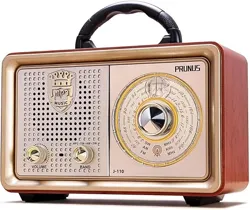
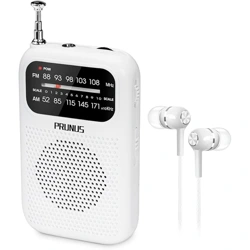
The PRUNUS J03 is a portable AM/FM radio designed for both indoor and outdoor use. It can be powered by an AC wall plug or by batteries, offering flexibility for various listening situations. The radio features a large speaker, a telescopic antenna for improved reception, and simple, user-friendly controls.

Features and Specifications
Key Features
- Dual Power Options: Operates via included AC plug cable or 4 AA batteries (batteries not included).
- Portable Design: Compact size with a foldable carrying handle.
- Easy-to-Use Controls: Large tuning knobs and a clear frequency scale.
- Enhanced Reception: Equipped with a DSP chip and a 19.5-inch telescopic antenna for clear AM/FM signals.
- Headphone Jack: 3.5mm jack for private listening.
Technical Specifications
| Brand | PRUNUS |
|---|---|
| Model | RX750SD |
| Power Source | Corded Electric (AC) or 4 x AA Batteries |
| Radio Bands | AM (520-1710 KHz), FM (87-108 MHz) |
| Speaker Output | 5 Watts |
| Dimensions (L x W x H) | 8.8" x 5.3" x 1.4" (Approx. 8.2" x 5.2" x 2.4") |
| Weight | Approx. 1.3 lbs (20.8 oz) |
| Included Components | Radio, AC Plug Cable, Owner's Manual |
Use Guide
1. Getting Started
What's in the Box
- PRUNUS J03 Radio
- AC Plug Cable
- Owner's Manual (this guide)
Note: AA batteries are required for portable operation and are not included.
2. Powering the Radio
You can operate the radio using one of two methods:
Using AC Power (Indoor Use)
- Connect the included AC plug cable to the DC input port on the back or side of the radio.
- Plug the other end into a standard 110V AC wall outlet.
Using Batteries (Portable Use)
- Open the battery compartment cover on the back of the radio.
- Insert 4 AA batteries, observing the correct polarity (+/-) markings inside the compartment.
- Close the battery compartment cover securely.
3. Controls and Indicators
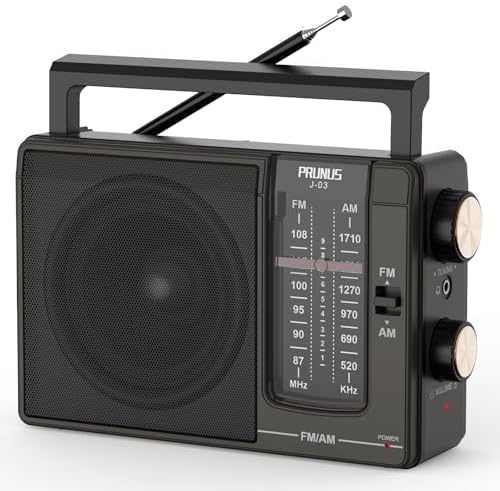
The main control panel typically includes the following elements:
- Power/Volume Knob: Rotate to turn the radio on and adjust the volume.
- Tuning Knob: Rotate to select AM or FM stations. The selected frequency is shown on the scale.
- Band Switch: A button or switch to select between AM and FM modes.
- Telescopic Antenna: Extend fully and adjust its angle for the best FM reception. For AM reception, the antenna's orientation may be less critical.
- Headphone Jack (3.5mm): Located on the side. Plugging in headphones will mute the internal speaker.
4. Basic Operation
To Listen to the Radio:
- Ensure the radio is powered (via AC or batteries).
- Turn the Power/Volume knob clockwise to turn on the radio and set a comfortable volume level.
- Press the Band switch to select either AM or FM.
- Slowly rotate the Tuning Knob until the desired station is found on the frequency scale. For clearer reception, fully extend the telescopic antenna and try moving the radio closer to a window or outdoors.
For Private Listening:
- Insert a standard 3.5mm plug from your headphones into the headphone jack on the radio.
- The internal speaker will be muted, and audio will route to your headphones.
5. Tips for Best Reception
- FM Reception: Fully extend the 19.5-inch telescopic antenna. Position the radio near a window or in an open area. Adjust the antenna's angle for the clearest sound.
- AM Reception: The radio uses an internal ferrite antenna for AM. Rotating the entire radio may improve AM signal strength. AM reception is often better in the evening and at night.
- If reception is poor, try changing your location, as buildings and terrain can block signals.
Safety and Maintenance
- Use only the provided AC adapter. Using an incorrect adapter may damage the radio.
- Remove batteries if the radio will not be used for an extended period to prevent potential leakage and damage.
- Do not expose the radio to extreme temperatures, moisture, or direct sunlight for prolonged periods.
- Clean the radio with a soft, dry cloth. Do not use liquid or aerosol cleaners.