Overview
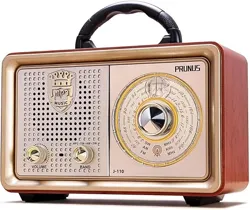
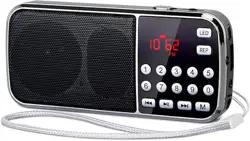
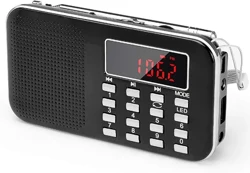
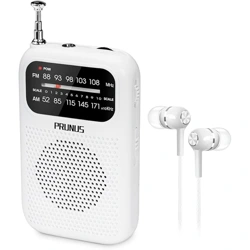
The PRUNUS J-136 is a portable AM/FM radio designed for indoor and outdoor use. It features dual power options (AC plug and D batteries), a telescopic antenna for enhanced reception, and auxiliary input functionality.

Features and Specifications
Physical Specifications
- Dimensions: 6.5" L x 2.8" W x 4.6" H
- Weight: 1 lb (16 ounces)
- Color: As shown in product images.
- Built-in Handle: For easy portability.
Technical Specifications
- Radio Bands: AM (520-1710 KHz), FM (87.5-108 MHz)
- Tuner Technology: AM, FM
- Antenna: 22-inch retractable telescopic antenna.
- Speaker Output: 5 Watts maximum power.
- Connectivity:
- 3.5mm AUX input jack for external audio devices (e.g., smartphone, MP3 player).
- 3.5mm microphone input jack (microphone not included).
- Display: LED indicator for power/charging status.
- Power Source:
- AC Power: Plug-in operation using included AC cable (110V).
- Battery Power: Operates on 2 x D cell batteries (not included).
- Included Components: Radio, AC power cable, owner's manual.

Use Guide
Powering the Radio
Using AC Power
- Connect the included AC power cable to the DC input port on the back or side of the radio.
- Plug the other end into a standard 110V wall outlet.
- The LED power indicator should illuminate, signifying the radio is receiving power.
Using Battery Power
- Open the battery compartment cover on the back of the radio.
- Insert 2 new D cell batteries, observing the correct polarity (+/-) markings inside the compartment.
- Close the battery compartment cover securely.
Note: The radio will automatically switch to battery power if the AC cable is disconnected.
Listening to AM/FM Radio
- Turn the Volume Knob clockwise to power on the radio. You may hear a click.
- Extend the telescopic antenna fully for best reception.
- Turn the large Tuning Knob to scroll through the AM or FM frequency band.
- Fine-tune the position for the clearest sound. Adjust the antenna orientation if necessary to improve signal strength.
- Adjust the Volume Knob to your desired listening level.
- To turn off, rotate the Volume Knob fully counterclockwise until it clicks.
Using the AUX Input (as a Wired Speaker)
- Ensure the radio is powered on.
- Using a standard 3.5mm audio cable (not included), connect your external audio device (e.g., smartphone, tablet, MP3 player) to the AUX IN jack on the radio.
- Start playback on your external device. The audio will now play through the radio's speaker.
- Control the volume using both the radio's Volume Knob and your external device's volume controls.
Using the Microphone Input (as a Voice Amplifier)
- Ensure the radio is powered on.
- Connect a compatible wired microphone (not included) with a 3.5mm plug to the MIC IN jack on the radio.
- Speak into the microphone. Your voice will be amplified through the radio's speaker.
- Adjust the radio's Volume Knob to control the amplification level.

Care and Maintenance
- Cleaning: Wipe the exterior with a soft, dry cloth. Do not use abrasive cleaners or solvents. Batteries:
- Use only 2 x D cell batteries of the same type and brand.
- Remove batteries if the radio will not be used for an extended period to prevent potential leakage and damage.
- Dispose of used batteries according to local regulations.
- Antenna: Extend and retract the telescopic antenna gently. Do not force or bend it.
- Storage: Store the radio in a cool, dry place away from direct sunlight and extreme temperatures.
- Water Resistance: This product is not water-resistant. Keep it away from moisture and liquids.
Troubleshooting
| Problem | Possible Cause | Solution |
|---|---|---|
| Radio does not power on. | Dead or incorrectly installed batteries; AC cable not connected properly. | Check battery polarity and replace if necessary. Ensure AC cable is firmly connected to both the radio and the wall outlet. |
| No sound or very low volume. | Volume set too low; antenna not extended; weak signal. | Increase volume. Fully extend the antenna and reposition the radio for better reception. |
| Poor AM/FM reception. | Antenna not fully extended or optimally positioned; location has weak signal. | Fully extend the antenna and slowly rotate/tilt it for the best signal. Move the radio to a different location, preferably near a window. |
| No sound from AUX input. | Audio cable not fully connected; external device volume is low or muted. | Ensure the 3.5mm cable is securely plugged into both the radio's AUX jack and the device's headphone jack. Increase volume on the external device. |
| Distorted sound. | Volume is set too high; batteries are low; radio is too close to other electronic devices. | Reduce the volume. Replace batteries. Move the radio away from potential sources of interference like computers or TVs. |
Warranty and Support
This product is covered by a 1-year seller warranty.
For support, contact the seller through your Amazon purchase history or visit the PRUNUS Store on Amazon.
Model Number: J-136
ASIN: B0CDVXRGH8