1. Overview
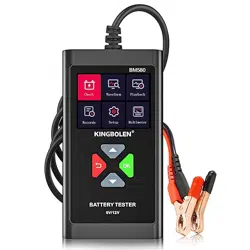
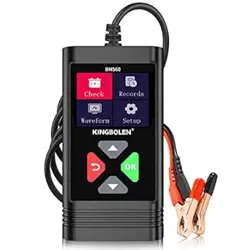
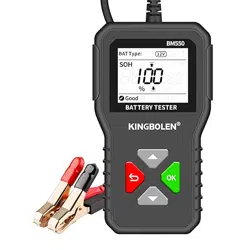
The KINGBOLEN BM550 PLUS is a digital battery analyzer designed to test the condition of 6V, 12V, and 24V lead-acid batteries. It measures key parameters to assess battery health without the need for a separate power source.

Primary Function: To provide a quick, accurate assessment of a vehicle battery's State of Health (SOH), State of Charge (SOC), internal resistance, and cranking capability.
2. Features & Specifications
2.1 Key Features
- Wide Compatibility: Tests 6V, 12V, and 24V batteries with a CCA (Cold Cranking Amps) range of 100-2000.
- Battery Technology Support: Compatible with Regular Flooded, AGM Flat Plate, AGM Spiral, GEL, and EFB batteries. Note: Deep cycle batteries are not supported.
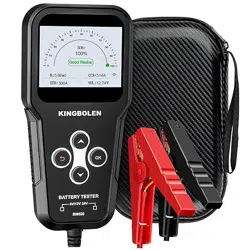
- Multifunctional Analysis: Displays Voltage, Internal Resistance, State of Health (SOH), and State of Charge (SOC).
- Real-time Voltage Waveform Monitor: Graphs voltage fluctuations to help identify faulty batteries or charging system issues.
- Self-Powered: Draws operating power directly from the battery being tested; no internal batteries required.
- Reverse Connection Protection: Safety feature prevents damage if test clips are connected incorrectly.
- High-Definition Color Screen: 1.8-inch display for clear visibility in low-light conditions.
2.2 Technical Specifications
- Power Source: Battery Powered (from tested battery)
- Minimum Operating Voltage: 6 Volts
- Measurement Types: Voltmeter, Ohmmeter
- Item Weight: 0.55 Pounds (approx. 249 grams)
- Item Dimensions: 4.88 x 2.74 x 0.89 inches
- Specifications Met: CCA, BCI, CA, MCA, JIS, DIN, IEC, EN, SAE, GB

3. Package Contents
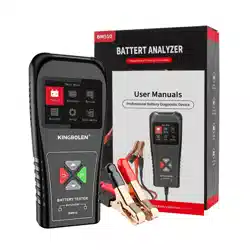
- 1 x KINGBOLEN BM550 PLUS Battery Tester unit with integrated test clips.
4. Use Guide
4.1 Safety Precautions
WARNING: Always observe standard automotive safety practices. Work in a well-ventilated area, wear safety glasses, and remove rings or metal jewelry. Ensure the vehicle is in Park (or Neutral for manual) with the parking brake engaged and the ignition OFF.
- The tester features reverse polarity protection. If the clips are connected backwards, the device will not activate, protecting the internal circuitry.
- If the test clips are not properly clamped to the battery terminals, the screen may flicker. Ensure a solid metal-to-metal connection.
4.2 Testing Procedure (In-Vehicle)
- Identify Battery Specifications: Locate the battery's rated voltage (6V, 12V, or 24V) and its CCA (Cold Cranking Amps) rating on the battery label.
- Connect the Tester:
- Connect the RED test clip to the POSITIVE (+) battery terminal.
- Connect the BLACK test clip to the NEGATIVE (-) battery terminal.
- Ensure clips grip the terminal metal securely, not just the plastic cover.
- Power On & Input Data: The device will power on automatically.
- Use the buttons on the device to input the battery's rated voltage and CCA value as found in Step 1.
- You may also need to input the battery's Amp-hour (Ah) capacity if prompted, and select the correct battery type (e.g., AGM, GEL, Standard).
- Initiate Test: Follow the on-screen prompts to start the analysis. The test will take a few seconds to complete.
- Interpret Results: The screen will display the results. Refer to Section 4.4 for understanding the readings.
- Disconnect: Disconnect the BLACK clip first, then the RED clip.

4.3 Using the Voltage Waveform Monitor
- With the tester connected to the battery (and optionally, with the vehicle running to test the charging system), navigate to the waveform function.
- The screen will display a real-time graph of the system voltage.
- Observe the waveform for stability. A healthy charging system will show a relatively stable voltage with minimal ripple. Excessive fluctuation or "noise" may indicate alternator or regulator issues.
- The display will typically show the current, minimum, and maximum voltage values recorded during monitoring.

4.4 Understanding Test Results
- State of Health (SOH): Indicates the overall condition and remaining capacity of the battery compared to its original specification.
- Good: The battery condition is good and ready for use.
- Normal: The battery condition is acceptable and can continue to be used.
- Poor: The battery condition is poor and should be replaced soon.
- State of Charge (SOC): Shows the current charge level of the battery as a percentage (e.g., 75%).
- Voltage: The present voltage at the battery terminals.
- Internal Resistance: Measured in milliohms (mΩ). A higher than normal resistance often indicates a failing battery.
- CCA Test Result: The measured cranking amps compared to the battery's rated CCA.

5. Troubleshooting
- Device does not turn on when connected:
- Check that the test clips are making firm contact with clean battery terminal metal.
- Verify the battery voltage is at least 6V.
- Ensure clips are not reversed (Red to Positive, Black to Negative).
- Screen flickers: This usually indicates a poor connection. Re-clamp the test clips securely onto the battery terminals.
- Test results seem inaccurate:
- Confirm you entered the correct battery voltage, CCA, and type.
- For the most accurate SOH reading, the battery should have a State of Charge (SOC) above 50%. Consider charging the battery and retesting.
6. Care & Maintenance
- Store the tester in a dry, cool place.
- Keep the test clips clean and free of corrosion. Wipe with a dry cloth if necessary.
- Avoid dropping the device or subjecting it to extreme temperatures.
- Do not disassemble the unit.