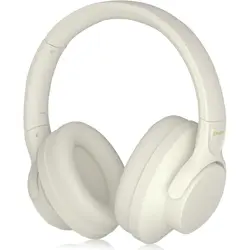
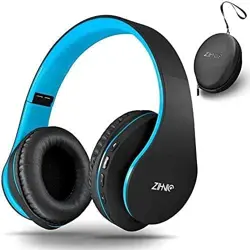
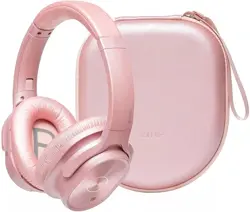
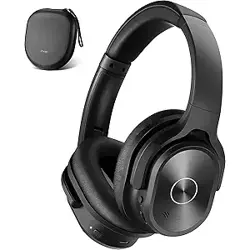
Model: zih-PA100 | Wireless Bluetooth Headset | Low Latency – Black
Overview
The ZIHNIC Active Noise Cancelling Headphones are wireless over-ear headphones designed for immersive audio and hands-free calling. They feature active noise cancellation (ANC) to reduce low and mid-frequency ambient sounds, making them suitable for travel, commuting, and office use. The headphones are equipped with large-aperture dynamic drivers, memory foam ear cushions, and a built-in microphone. They connect via Bluetooth 5.0 and offer up to 40 hours of playback on a full charge.

Key specifications:
- Driver type: Dynamic Driver
- Frequency range: 20 Hz – 20,000 Hz
- Impedance: 32 Ohms
- Bluetooth version: 5.0
- Battery: 500 mAh, up to 40 hours playtime
- Charging time: 1.5 hours (USB Type-C)
- Weight: Lightweight, adjustable headband
What's in the Box
- ZIHNIC Active Noise Cancelling Headphones (1 unit)
- USB Type-C charging cable
- Audio cable (3.5mm, if applicable – check package)
- User manual / quick start guide
Note: The product listing confirms "Over Ear Headphones" as the main item. Additional accessories may vary by region.
Features
Active Noise Cancellation (ANC)
The headphones use active noise cancelling technology to reduce ambient noise in low and mid-range frequencies, such as city traffic, airplane cabin noise, or office chatter. This allows you to focus on your audio without distraction.

Memory Foam Earpads & Adjustable Design
The earcups are made from skin-friendly protein leather with memory foam cushions. They wrap around your ears comfortably without excessive pressure. The headband is adjustable, and the earcups can swivel 90° to find the best fit.

Built-in Microphone & Hands-Free Calling
A built-in microphone enables clear hands-free calls. The headphones are compatible with most Bluetooth devices (smartphones, tablets, laptops) and provide a stable wireless connection.
Immersive Sound & Deep Bass
Equipped with large-aperture dynamic drivers, the headphones deliver Hi-Res audio with deep bass. You can hear subtle details in your music, movies, or podcasts.
Multipoint Connection
The headphones support multipoint connection, allowing you to connect to two devices simultaneously (e.g., phone and laptop).

Long Battery Life & Quick Charging
The 500 mAh battery provides up to 40 hours of music playback (with ANC on). A full charge takes approximately 1.5 hours via the USB Type-C port.

Low Latency
Designed for low latency, these headphones are suitable for watching videos and gaming without noticeable audio delay.
Controls and Indicators
The headphones feature physical buttons for media control and power. The control method is remote (on-ear).
- Power button: Press and hold to turn on/off. Short press to play/pause music or answer/end calls.
- Volume + / - buttons: Adjust volume. Press and hold to skip tracks (next/previous).
- ANC button: Toggle Active Noise Cancellation on/off.
- LED indicator: Shows power status, pairing mode, and charging status (blue/red light).
- Microphone: Built-in for hands-free calls.
- Charging port: USB Type-C (located on the earcup).
- 3.5mm audio jack: For wired use (if included).
Note: The product listing indicates "Control Type: Media Control" and "Control Method: Remote".
Use Guide
Charging the Headphones
- Connect the USB Type-C cable to the charging port on the left earcup.
- Plug the other end into a USB power adapter (5V/1A recommended) or a computer USB port.
- The LED indicator will turn red during charging and turn off or turn blue when fully charged (approx. 1.5 hours).
Pairing with a Bluetooth Device
- Ensure the headphones are charged.
- Press and hold the power button for 3-5 seconds until the LED indicator flashes blue and red (pairing mode).
- On your device (smartphone, tablet, etc.), enable Bluetooth and search for available devices.
- Select "ZIHNIC PA100" (or similar name) from the list.
- If prompted, enter the PIN "0000" or confirm pairing.
- The LED will stop flashing and remain blue when connected.
Using Active Noise Cancellation
- Press the ANC button (located on the earcup) to activate noise cancellation.
- Press again to deactivate ANC (ambient sound mode may be available depending on firmware).
- The LED indicator may change color to indicate ANC status (refer to indicator guide).
Making and Receiving Calls
- Answer a call: Press the power button once.
- End a call: Press the power button once.
- Reject a call: Press and hold the power button for 2 seconds.
- Voice assistant: Double-press the power button to activate Siri/Google Assistant (if supported).
Adjusting the Fit
- Extend the headband by pulling the earcups downward until the headphones sit comfortably on your head.
- Rotate the earcups 90° to lay flat or for a better fit.
- The memory foam earpads will conform to your ears over time.
Multipoint Connection (Connecting Two Devices)
- Pair the headphones with the first device (as described above).
- Turn off Bluetooth on the first device or disconnect the headphones.
- Put the headphones into pairing mode again and connect to the second device.
- Re-enable Bluetooth on the first device and select the headphones from its Bluetooth list.
- Both devices will now be connected. You can switch audio sources by pausing one and playing on the other.
Wired Mode (if applicable)
If an audio cable is included, you can use the headphones in wired mode when the battery is low or with devices that do not support Bluetooth.
- Connect the 3.5mm audio cable to the headphone jack on the earcup.
- Connect the other end to your device.
- The headphones will work in passive mode (ANC may not be available).
Troubleshooting
| Issue | Possible Cause | Solution |
|---|---|---|
| Headphones won't turn on | Battery depleted | Charge the headphones for at least 30 minutes. |
| No sound or low volume | Volume too low on device or headphones | Increase volume on both the headphones and the connected device. |
| Bluetooth connection fails | Device out of range or not in pairing mode | Move closer to the device and ensure the headphones are in pairing mode (LED flashing blue/red). |
| ANC not working | ANC mode not activated | Press the ANC button to toggle noise cancellation on. |
| Microphone not working during calls | Microphone blocked or muted | Ensure the microphone is not covered. Check call settings on your device. |
| Headphones not charging | Faulty cable or power source | Try a different USB cable and power adapter. |
Care and Maintenance
- Clean the earpads and headband with a soft, dry cloth. Do not use liquids or abrasive cleaners.
- Store the headphones in a cool, dry place. Avoid prolonged exposure to direct sunlight or high temperatures.
- Do not disassemble the headphones. There are no user-serviceable parts inside.
- Keep the headphones away from water and moisture (not water resistant).
- Charge the battery at least once every three months if not in use to maintain battery health.
Warranty and Support
The product includes a 1-year warranty from the date of purchase. For warranty claims or technical support, please contact the seller or manufacturer through the Amazon order page.
Manufacturer: ZIHNIC
Model: zih-PA100
Note: Specific contact details are not provided in the product listing. For assistance, refer to your Amazon order history or the ZIHNIC brand store.
Document version 1.0 – Based on product information available on Amazon. For the most current details, refer to the official product page.