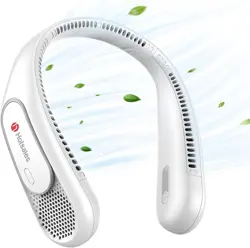
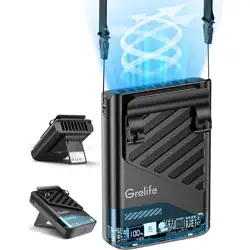
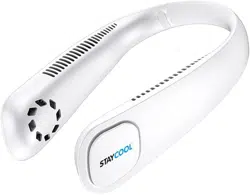
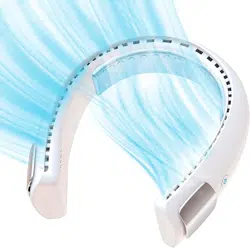
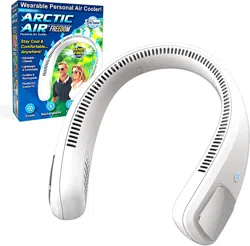
Hotsales NECK Fan, Hands Free Bladeless Fans Portable 6000 mAh Battery Operated Wearable Personal Fan

Product's Documents

Below are documents related to this product, you can read online or download:
NECK photo

1. Overview

The Hotsales Neck Fan is a wearable, bladeless personal cooling device designed for hands-free use. It is powered by a built-in rechargeable battery and provides airflow to the neck and face area.

Hotsales Neck Fan product image showing a white unit worn around a person's neck

Key attributes of the product include:

  • Wearable Design: Worn around the neck for hands-free operation.
  • Bladeless Construction: Uses air outlets instead of exposed blades.
  • Rechargeable Battery: Includes a 6000mAh lithium-ion battery.
  • Portable: Intended for use at home, work, and during outdoor activities.

2. Features and Specifications

Graphic highlighting the neck fan's features: 66 wind outlets, 360 airflow, 3 speeds

2.1 Physical Specifications

  • Dimensions: 8.66" D x 7.09" W x 2.76" H
  • Weight: 9.8 oz (approx. 278 grams)
  • Material: ABS (Acrylonitrile Butadiene Styrene) plastic
  • Colors Available: White, Black, Blue, Gray, Green, Navy Blue, Orange, Pink, Purple, Red

2.2 Technical Specifications

  • Power Source: Built-in 6000mAh rechargeable lithium-ion battery
  • Charging: USB Type-C port (5V/1A input)
  • Motor: Modified brushless motor
  • Airflow Design: 66 wind outlets, dual fans with 50 twin-turbine blades each
  • Airflow Direction: 360° around the neck and face
  • Speed Settings: 3 (Low, Medium, High)
  • Operating Modes: Sleep, Comfortable, Cooling (correlated with speed settings)
Image showing the neck fan being used while traveling

3. What's in the Box

  • Hotsales Neck Fan (1 unit)
  • USB Type-C Charging Cable (1)
  • User Manual (this document)

The product ships with its battery installed.

4. Use Guide

Person wearing the neck fan during outdoor activity

4.1 Wearing the Fan

  1. Hold the fan with the curved side facing down.
  2. Place the unit around the back of your neck. The two fan units should rest on your upper chest/shoulders, with the air outlets facing upwards and towards your face.
  3. Adjust the fit so it feels secure but not tight. The flexible neckband should conform to your neck.
Hair Safety: Users with long hair should tie it back or ensure it is kept away from the air intake areas on the sides of the fan units to prevent hair from being drawn in.

4.2 Powering On/Off and Speed Control

  1. Locate the power button on the main body of the fan.
  2. To Turn On: Press the power button once. The fan will start at the lowest speed (Sleep mode).
  3. To Change Speed: Press the power button again to cycle through the three speed settings: Low (Sleep), Medium (Comfortable), and High (Cooling).
  4. To Turn Off: Continue pressing the power button until the fan cycles through all speeds and turns off.

4.3 Charging the Battery

  1. Ensure the fan is turned off.
  2. Locate the USB Type-C charging port on the fan.
  3. Connect the provided USB Type-C cable to the port.
  4. Connect the other end of the cable to a USB power source (e.g., a computer USB port, a 5V/1A USB wall adapter, or a power bank).
  5. An indicator light will blink white while charging.
  6. Charging is complete when the indicator light turns off. A full charge typically takes 3-5 hours.
  7. Disconnect the cable after charging.

Battery Life Estimates:

  • Sleep Mode (Low Speed): Up to 18 hours
  • Cooling Mode (High Speed): Up to 4 hours

Actual battery life will vary based on speed setting and environmental conditions.

4.4 Using the Fan

The fan is designed for use in various settings:

  • Indoors: While working, cooking, or exercising at home or in an office.
  • Outdoors: During activities like gardening, hiking, biking, attending concerts or sports events, or waiting in lines.
  • While Traveling: On planes, buses, or at the beach.

Note on Cooling Effect: This fan circulates the ambient air. It does not cool the air itself. The perceived cooling effect is created by airflow accelerating sweat evaporation.

5. Care and Maintenance

  • Cleaning: Wipe the exterior with a soft, slightly damp cloth. Do not submerge the unit in water or use abrasive cleaners.
  • Storage: Store in a cool, dry place away from direct sunlight. Store with a partial charge if not used for extended periods.
  • Air Vents: Keep the air intake and outlet vents clear of dust, lint, and obstructions. Use a soft brush or compressed air to clean if necessary.
  • Do not attempt to disassemble the unit.

6. Troubleshooting

Problem Possible Cause Solution
Fan does not turn on Battery is depleted. Connect the fan to a power source using the USB-C cable and charge for several hours.
Fan turns off unexpectedly Battery is low. Recharge the battery.
Weak airflow or no airflow Air vents are blocked. Turn off the fan and check that the air intake and outlet vents are not obstructed by hair, clothing, or debris.
Fan is not charging Faulty cable, power source, or charging port. Try a different USB-C cable and power source. Ensure the cable is fully inserted into the fan's port.
Unusual noise Foreign object in fan or motor issue. Turn off immediately. Inspect vents for obstructions. If noise persists, discontinue use.

7. Safety Information

Warnings:
  • This product contains a lithium-ion battery. Do not expose to extreme heat, fire, or puncture.
  • Use only the provided USB-C cable or a certified equivalent for charging. Use a power source rated 5V/1A maximum.
  • Do not charge the fan near flammable materials or on soft surfaces like beds or sofas.
  • Do not use the fan if it is damaged, has been dropped, or if the casing is cracked.
  • Keep away from water and other liquids. Do not use in rain or high-humidity environments where it may get wet.
  • This product is not a toy. Keep out of reach of small children.
  • The air intake can pull in loose hair or clothing. Use caution, especially with long hair.
  • Discontinue use if you experience skin irritation from the materials.

Compliance: This product conforms to CE standards.

Model Number: Hotsales Neck

ASIN: B0CQTKDCBG

Reference file: Hotsales NECK Fan, Hands Free Bladeless Fans Portable 6000 mAh Battery Operated Wearable Personal Fan

Specifications

Hotsales NECK Questions and Answers