Grelife AI PORTABLE WAIST FAN Rechargeable with LED Display & 40H Runtime,5 Speed 10000RPM Cooling Personal Clip Fan,33ft/s Wind Speed Neck fan for Outdoor Work,Camping,Farm,JobsiteBlack

Product's Documents

Below are documents related to this product, you can read online or download:
AI PORTABLE WAIST FAN photo

1. Overview

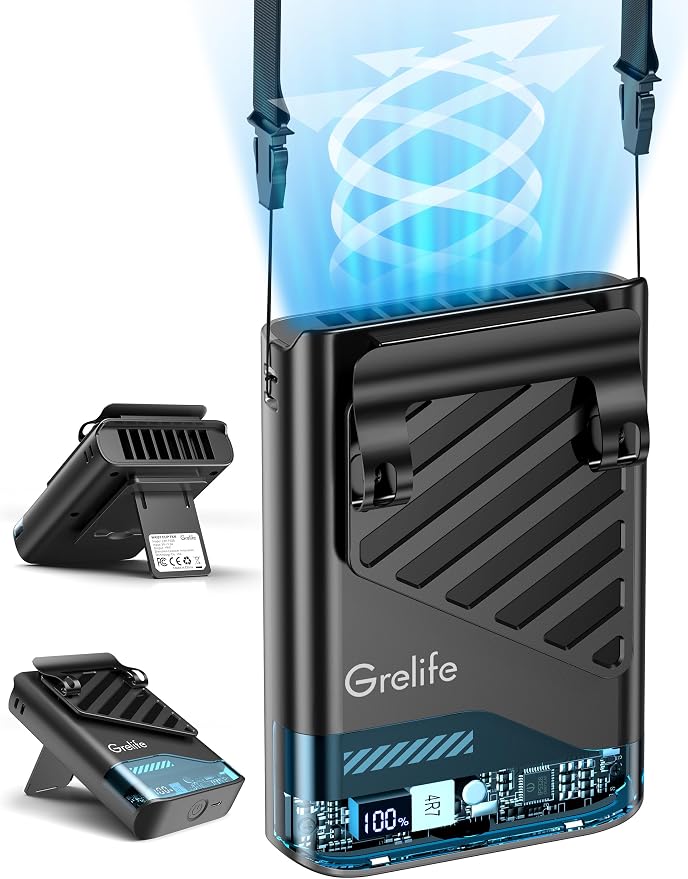
The Grelife 2025 AI Portable Waist Fan is a rechargeable, wearable personal cooling device. It features a 10000mAh battery, a 5-speed turbine fan capable of 10000 RPM, and an LED display for wind speed and battery level. The fan is designed for hands-free use in various outdoor and indoor settings.

Grelife 2025 AI Portable Waist Fan shown in black, clipped to a belt.

Key Characteristics:

  • Design: Wearable fan with dual clip system.
  • Power Source: Integrated 10000mAh rechargeable battery.
  • Display: LED screen showing wind speed and battery percentage.
  • Portability: Weighs 0.41 lbs (approx. 0.28 kg).
  • Dimensions: 3.22"D x 1.78"W x 4.8"H.

2. Features and Specifications

2.1 Physical Components

  • Main Fan Unit: Houses the turbine, battery, controls, and LED display.
  • Large Clip: Designed to attach securely to a belt or waistband.
  • Small Clip: Attaches to outer clothing for added stability.
  • Included Lanyard: Allows the fan to be worn around the neck.
  • Control Button: Single button for power and speed adjustment.
  • USB-C Charging Port: For recharging the internal battery.

2.2 Performance Specifications

  • Motor Speed: Up to 10000 RPM.
  • Airflow Speed: Adjustable from 16.5 ft/s to 33 ft/s.
  • Speed Settings: 5 adjustable levels.
  • Battery Runtime: Up to 40 hours on lowest speed setting.
  • Battery Capacity: 10000mAh with AI energy-saving management.
  • Charging: Via included USB cable (USB-C port on fan).

2.3 LED Display Information

The digital screen provides real-time information:

  • Wind Speed Indicator: Shows the current fan speed level (1-5).
  • Battery Level Indicator: Displays remaining battery charge as a percentage (0-100%).
Image highlighting the LED display on the fan showing battery and speed.

3. Included in the Box

  • Grelife Portable Waist Clip Fan (1 unit)
  • Lanyard (1)
  • USB Charging Cable (1)
  • User Manual (this document)

4. Use Guide

4.1 Initial Setup and Charging

  1. Before first use, fully charge the fan using the provided USB cable and a standard USB power adapter (not included).
  2. Connect the USB cable to the charging port on the fan.
  3. The LED display will activate during charging, showing the increasing battery percentage.

4.2 Basic Operation

  1. Power On/Off: Press and hold the control button for 2 seconds to turn the fan on or off.
  2. Adjust Speed: Briefly press the control button to cycle through the 5 wind speed settings. The current speed level (1-5) will be shown on the LED display.
  3. Check Battery: The battery percentage is continuously displayed on the LED screen while the fan is operating.

4.3 Wearing and Positioning Methods

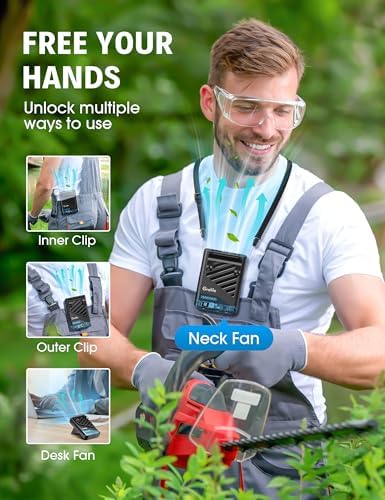
The fan supports four primary usage modes:

  • Waist Fan: Clip the large clip onto your belt or waistband. Use the small clip to secure the fan to your outer clothing for stability. Position the fan outlet towards your upper body.
  • Neck Fan: Attach the included lanyard to the fan and wear it around your neck.
  • Tabletop Fan: Place the fan on a stable, flat surface. The base is designed to sit upright.
  • Handheld Fan: Hold the fan unit directly in your hand.
The fan being used as a neck fan with the lanyard. The fan clipped to a worker's belt on a jobsite.

5. Care and Maintenance

  • Cleaning: Wipe the exterior with a soft, dry cloth. Do not immerse in water or use liquid cleaners.
  • Storage: Store in a cool, dry place. Charge the battery to approximately 50% if storing for an extended period.
  • Battery: The built-in AI chip manages charging and discharge to protect battery life. Use only the provided or manufacturer-approved USB cable for charging.
  • Air Vents: Keep the air intake and outlet vents clear of obstructions, dust, and lint.

6. Troubleshooting

  • Fan does not turn on: Ensure the battery is charged. Press and hold the power button firmly for 2 seconds.
  • Weak airflow: Check for blockages in the vents. Ensure you have selected a higher speed setting.
  • LED display not working: The fan may be in a low-power state. Connect to a power source to recharge.
  • Fan stops unexpectedly: The battery may be depleted. Recharge the fan.
  • Fan does not charge: Verify the USB cable and power source are functioning. Ensure the connection to the fan's port is secure.

7. Safety Information

  • This product contains a lithium-ion battery. Do not disassemble, puncture, or expose to extreme heat or fire.
  • Do not use the fan in heavy rain or submerge it in water.
  • Keep hair, loose clothing, and fingers away from the fan vents while in operation.
  • Use only the provided USB cable or a certified equivalent for charging.
  • Discontinue use if the fan, battery, or cable becomes damaged, overheated, or emits an unusual odor.
  • This product is not a toy. Keep out of reach of children and pets.

8. Compliance and Disposal

FCC Compliance (if applicable): This device complies with Part 15 of the FCC Rules. Operation is subject to the condition that this device does not cause harmful interference.

Battery Disposal: Do not dispose of the fan with household waste. The built-in battery must be recycled or disposed of according to local regulations for electronic waste.

Reference file: Grelife AI PORTABLE WAIST FAN Rechargeable with LED Display & 40H Runtime,5 Speed 10000RPM Cooling Personal Clip Fan,33ft/s Wind Speed Neck fan for Outdoor Work,Camping,Farm,JobsiteBlack

Specifications

Grelife AI PORTABLE WAIST FAN Questions and Answers