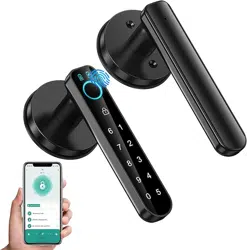
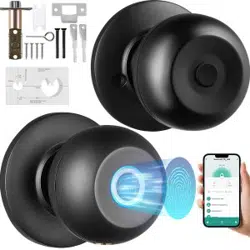
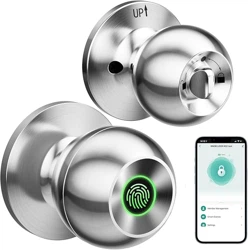
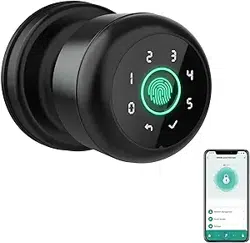
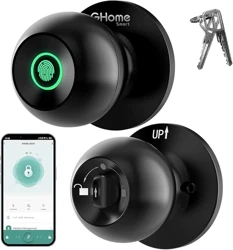
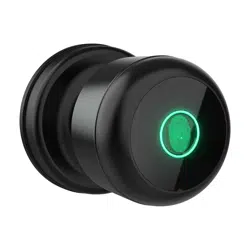
The OFFTV Fingerprint Door Lock is a biometric smart door knob designed for keyless entry to bedrooms, homes, hotels, offices, and apartments. It integrates fingerprint recognition, password entry, mechanical keys, and app control for versatile and secure access. The lock features a fast 0.3-second fingerprint recognition and can store up to 100 fingerprints and 50 passwords.
Product Features
Fingerprint Recognition
Equipped with an upgraded 160*160DIP fingerprint sensor, this lock offers a 35% larger recognition area compared to older models, providing more accurate and stable fingerprint detection. It supports fast recognition within 0.3 seconds and unlocks the door in 1 second.
Multiple Access Methods
Fingerprint authentication
Password keypad entry (supports up to 50 passwords)
Two mechanical backup keys
App control for remote unlocking and user management
App Control
The lock can be managed via an app that allows unlocking, checking unlock records, and managing users. It supports Bluetooth connectivity for seamless communication.
USB Emergency Charging
The lock has a low battery alarm and includes a USB port for emergency charging. It requires 4 AAA batteries (not included).
Installation Compatibility
Suitable for both left and right doors, the lock fits US standard doors with back panel sizes of 2-3/8 inches (60mm) and 2-1/8 inches (70mm), and door thicknesses from 1-1/8 inches to 2-1/8 inches (30mm-55mm).
Additional Features
Auto-lock function
Passage mode
Anti-peep password feature
Silent mode
Voice control
One-time password support
Burglar alarm
Product Components
Fingerprint Door Lock smart door knob unit
Two mechanical backup keys
USB emergency charging port (USB cable not included)
Passcode keypad
Installation hardware (screws and mounting plates)
Battery compartment for 4 AAA batteries (not included)
Installation & Setup
The smart door lock is designed for easy installation on standard US doors. It fits doors with back panel sizes of 2-3/8 inches (60mm) and 2-1/8 inches (70mm), and door thicknesses ranging from 1-1/8 inches to 2-1/8 inches (30mm-55mm). It is suitable for both left and right-handed doors.
Remove the existing door knob and lock hardware from your door.
Install the mounting plate and secure it with the provided screws.
Attach the smart door knob unit to the mounting plate, ensuring the keypad and fingerprint sensor are accessible.
Insert 4 AAA batteries into the battery compartment.
Use the mechanical keys to unlock the door for the first time and verify the lock is functioning mechanically.
Download the compatible app on your smartphone and pair the lock via Bluetooth.
Register fingerprints and set passwords through the app or keypad as per the user guide.
Test all unlocking methods to ensure proper installation and operation.
Installation Tutorial Video
Usage Instructions
Unlocking the Door
Fingerprint: Place your registered finger on the fingerprint sensor. The lock recognizes the fingerprint within 0.3 seconds and unlocks the door in 1 second.
Password: Enter your passcode on the keypad. The lock supports up to 50 passwords.
Mechanical Key: Use one of the two mechanical keys to unlock the door manually.
App Control: Use the app to unlock the door remotely, check unlock records, and manage users.
Managing Users
Through the app, you can add or remove fingerprints and passwords, assign temporary access codes, and monitor unlock history.
Additional Modes
Auto-lock: The door automatically locks after being closed.
Passage Mode: The door remains unlocked for easy passage.
Anti-Peep Password: Enter extra digits before or after the correct password to prevent others from guessing your code.
Silent Mode: Disable sound notifications for quiet operation.
Maintenance & Cleaning
Regularly clean the fingerprint sensor and keypad with a soft, dry cloth to ensure accurate recognition.
Replace the 4 AAA batteries promptly when the low battery alarm sounds to avoid lockout.
Use the USB emergency charging port if the batteries are depleted to temporarily power the lock.
Do not use harsh chemicals or abrasive materials on the lock surface.
Check the mechanical keys and lock mechanism periodically for smooth operation.
Troubleshooting
Fingerprint not recognized: Ensure your finger is clean and placed correctly on the sensor. Re-register fingerprints if necessary.
Keypad unresponsive: Check battery levels and replace batteries if low. Clean the keypad surface.
App connection issues: Ensure Bluetooth is enabled on your smartphone and the lock is within range. Restart the app or re-pair the device if needed.
Lock does not open: Use the mechanical key to unlock. Check battery status and charge if needed.
Low battery alarm: Replace the 4 AAA batteries immediately or use the USB emergency charging port.
Technical Specifications
Brand
OFFTV
Special Feature
Fingerprint
Lock Type
Biometric
Controller Type
Android, Hand Control, Mechanical knob
Control Method
App
Connectivity Protocol
Bluetooth
Item Dimensions (L x W x H)
6.5 x 2.8 x 2.4 inches
Material
Zinc
Finish
Polished
Style Name
A
Color
Black
Shape
Rectangular
Battery
4 AAA batteries (not included)
Fingerprint Sensor
160*160DIP sensor
Fingerprint Capacity
Up to 100 fingerprints
Password Capacity
Up to 50 passwords
Door Compatibility
US standard doors, back panel sizes 2-3/8" (60mm) and 2-1/8" (70mm), thickness 1-1/8" to 2-1/8" (30mm-55mm)
Safety Information
Ensure the lock is installed securely to prevent unauthorized access.
Keep mechanical keys in a safe place as a backup for emergency access.
Replace batteries promptly when low battery alarm sounds to avoid lockout.
Do not expose the lock to extreme weather conditions or moisture to prevent damage.
Use the anti-peep password feature to enhance security when entering passcodes.
Keep the app and lock firmware updated for optimal security and performance.