Overview
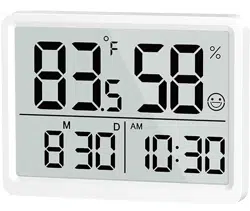
The DOOMAY Room Thermometer Indoor is a digital device that monitors indoor temperature and humidity. It features a large LCD display, a date and clock function, and provides visual comfort indicators.


Features and Specifications
Display and Readability
- 3.62-inch LCD Display: Large, clear numbers for easy reading from any angle and distance.
- Portable Design: Lightweight and easy to carry.
Measurement Performance
- Temperature Range: 14.2°F to 140°F (-9.9°C to 60°C).
- Temperature Accuracy: ±1°C.
- Humidity Range: 10% to 95% Relative Humidity (RH).
- Humidity Accuracy: ±3-5% RH.
- Refresh Rate: Updates readings every 10 seconds.
Comfort Indicator
The device features face icons on the display to indicate air conditions:
- DRY (Sad Face): Humidity below 30% and temperature below 19°C (66.2°F).
- COMFORT (Expressionless or Smile Face): Humidity between 30%-70% and temperature between 19°C-27°C (66.2°F-80.6°F).
- WET (Sad Face): Humidity above 70% and temperature above 27°C (80.6°F).

Mounting Options
The thermometer can be placed in multiple ways:
- Desktop stand (built-in).
- Magnetic attachment (magnetic back).
- Wall mount using the included metal adhesive pad.

Calibration Function
Manual calibration is supported to improve data accuracy if environmental factors affect readings.
- Temperature Calibration Range: Maximum ±5°C / ±10°F.
- Humidity Calibration Range: Maximum ±10% RH.
- Note: The device is tested and calibrated before shipping.
Date and Clock
The device includes a digital date and clock display.
Power
- Battery: 1 x CR2450 button cell (included).
- Battery Life: Approximately 8-12 months per battery.

Physical Specifications
- Product Dimensions: 2.82" W x 3.43" H.
- Item Weight: 70 grams (approx.).
Use Guide
Initial Setup
- Open the battery compartment on the back of the unit.
- Insert the included CR2450 battery, observing the correct polarity (+/-).
- The display will activate.
Button Controls and Settings
The device has two buttons: '+' and 'SET'.
Normal Operation Mode
- Press the '+' button to switch the temperature unit between Celsius (°C) and Fahrenheit (°F).
- Press the 'SET' button to switch the time format between 12-hour and 24-hour.

Setting the Date and Time
- Press and hold the 'SET' button for a few seconds to enter Date/Time setting mode.
- The display field to be set (Year, Month, Day, Hour, Minute) will blink.
- Use the '+' button to increase the value.
- Use the '-' button (functionality implied, may be a long press or combination) to decrease the value. (Refer to manual for precise method).
- Press the 'SET' button to confirm and move to the next setting field.
- After setting the last field (Minute), the device will exit setting mode and return to normal operation.
Manual Calibration Procedure
Perform calibration only if you suspect readings are inaccurate compared to a known, reliable source.
- Ensure the device has been in its intended location for at least 1 hour to stabilize.
- Enter calibration mode (specific button sequence to be confirmed from the included physical manual).
- Use the '+' and '-' functions to adjust the temperature or humidity value to match your reference.
- Confirm and save the calibration settings.
Placement Tips
- For accurate readings, place the device in a central location within the room, away from direct sunlight, heating/cooling vents, windows, and doors.
- Avoid placing it behind curtains, on top of electronics, or in enclosed spaces.
- Suitable for living rooms, bedrooms, baby rooms, kitchens, offices, guitar rooms, and greenhouses (within its specified temperature and humidity ranges).


What's in the Box
- 1 x DOOMAY Indoor Thermometer/Hygrometer
- 1 x CR2450 Button Battery
- 1 x User Manual