1. Overview
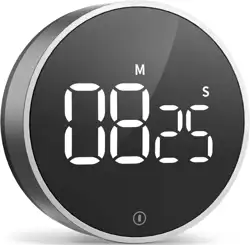
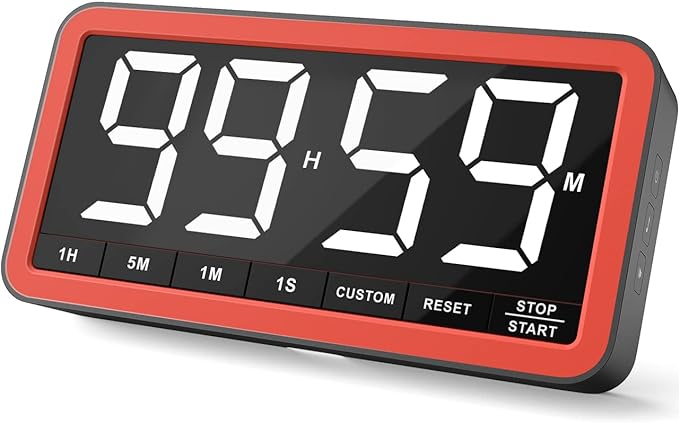
The VOCOO Digital Timer is a versatile time management tool featuring a 7.8-inch extra-large LED display. It is designed for use in kitchens, classrooms, home gyms, and other environments where clear, adjustable timing is required.
The timer operates in two primary modes: countdown and count-up (stopwatch). It offers adjustable brightness, multiple alarm options, and versatile mounting through built-in magnets, a stand, and a hanging hole.
2. Package Contents
- VOCOO Digital Timer
- USB-C Charging Cable
- USB-A to USB-C Power Adapter (5V)
- User Manual (this document)
3. Product Features & Specifications
3.1 Physical Specifications
- Dimensions: 1.38"D x 8.27"W x 4.13"H
- Weight: 271.5 Grams
- Screen Size: 7.8-inch diagonal (19.8 cm) White LED
- Digit Height: 2.3 inches
- Material: Silicone-covered body
- Color Options: Black Red, Space Grey, White, Yellow
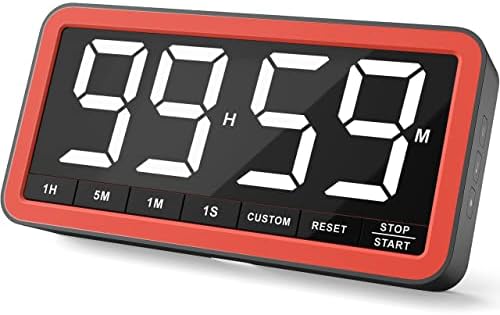
3.2 Display & Brightness
- Display Type: Large White LED
- Brightness Levels: 3 (Dim, Medium, Bright)
- Low Power Indicator: Digits turn red when battery is low.
3.3 Timing Functions
- Modes: Countdown and Count-up (Stopwatch)
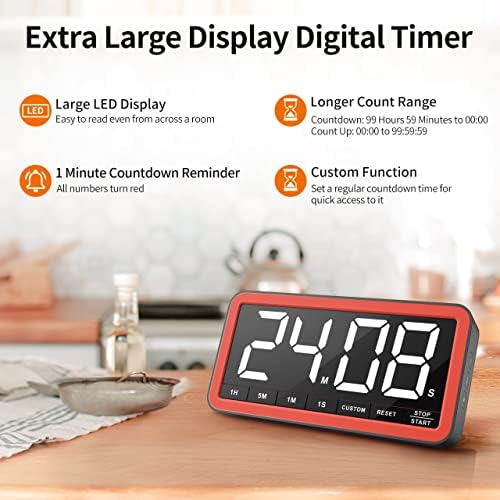
- Maximum Countdown Time: 99 hours, 59 minutes, 59 seconds (99:59:59)
- Countdown Alert: Digits change to red when less than 1 minute remains.
3.4 Alarms & Volume
- Alarm Options: 4 total
- 1 Traditional Beep
- 3 Melody Options
- 1 Silent Mode (screen flashes only)
- Volume Levels: 3 adjustable levels for audible alarms.
- Soft: 75-85 dB
- Medium: 70-85 dB
- Loud: 80-95 dB
- Alarm Duration: Rings for 1 minute when time ends.
3.5 Power & Battery
- Power Source: Rechargeable 2000 mAh battery.
- Charging Port: USB-C
- Battery Life (Approx.):
- Over 7 days (180+ hours) on low brightness.
- Over 7 hours on high brightness.
- Included: USB-C cable and 5V USB-A power adapter.
Charging Note: Use only the included 5V power adapter or a standard 5V USB charger. Using a power plug with an output voltage higher than 5V may damage the battery.
3.6 Mounting & Placement
- Strong Magnets: Silicone-covered magnets on the back for attachment to metal surfaces (refrigerators, lockers, whiteboards).
- Built-in Stand: For placement on a desk or table.
- Hanging Hole: For use with a hook in a pantry or classroom.
4. Use Guide
4.1 Initial Setup and Charging
- Remove the timer and accessories from the packaging.
- Connect the provided USB-C cable to the charging port on the timer.
- Connect the other end of the cable to the included 5V USB power adapter and plug it into a wall outlet.
- The display will illuminate. Allow the timer to charge fully before first use. A full charge is indicated when the battery is no longer low.
4.2 Button Layout and Functions
The timer features separated, intuitive buttons. Refer to the product images for their physical location.
- Power / Brightness Button:
- Press to turn the display on/off.
- Press and hold to cycle through the 3 brightness levels (Dim, Medium, Bright).
- Mode Button: Press to switch between Countdown and Count-up (Stopwatch) modes.
- Time Set Buttons (Hour/Minute/Second): Use to set the desired countdown time. Press to increase the value for the selected digit.
- Start / Pause Button: Starts or pauses the active timer.
- Reset Button: Stops the timer and resets the display to the last set time or to 00:00:00.
- Alarm Button: Cycles through the 4 alarm options (Beep, Melody 1, Melody 2, Melody 3, Silent). The current selection is indicated when pressed.
- Volume Button: Cycles through the 3 volume levels (Soft, Medium, Loud) for the audible alarms.
4.3 Setting a Countdown Timer
- Ensure the timer is in Countdown mode (use the Mode button if necessary).
- Press the Hour, Minute, or Second buttons to set your desired countdown time. The display will show the time you are setting.
- Press the Start / Pause button to begin the countdown.
- To pause, press the Start / Pause button again. To resume, press it once more.
- To cancel and reset, press the Reset button.
- When the time reaches zero, the selected alarm will activate for one minute. Press any button to silence the alarm.
4.4 Using the Stopwatch (Count-Up)
- Press the Mode button to switch to Count-up (Stopwatch) mode. The display will show 00:00:00.
- Press the Start / Pause button to begin timing.
- Press the Start / Pause button again to pause.
- Press the Reset button to return to 00:00:00.
4.5 Selecting Alarm and Volume
- While the timer is not running, press the Alarm button to cycle through the available alarm sounds. The selected alarm will sound briefly.
- Press the Volume button to cycle through Soft, Medium, and Loud volume levels for the audible alarms.
- To use Silent Mode, cycle the Alarm button until no sound plays—only the screen will flash when the timer ends.
4.6 Mounting the Timer
- Magnetic Mount: Place the back of the timer directly onto any clean, ferrous metal surface (e.g., refrigerator, filing cabinet, metal whiteboard frame).
- Desktop Stand: Fold out the kickstand on the back to place the timer on a flat surface.
- Hanging: Use the hole at the top of the timer with a hook, nail, or string for suspension.
5. Care and Maintenance
- Clean the exterior with a soft, dry cloth. Do not use abrasive cleaners or submerge in water.
- To maintain battery health, avoid completely draining the battery. Recharge when the low-power warning (red digits) appears.
- Use only the provided 5V charger or a certified 5V USB power source to avoid damage.
- Store in a cool, dry place away from direct sunlight and extreme temperatures.
6. Troubleshooting
- Display is blank: Press the Power button. If there is no response, connect the timer to a USB charger.
- Timer will not charge: Ensure you are using the included USB-C cable and a 5V power adapter. Try a different USB power source.
- Buttons are unresponsive: Press the Reset button. If the issue persists, recharge the timer fully.
- Alarm does not sound: Check that Silent Mode is not selected. Press the Alarm button to cycle to an audible option. Ensure the volume is not set to minimum.
- Digits are red: This is the low battery warning. Recharge the timer.
- Magnet does not hold: Ensure the mounting surface is clean, dry, and made of ferrous metal. The silicone cover on the magnets may need to be cleaned.