Overview
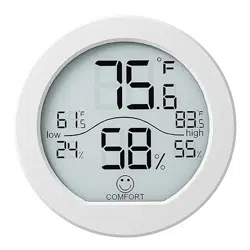
The SECRUI KR-TH1 is a digital indoor thermometer and hygrometer. It monitors room temperature and humidity, displaying the data on an LCD screen. The device records maximum and minimum values and features a comfort level indicator.

Features
Display and Measurements
- LCD Display: Shows current temperature and humidity.
- Temperature Unit: Can display in Celsius (°C) or Fahrenheit (°F).
- Measurement Range: Temperature: -4°F to 158°F (-20°C to 70°C). Humidity: 10% to 99% RH.
- Update Frequency: Data readings are refreshed every 10 seconds.
Data Recording
- Max/Min Records: Displays the highest and lowest temperature and humidity values recorded over the past 24 hours.
Comfort Level Indicator
- An icon on the display indicates the air quality level based on the current readings:
- Dry: Low humidity.
- Comfort: Optimal humidity and temperature range.
- Wet: High humidity.
- The comfort icon is displayed only when humidity is between 40%-70% and temperature is between 68°F-78.8°F.
Mounting Options
The device offers three installation methods:
- Table Stand: Use the built-in kickstand to place it on any flat surface.
- Magnetic Back: Attach it to any metal surface, like a refrigerator.
- Wall Mount: Use the provided hanging hole and screws to mount it on a wall.


Use Guide
Initial Setup
- Open the battery compartment on the back of the device.
- Insert one AAA battery (not included). Ensure the polarity is correct.
- Close the battery compartment. The display will activate.
Button Functions
A single "SET" button is located on the back of the device.
- Short Press: Toggles the temperature display between Celsius (°C) and Fahrenheit (°F).
- Long Press: Clears the stored maximum and minimum temperature and humidity records.
Reading the Display
- The large central numbers show the current temperature.
- The percentage (%) number shows the current relative humidity.
- Look for the "MAX" and "MIN" indicators to view recorded highs and lows.
- The face icon (dry, comfort, or wet) indicates the current air comfort level.
Placement for Accurate Readings
- For the most accurate readings, place the device in a central location within the room.
- Avoid placing it in direct sunlight, near heat sources (ovens, radiators), in drafts, or in excessively damp areas like bathrooms.
- Allow the device to acclimate to a new environment for at least one hour before relying on the readings.
Technical Specifications
| Brand |
SECRUI |
| Model |
KR-TH1 |
| Material |
Plastic |
| Display Type |
LCD |
| Detection Gap |
10 seconds |
| Operating Temperature |
-4°F to 158°F (-20°C to 70°C) |
| Accuracy |
Temperature: ±1°F (±0.5°C)
Humidity: ±2~3% RH |
| Temperature Display |
°C / °F Selectable |
| Power Source |
1 x AAA Battery (not included) |
| Comfort Icon Display |
Dry, Comfort, Wet |
| Dimensions |
Approximately 3.07 inches in length |
What's in the Box
- 1 x SECRUI KR-TH1 Digital Hygrometer Thermometer
- 1 x Instruction Manual
- 2 x Mounting Screws (for wall mounting)
Warranty and Support
This product is covered by a 1-year warranty. For support, contact the seller through your Amazon purchase history or visit the SECRUI store on Amazon.