1. Overview
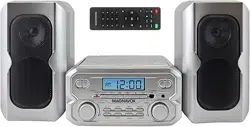
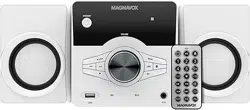
The Magnavox MM435M2-SL is a 3-piece compact audio system designed for shelf use. It combines multiple audio sources into one unit, including a CD player, FM radio, and wireless Bluetooth connectivity. The system features a main unit with an LCD display and two separate stereo speakers.

The main unit houses the controls, display, and primary inputs/outputs. It is designed to be connected to AC power. The system provides balanced stereo sound suitable for rooms such as offices, bedrooms, or kitchens.
2. Features & Specifications
2.1 Audio Sources & Playback
- CD Player: Top-loading, programmable CD player compatible with CD-R and CD-RW discs.
- FM Radio: Digital FM stereo radio with digital frequency readout.
- Bluetooth: Wireless technology for streaming audio from compatible devices like smartphones, tablets, or laptops.
- Auxiliary Input: 3.5mm AUX port for connecting external audio devices (e.g., MP3 players).
2.2 Audio Output
- Speaker Configuration: 2.0 Stereo (Two speakers).
- Total RMS Power Output: 4 Watts (2 Watts per channel).
- Supported Audio Formats: CD Audio, MP3 (via CD-R/RW).
2.3 Display & Controls
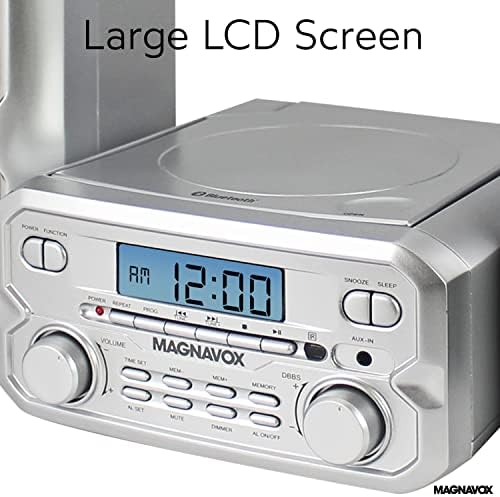
- LCD Display: Large screen for showing track information, radio frequency, volume level, and system status.
- Remote Control: Included for operating key functions from a distance.
2.4 Physical Specifications
- Dimensions (Main Unit with Speakers): Approximately 18.2 x 9.8 x 5.6 inches.
- Power Source: Corded Electric (AC adapter included).
- Color: Silver.
3. What's in the Box
- Main CD/Radio/Bluetooth unit
- Left and Right stereo speakers
- Remote control
- AC power adapter
- User documentation
Note: The remote control requires 2 x AAA batteries, which are not included.
4. Setup & Installation Guide
4.1 Unpacking and Placement
- Remove all components from the packaging.
- Place the main unit on a stable, flat surface such as a shelf or table.
- Position the left and right speakers on either side of the main unit. Ensure they are not obstructed.
4.2 Connecting the Speakers
- Locate the speaker wire terminals on the back of the main unit and on each speaker.
- Connect the provided speaker wires from the main unit's LEFT output to the left speaker, and from the RIGHT output to the right speaker. Match the wire polarity (typically red to red, black to black).

4.3 Power Connection
- Plug the AC power adapter into the DC input port on the back of the main unit.
- Plug the power adapter into a standard wall outlet.
4.4 Remote Control Setup
- Open the battery compartment on the back of the remote.
- Insert two AAA batteries, observing the correct polarity (+/-).
- Replace the cover.
5. Use Guide
5.1 Power On/Off
Press the POWER button on the main unit or the remote control to turn the system on or off.
5.2 Using the CD Player
- Press the OPEN/CLOSE button on the main unit to open the CD compartment lid.
- Place a CD (label side up) on the spindle and gently close the lid.
- Press the CD mode button to select CD source.
- Use the PLAY/PAUSE, STOP, SKIP (>>| and |<<), and PROGRAM buttons to control playback.

5.3 Using the FM Radio
- Press the FM mode button.
- Use the TUNING +/- buttons to manually search for a station.
- For automatic station scan, press and hold the TUNING button.
- To save a station to memory, tune to the desired frequency, press and hold a PRESET button (1-10) until the display confirms.
- Recall a saved station by pressing the corresponding PRESET button.
5.4 Using Bluetooth
- Press the BLUETOOTH mode button. The LCD will show "BT" or similar, indicating it is in pairing mode.
- On your smartphone, tablet, or computer, enable Bluetooth and search for available devices.
- Select "Magnavox MM435" or a similar name from the list on your device to pair.
- Once connected, audio from your device will play through the system speakers. Use your device or the system's volume control to adjust the sound level.
5.5 Using the AUX Input
- Press the AUX mode button.
- Connect a 3.5mm audio cable from your external device's headphone output to the AUX IN port on the main unit.
- Start playback on your external device. Control the volume using the system's volume controls.
5.6 General Controls
- VOLUME +/-: Adjusts the master volume level.
- MUTE: Temporarily silences the audio.
- LCD DISPLAY: Shows the current mode, track number, radio frequency, volume level, and other status information.
6. Troubleshooting
No Power
- Ensure the AC power adapter is firmly connected to both the main unit and the wall outlet.
- Check that the wall outlet is functioning.
No Sound from Speakers
- Verify the speaker wires are securely connected to both the main unit and the speakers.
- Ensure the wires are not frayed or damaged.
- Check that the volume is not muted or set to minimum.
CD Will Not Play
- Ensure the CD is placed label-side up.
- Check that the CD is clean and not scratched.
- Confirm the system is in CD mode.
- The player supports CD-R and CD-RW discs. Ensure the disc is finalized if it is a recorded CD-R/RW.
Bluetooth Connection Issues
- Ensure Bluetooth is enabled on your source device.
- Move the source device closer to the main unit (within 33 feet/10 meters).
- Delete "Magnavox MM435" from your device's Bluetooth memory and attempt pairing again.
- Ensure no other Bluetooth device is actively connected to the system.
Remote Control Not Working
- Check that the batteries are installed correctly and are not depleted.
- Ensure you are pointing the remote at the front of the main unit and there are no obstructions.
7. Safety & Compliance
WARNING: California Proposition 65
This product can expose you to chemicals including Butyl benzyl phthalate (BBP), which is known to the State of California to cause birth defects or other reproductive harm. For more information, go to www.P65Warnings.ca.gov.
General Safety Instructions
- Use only the included AC power adapter.
- Do not expose the unit or speakers to moisture or liquids.
- Place the system on a stable surface to prevent it from falling.
- Ensure proper ventilation around the main unit; do not block any vents.
- Disconnect the power adapter during lightning storms or when the unit will not be used for extended periods.
8. Product Information
- Brand: Magnavox
- Manufacturer: Craig Electronics, LLC
- UPC: 731398435029
- ASIN: B08HVYPDZG