Product: 【48 Hrs Playtime】 Bluetooth Headphones, IPX5 Waterproof Sport Earphones, Magnetic in-Ear Wireless Earbuds with Microphone
Brand: gorsun | Model: E18 | Color: Black
1. Overview
The gorsun E18 Bluetooth Headphones are wireless in-ear sport earphones designed for active use. They feature a neckband form factor with magnetic earbuds, an IPX5 waterproof rating, and a built-in microphone for calls. The headphones utilize Bluetooth 5.0 for wireless connectivity and provide up to 48 hours of playback on a full charge.

Key specifications at a glance:
- Connectivity: Bluetooth 5.0 (Wireless)
- Battery Life: Up to 48 hours
- Water Resistance: IPX5 (sweat and water resistant)
- Ear Placement: In-Ear
- Form Factor: Neckband with magnetic earbuds
- Microphone: Built-in for calls
- Control Method: Touch controls
- Bluetooth Range: 10 meters (33 feet)
- Noise Control: Sound isolation (passive)
- Compatible Devices: Laptops, desktops, tablets, smartphones, smart speakers, televisions, car audio systems
2. What's in the Box
- gorsun E18 Bluetooth Headphones (neckband with earbuds)
- USB charging cable
- User manual / Quick start guide
- Ear tips (sizes S/M/L – may vary by package)
3. Features
3.1 Extended Battery Life (48 Hours)
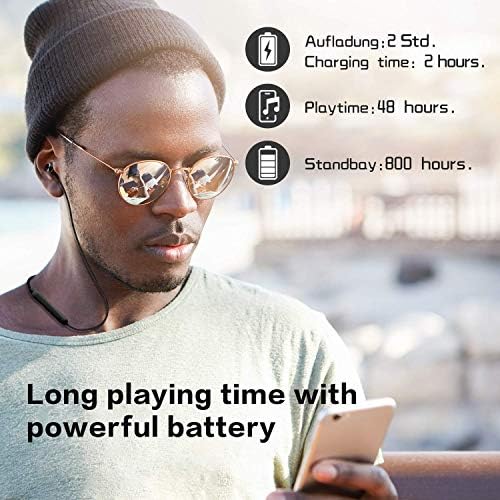
The headphones provide up to 48 hours of continuous playback on a single charge, reducing the need for frequent recharging during extended use or travel.

3.2 IPX5 Waterproof Rating
With an IPX5 rating, the earphones are protected against sweat and water splashes, making them suitable for workouts, running, and outdoor activities in light rain.
3.3 Bluetooth 5.0 Technology
Bluetooth 5.0 provides a stable wireless connection with faster data transfer and improved range (up to 10 meters). It ensures reliable pairing with smartphones, tablets, laptops, and other Bluetooth-enabled devices.
3.4 High-Resolution Audio
Powerful dynamic drivers deliver a fuller and cleaner sound with a wider frequency range (15 Hz – 22 kHz), offering detailed audio for music, calls, and media.
3.5 Comfortable Ergonomic Design
The in-ear earbuds feature an ergonomic shape for a secure and comfortable fit during extended wear. The neckband is lightweight and rests comfortably around the neck.
3.6 Magnetic Earbuds
The earbuds have built-in magnets that allow them to snap together when not in use, preventing tangling and making them easy to store around the neck.
3.7 Built-in Microphone
A built-in microphone enables hands-free calling. The microphone picks up your voice for clear phone conversations.
3.8 Touch Controls
The headphones feature touch-sensitive controls on the earbuds for managing music playback, volume, calls, and voice assistant activation.
3.9 Sound Isolation
The in-ear design provides passive noise isolation by physically blocking ambient noise, allowing you to focus on your audio.
4. Product Diagram and Controls

4.1 Touch Control Areas (on each earbud)
- Play/Pause: Single tap on either earbud.
- Next Track: Double tap on the right earbud.
- Previous Track: Double tap on the left earbud.
- Volume Up: Triple tap on the right earbud (or long press – refer to specific model instructions).
- Volume Down: Triple tap on the left earbud (or long press).
- Answer/End Call: Single tap on either earbud.
- Reject Call: Long press (2 seconds) on either earbud.
- Voice Assistant (Siri/Google Assistant): Double tap (or long press – varies by firmware).
4.2 LED Indicator
- Pairing mode: LED flashes red and blue alternately.
- Connected: LED flashes blue slowly (or turns off after connection).
- Low battery: LED flashes red.
- Charging: LED stays red while charging; turns off (or turns blue) when fully charged.
4.3 Charging Port
The charging port (micro USB or USB-C – verify with your unit) is located on the neckband control module. Use the included USB cable to charge.
5. Use Guide
5.1 Charging the Headphones
- Connect the USB charging cable to the charging port on the neckband.
- Connect the other end to a USB power source (computer, wall adapter, power bank).
- The LED indicator will glow red during charging.
- When fully charged, the LED will turn off or change to blue (depending on model).
- A full charge takes approximately 2 hours.
5.2 Power On/Off
- Power On: Press and hold the multi-function button (or touch control) for 3 seconds until the LED flashes blue.
- Power Off: Press and hold the same button for 5 seconds until the LED flashes red and then turns off.
5.3 Pairing with a Bluetooth Device
- Ensure the headphones are powered off.
- Press and hold the multi-function button for 5 seconds until the LED flashes red and blue alternately (pairing mode).
- On your phone/tablet/computer, go to Bluetooth settings and search for new devices.
- Select "gorsun E18" (or similar name) from the list.
- If prompted, enter the PIN 0000 or confirm pairing.
- Once connected, the LED will flash blue slowly or turn solid (depending on firmware).
5.4 Wearing the Headphones
- Place the neckband around your neck with the earbuds facing upward.
- Insert the earbuds into your ears with a gentle twist to ensure a secure fit.
- Adjust the neckband for comfort. The magnetic earbuds can be snapped together when not in use.
5.5 Making and Receiving Calls
- Answer a call: Single tap on either earbud.
- End a call: Single tap on either earbud.
- Reject a call: Long press (2 seconds) on either earbud.
- Redial last number: Double tap on the multi-function button (if supported).
5.6 Music Playback Control
- Play/Pause: Single tap on either earbud.
- Next track: Double tap on the right earbud.
- Previous track: Double tap on the left earbud.
- Volume up: Triple tap on the right earbud (or long press).
- Volume down: Triple tap on the left earbud (or long press).
5.7 Activating Voice Assistant
- Double tap (or long press – depending on firmware) on the multi-function button to activate Siri, Google Assistant, or other voice assistants.
5.8 Using the Magnetic Earbuds
When not in use, let the earbuds hang naturally. The magnets will snap them together, preventing tangling. Some models may automatically power off when the earbuds are snapped together (check your specific model).
6. Troubleshooting
| Issue | Possible Cause | Solution |
|---|---|---|
| No sound / headphones not turning on | Battery depleted | Charge the headphones for at least 2 hours. |
| Cannot pair with device | Headphones not in pairing mode / device not searching | Ensure LED is flashing red/blue. Delete old pairing from device list and retry. |
| Audio cuts out or is distorted | Bluetooth interference or low battery | Move closer to the source device (within 10m). Charge the headphones. |
| Microphone not working during calls | Microphone blocked or wrong audio source | Ensure the earbud with the microphone is correctly positioned. Check call audio settings on your phone. |
| Headphones not charging | Loose cable connection or faulty charger | Try a different USB cable and power source. Clean the charging port gently. |
| Controls unresponsive | Touch sensor dirty or firmware glitch | Clean the touch surface with a soft cloth. Reset the headphones (see below). |
6.1 Resetting the Headphones
- Turn off the headphones.
- Press and hold the multi-function button for 10 seconds until the LED flashes red and blue twice.
- Release the button. The headphones will reset and enter pairing mode.
- Delete the old pairing from your device and pair again.
7. Technical Specifications
| Specification | Details |
|---|---|
| Model Number | E18 |
| Brand | gorsun |
| Connectivity | Bluetooth 5.0 |
| Bluetooth Range | Up to 10 meters (33 feet) |
| Battery Life | Up to 48 hours (playback) |
| Charging Time | Approximately 2 hours |
| Water Resistance | IPX5 (sweat and splash proof) |
| Driver Size | Dynamic driver (frequency response 15 Hz – 22 kHz) |
| Microphone | Built-in |
| Control Type | Touch controls |
| Ear Placement | In-Ear |
| Form Factor | Neckband with magnetic earbuds |
| Color | Black |
| Enclosure Material | Plastic |
| Noise Control | Sound isolation (passive) |
| Compatible Devices | Laptops, desktops, tablets, smartphones, smart speakers, televisions, car audio systems |
| Weight | Approximately 18-22 grams (varies) |
| ASIN | B085L34V8J |
8. Safety and Care Instructions
- Do not expose the headphones to extreme temperatures or direct sunlight for prolonged periods.
- Although IPX5 rated, do not submerge the headphones in water. Avoid swimming or showering with them.
- Clean the earbuds and charging port with a dry, soft cloth. Do not use abrasive cleaners.
- Store the headphones in a cool, dry place when not in use.
- Do not attempt to disassemble or modify the headphones. There are no user-serviceable parts inside.
- Use only the provided charging cable or a certified equivalent to avoid damage.
- Keep the headphones away from small children to avoid choking hazards.
- If you experience discomfort or skin irritation, discontinue use and consult a physician.
