DOQAUS DIGITAL HYGROMETER DOQAUS Indoor Thermometer Humidity Meter Room Thermometer

Product's Documents

Below are documents related to this product, you can read online or download:
DIGITAL HYGROMETER photo

Overview

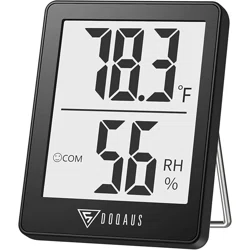
The DOQAUS Digital Hygrometer and Thermometer is a compact device designed to monitor indoor temperature and humidity. It provides real-time data to help you maintain a comfortable environment in spaces such as bedrooms, offices, greenhouses, and cellars.

DOQAUS Digital Hygrometer Indoor Thermometer showing the front display with temperature and humidity readings.

Features and Specifications

Key Features

  • Dual Measurement: Displays both temperature and relative humidity.
  • Fast Refresh Rate: Updates readings every 5 seconds.
  • Air Comfort Indicator: Uses three face icons to show DRY, COMFORT, or WET air conditions.
  • Large LCD Display: Features a 2.3-inch screen with clear, bold numbers for easy reading.
  • Multiple Mounting Options: Can be placed on a tabletop, hung on a wall, or attached magnetically to metal surfaces.
  • Unit Selection: Temperature can be displayed in Celsius (°C) or Fahrenheit (°F).

Technical Specifications

  • Temperature Range: -58°F to 158°F (-50°C to 70°C)
  • Temperature Accuracy: ±1°F
  • Humidity Range: 10% to 99% RH
  • Humidity Accuracy: ±5% RH
  • Product Dimensions: 1.8" W x 2.3" H
  • Item Weight: 0.03 kg
  • Power Source: Does not require batteries (power source not specified in provided content).

Use Guide

Package Contents

  • 1 x DOQAUS Digital Hygrometer/Thermometer
  • 1 x User Manual
Product package contents showing the hygrometer and manual.

Understanding the Display

The main LCD screen shows the following information:

  • Large Numeric Readout: The current temperature.
  • Humidity Percentage: The current relative humidity (RH%).
  • Face Icon: An indicator for air comfort level.
    • Smiling Face: Indicates COMFORT (humidity between 40% and 60%).
    • Other Icons: Indicate DRY (below 40%) or WET (above 60%) conditions.
  • Unit Indicator: Shows °F or °C.

Initial Setup and Operation

  1. Placement: Choose a location away from direct sunlight, heat sources, or drafts for an accurate reading.
  2. Mounting: Select your preferred mounting method:
    • Tabletop Stand: Use the built-in stand on the back.
    • Wall Hanging: Use the hanging hole on the back.
    • Magnetic Mount: Attach to any ferromagnetic metal surface using the rear magnet.
  3. Switching Temperature Units: Press the ℉/℃ button on the device to toggle between Fahrenheit and Celsius.
  4. The device will begin displaying readings automatically.
Back of the hygrometer showing the tabletop stand, hanging hole, and magnet.

Interpreting the Air Comfort Indicator

The device assesses ambient humidity and displays an icon:

  • DRY (Icon): Humidity is below 40%. Consider using a humidifier.
  • COMFORT (Smiling Face Icon): Humidity is between 40% and 60%. This is the ideal range for human comfort.
  • WET (Icon): Humidity is above 60%. Consider using a dehumidifier or increasing ventilation.

Care and Maintenance

  • Clean the device with a soft, dry cloth. Do not use liquids or abrasive cleaners.
  • Do not submerge the device in water.
  • For optimal accuracy, avoid placing it in extreme environments beyond its specified operating range.

Troubleshooting

  • No Display: Check the power source. This model does not require user-replaceable batteries according to the specifications.
  • Inaccurate Readings: Ensure the device is not placed near windows, vents, radiators, or other sources that could affect local temperature/humidity.
  • Unit Not Switching: Press the ℉/℃ button firmly.

Product Information

Brand: DOQAUS

Model: Refer to product packaging or listing for specific model identifier.

ASIN: B07ZSF5RC5

Reference file: DOQAUS DIGITAL HYGROMETER DOQAUS Indoor Thermometer Humidity Meter Room Thermometer

Specifications

DOQAUS DIGITAL HYGROMETER Questions and Answers