1. Overview
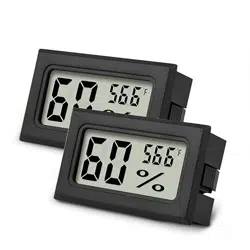
This manual provides instructions for the AikTryee Mini Digital Hygrometer Thermometer. This device is a compact, battery-powered instrument designed to monitor indoor temperature and humidity. It is suitable for use in various environments such as greenhouses, gardens, cellars, closets, and terrariums.
The package includes two identical monitor units, batteries, and mounting accessories.

2. Package Contents
- 2 x Digital Thermometer Hygrometer units
- 4 x LR44 button cell batteries (pre-installed)
- 4 x LR44 spare batteries
- 2 x Double-sided adhesive tape strips
3. Product Features & Specifications
3.1 Physical Specifications
- Color: Black
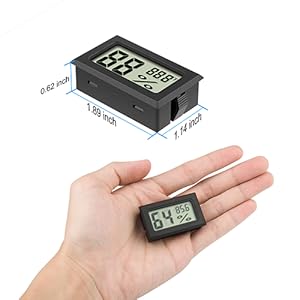
- Dimensions (Each Unit): 1.06" Wide x 1.81" High (2.7 cm x 4.6 cm)
- Item Weight: 0.05 kg
- Mounting Type: Tabletop or wall-mount (using adhesive tape or embedded opening)
3.2 Measurement Specifications
- Temperature Measuring Range: -58°F to 158°F (-50°C to 70°C)
- Temperature Accuracy: ±2°F (±1.11°C)
- Humidity Measuring Range: 10% to 99% Relative Humidity (RH)
- Humidity Accuracy: ±2% RH
3.3 Power Specifications
- Battery Type: 2 x LR44 button cell batteries per unit (4.5V total)
- Battery Life: Up to 8 months
- Included Batteries: 8 total LR44 batteries (4 pre-installed, 4 spare)
4. Use Guide
4.1 Initial Setup & Power On
- Remove the battery cover on the back of the unit.
- Insert two LR44 batteries, observing the correct polarity (+/-) markings inside the battery compartment.
- Replace the battery cover. The LCD screen will activate and display the current temperature and humidity.
4.2 Understanding the Display
The LCD screen shows two primary readings:
- Temperature: Displayed in degrees Fahrenheit (°F). The reading updates approximately every 10 seconds.
- Relative Humidity: Displayed as a percentage (% RH). The reading updates approximately every 10 seconds.
The device does not have a backlight.
4.3 Placement and Mounting
For accurate readings, place the unit in the desired location, avoiding:
- Direct sunlight or heat sources (e.g., radiators, vents).
- Areas with direct moisture or splashing water.
Mounting Options:
- Standing: Place on a flat, stable surface.
- Wall-Mounting: Use the provided double-sided adhesive tape. Clean and dry the surface before applying.
- Embedded Mounting: The unit can be fitted into a pre-cut opening measuring 1.81" x 1.06".
Video: Product Setup and Use
Reference video titled "Mini Hygrometer Thermometer" from the product page for visual guidance on setup and mounting.
4.4 Battery Replacement
- When the LCD display becomes faint or blank, replace both LR44 batteries.
- Open the battery compartment on the back of the unit.
- Remove the old batteries and insert two new LR44 batteries, ensuring correct polarity.
- Close the battery compartment. The display will reset and show current readings.
5. Care and Maintenance
- Clean the unit with a soft, dry cloth. Do not use liquids or abrasive cleaners.
- Do not disassemble the unit beyond the battery compartment.
- For long-term storage, remove the batteries.
6. Troubleshooting
- No Display: Check that batteries are correctly installed and not depleted. Replace with new LR44 batteries.
- Inaccurate Readings: Ensure the unit is not placed near a direct heat, cooling, or moisture source. Allow several hours for the unit to acclimate to a new environment.
- Display is Foggy or Condensed: This may occur if the unit is moved from a cold to a warm environment rapidly. Allow it to adjust to ambient conditions; condensation should clear naturally.