Overview
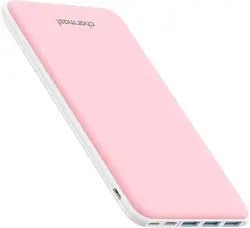
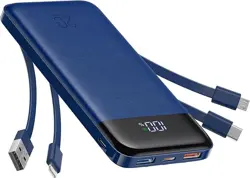
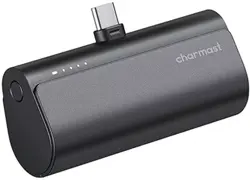
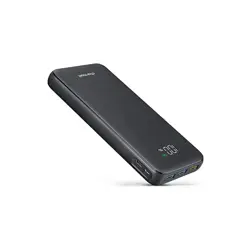
This manual provides instructions for the Charmast 26800mAh portable power bank. This device is a slim, high-capacity battery pack designed to charge smartphones, tablets, and other compatible USB devices.
Features and Specifications
Key Features
- Large Capacity: 26800mAh battery for extended charging.
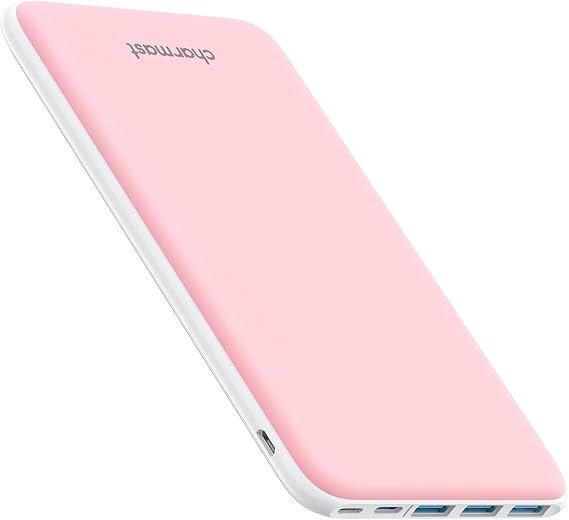
- Slim Design: Compact form factor, slightly larger than an iPhone 16 Pro Max.
- Multiple Ports: Features 3 input ports and 4 iSmart output ports for charging multiple devices.
- Bi-directional USB-C: The USB-C port supports both input (charging the power bank) and output (charging devices).
- Smart Charging: Auto-detects connected devices to deliver optimal charging current.
- Battery Indicators: Four LED lights display remaining battery capacity.
- Safety Protections: Includes protection against over-current, over-voltage, short circuits, and overloads.
Technical Specifications
- Battery Capacity: 26800mAh / 99.16Wh
- Battery Type: Lithium Polymer
- Input Ports: USB-C, Micro USB, USB-A
- Output Ports: 1x USB-C, 3x USB-A (iSmart)
- Total Ports: 6
- Output Current: Up to 2.4A per port
- Input Current (USB-C): Up to 3A
- Full Recharge Time: Approximately 9 hours
- Dimensions: 162mm x 92mm x 15mm (6.4" x 3.6" x 0.6")
- Weight: 338g (0.75 lbs)
- Model Number: W2002C
Package Contents
- 1 x Charmast 26800mAh Power Bank
- 1 x USB-A to USB-C Cable
- 1 x USB-A to Micro USB Cable
- 1 x User Manual
- 1 x Mesh Storage Bag
Use Guide
Charging the Power Bank (Input)
Before first use, fully charge the power bank. You can charge it using any of the three input ports:
- USB-C Input (Recommended for fastest charging): Connect a USB-C to USB-C cable from a compatible wall adapter (not included) to the power bank's USB-C port.
- Micro USB Input: Connect the provided USB-A to Micro USB cable from a USB wall adapter to the power bank's Micro USB port.
- USB-A Input: Use a standard USB-A to USB-A cable (not included) from a low-power source (e.g., computer USB port).
The four LED indicators will illuminate sequentially during charging. All four LEDs will stay lit when the power bank is fully charged. A full charge takes approximately 9 hours.
Charging Your Devices (Output)
The power bank can charge up to four devices simultaneously.
- Connect your device(s) to the power bank using appropriate cables.
- Use the USB-C output port for compatible devices like newer smartphones or a Nintendo Switch for faster charging.
- Use any of the three USB-A (iSmart) output ports for standard USB devices. The iSmart technology will automatically identify your device and match the optimal charging current.
- The power bank will automatically begin charging connected devices. No power button needs to be pressed for output.
Checking Battery Level
Press the power button on the side of the unit. The four LED indicators will show the approximate remaining capacity:
- 1 LED lit: 1-25% capacity
- 2 LEDs lit: 26-50% capacity
- 3 LEDs lit: 51-75% capacity
- 4 LEDs lit: 76-100% capacity
Compatible Devices
This power bank is compatible with a wide range of devices, including but not limited to:
- Smartphones: iPhone, Samsung Galaxy, Google Pixel, Huawei, Xiaomi, OnePlus, Motorola, HTC.
- Tablets: iPad, Android tablets.
- Other Devices: Bluetooth headphones, speakers, portable gaming consoles (Nintendo Switch), and other USB-powered gadgets.
Note: For the fastest charging speeds, use the original cable that came with your device or a high-quality certified cable.
Safety and Maintenance
- Use only the provided cables or certified high-quality third-party cables.
- Charge the power bank in a cool, dry place away from direct sunlight and heat sources.
- Do not disassemble, puncture, or expose the power bank to fire or water.
- If the power bank is not used for an extended period, recharge it every 3-6 months to maintain battery health.
- The built-in safety system protects against over-charging, over-discharging, short circuits, and excessive current. If you notice abnormal heating, swelling, or smoke, discontinue use immediately and place the device in a safe area.
- This power bank uses an A+ grade lithium polymer battery rated for over 500 charge cycles.
Troubleshooting
- Power bank does not turn on/charge devices: The battery may be depleted. Connect the power bank to a charger using a USB-C or Micro USB cable for several hours.
- Device charges slowly: Ensure you are using a high-quality data cable. The connected device or cable may not support faster charging speeds. Try a different port or cable.
- LED indicators flash abnormally: This may indicate a fault (e.g., short circuit, overload). Disconnect all devices and cables, then try again. If the problem persists, contact support.
- Power bank gets warm during use/charging: Mild warming is normal during high-current charging. If it becomes excessively hot, disconnect all cables and stop using it.
Warranty and Support
This product includes a 24-month manufacturer's warranty from the date of purchase. For technical support or warranty service, please contact Charmast customer service through the seller platform where the product was purchased.
Manufacturer: Charmast
Model: W2002C
ASIN: B073FKRYJ1