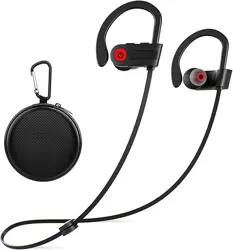
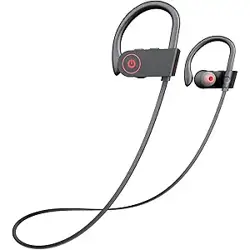
Otium U18 Bluetooth Earbuds Wireless Headphones Bluetooth Headphones, Sports Earbuds, IPX7 Waterproof Stereo Earphones for Gym Running 15 Hours Playtime Sound Isolation Headsets,Black

Product's Documents

Below are documents related to this product, you can read online or download:
U18 photo

Overview

The Otium Bluetooth Earbuds (Model U18) are wireless in-ear headphones designed for sports and exercise. They feature a neckband design with silicone ear hooks for a secure fit during physical activity. The earbuds utilize Bluetooth 5.3 technology for wireless connectivity and include a built-in microphone for hands-free calls.

Otium Bluetooth Earbuds Wireless Headphones, Black, main product view

The product is available in multiple colors: Black, Blue, Red, and Rose. The package includes a protective case.

Features

Audio and Connectivity

  • Bluetooth 5.3: Provides a stable wireless connection with a range of up to 30 feet (10 meters).
  • High Fidelity Sound: Equipped with dynamic drivers and improved acoustic components for deep bass and clear treble.
  • Sound Isolation: Noise suppression technology helps reduce background noise for an immersive listening experience.
  • Built-in Microphone: Allows for crystal-clear hands-free calling.

Design and Durability

  • IPX7 Waterproof Rating: The earbuds are resistant to water, splashes, and sweat, making them suitable for intense workouts and running.
  • Ergonomic Fit: Silicone ear hooks and a neckband design ensure the earbuds stay securely in place during movement.
  • Lightweight Construction: Made with rubber and silicone materials for comfortable extended wear.
Otium earbuds showing ergonomic fit and ear hook design Otium earbuds demonstrating IPX7 waterproof protection against sweat and rain

Battery and Charging

  • Playtime: Up to 16 hours of music playback on a full charge.
  • Standby Time: Up to 240 hours in standby mode.
  • Charging Time: Approximately 1.5 hours for a full charge via the Micro USB port.
  • Battery Status Display: The battery level is visible on your connected phone, and a low battery voice notification is provided.

Controls

  • Button Control: The inline remote allows you to skip tracks, play/pause music, and manage phone calls without touching your phone.
  • Voice Control: Compatible with your device's voice assistant.
Otium earbuds inline remote control with buttons

What's in the Box

  • Otium Bluetooth Earbuds (Model U18)
  • Protective Case
  • Micro USB Charging Cable
  • User Manual

Use Guide

Charging the Earbuds

  1. Connect the provided Micro USB cable to the charging port on the earbuds.
  2. Connect the other end to a USB power source (e.g., computer, wall adapter).
  3. The LED indicator will show red while charging and turn off or change color when fully charged. A full charge takes approximately 1.5 hours.

Pairing with a Bluetooth Device

The Bluetooth name for this device is "U18".

  1. Ensure the earbuds are charged.
  2. Press and hold the Multi-Function Button (MFB) until the LED indicator flashes red and blue alternately. This indicates the earbuds are in pairing mode.
  3. On your phone or other Bluetooth-enabled device, enable Bluetooth and search for available devices.
  4. Select "U18" from the list of devices.
  5. If prompted, enter the passcode 0000.
  6. Once connected, the LED indicator will flash blue slowly.
Otium earbuds connecting to a smartphone via Bluetooth

Connecting Two Smartphones (Multipoint)

  1. Pair with the first device (Device 1) as described above.
  2. Turn off Bluetooth on Device 1.
  3. The earbuds will enter pairing mode again. Pair with the second device (Device 2).
  4. Turn on Bluetooth on Device 1. The earbuds will automatically reconnect to both devices.

Using the Controls

  • Play/Pause: Press the MFB once.
  • Next Track: Press and hold the Volume + button.
  • Previous Track: Press and hold the Volume - button.
  • Answer/End Call: Press the MFB once.
  • Reject Call: Press and hold the MFB for 2 seconds.
  • Voice Assistant: Double-press the MFB.

Resetting the Earbuds

If you experience connectivity issues, you can reset the earbuds to factory settings.

  1. Connect the earbuds to a charger.
  2. While charging, long press the MFB for about three seconds.
  3. The red and blue LED will flash three times to indicate that factory settings have been restored.

After resetting, you will need to pair the earbuds with your devices again.

Specifications

BrandOtium
ModelU18
ConnectivityBluetooth 5.3
Bluetooth RangeUp to 30 feet (10 meters)
Audio DriverDynamic Driver
Frequency Range20 Hz - 20,000 Hz
Battery LifeUp to 16 hours (playback)
Standby TimeUp to 240 hours
Charging TimeApproximately 1.5 hours
Charging PortMicro USB
Water ResistanceIPX7
Noise ControlSound Isolation
Weight0.22 Pounds (approx. 100 grams)
Color OptionsBlack, Blue, Red, Rose

Troubleshooting

Earbuds not pairing

  • Ensure the earbuds are charged and in pairing mode (LED flashing red and blue).
  • Delete the "U18" device from your phone's Bluetooth list and try pairing again.
  • Reset the earbuds to factory settings (see Use Guide).

Poor sound quality or connection drops

  • Ensure your device is within 30 feet of the earbuds.
  • Move away from other wireless devices or sources of interference.
  • Check the battery level of the earbuds.

Earbuds not charging

  • Ensure the charging cable is securely connected to both the earbuds and the power source.
  • Try a different USB cable or power source.
  • Clean the charging port on the earbuds with a dry cloth.

Warranty and Support

This product comes with a 1-year warranty from the date of purchase.

For warranty claims or technical support, please contact the manufacturer:

  • Manufacturer: Shenzhen Huan qiu yi tong technology Co., Ltd.
  • UPC: 781573650167
  • ASIN: B0734S1YBS

Please refer to the product packaging or your purchase receipt for additional contact information.

Reference file: Otium U18 Bluetooth Earbuds Wireless Headphones Bluetooth Headphones, Sports Earbuds, IPX7 Waterproof Stereo Earphones for Gym Running 15 Hours Playtime Sound Isolation Headsets,Black

Specifications

Otium U18 Questions and Answers

See other models: U8