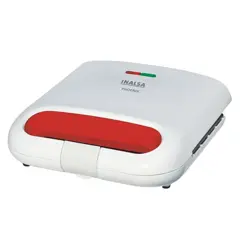
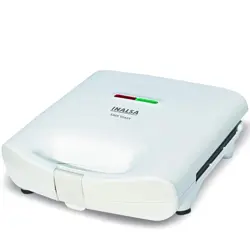
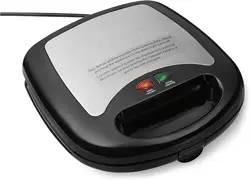
1. Product Overview

The Inalsa Super Jumbo Max-grill is a 2000-watt contact grill designed for preparing grilled sandwiches, vegetables, burgers, and steaks. It features an extra-large cooking surface, adjustable temperature control, and non-stick coated plates.
1.1 Key Components
- Main Grill Unit with Non-Stick Plates
- Cool Touch Sliding Handle
- Temperature Control Dial
- Power and Ready-to-Cook LED Indicators
- Inbuilt Detachable Oil Tray
1.2 Included Accessories
- Oil Cups (2 pieces)
- Spatula (1 piece)
- Instruction Manual with Warranty Card

2. Technical Specifications
- Model: Super Jumbo Max-grill
- Power Rating: 2000 Watts
- Voltage: 220-240V AC
- Cord Length: 1 meter
- Plate Coating: Non-Stick
- Plate Opening: Up to 180 degrees
- Product Dimensions (D x W x H): 33.5 x 33.8 x 13.4 cm
- Item Weight: 3100 grams
- Color: Black/Grey
3. Controls and Indicators

3.1 Temperature Control Dial
A rotary dial located on the front of the unit allows you to adjust the cooking temperature. Turn the dial clockwise to increase heat and counter-clockwise to decrease it.
3.2 Indicator Lights
- Power (Red) Indicator: Illuminates when the unit is plugged in and switched on, indicating it is receiving power.
- Ready-to-Cook (Green) Indicator: Illuminates when the plates have reached the selected temperature. The light may cycle on and off during use as the thermostat maintains temperature.
3.3 Cool Touch Sliding Handle
The handle slides to lock the upper plate in a closed position during cooking. It is designed to remain cool for safe handling.
3.4 Floating Hinge & 180° Opening
The upper plate is attached via a floating hinge mechanism. This allows the plate to adjust to the thickness of the food. The unit can be opened fully to 180 degrees for easier loading, cleaning, and use as a dual-sided grill.

4. Safety Instructions
- Read all instructions before first use.
- Ensure the voltage of your power outlet matches the product's rating (220-240V AC).
- Do not immerse the main unit, cord, or plug in water or any other liquid.
- The exterior surfaces, especially the cooking plates, become extremely hot during and after use. Use the cool-touch handle only.
- Always place the grill on a stable, flat, heat-resistant surface.
- Keep the cord away from hot surfaces. Do not let it hang over the edge of a counter or table.
- Unplug the unit when not in use and before cleaning.
- This appliance is not intended for use by persons (including children) with reduced physical, sensory, or mental capabilities.
- Do not use the appliance for any purpose other than its intended use.
5. Use Guide
5.1 Before First Use
- Remove all packaging materials and stickers.
- Wipe the cooking plates and exterior with a damp cloth. Dry thoroughly.
- Plug in the unit and turn the temperature dial to the medium setting. Allow it to heat for 5-10 minutes without any food. This will burn off any residual manufacturing oils. You may notice slight smoke or odor; this is normal.
- Unplug and let the unit cool completely. Wipe the plates again with a damp cloth.
5.2 Cooking Instructions
- Place the grill on a stable, heat-resistant surface.
- Plug the power cord into a suitable wall outlet.
- Set the desired temperature using the control dial. For most sandwiches and burgers, a medium setting is recommended.
- The red Power light will illuminate. Wait for the green Ready-to-Cook light to illuminate, indicating the plates have reached the set temperature.
- Open the grill by sliding the handle forward and lifting the upper plate.
- Place your food items on the lower cooking plate. Do not overfill.
- Carefully lower the upper plate. The floating hinge will adjust to the food's thickness.
- Slide the handle back to lock the plates in the closed position.
- Cook for the required time, checking occasionally. Cooking times will vary based on temperature setting and food type.
- When cooking is complete, slide the handle forward to unlock and open the grill.
- Use the provided spatula (not metal utensils) to remove food.
- Unplug the appliance after use and allow it to cool completely before cleaning.
5.3 Using the Oil Tray
The built-in oil tray at the front of the unit collects excess oils and fats during cooking. Ensure it is properly inserted before use. Remove and clean it after the grill has cooled down.
5.4 Suggested Foods
- Grilled Sandwiches and Paninis
- Burgers and Steaks
- Grilled Vegetables
- Toasted Bread
6. Cleaning and Maintenance
- Always unplug the unit and allow it to cool completely before cleaning.
- Wipe the exterior with a soft, damp cloth. Do not use abrasive cleaners or scouring pads.
- Once cool, wipe the non-stick cooking plates with a soft cloth or paper towel to remove food residue. For stuck-on food, a mild detergent can be used on a damp cloth. Rinse the cloth and wipe again.
- Do not use metal utensils or abrasive pads on the non-stick surface.
- Remove the oil tray and wash it with warm, soapy water. Dry thoroughly before reinserting.
- Ensure the unit and plates are completely dry before storing.
- Do not immerse the main body, cord, or plug in water.
7. Troubleshooting
| Problem | Possible Cause | Solution |
|---|---|---|
| Appliance does not heat up. | Not plugged in. Power switch off. | Check plug connection and ensure wall outlet is functional. |
| Green "Ready" light does not come on. | Temperature dial is set to minimum. Unit is still heating. | Turn the temperature dial to a higher setting. Wait a few minutes for plates to heat. |
| Food is sticking to the plates. | Plates not properly seasoned/cleaned. Temperature too low. Using inappropriate utensils. | Clean plates thoroughly. Ensure unit is pre-heated. Use wooden or plastic spatula only. |
| Smoke or odor during first use. | Burning off of manufacturing oils. | This is normal. Ensure room is ventilated. The odor should disappear after first use. |
| Uneven cooking. | Food items placed unevenly. Faulty thermostat. | Arrange food evenly on the plate. If problem persists, contact support. |
8. Warranty and Support
This product is covered by a 2-year limited warranty on the product from the date of purchase. The warranty card is included in the packaging.
Manufacturer Contact Information:
Tuareg Marketing Pvt. Ltd.
KHASRA NO.154,1092,1189, BHALSWA VILLAGE, BHALSWA,
North West Delhi, Delhi, 110033, INDIA.
Contact: 9773982065 / 66 / 67 / 68 / 69 / 70
For warranty service or support, please retain your original proof of purchase.