Owner's Guide Dishwasher
KEY USAGE TIPS
Top Rack Adjuster (on some models)
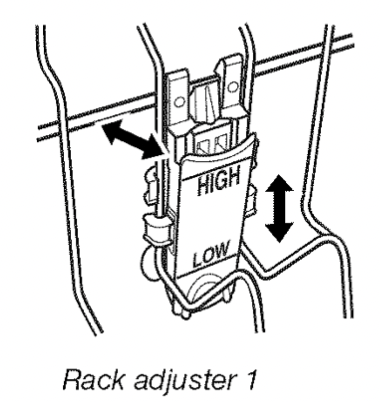
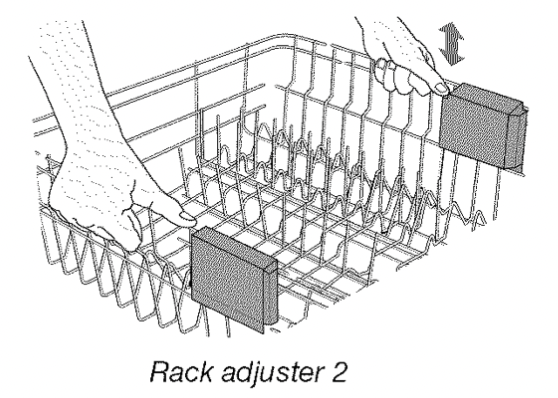
You can raise or lower the top rack to fit tall items in either the top or bottom rack. Adjusters are located on each side of the top rack.
To raise or lower the rack with adjuster 1, hold the top rack with one hand near the adjuster and use the other hand to pull out the top of the adjuster. Raise or lower the rack to one of the preset positions.
NOTE: The top rack must be level.
To raise the rack with adjuster 2, lift and pull up.
To lower the rack, lift up and let down.
NOTE: The top rack must be level.
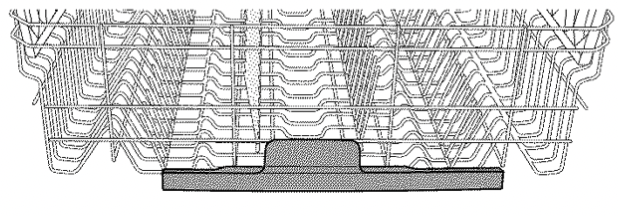
Silverware Spray (on some models)
Silverware Spray helps remove stuck-on food.
It delivers a concentrated shower of water to the in-door silverware basket to eliminate rewashing.
Filtration system
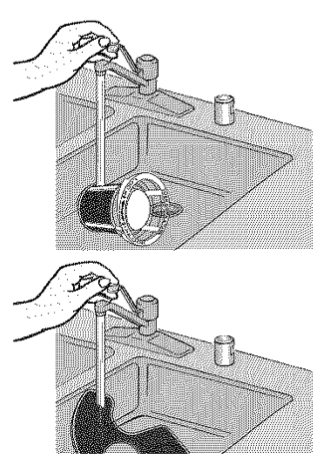
Your dishwasher has the latest technology in dishwasher filtration. This filtration system minimizes sound and optimizes water and energy conservation while providing superior cleaning.
The level of cleaning performance may be affected if filters are not properly placed.
IMPORTANT: To avoid damage to dishwasher, do not operate your dishwasher without filters properly installed. Be sure lower filter is securely in place and upper filter assembly is locked into place. If upper assembly turns freely, it is not locked into place.
See "Filtration System" in full User Guide for complete removal and maintenance schedule.
Drying - Rinse Aid is essential
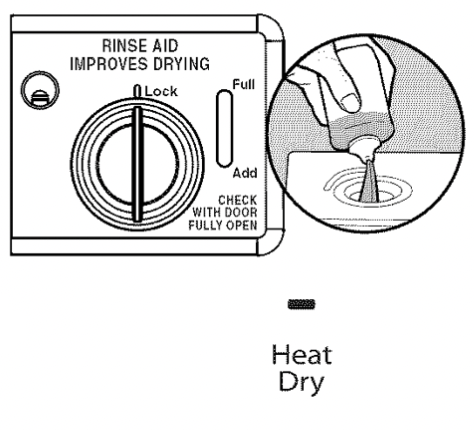
You must use a drying agent such as a rinse aid for good drying performance. Rinse aid along with the Heat Dry option will provide best drying and avoid excessive moisture in dishwasher interior.
If you are using the all-in-one tablets or packs, you may also need rinse aid.
Energy efficiency
Energy efficiency is gained by extending cycle time and reducing the amount of wattage and water used during your dishwasher's cycle. For exceptional cleaning, cycles are longer due to the soak and pauses. Several models contain an optical water sensor used to determine water and energy consumption for great cleaning performance.
Efficient dishwashers run longer to save water and energy, just as driving a car slower saves on gas. Your first cycle will run longer to calibrate the optical water sensor.
Press start/resume every time you add a dish.
IMPORTANT: If anyone opens the door (such as, for adding a dish, even during the Delay Hours option), START/RESUME must be pressed each time.
If START/RESUME is located on top of door: Push door firmly closed within 3 seconds of pressing START/RESUME. If door is not closed within 3 seconds, the start button LED will flash, an audible tone will be heard, and cycle will not start.
OPERATING YOUR DISHWASHER
Prepare and Load the Dishwasher
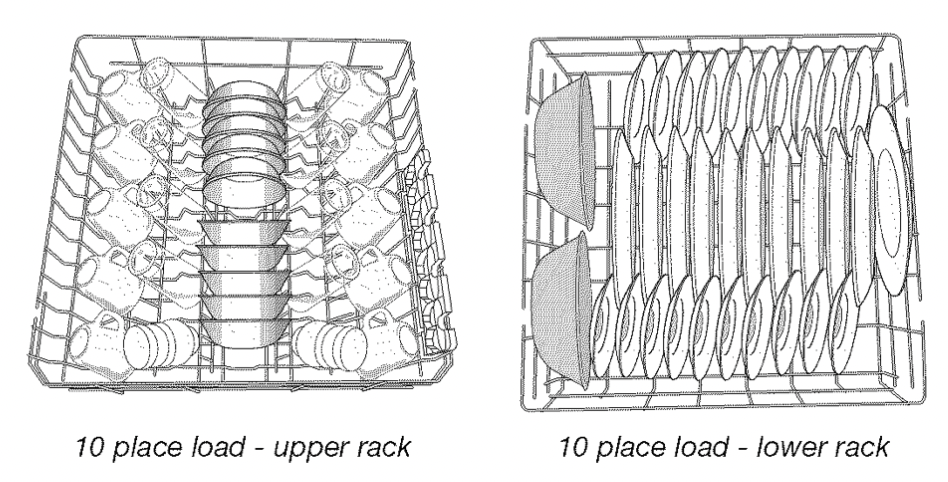
IMPORTANT: Remove leftover food, bones, toothpicks and other hard items from dishes. Remove labels from containers before washing.
- Make sure when dishwasher door is closed no items are blocking detergent dispenser.
- Items should be loaded with soiled surfaces facing down and inward to the spray as shown in the graphics above. This will improve cleaning and drying results. Angle dirtiest dish surface downward, allowing space for water to flow up through rack and between dishes.
- Avoid overlapping items like bowls or plates that may trap food.
- Place plastics, small plates and glasses in upper rack.
- Wash only items marked"dishwasher safe."
- To avoid thumping/clattering noises during operation: Load dishes so they do not touch one another. Make sure lightweight load items are secured in racks.
- Use slots in the covers and suggested loading patterns to keep your silverware separated for optimum wash.
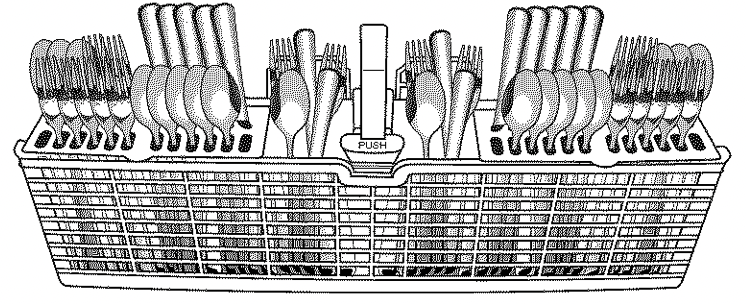
- When loading silverware, always place sharp items pointing down and avoid "nesting" as shown. If your silverware does not fit into the designated slots, flip covers up and mix silverware types to keep them separated.
NOTE: The AnyWare TM Silverware Basket can sit in the door for completely usable rack space letting you fit more items in the rack. It can also go in your lower rack to fit your needs.
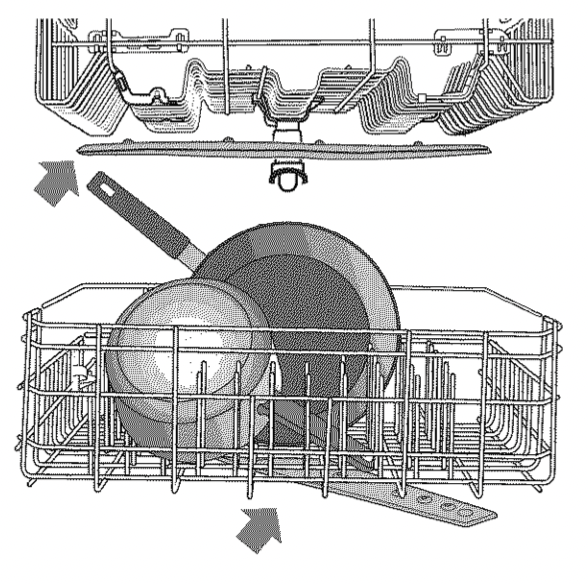
Check that all arms spin freely
Add Detergent
- Use automatic dishwasher detergent only. Add just before starting a cycle.
- Fresh automatic dishwasher detergent results in better cleaning. Store tightly closed detergent container in a cool, dry place.
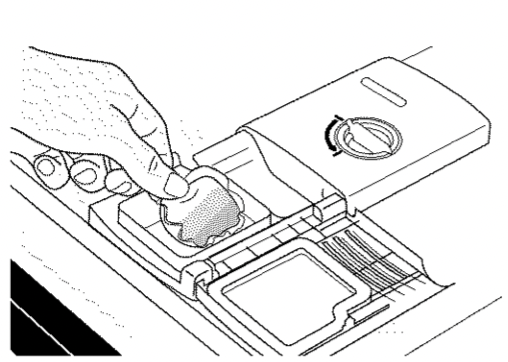
Recommended Detergents
Many detergents now come in premeasured forms (gel packs, tablets, or powder packs).
It is recommended to use tablets and packs for convenience and improved performance. They have been proven better than powder, liquid or gel detergents at reducing filming on dishes. Using tablets and packs over time will start to reduce or eliminate white film. Also, by using a rinse aid you can minimize repeat buildup of white film. These forms are suitable for all hardness and soil levels. Always place premeasured detergents in main compartment and close lid.
NOTE: Follow instructions on the package when using other dishwasher detergent types. See the online guide for more information on powder and gel usage.
Add Rinse Aid
- Your dishwasher is designed to use rinse aid for good drying performance. Without rinse aid, your dishes and dishwasher interior will have excessive moisture. The heat dry option will not perform as well without rinse aid.
- Rinse aid keeps water from forming droplets that can dry as spots or streaks. It also improves drying by allowing water to drain off of dishes after final rinse. Rinse aid does not adhere to dishware and when used, it is dispensed during each cycle.
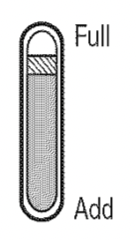
- To add rinse aid, turn the dispenser cap 1/4 turn counterclockwise and lift off. Pour rinse aid into the opening until indicator level is at "Full". Replace dispenser cap and turn to "Lock." Make sure cap is fully locked.
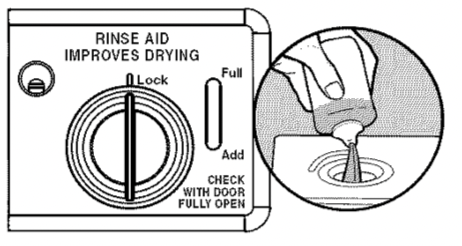
NOTE: For most water conditions, the factory setting will give good results.
- Check water hardness level to ensure there are no rings or spots on your dishware before adding rinse aid or adjusting the factory setting.
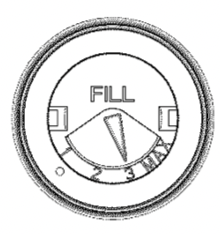
- If you are experiencing poor drying performance, you may want to try a higher setting.
Turn the arrow adjuster inside the dispenser to change rinse aid setting.
Select Options (options vary by model)
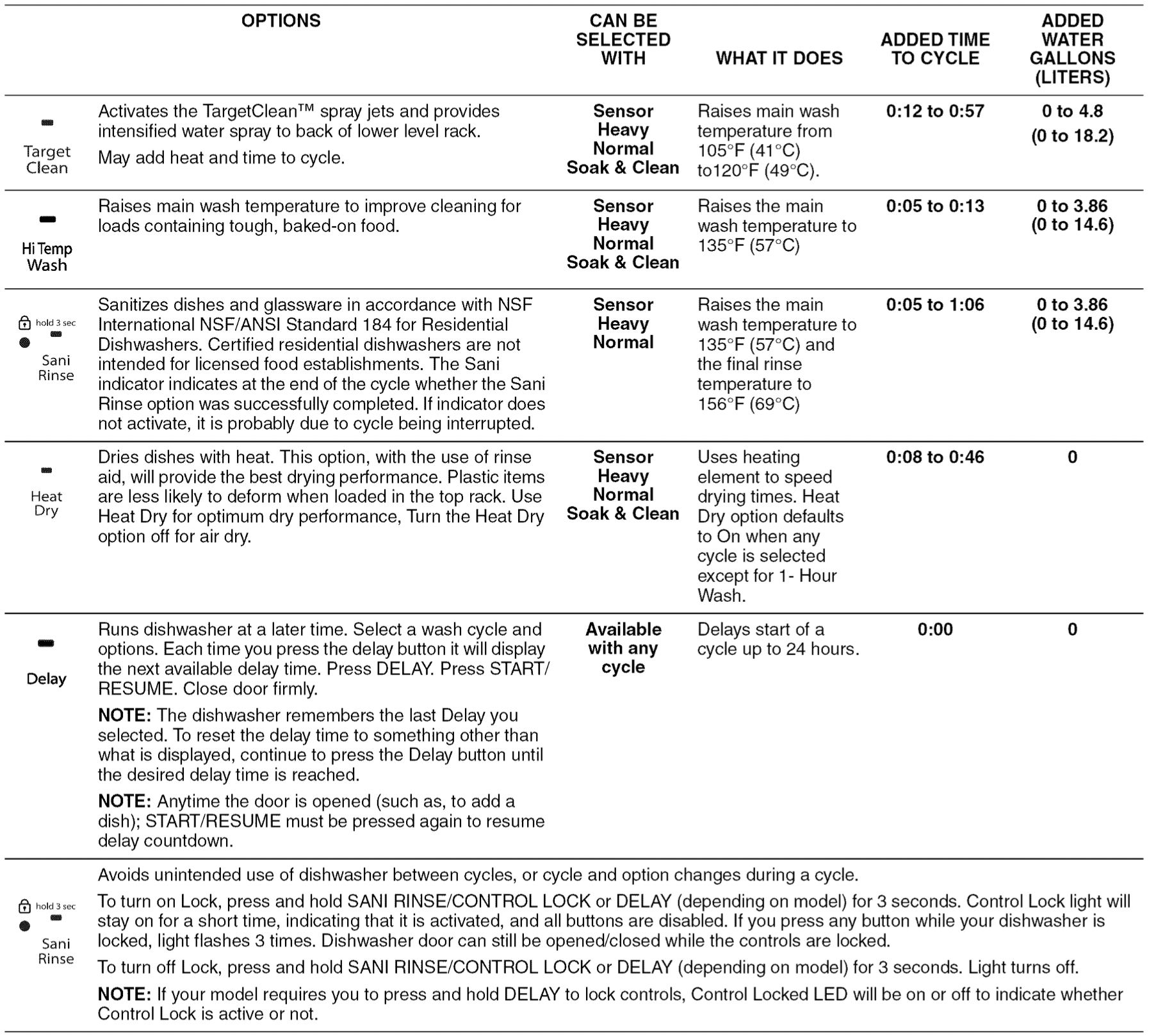
You can customize your cycles by pressing the options desired. If you change your mind, press the option again to turn off the option. Not all options are available for every cycle. If an invalid option is selected for a given cycle, the lights will flash. Adding options may increase the cycle time displayed.
Follow the Progress of your Dishwasher
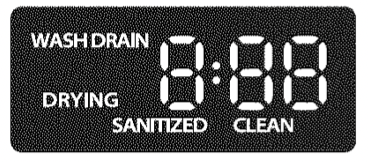
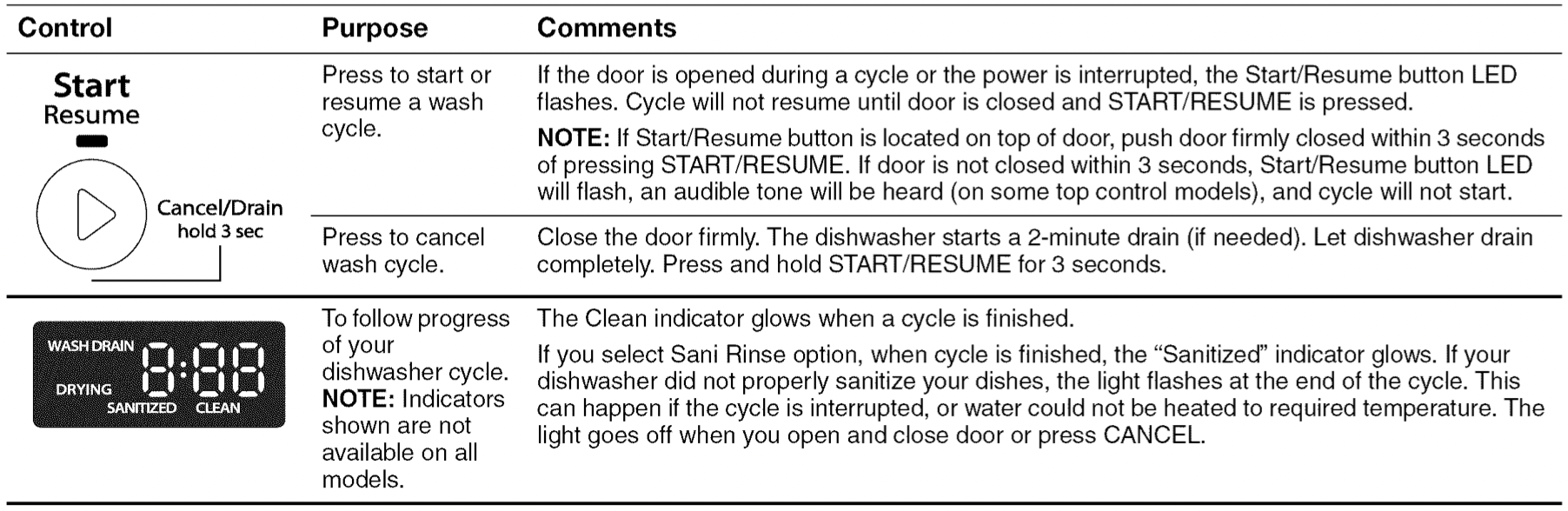
The full lit display will glow for wash, drain, drying, sanitized, and clean. It will also display the remaining time for the cycle in hours and minutes.
Select the desired cycle by pressing the Cycles button. Each time the cycles button is pressed the next available cycle will be displayed.
Start or Resume a Cycle
NOTE: Run hot water at the sink nearest your dishwasher until the water is hot. Turn off water.
- If the Start/Resume button is located on top of door; push door firmly closed within 3 seconds of pressing START/RESUME. If door is not closed within 3 seconds, the start button LED will flash, an audible tone will be heard, and cycle will not start.
IMPORTANT: If anyone opens the door (such as, for adding a dish, even during the Delay Hours option), the START/RESUME button must be pressed each time.
- If your Start/Resume button is located on front of door: push door firmly closed. The door latches automatically. Select the wash cycle, options and press START/RESUME or press START/RESUME to repeat the same cycle and options as in previous wash cycle.
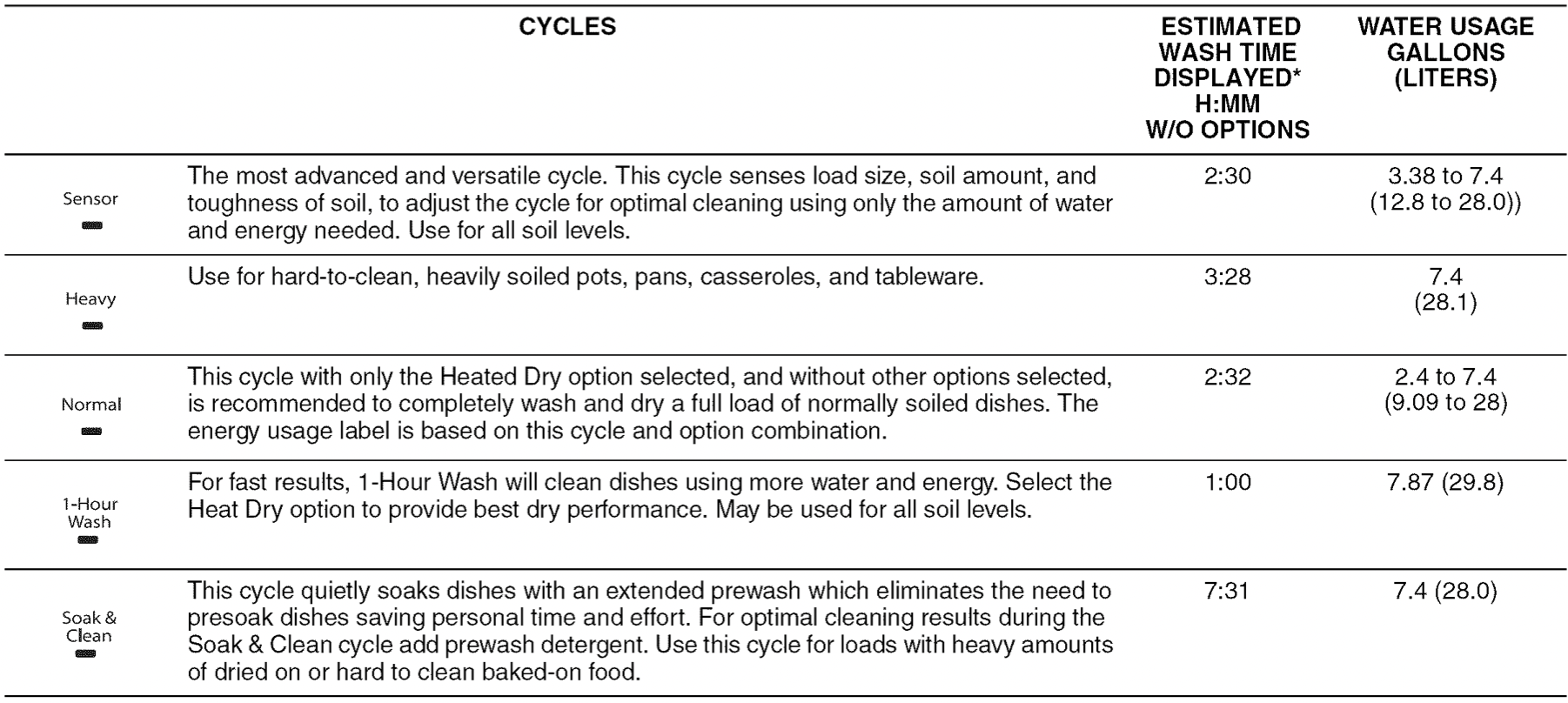
CYCLE GUIDE
This information covers several different models. Your dishwasher may not have all of the cycles and options described. Estimated cycle times may increase or decrease depending on water temperature, soil conditions, dish load size, and options selected.
DISHWASHER CARE
Cleaning the Dishwasher
Clean the exterior of dishwasher with a soft, damp cloth and mild detergent. If your dishwasher has a stainless steel exterior, a stainless steel cleaner is recommended - Stainless Steel Cleaner and Polish Part Number 31462A.
Removal of Hard Water / Filming: Recommended use of a monthly maintenance product such as affresh ®Dishwasher Cleaner Part Number W10282479.
- Load your dishwasher (preferably with dishes affected by filming / hard water).
- Place tablet in main wash compartment of detergent dispenser.
- Select cycle/option best for heavily soiled dishes and start dishwasher.
NOTE: Recommended to use a premeasured detergent tablet or pack for regular daily use.
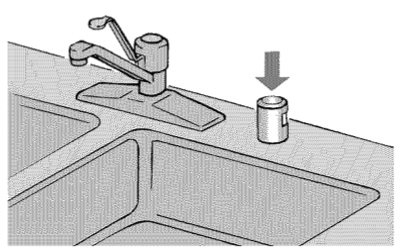
If you have a drain air gap, check and clean it if the dishwasher isn't draining well.
To Reduce Risk of Property Damage During Vacation or Extended Time Without Use
- When you will not be using the dishwasher during the summer months, turn off the water and power supply to the dishwasher.
- Make sure the water supply lines are protected against freezing conditions. Ice formations in the supply lines can increase water pressure and cause damage to your dishwasher or home. Damage from freezing is not covered by the warranty.
- When storing your dishwasher in the winter, avoid water damage by having your dishwasher winterized by authorized service personnel.
PROBLEM SOLVER
| If you experience |
Recommended Solutions
|
| Dishwasher does not run or stops during a cycle |
It is normal for certain cycles to repeatedly pause for several seconds during the main wash. Is the door closed tightly and latched?
Is the right cycle selected?
Is there power to the dishwasher? Has a household fuse blown, or has a circuit breaker tripped? Replace the fuse or reset the circuit breaker. If the problem continues, call an electrician.
Has the motor stopped due to an overload? The motor automatically resets itself within a few minutes. If it does not restart, call for service.
Is the water shutoff valve (if installed) turned on?
|
| The Clean indicator is flashing |
Check the following:
- Is the overfill protection float able to move up and down freely? Press down to release.
- Be sure the water supply is turned on to the dishwasher. (This is very important following the new installation of your dishwasher.)
- Check for suds in the dishwasher. If foam or suds are detected by the dishwasher sensing system, the dishwasher may not operate properly or may not fill with water.
- Suds can come from:
- Using the incorrect type of detergent, such as laundry detergent, hand soap, or dish detergent for hand washing dishes.
- Forgetting to replace the rinse aid dispenser cap after filling (or refilling) the rinse aid.
- Using an excessive amount of dishwasher detergent.
|
| Dishes do not dry completely |
NOTE: Plastic and items with nonstick surfaces are difficult to dry because they have a porous surface which tends to collect water droplets. Towel drying may be necessary.
Use of rinse aid along with Heat Dry option is needed for proper drying.
Proper loading of items can affect drying.
Glasses and cups with concave bottoms hold water. This water may spill onto other items when unloading.
- Unload the bottom rack first.
- For improved results, place these items on the more slanted side of the rack.
|
| Noise |
NOTE: Common noises:
- Surging sounds can occur periodically throughout the cycle while the dishwasher is draining.
- Normal water valve hissing may be heard periodically.
- A normal snap sound may be heard when the detergent dispenser opens during the cycle or when the door is opened at the end of the cycle.
- Improper installation will affect noise levels.
Be sure the filters are properly installed.
A thumping sound may be heard if items extend beyond the racks and interfere with the wash arms. Readjust the dishware and resume the cycle.
|
| Spotting/Filming |
Liquid rinse aid is necessary for drying and to reduce spotting.
Use the correct amount of detergent.
Confirm that the cloudiness is removable by soaking the item in white vinegar for 5 minutes. If the cloudiness disappears, it is due to hard water. Adjust the amount of detergent and rinse aid (see "Dishwasher Care" section in full Use and Care Guide). If it does not come clear, it is due to etching.
Be sure the incoming water temperature is set at 120°F (49°C).
Try using the High Temp and Sani Rinse options.
To remove spotting, run a vinegar rinse through the dishwasher.
- Wash and rinse the affected dishware and load into dishwasher. Remove all silverware and metal items. Put 2 cups (500 mL) of white vinegar in a glass measuring cup in the lower rack. Run a normal cycle with the Heat Dry option turned off. No detergent is needed (see "Dishwasher Care" section in full Use and Care Guide).
|
| Dishwasher does not clean completely |
Be sure the dishwasher is loaded correctly. Improper loading can greatly decrease the washing performance (see Operating Your Dishwasher" section).
Check filter to ensure it is properly installed. Clean it if needed. (See "Filtration System" in full User Guide for details.)
Select the proper cycle for the type of soils. The Sensor Wash or the Heavy Wash cycles can be used for tougher loads.
Be sure the incoming water temperature is at least 120°F (49°C).
Use the proper amount of fresh detergent. More detergent is needed for heavier-soiled loads and hard water conditions.
Scrape food from dishes prior to loading (do not prerinse).
If foam or suds are detected by the dishwasher sensing system, the dishwasher may not operate properly or may not fill with water.
Suds can come from:
- Using the incorrect type of detergent, such laundry detergent, hand soap, or dish detergent for hand washing dishes.
- Not replacing the rinse aid dispenser cap after filling (or refilling) the rinse aid.
- Using an excessive amount of dishwasher detergent.
|
| Dishwasher does not drain |
Be sure the cycle has been completed (the Clean light is on). If it has not, you will need to resume the cycle by closing the door and pressing START/RESUME.
If dishwasher is connected to a food waste disposer, be sure the knockout plug has been removed from the disposer inlet.
Check for kinks in the drain hose.
Check for food obstructions in the drain or disposer.
Check your house fuse or circuit breaker.
|