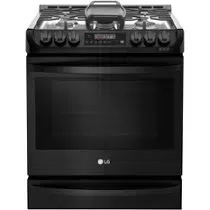
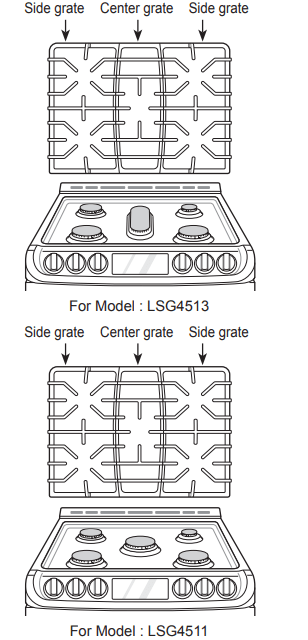
Make sure that all grates are properly placed before using the burner.
CAUTION
Do not operate the burner for an extended period of time without cookware on the grate.
The finish on the grate may chip without cookware to absorb the heat.
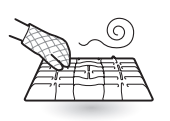
Make sure the burners and grates are cool before touching them, or placing a pot holder, cleaning cloth, or other materials on them.
Touching grates before they cool down may cause burns.
Burner Locations
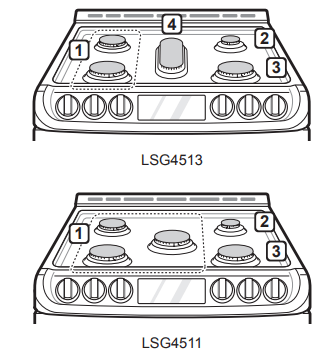
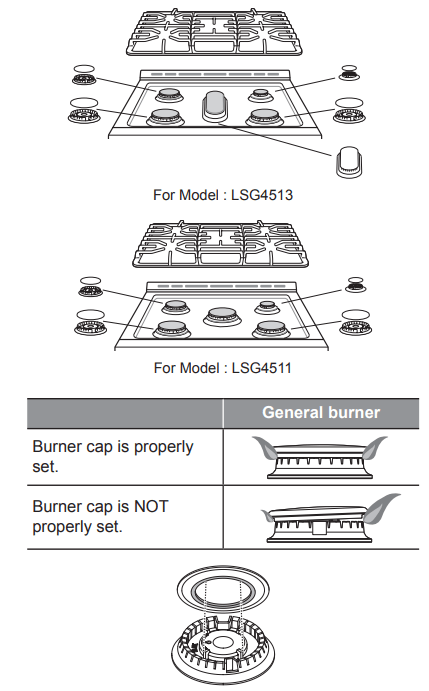
Your gas range cooktop has four or five sealed gas burners, depending on the model. These can be assembled and separated. Follow the guide below.
1. Medium and Large Burners
The medium and large burners are the primary burners for most cooking. These general purpose burners can be turned down from Hi to Lo to suit a wide range of cooking needs.
2. Small Burner
The smallest burner is used for delicate foods such as sauces or foods that require low heat for a long cooking time.
3. Extra Large Burner
The extra large burner is the maximum output burner. Like the other four burners, it can be turned down from Hi to Lo for a wide range of cooking applications. This burner is also designed to quickly bring large amounts of liquid to a boil. It can be used with cookware 10 inches or larger in diameter.
4. Oval Burner
The center, oval burner is for use with a griddle or oval pots.
Using the Gas Surface Burners
Be sure that all of the surface burners and grates are placed in the correct positions.
Place cookware on the grate.
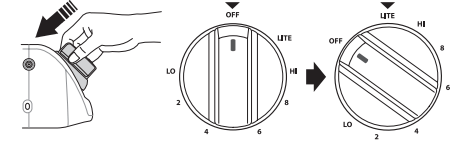
Push the control knob and turn to the Lite position. The electric spark ignition system makes a clicking noise.
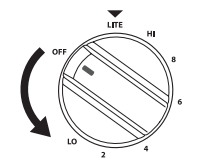
Turn the control knob to control the flame size.
Setting the Flame Size
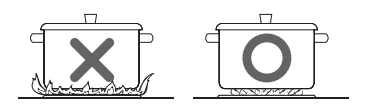
Watch the flame, not the knob, as you reduce heat. Match the flame size on a gas burner to the cookware being used for fastest heating.
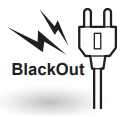
In Case of Power Failure
In case of a power failure, you can light the gas surface burners on your range with a match.
Surface burners in use when an electrical power failure occurs will continue to operate normally.
Hold a lit match to the burner, then push in the control knob.
Turn the control knob to the Lo position.
Range-Top Cookware
Aluminum
Medium-weight cookware is recommended because it heats quickly and evenly. Most foods brown evenly in an aluminum skillet. Use saucepans with tight fitting lids when cooking with minimum amounts of water.
Cast-Iron
If heated slowly, most skillets will give satisfactory results.
Stainless Steel
This metal alone has poor heating properties and is usually combined with copper, aluminum or other metals for improved heat distribution. Combination metal skillets work satisfactorily if they are used with medium heat as the manufacturer recommends
Enamelware
Under some conditions, the enamel of this cookware may melt. Follow cookware manufacturer’s recommendations for cooking methods
Glass
There are two types of glass cookware. Those for oven use only and those for top-of-range cooking.
Heatproof Glass Ceramic
Can be used for either surface or oven cooking. It conducts heat very slowly and cools very slowly. Check cookware manufacturer’s directions to be sure it can be used on gas ranges.
Using a Wok
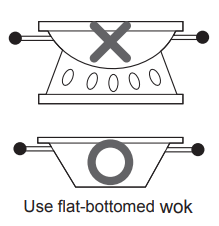
If using a wok, use a 14-inch or smaller flat-bottomed piece of wok. Make sure that the wok bottom sits flat on the grate
CAUTION Do not use a wok support ring. Placing the ring over the burner or grate may cause the burner to work improperly, resulting in carbon monoxide levels above allowable standards. This can be hazardous to your health.
Using Stove-Top Grills
Do not place stove-top grills on the burner.
CAUTION Do not use stove top grills on the surface burners. Using a stove top grill on the surface burner will cause incomplete combustion and can result in exposure to carbon monoxide levels above allowable current standards. This can be a health hazard.
Using the Griddle
(For Model : LSG4513)
The non-stick coated griddle provides an extra-large cooking surface for meats, pancakes or other food usually prepared in a frying pan or skillet.
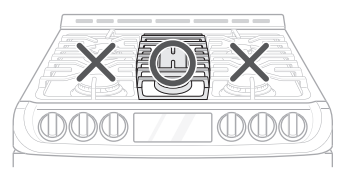
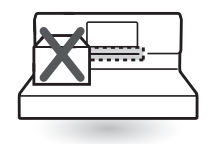
How to Place the Griddle: The griddle can only be used with the center burner. The griddle must be properly placed on the center grate, as shown below.
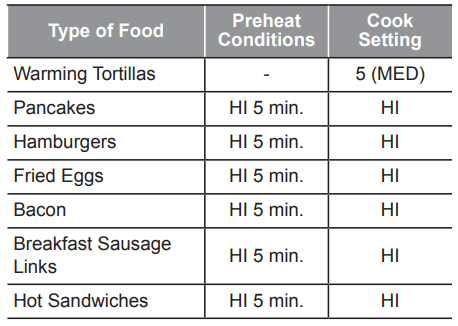
Preheat the griddle according to the guide below and adjust for the desired setting.
NOTE After cooking on the griddle for an extended period, adjust the griddle temperature settings as the griddle retains heat.
IMPORTANT NOTES
Avoid cooking extremely greasy foods as grease spillover can occur.
The griddle can become hot when surrounding burners are in use.
Do not overheat the griddle. This can damage the non stick coating.
Do not use metal utensils that can damage the griddle surface. Do not use the griddle as a cutting board.
Do not place or store items on the griddle.
The Oven
Before Use
Read all instructions before using.
Make sure the electrical power cord and the gas valve are properly connected.
Confirm the correct usage of the range for the type of food you will cook.
Make sure you know how to use the oven (temperature setting, time setting and recipe) for best results.
In case of power failure, do not use the oven.
The oven and broiler cannot be used during a power outage. If the oven is in use when a power failure occurs, the oven burner shuts off and cannot be re-lit until power is restored. Once power is restored, you will need to reset the oven (or Broil function).
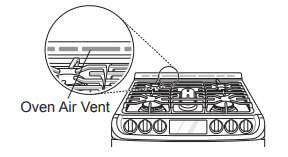
Do not block, touch or place items around the oven vent during cooking.
Your oven is vented through ducts at the center above the burner grate. Do not block the oven vent when cooking to allow for proper air flow. Do not touch vent openings or nearby surfaces during any cooking operation.
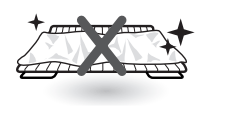
Do not cover racks or oven bottom with aluminum foil.
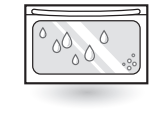
You may see condensation on the oven door glass.
As the oven heats up, the heated air in the oven may cause condensation to appear on the oven door glass. These water drops are harmless and will evaporate as the oven continues to heat up.
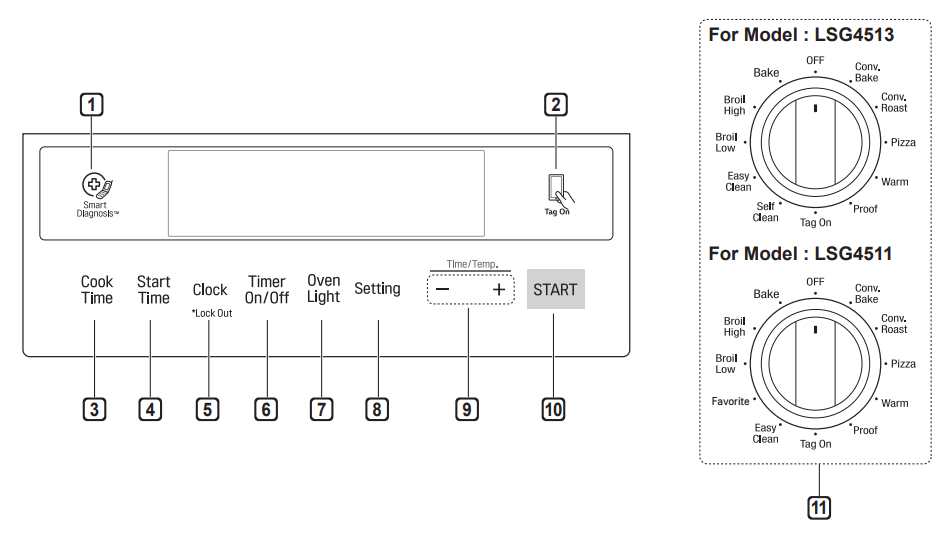
Control Panel Overview
1. Smart DiagnosisTM Use during the Smart Diagnosis feature. 2. Smart Features The Tag On icon, for use with Smart Features. 3. Cook Time Press the button to set the desired amount of time for food to cook. The oven shuts off when the set cooking time runs out. 4. Start Time Press the button to set the delayed timed cook. The oven starts at the set time. 5. Clock / Lockout • Press button to set the time of day. • Press and hold button for three seconds to lock the door and control panel. 6. Timer On/Off Press the button to set or cancel timer on oven. 7. Oven Light Press the button to turn oven light on or off. 8. Setting Press button to select and adjust oven settings. 9. - /+ Press the plus button to increase cooking time or oven temperature. Press the minus button to decrease cooking time or oven temperature. 10. Start Press the button to start all oven features. 11. Oven Mode Knob Turn the knob to select oven operating mode
Flashing Clock
If the colon in the clock display flashes, touch Clock and reset the time, or touch any key to stop the flashing.
Changing Oven Settings
Clock
The clock must be set to the correct time of day in order for the automatic oven timing functions to work properly.
Set the oven mode knob to the Off position.
Press Clock. CLO shows in the display.
Press plus(+) or minus(-) to select the desired time. Plus(+) to increase the time and minus(-) to decrease the time.
Press Start to enter the time and start the clock.
Oven Light
The interior oven light automatically turns on when the door is opened. Press Light to manually turn the oven light on.
Timer On/Off
The Timer On/Off serves as an extra timer in the kitchen that beeps when the set time has run out. It does not start or stop cooking.
The Timer On/Off feature can be used during any of the oven control functions.
For example to set 5 minutes
Set the oven mode knob to the Off position.
Press the Timer On/Off. 0:00 with Hr inside it appears and Timer flashes in the display.
Press plus(+) or minus(-) to set the desired time. Plus(+) to increase the time and minus(-) to decrease the time.
Press Timer On/Off or Start to start the Timer. The remaining time countdown appears in the display.
When the set time runs out, End shows in the display. The indicator tones sound every 15 seconds until Timer On/Off is pressed.
Settings
Set the oven mode knob to the Off position. Press Setting key repeatedly to toggle through and change oven settings.
The Settings key allows you to:
set the hour mode on the clock (12 or 24 hours)
enable/disable convection auto conversion
adjust the oven temperature
activate/deactivate the preheating alarm light
set the beeper volume
switch the temperature scale between Fahrenheit and Celsius
Setting the Hour Mode
The control is set to use a 12-hour clock. To reset the clock to 24-hour mode, follow the steps below.
Set the oven mode knob to the Off position.
Press Setting.
Press plus(+) or minus(-) to set the desired hour mode on the clock.
Press Start to accept the desired change.
Setting Convection Auto Conversion
When Conv. Bake and Conv. roast are selected, Convection Auto Conversion automatically converts the standard recipe temperature entered to a convection temperature by subtracting 25 °F / 14 °C. This auto-converted temperature shows on the display. For example, select Conv. Bake, enter 350 °F, and 325 °F shows on the display after preheat.
Convection Auto Conversion is enabled by default. To change the setting, follow these instructions.
Set the oven mode knob to the Off position.
Press Setting repeatedly until Auto appears in the display.
Press plus(+) or minus(-) to enable or disable the feature.
Press Start to accept the change.
Adjusting the Oven Thermostat
Your new oven may cook differently from the one it replaced. Use your new oven for a few weeks to become more familiar with it before changing the temperature settings. If after familiarizing yourself with the new oven, you still think that it is too hot or too cold, you can adjust the oven thermostat yourself.
Set the oven mode knob to the Off position.
Press Setting repeatedly until AdJU appears in the display.
To increase the temperature, press plus (+) until the desired amount appears in the display. To decrease the temperature, press minus (-) until the desired amount appears in the display.
Press Start to accept the change.
Turning the Preheat Alarm Light On/Off
When the oven reaches its set-temperature, the preheating alarm light flashes 5 times or until the oven door is opened.
You can activate or deactivate the preheating alarm light.
Touch Settings repeatedly until Pre appears in the display.
Touch plus (+) or minus (-) to turn the light on/ off.
Press Start to accept the change.
Adjusting the Beeper Volume
Set the oven mode knob to the Off position.
Press Setting repeatedly until Beep appears in the display.
Press plus(+) or minus(-) to select the desired volume.
Press Start to accept the change.
Selecting Fahrenheit or Celsius
Set the oven temperature display to show either Fahrenheit (°F) or Celsius (°C) units. The oven defaults to Fahrenheit unless changed by the user. Set the oven mode knob to the Off position.
Press Setting repeatedly until Unit appears in the display.
Press plus(+) or minus(-) to select F(Fahrenheit) or C(Centigrade).
Press Start to accept the change.
Lockout
The Lockout feature automatically locks the oven door (For Model : LSG4513) and prevents most oven from being turned on. It does not disable the timer and the interior oven light.
Set the oven mode knob to the Off position.
Press and hold Clock for three seconds.
The lock melody sounds, Loc appears in the display and the lock icon blinks (For Model : LSG4513)in the display.
Once the oven door is locked, the lock indicator stops blinking (For Model : LSG4513) and remains on.
To deactivate the Lockout feature, press and hold Clock for three seconds. The unlock melody sounds and the door and the controls unlock.
Start Time (Delayed Timed Cook)
The automatic timer of the Delayed Timed Cook function turns the oven on and off at the time you select. This feature can be used with the Bake, Conv. Bake and Conv. roast modes.
Setting a Delayed Timed Cook
For example, to bake at 300 °F and delay the start of baking until 4:30, first set the clock for the correct time of day.
Turn the oven mode knob to select the Bake mode. 350 °F appears in the display.
Set the temperature: press minus(-) until 300 °F appears in the display.
Press Cook Time and set the baking time.
Press Start Time.
Set the start time: press plus(+) until 4:30 appears in the display.
Press Start. A short beep sounds and Timed Delay and the start time appear in the display. The oven begins baking at the set start time.
The oven will continue to cook for the set amount of time and then turn off automatically. When the cooking time has elapsed:
End and the time of day show in the display.
The cook end indicator tone sounds every 60 seconds until the oven mode knob is turned to the Off position.
Cook Time (Timed Cook)
Set the oven to cook for a specific length of time using the Timed Cook feature. This feature can only be used with the Bake, Conv. Bake, Favorite and Conv. roast modes.
Setting a Timed Cook
For example, to bake at 300 °F for 30 minutes, first set the clock to the correct time of day.
Turn the oven mode knob to select the Bake mode. 350 °F appears in the display.
Set the oven temperature. For this example, press minus(-) until 300 °F appears in the display.
Press Cook Time. Timed flashes in the display. Bake, 0:00 and 300 °F appear in the display.
Set the baking time: press plus(+) until 30:00 appears in the display. The baking time can be set for any amount of time between 1 minute and 11 hours and 59 minutes.
Press Start.
The oven will continue to cook for the set amount of time and then turn off automatically. When the cooking time has elapsed:
End and the time of day show in the display.
The cook end indicator tone sounds every 60 seconds until the oven mode knob is turned to the Off position.
Changing the Cook Time during Cooking
For example, to change the cook time from 30 minutes to 1 hour and 30 minutes, do the following.
Press Cook Time.
Change the baking time: press plus(+) until 1 hour and 30 minutes appears in the display.
Press Start to accept the change
Removing and Replacing the Oven Racks
Removing racks
While wearing oven mitts, grasp the oven rack*.
Pull the rack straight out until it stops.
Lift up the front of the rack.
Pull out the rack.
* When possible, adjust oven racks before using the oven. Always wear oven mitts if adjusting racks while the oven is on.
Replacing racks
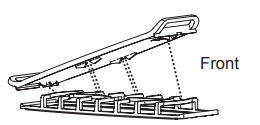
While wearing oven mitts, place the end of the rack on the support*
Tilt the front end of the rack up.
Push the rack in.
Check that the rack is properly in place.
*When possible, adjust oven racks before using the oven. Always wear oven mitts if adjusting racks while the oven is on.
Recommended Baking and roasting Guide
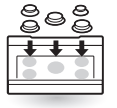
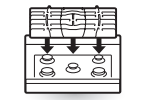
Center pans on racks for best baking results. If baking with more than one pan, place the pans so that each one has at least 1" to 11/2" of air space around it. Do not allow pans to touch the walls of the oven.
If cooking on single rack, place the rack in the position suggested in the charts on the following pages. Center the cookware as shown in the upper rack of the multiple rack image.
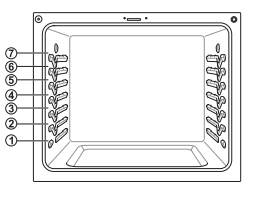
If cooking on multiple racks in the oven, place racks in positions 1 and 4. For best results, place the cookware as shown, centered on the top rack and toward the front on the bottom rack. Multiple rack baking
Bake
Bake is used to prepare foods such as pastries, breads and casseroles. The oven can be programmed to bake at any temperature from 170 °F (80 °C) to 550 °F (285 °C). The default temperature is 350 °F (175 °C).
Setting the Bake Function (example, 375 °F)
Turn the oven mode knob to select Bake.
Set the oven temperature: for example, press plus(+) until 375 °F appears in the display.
Press Start. The oven starts to preheat. As the oven preheats, the temperature is displayed and rises in 5-degree increments. Once the oven reaches the set temperature, a tone sounds and the oven light blinks on and off.
When cooking is complete, turn the oven mode knob to the Off position.
Remove food from the oven.
Convection Mode
The convection system uses a fan to circulate heat evenly within the oven. This improves heat distribution and allows for even cooking and excellent results, especially when using multiple racks. Convection cooking can also shorten cooking times.
Convection Bake
Setting the Conv. Bake Function (example: to Conv. Bake 375 °F)
Turn the oven mode knob to select Conv. Bake.
Set the oven temperature: press plus(+) until 375 °F appears in the display.
Convection Bake cooks faster and more evenly when cooking foods like cookies, biscuits, rolls, or other baked goods on a single rack. Cookies, muffins, and biscuits will have very good results when using multiple racks.
Multiple rack cooking may slightly increase times for some foods, but the overall time is reduced.
Convection Bake gives excellent results for quick breads and yeast breads of all kinds, and breads and pastries brown more evenly.
Do not use Convection Bake for delicate items like custards, souffles, or cheesecakes, which may be disturbed by the convection fan.
3. Press Start. The display shows Conv. Bake and the converted temperature starting at 100 °F. As the oven preheats, the displayed temperature will increase in 5-degree increments.
4. Once the oven reaches the desired temperature, a tone sounds and the oven light blinks on and off. The display shows the auto converted oven temperature 350 °F, Conv. Bake and
Cookware for Convection Cooking
Any cookware safe for use in a conventional oven will work in a convection oven. But for best results, keep the following in mind.
Make sure pans don’t touch the oven walls when centered on the racks. Use cookware that leaves room for air circulation in the oven for best results when convection cooking.
Leave space between pans. Make sure pans don't touch each other or the oven walls.
Do not use pans with high sides. Use flat pans with no sides for cookies or biscuits. Use a pan with low sides for oven-baked chicken.
Metal pans heat the fastest. Heat-resistant paper and plastic containers that are recommended for use in regular ovens can be used in convection ovens. Glass and ceramic pans can also be used. However, metal pans heat the fastest and are recommended for convection cooking.
Food cooked on pans with dark or matte finishes cooks faster than food on pans with shiny finishes.
Use the pan size recommended in the recipe.
Convection roast
The Convection Roast feature is designed to give optimum roasting performance. Convection Roast combines cooking with the convection fan to roast meats and poultry. The heated air circulates around the food from all sides, sealing in juices and flavors. Food cooked in this manner is crispy brown on the outside while staying moist on the inside.
Setting the Conv. roast Function (example: to Conv. roast 375 °F)
Turn the oven mode knob to select Conv. roast.
Set the oven temperature: press plus(+) until 375 °F appears in the display.
Press Start. The display shows Conv. roast and the changing temperature starting at 100 °F. As the oven preheats, the displayed temperature will increase in 5-degree increments.
Once the oven reaches the desired temperature, a tone sounds and the oven light flashes on and off. The display shows the auto converted oven temperature 350 °F, Conv. roast and
Place food in oven.
Broil
Your oven is designed for closed-door broiling. Broil uses an intense heat radiation from the upper gas burner.
The Broil function works best when broiling thin, tender cuts of meat (1" or less), poultry or fish.
NOTE
Use Lo broil to broil foods such as poultry and thick cuts of meat.
Remove the pan from the oven to cool down for easy cleaning.
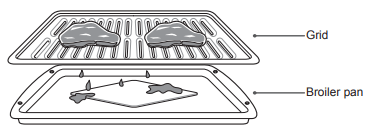
For best results, use a pan designed for broiling, as shown below. The broiler pan will catch grease spills and the grid will help prevent grease splatters
When broiling refer to the broiling guide for placing the rack.
Setting the oven to Broil
Turn the oven mode knob to select BroilHigh or Broil Low.
Press Start.
Allow the broiler to preheat for five minutes.
Place food in the oven.
Close the oven door. The oven door must be closed during broiling.
When broiling is finished, turn the oven mode knob to the Off position.
Favorite (For model : LSG4511)
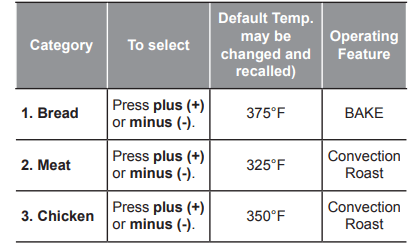
Use the Favorite feature to record and recall favorite recipe settings. Favorite can store and recall up to three settings. It cannot be used in combination with any other function except the Cook Time feature.
Setting the Favorite Function
Turn the oven mode knob to select Favorite.
Press plus (+) or minus (-) to cycle through the options (see table below). The default temperature appears in the display and Bake or Convection roast and Favorite flash.
Press Start to select desired option and press plus (+) or minus (-) to set the desired oven temperature. This temperature is stored and will be recalled on next use.
Press Start to begin cooking with the selected options.
To cancel operation at any time, turn the oven mode knob to the Off position.
Pizza
This function automatically sets the oven temperature to cook either frozen pizza with regular or rising crust, or freshly made pizza. Simply choose the type of pizza (see chart) and set the desired cook time.
Setting the Oven for Pizza
Turn the oven mode knob to select the Pizza mode. P1 appears in the display. Press plus(+) or minus(-) repeatedly to toggle between the P1, P2 and P3 options. (See Pizza Chart below.)
Press Start. The oven starts to preheat. As the oven preheats, the temperature is displayed and rises in 5-degree increments. Once the oven reaches the set temperature, a tone sounds and the oven light blinks on and off.
Place pizza in the oven, close the door and set the timer following the suggestions in the chart.
Turn the oven mode knob to the Off position to cancel Pizza at any time.
Remove the food from the oven.
Warm
This function will maintain an oven temperature of 170 °F. The Warm function will keep cooked food warm for serving up to three hours after cooking has finished. The Warm function may be used without any other cooking operations.
Setting the Warm Function
Turn the oven mode knob to select Warm.
Press Start.
Turn the oven mode knob to the Off position when warming is finished.
Proof
This feature maintains a warm oven for rising yeast leavened products before baking.
Setting the Proof Function
Use rack position 2 or 3 for proofing.
Turn the oven mode knob to select Proof.
Press Start.
Turn the oven mode knob to the Off position when proofing is finished.
MAINTENANCE
Removing and replacing the Gas Surface Burners
Grates and burner heads/caps can be removed for care and cleaning.
Cleaning Burner Heads/Caps
For even and unhampered flame, the slits in the burner heads must be kept clean at all times.The burner heads and caps (and the oval burner head and cap assembly) can be lifted off. Do not attempt to remove the oval burner cap.
Wash the burner caps in hot soapy water and rinse with clean water. Run water through the oval burner from the bottom stem to flush out debris.
Use care when cleaning the cooktop. The pointed metal ends on the electrodes could cause injury. Hitting an electrode with a hard object may damage it.
To remove burnt-on food, soak the burner heads in a solution of mild liquid detergent and hot water for 20–30 minutes. For stubborn stains, use a toothbrush or wire brush.
The burners will not operate properly if the burner ports or electrodes are clogged or dirty.
Burner caps and heads should be cleaned routinely, especially after excessive spillover.
Burners will not light if the cap is removed.
After Cleaning the Burner Heads/ Caps
Shake out any excess water and then let them dry thoroughly. Placing the oval burner upside down will allow the water to drain out more easily. Replace the burner heads and caps over the electrodes on the cooktop in the correct locations according to their size. Make sure the hole in the burner head is positioned over the electrode.
Burner Grates
The range consists of three separate professional style grates. For maximum stability, these grates should only be used when in their proper position. The center grate can be interchanged from front to back.
Cleaning the Cooktop Surface
Foods with high acid or sugar content may cause a dull spot if allowed to set. Wash and rinse soon after the surface has cooled. For other spills such as oil/ grease spattering, etc., wash with soap and water when the surface has cooled, then rinse and polish with a dry cloth.
Oven Air Vents
Air openings are located at the rear of the cooktop, at the top and bottom of the oven door, and at the bottom of the range
Control Panel
To prevent activating the control panel during cleaning, unplug the range. Clean up splatters with a damp cloth using a glass cleaner. Remove heavier soil with warm, soapy water. Do not use abrasives of any kind.
Front Manifold Panel and Knobs
It is best to clean the manifold panel after each use of the range. For cleaning, use a damp cloth and mild soapy water or a 50/50 solution of vinegar and water. For rinsing, use clean water and polish dry with a soft cloth.
Cleaning the Exterior
Painted and Decorative Trim
For general cleaning, use a cloth with hot soapy water. For more difficult soils and built-up grease, apply a liquid detergent directly onto the soil. Leave it on for 30 to 60 minutes. Rinse with a damp cloth and dry. Do not use abrasive cleaners.
Stainless Steel Surfaces
To avoid scratches, do not use steel wool pads.
Place a small amount of stainless steel appliance cleaner or polish on a damp cloth or paper towel.
Clean a small area, rubbing with the grain of the stainless steel if applicable.
Dry and buff with a clean, dry paper towel or soft cloth.
Repeat as necessary.
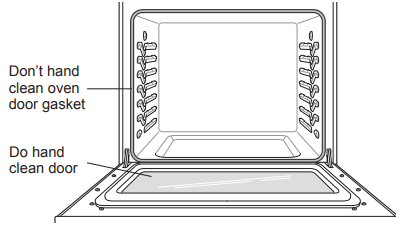
Oven Door
Use soapy water to thoroughly clean the oven door. Rinse well. Do not immerse the door in water.
You may use a glass cleaner on the outside glass of the oven door. Do not spray water or glass cleaner on the door vents.
Do not use oven cleaners, cleaning powders, or harsh abrasive cleaning materials on the outside of the oven door.
Do not clean the oven door gasket. The oven door gasket is made of a woven material that is essential for a good seal. Care should be taken not to rub, damage, or remove this gasket.
Door Care Instructions
Most oven doors contain glass that can break.
Oven racks
Remove the oven racks before operating the self clean cycle (For Model : LSG4513) and EasyClean®.
Food spilled into the tracks could cause the racks to become stuck. Clean with a mild, abrasive cleaner.
Rinse with clean water and dry.
EasyClean®
LG’s EasyClean® enamel technology provides two cleaning options for the inside of the range. The EasyClean® feature takes advantage of LG’s new enamel to help lift soils without harsh chemicals, and it runs using ONLY WATER for just 10 minutes in low temperatures to help loosen LIGHT soils before handcleaning.
For Model : LSG4513
While EasyClean® is quick and effective for small and LIGHT soils, the Self Clean feature can be used to remove HEAVY, built up soils. The intensity and high heat of the Self Clean cycle may result in smoke which will require the opening up of windows to provide ventilation. Compared to the more intense Self Clean process, your LG oven gives you the option of cleaning with LESS HEAT, LESS TIME, and virtually NO SMOKE OR FUMES.
When needed, the range still provides the self clean option for longer, more thorough oven cleaning for heavier, built up soils.
Benefits of EasyClean®
Helps loosen light soils before hand-cleaning
EasyClean® only uses water; no chemical cleaners
Makes for a better self-clean experience (For Model : LSG4513)
Delays the need for a self-clean cycle
Minimizes smoke and odors
Can allow shorter self-clean time
Cleaning Tips
Allow the oven to cool to room temperature before using the EasyClean® cycle. If your oven cavity is above 150 °F (65 °C), Hot will appear in the display, and the EasyClean® cycle will not be activated until the oven cavity cools down.
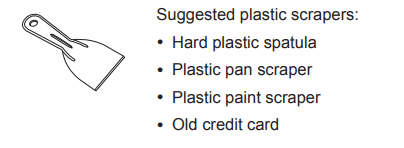
A plastic spatula can be used as a scraper to scrape off any chunks or debris before and during oven cleaning.
Using the rough side of a non-scratch scouring pad may help to take off burnt-on stains better than a soft sponge or towel.
Certain non-scratch scrubbing sponges, such as those made of melamine foam, available at your local stores, can also help improve cleaning.
The range should be level to ensure that the bottom surface of the oven cavity is entirely covered by water at the beginning of the EasyClean® cycle.
For best results, use distilled or filtered water. Tap water may leave mineral deposits on the oven bottom.
Soil baked on through several cooking cycles will be more difficult to remove with the EasyClean® cycle.
Do not open the oven door during the EasyClean® cycle. Water will not get hot enough if the door is opened during the cycle.
For hard to reach areas such as the back surface of the oven, it is better to use the Self Clean cycle. (For Model : LSG4513)
EasyClean® Instruction Guide
Remove oven racks and accessories from the oven.
Scrape off and remove any burnt-on debris with a plastic scraper.
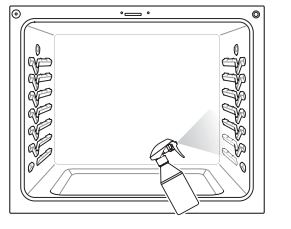
Fill a spray bottle (10 oz or 300 ml) with water and use the spray bottle to thoroughly spray the inside surfaces of the oven.
Use at least 1/5 (2 oz or 60 ml) of the water in the bottle to completely saturate the soil on both the walls and in the corners of the oven.
Spray or pour the remaining water (8 oz or 240 ml) onto the bottom center of the oven cavity. The indentation on the oven bottom should be fully covered to submerge all soils. Add water if necessary.
Close the oven door. Turn the oven mode knob to select EasyClean®. Press Start.
A tone will sound at the end of the 10 minute cycle. Turn the oven mode knob to the Off position to clear the display and end the tone.
After the cleaning cycle and during hand-cleaning, enough water should remain on the oven bottom to completely submerge all soils. Add water if necessary. Place a towel on the floor in front of the oven to capture any water that may spill out during hand-cleaning.
Clean the oven cavity immediately after the EasyClean® cycle by scrubbing with a wet, non-scratch scouring sponge or pad. (The scouring side will not scratch the finish.) Some water may spill into the bottom vents while cleaning, but it will be captured in a pan under the oven cavity and will not hurt the burner.
Once the oven cavity is cleaned, wipe any excess water with a clean dry towel. Replace racks and any other accessories.
If some light soils remain, repeat the above steps, making sure to thoroughly soak the soiled areas.
For Model : LSG4513
If stubborn soils remain after multiple EasyClean® cycles, run the Self Clean cycle. Be sure that the oven cavity is empty of oven racks and other accessories, and that the oven cavity surface is dry before running the Self Clean cycle. Consult the Self Clean section of your owner’s manual for further details.
Self Clean (For Model : LSG4513)
The Self Clean cycle uses extremely hot temperatures to clean the oven cavity. While running the Self Clean cycle, you may notice smoking or an odor. This is normal; especially if the oven is heavily soiled.
During Self Clean, the kitchen should be well ventilated to minimize the odors from cleaning.
Before Starting Self Clean
Remove the oven racks, broiler pan, broiler grid, all cookware, aluminum foil or any other material from the oven.
The kitchen should be well ventilated to minimize the odors from cleaning.
Wipe any heavy spillovers on the bottom of the oven.
Make sure that the oven light bulb cover is in place and the oven light is off.
The oven light cannot be turned on during a Self Clean cycle. The oven light cannot be turned on until the oven temperature has cooled below 500 ˚F (260 ˚C) after a Self Clean cycle is complete.
During the Self Clean cycle, the cooktop elements and warming drawer cannot be used.
Make sure that the oven light bulb cover is in place and the oven light is off.
It is normal for the fan to operate during the Self Clean cycle.
Setting Self Clean
The Self Clean function has cycle times of 2, 3, or 5 hours.
Self Clean Soil Guide
Soil Level
Cycle Setting
Lightly Soiled Oven Cavity
2-Hour Self Clean
Moderately Soiled Oven Cavity
3-Hour Self Clean
Heavily Soiled Oven Cavity
5-Hour Self Clean
Remove all racks and accessories from the oven.
Turn the oven mode knob to select Self Clean. The oven defaults to the recommended three-hour self clean for a moderately soiled oven. Press plus(+) or minus(-) to select a self clean time from 2 to 5 hours.
Press Start.
Once the self-clean cycle is set, the oven door locks automatically and the lock icon displays. You will not be able to open the oven door until the oven has cooled. The lock releases automatically when the oven has cooled.
Setting Self Clean with a Delayed Start
Remove all racks and accessories from the oven.
Turn the oven mode knob to select Self Clean. The oven defaults to the recommended three-hour self clean for a moderately soiled oven. Press plus(+) or minus(-) to select a self clean time from 2 to 5 hours.
Press Start Time.
Press plus(+) or minus(-) to enter the time of day you would like the Self Clean to start.
Press Start.
During Self Clean
The Self Clean cycle uses extremely hot temperatures to clean the oven cavity. While running the Self Clean cycle, you may notice smoking or an odor. This is normal, especially if the oven is heavily soiled.
As the oven heats, you may hear sounds of metal parts expanding and contracting. This is normal and will not damage the oven.
Do not force the oven door open when the lock is displayed. The oven door remains locked until the oven temperature has cooled. Forcing the door open will damage the door.
After the Self Clean Cycle
The oven door remains locked until the oven temperature has cooled.
You may notice some white ash in the oven. Wipe it off with a damp cloth or a soap-filled steel wool pad after the oven cools. If the oven is not clean after one self-clean cycle, repeat the cycle.
If oven racks were left in the oven and do not slide smoothly after a self-clean cycle, wipe racks and rack supports with a small amount of vegetable oil to make them glide more easily.
Fine lines may appear in the porcelain because it went through heating and cooling. This is normal and will not affect performance.
Changing the Oven Light
The oven light is a standard 40-watt appliance bulb. It turns on when the oven door is open. When the oven door is closed, press Light to turn it on or off.
Unplug the range or disconnect power.
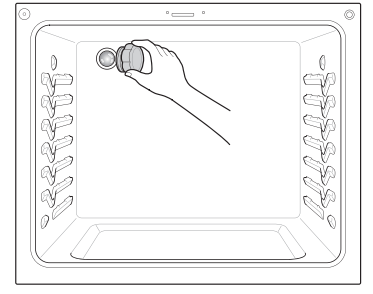
Turn the glass bulb cover in the back of the oven counterclockwise to remove.
Turn the bulb counterclockwise to remove it from the socket.
Insert the new bulb and turn it clockwise.
Insert the glass bulb cover and turn it clockwise.
Plug in the range or reconnect the power.
Removing and replacing the Lift-Off Oven Doors and Drawer
Removing the Door
Fully open the door.
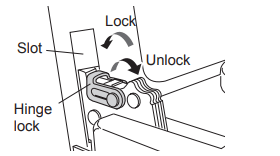
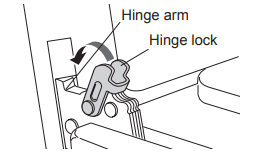
Unlock the hinge locks, rotating them as far toward the open door frame as they will go.
Firmly grasp both sides of the door at the top.
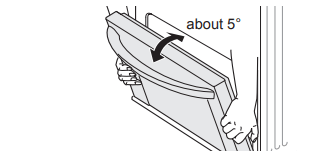
Close the door to the removal position (approximately five degrees) which is halfway between the broil stop position and fully closed. If the position is correct, the hinge arms will move freely.
Lift door up and out until the hinge arms are clear of the slots.
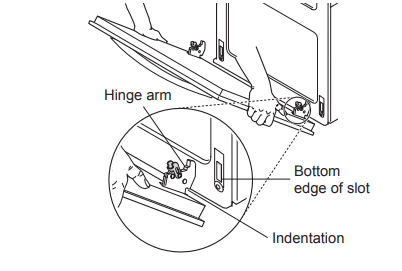
Replacing the Door
Firmly grasp both sides of the door at the top.
With the door at the same angle as the removal position, seat the indentation of the hinge arms into the bottom edge of the hinge slots. The notch in the hinge arms must be fully seated into the bottom edge of the slots.
Open the door fully. If the door will not open fully, the indentation is not seated correctly in the bottom edge of the slots.
Lock the hinge locks, rotating them back toward the slots in the oven frame until they lock.
Close the oven door.
Removing the Drawer
Most cleaning can be done with the drawer in place; however, the drawer may be removed if further cleaning is needed. Use warm water to thoroughly clean.
Fully open the drawer.
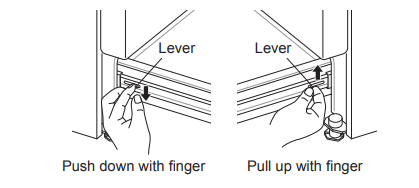
Locate the glide lever on each side of the drawer. Push down on the left glide lever and pull up on the right glide lever.
Pull the drawer away from the range.
Replacing the Drawer
Pull the bearing glides to the front of the chassis glide.
Align the glide on each side of the drawer with the glide slots on the range.
Push the drawer into the range until levers click (approximately 2 inch)
Pull the drawer open again to seat bearing glides into position.
TROUBLESHOOTING
FAQs
What types of cookware are recommended for use with the cooktop?
The pans must have a flat bottom and straight sides.
Only use heavy- gauge pans.
The pan size must match the amount of food to be prepared and the size of the surface element.
Use tight fitting lids.
Only use flat-bottom woks.
Why do the heating elements appear to be turning On and OFF during use of the cooktop or oven?
Depending on your cooktop element setting or the temperature selected in your oven it is NORMAL for the cooking elements to cycle on and off.
My new oven doesn’t cook like my old one. Is there something wrong with the temperature settings?
No, your oven has been factory tested and calibrated. For the first few uses, follow your recipe times and temperatures carefully. If you still think your new oven is too hot or too cold, you can adjust the oven temperature yourself to meet your specific cooking needs. Refer to the Oven Temperature Adjustment section in this manual for easy instructions on how to adjust your thermostat.
Is it normal to hear a clicking noise coming from the back of my oven when I am using it?
Your new range is designed to maintain a tighter control over your oven’s temperature. You may hear your oven’s heating elements click on and off more frequently on your new oven. This is NORMAL.
Why is the colon in the clock flashing?
This means that the product has just been plugged in, or that it has experienced a power interruption. To clear the flashing colon in the clock, press any key or reset the clock if needed.
During convection cooking the fan stops when I open the door. Is that normal?
Yes, this is normal. When the door is opened, the convection fan will stop until the door is closed.
Can I use aluminum foil to catch drippings in my oven cavity?
Never use aluminum foil to line the bottom or sides of the oven or the warming drawer. The foil will melt and stick to the bottom surface of the oven and will not be removable. Use a sheet pan placed on a lower oven rack to catch drippings instead. (If foil has already melted onto the bottom of the oven, it will not interfere with the oven's performance.)
Can I use aluminum foil on the racks?
Do not cover racks with aluminum foil. Covering entire racks with foil restricts air flow, leading to poor cooking results. Use a sheet pan lined with foil under fruit pies or other acidic or sugary foods to prevent spillovers from damaging the oven finish.
Can I leave my racks in the oven when running a Self Clean cycle? (For Model : LSG4513)
No. Although it will not damage the racks, it will discolor them and may make them hard to slide in and out during use. Remove all items from the oven before starting a Self Clean cycle.
What should I do if my racks are sticky and have become hard to slide in and out?
Over time, the racks may become hard to slide in and out. Apply a small amount of olive oil to the ends of the racks. This will work as a lubricant for easier gliding.
What should I do for hard to remove stains on my cooktop?
The cooktop should be cleaned after every use to prevent permanent staining. When cooking foods with high sugar content, such as tomato sauce, clean the stain off with a scraper while the cooktop is still warm. Use an oven mitt when scraping to prevent burns. Refer to the MAINTENANCE section of this owner's manual for further instruction.
Why aren't the function buttons working?
Make sure that the range is not in Lockout mode. The lock will show in the display if Lockout is activated. To deactivate Lockout, pressing Probe or Clock for three seconds. The unlock melody sounds and Loc appears in the display until the controls are unlocked.
My range is still dirty after running the EasyClean® cycle. What else should I do?
The EasyClean® cycle only helps to loosen light soils in your oven range to assist in hand-cleaning of your oven. It does not automatically remove all soils after the cycle. Some scrubbing of your oven range is required after running the EasyClean® cycle.
I tried scrubbing my oven after running EasyClean®, but some soils still remain. What can I do?
The EasyClean® feature works best when the soils are fully soaked and submerged in water before running the cycle and during hand-cleaning. If soils are not sufficiently soaked in water, it can negatively affect the cleaning performance. Repeat the EasyClean® process using sufficient water.
• For Model : LSG4513
Sugar-based and certain greasy soils are especially hard to clean. If some stubborn soils remain, use the Self Clean feature to thoroughly clean your oven.
Soils on my oven walls are not coming off. How can I get my walls clean?
Soils on the side and rear walls of your oven range may be more difficult to fully soak with water. Try repeating the EasyClean® process with more than the ¼ cup (2 oz or 60 ml) spray recommended.
Will EasyClean® get all of the soils and stains out completely?
It depends on the soil type. Sugar-based and certain grease stains are especially hard to clean. Also, if stains are not sufficiently soaked in water, this can negatively affect cleaning performance.
For Model : LSG4513
If stubborn or built-up stains remain, use the Self Clean feature. Refer to the Self Clean section of your owner's manual.
Are there any tricks to getting some of the stubborn soils out?
Scraping the soils with a plastic scraper before and during hand-cleaning is recommended. Fully saturating soils with water is also recommended.
For Model : LSG4513
However, certain types of soils are harder to clean than others. For these stubborn soils, the Self Clean cycle is recommended. Consult the Self Clean section of your owner's manual for details.
Is it safe for my convection fan, broil burner or heater element to get wet during EasyClean®?
Yes. The convection fan, broiler burner or heater element may get a little wet during cleaning. However, direct spray onto the broil burner and heater elements is not necessary because these are self-cleaning during regular use.
Do I need to use all 1¼ cups (10 oz or 300 ml) of water for EasyClean®?
Yes. It is highly recommended that 1 cup (8 oz or 240 ml) of water be sprayed or poured on the bottom and an additional ¼ cup (2 oz or 60 ml) of water be sprayed on walls and other soiled areas to fully saturate the soils for better cleaning performance.
I see smoke coming out of my oven range’s cooktop vents during EasyClean®. Is this normal?
This is normal. This is not smoke. It is actually water vapor (steam) from the water in the oven cavity. As the oven heats briefly during EasyClean®, the water in the cavity evaporates and escapes through the oven vents.
How often should I use EasyClean®?
EasyClean® can be performed as often as you wish. EasyClean® works best when your oven is LIGHTLY soiled from such things as LIGHT grease splatter and small drops of cheese. Please refer to the EasyClean® section in your owner's manual for more information.
What is required for EasyClean®?
A spray bottle filled with 1¼ cups (10 oz or 300 ml) of water, a plastic scraper, a non-scratch scrubbing pad and a towel. You should not use abrasive scrubbers such as heavy-duty scouring pads or steel wool. Except for a towel, all of the materials you need are included in a special cleaning kit with your new range.
Is it safe for water to spill into the oven bottom vents during cleaning?
Some water spillage into the oven bottom vents (gas range) is okay. However, it is recommended to try avoid spilling too much water into the vents.
Before Calling for Service
Before you call for service, review this list. It may save you time and expense. The list includes common occurrences that are not the result of defective workmanship or materials in this appliance.
Symptoms
Possible Cause / Solutions
Top burners do not light or do not burn evenly.
Make sure that the electrical plug is inserted into a live, properly grounded outlet.
Remove the burners and clean them. Check the electrode area for burnt on food or grease. See Cleaning Burner Heads/Caps in the MAINTENANCE section.
Make sure that the burner parts are installed correctly.
See Removing and Replacing the Gas Surface Burners in the MAINTENANCE section.
Burner flames are very large or yellow.
If the range is connected to LP gas, contact the technician who installed your range or made the conversion.
Surface burners light but the oven does not.
Make sure that the oven gas shut-off valve, located behind the range, is fully open.
Food does not bake or roast properly.
Incorrect oven control settings. See Control Panel Overview in the OPERATION section.
Incorrect rack position. See Removing and Replacing the Oven Racks in the OPERATION section.
Incorrect cookware is being used. See Convection Bake in the OPERATION section.
Oven thermostat needs adjustment.
See Adjusting the Oven Thermostat in the OPERATION section.
The Clock is not set correctly. See Changing Oven Settings in the OPERATION section.
Aluminum foil used improperly in the oven. See Removing and Replacing the Oven Racks.
Food does not broil properly in the oven.
Incorrect oven control settings. See Control Panel Overview in the OPERATION section.
The oven door is not closed. See Broil in the OPERATION section.
Aluminum foil used on the broiling pan and grid is not fitted properly.
Oven temperature is too hot or too cold.
The oven thermostat needs adjustment. See Adjusting the Oven Thermostat in the OPERATION section.
Clock and timer does not work.
Make sure the electrical plug is inserted into a live, properly grounded outlet. Replace the fuse or reset the circuit breaker.
Improper oven control settings. See Changing Oven Settings in the OPERATION section.
Oven light does not work.
The light bulb is loose or defective. Tighten or replace the bulb.
The plug on the range is not completely inserted in the electrical outlet. Make sure the electrical plug is inserted into a live, properly grounded outlet.
Self Clean is not working. *
The oven temperature is too high to set a self clean operation. Allow the range to cool down to room temperature and reset the controls.
Improper oven control settings. See Self Clean in the MAINTENANCE section.
“Crackling” or
“popping” sound.
• This is the sound of the metal heating up and cooling down during both the cooking and cleaning functions. This is normal.
*For Model : LSG4513
Symptoms
Possible Cause / Solutions
Too much smoke during the Self Clean cycle. *
Too much soil in the oven. Open the windows to get rid of the smoke from the room. Turn the oven mode knob to select Self Clean. Wait until the light goes off before trying to open the oven door. Wipe up the excess soil and reset the clean cycle.
The oven door does not open after a Self Clean cycle. *
The oven temperature is too high. Wait up to one hour for it to cool down.
The oven door is not clean after a Self
Clean cycle. *
Incorrect oven control settings. See Self Clean in the MAINTENANCE section.
The oven was heavily soiled. Clean up heavy spills before beginning the Self Clean cycle. Heavily soiled ovens may need either a longer Self Clean or two Self Clean cycles.
Clean and door flash in the display *
• The self clean cycle has been selected, but the door is not closed.
- Close the oven door.
"Loc" message appears when you want to cook. *
The oven door is locked because the temperature inside of the oven is too high. Press and hold Clock for three seconds.
Oven control beeps and displays an F error code.
• Check the main gas shut-off valve or
the oven gas shut-off valve and call for service.
• Remove the power from the range for five minutes and then reconnect the power. If the function error code repeats, call for service.
CODE
CAUSE
F-3
Key short error
F-9
Oven not heating
The oven racks were cleaned in a Self Clean cycle. *
Apply a small amount of vegetable oil to a paper towel and wipe the edges of the oven racks. Do not use lubricant sprays.
Clock is flashing.
Power outage or surge. Reset the clock. If the oven was in use, you must reset it by pressing the oven mode knob to the Off position. Reset the clock and any cooking function.
“Burning” or “oily” odor emitting from the vent.
This is normal in a new oven and will disappear with use. To speed the process, set a Self Clean cycle for a minimum of three hours. See Self Clean in the MAINTENANCE section.
Strong odor.
An odor from the insulation around the inside of the oven is normal for the first few times the oven is used.
Fan noise
• A convection fan may automatically turn on and off.
- This is normal.
Fan operation
It is normal for the fan to operate periodically throughout a normal bake cycle in the oven. This is to ensure even baking results.
Burners are not lighting properly after cleaning the cooktop surface.
Make sure that the burner heads and caps are completely dry and properly positioned.
When lighting just one burner, clicking noise is heard from all the burners.
This is normal. Electric spark igniters from the burners cause the clicking noise. All the spark igniters on the cooktop will activate when igniting just one burner.
Light can be seen through the oven air vents.
While the Broil function is running, it is normal to see a light between the oven air vents.
Burners are not lighting properly after cleaning the cooktop surface.
Make sure that the burner heads and caps are completely dry and properly positioned.
When lighting just one burner, clicking noise is heard from all the burners.
This is normal. Electric spark igniters from the burners cause the clicking noise. All the spark igniters on the cooktop will activate when igniting just one burner.
Light can be seen through the oven air vents.
While the Broil function is running, it is normal to see a light between the oven air vents.

 blinks (For Model : LSG4513)in the display.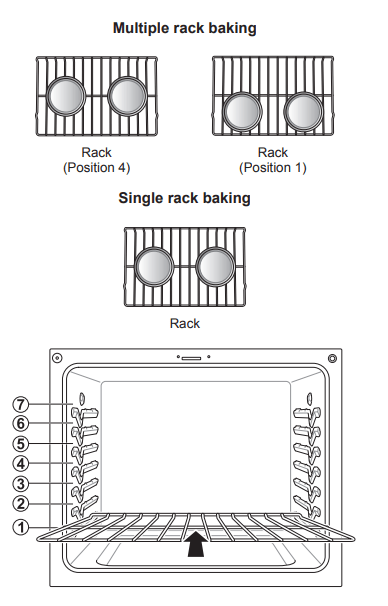

 will show in the display if Lockout is activated. To deactivate Lockout, pressing Probe or Clock for three seconds. The unlock melody sounds and Loc appears in the display until the controls are unlocked.