Overview
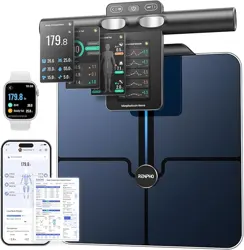
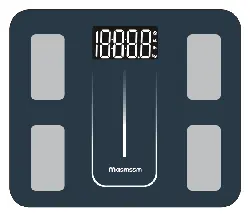
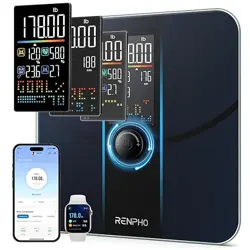
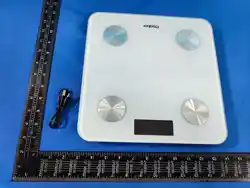
The INEVIFIT EROS is a smart body composition analyzer scale. It uses Bluetooth technology to connect to a smartphone app, where it displays 13 key body metrics. The scale features a large LED display, a tempered glass platform, and a maximum weight capacity of 400 lbs (180 kg).

Features
Body Composition Analysis
The scale measures and tracks 13 fitness metrics:
- Body Weight
- Body Fat Percentage
- Body Water Percentage
- Muscle Mass
- BMI (Body Mass Index)
- BMR (Basal Metabolic Rate)
- Bone Mass
- Skeletal Muscle
- Fat-Free Body Weight
- Subcutaneous Fat
- Protein
- Metabolic Age
- Visceral Fat
Physical Design
- Platform: 6mm thick tempered glass.
- Display: Large 3.6-inch luminous LED display that activates automatically.
- Dimensions: 11.8 x 11.8 x 1 inches.
- Weight Capacity: 400 lbs / 180 kg.
- Sensors: Upgraded auto-calibrating high-strain sensors.
- Accuracy: +/- 0.2 lbs.

Smart Connectivity
- Bluetooth: Connects wirelessly to the Eros Scale smartphone app.
- App Sync: Data syncs with Fitbit, Apple Health, and Google Fit.
- User Profiles: The app supports an unlimited number of user profiles.
Power & Operation
- Power Source: 3 x AAA batteries (included).
- Auto On/Off: The scale turns on when stepped on and off automatically.
What's in the Box
- EROS Smart Scale
- Instruction Manual
- 3 x AAA Batteries
Use Guide
Initial Setup
- Place the scale on a hard, flat surface. Avoid carpets or uneven flooring.
- Open the battery compartment on the underside of the scale and insert the 3 AAA batteries.
- The scale will initialize. You may see the display light up briefly.
Connecting to the App
- On your smartphone, download the "Eros Scale" app from the Apple App Store or Google Play Store.
- Open the app and create an account.
- Enable Bluetooth on your phone.
- Follow the in-app instructions to pair the scale with your phone. This typically involves stepping on the scale to activate it.
- Set up your user profile in the app by entering details like age, height, and gender.
Video: Product Setup & App Connection
The video guides you through the initial product setup and connecting the scale to the smartphone app.
Taking a Measurement
- Ensure the scale is on a flat, hard surface.
- Open the Eros Scale app on your phone. Make sure Bluetooth is enabled.
- Step onto the scale barefoot. Stand still with your feet aligned with the four metal electrodes.
- The large LED display will show your weight. The detailed body composition data will appear in the app on your smartphone.
- Step off the scale. The data will be saved to your profile in the app.
Note: For consistent and accurate body composition readings, try to weigh yourself at the same time of day (e.g., in the morning before eating or drinking).
Important: The scale uses Bioelectrical Impedance Analysis (BIA). Do not use if you have a pacemaker or other internal medical device. Consult a doctor if you are pregnant or have health concerns regarding body composition analysis.
Understanding the Display & Indicators
- LED Display: Shows body weight in lbs or kg. It will illuminate when you step on the scale.
- Bluetooth Icon: An indicator on the display or within the app shows the connection status.
- App Interface: All 13 body metrics are displayed within the Eros Scale app, with historical trends and graphs.

Managing Multiple Users
The app can recognize different users automatically based on weight. To set this up:
- Each user must create their own profile within the app with their specific details.
- When a user steps on the scale, the app will match the measured weight to the closest profile and log the data accordingly.
Syncing with Other Apps
Within the Eros Scale app settings, you can enable syncing with:
- Fitbit
- Apple Health
- Google Fit
This allows your weight and body composition data to be shared with your preferred health ecosystem.
Care & Maintenance
- Wipe the glass platform with a slightly damp cloth. Do not use abrasive cleaners or submerge the scale in water.
- Store in a dry place. Avoid extreme temperatures and humidity.
- Replace the batteries when the display becomes dim or unresponsive. Use 3 AAA batteries.
Troubleshooting
Scale does not turn on.
- Check that the batteries are correctly installed.
- Replace with new AAA batteries.
Scale shows inconsistent weight readings.
- Ensure the scale is on a hard, flat surface (not carpet).
- Make sure your feet are dry and the scale's electrodes are clean.
- Step on and off, allowing it to reset to zero before weighing.
App does not connect to the scale.
- Ensure Bluetooth is enabled on your smartphone.
- Make sure the scale is awake (step on it briefly to activate it) and within range (typically within 10 feet).
- Restart the app and your phone's Bluetooth.
- Check the app's permissions to ensure it has access to Bluetooth.
Data is not syncing to Apple Health/Google Fit/Fitbit.
- Verify that syncing is enabled in the Eros Scale app settings.
- Check that you are logged into the respective third-party app.
- Ensure the Eros Scale app has permission to write data to the health service.
Technical Specifications
| Model Number | I-BF002 |
|---|---|
| Weight Capacity | 400 lbs / 180 kg |
| Readout Accuracy | +/- 0.2 lbs |
| Platform Dimensions | 11.8 x 11.8 x 1 inches |
| Display Type | 3.6" LED |
| Platform Material | 6mm Tempered Glass |
| Power Requirements | 3 x AAA Batteries (included) |
| Connectivity | Bluetooth |
| Compatible Apps | Eros Scale (iOS & Android), Fitbit, Apple Health, Google Fit |