Model: ECT2899
Overview
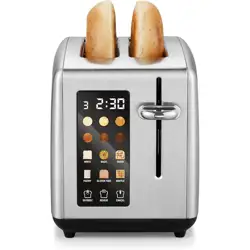
The Elite Gourmet 2-Slice Digital Toaster is designed for consistent toasting of various bread types. It features a digital countdown display, one-touch preset controls, and extra-wide slots to accommodate bagels, thick bread, and other items.


Features and Specifications
Physical Specifications
- Brand: Elite Gourmet
- Model Number: ECT2899
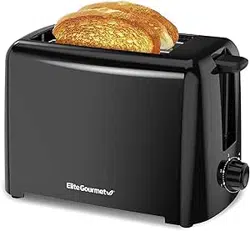
- Color: Gloss Black (also available in Black/Stainless Steel and Stainless Steel)
- Material: Stainless Steel
- Dimensions (D x W x H): 10.7" x 7.7" x 6.6"
- Slot Count: 2
- Slot Width: 1.55 inches (extra-wide)
- Wattage: 1300 watts
Control Panel and Display
The front control panel includes an LCD display and touch-sensitive buttons.
- LCD Display: Shows a digital countdown timer during operation.
- Shade Settings: 6 browning levels (1-6).
- Preset Menus: 6 one-touch programs for different bread types.
- Function Buttons: Defrost, Reheat, and Cancel.
Key Functions
- One-Touch Presets: Automatically adjusts time and heat for specific bread types.
- Defrost Function: Toasts bread directly from the freezer.
- Reheat Function: Warms toast without additional browning.
- Cancel Function: Stops the toasting cycle immediately.
- Self-Centering Guides: Help position bread for even browning.
- Removable Crumb Tray: Slides out from the bottom for easy cleaning.
Use Guide
Before First Use
- Remove all packaging materials.
- Wipe the exterior with a damp cloth and dry thoroughly.
- Operate the toaster without bread for one cycle on a high setting to burn off any manufacturing residues. Ensure the area is well-ventilated.
Basic Toasting
- Plug the toaster into a standard 120V electrical outlet.
- Place one or two slices of bread into the extra-wide slots. The self-centering guides will help position the bread.
- Select your desired browning level (1-6) using the shade control buttons.
- Press the lever down to begin the toasting cycle. The digital display will show the countdown.
- When the cycle is complete, the toast will pop up automatically. You may lift the lever slightly to raise the toast higher for easy removal.
- Caution: The toaster and toast will be hot. Use caution when removing.
Using the Preset Functions
The toaster has 6 preset programs for common items. Press the corresponding button for your bread type. The toaster will automatically select the appropriate time and heat setting.
- Common presets include: White Bread, Whole Wheat, Bagel, Pastry, Frozen Waffle, and Reheat.
Using the Defrost Function
- Place frozen bread, waffles, or bagels into the slots.
- Press the Defrost button. The indicator will light up.
- Select your desired browning level.
- Press the lever down to start. The cycle will be longer than a standard toast cycle to account for the frozen state.
Using the Reheat Function
- Place previously toasted bread into the slots.
- Press the Reheat button. The indicator will light up.
- Press the lever down. The toaster will warm the bread without significantly darkening it further.
Canceling a Cycle
To stop the toaster at any time, press the Cancel button. The lever will pop up, and the heating elements will turn off immediately.
Cleaning and Maintenance
- Always unplug the toaster and allow it to cool completely before cleaning.
- Wipe the exterior with a soft, damp cloth. Do not use abrasive cleaners or scouring pads.
- To clean the crumb tray: Pull the tray out from the bottom of the toaster over a trash bin. Empty it, wipe it clean, and slide it back into place.
- To remove lodged crumbs: Unplug the toaster, turn it upside down, and gently shake it over a sink or trash bin. Do not insert any utensils into the slots.
- Never immerse the toaster, cord, or plug in water or any other liquid.
Safety Information
- This appliance is for household use only.
- Use the toaster on a stable, flat, heat-resistant surface, away from the edge of the counter.
- Keep the toaster away from curtains, cabinets, paper, and other flammable materials during use.
- Do not insert any objects (forks, knives, etc.) into the toaster slots.
- Do not toast items with extremely runny toppings (like butter) or items wrapped in packaging.
- Do not operate the toaster if the cord or plug is damaged, or if the appliance malfunctions.
- This toaster is not intended for use by persons (including children) with reduced physical, sensory, or mental capabilities.
- Supervise children to ensure they do not play with the appliance.
- The exterior surfaces may become hot during use.
Troubleshooting
- Toaster does not turn on: Check that the power cord is securely plugged into the outlet.
- Bread is not browned: Ensure the browning level is set above 1. Check that the bread is not excessively thick for the selected preset.
- Bread is burning: Select a lower browning level. Ensure you are using the correct preset for your bread type.
- Uneven toasting: Ensure bread is placed centrally in the slot. Clean the crumb tray to ensure proper airflow.
- Display is not working: Unplug the toaster for 60 seconds, then plug it back in. If the issue persists, contact support.
Warranty and Support
Elite Gourmet provides support for this product. For assistance, you can call, email, or live chat with their US-based support team.
Model Number: ECT2899
UPC: 717056140733
ASIN: B0FM2P7XXG