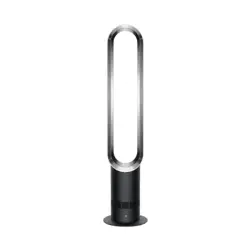
Grelife TF-2202EB 13'' Tower Fan for Bedroom, 26dB Quiet Floor Fan with Remote, 3 Mode, 1-8H Timer

Product's Documents

Below are documents related to this product, you can read online or download:
TF-2202EB photo

Model: TF-2202EB | Color: Black

1. Overview

The Grelife 13" Tower Fan is a portable, bladeless floor fan designed for indoor use in bedrooms, offices, and living rooms. It features a slim, space-saving design with a clear electronic display and remote control operation.

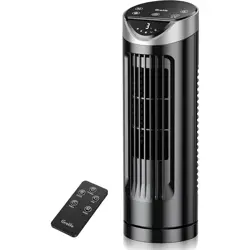
Front view of the Grelife 13-inch black tower fan

Key attributes include:

  • Dimensions: 15.7"D x 5.7"W x 5.7"H
  • Power Source: AC (Plug-in)
  • Material: Plastic construction
  • Included Components: Fan unit and remote control.

2. Features and Specifications

2.1. Physical Features

  • Design: Bladeless tower design with a matte black finish.
  • Display: Electronic LED display on the top control panel shows settings.
  • Control Panel: Located on the top of the fan, featuring touch-sensitive buttons.
  • Air Outlet: A vertical grille running the height of the fan.
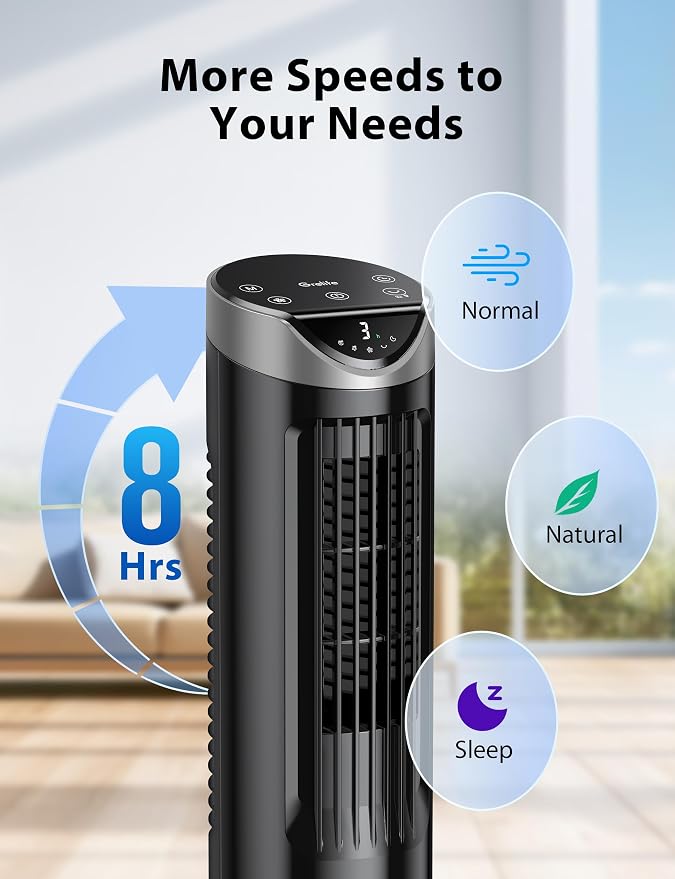
Top-down view showing the control panel and display of the fan

2.2. Performance Specifications

  • Motor: 30W DC motor.
  • Speed: 2700 RPM maximum.
  • Airflow Velocity: Up to 27 feet per second (ft/s).
  • Noise Level: Less than 26 decibels (dB) at high speed.
  • Oscillation: 90° wide-angle automatic oscillation.
  • Timer: Programmable from 1 to 8 hours.
  • Wind Modes: 3 modes (Normal, Natural, Sleep).
  • Fan Speeds: 3 speed settings.

3. Control Guide

3.1. Control Panel (On Fan)

The touch-sensitive control panel is located on the top of the fan unit. The electronic display is integrated into this panel.

Close-up of the fan's electronic control panel and display

Typical controls include:

  • Power (On/Off): Turns the fan on or off.
  • Speed (▲/▼): Cycles through the 3 fan speed levels.
  • Mode: Selects between Normal, Natural, and Sleep wind modes.
  • Timer: Sets the auto-off timer in 1-hour increments up to 8 hours.
  • Oscillation: Turns the 90° left-right oscillation on or off.
  • Display Dimmer/Light: Adjusts or turns off the brightness of the LED display.

3.2. Remote Control

A handheld remote is included for convenient operation from a distance. It requires 2 x AAA batteries (not included).

The included remote control for the tower fan

The remote control mirrors the functions of the top panel:

  • Power On/Off
  • Speed Selection
  • Mode Selection (Normal/Natural/Sleep)
  • Timer Setting (1-8H)
  • Oscillation On/Off

4. Use Guide

4.1. Initial Setup

  1. Unpack: Remove the fan and remote from the packaging.
  2. Placement: Place the fan on a stable, level, and dry floor or desk surface. Ensure at least 20 inches of clearance around the air outlet and inlet for proper airflow.
  3. Power: Plug the power cord into a standard 120V AC wall outlet.
  4. Remote: Insert 2 AAA batteries into the remote control.

4.2. Basic Operation

  1. Press the Power
  2. Use the Speed buttons to select your desired airflow strength (Low, Medium, High).
  3. Press the Mode button to cycle through the wind options:
    • Normal: Constant, steady airflow.
    • Natural: Simulates a natural breeze by varying the fan speed rhythmically.
    • Sleep: Provides quieter, gradual cooling. The fan may automatically reduce speed over time.
  4. Press the Oscillation button to start or stop the 90° wide-angle sweeping motion.

4.3. Using the Timer

To set the fan to turn off automatically:

  1. While the fan is on, press the Timer button repeatedly. The display will show the set time (1H, 2H, ... 8H).
  2. Each press increases the timer by 1 hour, cycling from 1 to 8 hours and then off.
  3. The selected time will be shown on the display. The fan will automatically power off after the set duration.

4.4. Display Adjustment

To adjust or turn off the LED display light for a darker room environment (e.g., during sleep):

  1. Locate the display dimmer button (often symbolized by a light bulb or "Light").
  2. Press it repeatedly to cycle through brightness levels or to turn the display off completely.

5. Care and Maintenance

WARNING: Always unplug the fan from the electrical outlet before cleaning or performing any maintenance.

5.1. Cleaning

  • Exterior: Wipe the exterior housing with a soft, dry cloth. For stubborn dirt, use a cloth slightly dampened with mild soapy water. Do not use abrasive cleaners.
  • Air Inlet/Outlet Grilles: Use a vacuum cleaner with a brush attachment or a soft brush to remove dust and lint from the grilles to maintain optimal airflow.
  • Do NOT immerse the fan, remote control, or power cord in water or any other liquid.

5.2. Storage

If not using the fan for an extended period, unplug it, clean it as described above, and store it in its original packaging or a dry place.

6. Troubleshooting

Problem Possible Cause Solution
Fan does not turn on. Not plugged in. Power outlet issue. Ensure the power cord is securely plugged into the fan and the wall outlet. Test the outlet with another device.
Remote control does not work. Dead or incorrectly installed batteries. Obstruction between remote and fan. Replace the AAA batteries. Ensure they are installed with correct polarity (+/-). Point the remote directly at the fan's control panel from within a reasonable distance.
Reduced airflow. Air inlet or outlet grilles are blocked by dust. Unplug the fan. Clean the grilles with a vacuum or soft brush as per the cleaning instructions.
Fan is making an unusual noise. An object may be touching the internal fan mechanism. Loose parts. Unplug the fan immediately. Check for and remove any foreign objects near the air inlet. Ensure the fan is on a stable surface. If noise persists, discontinue use.
Display is not lit. The display may be dimmed or turned off. Press the display dimmer/light button on the control panel to restore brightness.

7. Safety Information

  • This is an indoor use appliance only. Do not use outdoors or in wet conditions.
  • Do not operate the fan if the power cord or plug is damaged.
  • Do not insert fingers or objects into the air inlet or outlet grilles.
  • Keep the fan away from heat sources and open flames.
  • Do not cover the fan or block the air inlet/outlet during operation.
  • This appliance is not intended for use by persons (including children) with reduced physical, sensory, or mental capabilities, unless they have been given supervision or instruction concerning use of the appliance by a person responsible for their safety.
  • Children should be supervised to ensure they do not play with the appliance.
  • Always unplug the fan when not in use for long periods or before cleaning.

8. Product Information

Brand: Grelife

Model Number: TF-2202EB

ASIN: B0DQWPL3Z2

Manufacture Year: 2025

Compliance: For indoor use only. Follow all local regulations for disposal of electronic products.

Specifications and design are subject to change without notice.

Reference file: Grelife TF-2202EB 13'' Tower Fan for Bedroom, 26dB Quiet Floor Fan with Remote, 3 Mode, 1-8H Timer

Specifications

Grelife TF-2202EB Questions and Answers