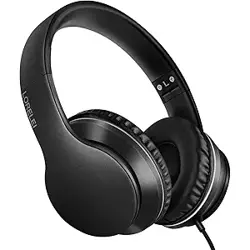
Thank you for choosing the LORELEI QC60 Hybrid Active Noise Cancelling Headphones. This manual provides instructions for setup, operation, and maintenance. Please read carefully before use.
Overview
The LORELEI QC60 is a wireless over-ear Bluetooth headset with hybrid active noise cancellation. Designed for travel, home, and office use, it features a lightweight, foldable construction, memory foam earmuffs, and up to 60 hours of playtime.

Key features at a glance:
- Hybrid Active Noise Cancellation
- Bluetooth 5.0 wireless connectivity (range: 10 metres)
- 60-hour battery life
- 40 mm dynamic drivers, frequency response 20 Hz – 20,000 Hz
- Built-in microphone for hands-free calls
- Foldable, lightweight design (0.5 kg)
- Memory foam ear cushions for comfort
- Detachable 3.5 mm audio cable for wired use
What's in the Box
- LORELEI QC60 Headphones (1 unit)
- Detachable 3.5 mm audio cable
- Extra ear cushions
- User manual
Product Specifications
| Specification | Details |
|---|---|
| Brand | LORELEI |
| Model Name | QC60 ANC Headphones |
| Colour | Beige White (also available in Space Black) |
| Ear Placement | Over Ear |
| Form Factor | Over Ear |
| Noise Control | Hybrid Noise Cancellation |
| Connectivity Technology | Wireless (Bluetooth 5.0) |
| Bluetooth Range | 10 metres |
| Headphone Jack | 3.5 mm Jack (detachable cable) |
| Audio Driver Type | Dynamic Driver |
| Audio Driver Size | 40 mm |
| Frequency Response | 20 Hz – 20,000 Hz |
| Sensitivity | 110 dB |
| Battery Life | 60 hours |
| Item Weight | 0.5 kg |
| Enclosure Material | Silicone |
| Water Resistance | Not water resistant |
| Compatible Devices | Smartphones, laptops, desktops, tablets, mobile phones |
| Control Method | Push Button |
| Product Features | Adjustable Headband, Microphone Included, Noise Cancellation, Noise Isolation, Surround Sound |
Features
Hybrid Active Noise Cancellation
The QC60 uses hybrid noise cancellation technology to reduce ambient noise, allowing you to focus on your audio. The system combines feedforward and feedback microphones for effective noise reduction in various environments.

Wireless Bluetooth 5.0 Connectivity
Bluetooth 5.0 provides a stable wireless connection up to 10 metres (33 feet) from your device. Compatible with smartphones, tablets, laptops, and desktop computers.
60-Hour Battery Life
Enjoy up to 60 hours of playback on a full charge. Battery life may vary depending on volume level and usage of noise cancellation.
Comfort and Design
The headphones feature memory foam ear cushions and a lightweight, foldable design for easy portability. The adjustable headband ensures a secure fit.

Built-in Microphone
A built-in microphone enables hands-free calling and voice assistant access.
Wired Mode
Use the included detachable 3.5 mm audio cable to connect to devices without Bluetooth, such as audio players or in-flight entertainment systems.

Controls
All controls are operated via push buttons on the ear cups. Functions include power, volume, track skip, play/pause, and noise cancellation toggle.

Use Guide
Charging the Headphones
- Connect the provided USB charging cable to the charging port on the right ear cup.
- Connect the other end to a USB power source (computer, wall adapter, etc.).
- The LED indicator will show red while charging and turn off (or change to blue) when fully charged.
- A full charge takes approximately 2–3 hours.
Powering On/Off
- Power On: Press and hold the power button for 2–3 seconds until the LED indicator flashes blue.
- Power Off: Press and hold the power button for 3–5 seconds until the LED indicator turns red and then off.
Bluetooth Pairing
- Ensure the headphones are powered off.
- Press and hold the power button for about 5 seconds until the LED indicator rapidly flashes blue and red (pairing mode).
- On your device, enable Bluetooth and search for available devices.
- Select "LORELEI QC60" from the list.
- If prompted, enter the PIN "0000" or confirm pairing.
- Once connected, the LED will flash blue slowly.
Note: The headphones will automatically attempt to reconnect to the last paired device when powered on.
Using Noise Cancellation
- Press the ANC button (marked with a noise cancellation icon) on the ear cup to toggle hybrid noise cancellation on or off.
- When ANC is active, the LED indicator may show a steady green or blue light (depending on model variant).
Audio Playback and Calls
- Play/Pause: Press the multifunction button once.
- Volume Up/Down: Press the volume + or – buttons.
- Next/Previous Track: Press and hold the volume + or – buttons for 2 seconds.
- Answer/End Call: Press the multifunction button once.
- Reject Call: Press and hold the multifunction button for 2 seconds.
Wired Connection
- Insert the 3.5 mm plug of the detachable cable into the headphone jack on the left ear cup.
- Connect the other end to your audio source.
- When using wired mode, the headphones do not require battery power. Bluetooth and ANC functions are disabled.
Folding and Storage
The ear cups rotate and fold inward for compact storage. Always fold the headphones before placing them in a bag or case to protect the headband and ear cushions.

Replacing Ear Cushions
- Gently pull the old ear cushion away from the ear cup, starting from the edge.
- Align the new cushion with the ear cup rim and press firmly until it snaps into place.
- Ensure the cushion is securely attached all around.
Indicators and Buttons
| Button/Indicator | Function |
|---|---|
| Power button | Press and hold to power on/off; short press for play/pause (in music mode) or answer/end call |
| Volume + / Next track | Short press: volume up; long press: next track |
| Volume – / Previous track | Short press: volume down; long press: previous track |
| ANC button | Toggle hybrid noise cancellation on/off |
| LED indicator | Blue flashing: Bluetooth pairing; Blue slow flash: connected; Red: charging; Off: fully charged or powered off |
| 3.5 mm jack | Wired audio input (left ear cup) |
| Charging port | USB-C (or micro USB – refer to product label) for charging |
Troubleshooting
| Issue | Possible Cause | Solution |
|---|---|---|
| Headphones do not power on | Battery depleted | Charge the headphones for at least 30 minutes, then try again. |
| No sound or intermittent audio | Bluetooth connection lost or low battery | Re-pair the headphones with your device. Ensure battery is charged. |
| Cannot pair via Bluetooth | Headphones not in pairing mode | Power off, then press and hold power button for 5 seconds until LED flashes blue/red. |
| Noise cancellation not working | ANC not activated | Press the ANC button to enable noise cancellation. Check if battery is low. |
| Microphone not working during calls | Wrong audio source selected | Ensure your device is using the headset profile (HSP) for calls. |
| Headphones uncomfortable | Ear cushions worn or headband not adjusted | Replace ear cushions if necessary. Adjust headband for a better fit. |
Safety and Maintenance
- Do not expose the headphones to water, moisture, or extreme temperatures.
- Clean the ear cushions and headband with a soft, dry cloth. Do not use solvents or abrasive cleaners.
- Store the headphones in a cool, dry place when not in use.
- Do not disassemble or attempt to repair the headphones yourself. Contact LORELEI support for service.
- Keep the headphones away from children under 3 years of age due to small parts.
- Use only the supplied charging cable or a certified equivalent to avoid damage.
Regulatory Compliance
This device complies with relevant EU and UK regulations for electronic equipment. The Bluetooth® word mark and logos are registered trademarks owned by Bluetooth SIG, Inc.
Customer Reviews Summary
Rated 4.3 out of 5 stars based on 310 customer reviews on Amazon.co.uk.
Document version 1.0 – For product model LORELEI QC60 (Beige White / Space Black).