Overview
The PLEGBLE PL515 is a foldable quadcopter drone equipped with a 4K UHD camera, designed for beginners and adults. It features brushless motors, dual batteries, and a lightweight design under 250 grams, eliminating the need for FAA or Remote ID registration in the United States.

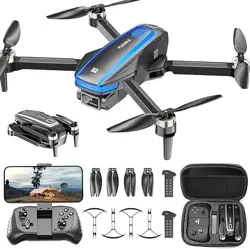
The package includes the drone, a remote controller, two 1500mAh batteries, spare propellers, propeller guards, a carrying case, and a charging cable.
Features
4K UHD Camera with Image Stabilization
The drone is equipped with a 4K UHD camera that captures video at 3840 x 2160 resolution and still images at 8.3 MP. A shock-absorbing mount reduces camera shake. The lens can be adjusted up to 90 degrees.

Brushless Motors
The drone uses brushless motors, which provide longer lifespan and lower power consumption compared to brushed motors. The fan blade design enables higher flight speeds, and the built-in altitude maintenance system ensures steady hovering.
Dual Battery System
Two 1500mAh batteries are included, providing a total flight time of up to 32 minutes (approximately 15 minutes per battery). The batteries support USB-C/PD charging and are UL-certified for up to 500 recharge cycles. A full charge takes approximately 60 minutes.

Lightweight and Foldable Design
The drone weighs under 249 grams (body weight 124 grams) and features a foldable design. Folded dimensions are approximately 4.84 inches (L) x 3.66 inches (W) x 2.36 inches (H). No FAA or Remote ID registration is required in the United States.

WiFi FPV Transmission
The drone supports WiFi FPV (First Person View) transmission, allowing live video streaming to a smartphone. The WiFi transmission range extends up to 70 meters, and the remote control range is up to 100 meters.
Voice and Gesture Control
Through the companion app, the drone supports voice control commands and gesture-based photography. Gestures can be used to trigger photo and video capture.

Beginner-Friendly Flight Modes
The drone includes several features to assist new pilots:
- Headless Mode: When activated, the drone responds to control inputs based on the pilot's position rather than the drone's orientation.
- One-Key Takeoff/Landing: Press a single button to automatically take off and hover at a preset altitude. Press again to land.
- Altitude Hold: Dual altitude-hold technologies (optical flow and air pressure) keep the drone hovering at a fixed height when the throttle stick is released.
- Speed Adjustment: Three speed modes are available: Low (3.6 m/s), Medium (5 m/s), and High (6.6 m/s).
- 360-Degree Flips: The drone can perform flips and rolls in any direction.

Safety Features
- Child Lock: To start the motors, simultaneously pull down the outer eight-shaped control sticks on the remote controller. This prevents accidental operation.
- Propeller Guards: Included guards protect the propellers and reduce the risk of injury during indoor flight.
- Anti-Lost Alarm: The drone includes an anti-lost alarm feature.
Use Guide
Charging the Batteries
- Connect the battery to the charging cable.
- Plug the cable into a USB power source (USB-C/PD compatible).
- A full charge takes approximately 60 minutes.
- Disconnect the battery once charging is complete.
Powering On the Drone and Controller
- Power on the remote controller.
- Power on the drone by pressing its power button.
- Place the drone on a flat, level surface.
- Wait for the indicator lights to stabilize, indicating a successful connection.
Calibration
Before flight, calibrate the drone by moving both control sticks on the remote controller to the lower outer corners simultaneously. The drone's indicator lights will flash, then become solid, indicating calibration is complete.
Takeoff and Landing
- Press the One-Key Takeoff button. The drone will automatically take off and hover at a preset altitude.
- To land, press the One-Key Landing button. The drone will descend and land automatically.
Flight Controls
- Left Stick: Controls throttle (up/down) and yaw (left/right).
- Right Stick: Controls pitch (forward/backward) and roll (left/right).
Speed Mode Selection
Hold down the left front button on the remote controller. The number of beeps indicates the selected speed level:
- 1 beep: Low speed (3.6 m/s) — suitable for indoor use.
- 2 beeps: Medium speed (5 m/s) — suitable for yard flight.
- 3 beeps: High speed (6.6 m/s) — suitable for outdoor adventures.
Headless Mode
Press the Headless Mode button on the controller to activate. In this mode, the drone responds to controls based on the pilot's position, regardless of the drone's orientation.
360-Degree Flips
Press the flip button on the controller, then move the right stick in the desired direction (forward, backward, left, or right). The drone will perform a 360-degree flip in that direction.
Using the App
- Download the companion app (PLEGBLE Fly) on a smartphone.
- Power on the drone and connect to its WiFi network.
- Open the app and enter the FPV view.
- Use the app to capture photos, record video, and access gesture and voice control features.
Gesture Control
In the app's gesture control mode, show specific hand gestures to the camera to trigger photo or video capture.
Voice Control
The app supports voice commands for controlling certain drone functions. Refer to the app's instructions for a list of supported commands.
Storage and Maintenance
- Fold the drone arms and store the drone in the included carrying case.
- Remove batteries from the drone and controller when not in use for extended periods.
- Keep the drone and batteries away from extreme temperatures.
- Inspect propellers for damage before each flight and replace if necessary.
Specifications
- Brand: PLEGBLE
- Model: PL-515
- Video Capture Resolution: 4K (3840 x 2160)
- Effective Still Resolution: 8.3 MP
- Connectivity: Wi-Fi
- Skill Level: Beginner
- Battery Capacity: 1500 mAh (2 batteries included)
- Video Format: MP4
- Image Format: JPEG
- Maximum Range: 100 meters (remote control), 70 meters (WiFi FPV)
- Battery Type: Lithium Polymer
- Weight: 124 grams (body), under 249 grams (with battery)
- Dimensions (Folded): 4.84 in (L) x 3.66 in (W) x 2.36 in (H)
- Charging: USB-C/PD, approximately 60 minutes
- Flight Time: Up to 32 minutes total (2 x 15 minutes)
What's in the Box
- Drone (PL-515)
- Remote Controller
- 2 x 1500mAh Batteries
- Propeller Guards
- Spare Propellers
- Carrying Case (Handbag)
- Micro-USB Cable
Troubleshooting
- Drone does not respond to controller: Ensure both the drone and controller are powered on and paired. Recalibrate the drone if necessary.
- Video lag or poor FPV quality: Move to an area with less WiFi interference. Keep the drone within the specified transmission range.
- Drone drifts during hover: Recalibrate the drone on a level surface. Check for wind conditions and adjust speed mode accordingly.
- Short flight time: Fully charge both batteries before flight. Battery performance may decrease in cold temperatures.