Overview
The CHIFENCHY PulseSound is a compact, portable Bluetooth speaker designed for indoor and outdoor use. It features IPX5 water resistance, dynamic beat-syncing LED lights, and up to 15 hours of playtime. The speaker supports Bluetooth 5.3 for stable wireless connections and TWS (True Wireless Stereo) pairing to link two speakers for a wider stereo soundstage.
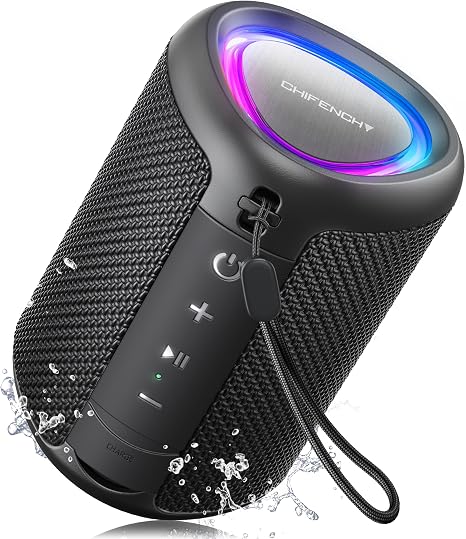
Key Specifications
| Specification | Details |
|---|---|
| Brand | CHIFENCHY |
| Model Name | PulseSound |
| Speaker Type | Portable Bluetooth Speaker |
| Connectivity | Bluetooth 5.3, Auxiliary (3.5mm) |
| Audio Output Mode | Mono (single speaker) / Stereo (TWS pair) |
| Maximum Output Power | 15W continuous (20W peak) |
| Water Resistance | IPX5 (water-resistant, sand-resistant) |
| Battery Life | Up to 15 hours |
| Battery Capacity | 2500 mAh |
| Bluetooth Range | Up to 100 ft (30 m) |
| Dimensions (D x W x H) | 2.99 x 2.99 x 4.25 inches (7.6 x 7.6 x 10.8 cm) |
| Weight | 0.58 lbs (264 g) |
| Color Options | Black, Blue, Camo, Gradient Purple, Mandarin Orange, Orange, Pink, Purple, Red, Teal, White, Yellow |
What's in the Box
- PulseSound Speaker x1
- Type-C Charging Cable x1
- Lanyard (detachable) x1
- User Manual x1
Features
1. Powerful HD Sound
The speaker delivers 15W continuous (20W peak) audio with a dynamic driver. It provides clear highs and punchy bass suitable for indoor relaxation or outdoor gatherings.

2. IPX5 Waterproof & Sand-Resistant
Rated IPX5, the speaker can withstand water splashes, rain, and ocean mist. It is also sand-resistant – simply rinse it off after beach use. Suitable for poolside, shower, and outdoor adventures.

3. Dynamic LED Light Show
Built-in LED lights pulse and change colors in sync with the music. The lights add a visual element to any setting, from beach bonfires to bedroom parties.

4. Bluetooth 5.3 & TWS Pairing
Bluetooth 5.3 provides a stable, instant connection up to 100 feet. TWS (True Wireless Stereo) allows you to pair two PulseSound speakers for a left-right stereo experience (30W combined).

5. Long Battery Life – 15 Hours
The built-in 2500 mAh battery provides up to 15 hours of playback on a full charge, depending on volume level and light usage.

6. Ultra-Compact & Lightweight
Measuring only 2.99 inches wide and 4.25 inches tall, and weighing just 0.58 lbs, the speaker fits easily in a bag, backpack, or cup holder. A built-in lanyard allows hanging from a hook, umbrella, or bike.

7. Built-in Microphone
The speaker includes a built-in microphone for hands-free calling. Use it to answer calls without disconnecting from your device.
8. Multiple Connectivity Options
In addition to Bluetooth, the speaker supports an auxiliary (3.5mm) input for non-Bluetooth devices.

Product Diagram – Controls & Indicators
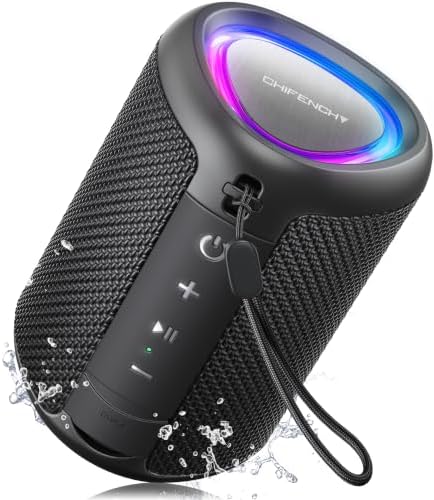
The speaker has a simple push-button interface. Refer to the following table for button functions:
| Button / Element | Function |
|---|---|
| Power Button | Press and hold to turn on/off. Short press to play/pause music. |
| Volume + / Next Track | Short press to increase volume. Press and hold to skip to next track. |
| Volume – / Previous Track | Short press to decrease volume. Press and hold to go to previous track. |
| Bluetooth / Pairing Button | Press to enter pairing mode (flashing LED). |
| LED Light Button | Press to cycle through light modes or turn lights on/off. |
| Microphone | Built-in mic for hands-free calls. |
| Charging Port (Type-C) | Connect the included Type-C cable for charging. |
| Auxiliary Input (3.5mm) | Connect external audio sources via AUX cable. |
| LED Indicator | Shows Bluetooth pairing status and charging status (red when charging, off when full). |
Use Guide
Charging the Speaker
- Connect the included Type-C charging cable to the speaker’s charging port.
- Connect the other end to a USB power adapter (5V/1A recommended) or a computer USB port.
- The LED indicator will glow red during charging and turn off when fully charged.
- A full charge takes approximately 3-4 hours.
Powering On/Off
- Power On: Press and hold the Power button for 2-3 seconds. You will hear a startup tone, and the LED indicator will flash.
- Power Off: Press and hold the Power button for 2-3 seconds. You will hear a shutdown tone.
Bluetooth Pairing (First Time)
- Ensure the speaker is powered on.
- Press the Bluetooth/Pairing button. The LED indicator will flash rapidly (blue/red) to indicate pairing mode.
- On your smartphone, tablet, or computer, enable Bluetooth and search for available devices.
- Select "PulseSound" from the list. If prompted, enter the PIN 0000.
- Once connected, the LED indicator will stop flashing and remain solid (or slow blink). You will hear a confirmation tone.
- The speaker will automatically reconnect to the last paired device when powered on.
Playing Music
- Play/Pause: Short press the Power button.
- Volume Up: Short press the Volume + button.
- Volume Down: Short press the Volume – button.
- Next Track: Press and hold the Volume + button.
- Previous Track: Press and hold the Volume – button.
Using the LED Light Show
- Short press the LED Light button to cycle through light modes (e.g., solid, pulse, beat-sync, off).
- The lights will automatically sync with the music rhythm in beat-sync mode.
Hands-Free Calling
- When a call comes in, short press the Power button to answer.
- Press and hold the Power button to reject a call.
- During a call, short press the Power button to hang up.
- The built-in microphone picks up your voice; speak clearly within a reasonable distance.
TWS Pairing (Two Speakers for Stereo Sound)
- Power on both PulseSound speakers.
- On one speaker, press and hold the Bluetooth/Pairing button for about 3 seconds until you hear a tone indicating TWS mode.
- The two speakers will automatically pair with each other. One speaker will act as the left channel, the other as the right channel.
- Now pair your phone/tablet to the primary speaker (the one you initiated TWS on).
- To exit TWS mode, press and hold the Bluetooth/Pairing button on either speaker again.
Using the Auxiliary (AUX) Input
- Connect a 3.5mm audio cable from your device (phone, laptop, etc.) to the AUX port on the speaker.
- The speaker will automatically switch to AUX mode. Use your device to control playback.
- Note: Bluetooth will be disconnected while using AUX.
Resetting the Speaker
If the speaker becomes unresponsive or has connectivity issues, you can reset it:
- Turn off the speaker.
- Press and hold the Power button and the Volume + button simultaneously for about 5 seconds.
- The speaker will power on and enter pairing mode. All paired devices will be cleared.
Product Videos
Video: Product Showcase & Setup Guide
The video showcases the product in use, guides you through product setup, compares multiple products, and shows the product being unpacked.
Note: The video is hosted on Amazon. Use the video player on the product page for full playback.
Video: Big Sound from Small Package
Witness the magic of amazing sound from PulseSound - it's music to your ears!
Video: Light up Your Groove – Dazzling Display
Get ready to groove with Andrea as she dances to the beats of PulseSound's rhythmic light show!
Video: Portable Fun with PulseSound
Discover how the compact size and convenient detachable lanyard make it the perfect companion for outdoor adventures.
Troubleshooting
| Issue | Possible Cause | Solution |
|---|---|---|
| Speaker won't turn on | Battery depleted | Charge the speaker for at least 30 minutes, then try again. |
| No sound / low volume | Volume too low on speaker or source device | Increase volume on both the speaker and your phone/computer. |
| Bluetooth not connecting | Speaker not in pairing mode / device out of range | Ensure speaker is in pairing mode (flashing LED). Move device closer (within 30 ft). Forget device and re-pair. |
| Audio cuts out or skips | Interference or distance too far | Reduce distance between speaker and source. Avoid obstacles and other wireless devices. |
| LED lights not working | Light mode set to off | Press the LED Light button to cycle through modes. |
| Microphone not working during calls | Call not connected via speaker | Ensure the call is using the speaker's hands-free profile (check phone Bluetooth settings). |
| Speaker not charging | Faulty cable or adapter | Try a different Type-C cable and a 5V/1A adapter. Clean the charging port gently. |
Safety & Care Instructions
- Do not expose the speaker to extreme temperatures (above 45°C / 113°F or below -10°C / 14°F).
- Although IPX5 rated, do not submerge the speaker in water. Rinse with fresh water after exposure to saltwater or sand.
- Do not use abrasive cleaners or solvents. Wipe with a soft, damp cloth.
- Do not disassemble the speaker. There are no user-serviceable parts inside.
- Keep away from open flames and heat sources.
- Charge only with a certified USB power adapter (5V/1A). Overcharging may reduce battery life.
- If the speaker emits smoke or unusual odors, stop using immediately and contact support.
Warranty & Support
The CHIFENCHY PulseSound speaker comes with a 6-month limited warranty from the date of purchase. This warranty covers manufacturing defects in materials and workmanship under normal use.
For warranty claims or technical support, please contact the seller (CHIFENCHY) through Amazon's messaging system. You can find the "Ask a question" or "Contact seller" link on the product page.
Note: This user manual does not include direct phone or email support details. For the most current support information, refer to the product listing on Amazon.
