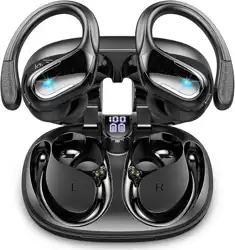
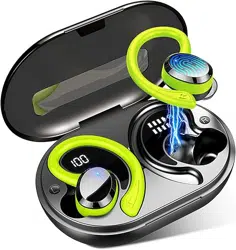
This manual provides instructions for the Ltinist Wireless Earbud Sport. These are over-ear Bluetooth headphones designed for sports and active use. Key features include Bluetooth 5.3 connectivity, ENC noise cancellation for calls, up to 75 hours of total playtime with the charging case, an LED power display, IP7 waterproof rating, and physical button controls.
What's in the Box
2x Wireless Earbuds (Left and Right)
1x Charging Case
1x USB Type-C Charging Cable
3x Pairs of Soft Ear Tips (S/M/L)
1x User Manual
Product Features
Bluetooth Connectivity
The earbuds use Bluetooth 5.3 technology, which provides a stable connection up to 15 meters (approx. 49 feet). They support automatic reconnection to the last paired device when the charging case lid is opened.
Audio & Call Quality
Speaker: 14.2mm dynamic driver.
Frequency Response: 20 Hz - 20,000 Hz.
Noise Cancellation: ENC (Environmental Noise Cancellation) technology is used for the microphone to reduce background noise during calls.
Battery & Charging
Earbud Playtime: Up to 15 hours on a single charge.
Total Playtime with Case: Up to 75 hours.
Charging Case Battery: 480mAh.
Charging Port: USB Type-C.
Charging Time: Approximately 1.5 hours.
Display: The charging case has an LED display that shows the remaining battery power for the case and earbuds.
Design & Durability
Fit: Over-ear design with earhooks for stability. Includes three sizes of silicone ear tips.
Water Resistance: IP7 rating, protecting against immersion in water up to 1 meter for 30 minutes. Suitable for sweat and rain.
Controls: Physical multi-function buttons on each earbud.
Compatibility
The earbuds are compatible with Bluetooth-enabled devices including:
iOS devices (iPhone, iPad)
Android smartphones and tablets
Computers (Windows, macOS)
Other devices with Bluetooth audio support
Use Guide
Charging the Earbuds and Case
Place the earbuds into their corresponding slots in the charging case.
Connect the provided USB Type-C cable to the charging port on the case and to a power adapter or computer USB port.
The LED display on the case will indicate the charging status. The earbuds will also charge while in the case.
Powering On/Off & Pairing
To Power On: Remove the earbuds from the charging case. They will automatically power on and enter pairing mode if not previously connected.
To Pair:
Enable Bluetooth on your device (e.g., smartphone).
Select "Ltinist BX29" from the list of available Bluetooth devices.
Auto-Reconnect: After the initial pairing, the earbuds will automatically reconnect to the last paired device when taken out of the case.
To Power Off: Place the earbuds back into the charging case. They will power off automatically and begin charging.
Wearing the Earbuds
Select the ear tip size (S, M, L) that provides the most secure and comfortable fit.
Place the earbud in your ear and loop the earhook over the top of your ear for stability.
Gently twist the earbud to secure it in your ear canal.
Ensure a proper seal for optimal sound quality and to prevent the earbuds from falling out during activity.
Button Controls
Each earbud has a multi-function button. The following controls are typical (exact functions may vary; please test with your device).
Play/Pause Music: Press the button once.
Answer/End Call: Press the button once.
Reject Call: Press and hold the button for 2 seconds.
Next Track: Press the button twice.
Previous Track: Press the button three times.
Volume Up/Down: Typically controlled by pressing and holding the button on the respective earbud (e.g., right for volume up, left for volume down). Refer to your device's audio settings if this function does not work.
Activate Voice Assistant: Press and hold the button for 3 seconds (e.g., Siri or Google Assistant).
Checking Battery Level
The LED display on the front of the charging case shows the approximate remaining battery percentage for the case. The earbud battery levels may also be indicated on the display when the earbuds are placed inside. You can also check the battery level via the Bluetooth settings on your connected smartphone.
Resetting the Earbuds
If you experience connection issues:
Place both earbuds in the charging case.
With the lid open, press and hold the button on both earbuds simultaneously for about 10 seconds until the LED indicators flash.
The earbuds will reset. You will need to pair them with your device again.
Care & Maintenance
Cleaning: Use a dry, soft cloth to clean the earbuds and case. Do not use liquids or chemicals. Ensure ear tips are clean and free of earwax.
Water Exposure: While IP7 waterproof, it is recommended to dry the earbuds thoroughly with a cloth if they get wet. Do not charge the earbuds or case while they are wet.
Storage: Store the earbuds in the charging case when not in use to protect them and keep them charged.
Temperature: Avoid exposing the earbuds and case to extreme temperatures (very hot or very cold).
Troubleshooting
Problem
Possible Solution
Earbuds won't power on.
Place them in the charging case to ensure they have battery. Charge the case fully.
Earbuds won't connect to device.
1. Ensure Bluetooth is enabled on your device. 2. Delete "Ltinist BX29" from your device's Bluetooth paired list and pair again. 3. Reset the earbuds (see Resetting the Earbuds).
Only one earbud has sound.
1. Place both earbuds in the case, then remove them to re-sync. 2. Reset the earbuds.
Poor call quality or microphone not working.
1. Ensure the earbud microphone is not obstructed. 2. Check that the earbuds are selected as the audio input device on your phone during calls.
Short battery life.
Fully charge the earbuds and the case. Battery life may decrease over time with normal use.
Buttons not responding.
Reset the earbuds. Ensure they are powered on and connected.
This product complies with relevant regulations for electronic devices. At the end of its life, do not dispose of this product with household waste. Please recycle or dispose of it according to your local electronic waste (e-waste) regulations.