Overview
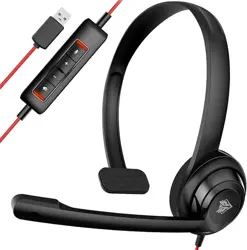
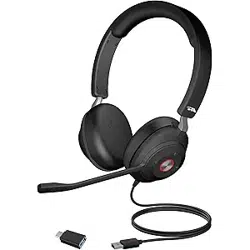
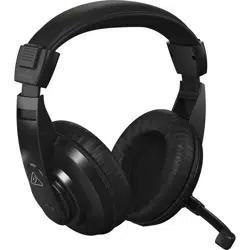
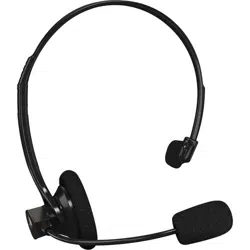
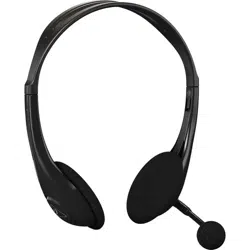
The Rebocico USB Headset (Model 192) is a wired, on-ear communication headset designed for use with computers, laptops, tablets, and mobile phones. It features a noise-cancelling microphone, in-line audio controls, and dual connectivity via a 3.5mm jack or USB connection.

What's in the Box
- Earphone with microphone × 1
- USB sound card with control buttons × 1
- User Manual
Features
Audio Performance
- Wideband Audio: Delivers clearer voice reproduction for more natural conversations.
- Digital Signal Processing (DSP): Enhances voice clarity and reduces background noise.
- Noise-Cancelling Microphone: Minimizes unwanted ambient noise for clearer speech transmission.
- Acoustic Shock Protection (ASP): Protects hearing from sudden loud noises.
- Driver Size: 40 mm dynamic driver.
- Frequency Range: 20 Hz – 20,000 Hz.
Design and Comfort
- Adjustable Headband: Allows for a custom fit for different head sizes.
- 15° Tilting Earmuffs: Earcups can tilt to better conform to the shape of your head.
- Soft Protein Memory Foam Ear Cushions: Made from breathable material to reduce pressure during extended use.
- Lightweight Construction: Weighs approximately 0.17 kg for comfortable all-day wear.
- On-Ear Form Factor: Earpads rest on the ears.

Microphone
- Noise-Cancelling Boom Microphone: Rigid, left-sided mic that can be positioned for optimal voice capture.
- 180° Rotation: The microphone boom can be rotated and tucked away when not in use.
Connectivity and Controls
- Dual Connectivity: 3.5 mm audio jack and USB connection.
- USB Sound Card: Included USB sound card with in-line control buttons for volume adjustment and mute.
- Plug-and-Play: No additional driver installation required.
- Detachable Cable: The cable is detachable from the headset.
Compatibility
- Operating Systems: Windows 2000/7/8/10/XP/Vista, Mac OS X, iOS, Android.
- Devices: Computers, laptops, tablets, mobile phones (with appropriate adapter).
- Applications: Suitable for call centers, business chats (e.g., Skype, Teams), online teaching, gaming, and online courses.
Use Guide
Connecting the Headset
- USB Connection: Plug the USB connector of the included sound card into an available USB port on your computer. The headset will be automatically detected.
- 3.5 mm Connection: Plug the 3.5 mm jack directly into the headphone/microphone combo port on your device. If your device has separate ports, use a splitter (not included).
Adjusting the Headset
- Headband: Extend or retract the headband to fit your head size.
- Earmuffs: Rotate the earmuffs up to 15° to achieve a comfortable seal around your ears.
- Microphone: Position the boom microphone near the corner of your mouth for optimal voice pickup. Rotate the mic 180° upward to stow it away when not in use.
Using the In-Line Controls
The in-line control module on the USB sound card provides the following functions:
- Volume Up/Down: Adjust the headset speaker volume.
- Mute: Toggle the microphone on and off.
Video: Product Setup and Function Introduction
The following video demonstrates the product setup and introduces the headset functions.
Video description: The video showcases the product in use and guides you through product setup.
Troubleshooting Tips
- No sound or low volume: Ensure the headset is properly connected. Adjust the volume using the in-line controls and your device's system volume. If the volume is still low, increase the volume on your computer or mobile phone.
- Microphone not working: Check that the microphone is not muted (using the in-line mute button). Ensure the correct input device is selected in your operating system's sound settings.
- Poor audio quality: Verify the connection is secure. For USB connections, try a different USB port.
Specifications
| Brand | Rebocico |
|---|---|
| Model Name | 192 |
| Colour | Black |
| Form Factor | On Ear |
| Connectivity Technology | Wired |
| Headphone Jack | 3.5 mm Jack |
| Noise Control | Active Noise Cancellation (Microphone) |
| Audio Driver Type | Dynamic Driver |
| Audio Driver Size | 40 mm |
| Frequency Range | 20 Hz – 20,000 Hz |
| Item Weight | 0.17 kg |
| Enclosure Material | ABS, Polyurethane (PU) |
| Included Components | Earphone with microphone, USB sound card with control buttons, User Manual |
| Compatible Devices | Computers, Mobile Phones, Tablets |
| Control Type | Media Control (Touch/Button) |
| Water Resistance Level | Not Water Resistant |
Warranty and Support
This product is covered by a 24-month warranty from Rebocico. For warranty claims or support, please contact Rebocico directly through their Amazon storefront or the contact information provided in the product packaging.
Note: This manual does not contain specific contact details. Please refer to the included User Manual or the Rebocico store page for support contact information.