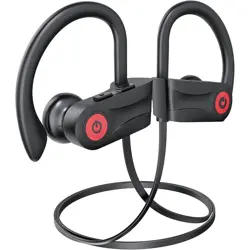
Boean U18 Bluetooth Headphones, Wireless Headphones with 16 Hours Playtime Bluetooth 5.3 Wireless Earbuds HD Deep Bass Stereo Sound Isolation IPX7 Waterproof Earphones for Workout Running Sports

Product's Documents

Below are documents related to this product, you can read online or download:

1. Overview

The Boean U18 are wireless in-ear headphones designed for sports and active use. They feature an earhook design for stability, Bluetooth 5.3 for connectivity, and an IPX7 waterproof rating.

Boean Bluetooth Headphones, main product image showing black earbuds with earhooks

Key attributes include:

  • Model: U18
  • Form Factor: In-Ear with Open Ear placement
  • Connectivity: Wireless via Bluetooth 5.3
  • Playtime: Up to 16 hours
  • Water Resistance: IPX7 rated

2. Features and Specifications

2.1 Physical Design

  • Earhook Design: Flexible silicone earhooks and in-ear tips provide a secure and comfortable fit during physical activity.
  • Lightweight: Weighs approximately 18.5 grams for minimal burden.
  • Color Options: Available in Black, Blue, Green, Pink, and Red.
Close-up image showing the ergonomic earhook and eartip design for a perfect fit.

2.2 Audio & Connectivity

  • Sound Drivers: 11mm dynamic drivers for stereo sound with deep bass.
  • Microphone: Integrated for clear phone calls.
  • Bluetooth: Version 5.3 provides a stable connection with a range of up to 10 meters.
  • Noise Control: Sound Isolation technology.
  • Compatibility: Works with iOS, Android, and Windows devices (smart watch connectivity is not supported).

2.3 Battery & Durability

  • Battery Life: Up to 16 hours of playtime on a full charge.
  • Charging Time: Approximately 2 hours using the supplied USB-C cable.
  • Waterproof Rating: IPX7 rating protects against heavy sweat and rain. Not recommended for swimming.
Image indicating the headphones are sweatproof and waterproof.

3. Package Contents

  • Boean U18 Wireless Sport Headphones
  • USB Charging Cable (Type-C)
  • 1x Cable Clip and 1x Clothing Clip
  • User Guide
  • 4 Additional Pairs of Eartips (Small, Medium, Large sizes)
  • Headband

4. Use Guide

4.1 Charging the Headphones

  1. Connect the supplied USB-C cable to the charging port on the headphones.
  2. Connect the other end to a USB power source (e.g., computer, wall adapter).
  3. A red LED indicator will light up during charging. The light will turn off when charging is complete.

Note: For faster charging, use the supplied cable. Other cables are not recommended.

4.2 Power On/Off & Pairing

First-Time Pairing

  1. Power on the headphones. The LED indicator will flash red and blue.
  2. On your smartphone or laptop, enable Bluetooth in the device settings.
  3. Select "U18" from the list of available Bluetooth devices to connect.
Diagram showing stable Bluetooth connection and automatic pairing process.

Subsequent Use

The headphones will automatically reconnect to the last paired device when powered on, typically within 1 second.

4.3 Wearing the Headphones

  1. Select the eartip size (S, M, L) that best fits your ear canal for comfort and sound isolation.
  2. Loop the flexible silicone earhook over the top of your ear.
  3. Gently insert the earbud into your ear and adjust for a secure fit.
  4. Use the included headband for additional stability during high-intensity activities if desired.

4.4 Controls

The headphones feature push-button controls. Refer to the physical buttons on the earpieces for the following functions (exact button layout may vary):

  • Power/Multi-function Button: Press to power on/off. Press to answer/end calls. Press to play/pause music.
  • Volume Up (+) Button: Press to increase volume.
  • Volume Down (-) Button: Press to decrease volume.

Note: Press and hold both Volume (+) and Volume (-) buttons simultaneously for 5 seconds to reset the headphones. The red and blue LEDs will flash three times before turning off to indicate a successful reset.

5. Care and Maintenance

  • Clean the eartips and earhooks with a soft, dry cloth after use.
  • Do not use chemicals or solvents to clean the headphones.
  • Although IPX7 rated, allow the headphones to dry completely if they get wet before storing or charging.
  • Store in a cool, dry place when not in use.

6. Troubleshooting

  • Headphones won't power on: Ensure the battery is charged.
  • Cannot pair with device:
    • Ensure the headphones are in pairing mode (LED flashing red/blue).
    • Move your device closer to the headphones (within 1 meter).
    • Reset the headphones (see section 4.4) and try pairing again.
  • Poor audio quality or intermittent connection: Ensure there are no large obstructions between the headphones and your device. Check that the eartips are properly sealed in your ears.
  • Headphones not charging: Ensure you are using the supplied USB-C cable. Check that the charging port is clean and dry.

7. Compliance and Specifications

Manufacturer: Shenzhen Na Yin Technology CO.,LTD.

Item Model Number: U18

Bluetooth Version: 5.3

Impedance: 32 Ohms

Battery Type: Polymer Lithium

Operating Temperature: Refer to device labeling.

Reference file: Boean U18 Bluetooth Headphones, Wireless Headphones with 16 Hours Playtime Bluetooth 5.3 Wireless Earbuds HD Deep Bass Stereo Sound Isolation IPX7 Waterproof Earphones for Workout Running Sports

Specifications

Boean U18 Questions and Answers