Overview
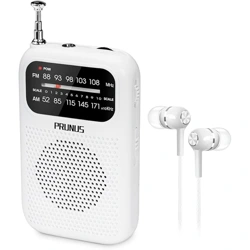
The PRUNUS J-985 is a portable, battery-operated AM/FM stereo radio. It is designed for personal listening via included headphones and features a compact, lightweight form factor with a back clip for carrying.

Features and Specifications
Key Features
- Dual Band Reception: Receives AM (530-1710 KHz) and FM (87-108 MHz) radio signals.
- FM Stereo Sound: Delivers stereo audio when listening on FM stations with headphones.
- Compact & Portable: Measures approximately 1.65" x 0.71" x 3.42" and weighs 40g (without batteries).
- Battery Powered: Operates on 2 AAA batteries (not included).
- Integrated Antenna: Uses the headphone wire as an FM antenna; no external antenna to extend.
- Back Clip: Metal clip on the back for attaching to a pocket or belt.
- Signal/Power Indicator: Red LED lights up when the radio is powered on.
- Included Accessories: Headphones and an owner's manual.
Technical Specifications
- Brand: PRUNUS
- Model: J-985
- Power Source: 2 x AAA Batteries
- Battery Life: Over 30 hours (typical use)
- Connectivity: 3.5mm headphone jack
- Tuner Technology: Digital Signal Processing (DSP)
- Dimensions: 3.78" L x 0.98" W x 4.72" H
- Weight: 40 grams
- Color: Black
- Style: Classic

Parts and Controls
Familiarize yourself with the controls and indicators on your radio.
- Power Indicator (Red LED): Lights up when the radio is switched on.
- Band Switch: Toggles between AM and FM reception modes.
- Tuning Wheel: Rotate to scan through the AM or FM frequency band.
- Big Numbers Tuner Dial: Displays the selected frequency.
- Volume Wheel: Rotate to adjust the audio level.
- 3.5mm Headphone Jack: Connect the included headphones here. The headphone wire also acts as the FM antenna.
- ON/OFF Switch: Powers the radio on or off.
- Back Clip: A sturdy metal clip for attaching the radio to clothing.
- Battery Compartment: Located on the back, houses 2 AAA batteries.
Use Guide
Initial Setup
- Open the battery compartment cover on the back of the radio.
- Insert two fresh AAA batteries, observing the correct polarity (+/-) markings inside the compartment.
- Close the battery compartment cover securely.
- Plug the included headphones firmly into the 3.5mm headphone jack.
Basic Operation
- Power On: Slide the ON/OFF switch to the ON position. The red power indicator will light up.
- Select Band: Use the Band Switch to select either AM or FM.
- Tune to a Station: Slowly rotate the Tuning Wheel while listening through the headphones. Stop when you find a clear station. The tuner dial shows the frequency.
- Adjust Volume: Rotate the Volume Wheel to a comfortable listening level.
- For Best FM Reception: Ensure the headphone wire is fully extended and not coiled tightly, as it functions as the antenna.
- Power Off: Slide the ON/OFF switch to the OFF position when finished. The red indicator will turn off.
Using the Back Clip
The metal clip on the back allows you to securely attach the radio to a shirt pocket, jacket, or belt loop for hands-free portability during activities like walking or running.
Listening Modes
- FM Stereo (FM-ST): When listening to FM stations, the radio outputs stereo sound through the headphones for a richer audio experience.
- AM Mode: Provides monaural audio suitable for talk radio, news, and sports broadcasts.

Troubleshooting
- No sound or power:
- Ensure the ON/OFF switch is in the ON position.
- Check that the batteries are correctly installed and not depleted. Replace with fresh AAA batteries if necessary.
- Confirm the headphones are fully plugged into the jack.
- Poor FM reception or static:
- Fully extend the headphone wire. Avoid coiling it near the radio.
- Move to a different location, away from large obstructions or electronic interference.
- Low battery power can cause increased hiss and poor signal. Replace the batteries.
- Poor AM reception:
- AM reception can be affected by structures and time of day. Try repositioning the radio.
- Station drifts or is hard to tune:
- The tuning wheel is designed with resistance for fine-tuning. Adjust slowly for precise station selection.
Care and Maintenance
- Use a soft, dry cloth to clean the radio. Do not use liquids or abrasive cleaners.
- Remove batteries if the radio will not be used for an extended period to prevent potential leakage and damage.
- Store the radio in a cool, dry place away from direct sunlight and excessive heat.
- The radio is not water-resistant. Keep it away from moisture and liquids.
Warranty and Support
This product includes a one-year warranty from the date of purchase. For warranty service or support, please contact the seller or retailer where the product was purchased. Specific contact details for PRUNUS are not provided in the available product information.
What's in the Box
- PRUNUS J-985 Pocket AM/FM Radio
- Stereo Headphones
- Owner's Manual (this document)
Note: AAA batteries are not included.