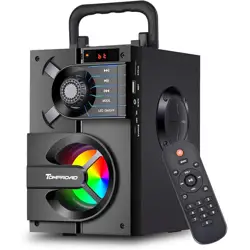
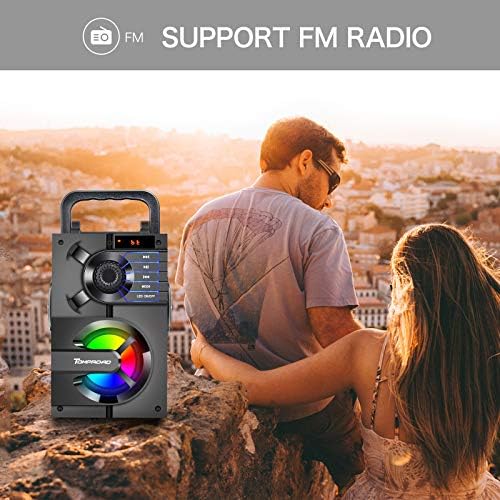
The TOMPROAD S39 is a portable Bluetooth speaker designed for indoor and outdoor use. It combines a subwoofer and two tweeters to deliver stereo sound with enhanced bass. The speaker supports multiple playback methods, including Bluetooth, FM radio, TF card, USB drive, and AUX input. It features RGB LED lights that sync with the music and can be controlled via the front panel or the included remote control.
Key Features
11W output power with 3 loudspeakers (1 subwoofer + 2 tweeters) and a rear bass guide tube
Bluetooth 5.0 wireless transmission with a working range of up to 33 feet (10 meters)
Multiple playback modes: Bluetooth, FM radio, TF card, USB flash drive, AUX line-in
RGB LED lights that flash and dance with the music
Digital display and intelligent remote control
Rechargeable battery (2000mAh) with 4-7 hours of playtime
Portable design with a hand-held pull ring and a stand holder for phones/tablets
2. What's in the Box
1 × S39 Bluetooth Speaker
1 × Remote Control (requires 2× AAA batteries, not included)
1 × AUX Audio Cable
1 × USB Charging Cable
1 × User Manual
1 × Retail Box
3. Product Diagram
Front Panel Controls
Power Button: Press and hold to turn the speaker on or off.
Mode Button: Press to switch between Bluetooth, FM radio, TF card, USB, and AUX modes.
Play/Pause Button: Press to play or pause music. In FM mode, long press to auto-search and save stations.
Previous/Next Buttons: Press to skip tracks or browse FM channels.
Volume +/- Buttons: Adjust the volume level.
LED Lights ON/OFF Button: Press to turn the RGB lights on or off.
4. Features
4.1 Bluetooth 5.0 Connectivity
The S39 uses Bluetooth 5.0 for stable wireless connections with a range of up to 33 feet (10 meters). It pairs quickly with most Bluetooth-enabled devices, including smartphones, tablets, and laptops.
4.2 Audio Performance
The speaker delivers 11W of power through three drivers: one 3-inch subwoofer and two 2-inch tweeters. A rear heavy bass guide tube enhances low-frequency output. The frequency response ranges from 80Hz to 18kHz.
4.3 Multiple Playback Modes
Bluetooth: Wireless streaming from compatible devices
FM Radio: Automatic or manual station search with save function
TF Card: Insert a microSD card for music playback
USB Flash Drive: Play MP3 files directly from a USB drive
AUX Input: Connect via 3.5mm audio cable to non-Bluetooth devices
4.4 RGB LED Lights
The front panel features RGB LED lights that flash and change colors in sync with the music. The lights can be turned off using the dedicated button on the front panel if desired.
4.5 Remote Control
The included remote control allows you to manage speaker functions from a distance, including volume, track selection, mode switching, and FM station tuning. The remote requires 2× AAA batteries (not included).
4.6 Digital Display
A digital display on the front panel shows the current mode, FM frequency, or track information.
4.7 Portability
The speaker features a hand-held pull ring on top for easy carrying. A stand holder on top can support a smartphone or tablet for hands-free viewing.
5. Use Guide
5.1 Charging the Speaker
Connect the included USB charging cable to the charging port on the side of the speaker.
Plug the other end into a USB wall adapter (DC 5V) or a computer's USB port.
Charging takes approximately 3 hours for a full charge.
A full charge provides 4-7 hours of playtime, depending on volume level.
Note: The speaker can be used while charging, but this may extend the charging time.
5.2 Bluetooth Pairing
Press and hold the Power button to turn on the speaker.
Press the Mode button until the speaker enters Bluetooth mode (indicated on the digital display).
On your Bluetooth-enabled device (smartphone, tablet, etc.), search for available devices.
Select "TOMPROAD S39" from the list of discovered devices.
Once connected, you will hear a confirmation tone. The speaker is now ready for wireless audio streaming.
5.3 Using FM Radio
Press the Mode button to enter FM Radio mode.
Long press the Play/Pause button to automatically search for and save all available FM stations.
To stop the automatic search, short press the Play/Pause button. The search may take a few minutes to complete.
Use the Previous/Next buttons or the remote control to browse and select saved channels.
Alternatively, use the remote control to manually input a specific FM frequency.
5.4 Playing Music from TF Card or USB Drive
Insert a TF (microSD) card or USB flash drive containing MP3 files into the corresponding slot on the speaker.
Press the Mode button to select TF Card or USB mode.
Playback will begin automatically. Use the Previous/Next buttons to change tracks.
5.5 AUX Line-In Connection
Connect one end of the included AUX cable to the 3.5mm AUX input on the speaker.
Connect the other end to the headphone jack of your audio source (laptop, MP3 player, etc.).
Press the Mode button to select AUX mode.
Playback will begin from the connected device.
5.6 Using the Remote Control
Insert 2× AAA batteries into the remote control (batteries not included).
Point the remote at the speaker's IR receiver.
Use the remote to control volume, track selection, mode switching, and FM tuning from a distance.
5.7 Controlling RGB LED Lights
Press the LED Lights ON/OFF button on the front panel to turn the RGB lights on or off. The lights will flash and change colors in sync with the music when enabled.
6. Specifications
Brand
TOMPROAD
Model
S39
Speaker Output Power
11W (5W + 3W × 2)
Speaker Driver Size
3" + 2" × 2
Frequency Response
80Hz - 18kHz
Input Voltage
DC 5V
Input Impedance
10kΩ
Battery Capacity
2000mAh
Charging Time
Approximately 3 hours
Playing Time
4-7 hours (depends on volume)
Bluetooth Version
5.0
Bluetooth Range
Up to 33 feet (10 meters)
Product Dimensions
7.6 × 6.8 × 4.7 inches (H × D × W)
Item Weight
1230g
Connectivity
Bluetooth, FM, AUX, TF Card, USB
Compatible Devices
Smartphones, tablets, laptops, MP3 players, PCs
Water Resistance
Not water resistant
7. Troubleshooting
7.1 Speaker Does Not Power On
Ensure the speaker is charged. Connect the USB cable and charge for at least 30 minutes.
Press and hold the Power button for 3-5 seconds.
7.2 Bluetooth Connection Fails
Ensure the speaker is in Bluetooth mode.
Move the speaker and your device closer together (within 33 feet).
Turn off Bluetooth on your device, then turn it back on and try pairing again.
If the speaker is already paired with another device, disconnect that device first.
7.3 No Sound from FM Radio
Long press the Play/Pause button to perform an automatic station search.
Ensure you are in an area with good FM signal reception.
Try manually tuning to a known station frequency.
7.4 Remote Control Not Working
Ensure the batteries are inserted correctly (2× AAA, not included).
Replace the batteries with fresh ones.
Point the remote directly at the speaker's IR receiver.
7.5 Poor Audio Quality
Reduce the volume on both the speaker and the connected device.
Ensure the audio source is not distorted.
For Bluetooth playback, move the source device closer to the speaker.
8. Safety and Maintenance
Do not expose the speaker to water, rain, or high humidity. The speaker is not water resistant.
Do not disassemble the speaker or attempt to repair it yourself.
Keep the speaker away from heat sources and direct sunlight.
Clean the speaker with a soft, dry cloth. Do not use chemical cleaners.
Do not drop or subject the speaker to strong impacts.
Charge the speaker using only the provided USB cable and a compatible 5V adapter.
When not in use for extended periods, charge the speaker at least once every 3 months to maintain battery health.
9. Product Video
The following video showcases the product in use and guides you through the setup process.
Video duration: 2:20. The video demonstrates the speaker's features, setup, and usage.