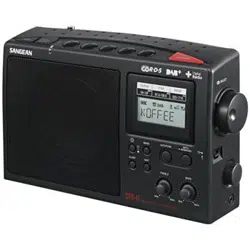
Sangean DPR-42BT Portable DAB+ Digital Radio FM-RDS-Tuner, Bluetooth, Integrated Speakers

Product's Documents

Below are documents related to this product, you can read online or download:
DPR-42BT photo

1. Product Overview

Front view of the Sangean DPR-42BT Portable DAB+ Digital Radio in blue color, showing the speaker grille and display screen.

The Sangean DPR-42BT, also referred to as the Traveler 420, is a portable digital radio. It is designed to receive DAB+ and FM-RDS radio broadcasts and includes Bluetooth connectivity for wireless audio streaming from compatible devices. The unit is battery-powered for portability and features integrated speakers.

Key identifiers for this model are:

  • Model Number: DPR-42BT / A500425
  • Style: Portable
  • Color: Blue (also available in black)

2. Features and Specifications

2.1. Tuner and Reception

  • Supported Radio Bands: DAB+ Digital Radio and FM with RDS.
  • Station Memory: Capable of storing up to 40 preset stations (20 for DAB+ and 20 for FM).

2.2. Audio and Connectivity

  • Bluetooth: Built-in for wireless audio streaming from smartphones, tablets, or computers.
  • Integrated Speakers: Internal speakers provide audio output.
  • Speaker Output Power: 1.2 Watts maximum.

2.3. Power

  • Power Source: Battery powered. Can be operated using batteries for full portability.
  • Battery Requirement: Requires 1 AAAA battery (specific type to be confirmed with physical product labeling).
  • Voltage: 28 Volts (likely for external DC input, if available).

2.4. Display and Controls

  • Display Type: LCD screen.
  • Visible Screen Diagonal: Approximately 5 inches (13 cm).
  • Additional Features: Alarm clock functionality.

2.5. Physical Specifications

  • Item Weight: 0.74 Kilograms.
  • Included Components: Radio unit.
  • Water Resistance: Not water resistant.

3. Initial Setup and Installation

3.1. Unpacking

Remove the radio and any included documentation from the packaging.

3.2. Installing Batteries

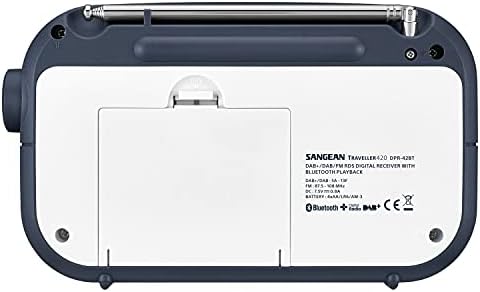
  1. Locate the battery compartment, typically on the back or bottom of the unit.
  2. Open the compartment cover.
  3. Insert the required AAAA battery, observing the correct polarity (+/-) markings inside the compartment.
  4. Close and secure the cover.

3.3. First-Time Power On

Press and hold the Power button to turn on the radio. The LCD display will illuminate.

4. Use Guide

Detail of the radio's side panel, potentially showing ports or additional controls.

4.1. Listening to the Radio

DAB+ Digital Radio

  1. Ensure the unit is powered on.
  2. Press the Band or Mode button to select DAB+ mode.
  3. The radio may begin an automatic scan for available stations. If not, initiate a scan via the menu.
  4. Use the Tuning Up/Down buttons or the menu to browse found stations.
  5. Press the Select or Play button to tune to a station.

FM Radio

  1. Press the Band or Mode button to select FM mode.
  2. You can manually tune using the Tuning Up/Down buttons or perform an auto-scan.
  3. For better FM reception, fully extend the telescopic antenna (if present).

4.2. Saving and Recalling Preset Stations

  1. Tune to the desired DAB+ or FM station.
  2. Press and hold a numbered Preset button (1-10 or similar) for a few seconds until a confirmation appears on the display.
  3. To recall a preset, press the corresponding Preset
  4. The radio can store a total of 40 presets (20 per band).

4.3. Using Bluetooth

  1. On the radio, press the Mode or Source button to select Bluetooth mode. The display may show "BT" and the unit should become discoverable.
  2. On your smartphone, tablet, or computer, enable Bluetooth and search for new devices.
  3. Select "Sangean DPR-42BT" or a similar identifier from the list of available devices on your Bluetooth source device.
  4. If prompted, confirm pairing. A tone or on-screen message will indicate a successful connection.
  5. Play audio from your connected device. Use your device's volume controls and the radio's volume knob/buttons to adjust the sound level.

4.4. Using the Alarm Clock

  1. Access the main menu using the Menu button.
  2. Navigate to the Alarm settings.
  3. Set the desired alarm time and choose the alarm source (e.g., buzzer, radio station).
  4. Enable the alarm and exit the menu. An alarm icon may appear on the display when the alarm is active.

4.5. General Controls

  • Volume Control: Use the dedicated volume knob or +/- buttons.
  • Power On/Off: Use the Power button.
  • Display: The LCD shows station name, frequency, time, and mode indicators.
  • Sleep Timer: This function may be available in the menu to turn the radio off after a set period.

5. Troubleshooting

Problem Possible Cause Solution
Radio does not power on. Battery is depleted, inserted incorrectly, or missing. Check battery orientation and charge. Replace with a new battery if necessary.
No sound from speakers. Volume is set to minimum. Unit is in standby or incorrect mode. Increase the volume. Ensure the unit is powered on and in Radio or Bluetooth mode.
Poor FM reception. Antenna not extended. Location has weak signal. Fully extend the telescopic antenna. Move the radio to a different location, preferably near a window.
No DAB+ stations found. Initial scan not performed. Outside DAB+ coverage area. Perform a full DAB+ station scan via the menu. Check local DAB+ service availability.
Bluetooth device will not connect. Radio not in pairing mode. Device out of range. Ensure the radio is in Bluetooth discoverable mode. Move devices closer together (within 10 meters). Turn Bluetooth off and on again on your source device.
Display is dim or unreadable. Display contrast/brightness setting may be low. Adjust the display settings in the menu if available.

6. Safety and Care

  • Use only the recommended battery type.
  • Do not expose the radio to extreme temperatures, moisture, or direct sunlight for prolonged periods.
  • Clean the exterior with a soft, dry cloth. Do not use liquid or aerosol cleaners.
  • This product is not water-resistant. Keep it away from liquids.
  • Dispose of used batteries according to local regulations.

7. Compliance Information

Manufacturer: Sangean

EU Spare Part Availability Duration: 1 Year

Global Trade Identification Number (GTIN): 04711317995328

Reference file: Sangean DPR-42BT Portable DAB+ Digital Radio FM-RDS-Tuner, Bluetooth, Integrated Speakers

Specifications

Sangean DPR-42BT Questions and Answers

See other models: PR-D4W U7HD RCR-40 SG-118 BB-100