Overview
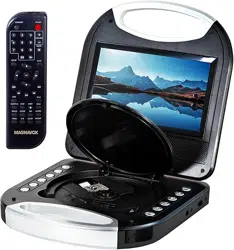
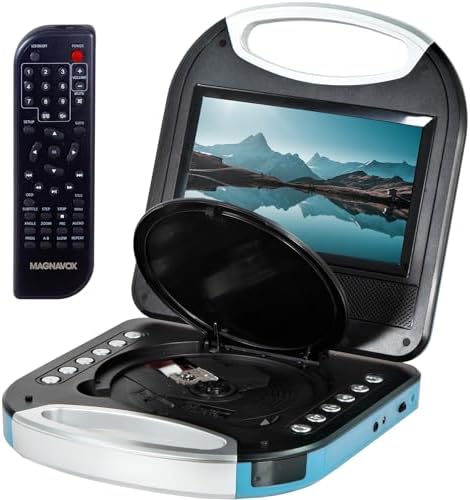
The Magnavox MTFT750-BL is a portable DVD and CD player designed for on-the-go entertainment. It features a 7-inch TFT screen, built-in stereo speakers, and a rechargeable battery.

Key components include the main unit with a screen and control buttons, a remote control, an AC power adapter, and a DC car adapter.
Features & Specifications
Display
- Screen Size: 7 Inches
- Display Type: TFT LCD
- Native Resolution: 800 x 480 pixels
Media Compatibility
- DVD
- CD
- CD-R
- CD-RW
- JPEG (from CD)
Note: This player is not compatible with Blu-ray discs.
Audio & Connectivity
- Built-in Audio: Stereo speakers
- Headphone Jack: 3.5mm port for private listening
- AV Output: Jack for connecting to an external display
- Connectivity Technology: Auxiliary (wired)
Power
- Battery: Built-in rechargeable battery
- Approximate Playback Time: 2.5 hours on a full charge
- Power Adapters: Includes AC (wall outlet) and DC (car cigarette lighter) adapters for charging and operation.
Physical Specifications
- Color: Blue with silver handle and black interior.
- Item Dimensions (L x W x H): 8.46" x 1.65" x 0.09"
- Included Accessories: Remote control (requires 2 AAA batteries, included), AC adapter, DC car adapter.
Use Guide
Initial Setup
- Insert 2 AAA batteries into the remote control.
- To charge the player, connect the AC power adapter to the player's DC input port and plug it into a wall outlet. The battery charges while the player is off or on.
Playing Media
- Press the disc compartment open button and place a compatible DVD or CD on the tray with the label facing up. Close the compartment gently.
- Press the Power button to turn on the player.
- Use the Play/Pause, Stop, Next/Previous Chapter/Track, and Menu navigation buttons on the player or the remote control to operate playback.
- Adjust volume using the Volume Up/Down buttons.
Using Headphones
Plug a standard 3.5mm headphone plug into the headphone jack. Audio will automatically route to the headphones, muting the built-in speakers.
Connecting to an External Display
Use an Audio/Video (AV) cable (not included) to connect the player's AV output jack to the corresponding input on a television or monitor.
Using in a Car
Plug the DC car adapter into the vehicle's 12V cigarette lighter socket and connect the other end to the player's DC input port. This will power the player and charge the battery while driving.
Viewing JPEG Images
Burn JPEG image files onto a CD-R or CD-RW disc. Insert the disc into the player. Use the player's menu controls to navigate and view the image files.
Care & Maintenance
- Clean the screen and casing with a soft, dry cloth. Do not use liquid or aerosol cleaners.
- Store the player and discs in a cool, dry place away from direct sunlight.
- Do not expose the player to extreme temperatures, moisture, or dust.
- Handle discs by the edges to avoid fingerprints and scratches.
Troubleshooting
Player does not turn on:
- Ensure the battery is charged. Connect the AC adapter.
- Check that the power adapter is firmly connected to the player and the wall outlet.
No sound from speakers:
- Check if headphones are plugged in, which disables the speakers.
- Increase the volume level.
Disc does not play:
- Ensure the disc is compatible (DVD, CD, CD-R, CD-RW, JPEG).
- Check if the disc is scratched, dirty, or inserted upside down.
- Clean the disc with a soft cloth from the center outward.
Remote control is not working:
- Check that the batteries are installed correctly and are not depleted.
- Ensure you are pointing the remote at the player's front panel.
Product Information
- Brand: Magnavox
- UPC: 731398750030
- Manufacturer: Magnavox
- ASIN: B072FJLB6Z
Note on Proposition 65: This product may contain chemicals known to the State of California to cause cancer, birth defects, or other reproductive harm. For more information, visit www.P65Warnings.ca.gov.